Overview

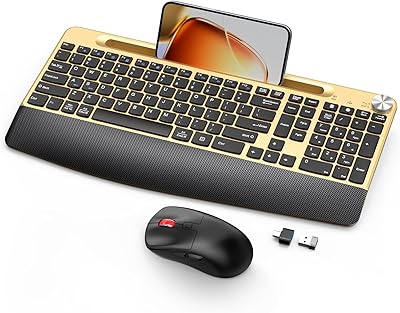
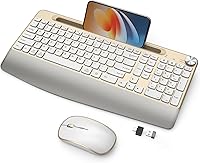
The JOYACCESS Ergonomic Wireless Keyboard and Mouse Combo is one of those rare budget picks that actually looks good on a desk — the gold-and-white colorway alone sets it apart from the sea of black and gray office peripherals flooding the market. But the design is only part of the pitch. For the price, you are getting a lot of hardware: a full-size keyboard with an attached wrist rest, a quiet wireless mouse, a built-in phone cradle, and a physical volume roller. Plug in the nano USB receiver and everything works immediately — no drivers, no setup headaches. Just keep in mind this is tuned for casual, everyday typing, not for anyone who lives and dies by tactile switches.
Features & Benefits

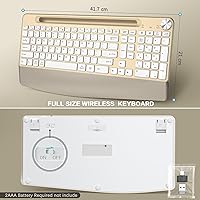
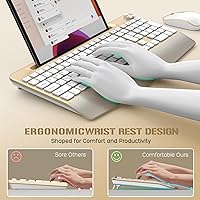
The integrated palm rest is probably the detail most people notice first in daily use — it keeps your wrist at a gentler angle through long typing stretches without requiring any special posture training. The phone cradle is more useful than it sounds; it props your device in portrait or landscape without taking up separate desk space, which is genuinely handy if you need to follow a recipe, reference a document, or keep an eye on messages mid-work. The volume roller is a small touch that quickly becomes something you miss on other keyboards. Both devices share a single nano USB receiver, keeping your remaining ports free, and the Fn+S toggle switches between Mac and Windows layouts in a single keystroke.

Best For

This ergonomic desk set is a natural fit for home office workers who want their desk to look intentional without spending a lot. If you frequently glance at your phone between tasks — responding to messages or watching a quick video — the built-in cradle means your device is always propped at a comfortable angle rather than lying flat on the desk. It also works well for anyone who switches between a Mac and a Windows machine, since the layout toggle is quick and painless. Students and light typists who prioritize comfort and convenience over raw keystroke precision will find a lot to like here. If you are upgrading from a messy wired keyboard setup for the first time, this is a solid, low-friction starting point.

User Feedback

Buyers generally respond well to this wireless keyboard-mouse combo, with most appreciation landing on wrist rest comfort and the look of the setup — people seem genuinely happy to have something that does not look generic sitting on their desk. The mouse's quiet clicks come up often in reviews, especially from users who work in shared spaces or late-night environments. On the critical side, those coming from mechanical keyboards tend to find the key travel shallow and the typing feedback a bit flat — that is an honest trade-off at this price point. One consistent note worth flagging: batteries are not included for either device, so have some AAA and AA cells ready before you unbox. The phone holder holds up fine for most handsets, though very large phones may feel slightly less secure.

Pros

  • The gold-and-white colorway genuinely stands out on a desk — this ergonomic desk set has real visual appeal.
  • Integrated wrist rest keeps your forearm at a more comfortable angle during everyday typing sessions.
  • Built-in phone cradle holds devices in portrait or landscape mode without taking up extra desk space.
  • Physical volume roller lets you adjust audio instantly — no hunting for a keyboard shortcut.
  • A single nano USB receiver handles both devices, so you are not burning through USB ports.
  • Works on both Windows and Mac out of the box, with a simple Fn+S toggle to switch layouts.
  • Plug-and-play setup means no software installation, no driver conflicts, and no wasted time.
  • Mouse clicks are genuinely quiet — a practical perk for shared offices or late-night work sessions.
  • Auto-sleep mode on both devices helps stretch battery life between replacements.
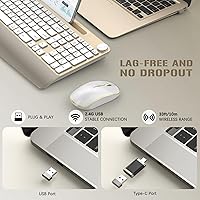
  • The wireless range of up to 10m (33ft) gives you flexibility without signal drop issues at a normal desk distance.

Cons

  • Batteries are not included for either device — budget for AAA and AA cells before you unbox.
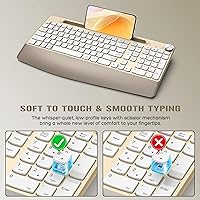
  • Key travel is shallow and feedback is soft, which will disappoint anyone used to a mechanical keyboard.
  • The phone cradle may feel less stable with larger, heavier smartphones.
  • Running on disposable batteries rather than a rechargeable built-in adds an ongoing maintenance cost.
  • The wrist rest is fixed and not adjustable independently, which may not suit every hand size or desk height.
  • No backlighting on the keys, which limits usability in low-light or nighttime work environments.
  • The mouse size and shape may feel modest for users with larger hands who prefer a fuller grip.
  • Long-term durability of the plastic build is uncertain given the budget price point.
  • No dedicated media or shortcut keys beyond the volume roller, which limits workflow customization.
  • The Mac layout toggle requires remembering a key combination, which can trip up infrequent switchers.

Ratings

The scores below reflect AI-powered analysis of verified global user reviews for the JOYACCESS Ergonomic Wireless Keyboard and Mouse Combo, with spam, bot activity, and incentivized submissions actively filtered out before any score was calculated. Every category captures the full picture — where real buyers were genuinely impressed and where they ran into friction — so you can make a confident, eyes-open decision.

Value for Money
88%
For a budget-tier peripheral set, buyers consistently feel they are getting more than they paid for — the combination of wrist rest, phone cradle, volume roller, and wireless mouse in a single package is hard to match at this price point. First-time wireless upgraders in particular tend to be pleasantly surprised by how complete the out-of-box experience feels.
A small segment of users who stretch their expectations too far — hoping for premium key feel or long-term durability comparable to more expensive brands — end up feeling the price reflected in the product after a few months of use.
Design & Aesthetics
91%
The gold-and-white colorway is genuinely one of the strongest selling points of this ergonomic desk set, and buyers frequently mention it as the reason they chose it over competing combos. It photographs well, coordinates easily with lighter desk setups, and brings a level of visual intentionality that most budget peripherals completely ignore.
The gold finish on the keycaps and mouse body can show fingerprints and smudges more readily than darker alternatives, which bothers some users who keep their desk meticulously clean. A handful of reviewers noted the shade of gold looked slightly different from product photos under certain lighting conditions.
Typing Comfort
76%
24%
The integrated palm rest makes a tangible difference for users who spend several hours a day typing emails, documents, or spreadsheets — keeping the wrist at a lower, more neutral angle without requiring a separate accessory. Casual typists and students regularly cite wrist fatigue reduction as a real, day-to-day benefit.
The palm rest is fixed and non-detachable, so users with smaller hands or unconventional wrist positioning may find it shifts rather than helps their natural posture. It is a passive foam-style pad, not an advanced ergonomic solution, and anyone with existing repetitive strain issues should not rely on it as a therapeutic device.
Typing Feel & Key Response
58%
42%
For everyday office tasks — drafting emails, filling spreadsheets, general web browsing — the membrane keys are quiet and sufficiently responsive. Users new to ergonomic or budget keyboards rarely have strong complaints, and the quieter keystrokes are appreciated in shared home office or bedroom environments.
This is the most consistent pain point raised by experienced typists: the key travel is shallow, the actuation feedback is soft, and anyone transitioning from a mechanical keyboard will feel the difference almost immediately. It is a fundamental limitation of membrane construction at this price tier, not something firmware or adjustment can fix.
Mouse Performance
74%
26%
The quiet-click mechanism on the mouse is a legitimately useful feature — users in shared apartments, open offices, or late-night work sessions consistently call it out as something they did not expect to appreciate as much as they do. Tracking is smooth enough for general office and casual use without any noticeable lag at normal working distances.
The mouse sits on the smaller side in terms of form factor, which users with larger hands find fatiguing over extended sessions. Precision-focused users — particularly those who do photo editing or detailed document work — may find the sensor resolution limiting compared to dedicated mid-range mice.
Wireless Reliability
83%
The 2.4GHz connection holds up reliably in typical home and office environments, with the vast majority of users reporting no dropout or lag during standard working sessions. The 10m (33ft) range is more than adequate for any realistic desk-to-computer distance, and the single nano receiver keeping both devices connected simultaneously works without issue.
In environments with significant wireless interference — dense apartment buildings with many overlapping networks, or heavily wireless-equipped offices — a small number of users report intermittent micro-pauses in mouse tracking. This is a known limitation of the 2.4GHz band rather than a product-specific defect.
Phone Holder Utility
77%
23%
The built-in cradle is a thoughtful addition that genuinely earns its place on the keyboard — being able to prop a phone vertically or horizontally at eye level while working reduces neck strain from looking down at a flat desk surface. Users who reference messages, follow video tutorials, or track delivery updates throughout their workday find it unexpectedly useful.
Larger smartphones — particularly phablets or phones in thick protective cases — can feel slightly loose or unsteady in the cradle, which undermines confidence during longer video viewing. The holder is also fixed in angle, so users who prefer a more aggressive tilt for video watching do not have much flexibility.
Volume Roller
86%
The physical volume roller is a small detail that earns outsized appreciation once users get used to it — spinning a knob to adjust audio mid-call or during a video is noticeably faster and more intuitive than pressing function keys or hunting for a software slider. It feels well-integrated rather than tacked on as a gimmick.
The roller has a fairly light resistance, which means it is easy to accidentally nudge volume up or down when reaching for nearby keys. There is also no dedicated mute button, which some users feel would complete the audio control package.
Setup & Ease of Use
93%
Plug the nano receiver in, flip the power switches, and everything works — there is no software to download, no pairing sequence to fumble through, and no account to create. First-time wireless keyboard users consistently highlight how friction-free the initial experience is, often noting it took under a minute from unboxing to fully operational.
The single shared receiver is convenient but means that if the nano dongle is lost, both devices become unusable simultaneously — there is no Bluetooth fallback or secondary connection method. Users who frequently swap between multiple computers also cannot do so without physically moving the receiver each time.
Mac & Windows Compatibility
79%
21%
The Fn+S toggle genuinely works as advertised — Mac-specific keys including Command and Option are correctly positioned, and the layout switch is fast enough that users who move between operating systems during the day do not find it disruptive. Cross-platform households appreciate not needing separate keyboards for each machine.
Some Mac users report needing to remap a key or two to match their precise preferred layout, particularly for special characters or screenshot shortcuts. The toggle is also easy to press accidentally, which can cause brief confusion when the keyboard suddenly behaves differently mid-session.
Battery Life
69%
31%
The auto-sleep mode and physical on/off switches on both devices do meaningfully extend battery longevity for users who remember to use them — light to moderate users typically get a reasonable run of weeks from a fresh set of batteries when practicing basic power hygiene between sessions.
The reliance on disposable batteries rather than a built-in rechargeable cell is a recurring frustration, particularly since neither the keyboard nor the mouse ships with batteries included — a detail that catches some buyers off guard on first use. Heavy users working long daily sessions will burn through batteries faster than the product marketing implies.
Build Quality & Durability
62%
38%
For everyday light-to-moderate office use, the plastic construction holds together adequately and the keycaps show no unusual wear in the short-to-medium term. The overall assembly feels solid enough on first impression, and most users do not encounter structural issues within the first few months of regular use.
The all-plastic build does not inspire long-term confidence, and some buyers who have used the JOYACCESS combo for six months or more report keycap legends beginning to fade and the mouse scroll wheel developing slight looseness. At this price tier, durability is a genuine trade-off and not an expectation that should be set too high.
Portability & Footprint
71%
29%
Despite being a full-size keyboard with an integrated wrist rest, the overall desk footprint is manageable for most home office setups, and the lightweight build means repositioning or packing it away for occasional travel is not burdensome. The single shared receiver also simplifies transport compared to multi-dongle setups.
The attached wrist rest adds meaningful length to the keyboard — users with compact or standing desks may find it encroaches on limited horizontal space more than a standard tenkeyless or compact layout would. The full numpad, while useful, makes this a poor fit for genuinely minimalist desk configurations.

Suitable for:

The JOYACCESS Ergonomic Wireless Keyboard and Mouse Combo is a strong fit for home office workers and students who want a cleaner, more comfortable desk setup without spending a lot. If your current workspace is cluttered with wires or you have been making do with a basic keyboard that offers zero wrist support, this ergonomic desk set addresses both problems at once. The built-in phone cradle is a genuine convenience for anyone who needs to reference their phone while working — no more propping it against a coffee mug or craning your neck to read a flat screen. People who split time between a Mac and a Windows machine will also appreciate the quick layout toggle, which removes a small but real daily friction point. The gold-and-white design appeals to anyone who cares about how their workspace looks, not just how it functions — it stands out in a category that otherwise offers endless shades of gray and black.
Not suitable for:

The JOYACCESS Ergonomic Wireless Keyboard and Mouse Combo is not the right tool for anyone who takes typing feel seriously. Power users, writers who log thousands of words daily, or anyone coming from a mechanical keyboard will likely find the key travel shallow and the feedback unsatisfying — that is not a flaw so much as an honest reflection of what this price tier delivers. The wrist rest is a padded cushion, not a clinical ergonomic solution, so if you are managing an active repetitive strain injury or need medically directed wrist positioning, you should look at purpose-built ergonomic hardware instead. Gamers should also look elsewhere; the wireless latency and membrane key design are not built for fast-paced, precision-dependent play. Finally, users who need rechargeable peripherals may find the disposable battery requirement inconvenient over time, especially since neither the keyboard nor the mouse ships with batteries included.
Specifications

  • Connectivity: Both keyboard and mouse connect via a shared 2.4GHz nano USB receiver — no Bluetooth, no pairing codes, no software required.
  • Wireless Range: The combo maintains a stable connection at distances of up to 10m (33ft) from the receiver under normal conditions.
  • Keyboard Layout: Full-size layout includes a dedicated numpad, function row, and all standard keys without compression or key elimination.
  • OS Compatibility: Supports both Windows and Mac operating systems, with layout switching handled by pressing Fn+S on the keyboard.
  • Wrist Rest: An integrated palm rest is built directly into the keyboard frame and is paired with adjustable tilt legs to modify typing angle.
  • Phone Cradle: A built-in holder on the keyboard accommodates smartphones and small tablets in both portrait and landscape orientations.
  • Volume Control: A dedicated physical roller knob on the keyboard allows direct audio adjustment without relying on function key shortcuts.
  • Mouse Clicks: The wireless mouse uses a quiet-click mechanism designed to significantly reduce audible click noise compared to standard mice.
  • Keyboard Power: The keyboard is powered by 2 AAA batteries, which are not included in the package.
  • Mouse Power: The mouse runs on 1 AA battery, also not included, and features a physical on/off switch to conserve charge when idle.
  • Auto-Sleep: Both devices enter an automatic sleep mode after a period of inactivity to reduce battery drain between uses.
  • Package Dimensions: The retail package measures 17.32 x 9.13 x 2.24 inches, suitable for standard shelf or drawer storage.
  • Item Weight: The complete package, including keyboard and mouse, weighs 2.21 pounds.
  • Color: The set is available in a gold-and-white finish across both the keyboard body and the mouse.
  • USB Receiver: A single nano USB receiver connects both devices simultaneously, requiring only one USB-A port on the host computer.
  • Key Type: The keyboard uses membrane key switches, which offer a quieter and softer typing experience compared to mechanical alternatives.
  • Plug and Play: No drivers or companion software are needed; the combo is operational immediately upon inserting the USB receiver.
  • Compatible Devices: Works with desktop PCs, laptops, and tablets that have a USB-A port and run Windows or macOS.

Related Reviews

JOYACCESS Wireless Keyboard and Mouse Combo
82%
88%
Value for Money
83%
Typing Experience
74%
Mouse Performance
86%
Backlight Quality
81%
Battery Life
More
GAMCATZ Ergonomic Wireless Keyboard and Mouse Combo
77%
83%
Value for Money
72%
Typing Feel
74%
Mouse Performance
87%
Wireless Reliability
68%
Wrist Comfort
More
PEIOUS Wireless Ergonomic Keyboard and Mouse Combo
74%
78%
Ergonomic Comfort
74%
Typing Feel & Key Response
69%
Mouse Ergonomics
83%
Wireless Reliability
61%
Build Quality & Durability
More
Lomiluskr Wireless Ergonomic Keyboard and Mouse Combo
70%
79%
Ergonomic Design
76%
Wrist Rest Quality
63%
Wireless Reliability
58%
Mouse Comfort & Fit
81%
Value for Money
More
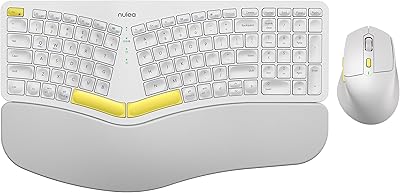
Nulea KM75
Nulea KM75
76%
83%
Ergonomic Comfort
79%
Memory Foam Palm Rest
76%
Keyboard Typing Feel
72%
Mouse Ergonomics
74%
Multi-Device Switching
More
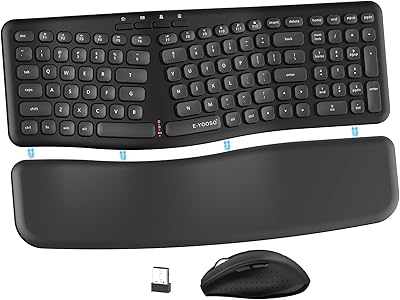
E-YOOSO Ergonomic Wireless Keyboard and Mouse Combo
84%
88%
Ergonomic Comfort
91%
Wireless Connectivity
94%
Ease of Setup
82%
Design and Build Quality
85%
Mouse Performance
More
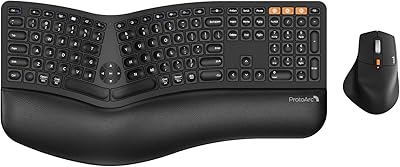
ProtoArc EKM01 Plus Ergonomic Keyboard Mouse Combo
74%
88%
Ergonomic Comfort
74%
Typing Experience
91%
Multi-Device Connectivity
83%
Mouse Comfort & Design
77%
Build Quality
More
MEETION Director-D-2 Ergonomic Wireless Keyboard and Mouse Combo
85%
88%
Ergonomic Comfort
91%
Wireless Connectivity
86%
Battery Life
89%
Mouse Precision (DPI Settings)
62%
Key Quietness
More
Perixx Periduo-605 Wireless Ergonomic Keyboard Mouse Combo
72%
83%
Ergonomic Comfort
61%
Keyboard Feel & Typing
79%
Mouse Comfort & Design
69%
Wireless Reliability
76%
Value for Money
More
Arteck HW192 Wireless Keyboard and Mouse Combo
78%
78%
Build Quality
72%
Typing Experience
63%
Mouse Comfort & Ergonomics
81%
Battery Life
69%
Wireless Connectivity
More

FAQ

No, there is nothing to install. Just plug the nano USB receiver into an available USB-A port on your computer and both devices connect automatically. It is fully plug and play out of the box.

You will need to supply your own batteries — the keyboard takes 2 AAA batteries and the mouse takes 1 AA battery, and neither is included in the box. It is worth picking some up before you unbox so you are ready to go straight away.

It works on both. The keyboard defaults to Windows layout, and you can switch to Mac mode by pressing Fn+S. The Mac-specific keys, including Command and Option, are properly positioned so the layout feels natural on Apple devices.

Pressing Fn+S toggles between the two layouts. It is a quick, single key combination — no need to restart or reconnect anything. Just press it again to switch back.

The palm rest is built into the keyboard frame, so it is not detachable. It is fixed in place, but the keyboard does have tilt legs that let you adjust the typing angle slightly to find a more comfortable position.

The cradle fits most standard smartphones comfortably, but very large or bulky phones in thick cases may feel less secure than smaller handsets. Most buyers report it works fine for everyday-sized phones in portrait or landscape mode.

The quiet-click mechanism makes a real difference in practice. The clicks are noticeably softer than a conventional mouse — enough that you would not disturb someone sleeping nearby or a colleague in a quiet shared office. It is not completely silent, but the reduction is genuine.

They can absolutely be used independently. Both devices share the same nano USB receiver but operate as separate inputs, so there is no requirement to use both at the same time.

Probably not, if tactile feedback is important to you. The JOYACCESS Ergonomic Wireless Keyboard and Mouse Combo uses membrane switches, which feel softer and have less key travel than mechanicals. It is comfortable for everyday office typing, but it will not satisfy anyone who relies on that distinct click or bump under their fingers.
Actual battery life depends on usage habits, but the auto-sleep feature and physical on/off switches on both devices help stretch battery life considerably. Turning the devices off when you step away from your desk is the easiest way to get the most out of each set of batteries.