Overview

The Lomiluskr Wireless Ergonomic Keyboard and Mouse Combo is a solid entry point for anyone curious about ergonomic peripherals without committing to a premium price tag. Everything you need arrives in one box — keyboard, mouse, and a shared USB nano-receiver — so there's no hunting for accessories out of the gate. The split, sloped keyboard layout is what sets this apart from a standard flat combo, encouraging a more natural hand position during long sessions. It comes in purple, which gives it a bit of personality compared to the usual gray-and-black office fare. Just know going in: these are membrane keys powered by alkaline batteries, not the mechanical or rechargeable setup some buyers expect.

Features & Benefits

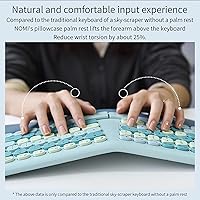
The split ergonomic layout is the headline feature here, angling each half of the keyboard outward to reduce the wrist rotation that flat boards force on you all day. The integrated PU leather wrist rest is a genuine convenience — you skip buying a separate pad and your palms have somewhere soft to land. A single nano-receiver handles both the keyboard and mouse over 2.4G wireless, which keeps your USB situation tidy. The mouse cycles through three DPI levels (1200, 1600, and 2400), covering everyday browsing up to faster cursor work. Both devices auto-sleep after inactivity, stretching battery life without any manual fuss. The 10-meter range also gives you flexibility if your setup isn't desk-bound.

Best For

This ergonomic combo makes the most sense for office workers and students who are starting to feel tension in their wrists but aren't ready to drop serious money on a high-end ergonomic brand. If you've been using a standard flat keyboard your whole life, this split keyboard set is a reasonable first step — expect a short adaptation period as your hands find the new layout. It's also a good pick for anyone chasing a cleaner, cable-free desk on a tight budget. That said, this isn't a fit for gamers, mechanical keyboard fans, or anyone who needs Bluetooth connectivity — the 2.4G USB receiver is the only wireless option here.

User Feedback

With just under 620 reviews and a 3.8-star rating, the Lomiluskr combo lands in solidly-okay territory — appreciated by many, but not without its gripes. The most consistent praise is the comfort improvement users feel after making the switch, especially during long typing days. On the flip side, the split layout has a real learning curve; some people report needing a couple of weeks before their speed recovers. The mouse draws complaints from users with larger hands who find it too small for comfortable extended use. AAA batteries also come up repeatedly — not a dealbreaker, but annoying when rechargeable is now the norm. A smaller group flags intermittent connectivity issues after months of use, which is worth keeping in mind.

Pros

  • Split keyboard layout encourages a more neutral wrist angle, reducing forearm strain during long typing sessions.
  • The built-in PU leather wrist rest saves you from buying a separate palm pad.
  • One USB nano-receiver connects both the keyboard and mouse, keeping your available ports free.
  • Three DPI settings offer enough cursor speed flexibility to handle everyday tasks comfortably.
  • Auto-sleep mode extends battery life without any manual power-off steps required.
  • The 10-meter wireless range works well across most home office and living-room setups.
  • The purple colorway stands out on any desk without looking cheap or garish.
  • AAA batteries are included in the box, so you're ready to go immediately after unboxing.
  • This ergonomic combo delivers a surprisingly complete package for first-time ergonomic keyboard users.

Cons

  • The split layout has a genuine learning curve — expect one to two weeks before your typing speed normalizes.
  • The mouse runs small and can feel cramped for users with larger hands during extended sessions.
  • No Bluetooth support means it won't pair with tablets, phones, or laptops that lack a USB-A port.
  • Alkaline battery dependency adds ongoing cost and environmental waste compared to built-in rechargeable designs.
  • Some users report key registration drops and inconsistent wireless performance after several months of daily use.
  • Membrane keys provide no tactile feedback, which feels like a clear step down for anyone coming from mechanical switches.
  • There are no macro keys, backlighting, or any software customization options included.
  • Quality control appears inconsistent across units, with a notable share of lower-star reviews citing hardware defects.

Ratings

The scores below for the Lomiluskr Wireless Ergonomic Keyboard and Mouse Combo were generated by our AI review engine after analyzing hundreds of verified buyer experiences worldwide, with spam, bot-generated content, and incentivized feedback actively screened out. Each category score is an honest synthesis of what real users genuinely appreciated and what consistently let them down — nothing has been softened or inflated to favor the product. Both the practical strengths that make this split keyboard set worth considering and the limitations that may be dealbreakers for certain buyers are reflected transparently in every number.

Ergonomic Design
79%
21%
The split, angled layout is a genuine step up for anyone who types for most of the day. Users who switched from a standard flat board consistently note that their hands settle into a more relaxed position, with noticeably less forearm tension building up over a long workday. For the price tier, the ergonomic intent is well-executed and clearly felt.
The split design carries a real adaptation tax — a meaningful share of buyers report needing two weeks or more before their typing accuracy and speed recover to baseline. The ergonomic gains are also partially offset by the membrane key mechanism, which lacks the consistent force feedback that helps more advanced ergonomic keyboards feel truly precise.
Wrist Rest Quality
76%
24%
Having the wrist rest built directly into the keyboard body is one of the combo's most practical advantages — there is nothing extra to buy, align, or accidentally knock off the desk. The PU leather surface feels noticeably softer than bare plastic and keeps palms cushioned through extended typing sessions without sliding around.
PU leather has a known durability ceiling, and integrated rests like this tend to show surface wear, cracking, or peeling after several months of heavy daily contact. Users in warmer environments or with naturally warm hands may also find the material develops a slightly tacky feel over time that becomes noticeable during long sessions.
Wireless Reliability
63%
37%
Under typical office conditions, the 2.4G connection holds steady for the majority of buyers — the receiver pairs instantly with no manual configuration, and day-to-day input lag during standard typing and cursor movement is essentially undetectable. For a first-time wireless peripheral user, the experience out of the box is reassuringly smooth.
A meaningful subset of reviewers report that wireless stability begins to degrade after several months of daily use, with symptoms ranging from occasional key registration failures to brief dropouts that require re-plugging the receiver. Dense wireless environments — offices crowded with 2.4G devices — tend to amplify these issues noticeably.
Mouse Comfort & Fit
58%
42%
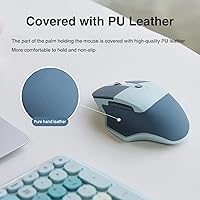
The PU leather grip panel on the mouse adds a tactile, non-slip texture that prevents the device from shifting during extended use, and the three DPI presets cover the practical range for daily document work and general browsing. Users with average or smaller hand sizes generally find the shape comfortable enough for a full workday.
Mouse sizing is the most frequently raised complaint across buyer feedback — the device runs noticeably small, and users with medium-to-large hands report real discomfort setting in well before the workday ends. The limited lateral palm support makes it a poor long-term fit for anyone accustomed to a full-size ergonomic mouse shape.
Value for Money
81%
19%
Arriving as a complete combo — keyboard, mouse, integrated wrist rest, and a single shared USB receiver — with no additional accessories required is a meaningful practical win at this price point. For students or entry-level office workers setting up a first ergonomic workspace on a tight budget, this split keyboard set delivers a genuinely complete package.
The value equation shifts for buyers who encounter connectivity degradation or build quality failures within the first year, since troubleshooting or replacement costs erode the initial savings quickly. Users who end up buying a separate mouse due to size issues also lose a core part of the combo's financial justification.
Typing Comfort
72%
28%
The low-actuation membrane keys are light under the fingers and nearly silent, making this a considerate choice for shared office spaces or late-night work where keyboard noise is a real concern. The shallow key travel means sustained typing rarely feels physically tiring in the short term, which suits most everyday productivity tasks.
Users coming from mechanical keyboards will find the membrane feedback flat and unreliable — there is no tactile bump or audible confirmation of a keypress, which can quietly increase typo rates, especially during the layout adjustment period. Anyone expecting a satisfying, premium typing feel should recalibrate expectations before purchasing.
Build Quality
67%
33%
The keyboard body has a reasonable amount of rigidity and does not flex visibly during vigorous typing — keycaps sit evenly and the assembly does not rattle or creak under normal desk conditions. For an entry-level product, the physical construction clears a basic threshold of acceptability that most casual daily users will not find frustrating.
Quality control appears inconsistent across production runs — a notable share of lower-star reviews cite dead keys, loose keycaps, or scroll wheels that feel gritty straight out of the packaging. The mouse in particular feels lighter and less substantial than the keyboard, suggesting the two components were not held to the same manufacturing standard.
Setup & Ease of Use
88%
Plug the single nano-receiver into any available USB-A port and both devices are immediately recognized by the operating system — no drivers, no software installation, no pairing sequence required. For less technical users or anyone who values immediate productivity over configuration, this plug-and-play experience is one of the most frictionless in the budget combo category.
The simplicity of setup is also its hard ceiling — because there is no companion software whatsoever, users cannot remap keys, create shortcuts, or dial in custom DPI values beyond the three hardware presets. Anyone who expects to tune their peripheral behavior to match a specific workflow will hit this wall almost immediately.
Battery Life
71%
29%
The auto-sleep mechanism, which activates passively after 3 to 5 minutes of inactivity, does a solid job of stretching battery life without any user intervention, and both required AAA batteries ship inside the box so there is no delay before first use. For moderate daily users, battery swaps are not a frequent disruption.
Reliance on disposable AAA alkaline batteries is increasingly out of step with a peripheral market where built-in rechargeable cells have become the standard expectation. Neither device includes a battery level indicator, which means dead batteries tend to arrive as a surprise mid-session rather than with any advance warning to the user.
DPI Performance
69%
31%
The three preset DPI steps — 1200, 1600, and 2400 — cover the practical range for everyday office tasks, and cycling through them is a single button press that takes no time at all mid-workflow. For users whose needs are limited to document editing, web browsing, and general productivity, these presets are sufficient without being overwhelming.
The fixed three-step structure offers no intermediate values, which becomes a real limitation for users who want finer cursor control for tasks like image editing or precise spreadsheet navigation. The 2400 DPI ceiling also makes this mouse unsuitable for high-resolution or multi-monitor setups where significantly faster cursor travel is often necessary.
Wireless Range
83%
The 10-meter signal range is more than sufficient for standard desk configurations and handles casual living-room or standing-desk setups reliably without signal degradation in most home environments. Users who like to step away briefly without interrupting their session find the range a genuine practical convenience.
In dense wireless environments — crowded open-plan offices or apartments with many overlapping 2.4G networks — effective range can shrink noticeably, and some users report the connection feeling less stable than the spec suggests. The generous range also provides zero benefit to anyone who needs Bluetooth support, which this combo does not offer.
Layout Adaptation
54%
46%
Buyers who push through the initial discomfort and commit to the split layout consistently describe a rewarding payoff — hands eventually settle into a more open, relaxed position that long-term users say becomes hard to give up. For patient buyers, the adaptation period is ultimately worth the temporary productivity dip.
The learning curve is steep enough to be a genuine deterrent for a significant portion of buyers. Many reviewers describe a two-week window of noticeably reduced typing accuracy and rising frustration — a real barrier for anyone who cannot afford a productivity dip during a busy period at work or school, and the primary driver of early low-star reviews.
Desk Aesthetics
77%
23%
The purple colorway genuinely stands out in a peripheral market dominated by matte black and silver-gray options, and buyers who want a personalized or playful workspace consistently mention the color as a pleasant surprise once the product is in hand. It reads as bold without being garish and sits comfortably in a variety of desk setups.
A handful of buyers note that the purple shade delivered in person skews slightly more muted or blue-toned than it appears in product photography, which can feel like a minor mismatch at unboxing. There is also only one colorway available, limiting options for buyers whose desk palette trends toward warmer, cooler, or more neutral tones.
Customization Options
38%
62%
The complete absence of software dependency has a narrow appeal — there is nothing to install, no background processes to manage, and no firmware updates to apply. For users who want a peripheral that simply works immediately with zero configuration overhead, the no-frills design removes friction entirely.
Beyond that narrow use case, the lack of any customization is a significant functional limitation. There is no key remapping, no macro support, no backlighting of any kind, and no way to save preferred DPI values — whatever the hardware ships with is precisely what the user is locked into for the entire lifespan of the product.

Suitable for:

The Lomiluskr Wireless Ergonomic Keyboard and Mouse Combo is a genuinely practical choice for people who are starting to notice wrist or forearm discomfort during long hours at a desk but aren't ready to invest in a high-end ergonomic setup. Students working through marathon study sessions, remote workers logging eight-hour days, and entry-level office users will get real value from the split keyboard layout and built-in wrist rest without needing to spend significantly more. It works especially well for anyone upgrading from a standard flat keyboard for the first time — the angled design feels noticeably different right away, even if there's a short adaptation period to push through. The cable-free design and single-receiver setup also make it a smart fit for people who prioritize a clean, uncluttered workspace without juggling multiple USB dongles. If you want a bit of color at your desk rather than the usual gray peripherals, the purple colorway is a genuine bonus rather than an afterthought.

Not suitable for:

The Lomiluskr Wireless Ergonomic Keyboard and Mouse Combo won't be the right call for several categories of buyers, and it's worth being upfront about that before purchasing. Mechanical keyboard enthusiasts will find the membrane key feel underwhelming — there's no tactile click, no adjustable actuation, just a soft, quiet press that dedicated typists often find unsatisfying over extended use. Anyone who needs Bluetooth connectivity is immediately out of luck; the only wireless option is the 2.4G USB nano-receiver, which means no pairing with tablets, iPads, or smartphones. Heavy gamers should also look elsewhere — the mouse tops out at 2400 DPI, the split layout takes adjustment time that can hurt reaction speed, and there's no polling rate control or macro support anywhere in the package. Users with larger hands may find the mouse too compact for comfortable all-day use, and buyers who prefer rechargeable peripherals will have to contend with the ongoing inconvenience of swapping out AAA batteries.

Specifications

  • Connectivity: Both the keyboard and mouse connect to a PC or laptop via a single shared 2.4G USB nano-receiver included in the box.
  • Wireless Range: The 2.4G wireless signal supports a maximum operating range of up to 10 meters (approximately 33 feet) under open, unobstructed conditions.
  • Keyboard Type: The keyboard uses a membrane key mechanism with a split, outward-angled layout intended to reduce ulnar deviation during extended typing.
  • Wrist Rest: An integrated palm rest covered in PU leather is built directly into the keyboard base and is not detachable.
  • Mouse DPI: The mouse offers three switchable DPI levels — 1200, 1600, and 2400 — with 1600 DPI set as the factory default.
  • Power Source: Both devices run on AAA alkaline batteries, which are included in the package; neither the keyboard nor the mouse has a built-in rechargeable battery.
  • Auto-Sleep: Both devices automatically enter a low-power sleep state after 3 to 5 minutes of inactivity and wake immediately upon a keypress or mouse click.
  • Dimensions: The package measures 17.44 × 11.85 × 2.24 inches, encompassing the keyboard with integrated wrist rest, the mouse, and the USB receiver.
  • Weight: The total package weight is 2.08 pounds, covering all included components.
  • Compatibility: This combo is designed for use with desktop PCs and laptops and does not support Bluetooth or direct pairing with tablets, iPads, or smartphones.
  • Bluetooth: There is no Bluetooth mode; the only wireless connection method is the included 2.4G USB nano-receiver.
  • USB Requirement: Only one USB-A port is required to operate both devices simultaneously through the shared nano-receiver.
  • Mouse Grip: The palm-contact area of the mouse body is covered in PU leather to provide a non-slip, cushioned grip surface.
  • Warranty: The manufacturer offers a one-year warranty covering quality defects, with either a full refund or a free replacement provided as the remedy.
  • Color: The combo is offered in a purple colorway; no additional color variants are listed by the manufacturer.

Related Reviews

PEIOUS Wireless Ergonomic Keyboard and Mouse Combo
74%
78%
Ergonomic Comfort
74%
Typing Feel & Key Response
69%
Mouse Ergonomics
83%
Wireless Reliability
61%
Build Quality & Durability
More
JOYACCESS Ergonomic Wireless Keyboard and Mouse Combo
77%
88%
Value for Money
91%
Design & Aesthetics
76%
Typing Comfort
58%
Typing Feel & Key Response
74%
Mouse Performance
More
GAMCATZ Ergonomic Wireless Keyboard and Mouse Combo
77%
83%
Value for Money
72%
Typing Feel
74%
Mouse Performance
87%
Wireless Reliability
68%
Wrist Comfort
More
E-YOOSO Ergonomic Wireless Keyboard and Mouse Combo
84%
88%
Ergonomic Comfort
91%
Wireless Connectivity
94%
Ease of Setup
82%
Design and Build Quality
85%
Mouse Performance
More
Nulea KM75
Nulea KM75
76%
83%
Ergonomic Comfort
79%
Memory Foam Palm Rest
76%
Keyboard Typing Feel
72%
Mouse Ergonomics
74%
Multi-Device Switching
More
ProtoArc EKM01 Plus Ergonomic Keyboard Mouse Combo
74%
88%
Ergonomic Comfort
74%
Typing Experience
91%
Multi-Device Connectivity
83%
Mouse Comfort & Design
77%
Build Quality
More
MEETION Director-D-2 Ergonomic Wireless Keyboard and Mouse Combo
85%
88%
Ergonomic Comfort
91%
Wireless Connectivity
86%
Battery Life
89%
Mouse Precision (DPI Settings)
62%
Key Quietness
More
Perixx Periduo-605 Wireless Ergonomic Keyboard Mouse Combo

72%
83%
Ergonomic Comfort
61%
Keyboard Feel & Typing
79%
Mouse Comfort & Design
69%
Wireless Reliability
76%
Value for Money
More
Arteck HW192 Wireless Keyboard and Mouse Combo
78%
78%
Build Quality
72%
Typing Experience
63%
Mouse Comfort & Ergonomics
81%
Battery Life
69%
Wireless Connectivity
More
Kootop Wireless Keyboard Mouse Combo
87%
89%
Ergonomics and Comfort
91%
Typing Experience
85%
Wireless Connectivity
87%
Design and Aesthetics
83%
Battery Life
More

FAQ

It will work for general use on a Mac since it connects via USB and most operating systems recognize plug-and-play HID devices without drivers. That said, the manufacturer lists compatibility with PC and laptop specifically, so Mac-specific function keys and shortcuts may not behave exactly as expected. For standard typing and cursor work, most Mac users report it functioning fine right out of the box.

No — this is a 2.4G wireless combo that relies entirely on the USB nano-receiver, so it has no way to pair with tablets, iPads, or smartphones. There is no Bluetooth mode at all. If you need something that works across mobile devices, you will need to look at a Bluetooth-enabled keyboard and mouse instead.

Expect a genuine adjustment period — this is one of the most consistent themes in real buyer feedback. The first few days tend to feel slower and slightly frustrating, and some users report needing one to two full weeks before their typing speed recovers. If you can push through that initial phase, the layout tends to feel more natural over time, but going in with realistic expectations matters a lot here.

The manufacturer does not publish a specific battery life figure, but the auto-sleep feature — which activates after 3 to 5 minutes of inactivity — is designed to stretch run time meaningfully. Under typical office use, you can reasonably expect the included AAA batteries to last several weeks before needing a swap, though heavier daily use will shorten that window.

No, the wrist rest is integrated permanently into the keyboard base and cannot be detached. For most users that is a convenience — nothing extra to position or purchase separately — but if you already have a preferred ergonomic palm pad or simply do not use wrist rests, it is worth knowing the layout is fixed.

This is one of the more frequently raised concerns from actual buyers, so it is worth being honest about. The mouse runs on the smaller side, and several users with larger hands report it feeling cramped during long work sessions. If hand size is a real concern, the mouse portion of this split keyboard set may not be the best match for you, even if the keyboard itself suits your needs well.

No, there is no backlighting of any kind — no LED, no RGB, nothing. This is a straightforward membrane keyboard with a purely functional design. If you frequently work in low-light conditions and rely on lit keys, this combo will not meet that need.

Just press any key or click the mouse and both devices will reconnect almost immediately. Sleep mode activates automatically after 3 to 5 minutes of idle time, and there is no manual power switch to manage — the whole process happens in the background without any extra steps on your end.

No driver installation is required — you plug the USB nano-receiver into a USB-A port and both devices are recognized automatically. There is also no companion software, which keeps setup simple, but it does mean there is no way to remap keys, create macros, or adjust DPI beyond the three preset levels the mouse button cycles through.

The manufacturer covers quality defects for one year from purchase, offering either a full refund or a free replacement as the resolution. To make a claim, you would contact the seller through the platform where you bought it, provide proof of purchase, and describe the issue. Based on the product listing, the process appears straightforward, though individual experiences may vary depending on the seller's responsiveness.