Overview

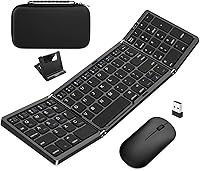
The EDJO Foldable Wireless Keyboard Mouse Combo enters a crowded market somewhere between throwaway budget options and the well-established names most office workers already know. EDJO isn't a brand with decades of recognition behind it, but the numbers tell an encouraging early story — over 250 real buyers and a solid 4.2-star average after less than a year on shelves. This folding keyboard combo ships with a rigid carry case and an adjustable phone stand included, which immediately signals that the target buyer is someone who works away from a fixed desk more than they'd like. It's practical rather than flashy, and that's clearly the point.

Features & Benefits

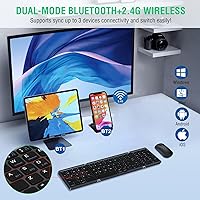
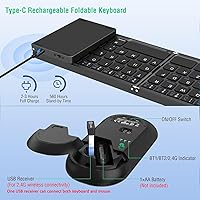
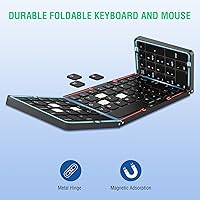
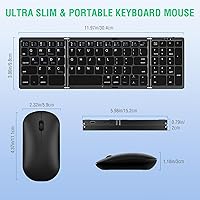
What stands out immediately about this portable wireless combo is the hinge mechanism — fold it open and you have a layout that includes a numeric keypad and 13 multimedia shortcuts, which you simply don't find on most compact keyboards. Three-device connectivity is handled through two Bluetooth channels and one 2.4G USB connection, so jumping between a tablet, laptop, and phone is straightforward. The keyboard charges via USB-C and claims up to 90 hours per charge, which is genuinely generous for travel use. The mouse, however, runs on a single AA battery — a small but notable step back compared to what buyers increasingly expect at this price tier.

Best For

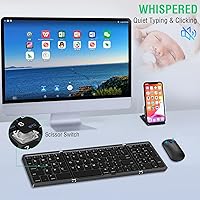
This folding keyboard combo makes the most sense for someone constantly moving between devices and locations — think a consultant toggling between a work laptop and personal iPad, or a student who wants a real keyboard experience on their tablet without hauling extra gear. It also suits quiet shared spaces well; the scissor-switch keys keep noise low enough that nearby colleagues won't notice. The hard carry case slips easily into a backpack side pocket, and the included phone stand adds handy utility for video calls or reference material. It's a less obvious fit for heavy daily typists who need long-session comfort and deeper key travel.

User Feedback

Buyers consistently highlight the carry case quality and how painlessly the combo pairs and switches between devices — two things that matter most when you're working across platforms. The quiet keys earn praise from café and open-office users alike. On the flip side, some reviewers find the numeric section noticeably cramped in practice; it's a compressed layout, not a standard numpad. Extended typing sessions also expose shallower key travel than touch-typists prefer. The AA-powered mouse draws recurring frustration from buyers who expected both devices to recharge the same way. EDJO's 12-month warranty and reportedly fast support responses help offset some of the hesitation that naturally comes with a lesser-known brand.

Pros

  • Folds into a compact hard case that fits easily in a backpack or carry-on without dedicated space.
  • Supports three devices simultaneously across Bluetooth and 2.4G, covering most multi-device workflows.
  • The keyboard charges via USB-C and delivers a claimed 90 hours of use on a full charge.
  • Scissor-switch keys stay quiet enough for shared spaces like offices and coffee shops.
  • Works across Windows, macOS, iOS, and Android without needing separate software or drivers.
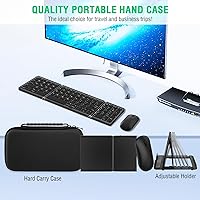
  • The included rigid carry case protects the combo during travel and doubles as an organized storage solution.
  • An adjustable phone stand is included in the box, adding useful utility for video calls or reference.
  • Auto sleep on both devices kicks in after inactivity, helping stretch battery life between charges.
  • A 12-month warranty with reportedly responsive support adds a reasonable safety net for a lesser-known brand.
  • The numeric keypad inclusion is uncommon at this size, giving spreadsheet and data-entry users an edge over slimmer rivals.

Cons

  • The mouse requires a replaceable AA battery rather than a built-in rechargeable cell, which feels dated at this price point.
  • The numeric keypad is a compressed layout in practice, not the spaced-out numpad most accountants or data workers expect.
  • Extended typing sessions expose shallow key travel that touch-typists and fast writers tend to find tiring over time.
  • Some buyers have reported intermittent Bluetooth pairing drops, particularly when switching between platforms.
  • EDJO lacks the brand recognition and long-term track record of established peripheral makers, which may concern cautious buyers.
  • The mouse ergonomics are fairly basic — users with larger hands or wrist strain concerns may find it uncomfortable for long use.
  • No backlit keys, which limits usability in dim environments like airplane cabins or evening travel.
  • At roughly 1.32 pounds total, the combo is lighter than full-size alternatives but noticeably heavier than ultra-slim Bluetooth-only keyboards.

Ratings

The scores below reflect our AI-powered analysis of verified global buyer reviews for the EDJO Foldable Wireless Keyboard Mouse Combo, with spam, bot-generated, and incentivized feedback actively filtered out before any scoring was applied. We evaluated real-world usage patterns across travelers, remote workers, and multi-device users to surface both what this portable combo genuinely delivers and where it falls short. Nothing is glossed over — the strengths and frustrations are weighted equally so you can make a genuinely informed call.

Portability
91%
Buyers consistently single out portability as the single strongest reason they chose this combo over a conventional wireless set. The folded keyboard slips into a jacket pocket or laptop sleeve, and the rigid carry case keeps everything protected during airport runs and daily commutes without adding meaningful bulk to a bag.
A handful of users note that once you factor in the mouse, USB dongle, and charging cable alongside the keyboard inside the case, the overall kit is slightly heavier than expected at 1.32 pounds — noticeable if you are already carrying a packed daypack.
Multi-Device Switching
83%
Users who juggle a work laptop, personal tablet, and phone throughout the day find the three-channel setup genuinely practical. Switching between a MacBook and an iPad during back-to-back meetings, for instance, takes a single keypress rather than re-pairing from scratch each time.
A recurring complaint is that Bluetooth reconnection occasionally takes a few extra seconds on some Android devices, and a small number of reviewers report needing to re-pair one channel from scratch after firmware updates on their host device. The 2.4G channel tends to be the most reliable of the three.
Carry Case Quality
88%
The hard shell case earns more unsolicited praise than almost any other single element of this combo. Buyers testing it through checked luggage, overstuffed backpacks, and frequent daily carry report that it holds its shape well and keeps both devices from shifting or scratching inside.
The zipper on a small number of units has been reported to feel slightly stiff out of the box, and the case offers no internal organization for the USB dongle or charging cable beyond laying them loose beside the keyboard.
Typing Experience
67%
33%
For light to moderate typing — emails, notes, short documents — the scissor-switch keys feel responsive enough and stay quiet in shared environments like libraries and open offices. Users who previously typed on laptop chiclet keys tend to adapt quickly and find the feedback acceptable.
Buyers who type heavily for extended sessions are more divided. The shallow key travel becomes fatiguing after an hour or more of continuous writing, and the folding hinge introduces a faint flex at the center of the keyboard that touch-typists find distracting once they notice it.
Mouse Usability
61%
39%
For light navigation tasks — scrolling through documents, clicking through spreadsheets, browsing — the mouse performs adequately and pairs reliably via the 2.4G dongle. Its compact size fits naturally in a travel bag and works on most surfaces without a mousepad.
The mouse is the weakest link in the combo for most buyers. It requires a replaceable AA battery rather than a rechargeable cell, which feels out of step with what buyers expect at this price point, and the small form factor leaves users with larger hands feeling cramped during extended use.
Connectivity Stability
74%
26%
The 2.4G USB connection is consistently described as rock-solid with no perceptible lag, making it the preferred channel for users who stay on one primary device like a home office desktop or a dedicated work laptop.
Bluetooth performance is more inconsistent across the board. Some users experience brief dropout when the keyboard and host device are separated by more than 20 feet, and a minority report that BT2 in particular occasionally needs to be re-initialized after the device wakes from a long sleep.
Battery Life
84%
The keyboard's claimed 90-hour runtime holds up well in real-world use for most buyers. Travelers completing week-long business trips report not needing to recharge the keyboard at all, and the USB-C charging is convenient given how universal that cable has become.
The auto-sleep timeout of 10 minutes works well in theory but occasionally causes a brief lag when resuming after a short break, which some users find mildly disruptive mid-workflow. The mouse's AA battery dependency also means the combo does not have a unified recharging story.
Numeric Keypad
62%
38%
Having a numeric keypad at all on a foldable keyboard is a genuine differentiator — most competing compact keyboards omit it entirely. Users who occasionally enter figures into spreadsheets or fill in forms find its presence a meaningful convenience over smaller keypad-free alternatives.
The numpad keys are noticeably compressed relative to a standard desktop layout, which leads to frequent mis-hits for users who have strong muscle memory from full-size keyboards. Accountants or data professionals who rely on numpad input as a core workflow tool will likely find it more frustrating than helpful.
Platform Compatibility
86%
Cross-platform performance is broadly reliable across Windows, macOS, iOS, and Android with no drivers required. Users moving between a Windows work machine and an iPhone or iPad report that both devices pair cleanly and that most multimedia shortcut keys function as expected on each OS.
A small number of macOS users note that a few of the function and multimedia keys behave differently than labeled due to macOS key mapping differences, and there is no bundled software to remap them. Linux compatibility is not officially supported and works inconsistently based on user reports.
Build Quality
71%
29%
For a foldable keyboard at this price tier, the overall construction feels more considered than many budget rivals. The hinge mechanism in particular receives consistent praise for feeling solid rather than plasticky, and the key caps show minimal wear after months of regular use according to longer-term reviewers.
The keyboard body is primarily plastic, and some buyers notice minor flex along the lower edge when pressing keys near the corners. The mouse also feels light in hand in a way that reads as hollow rather than intentionally minimal, which undercuts confidence in its long-term durability.
Value for Money
77%
23%
Buyers who need a capable travel keyboard and are not committed to premium brands find the price-to-feature ratio reasonable, especially given that a hard carry case, phone stand, and multi-device support are all included without paying extra.
Those who compare it directly against established brands at a similar or only slightly higher price point often feel the typing experience and mouse quality lag behind. The AA-only mouse is the most cited reason buyers feel the value proposition is not quite as strong as it first appears.
Setup & Pairing
81%
19%
Initial setup is straightforward for most users regardless of technical experience — the pairing process follows standard Bluetooth conventions and the 2.4G dongle requires no configuration at all. Most buyers report being up and running within five minutes of unboxing.
A portion of reviewers encounter confusion pairing multiple devices simultaneously for the first time, as the channel-switching logic is not explicitly documented in a step-by-step way in the included instructions. The manual is brief and primarily illustrated rather than text-guided.
Noise Level
85%
The scissor-switch keys are quiet enough for café work and shared office environments without feeling completely muffled. Users sitting in open-plan offices specifically mention that the low typing noise drew no complaints from nearby colleagues even during rapid typing bursts.
The mouse click is slightly louder than the keyboard keys, which creates a minor tonal mismatch for users in very quiet environments like libraries or late-night work sessions in shared living spaces. It is not loud by any standard, but the asymmetry is noticeable.
Brand & Warranty Trust
68%
32%
EDJO's 12-month warranty and advertised 24-hour support response window are received positively by buyers who have actually needed to use them, with several reviewers noting that replacement or resolution came faster than expected from a smaller brand.
EDJO lacks the established reputation of peripheral brands that have been around for decades, which makes some buyers hesitant before purchasing. The relative scarcity of long-term ownership reviews — partly due to the product launching only in early 2024 — means durability beyond the first year remains an open question.

Suitable for:

The EDJO Foldable Wireless Keyboard Mouse Combo is a strong pick for anyone whose work life regularly spills outside a fixed desk — frequent travelers, remote consultants, and hybrid workers who rotate between multiple devices throughout the day will find real value here. The ability to pair with two Bluetooth devices and one 2.4G receiver means switching between a laptop and tablet takes seconds rather than fumbling with dongles. The rigid carry case and folded footprint make it genuinely bag-friendly in a way most full-size combos simply aren't. Tablet and iPad users who want a physical typing and pointing setup without committing to a dedicated keyboard case will appreciate how the included phone stand pulls double duty. Light typists who work in cafés, libraries, or open-plan offices will also benefit from the quiet scissor-switch keys, which keep noise to a minimum without feeling completely lifeless underhand.

Not suitable for:

The EDJO Foldable Wireless Keyboard Mouse Combo is a harder sell for anyone who spends four or more hours a day typing seriously. The scissor-switch keys are quieter than mechanical alternatives, but the shallow travel and compressed layout — particularly around the numeric section — will frustrate touch-typists who rely on consistent key spacing and tactile feedback. The mouse is powered by a single AA battery rather than a built-in rechargeable cell, which is a genuine inconvenience for buyers who want a fully cable-free, hassle-free charging routine for both devices. Power users who demand reliable, uninterrupted Bluetooth connections across demanding platforms may also encounter the occasional pairing hiccup that some reviewers have flagged. Anyone already invested in a premium peripheral ecosystem from an established brand will likely find the overall build quality underwhelming by comparison.

Specifications

  • Connectivity: The keyboard connects via Bluetooth 5.0 on two independent channels and one 2.4G USB dongle, supporting up to three paired devices total.
  • Wireless Range: Both the keyboard and mouse maintain a stable connection within a range of up to 33 feet (10 meters) from the receiver or paired device.
  • Keyboard Battery: A built-in lithium polymer cell powers the keyboard and recharges through a USB-C port in approximately 2 to 3 hours.
  • Battery Life: The keyboard delivers up to 90 hours of continuous use on a full charge under typical typing conditions.
  • Mouse Battery: The mouse is powered by one AA battery, which is required but not included; it is not rechargeable.
  • Key Switch: Scissor-switch keys provide a low-profile, quieter typing feel compared to standard membrane or mechanical alternatives.
  • Layout: The keyboard includes a compressed numeric keypad and 13 dedicated multimedia shortcut keys alongside the standard alphanumeric layout.
  • Auto Sleep: Both the keyboard and mouse enter sleep mode independently after 10 minutes of inactivity to conserve battery, and wake instantly on any input.
  • Case Dimensions: The included hard carry case measures 9.84 x 5.31 x 1.77 inches (25 x 13.5 x 4.5 cm) when closed with both devices inside.
  • Package Weight: The complete package, including the keyboard, mouse, and carry case, weighs approximately 1.32 pounds.
  • OS Compatibility: The combo is compatible with Windows, macOS, iOS, and Android without requiring any additional drivers or software installation.
  • Device Support: Compatible devices include laptops, desktop computers, tablets, iPads, and smartphones running a supported operating system.
  • In the Box: The package includes the foldable keyboard, wireless mouse, hard carry case, adjustable phone holder, USB-C charging cable, and 2.4G USB dongle.
  • Warranty: EDJO provides a 12-month warranty with 24-hour customer support response, covering defects beyond the standard Amazon return window.
  • Brand: Manufactured and sold by EDJO, a peripheral brand that became available on Amazon in April 2024.

Related Reviews

EDJO Wireless Keyboard and Mouse Combo

76%
88%
Value for Money
94%
Ease of Setup
71%
Keyboard Typing Feel
63%
Mouse Performance
86%
Wireless Connectivity & Range
More
Arteck HW192 Wireless Keyboard and Mouse Combo

78%
78%
Build Quality
72%
Typing Experience
63%
Mouse Comfort & Ergonomics
81%
Battery Life
69%
Wireless Connectivity
More
Harburfine Wireless Keyboard and Mouse Combo
85%
88%
Ergonomics & Comfort
93%
Quietness & Noise Level
85%
Wireless Connectivity & Range
84%
Battery Life & Power Management
90%
Setup & Installation
More
GEEZER Wireless Keyboard and Mouse Combo
72%
83%
Value for Money
91%
Aesthetic Design
94%
Ease of Setup
67%
Typing Feel
62%
Mouse Quality
More
FOPETT Wireless Keyboard and Mouse Combo
85%
91%
Typing Experience
87%
Battery Life
94%
Design & Aesthetics
88%
Ergonomics
85%
Build Quality
More
Cimetech Wireless Keyboard and Mouse Combo
88%
91%
Value for Money
88%
Ease of Use
83%
Connectivity
94%
Portability
85%
Ergonomics
More
KNOWSQT Wireless Keyboard and Mouse Combo

87%
89%
Wireless Performance
83%
Build Quality
86%
Ergonomics & Comfort
91%
Design & Aesthetics
76%
Battery Life
More
Letton Wireless Keyboard and Mouse Combo
83%
89%
Design & Aesthetics
81%
Ergonomics & Comfort
75%
Wireless Connectivity
90%
Battery Life
92%
Value for Money
More
CHESONA Multi-Device Wireless Keyboard and Mouse Combo
79%
88%
Multi-Device Switching
81%
Keyboard Typing Feel
61%
Mouse Quality
84%
Battery Life
74%
Wireless Connectivity Stability
More
TKVPJYYI Wireless Retro Typewriter Keyboard and Mouse Combo
76%
88%
Design & Aesthetics
71%
Typing Experience
62%
Mouse Performance
58%
Build Quality
83%
Wireless Connectivity
More

FAQ

The keyboard has dedicated keys for each connection channel — BT1, BT2, and the 2.4G USB mode. To switch, simply press the corresponding channel key and the keyboard reconnects to whichever device is assigned to that slot. Pairing a new device to a channel is done by holding that channel key until the indicator light flashes.

No, it does not. The keyboard has a built-in rechargeable battery that charges via USB-C, but the mouse runs on a standard AA battery that you replace when it runs out. This is worth factoring in if you prefer a fully rechargeable setup, since you will need to keep a spare AA on hand for longer trips.

Yes, it connects to iPads running iPadOS via Bluetooth just like any standard Bluetooth keyboard and mouse. You pair it through the iPad's Bluetooth settings, and both devices work right away. No app download or special configuration is needed.

Not exactly. The numeric keypad is included, which is genuinely useful, but the keys are compressed to fit the foldable form factor. If you regularly do heavy data entry on a traditional numpad, the spacing here may feel a little tight at first. For occasional number entry it works fine, but it is not a substitute for a dedicated full-size numpad.

A full charge takes around 2 to 3 hours via the USB-C port. The product listing does not explicitly confirm pass-through use during charging, so it is safest to charge when you are not actively using it — which is easy given the 90-hour battery life between charges.

Unfortunately, the 2.4G USB dongle is paired specifically to the mouse at the factory, so a lost dongle would mean the mouse can no longer be used wirelessly via that channel. You would need to contact EDJO's support team directly to inquire about a replacement, as generic dongles are not interchangeable.

It depends on how you define a lot. The EDJO Foldable Wireless Keyboard Mouse Combo handles light to moderate typing sessions comfortably, and the quiet keys are genuinely pleasant for shorter bursts of work. That said, the shallow scissor-switch travel tends to fatigue hands faster during multi-hour writing sessions, so heavy typists who spend most of their day at the keyboard may want a more robust option.

Not simultaneously — the active connection is always one device at a time. What you can do is quickly switch which device is active by pressing the channel button, but the keyboard and mouse always talk to the same selected device. It is fast to switch, but there is no split-device or KVM-style functionality.

The hard shell case is one of the more consistently praised aspects among buyers. It keeps its shape well in a bag and protects the keyboard and mouse from knocks during travel. The fit is snug, so the contents do not rattle around inside, and the case closes cleanly with a zipper.

Both devices are designed to wake up the moment you press any key or move the mouse. If they do not respond, check that the power switch on each device is still in the on position, as it is easy to accidentally nudge it during transport. If the issue persists, EDJO offers 24-hour support contact and a 12-month warranty to cover genuine hardware faults.





