EarlyLit CK230GL Wireless Keyboard and Mouse Combo
EarlyLit CK230GL Wireless Keyboard and Mouse Combo — image 1
EarlyLit CK230GL Wireless Keyboard and Mouse Combo — image 2
EarlyLit CK230GL Wireless Keyboard and Mouse Combo — image 3
EarlyLit CK230GL Wireless Keyboard and Mouse Combo — image 4
EarlyLit CK230GL Wireless Keyboard and Mouse Combo — image 5
EarlyLit CK230GL Wireless Keyboard and Mouse Combo — image 6
EarlyLit CK230GL Wireless Keyboard and Mouse Combo — image 7
EarlyLit CK230GL Wireless Keyboard and Mouse Combo — image 8
76%
24%

Overview

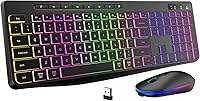
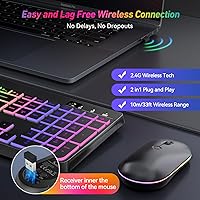
The EarlyLit CK230GL Wireless Keyboard and Mouse Combo is a straightforward, budget-conscious set aimed at anyone who wants a cleaner desk without spending a lot. It ships as a complete package — full-size 104-key keyboard and an RGB mouse — both running off a single USB receiver, so you only sacrifice one port. USB-C recharging on both devices means no hunting for AA batteries mid-workday. At its price point, it competes in a crowded space, but its Amazon ranking near the top 250 in its category suggests it has found a real audience among everyday users and home office workers.

Features & Benefits

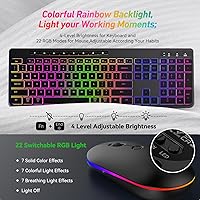
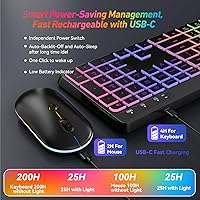
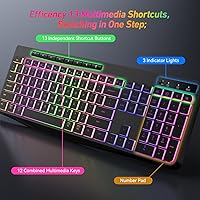
The backlight situation is worth clarifying upfront: the keyboard cycles through a rainbow color wave only — you cannot lock it to a single color. That said, four brightness steps (including off) give you real control over visibility in dim rooms. The mouse is more flexible, with 22 RGB modes to cycle through if lighting aesthetics matter to you. Near-silent membrane keys and a quiet mouse click make this combo genuinely usable in shared spaces without drawing attention. The auto-sleep function cuts the backlight after 90 seconds of inactivity, and 12 dedicated multimedia keys let you handle volume, playback, and shortcuts without extra software.

Best For

This backlit combo lands well for home office workers who want a cord-free setup without committing to a higher price tier. Students are a natural fit too — it connects instantly to a Chromebook, MacBook, or Windows laptop, and the quiet keys won't bother a roommate or library neighbor. If you frequently work in low light or just prefer to skip the battery-replacement routine, the rechargeable design and backlit keys are practical wins. It is not aimed at heavy typists craving tactile feedback or gamers who need per-key RGB. For everyone else doing everyday computing, it covers the basics reliably.

User Feedback

Buyers consistently appreciate how easy the EarlyLit keyboard and mouse set is to get running — plug in the receiver and it works, no drivers needed. The backlight visibility gets positive mentions, and the quiet click on both the keys and mouse is a frequent highlight for people in shared environments. On the critical side, some buyers feel the rainbow-only keyboard backlight was not clearly communicated, expecting single-color options that simply do not exist. Build quality draws mixed reactions — it feels lightweight, which suits portability but raises questions about long-term durability. Battery life appears solid for light use, though heavy backlight users may notice faster drain than the spec sheet suggests.

Pros

  • Single USB receiver handles both devices, keeping your ports and desk clean
  • USB-C recharging on both keyboard and mouse eliminates disposable battery waste
  • Near-silent membrane keys are genuinely quiet enough for shared workspaces and late-night sessions
  • The mouse offers 22 RGB lighting modes, giving it more visual flexibility than most budget mice
  • Plug-and-play setup works across Windows, macOS, Chromebook, and Surface with zero driver installation
  • 12 dedicated multimedia shortcut keys handle volume, playback, and common actions without extra software
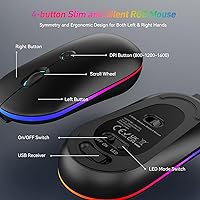
  • The symmetrical mouse design works comfortably for both left- and right-handed users
  • Wireless range of up to 33 feet gives real flexibility in how you position your setup
  • Auto-sleep backlight feature meaningfully extends charge life between sessions
  • At its price point, getting a full-size keyboard and an RGB mouse together represents solid value

Cons

  • Keyboard backlight is rainbow-only with no option to display a single solid color
  • Lightweight construction feels less durable and may not hold up well under years of heavy use
  • Keycap legends may show wear over time based on user reports about long-term durability
  • Battery life under heavy backlight use is likely shorter than the spec sheet implies
  • Membrane keys offer no tactile feedback, which frustrates users who prefer a more responsive feel
  • Both devices share one receiver, so losing it means neither peripheral works until you find a replacement
  • The mouse has a relatively small battery at 500mAh, which may require more frequent recharging than the keyboard
  • No software or companion app means you cannot remap keys or customize lighting beyond the built-in presets
  • The rainbow backlight cycle cannot be slowed or customized in speed
  • Lightweight mouse may feel insubstantial to users accustomed to heavier, more premium designs

Ratings

The scores below reflect an AI-driven analysis of verified global user reviews for the EarlyLit CK230GL Wireless Keyboard and Mouse Combo, with spam, bot activity, and incentivized submissions actively filtered out to ensure the ratings represent genuine buyer experiences. Every category captures both what real users appreciated and where they ran into frustration, giving you an honest picture of where this backlit combo excels and where it falls short.

Value for Money
84%
For buyers who want a rechargeable, backlit keyboard and mouse together without a significant outlay, this combo delivers a lot of functional hardware. Users frequently note that getting both devices — including RGB lighting and USB-C charging — at this price feels like a fair deal compared to buying each piece separately.
A small but vocal group of buyers feel the value equation shifts once build quality concerns surface over time, arguing that spending slightly more would have bought meaningfully better durability. At the price point, compromises are expected, but some users feel a few of them — like the rainbow-only backlight — were not clearly communicated upfront.
Ease of Setup
91%
Plug-and-play setup is one of the most consistently praised aspects across all user segments. Whether connecting to a Windows laptop, Chromebook, or MacBook, buyers report the combo is recognized instantly with no driver downloads, configuration screens, or pairing steps required.
A minor frustration arises specifically for users who switch between multiple computers, since the single shared receiver cannot be easily reassigned without physically moving it. There is no Bluetooth fallback, so multi-device workflows are not supported by this combo.
Typing Experience
71%
29%
Light typists and home office users generally find the membrane keys comfortable for extended sessions — emails, documents, and general browsing feel natural, and the low-profile key travel suits users who prefer a laptop-style feel at a full-size desk keyboard.
Anyone coming from a mechanical keyboard will likely find the membrane feedback flat and unsatisfying. The keys lack the tactile response or audible click that fast or heavy typists rely on for accuracy and rhythm, and a few users reported a slightly mushy bottoming-out sensation over time.
Backlight Quality
67%
33%
In a dim room or late-night work session, the keyboard backlight does its job well — the illuminated legends are clearly visible at all four brightness levels, and the rainbow effect gives the setup a visual personality that users in the right audience genuinely enjoy.
The rainbow-wave-only limitation is the single most cited disappointment in user reviews. Many buyers expected the ability to select a single color — red, white, or blue are common requests — and felt misled by product imagery. There is no workaround; the hardware simply does not support single-color output.
Mouse Lighting
78%
22%
The mouse punches above its price class in lighting variety, offering 22 RGB modes that cycle through solid colors, multi-color patterns, and breathing effects. Users who like a bit of desk ambiance find this level of customization impressive for a budget peripheral.
Cycling through 22 modes using a single button is tedious, and there is no software to jump directly to a preferred setting — you press until you land where you want. A few users also note that the lighting on the mouse and keyboard do not sync, which bothers those who prefer a unified look.
Noise Level
88%
Near-silent typing and mouse clicks are a genuine highlight for users in shared environments — open offices, dorm rooms, and late-night work sessions at home. Multiple reviewers specifically mention that family members or colleagues in the same room barely noticed they were typing.
While far quieter than a standard membrane keyboard, the keys are not completely inaudible, and users in near-silent recording or meditation environments may still pick up soft key sounds. A handful of users also note the mouse scroll wheel produces a faint mechanical whir that the clicks do not.
Battery Life
69%
31%
With backlight set to a low brightness level or off entirely, the keyboard's 1000mAh battery lasts impressively long between charges for typical office use. The auto-sleep feature that cuts the backlight after 90 seconds of inactivity meaningfully helps stretch each charge cycle.
Real-world battery life with backlight enabled at full brightness falls noticeably short of the spec sheet's optimistic framing. The mouse's 500mAh battery in particular draws more recharge cycles than users expect, and since both devices use the same cable, some users find the charging routine more frequent than anticipated.
Build Quality
58%
42%
The lightweight construction makes the combo easy to reposition or carry between rooms, and most users find it perfectly adequate for light home or student use where the keyboard stays in one place on a desk.
At this weight and price, the plastic housing flexes noticeably under pressure, and several long-term users report keycap legend fading after months of daily use. The overall feel is firmly in budget territory, and users who need a peripheral to survive years of heavy daily typing should look elsewhere.
Mouse Comfort
74%
26%
The symmetrical ambidextrous design works genuinely well for both left- and right-handed users, which is rarer than it should be at this price. For standard productivity tasks — browsing, document work, light editing — the mouse shape fits a wide range of hand sizes without obvious strain.
Users with larger hands find the compact mouse size leaves their palm unsupported during longer sessions. The lightweight body also means it can feel less precise to control on fast movements, and a few users note the scroll wheel feels slightly cheap compared to the rest of the mouse body.
Wireless Reliability
82%
18%
The 2.4GHz connection holds up well in typical home and office environments, with users reporting no meaningful lag or dropout during everyday computing tasks like web browsing, document editing, and video calls within a normal desk-to-computer distance.
A small number of users in environments with heavy wireless interference — crowded apartment buildings or busy open offices — report occasional brief disconnections. The connection also requires both devices to share the single receiver, meaning a lost or damaged receiver disables the entire combo.
Keyboard Ergonomics
63%
37%
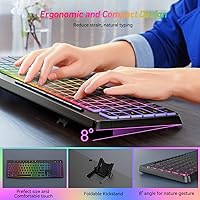
The 8-degree tilt legs give users a basic but functional typing angle adjustment, and the full-size layout with a dedicated number pad suits users who work with data entry or spreadsheets and do not want a compact compromise.
Beyond the tilt legs, there is no wrist rest included and no additional ergonomic shaping to the keyboard body. Users who type for many hours at a stretch may find wrist fatigue sets in earlier than with keyboards designed specifically around comfort engineering.
Compatibility
87%
Works across Windows, macOS, Chromebook, and Surface devices without any configuration. Most users confirm that connecting to a new device is as simple as moving the receiver, making it a practical choice for people who occasionally switch between a personal and work machine.
Bluetooth is not supported, so users who need to connect to tablets, smart TVs, or devices without a USB-A port are out of luck. The multimedia shortcut keys may also behave inconsistently on macOS depending on system settings, which requires a small amount of manual adjustment for some users.
Charging Convenience
77%
23%
USB-C charging on both devices is a meaningful practical upgrade over disposable batteries, and the included cable handles both. Users appreciate not needing to keep spare batteries on hand, especially for a set that may sit unused for days at a time between top-ups.
Only one USB-C cable is included, so charging both devices simultaneously requires a second cable that is not in the box. Some users also wish there were a visual battery indicator beyond the basic low-battery warning behavior, as it can be hard to tell at a glance how much charge remains.

Suitable for:

The EarlyLit CK230GL Wireless Keyboard and Mouse Combo is a strong fit for anyone who wants a functional, clutter-free desk setup without a significant financial commitment. Home office workers who spend hours on routine tasks — emails, spreadsheets, video calls — will find it covers the essentials without overcomplicating things. Students are particularly well-served here: the plug-and-play receiver means it works instantly with a Chromebook, MacBook, or Windows laptop, and the near-silent keys make it considerate to use in a library or shared dorm room. People who work frequently in dim lighting will appreciate having backlit keys at this price, and anyone tired of swapping out AA batteries will find the USB-C recharging on both devices a genuine convenience. Left- and right-handed users alike can use the symmetrical mouse without compromise.

Not suitable for:

The EarlyLit CK230GL Wireless Keyboard and Mouse Combo has real limitations that make it the wrong call for certain buyers. Anyone expecting customizable single-color backlighting on the keyboard will be disappointed — it only cycles a rainbow wave, with no option to lock to one color, which is a frequent source of frustration for buyers who did not read the fine print. Mechanical keyboard enthusiasts or fast typists who rely on tactile or clicky feedback will find the membrane keys unsatisfying by comparison. The build quality is lightweight in a way that raises durability concerns for heavy daily use over months or years, so professionals who need a workhorse peripheral should look at a higher price tier. Gamers who want per-key RGB control, onboard macro programming, or a high-polling-rate mouse will also find this combo falls well short of their needs.

Specifications

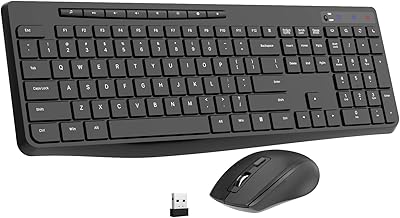
  • Keyboard Layout: Full-size 104-key US QWERTY layout with a dedicated number pad and well-spaced individual keys.
  • Key Type: Low-profile membrane keys designed for quiet, soft actuation with minimal noise output.
  • Keyboard Backlight: Rainbow wave backlight only, with 4 brightness levels: off, 30%, 60%, and 100%; single-color modes are not available.
  • Mouse Lighting: 22 switchable RGB lighting modes across three categories: solid color, colorful cycling, and breathing effects, plus an off setting.
  • Wireless Protocol: 2.4GHz wireless connection via a single USB-A nano receiver shared by both the keyboard and mouse.
  • Wireless Range: Stable connection rated up to 33 feet (approximately 10 meters) from the receiver under typical conditions.
  • Keyboard Battery: Built-in 1000mAh rechargeable lithium polymer battery charged via the included USB-C cable.
  • Mouse Battery: Built-in 500mAh rechargeable lithium polymer battery also charged via the included USB-C cable.
  • Auto-Sleep: Keyboard backlight automatically powers off after 90 seconds of inactivity to conserve battery charge.
  • Power Controls: Both devices include independent physical power switches, and the keyboard has a separate dedicated backlight switch.
  • Keyboard Tilt: Foldable 8-degree tilt legs on the underside of the keyboard provide an elevated typing angle.
  • Mouse Design: Symmetrical ambidextrous shape suitable for both left- and right-handed users with a silent optical click mechanism.
  • Shortcut Keys: 12 independent multimedia shortcut keys for controlling volume, playback, and common system functions without any software installation.
  • Dimensions: The keyboard measures 17.24 x 8.15 x 1.22 inches, making it a standard full-size footprint suitable for most desks.
  • Weight: The combined package weight is 1.72 pounds, reflecting a lightweight build for both devices.
  • Compatibility: Works with Windows, macOS, Chromebook, and Microsoft Surface devices via the plug-and-play USB receiver.
  • Charging Cable: A USB-C charging cable is included in the box for recharging both the keyboard and mouse.
  • Receiver Sharing: A single nano USB receiver connects both devices simultaneously, requiring only one available USB-A port on the host device.

Related Reviews
EarlyLit CK230G Wireless Keyboard and Mouse Combo

86%
88%
Typing Comfort
91%
Mouse Responsiveness
86%
Wireless Stability
74%
Battery Longevity
94%
Ease of Setup
More
Arteck HW192 Wireless Keyboard and Mouse Combo

78%
78%
Build Quality
72%
Typing Experience
63%
Mouse Comfort & Ergonomics
81%
Battery Life
69%
Wireless Connectivity
More
EDJO Wireless Keyboard and Mouse Combo
76%
88%
Value for Money
94%
Ease of Setup
71%
Keyboard Typing Feel
63%
Mouse Performance
86%
Wireless Connectivity & Range
More
HP 18H24AA Wireless Keyboard and Mouse Combo
79%
91%
Value for Money
93%
Ease of Setup
74%
Keyboard Typing Experience
63%
Mouse Comfort & Ergonomics
86%
Wireless Reliability
More
UBOTIE Wireless Keyboard and Mouse Combo
79%
88%
Value for Money
74%
Typing Experience
83%
Keycap Design & Aesthetics
67%
Mouse Performance
81%
Wireless Connectivity & Range
More
Cimetech Wireless Keyboard and Mouse Combo

88%
91%
Value for Money
88%
Ease of Use
83%
Connectivity
94%
Portability
85%
Ergonomics
More
Letton Wireless Keyboard and Mouse Combo
83%
89%
Design & Aesthetics
81%
Ergonomics & Comfort
75%
Wireless Connectivity
90%
Battery Life
92%
Value for Money
More
MPTOG S801AG Wireless Keyboard and Mouse Combo
75%
88%
Aesthetic Design
93%
Ease of Setup
78%
Typing Feel
61%
Mouse Tracking Accuracy
82%
Wireless Reliability
More
QUASIO Wireless Keyboard and Mouse Combo
77%
88%
Value for Money
93%
Setup & Ease of Use
79%
Typing Comfort
84%
Wireless Connectivity & Range
72%
Mouse Performance
More
TKVPJYYI Wireless Retro Typewriter Keyboard and Mouse Combo
76%
88%
Design & Aesthetics
71%
Typing Experience
62%
Mouse Performance
58%
Build Quality
83%
Wireless Connectivity
More

FAQ

No, it does not. The keyboard only supports a rainbow wave effect that cycles through multiple colors automatically. You can adjust how bright it is or turn it off entirely, but locking it to one solid color is not an option. This is one of the more common points of confusion, so it is worth knowing before you buy.

No drivers or software are needed. Just plug the USB receiver into an available port and both devices connect automatically. It works the same way on Windows, macOS, and Chromebook.

Yes, both devices are compatible with macOS. The layout follows standard US QWERTY, and while some multimedia shortcut keys may behave slightly differently depending on your Mac settings, the core functionality works without any extra setup.

The keyboard carries a 1000mAh battery and the mouse a 500mAh battery, and the manufacturer describes standby measured in months. Realistically, how long you get depends heavily on whether you keep the backlight on and at what brightness. With the backlight running at full brightness, expect noticeably shorter intervals between charges than the spec sheet suggests. Turning the backlight off or using the auto-sleep feature helps significantly.

Yes, the mouse uses a symmetrical shape, so it works just as naturally in the left hand as the right. It is not a dedicated left-hand mouse, but the balanced design means most left-handed users find it comfortable for everyday tasks.

Unfortunately, both the keyboard and mouse depend on the same single receiver, so losing it means neither device will work until you get a replacement. EarlyLit does not widely advertise a direct replacement program, so it is worth keeping the receiver in a safe place or noting the model number in case you need to contact support.

Yes, it connects and works on Chromebooks without any setup steps. Just plug in the receiver and both devices are recognized immediately.

They are genuinely quieter than a standard mouse. The clicks produce a soft, muted sound rather than the typical sharp click, which makes a real difference in quiet offices or shared rooms. They are not completely silent, but most people sitting nearby would not find them disruptive.

Both devices use the same USB-C cable included in the box, but the cable is a single unit, so you would need to charge them one at a time unless you have a second USB-C cable handy. Since the keyboard battery is larger, it is usually the one that needs attention less frequently.

The set feels lightweight, which makes it easy to move around but does raise some questions about long-term durability under heavy daily use. Keycap legends on budget membrane keyboards can fade with extended use, and the overall construction is not designed to compete with more expensive peripherals. For light to moderate everyday use it holds up fine, but if you type heavily for hours every day, you may start noticing wear after several months.





