Overview

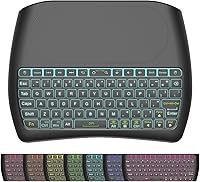
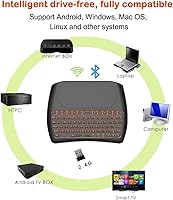
The Dupad Story D8 Mini Wireless Keyboard takes a different approach than the flat, credit-card-style remotes that flood this category — it borrows its shape from a game controller, giving you something to actually grip rather than awkwardly pinch. At roughly the size of a deck of cards, this handheld mini keyboard is built for couch use: navigating a TV box, scrolling through a streaming app, or managing a mini PC setup. The dual-mode connectivity — a 2.4G USB dongle plus Bluetooth 4.2 — is a practical bonus in homes with multiple devices. Dupad Story is not a household name, sitting in the budget-to-mid-range accessories space, so keep expectations grounded. This is a convenience peripheral, full stop.

Features & Benefits

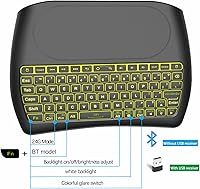
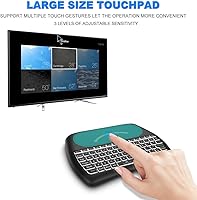
The built-in touchpad is genuinely the star feature here. It supports one-finger clicking for left-click, two-finger tap for right-click, and two-finger drag for scrolling — and while it is no trackpad replacement, it handles casual TV navigation without much frustration. The RGB backlighting covers seven colors at three brightness levels, which sounds gimmicky but is actually handy when typing in a dark room. Battery life is a genuine plus: the rechargeable cell claims up to ten days of active use, a clear edge over keyboards that drain AA batteries every few weeks. Connecting via the USB dongle covers devices without Bluetooth, while the Bluetooth 4.2 mode works directly with compatible smart TVs and boxes — no dongle required.

Best For

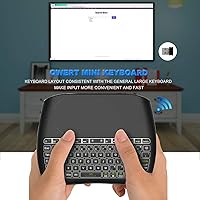
This compact remote keyboard is a natural fit for Android TV box users and cord-cutters who want something better than hunting through an on-screen keyboard one letter at a time. Raspberry Pi tinkerers and mini PC enthusiasts will appreciate having a single device that handles both pointer and typing duties. It also works well for bedside or travel situations where the backlit keys mean you are not fumbling in the dark. Where it stumbles is real typing work — key travel is minimal, there is no numpad, and the compact layout will frustrate fast typists. Think of it as a smart TV remote that grew up, not a productivity keyboard.

User Feedback

With 71 ratings averaging 3.9 out of 5, the sample is still fairly small — treat the score as a useful signal rather than a firm verdict. On the positive side, buyers regularly call out the compact size and backlight quality as highlights, with many noting both exceed expectations at this price point. The 30-day money-back guarantee is mentioned as a reassuring safety net by first-time buyers. The negatives are worth knowing: shallow key travel is a recurring complaint, making extended typing uncomfortable, and some users report the 2.4G dongle losing sync on specific TV boxes. The body is all plastic, which is expected here but makes the build feel lighter than some would prefer.

Pros

  • Game-controller-style grip makes this handheld mini keyboard far more comfortable to hold than flat slab alternatives.
  • Dual-mode connectivity — 2.4G dongle plus Bluetooth 4.2 — means it pairs with almost any device you own.
  • The built-in rechargeable battery lasts up to ten days of active use, eliminating the need for disposable batteries.
  • RGB backlighting with seven color options and three brightness levels is genuinely useful in dim living room settings.
  • Multi-finger touchpad gestures cover left-click, right-click, and scrolling without needing a separate mouse.
  • Broad OS compatibility covers Windows, macOS, Linux, Android, and iOS without requiring additional drivers.
  • At under 6 ounces, the D8 wireless keyboard is light enough to hold single-handed for extended couch sessions.
  • A 30-day money-back guarantee meaningfully reduces the risk of trying a lesser-known brand for the first time.
  • Anti-slip spiral texture on the back keeps the keyboard from sliding out of your hand during use.

Cons

  • Key travel is shallow and the layout cramped, making any sustained typing session feel tiring and error-prone.
  • Some users report the 2.4G USB dongle occasionally drops its connection on specific TV box models.
  • The all-plastic construction raises fair questions about long-term durability under regular daily handling.
  • With only 71 reviews available, the overall rating lacks the sample size needed to be fully reliable.
  • No numpad rules this keyboard out for anyone who does frequent numeric input or spreadsheet work.
  • Touchpad sensitivity, though adjustable, falls short of the accuracy most users expect from a dedicated pointing device.
  • Dupad Story is a relatively unknown brand with little independent data on long-term product reliability.
  • The advertised 10-meter wireless range can fall noticeably short in real-world environments with walls or interference.

Ratings

Our AI rating engine analyzed verified buyer reviews for the Dupad Story D8 Mini Wireless Keyboard sourced from global markets, actively filtering out incentivized submissions, duplicate accounts, and bot-generated feedback to surface authentic user sentiment. The scores below reflect what real buyers experienced across everyday use cases — from TV box navigation in the living room to bedside browsing and Raspberry Pi setup. Both genuine strengths and recurring frustrations are represented transparently, with no category softened to protect an overall impression.

Build Quality
61%
39%
The all-plastic shell keeps the unit at a light 5.9 ounces, which genuinely helps during single-hand couch use, and the spiral anti-slip texture on the rear does prevent it from sliding out of your grip. Buyers using this compact remote keyboard for casual TV navigation report the body holds up fine under light daily handling.
Users frequently describe a hollow, cheap sensation when the keys are tapped firmly — a feeling that quietly erodes confidence in long-term durability. Several buyers note the build inspires less trust than competing handheld remotes at a similar price, and the all-plastic hinge points raise questions about resilience over months of repeated use.
Touchpad Performance
68%
32%
For couch-based TV navigation — scrolling through app menus, clicking tiles, or tapping out a search query — the touchpad is more capable than buyers expect, and the adjustable sensitivity setting lets users tune responsiveness to their preference. Most smart TV and Android box owners report it removes the need for a separate mouse entirely.
Precision tasks quickly expose the touchpad's ceiling; hitting small UI buttons, dragging items, or navigating web-based interfaces becomes frustrating within a few minutes. A subset of buyers also report sensitivity drifts inconsistently across different surface temperatures and grip pressures, making it unreliable for anything beyond straightforward pointing and clicking.
Typing Experience
57%
43%
For short bursts of input — entering a Wi-Fi password, searching for a title, or typing a brief message — the familiar QWERTY layout and backlit keys make quick work of occasional tasks. Buyers who use the D8 wireless keyboard specifically for TV box input rather than sustained writing find the experience perfectly adequate.
Shallow key travel and cramped key spacing are the most consistently flagged complaints across the review pool, and any session longer than a few lines quickly becomes tiring. Touch typists find the reduced key pitch actively disruptive to their rhythm, and the absence of a numpad is a genuine limitation for users who assumed one would be present.
Backlighting
83%
The RGB backlight stands out as one of the most positively reviewed aspects of this handheld mini keyboard, with buyers consistently noting that the glow quality — seven selectable colors across three brightness levels — punches well above expectations at this price tier. Dimming to the lowest level for late-night living room use works exactly as hoped.
A few users report that cycling to a single static color and locking it there is not straightforward on some firmware versions, requiring repeated key presses to land on the preferred color. Minor light bleed around key edges is visible in fully dark environments, which some buyers find more distracting than anticipated.
Battery Life
86%
Buyers are genuinely impressed that a keyboard at this price can sustain a week or more of daily couch use on a single charge, removing the ongoing cost and inconvenience of swapping AA batteries. USB recharging means any standard phone charger, laptop port, or power bank tops it up without needing a proprietary cable.
The battery is non-removable, so meaningful capacity degradation after a year or two of charge cycling leaves the entire unit unusable rather than fixable with a simple cell replacement. A portion of buyers also report real-world active use falls noticeably short of the 10-day claim under heavier or more continuous daily sessions.
Wireless Stability
66%
34%
Under typical home conditions — a TV box sitting within a few meters on a shelf or entertainment unit — the 2.4G connection holds reliably for the majority of users, and input lag is rarely flagged as a noticeable issue during standard navigation tasks. Short-range Bluetooth pairing proves consistent on supported smart TVs.
The most persistent complaint in the review pool centers on the 2.4G dongle dropping its connection on specific TV box models, often requiring a full power cycle to restore. This issue is not universal, but buyers who experience it report it happening frequently enough to disrupt everyday use in a way that erodes confidence in the connection.
Value for Money
79%
21%
For buyers whose primary need is a couch controller for a smart TV or Android box, the feature-to-price ratio is genuinely competitive — a rechargeable battery, functional touchpad, RGB backlight, and dual-mode connectivity bundled together would cost meaningfully more if assembled from separate peripherals.
Buyers expecting laptop-grade typing or a solid build are likely to feel underwhelmed once the initial novelty wears off. With only 71 ratings on record and limited brand history, the long-term value proposition rests on a thin evidence base, making it a harder recommendation for buyers who prioritize proven reliability over upfront affordability.
Connectivity Options
74%
26%
Offering both a plug-and-play 2.4G USB dongle and Bluetooth 4.2 in a single compact device is a practical advantage that most direct competitors at this price skip entirely. TV box owners particularly appreciate the dongle option for devices that lack Bluetooth, getting instant recognition without installing any drivers.
Switching between the two connection modes requires a manual toggle rather than an automatic or one-button swap, which multi-device users find clunkier than expected. The Bluetooth pairing process is smooth on most platforms but can require multiple re-pair attempts on certain Android boxes, especially after a firmware update.
Ergonomics & Grip
71%
29%
The game-controller-inspired hand-tilt shape is a genuine step up from flat mini keyboards for couch use, and buyers notice less hand fatigue during short to medium TV navigation sessions. The anti-slip spiral texture on the back reliably prevents the unit from slipping during casual single-hand scrolling.
Extended sessions beyond 30 to 45 minutes reveal that the grip, while better conceived than a flat slab, is not as ergonomically refined as a purpose-built handheld device. Users with larger hands find the form factor uncomfortably small after prolonged holds, and the weight distribution feels slightly uneven at the top-heavy end.
Portability
88%
Smaller than a paperback and lighter than a cup of coffee, this handheld mini keyboard slips into a bag side pocket, jacket pocket, or hotel drawer without demanding any dedicated packing space. Travelers and bedside users consistently cite the compact footprint as one of the primary reasons they chose it over bulkier alternatives.
The USB dongle is small enough to lose easily during travel, and no storage pocket or carrying pouch is included to keep the pair together. Several buyers report misplacing the dongle after a few weeks of use and finding it difficult to source a replacement directly through the brand.
OS Compatibility
77%
23%
Spanning Windows, macOS, Linux, Android, and iOS, the D8 wireless keyboard avoids obsolescence as users upgrade their devices or shift between ecosystems. Most buyers report clean, driver-free connection to Android TV boxes and Windows machines the moment the dongle is inserted.
macOS and iOS users occasionally run into key mapping mismatches, as the layout follows a Windows-centric arrangement that does not translate cleanly to Apple-specific shortcuts. Linux compatibility is technically present but goes largely untested in the actual review pool, making it difficult to confidently recommend for that platform.
Setup & Ease of Use
82%
18%
The 2.4G dongle setup is genuinely plug-and-play — insert, power on, and it is ready with no configuration steps. Non-technical users setting up Android TV boxes or projector systems for the first time consistently mention getting started required no manual or technical knowledge.
Unlabeled on-device controls for backlighting adjustments and mode switching are a friction point that sends first-time users hunting for a manual or online guide. Bluetooth pairing, while generally smooth, can confuse less experienced users when the keyboard silently times out of pairing mode before the device discovers it.
Multimedia Navigation
76%
24%
Navigating streaming apps, browsing home screens, and controlling playback from the couch is where this compact remote keyboard earns its strongest praise — the combination of physical keys and a working touchpad makes TV box interaction faster and less error-prone than any standard infrared remote. Volume and directional controls respond reliably.
Dedicated media shortcut keys are absent on this layout, pushing users toward function-key combinations for playback control rather than single-press convenience. This adds a small but real layer of friction during movie or music sessions that a purpose-built media remote would not impose.

Suitable for:

The Dupad Story D8 Mini Wireless Keyboard was designed for people whose computing happens away from a desk, and it shows. Smart TV users, Android TV box owners, and cord-cutters who are tired of picking out letters on an on-screen keyboard will find it a genuine step up. It fits just as naturally into a home theater PC setup or alongside a Raspberry Pi, where you need a real keyboard and a workable pointer but have no room or patience for a full-size peripheral. Travelers and bedside users also have a legitimate use case here — the backlit keys mean you can type in the dark without disturbing anyone, and the compact footprint slips easily into a bag. If you regularly switch between two devices, the dual connection modes let you do that without repurchasing or carrying an extra peripheral.

Not suitable for:

If your primary goal is fast, accurate, or high-volume typing, the Dupad Story D8 Mini Wireless Keyboard is the wrong tool — the keys are compact and shallow by design, suited for occasional input rather than sustained writing or coding. Anyone who relies on a numpad for spreadsheet work or frequent data entry should look elsewhere entirely. Home office workers or students expecting desktop-grade touchpad precision will also find the built-in pointer frustrating for detailed tasks; it handles basic navigation well enough, but it is not a substitute for a proper mouse. The modest review count of 71 ratings means buyers are working with a thinner evidence base than they would with a more established product, so those who prefer tried-and-tested purchases may want to wait for more real-world data to accumulate.

Specifications

  • Brand & Model: This keyboard is manufactured by Dupad Story under the model designation D8.
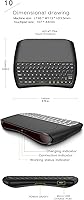
  • Dimensions: The unit measures 4.9″ long, 3.4″ wide, and 0.7″ thick — roughly the footprint of a large deck of cards.
  • Weight: At 5.9 ounces, the keyboard is light enough to hold in one hand for casual couch-based use.
  • Connectivity: The keyboard operates in two modes: 2.4G RF wireless via an included USB dongle, and Bluetooth 4.2 for direct pairing with compatible devices.
  • Wireless Range: The rated maximum wireless range is 10 meters, though actual performance will vary depending on obstacles and environmental interference.
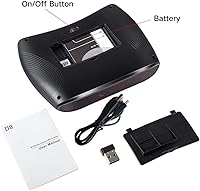
  • Battery Type: Power is supplied by a built-in, non-removable rechargeable lithium-ion battery that is included and pre-installed.
  • Battery Life: The battery supports up to 10 days of continuous active use and up to 50 days of standby time on a single charge.
  • Charging: The keyboard recharges via a USB cable, making it compatible with standard wall adapters, power banks, and USB ports.
  • Backlighting: The keyboard features RGB backlighting with 7 selectable colors and 3 adjustable brightness levels.
  • Touchpad: The integrated touchpad supports multi-finger gestures: one-finger tap for left-click, two-finger tap for right-click, and two-finger drag for scrolling.
  • OS Compatibility: Supported operating systems include Windows, macOS, Linux, Android, and iOS.
  • Device Support: The keyboard is compatible with PCs, laptops, smart TVs, TV boxes, tablets, smartphones, and projectors.
  • Grip Design: The form factor is inspired by a game controller, featuring a hand-tilt angle and a spiral-patterned anti-slip texture on the rear surface.
  • Build Material: The outer shell is constructed from plastic throughout, which is standard for keyboards in this price tier.
  • Layout: The keyboard uses a compact QWERTY arrangement without a dedicated numpad or function row.
  • Warranty: Dupad Story provides a 30-day money-back guarantee and states lifetime after-sales support for this product.

Related Reviews
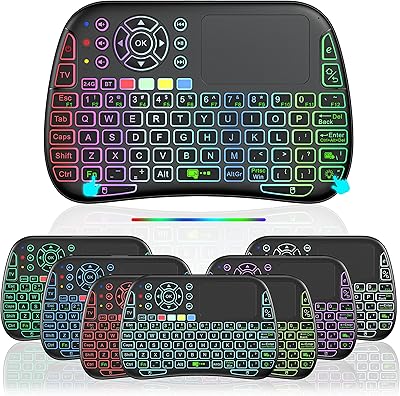
Dupad Story M9 Mini Bluetooth Keyboard
68%
78%
Value for Money
61%
Build Quality
54%
Keyboard Comfort & Typing
57%
Touchpad Performance
49%
Voice Input
More
UBOTIE Retro 84-Key Wireless Bluetooth Keyboard

78%
93%
Design & Aesthetics
58%
Typing Experience
86%
Multi-Device Connectivity
63%
Battery Life
79%
Value for Money
More
Arteck HW192 Wireless Keyboard and Mouse Combo
78%
78%
Build Quality
72%
Typing Experience
63%
Mouse Comfort & Ergonomics
81%
Battery Life
69%
Wireless Connectivity
More
JLab Epic Wireless Keyboard
88%
89%
Connectivity & Multi-device Support
87%
Typing Experience
93%
Battery Life
88%
Build Quality
85%
Ergonomics & Comfort
More
SHUNJINRUN KB426 Wireless Full-Size Keyboard
77%
83%
Typing Feel & Key Response
88%
Noise Level
67%
Build Quality & Materials
79%
Wireless Connectivity & Reliability
91%
Value for Money
More
Arteck HW305 Wireless Keyboard

79%
91%
Value for Money
94%
Ease of Setup
74%
Typing Experience
63%
Build Quality
69%
Battery Life
More
X9 Performance Wireless Ergonomic Split Keyboard
76%
83%
Ergonomic Comfort
58%
Key Feel & Typing Experience
86%
Wireless Performance
88%
Battery Life
62%
Build Quality
More
Links9+ Retro Typewriter Wireless Keyboard
74%
91%
Design & Aesthetics
62%
Typing Feel
76%
Wireless Connectivity
58%
Build Quality
83%
Value for Money
More
Logitech K270 Wireless Keyboard
75%
88%
Wireless Reliability
58%
Typing Feel
94%
Setup & Ease of Use
86%
Numeric Pad Usability
72%
Build Quality
More
Merdia Triple Mode 100-Key Wireless Mechanical Keyboard
74%
88%
Value for Money
84%
Wireless Connectivity
81%
Typing Experience
83%
Hot-Swap Functionality
67%
Build Quality
More

FAQ

It depends on your setup. Use the 2.4G USB dongle if your device does not have Bluetooth built in — just plug the dongle into any USB port and the keyboard connects automatically with no software needed. If your smart TV or Android box supports Bluetooth 4.2, pairing directly is cleaner since it keeps your USB port free. Both modes work reliably for general use, so go with whichever is more convenient for your device.

The 2.4G dongle mode is generally your best option here, since streaming sticks often have limited or locked Bluetooth support. One thing to keep in mind: Fire TV Sticks and many Rokus have only one USB port, and it is typically used by the stick itself, so you may need a small USB hub to free up a port for the dongle. For navigating menus and entering search queries, it performs well in this setup.

In typical couch use — browsing menus, occasional short typing bursts, and daily sessions of 30 to 60 minutes — the built-in battery will comfortably last a week or more. The 50-day standby figure applies when the keyboard sits idle for extended stretches. Recharging takes a couple of hours via any standard USB cable, so it is easy to top up overnight.

It is genuinely usable for the tasks this keyboard is designed for — clicking links, scrolling through app menus, and basic navigation all work without much frustration. Precision tasks are a different story; trying to hit a small on-screen button or drag windows accurately will test your patience. For smart TV and streaming box use, though, the touchpad is one of the more useful features and saves you from needing a separate mouse.

Yes, macOS and iOS are both supported. It connects via Bluetooth or the USB dongle, and standard typing works right away without additional drivers. The layout follows a Windows-style arrangement, so a few Mac-specific shortcuts may need remapping, but for casual use like controlling a Mac Mini from the couch or typing on an iPad without a case keyboard, it gets the job done.

Switching between a Bluetooth-paired device and a 2.4G dongle device requires toggling the connection mode manually — it is not the instant one-button switching you find on purpose-built multi-device keyboards. Re-pairing in Bluetooth mode to a new device requires putting the keyboard back into pairing mode. It is workable if you occasionally switch setups, but not ideal if you need to hop between devices multiple times a day.

More than you might expect. If you regularly use this compact remote keyboard in a dark living room or bedroom, the backlight genuinely helps you find keys without squinting. The seven color options are a novelty, but the three brightness levels are practical — you can dim it down so it does not distract others while you type. It is not a reason to buy the keyboard on its own, but it is a real bonus in low-light environments.

The hand-tilt angle and anti-slip texture do make a noticeable difference compared to holding a flat slab keyboard. For typical TV browsing sessions of 15 to 30 minutes, most people find it comfortable enough. Beyond that, the grip does start to fatigue — it is shaped like a game controller but is not as ergonomically refined as one, so it works best for shorter bursts of use rather than marathon input sessions.

Start by trying the dongle in a different USB port, as some TV boxes supply inconsistent power through certain ports. If that does not help, turning the keyboard off and back on usually re-establishes the link. A subset of users reports persistent sync issues on specific TV box models — if yours is one of them and the problem does not resolve, the 30-day money-back guarantee gives you a straightforward way out.

It is a solid fit for Raspberry Pi use, particularly when your Pi is connected to a TV and you need a combined keyboard and pointer without occupying two USB ports. Setup and light terminal work are manageable, though the compact layout and shallow key travel will slow you down if you are doing serious coding. For initial configuration and occasional adjustments, this handheld mini keyboard punches above its weight for the use case.