Overview

The Dupad Story M9 Mini Bluetooth Keyboard is a compact all-in-one input device built for people who want more control over their TV box, smart TV, or media center without cluttering the coffee table. At roughly the size of a TV remote, it weighs just 6 ounces and fits in one hand. Dupad Story is a lesser-known peripheral brand, so there is no legacy reputation to lean on — the hardware has to do the talking. You get dual-mode connectivity via 2.4G RF and Bluetooth 5.0, which covers a wide range of devices for a unit at this price tier.
Features & Benefits

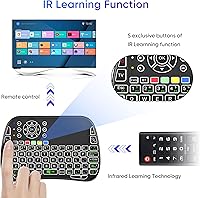
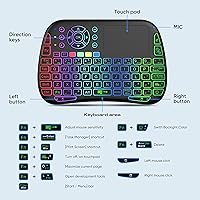
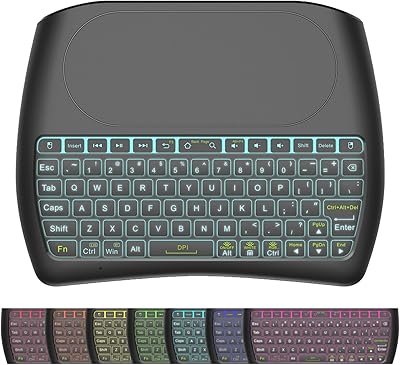
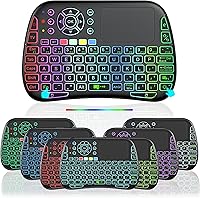
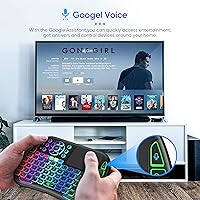
The M9 packs a surprising number of features into its thin frame. Voice input works through a dedicated button that triggers the built-in microphone — handy for Google Assistant queries or typing search terms without hunting for keys, but it only functions within native input fields. Expect nothing from it inside Alexa or similar third-party apps. The IR learning function lets you program up to 5 buttons to mimic an old TV remote, which is practical but limited compared to a full universal remote. RGB backlighting in 8 colors and a 10-meter range round out a feature set that holds up well for the price.

Best For

This mini keyboard remote is purpose-built for cord-cutters and media center enthusiasts — the kind of person running an Android TV box, a Fire Stick, or a Raspberry Pi in the living room. It works equally well as a secondary input device for a home office projector or smart TV. Light couch browsing, searching streaming libraries, and the occasional password entry are where it shines. Budget-conscious buyers after RGB backlighting without paying a premium will find it fits the bill. If you need heavy typing or a true universal remote replacement, this compact wireless keyboard will leave you wanting more.

User Feedback

With a 3.7-star average across roughly 100 early ratings, reception is cautiously positive but not without gripes. Buyers tend to appreciate plug-and-play setup, backlight quality, and the convenience of having a keyboard and touchpad in one small device. On the downside, the touchpad is compact enough that extended or precise use can feel cramped, and key travel is shallow even by mini-keyboard standards. The voice button's restricted compatibility catches some buyers off-guard, and IR learning performance appears inconsistent across devices. The small review pool means these early trends could shift meaningfully as more ratings come in.

Pros

  • Combines a keyboard, touchpad, and IR remote into one device that fits in a jacket pocket.
  • Dual connectivity covers both RF dongle and Bluetooth 5.0, so it works across a wide range of devices without extra adapters.
  • RGB backlighting with 8 color options makes key identification easy in dark home theater rooms.
  • The built-in rechargeable battery means no disposable batteries to replace — just plug in to charge.
  • Up to 50 days of standby time means the M9 is ready when you need it without constant recharging.
  • Plug-and-play RF setup requires no driver installation for most mainstream operating systems.
  • A 10-meter wireless range comfortably covers typical living room distances without signal issues.
  • At this price point, the multi-touch touchpad with gesture support is a genuinely unexpected inclusion.
  • Voice input speeds up search entry on Android TV and Google-powered interfaces when it works as intended.
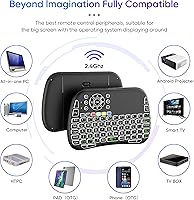
  • Compatible with Windows, macOS, Linux, Android, and iOS — useful across mixed-device households.

Cons

  • Voice input is restricted to native text input fields and does not work with Alexa or most third-party voice apps.
  • IR learning only supports 5 programmable buttons, making it a poor substitute for a full universal remote.
  • Shallow key travel makes extended typing uncomfortable — this is strictly a short-burst input device.
  • The small touchpad surface can feel cramped and imprecise for anything beyond basic cursor movement.
  • Dupad Story has a limited support history, which raises questions about firmware updates or warranty follow-through.
  • With just over 100 ratings, there is not enough user data yet to confidently assess long-term durability.
  • Bluetooth mode requires a manual key combination to activate, which is fiddly if you switch devices frequently.
  • The 3.7-star average rating signals a meaningful share of buyers left with unmet expectations.
  • IR learning reliability appears inconsistent across device brands, with some users reporting failed programming attempts.
  • No carrying pouch or protective cover is included, leaving the keys and touchpad exposed in a bag or drawer.

Ratings

The scores below reflect our AI-driven analysis of verified global user reviews for the Dupad Story M9 Mini Bluetooth Keyboard, with spam, bot-submitted, and incentivized feedback actively filtered out before scoring. We examined patterns across real buyer experiences — from home theater enthusiasts to casual cord-cutters — to surface both the genuine strengths and the frustrations that show up repeatedly. Nothing here is glossed over: where the M9 earns its keep, the scores reflect it, and where it falls short, that is reflected just as honestly.

Value for Money
78%
22%
For buyers who need a keyboard, touchpad, backlight, and IR learning in a single pocketable device, the M9 punches above its budget price point. The combination of features alone — especially dual connectivity and voice input — would cost noticeably more from a mainstream brand, which many buyers genuinely appreciate.
The value equation only holds if you stay within the device's limits. Buyers who expected a full universal remote replacement or fluid touchpad experience often felt let down relative to what they paid, dragging perceived value down for that segment.
Build Quality
61%
39%
The compact wireless keyboard feels reasonably solid for its weight class, and most users report no obvious flex or rattling keys straight out of the box. For a budget-tier unit, the physical fit and finish clear the bar of feeling like a deliberate, functional product rather than a throwaway gadget.
Longer-term durability is a genuine question mark — the thin chassis and lightweight construction raise concerns about how the unit holds up after months of regular use. A handful of buyers noted that the keys and touchpad surface feel less substantial than photos suggest.
Keyboard Comfort & Typing
54%
46%
Key spacing is adequate for one-handed hunt-and-peck typing, which covers the core use case of entering search queries or passwords from the couch. Users who used the M9 only for short bursts — a URL here, a streaming search there — generally had no significant complaints about the layout.
Key travel is notably shallow even for a compact keyboard, and fingers fatigue quickly during anything longer than a sentence or two. Several buyers who tried using this mini keyboard remote for extended typing, like filling in credentials or browsing comment sections, described it as genuinely uncomfortable within minutes.
Touchpad Performance
57%
43%
The integrated touchpad successfully eliminates the need to keep a separate mouse nearby for TV box and smart TV navigation, which is its primary purpose. Gesture support works well enough for scrolling and basic two-finger interactions on Android and Windows.
The usable surface area is quite small, and precision tasks become frustrating fast. Users frequently mentioned overshooting targets or losing cursor control during anything that required careful placement, which limits the touchpad to simple point-and-click interactions rather than genuine mouse-level control.
Voice Input
49%
51%
When used within Google Assistant or Android TV native search, the voice button delivers a genuinely convenient hands-free experience for quick searches and content lookups. The microphone picks up voice clearly enough at a normal speaking volume from couch distance.
The critical limitation is that voice input is siloed to native input fields only — it simply does not respond to Alexa, Siri, or most third-party apps. This surprises a significant share of buyers who expected broader voice assistant compatibility, and it is the single most frequent source of negative reviews for the M9.
IR Learning
52%
48%
Programming the most-used buttons — typically power and volume — works smoothly and does give users a genuine reduction in remote clutter for basic TV control. Users with straightforward single-device setups found the 5-button IR capacity sufficient for their everyday shortcuts.
Five programmable IR buttons is a very narrow ceiling, and reliability during the learning process varies noticeably across TV brands and set-top boxes. A portion of buyers reported inconsistent success getting devices to respond correctly after programming, which undermines confidence in the feature.
Connectivity & Pairing
74%
26%
The 2.4G RF dongle mode is plug-and-play on virtually every mainstream operating system, requiring no driver installation and delivering a stable, low-latency connection that most users find completely reliable. Bluetooth 5.0 pairing is also straightforward on Android and Windows devices.
Switching between RF and Bluetooth requires a manual key-combo that catches users off guard the first few times, and there is no memory of the last paired Bluetooth device after a power cycle on some setups. Multi-device households that need to swap connections frequently will find the process less convenient than expected.
Wireless Range
77%
23%
In standard open-plan living rooms, the 10-meter rated range holds up well — users parked on the far end of a couch or recliner consistently report no signal dropouts during normal use. For the core home theater use case, range is genuinely a non-issue.
In apartments or rooms with thick walls, concrete, or significant RF interference from other devices, real-world range drops perceptibly. A small number of users in dense urban living situations reported occasional lag or disconnection at distances well under the rated maximum.
Backlighting
83%
The RGB backlight is one of the most consistently praised aspects of the M9, with buyers appreciating how easy it makes key identification during nighttime movie sessions. Eight color options give enough variety to match different room setups or personal preferences without feeling gimmicky.
Backlight brightness is not adjustable in steps — it is either on or off — which some users find too bright in very dark rooms where they want just a dim glow. A few buyers also noted that the backlight timeout is set fairly aggressively and can kick in mid-session.
Battery Life
79%
21%
For users who primarily browse and stream from the couch a few hours each evening, the rated 10-day active battery life proves realistic in practice. The 50-day standby rating means the device is almost always charged and ready without requiring a disciplined charging routine.
Heavy backlight use — especially brighter colors at full intensity — noticeably shortens active runtime below the advertised figure. Since the battery is built-in and non-removable, a degraded cell over time means the whole device becomes unusable, with no easy fix.
Setup & Ease of Use
82%
18%
Most buyers describe setup as genuinely effortless — plug in the RF dongle and the keyboard is immediately recognized without any configuration. Even Bluetooth pairing, while requiring a key combination to activate, follows a predictable and repeatable process.
The Fn-key combinations for switching modes, adjusting backlight, and activating Bluetooth are not printed on the keys, which means new users need to consult the manual more than once. The documentation itself is described as thin and occasionally unclear.
Portability & Form Factor
86%
At 6 ounces and roughly the footprint of a TV remote, this compact wireless keyboard genuinely fits in a jacket pocket or side table drawer without taking up meaningful space. The one-handed grip design works naturally for couch-based navigation, which is exactly the scenario it was built for.
The same compact dimensions that make it so portable also mean there is no wrist rest and no palm support, which matters more than users expect once they start typing for more than a minute. The thin profile also makes it easy to misplace.
Device Compatibility
76%
24%
The M9 covers a wide hardware footprint — Android TV boxes, Fire Sticks, Windows PCs, macOS, Linux, iOS, and projectors all recognize it without driver headaches. This cross-platform breadth is a genuine practical advantage for households with mixed-brand setups.
Feature parity across platforms is uneven: voice input is essentially Android and Google-centric, and some touchpad gestures work inconsistently on iOS or older smart TV firmware. Buyers with Apple TV or Roku setups in particular report a more limited experience than the feature list implies.
Brand & After-Sales Support
44%
56%
Dupad Story includes a 30-day money-back guarantee and markets lifetime after-sales service, which at least gives first-time buyers a short window to return the unit if it does not meet expectations. A small number of users have reported responsive customer contact when reaching out with setup questions.
With limited brand history and a thin review pool, it is genuinely difficult to verify how the warranty and support claims hold up over time. There is no established community, third-party repair ecosystem, or firmware update history to fall back on if issues emerge after the return window closes.

Suitable for:

The Dupad Story M9 Mini Bluetooth Keyboard was built with a very specific kind of user in mind: someone who spends real time on the couch managing a media center, streaming box, or smart TV and is tired of juggling multiple remotes and a separate keyboard. Cord-cutters running Android TV boxes, Amazon Fire Sticks, or Raspberry Pi setups will find the combination of a full QWERTY layout, touchpad, and IR learning genuinely useful in a single handheld device. The 2.4G RF dongle is a low-friction option for desktop or laptop secondary setups, while Bluetooth 5.0 handles tablets and smartphones without extra hardware. Home office users who occasionally need to control a projector or a wall-mounted display during presentations will also appreciate having a pocket-sized input device on hand. Anyone who types sparingly — think search queries, passwords, and URL entry — and primarily wants smarter navigation over their home entertainment setup will get solid value here.
Not suitable for:

If your primary need is accurate, comfortable typing for anything beyond short bursts, the M9 is not the right tool. The shallow key travel and compact touchpad that make this mini keyboard remote so portable also make it genuinely tiring to use for extended sessions — there is a real ergonomic trade-off that no amount of backlighting can fix. Buyers hoping the voice button will work like a universal voice assistant across all their apps will be caught off guard: it only activates input within native text fields, so Alexa, Siri, and most third-party voice interfaces are simply out of scope. The IR learning feature caps out at 5 programmable buttons, which falls well short of replacing a proper universal remote for users with complex home theater setups. And if brand reliability and long-term support matter to you, Dupad Story's limited track record means you are taking on more uncertainty than you would with an established peripheral maker.

Specifications

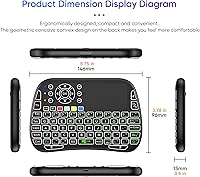
  • Dimensions: The keyboard measures 5.75″ long by 3.78″ wide by 0.59″ thick, making it roughly the size of a standard TV remote.
  • Weight: At 6 ounces, it is light enough to hold comfortably in one hand for extended couch sessions.
  • Connectivity: Supports both 2.4G RF wireless via a USB dongle and Bluetooth 5.0 for direct pairing with compatible devices.
  • Wireless Range: Rated for up to 10 meters of operating distance, though real-world range may be shorter depending on obstacles and interference.
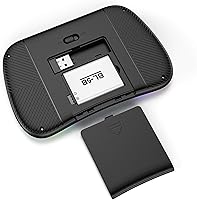
  • Battery: Houses a built-in rechargeable lithium-ion cell that is included and charged via USB; no replaceable batteries are required.
  • Battery Life: Rated for up to 10 days of active continuous use and up to 50 days of standby time on a full charge.
  • Backlighting: Features RGB backlighting with 8 selectable colors to assist visibility in low-light or dark room environments.
  • Touchpad: Integrated multi-touch touchpad supports gesture-based navigation, functioning as a basic mouse substitute without additional hardware.
  • IR Learning: Includes a 5-button infrared learning function that can be programmed to replicate buttons from an existing IR remote control.
  • Voice Input: A dedicated voice button activates a built-in high-fidelity microphone for hands-free text entry and Google Assistant queries within supported input fields.
  • OS Support: Compatible with Windows, macOS, Linux, Android, and iOS operating systems.
  • Device Support: Works with PCs, smart TVs, Android TV boxes, laptops, projectors, smartphones, gaming consoles, and tablets.
  • Model Number: Officially designated as model M9 by the manufacturer Dupad Story.
  • In the Box: Package includes the keyboard unit with built-in battery and a USB 2.4G RF dongle; a charging cable is also expected to be included for the built-in battery.
  • Bluetooth Version: Uses Bluetooth 5.0, which offers a more stable connection and lower power consumption compared to older Bluetooth standards.
  • Availability: First listed for sale in September 2023, positioning it as a relatively recent entry in the compact wireless keyboard category.

Related Reviews

Dupad Story D8 Mini Wireless Keyboard
74%
61%
Build Quality
68%
Touchpad Performance
57%
Typing Experience
83%
Backlighting
86%
Battery Life
More
Doohoeek Universal Bluetooth Mini Keyboard
78%
91%
Portability
86%
Dual-Device Switching
67%
Connectivity Stability
71%
Key Usability
83%
Orange Key Design
More
UBOTIE Retro 84-Key Wireless Bluetooth Keyboard
78%
93%
Design & Aesthetics
58%
Typing Experience
86%
Multi-Device Connectivity
63%
Battery Life
79%
Value for Money
More
Geyes GK608 Foldable Bluetooth Keyboard
75%
93%
Portability
81%
Build Quality
58%
Typing Experience
77%
Dual Device Connectivity
84%
Value for Money
More
OMOTON Bluetooth Keyboard for Mac
77%
91%
Value for Money
88%
Mac Compatibility
67%
Bluetooth Reliability
78%
Multi-Device Switching
74%
Typing Experience
More
NUTROMO Electric Focus Mini Projector
73%
91%
Focus & Keystone Correction
64%
Image Quality
51%
Brightness
88%
Ease of Setup
79%
Value for Money
More
Muzen Mini Bluetooth Speaker
84%
80%
Sound Quality
94%
Portability
85%
Battery Life
88%
Build Quality
90%
Design
More
GEODMAER Foldable Bluetooth Keyboard
82%
93%
Portability
71%
Typing Experience
88%
Multi-Device Switching
63%
Touchpad Usability
91%
Battery Life
More
iClever BK10 Bluetooth Keyboard
79%
83%
Typing Feel
78%
Multi-Device Switching
61%
Battery Life
71%
Build Quality
67%
Key Stability & Longevity
More
Arteck HB193 Bluetooth Keyboard
81%
88%
Multi-Device Switching
84%
Build Quality
71%
Typing Experience
86%
Battery Life
91%
Layout & Key Coverage
More

FAQ

This is probably the most important thing to know before buying: the voice button only activates voice input within native text input fields, such as Android TV's built-in search bar or Google Assistant. It does not integrate with Alexa, Siri, or most third-party voice platforms. If you are primarily an Alexa household, this feature will not do what you expect.

By default, the keyboard operates in 2.4G RF mode using the included USB dongle. To activate Bluetooth, you need to press and hold the Fn and BT keys together. It is a slightly awkward key combination if you switch connections frequently, but it works reliably once you get the hang of it.

Not exactly simultaneously, but yes. You can use 2.4G RF on one device and Bluetooth on another, and toggling between them requires switching modes manually. It is a workable setup if your two devices stay fairly static, but it is not as smooth as dedicated multi-device keyboards that let you switch with a single button tap.

It works well enough for basic cursor movement, scrolling, and simple gestures, which is all most people need when controlling a TV or streaming box from the couch. For anything requiring precision — like dragging files or using graphic tools — the small surface area becomes a real limitation. Think of it as a convenience feature rather than a full mouse replacement.

Only up to 5 buttons can be programmed, which honestly covers very little of a typical TV remote. You could map power, volume up, volume down, mute, and one other function — but that is about it. If you are hoping to fully retire an existing remote, this feature will disappoint. It is better thought of as a quick shortcut for your most-used buttons.

The built-in battery is rated for up to 10 days of active use or up to 50 days on standby. Recharging is straightforward via USB. Since the battery is non-removable, you will need to keep a cable nearby when it runs low, but the standby time is generous enough that most casual users will not need to charge very often.

Yes, as long as your device has a USB port for the RF dongle or supports Bluetooth, the Dupad Story M9 Mini Bluetooth Keyboard should work without any special drivers. Linux compatibility is listed, which covers most Raspberry Pi operating systems. Pairing via the USB dongle is generally the more reliable option for older or less mainstream hardware.
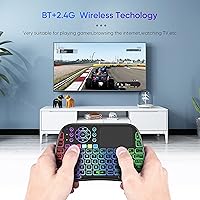
Most users find the RGB backlight perfectly adequate for a darkened home theater environment. With 8 color options, you can pick a hue that suits your room lighting and personal preference. It is not a blindingly bright backlight, which is actually preferable when watching a movie — you get just enough glow to locate keys without washing out the screen.

The official rating is up to 10 meters, which comfortably covers most living rooms without line-of-sight issues. In practice, walls, furniture, and other wireless devices can reduce this somewhat, but for typical couch-to-TV distances you should not run into any problems.

Dupad Story is a smaller, relatively unknown peripheral brand, which is worth factoring into your decision alongside the hardware specs. The 30-day money-back guarantee and a claimed lifetime after-sales policy offer some protection, but independent confirmation of how well that support actually holds up is limited at this stage. If brand reliability and long-term support are top priorities, that uncertainty is a fair reason to hesitate.