Overview

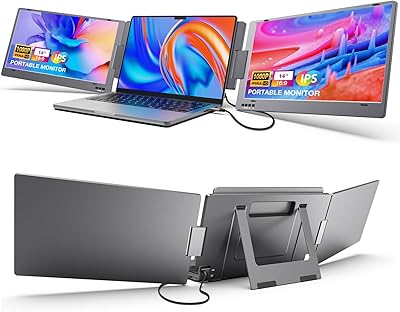
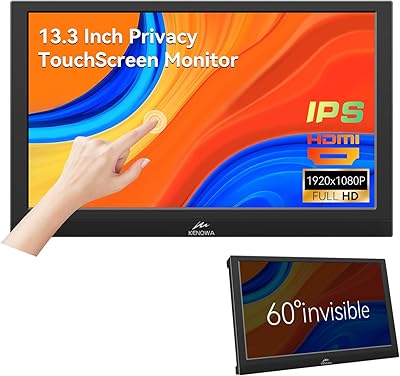
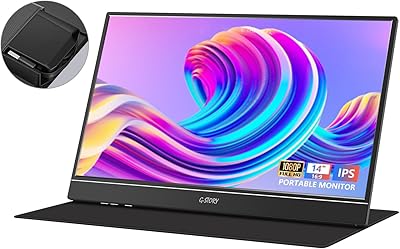
The Magedok MG140-FT02 14-Inch Portable Touchscreen Monitor enters a crowded mid-range field with a straightforward pitch: a genuinely thin, light secondary screen that fits in a bag without complaint. At under one and a half pounds, it disappears into a backpack alongside a laptop — you barely notice the extra weight until you need it. Connectivity covers the three ports most people actually use: USB-C, HDMI, and Mini DisplayPort. The folding kickstand handles angle adjustments on the fly without requiring a separate stand. Nothing about this feels exotic or cutting-edge, but that is the point — it is a practical travel companion built for productivity, not spectacle.
Features & Benefits

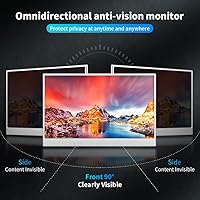
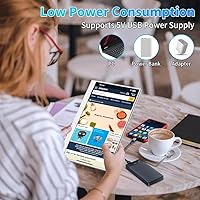
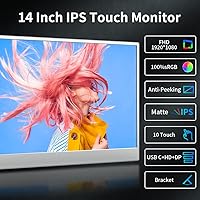
The full HD IPS panel is sharp enough for spreadsheets, browser work, and light photo review, with color coverage that holds up reasonably well for casual creative tasks. What the display does not have is deep contrast — the ratio sits on the modest side, so dark movie scenes can look a bit flat. That said, the matte screen surface is a genuine win for anyone working near windows or under fluorescent lights. The touchscreen works well with Windows tablets and some Android phones, though compatibility varies by device and OS — do not assume touch input will work on every laptop out of the box. Power consumption is impressively low, making it safe to run off a laptop port all day.

Best For

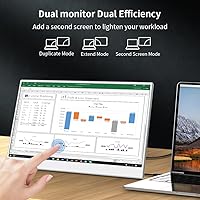
This travel-friendly screen makes most sense for people who travel regularly and find themselves cramped on a single laptop display. Remote workers hopping between coffee shops and hotel rooms will get immediate value from the extra screen real estate. Students carrying everything in one bag will appreciate the light footprint — under one and a half pounds is hard to argue with when you are already hauling books and a charger. It also works as a console gaming display for Switch users who want something bigger than a handheld. Where it falls short is for dedicated video editors or color-critical work — capable, but better-calibrated options exist at a similar price if that is your primary need.

User Feedback

Buyers who use the Magedok 14-inch touch display for travel work tend to come away satisfied, and many specifically mention that setup is fast — plug in a USB-C cable and it is ready. The kickstand stability gets decent marks on flat desks but wobbles on uneven surfaces or laps. Touchscreen praise clusters around Windows users, while those on macOS or Linux report inconsistent results. A recurring gripe involves cable compatibility — some USB-C cables in the box do not deliver both power and video simultaneously, which catches first-time buyers off guard. Color accuracy generally meets expectations for productivity but underwhelms users who compared it directly to higher-contrast portable monitors at a similar price.

Pros

  • Genuinely lightweight at under one and a half pounds — easy to carry alongside a laptop without noticing the extra load.
  • The folding kickstand is built in, so there is no need to pack or buy a separate stand.
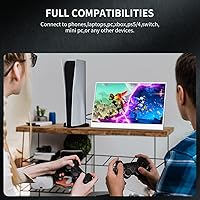
  • USB-C, HDMI, and Mini DisplayPort cover almost every device a traveler is likely to carry.
  • The matte IPS panel handles office lighting and window glare much better than glossy alternatives.
  • Power draw is low enough to run all day off a laptop port without meaningfully shortening battery life.
  • Full HD resolution is sharp and comfortable for long work sessions involving text, spreadsheets, and browsing.
  • Built-in dual speakers are a practical bonus that removes the need for external audio on the road.
  • 100% sRGB coverage makes color accurate enough for light photo review and casual creative tasks.
  • Plug-and-play setup is fast and reliable for most Windows and Android users with a compatible cable.

Cons

  • Contrast ratio is on the low end, making dark scenes in movies and games look flat and washed out.
  • Touchscreen functionality is inconsistent outside of Windows — macOS and Linux users may get little to no touch support.
  • Some included USB-C cables do not carry both power and video simultaneously, which can confuse first-time users.
  • The kickstand wobbles on uneven surfaces and is not stable enough for use on a lap.
  • No VESA mount support limits how and where the display can be positioned in a fixed setup.
  • Cable compatibility issues have been a recurring complaint, requiring users to source a reliable third-party cable separately.
  • At this price tier, competing portable monitors offer noticeably better contrast for similar or lower cost.
  • The single USB port limits connectivity options if you need to chain accessories through the monitor.

Ratings

Our AI rating system analyzed verified global buyer reviews for the Magedok MG140-FT02 14-Inch Portable Touchscreen Monitor, actively filtering out incentivized, bot-generated, and low-signal feedback to surface what real users genuinely experienced. The scores below reflect an honest synthesis of both the strengths that earned repeat praise and the friction points that consistently frustrated buyers. Nothing has been softened or inflated — the numbers reflect the full picture.

Portability
91%
Buyers consistently highlight how easy it is to slip this display into a backpack alongside a laptop without any noticeable weight penalty. Frequent travelers and daily commuters specifically mention that it fits into standard laptop sleeves and messenger bags without requiring a dedicated case.
A few users noted the lack of an included sleeve or protective pouch means the thin chassis picks up scratches in a packed bag fairly quickly. For people who carry it every day without added protection, cosmetic wear becomes a concern within weeks.
Display Quality
74%
26%
For productivity-focused use — spreadsheets, coding windows, browser tabs, document editing — the full HD IPS panel looks clean and sharp enough that most users are satisfied. The matte coating earns specific praise from people working in brightly lit offices or near windows, where a glossy panel would be distracting.
The contrast ratio is the most common visual complaint, with buyers noting that dark scenes in movies and games look washed out and gray rather than deep black. Side-by-side comparisons with competing portable monitors at a similar price point often leave users wishing for better depth in the image.
Color Accuracy
77%
23%
The full sRGB coverage translates to colors that look natural and well-balanced for everyday work, and casual photo reviewers find it adequate for checking edits on the road. Users doing light creative work appreciate that whites look neutral and colors do not shift noticeably across the screen.
Buyers with more critical color needs — particularly video editors and photographers — flag that the modest contrast undermines the otherwise reasonable color gamut, since shadow tones compress visibly. At this tier it is a solid performer for general use but not a replacement for a properly calibrated display.
Touchscreen Responsiveness
63%
37%
Windows 10 and Windows 11 users who primarily use touch for scrolling, tapping, and navigating apps report that the input registers accurately and with low latency in day-to-day use. For productivity tasks like navigating spreadsheets or sketching rough diagrams, the touch layer adds genuine convenience.
The experience drops sharply outside of Windows — macOS users get no touch support at all, and Android compatibility is inconsistent depending on the phone model and USB-C implementation. A meaningful portion of buyers did not realize the limitation before purchasing, which drives a disproportionate share of the negative reviews.
Connectivity & Compatibility
79%
21%
Having USB-C, full-size HDMI, and Mini DisplayPort on a monitor this thin covers an impressive range of devices, and most Windows laptops, desktops, and gaming consoles connect without any fuss. Users traveling with multiple devices appreciate not needing separate adapters for each one.
The USB-C implementation trips up a notable number of buyers — some included cables only carry video or only carry power, not both simultaneously, which requires sourcing a reliable third-party cable. Android phone compatibility also varies widely, and users with older or budget phones sometimes find the connection simply does not work as expected.
Build Quality
68%
32%
The slim chassis feels reasonably solid for a mid-range portable product, and the overall fit of the panel and bezels is tidy enough that most buyers are not disappointed on unboxing. The matte plastic construction keeps the weight down, which is a deliberate trade-off most travelers accept willingly.
Compared to premium portable monitors with metal chassis, the plastic body feels lightweight in a less flattering sense under close handling. A handful of users reported flex in the panel when picking it up by the corners, and the ports feel marginally loose after several weeks of regular cable swapping.
Kickstand Design
66%
34%
On a flat desk the kickstand does its job reliably — the angle adjustment is smooth, and the monitor stays put during a typical work session without creeping or tipping. Eliminating the need for a separate stand is a genuine convenience that frequent travelers appreciate.
On anything other than a perfectly flat, hard surface the instability becomes a real issue — laps, couch armrests, and slightly uneven desks all cause wobble that makes the display feel precarious. The hinge also shows signs of loosening with heavy daily use, which raises durability questions for long-term owners.
Speaker Quality
57%
43%
Having any built-in audio output at all is appreciated by users who use this monitor for video calls and YouTube while traveling, since it removes the need to carry earbuds just to hear anything. Volume is sufficient for quiet hotel rooms or personal use at a desk.
The speakers are thin and tinny, with almost no bass response and a tendency to distort at higher volume levels. Users who tried them for music, gaming audio, or movie watching almost universally switched to headphones or external speakers, rating them as functional but far from enjoyable.
Brightness & Glare Handling
76%
24%
The matte finish is the real hero here — it handles reflections from overhead office lighting and side windows far better than glossy alternatives, making the actual usable brightness feel higher than the raw number might suggest. Remote workers in cafes and shared spaces specifically call this out as a practical advantage.
In genuinely bright outdoor conditions or near a sunlit window, the brightness ceiling becomes limiting and the screen gets harder to read comfortably. Users who expected to use it on an outdoor patio or in a vehicle with direct sunlight exposure were disappointed by how quickly readability dropped.
Power Efficiency
88%
The extremely low power draw is one of the most consistently praised practical features — users report running it off a laptop USB-C port for full workdays without any meaningful impact on their laptop battery life. This makes it genuinely viable for long-haul flights and all-day cafe sessions without hunting for an outlet.
A small number of users found that lower-powered USB-C ports on older laptops or budget Android phones could not supply enough current to run the monitor reliably, resulting in flickering or failure to power on. This edge case is more of a device compatibility issue than a flaw in the monitor itself.
Setup & Ease of Use
82%
18%
For the majority of Windows users, the plug-and-play experience is fast and frustration-free — connect a cable, set the display mode in Windows settings, and the monitor is ready within a minute. Buyers who use it as a Switch screen extension also find the HDMI setup straightforward with no configuration needed.
The USB-C cable quality inconsistency creates a setup stumbling block that a disproportionate number of first-time users run into before they identify the cable as the problem. The manual is minimal, which means troubleshooting requires searching online rather than consulting included documentation.
Value for Money
71%
29%
For remote workers and students who primarily need a lightweight second screen for productivity tasks, the overall feature set — touch, multiple ports, built-in kickstand, low power draw — represents a reasonable return on investment at this price tier. Buyers who do not push it beyond its intended use case tend to feel they got a fair deal.
Buyers who compare it directly against competing portable monitors in the same price bracket often find alternatives with better contrast, metal builds, or more reliable USB-C implementations. The value case weakens if the touch feature does not work with your primary device, since that is a core part of what differentiates this monitor from cheaper non-touch options.

Suitable for:

The Magedok MG140-FT02 14-Inch Portable Touchscreen Monitor is a strong match for anyone whose work life regularly takes them away from a fixed desk. Business travelers who hop between airports, hotels, and client offices will find that the combination of low weight, a self-contained kickstand, and multiple port options removes most of the friction from setting up a dual-screen workflow on the road. Remote workers who split time between home, cafes, and coworking spaces benefit from the same flexibility — one cable into a laptop and you have a second display ready in under a minute. Students cramming in libraries or dorm rooms get a meaningful productivity upgrade without adding serious bulk to an already heavy bag. Casual gamers looking to give a handheld console a larger screen will also find it a capable and affordable option for that use case.
Not suitable for:

Buyers with more demanding visual requirements should think carefully before committing to this portable monitor. The contrast ratio is modest by any standard, which means dark content like films or moody games will look noticeably flatter than on a higher-end panel — this is not a display built for cinephiles or serious gaming setups. Video editors and photographers who depend on precise shadow detail and wide dynamic range will likely find the panel lacking, even with the solid color gamut coverage. The touchscreen, while a genuinely useful feature for some, does not work reliably across all operating systems, so macOS and Linux users should not factor it heavily into their decision. Anyone hoping for VESA mount compatibility will need to look elsewhere, as this travel-friendly screen offers no mounting option beyond its own kickstand. If your primary use is a permanent home office setup rather than travel, there are better-performing monitors available for a similar investment.

Specifications

  • Screen Size: The display measures 14 inches diagonally, offering a practical amount of screen real estate without adding bulk to a travel bag.
  • Resolution: Native resolution is 1920x1080 pixels, delivering a sharp and clear full HD image suitable for productivity, media, and light creative work.
  • Panel Type: Uses an IPS LCD panel, which provides consistent color reproduction and wide viewing angles compared to standard TN displays.
  • Brightness: Rated at 300 cd/m², the screen stays readable under typical indoor lighting and moderately bright environments.
  • Contrast Ratio: The contrast ratio is 700:1, which is adequate for general use but falls short for dark-scene video or high-contrast creative work.
  • Color Gamut: Covers 100% of the sRGB color space, making colors appear accurate and well-saturated for everyday productivity and casual photo review.
  • Touch Input: Features a capacitive touchscreen layer that supports touch interaction on compatible Windows and Android devices.
  • Ports: Connectivity includes one USB-C port, one full-size HDMI port, and one Mini DisplayPort, covering the most common laptop and console outputs.
  • Viewing Angle: IPS technology enables up to 178 degrees of horizontal and vertical viewing angle with minimal color shift or brightness drop.
  • Dimensions: The monitor body measures approximately 12.8 x 8.23 inches, with a minimum thickness of around 0.24 inches at its slimmest point.
  • Weight: Total unit weight is approximately 1.54 lbs (600g), light enough to carry daily alongside a laptop without noticeable strain.
  • Kickstand: A built-in folding kickstand supports up to 90 degrees of tilt adjustment, allowing the screen angle to be set without any additional accessories.
  • Speakers: Two built-in stereo speakers are included, providing basic audio output for calls, video playback, and casual media consumption.
  • Power Draw: The monitor consumes approximately 4 watts during normal operation, allowing it to run safely from a laptop USB port for extended periods.
  • Voltage: Operates at 5 volts, compatible with standard USB power delivery from laptops, power banks, and wall adapters.
  • Refresh Rate: Runs at a standard 60Hz refresh rate, which is appropriate for office work, browsing, and general media but not competitive gaming.
  • Surface Type: The screen surface is matte-finished, which reduces reflections and glare in bright indoor environments compared to glossy panels.
  • Aspect Ratio: Standard 16:9 widescreen aspect ratio matches the default output of most laptops, desktops, and gaming consoles without requiring custom scaling.

Related Reviews
Lrtzcbi 14-inch Portable Touchscreen Monitor
74%
88%
Value for Money
79%
Image Quality
72%
Touch Responsiveness
91%
Portability
58%
Kickstand Stability
More
Magedok 14-Inch 4K Portable Monitor
85%
93%
Display Quality
88%
Portability
90%
Ease of Setup
91%
Color Accuracy
58%
Sound Quality
More
Magedok T101F 10.1-inch Portable Touchscreen Monitor
72%
88%
USB-C Connectivity
63%
Touch Accuracy
79%
Display Quality
84%
Aspect Ratio Fit
76%
Setup Experience
More
Magedok 16-inch 4K OLED Touchscreen Portable Monitor
85%
91%
Display Quality
89%
Portability
75%
Touchscreen Performance
65%
Brightness in Bright Environments
88%
Gaming Performance
More
Dell P1424H 14-inch Portable Monitor
79%
93%
Portability
91%
Setup & Ease of Use
88%
Display Clarity
61%
Brightness & Visibility
58%
Stand & Adjustability
More
KEEPTIME 14-inch 2K Portable Monitor
84%
89%
Display Quality
94%
Portability
87%
Connectivity Options
91%
Ease of Setup
62%
Audio Performance
More
Prechen 12.3 Inch Touchscreen Portable Monitor
84%
88%
Display Quality
93%
Portability & Size
79%
Touchscreen Responsiveness
84%
Build Quality
91%
Ease of Setup
More
Kenowa 13.3-inch Touchscreen Portable Monitor
68%
86%
Value for Money
78%
Display Quality
71%
Privacy Screen Effectiveness
67%
Touchscreen Performance
88%
Portability
More
KYY X90A 14-inch Portable Laptop Monitor
84%
91%
Display Quality
88%
Portability
94%
Ease of Setup
86%
Viewing Angles
82%
Compatibility
More
InnoView 14-inch OLED Portable Monitor 4K UHD
85%
92%
Display Quality
88%
Portability
90%
Color Accuracy
94%
Response Time (Gaming)
85%
Build Quality
More

FAQ

For most Windows 10 and 11 laptops, it is genuinely plug-and-play over USB-C or HDMI — no driver installation needed. Some older systems or non-standard setups may require a quick display settings adjustment, but that is the exception rather than the rule.

Touch input is not natively supported on macOS, so plugging this into a MacBook will give you a fully functional second display but no touch functionality. If touch is a priority for your workflow, this screen is better suited to Windows or compatible Android devices.

Yes, and this is one of its more practical strengths. The low power draw means a single USB-C connection to your laptop handles both video signal and power simultaneously, so you do not need to find a wall socket or carry an extra adapter.

On a flat, solid desk it holds position reliably and the angle adjustment is easy to set. On softer or uneven surfaces — think a couch cushion or your lap — it is noticeably less stable, so it works best when you have a firm surface to set it on.

Yes, it works well with the Switch via HDMI. It is a popular pairing for people who want a larger display while traveling but do not want to carry a full-size monitor. Just make sure you have the Switch dock or a USB-C to HDMI adapter handy.

This is worth double-checking when you first set it up. Some buyers have found that the included cable only carries video or only carries power, not both together. If that happens, a higher-quality third-party USB-C cable rated for full-function use typically solves it immediately.

The matte surface makes a real difference here — it cuts down on reflections and glare significantly compared to glossy panels. At 300 cd/m² brightness it holds up well under standard office lighting, though direct sunlight will still wash it out like any portable display.

For casual photo review and basic color checks, the 100% sRGB coverage does a solid job. However, the contrast ratio is on the modest side, so subtle shadow detail can be lost. Professional photo editors or anyone doing color-critical work would be better served by a higher-spec panel.

If your Android phone supports USB-C video output (DisplayPort Alt Mode), a single USB-C cable is all you need. Not all Android phones support this, so it is worth confirming your specific model before assuming it will work.

Based on what is included in the box, there is no dedicated carrying case or sleeve. It is worth picking up a slim sleeve separately if you plan to carry it daily, since the thin chassis is easy to scratch without some protection in a bag.