Overview

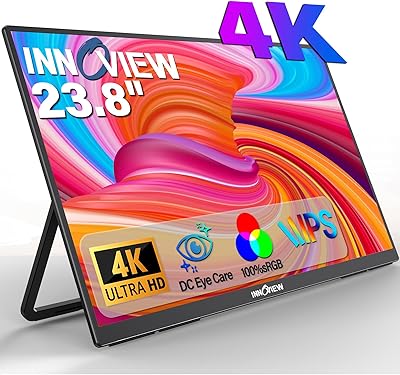
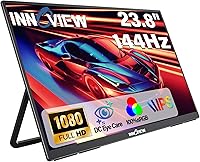
The InnoView 23.8-inch 144Hz Portable Monitor sits in an interesting middle ground — large enough to feel like a real workstation display, yet designed to move between rooms or locations without a permanent desk commitment. InnoView is a mid-tier brand gaining traction in the portable display space, and this model reflects that trajectory. The 4.2-star rating and a top-130 rank in Computer Monitors suggest solid real-world satisfaction, though not without caveats. At its price point, getting a 144Hz IPS panel at this screen size is genuinely competitive. Just go in knowing this is room-to-room portable, not something you would comfortably slip into a backpack.
Features & Benefits

The IPS panel here delivers noticeably rich, accurate color — 100% sRGB coverage means photos, video, and design work all look honest rather than washed out or oversaturated. The 144Hz refresh rate is a genuine differentiator at this screen size; motion feels noticeably smoother for both gaming and fast-scrolling work. The 180-degree kickstand is more useful than it sounds, letting you lay the screen nearly flat or prop it at a shallow angle for comfortable reclined viewing. Connectivity covers dual USB-C and HDMI, so most modern laptops, consoles, and phones connect without extra adapters. VESA compatibility adds long-term mounting flexibility, and the 18-month warranty stands above average for this category.

Best For

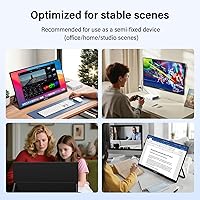
This large portable monitor makes the most sense for people who move between environments — the spare bedroom, a coffee shop, a co-working space — rather than daily commuters hauling gear in a backpack. Remote workers and hybrid professionals will find real value in a proper second screen that does not require leaving a monitor at every location. Laptop users, especially those on MacBooks, can expand their workspace with minimal setup. It also pulls double duty as a console gaming display at home, connecting to a PS5, Xbox, or Nintendo Switch without fuss. Frequent travelers expecting something truly compact and lightweight should look elsewhere.

User Feedback

Several buyers highlight color accuracy and overall image quality as standout strengths, with many noting the picture looks substantially better than expected at this price tier. The plug-and-play setup draws consistent praise for making USB-C connections quick and uncomplicated. Stand stability also gets positive mentions, with users finding it reliable across a range of tilt angles. On the downside, a recurring complaint is the weight — at around 4.8 lbs, those hoping for a truly lightweight option have been disappointed. Some users have flagged cable compatibility issues with specific laptops. Feedback on customer support has been largely favorable, with responses described as prompt and genuinely helpful.

Pros

  • A nearly 24-inch IPS screen is rare in the portable monitor category and gives remote workers genuine desk-level real estate.
  • The 144Hz refresh rate delivers noticeably smoother motion for gaming and fast-scrolling work compared to standard 60Hz portable panels.
  • 100% sRGB color coverage means photos, videos, and presentations look accurate rather than washed out or oversaturated.
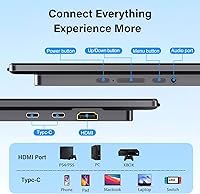
  • Dual USB-C ports and a full-size HDMI input make this portable second screen compatible with a wide range of laptops, phones, and consoles without extra adapters.
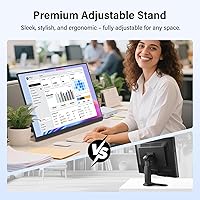
  • The 180-degree adjustable kickstand offers far more tilt flexibility than most competitors in this class, supporting shallow, reclined, and upright viewing positions.
  • VESA mount support gives buyers the option to use a monitor arm or wall bracket, adding long-term setup flexibility beyond the built-in stand.
  • Plug-and-play USB-C setup consistently gets high marks from buyers for being fast and hassle-free across multiple device types.
  • The matte screen coating reduces reflections in mixed lighting, making extended work sessions in cafes or offices with overhead lighting more comfortable.
  • An 18-month warranty and responsive 24/7 customer support stand noticeably above the industry norm for portable monitors at this price tier.

Cons

  • At roughly 4.8 lbs, this is not backpack-friendly — buyers expecting ultralight portability will be caught off guard.
  • 1080p resolution across a 23.8-inch panel produces a pixel density that falls short for users coming from Retina or QHD displays.
  • Some USB-C connections fail to deliver the full 144Hz output without specific cables or source device configurations, which is not made clear upfront.
  • The physical button menu for adjusting brightness and switching inputs is stiff and awkward to navigate during quick mid-session changes.
  • 300 cd/m² brightness limits usability near bright windows and makes this a poor choice for any outdoor or high-ambient-light setting.
  • There is no height adjustment or portrait rotation support from the built-in stand, limiting ergonomic flexibility without an external arm.
  • The VESA mount uses an M4 screw specification that does not match many standard monitor arms, requiring specific hardware some buyers had to source separately.
  • The included cable selection is minimal, and unlocking stable 144Hz performance may require purchasing a higher-quality cable independently.
  • Auto-switching between input sources is absent, meaning every device change requires manual navigation through the on-screen menu.

Ratings

The InnoView 23.8-inch 144Hz Portable Monitor scores below are generated by AI after systematically analyzing verified buyer reviews from global markets, with spam, bot-submitted, and incentivized feedback actively filtered out. This large portable second screen drew a wide range of users — remote workers, students, console gamers, and MacBook users — giving us a rich and varied sample to work from. Both the genuine strengths and the recurring frustrations are reflected honestly in the scores you see here.
Display Quality
88%
The IPS panel with 100% sRGB coverage consistently impressed buyers across work and entertainment use. Colors appeared accurate and vivid without looking artificially pumped, which several design-adjacent users specifically appreciated when reviewing photos or editing documents on a secondary screen.
At 300 cd/m², brightness is adequate in most indoor settings but can feel limiting near a bright window or in a sunlit room. A handful of users noted that HDR content looked underwhelming, which is expected at this panel tier but still worth flagging for media-focused buyers.
Refresh Rate Performance
83%
Buyers who switched from 60Hz portable monitors found the 144Hz experience noticeably smoother during fast-paced gaming and even basic desktop navigation. Console gamers connecting a PS5 or Xbox reported that gameplay felt more responsive compared to their previous portable display setups.
The full 144Hz benefit is only realized with the right cable and a capable source device, and some buyers found this out the hard way after assuming any USB-C connection would deliver maximum performance. Casual users primarily doing spreadsheets or browsing may not notice the difference enough to justify the premium over a 60Hz alternative.
Portability & Form Factor
61%
39%
The slim 0.4-inch profile keeps the monitor looking sleek, and moving it between a home office desk and a living room setup is genuinely easy. For buyers who defined portability as room-to-room flexibility rather than daily bag carrying, this size worked well and felt sturdy during repositioning.
At roughly 4.8 lbs, this is not a monitor you will comfortably carry alongside a laptop in a standard backpack, and a recurring theme in reviews from commuters reflects exactly that disappointment. Several buyers expected something closer to a 15-inch portable panel in terms of carry weight and were surprised by how substantial this feels in hand.
Stand & Ergonomics
86%
The 180-degree adjustable kickstand stood out as one of the more genuinely flexible stands in this product class, letting users prop the screen at low angles for shared viewing or nearly upright for desk work. Buyers frequently praised how stable the stand felt at various angles without wobbling when they adjusted the tilt mid-session.
The stand does not support height adjustment or portrait rotation, which limits its appeal for users who prefer a vertical workflow or need the screen raised higher without an external arm. A few buyers also found that on very smooth surfaces, the stand base tended to slide slightly under pressure.
Connectivity & Compatibility
79%
21%
Dual USB-C ports alongside a full-size HDMI input made this monitor genuinely versatile across a wide range of devices, from MacBooks to gaming consoles to Android smartphones. The plug-and-play experience with USB-C was consistently praised, with many buyers noting they were up and running within a minute of unboxing.
Some users encountered compatibility issues with specific laptop models where the USB-C signal failed to deliver full resolution or the expected refresh rate without additional configuration. The included cable selection was also flagged as minimal, with a few buyers needing to source their own higher-quality cables to unlock stable 144Hz output.
Build Quality & Materials
74%
26%
The chassis felt solid and well-assembled to most buyers, without the flex or creaking that tends to show up in lower-tier portable monitors. The matte finish on the chassis resisted fingerprints reasonably well and gave the monitor a professional appearance that worked in office settings.
Some users noticed slight flex along the outer bezel edges when handling the monitor, which raised minor durability concerns for those who move it frequently. The plastics used, while functional, do not quite match the premium tactile feel of monitors at higher price points.
Glare & Matte Screen Coating
81%
19%
The matte screen surface was well-received by buyers working in mixed or uncontrolled lighting environments, where a glossy panel would have created frustrating reflections. Café and library users in particular noted that the anti-glare coating allowed comfortable extended work sessions without needing to constantly reposition the screen.
The matte coating introduces a slight softening effect on fine text at 1080p resolution on a nearly 24-inch panel, which some users — particularly those doing close reading or coding — found mildly distracting after long sessions. This is a known trade-off with matte IPS coatings at this pixel density rather than a defect specific to this model.
Resolution & Pixel Density
67%
33%
For video, gaming, and general productivity, 1080p on a 23.8-inch screen looks perfectly acceptable and most buyers reported no complaints during everyday use. Content like Netflix, YouTube, and standard office applications rendered cleanly with no obvious pixelation at normal viewing distances.
At this screen size, 1080p delivers a pixel density that noticeably falls short for users coming from a Retina MacBook or a QHD monitor, and text can appear slightly soft compared to higher-resolution alternatives. A meaningful portion of critical reviews pointed to this trade-off as the single biggest limitation of an otherwise capable display.
Ease of Setup
91%
Setup feedback was among the most consistently positive aspects in the review pool, with buyers describing the initial connection process as intuitive and fast regardless of whether they used USB-C or HDMI. Most users reported having the monitor fully operational without touching any settings menus on first use.
The on-screen display menu drew occasional complaints for being navigated by physical buttons that some found stiff or awkwardly positioned, particularly for users who frequently adjust brightness or input sources. First-time monitor users also noted the manual could be more detailed on how to unlock full 144Hz output from specific devices.
Value for Money
77%
23%
For buyers who prioritized screen size and refresh rate over raw portability, the pricing felt reasonable relative to the specification list on offer. Getting a 144Hz IPS panel at nearly 24 inches in a portable form factor remains genuinely uncommon at this tier, and many buyers acknowledged paying less than expected for that combination.
Users who expected a lightweight, backpack-friendly experience felt the value proposition weakened considerably once the size and weight became apparent in real life. A segment of reviewers also noted that competing monitors at similar prices offered better pixel density or superior build materials, making the choice more context-dependent than it might first appear.
VESA Mount Compatibility
78%
22%
The inclusion of VESA mounting support was a frequently appreciated feature among buyers who wanted the option to use this monitor on a monitor arm or wall bracket without purchasing a separate stand-only unit. For hybrid setups where the monitor sometimes sits on the kickstand and sometimes mounts to an arm, this flexibility was seen as a practical long-term investment.
The M4 VESA mount specification is less common than the standard M4x10 pattern found on most monitor arms, meaning some buyers had to source specific screws or adapters to make mounting work. This minor friction was not a dealbreaker for most, but it added an unexpected setup step that a few reviewers found annoying.
Gaming Experience
80%
20%
Console gamers connecting a PS5 or Nintendo Switch described the experience as noticeably better than portable monitors they had used previously, citing both the screen size and the smoother motion as meaningful improvements for action-heavy games. The full sRGB color coverage helped game visuals look vibrant without the over-saturation common in cheaper panels.
Competitive PC gamers accustomed to dedicated gaming monitors noted that input lag, while acceptable for casual play, did not quite match purpose-built gaming displays. The 1080p ceiling also limits its appeal for users who want this as a primary gaming monitor rather than a supplemental setup.
Warranty & Customer Support
84%
The 18-month warranty is above average for the portable monitor category, and several buyers who encountered early issues reported that InnoView support responded quickly and offered practical resolutions without prolonged back-and-forth. This reliability in after-sales service was mentioned frequently enough in reviews to stand out as a genuine brand differentiator.
A smaller number of users reported slower response times during peak periods, and a few international buyers noted that support channels were more limited outside North America. The warranty period, while solid, still falls short of the two-year or three-year coverage offered by some established monitor brands at comparable price points.
Multi-Device Versatility
82%
18%
Buyers appreciated being able to switch this monitor between a work laptop, a gaming console, and a smartphone without needing to swap hardware or reconfigure anything major. The breadth of compatible devices — spanning USB-C laptops, HDMI consoles, and screen-mirroring phones — made it feel like a genuinely multi-purpose tool rather than a single-use display.
Switching between input sources required navigating the physical button menu, which some users found cumbersome during quick transitions between a work call and a gaming session. Auto-switching between sources was also absent, a feature present on some competing models that buyers familiar with it noted as a missing convenience.

Suitable for:

The InnoView 23.8-inch 144Hz Portable Monitor makes the most sense for people whose work or lifestyle involves moving between multiple locations within a home, office building, or local environment — not for those who need something that disappears into a bag. Remote workers and hybrid professionals who rotate between a home office, a spare room, and the occasional co-working space will find this large portable monitor genuinely useful as a plug-and-play second screen that does not require a permanent desk setup. MacBook users and laptop owners who feel cramped on a single display will appreciate how much breathing room a nearly 24-inch extended screen provides for multitasking across documents, calls, and browsers. Students and freelancers who work from cafes or libraries, and who are comfortable carrying it in a dedicated bag or sleeve rather than a loaded backpack, also fall squarely into the sweet spot. Console gamers who want a proper-sized display for a PS5, Xbox, or Nintendo Switch in a bedroom or living room setting — without investing in a full desktop monitor — will find the 144Hz refresh rate and accurate color a noticeable step up from a typical portable panel.

Not suitable for:

The InnoView 23.8-inch 144Hz Portable Monitor is not the right choice for anyone who pictures a portable monitor as something they will throw in a backpack alongside a laptop and carry on a daily commute — at around 4.8 lbs and nearly 24 inches diagonally, this is a different category of product entirely. Frequent travelers who need a lightweight, compact secondary screen for airports, trains, or hotel rooms should look at smaller 15-inch or 16-inch alternatives that are purpose-built for that use case. Power users who need sharp, high-density text rendering for extended coding sessions or detailed design work may find that 1080p across this screen size does not meet the visual standard they are used to on a QHD or Retina display. Anyone primarily interested in HDR content or high-brightness outdoor viewing will also run into real limitations, as 300 cd/m² is not enough for sunlit environments. Finally, buyers who need a portrait-mode or height-adjustable stand without purchasing an external arm should factor in that the built-in kickstand, while flexible in tilt, does not support those configurations natively.
Specifications

  • Screen Size: The display measures 23.8 inches diagonally, making it one of the larger options in the portable monitor category.
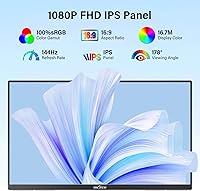
  • Resolution: Native resolution is 1920x1080 (Full HD 1080p) with a standard 16:9 aspect ratio.
  • Refresh Rate: Supports a maximum refresh rate of 144Hz, which delivers noticeably smoother motion compared to standard 60Hz portable displays.
  • Panel Type: Uses an IPS (In-Plane Switching) panel, which provides consistent color and contrast across wide viewing angles up to 178 degrees.
  • Color Gamut: Covers 100% of the sRGB color space, ensuring accurate and vibrant color reproduction for media, design work, and gaming.
  • Brightness: Peak brightness is rated at 300 cd/m², suitable for typical indoor environments but not recommended for bright sunlit settings.
  • Screen Surface: Features a matte anti-glare coating that reduces reflections under overhead lighting or in mixed-light workspaces.
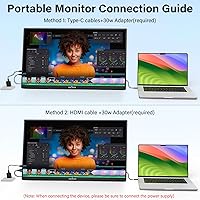
  • Ports: Equipped with two USB-C ports and one full-size HDMI port to support a broad range of source devices.
  • Power Adapter: Includes a 30W power adapter; for best performance and stable 144Hz output, use the supplied adapter rather than a third-party charger.
  • Weight: Weighs approximately 4.8 lbs, which is closer to a mid-size laptop than a compact portable display.
  • Profile Thickness: The monitor body measures approximately 0.4 inches thin when lying flat, contributing to its low-profile desk presence.
  • Stand Type: Built-in kickstand supports 180 degrees of tilt adjustment, from nearly upright to nearly flat, without requiring an external stand.
  • VESA Compatibility: Supports VESA wall and arm mounting using an M4x4mm screw pattern, though compatible screws may need to be sourced separately.
  • Compatible Devices: Works with USB-C laptops, MacBooks, HDMI-equipped gaming consoles including PS5 and Xbox, Nintendo Switch, and compatible smartphones.
  • Viewing Angle: Rated at 178 degrees horizontally and vertically, meaning color and contrast remain accurate even when viewed from sharp off-axis positions.
  • Aspect Ratio: Standard 16:9 widescreen aspect ratio, compatible with all common video formats and productivity layouts.
  • Warranty: Backed by an 18-month manufacturer warranty, which is above average for portable monitors in this price segment.
  • Customer Support: InnoView offers 24/7 customer support for technical assistance and after-sales service inquiries.

Related Reviews

InnoView PM608 23.8-inch 4K Portable Monitor
76%
91%
Image Sharpness
88%
Color Accuracy
54%
Portability & Weight
83%
Stand & Flexibility
76%
USB-C Connectivity
More
VisionOwl 23.8-Inch 2K Portable Monitor
87%
94%
Gaming Performance
92%
Display Quality
88%
Portability
90%
Build Quality
81%
Setup & Installation
More
InnoView 23.8″ Dual Portable Monitor 4K
82%
91%
Display Quality
88%
Portability & Design
94%
Ease of Setup
87%
Connectivity Options
82%
Build Quality
More
Redalf 23.8-inch 2K 180Hz Portable Monitor
86%
88%
Display Quality
92%
Portability
90%
Gaming Performance
85%
Compatibility
91%
Ease of Setup
More
Setclod 23.8″ Portable Monitor
85%
87%
Display Quality
94%
Portability
92%
Ease of Setup
85%
Gaming Performance
72%
Build Quality
More
Dell S2425HS 23.8-inch FHD Monitor
84%
88%
Image & Color Accuracy
83%
Refresh Rate & Motion Smoothness
91%
Eye Comfort & Blue Light Reduction
93%
Ergonomics & Stand Adjustability
87%
Build Quality & Materials
More
Prechen 23.8″ Portable Touchscreen Monitor
84%
91%
Display Quality
88%
Portability & Design
75%
Touchscreen Performance
89%
Setup & Installation
93%
Color Accuracy
More
InnoView INVPM406 15.6-inch Portable Monitor
75%
91%
Ease of Setup
83%
Display Clarity
78%
Portability & Build
62%
USB-C Compatibility
88%
Value for Money
More
InnoView 18-inch 260Hz Portable Gaming Monitor
86%
94%
Gaming Performance
88%
Portability
90%
Display Quality
92%
Color Accuracy
85%
Ease of Setup
More
HP V241ib 23.8-inch FHD Monitor
85%
91%
Display Clarity & Color Accuracy
88%
Ergonomics & Adjustability
92%
Value for Money
70%
Setup & Installation
90%
Viewing Angles
More

FAQ

The 144Hz refresh rate is real, but it does require the right setup to unlock it. You need a source device that supports 144Hz output over USB-C or HDMI, and ideally the included cable or a high-quality third-party one rated for the bandwidth. Some users found that a generic USB-C cable capped them at 60Hz without realizing it, so it is worth double-checking your cable and display settings if the motion does not look as smooth as expected.

Yes, a single USB-C cable handles both video signal and power delivery for most modern MacBook models, which makes setup genuinely quick. That said, results can vary depending on your specific MacBook generation and the cable quality — using the included 30W adapter alongside the USB-C video connection is the most reliable approach if you run into any issues.

The InnoView 23.8-inch 144Hz Portable Monitor is best described as room-to-room portable rather than bag-friendly. At around 4.8 lbs and nearly 24 inches diagonally, it is closer in size and weight to a small laptop than to the compact portable monitors designed for daily commuting. It will fit in a large sleeve or dedicated monitor bag, but it is not something most people would comfortably carry alongside a laptop in a standard backpack every day.
Yes, connecting via HDMI works without any special configuration for both PS5 and Xbox. You get a clean 1080p image, and the 144Hz panel provides a smoother experience than a standard TV for fast-paced games. Keep in mind that console output is capped by the console itself, so the actual frame rate you see depends on the game and console settings rather than the monitor alone.

The kickstand is more solid than many buyers expect for a portable monitor at this size. It holds position reliably across a wide range of tilt angles and does not flex noticeably during normal desk use. On very smooth or slick surfaces, the base can shift slightly if you press against the screen, so a textured desk surface or a non-slip mat helps.

Yes, the monitor supports VESA mounting, which means a compatible monitor arm or wall bracket will work. The catch is that the VESA pattern uses M4 screws in a 4mm depth, which is less common than the longer screws typically bundled with monitor arms. You may need to pick up the correct screws separately before mounting.

For most everyday tasks like web browsing, documents, and spreadsheets, the image looks perfectly fine at normal viewing distances of around two feet or more. However, if you are coming from a high-density display like a Retina MacBook screen or a QHD monitor, you will likely notice that text is not quite as crisp on this large portable monitor. It is a real trade-off of packing a 23.8-inch panel into a portable form factor at this price point.

The matte coating does a solid job of cutting reflections, which is genuinely useful in uncontrolled lighting environments. The trade-off is a slight softening of fine detail that is most noticeable on small text at 1080p across a nearly 24-inch screen. For video, photos, and gaming it is unlikely to bother you, but pixel-level detail work may reveal the limitation.

InnoView offers an 18-month warranty and promotes 24/7 support availability, and buyer feedback on support responsiveness has been largely positive, with many users describing quick replies and practical troubleshooting help. International buyers outside North America have occasionally reported that support channels are more limited, so it is worth checking regional availability before purchasing if you are outside the primary markets.

It can absolutely function as a primary display for everyday tasks, and several users do use this portable second screen as their main monitor in a minimal desk setup. The main limitations for full-time primary use are the 1080p resolution at this screen size and the 300 cd/m² brightness ceiling, which may not satisfy users who want a sharp, high-brightness main display. For light to moderate productivity work, it holds up well; for intensive creative or coding workflows, a dedicated desktop monitor would serve better.