
Overview

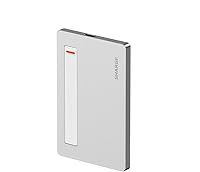
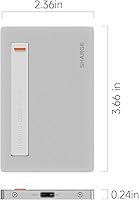
The Sharge SD002 M.2 NVMe SSD Enclosure is one of those rare accessories that genuinely earns its slim profile rather than just advertising it. At 0.24″ thick — roughly the width of a few credit cards stacked — this slim enclosure slips into a shirt pocket without awkward bulk. Sharge built its reputation around compact charging gear, so moving into storage feels like a logical extension of that same design philosophy. The aluminum shell feels solid, not cheap. One important heads-up before buying: no SSD is included, and the magnetic mounting accessories shown in some product imagery are sold separately, so factor both into your total budget.

Features & Benefits

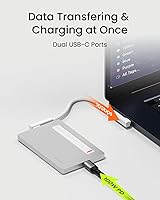
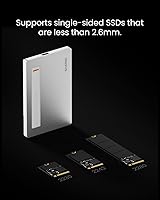
The real standout is the built-in USB-C cable, which tucks flush against the body and removes the usual cable-hunting ritual every time you need to plug in. Under the hood, the Realtek RTL9210 chipset delivers USB 3.2 Gen 2 speeds up to 10Gbps — in practice, large file transfers feel noticeably snappier than older USB-A enclosures. The Sharge SD002 supports 2230, 2242, and 2280 drives, but only single-sided ones under 2.6mm thick, so verify your drive specs before installing. A second USB-C port handles 100W passthrough charging, meaning your laptop stays powered while the drive works, which is a practical touch most competing enclosures skip.

Best For

This NVMe enclosure suits a fairly specific type of user, and it suits them well. Steam Deck owners will appreciate the pocketable size paired with genuine NVMe throughput for running games off external storage. Content creators shuffling large video files between machines will get real value from the 10Gbps bandwidth. It also makes excellent sense if you recently swapped the M.2 drive in a laptop upgrade and have a perfectly good spare sitting idle — housing it here costs a fraction of buying a preloaded external drive. Minimalist travelers and anyone tired of managing a cable pouch alongside their drive will find this slim enclosure genuinely worth considering.

User Feedback

With roughly 79 ratings and a 4.2-star average from a product that launched in late 2024, the sample size is still modest — take the sentiment as an encouraging early signal, not a settled verdict. Buyers consistently highlight build quality and thinness, with several noting the aluminum shell feels more substantial than the price implies. The integrated cable draws specific praise. On the flip side, some users report the enclosure runs noticeably warm during sustained, heavy transfers — a predictable tradeoff given the minimal surface area — and a few encountered SSD compatibility hiccups with specific drive models. Long-term durability data simply does not exist yet, but most buyers currently rate the value as solid.

Pros

  • The 0.24″ aluminum body is genuinely among the thinnest M.2 enclosures available at this price point.
  • A built-in USB-C cable means you will never be stuck searching for the right cable when you need it.
  • The Realtek RTL9210 chipset delivers dependable 10Gbps throughput that holds up in real-world transfers.
  • Supports 2230, 2242, and 2280 NVMe drives, covering the most common form factors found in laptop upgrades.
  • Passthrough charging up to 100W on the second USB-C port keeps your laptop powered during transfers.
  • Works across Windows, macOS, Android, Linux, and iOS without installing drivers or switching adapters.
  • Solid aluminum construction feels noticeably more premium than plastic enclosures in the same category.
  • Early buyers consistently rate the build quality above expectations for the price tier.
  • Pocketable size makes it a practical daily-carry storage solution for professionals on the move.

Cons

  • No SSD is included, and that cost needs to be factored in separately from the start.
  • Sustained heavy transfers can cause noticeable warmth, with some users reporting thermal slowdowns during extended sessions.
  • Only single-sided drives under 2.6mm fit, excluding many double-sided or thicker NVMe modules.
  • SATA M.2 drives are not supported — NVMe only, which catches some buyers off guard.
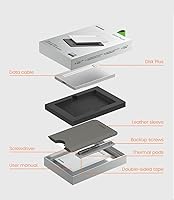
  • The magnetic mounting accessories featured prominently in product imagery are sold separately at additional cost.
  • With under 80 ratings as of early 2025, long-term reliability data is still thin.
  • The brand has limited history in the storage accessory space, making it harder to gauge after-sales support quality.
  • Drive compatibility edge cases have been flagged by a handful of users with specific SSD models.
  • No active cooling or ventilation means this enclosure is better suited for burst transfers than continuous workloads.

Ratings

The scores below for the Sharge SD002 M.2 NVMe SSD Enclosure were generated by our AI system after analyzing verified global buyer reviews, with spam, bot activity, and incentivized feedback actively filtered out. Both the strengths that made real users enthusiastic and the friction points that left some buyers frustrated are reflected transparently in each category. This slim enclosure earns strong marks in portability and design, but the ratings also surface meaningful trade-offs around thermals and compatibility that deserve equal attention.

Portability & Form Factor
96%
Buyers repeatedly describe this slim enclosure as something they forget is even in their pocket — that level of thinness is rare in NVMe enclosures. At 0.24″ thick and 1.76 oz, it genuinely fits alongside a phone in a jeans pocket without discomfort, which most competing enclosures cannot claim.
A handful of users noted that the ultra-slim chassis makes the enclosure slightly fiddly to open when installing a drive for the first time, especially for those with larger hands. The tradeoff for thinness is that there is simply less to grip during the initial SSD installation process.
Build Quality
88%
The aluminum shell consistently draws praise from buyers who expected something that felt more budget-grade at this price tier. Most describe the fit and finish as surprisingly solid, with no flex or creaking, and the matte silver surface resisting fingerprints reasonably well during daily handling.
A small number of reviewers noted minor machining inconsistencies around the cable cutout, and a few mentioned the screws feel modest relative to the otherwise premium chassis. Long-term durability remains an open question given the product only launched in late 2024.
Transfer Speed
83%
With the Realtek RTL9210 chipset and USB 3.2 Gen 2 under the hood, buyers pairing this enclosure with a capable NVMe drive and a modern USB-C port report fast, consistent transfers that noticeably outpace older USB-A enclosures they had used previously. For moving large video projects or game installs, the throughput feels responsive.
Users plugging into older USB 3.0 ports see speeds capped well below the 10Gbps ceiling, which is a host-side limitation but still generates some disappointment when expectations are set by the spec sheet. A few buyers also noted speeds vary more than expected depending on the specific NVMe drive installed.
Built-in Cable Design
91%
The integrated USB-C cable is the feature buyers mention most frequently and most positively — multiple reviewers specifically said it was the deciding factor in choosing this enclosure over alternatives. Not having to hunt for a cable when you need to transfer files quickly is a genuine quality-of-life improvement that shows up in daily use.
The built-in cable is USB-C to USB-C, which means users with USB-A only ports still need an adapter. A small number of buyers also wished the cable were slightly longer, as the current length works well for direct laptop connections but can feel tight in certain desk or docking setups.
Thermal Management
61%
39%
For short burst transfers — moving a folder of photos, copying a game save, or syncing a project file — the aluminum body manages heat adequately and the enclosure stays comfortable to the touch. Buyers using it for quick, intermittent transfers report no thermal issues in normal conditions.
During sustained heavy workloads like multi-gigabyte backups or extended game installations, the enclosure runs noticeably warm and some users have observed throttling that slows transfer rates. This is a genuine constraint of the form factor, and buyers planning continuous high-throughput use should approach expectations accordingly.
Drive Compatibility
67%
33%
The support for 2230, 2242, and 2280 NVMe form factors covers the vast majority of drives users are likely to have from laptop upgrades or budget NVMe purchases. Buyers recycling a spare 2280 M-Key drive from a PC build will find installation quick and recognition instant on most operating systems.
The 2.6mm single-sided thickness ceiling trips up buyers who assumed any M.2 NVMe drive would fit, particularly those with double-sided high-capacity modules. Several reviews flagged that SATA M.2 drives are incompatible, which caused frustration for buyers who did not verify their drive protocol before purchasing.
OS Compatibility
89%
Windows, macOS, Android, Linux, and iOS users all report driver-free plug-and-play operation in most scenarios, which is a meaningful convenience for people who move files across ecosystems regularly. The Realtek RTL9210 chipset has broad OS support that makes cross-platform workflows genuinely frictionless.
A small number of iOS users noted that access through the Files app requires a compatible USB-C iPad or iPhone 15 or later, and older Lightning devices are simply excluded. Some Android users with lower-end devices also reported inconsistent mounting behavior depending on OTG support.
Passthrough Charging
82%
18%
The 100W passthrough charging port is a practical feature that buyers working at a desk genuinely use — keeping a MacBook or Windows laptop charged while simultaneously running a large file transfer removes one cable from the equation. Several reviewers highlighted this as an underrated feature of the Sharge SD002.
The passthrough charging port requires its own USB-C power brick, which is not included. A few users found the dual-port layout slightly confusing at first, particularly figuring out which port handles data and which handles power, as the labeling on the chassis is subtle.
Value for Money
77%
23%
Most buyers feel the enclosure's build quality and design thoughtfulness justify the mid-range price, especially compared to cheaper plastic enclosures that feel disposable. The built-in cable alone is seen as adding tangible value relative to barebones competitors that ship without any cable at all.
The total cost of ownership climbs once you factor in the separately sold SSD and the optional magnetic accessory set, which can make the initial price feel misleading. Buyers who expected a more complete out-of-box solution occasionally left reviews expressing frustration about those hidden additional costs.
Setup & Installation
84%
Installing an M.2 drive is a straightforward process that most technically confident buyers complete in under five minutes, and the enclosure's internals are well-organized for a chassis this thin. Recognition across Windows, macOS, and Linux is typically instant once the drive is seated and the enclosure is connected.
The slim chassis means the SSD slot and retention screw require a steady hand and a small precision screwdriver, which is not included. Buyers with limited hardware experience have noted some anxiety around the tight tolerances, even if the end result works correctly.
Magnetic Accessory Ecosystem
58%
42%
For buyers who opt into the separately sold magnetic ring and pad set, the ability to attach the enclosure directly to a laptop lid or desk surface adds a genuinely novel layer of convenience. A few power users specifically purchased the enclosure for this modular potential.
The magnetic accessories not being included in the base package frustrates buyers who were drawn in by marketing imagery that prominently features the magnetic mounting configuration. At the price point, including even one mounting pad would have significantly improved the out-of-box experience.
Brand Confidence
66%
34%
Sharge has a solid reputation for compact, well-engineered charging accessories, and buyers familiar with the brand extended some goodwill to this storage debut. The use of a reputable chipset like the Realtek RTL9210 rather than an unknown controller also provides a measure of technical assurance.
Sharge is a newcomer to the storage accessory category, and that lack of track record shows in buyer hesitation around long-term reliability. With fewer than 80 reviews at launch, there simply is not enough data yet to confidently assess whether the enclosure holds up over years of regular use.

Suitable for:

The Sharge SD002 M.2 NVMe SSD Enclosure is a strong match for anyone who prioritizes portability and clean design over raw thermal headroom. Steam Deck users will find it particularly compelling — the enclosure is thin enough to slip into a game case pocket while still delivering the NVMe speeds needed to run demanding titles from external storage without painful load times. Content creators who shuttle large video or photo libraries between a desktop and a laptop will appreciate the 10Gbps throughput and the built-in cable that means one fewer thing to hunt for in a bag. It also makes excellent practical sense for anyone who recently upgraded their laptop's internal M.2 drive and has a spare sitting unused — housing that drive here is far more economical than buying a preloaded portable SSD. Travelers and minimalists who want a single, self-contained storage device that works across Windows, macOS, Android, and iOS without adapter drama will feel right at home with this slim enclosure.

Not suitable for:

The Sharge SD002 M.2 NVMe SSD Enclosure is not the right tool for every storage job, and knowing where it falls short will save you frustration. If you plan to run long, sustained workloads — think continuous 4K video captures, large backup jobs, or extended game installations — the compact aluminum body has limited surface area to shed heat, and thermal throttling during prolonged sessions is a real possibility. Double-sided M.2 drives or any NVMe module thicker than 2.6mm will not physically fit, which rules out some higher-capacity or server-grade drives people may have on hand. This NVMe enclosure also only supports M-Key NVMe protocol, so SATA M.2 drives are a non-starter — a common source of buyer confusion worth double-checking before purchasing. Those looking for plug-and-play storage with a drive already installed will need to budget separately for the SSD itself, and anyone drawn to the magnetic mounting system shown in marketing imagery should know those accessories cost extra.

Specifications

  • Dimensions: The enclosure measures 93 × 60 × 6mm (3.66 × 2.36 × 0.24″), making it one of the slimmest M.2 NVMe enclosures in its category.
  • Weight: The unit weighs 1.76 oz, light enough to carry daily without adding meaningful bulk to a bag or pocket.
  • Body Material: The shell is machined aluminum, which provides structural rigidity and acts as a passive heatsink during transfers.
  • Chipset: Data throughput is handled by the Realtek RTL9210, a widely supported and reliable controller for USB 3.2 Gen 2 enclosures.
  • Transfer Speed: Maximum rated transfer speed is 10Gbps via USB 3.2 Gen 2; real-world speeds depend on the installed SSD and host device capability.
  • Drive Interface: Supports M-Key M.2 NVMe drives only; SATA-based M.2 drives are not compatible with this enclosure.
  • Supported Sizes: Accommodates 2230, 2242, and 2280 M.2 form factors, covering the most common sizes found in laptops and compact PCs.
  • Drive Thickness: Only single-sided drives with a module thickness of 2.6mm or less will fit inside the enclosure chassis.
  • Max Capacity: The enclosure supports NVMe drives up to 4TB in capacity, though the drive itself is not included in the package.
  • Data Port: One USB-C port provides 10Gbps data connectivity and is complemented by the built-in flush USB-C cable.
  • Charging Port: A second USB-C port supports passthrough charging at up to 100W, allowing a connected laptop to charge while the drive is in use.
  • Built-in Cable: A flush, integrated USB-C data cable is stored within the enclosure body, eliminating the need to carry a separate cable.
  • OS Compatibility: The enclosure is compatible with Windows, macOS, Android, Linux, and iOS without requiring additional drivers on most modern systems.
  • Color: Available in silver, consistent with Sharge's minimalist aluminum aesthetic across its accessory lineup.
  • Model Number: The official model designation is SD002, manufactured by Sharge Technology (Shenzhen) Co., Ltd.
  • Magnetic Support: The enclosure body is designed to accept optional magnetic accessories, which are sold separately and not included in the standard package.
  • SSD Included: No SSD is included; buyers must source and install a compatible M-Key NVMe drive independently.
  • Market Ranking: As of its early listing period, this slim enclosure ranked approximately #86 in the Enclosures category on Amazon.

Related Reviews
Sharge Disk M.2 NVMe SSD Enclosure

83%
93%
Thermal Management
88%
Transfer Speed
91%
Build Quality & Durability
96%
Portability & Form Factor
78%
Compatibility
More
dockteck DH0002 M.2 NVMe/SATA SSD Enclosure

84%
88%
Transfer Speed (NVMe)
76%
SATA Drive Performance
83%
Build Quality
93%
Ease of Setup
79%
Thermal Management
More
ineo C2605-NVMe M.2 NVMe SSD Enclosure

77%
88%
Write Protection Reliability
79%
Transfer Speed Performance
82%
Thermal Management
61%
Fan Noise Level
76%
Build Quality & Materials
More
WAVLINK Dual-Bay NVMe M.2 SSD Cloner

75%
83%
Offline Cloning Reliability
78%
Transfer Speed
71%
Compatibility Range
76%
Build Quality
86%
Ease of Setup
More
Cable Matters USB4 40Gbps M.2 NVMe Enclosure

80%
88%
Data Transfer Performance
83%
Build Quality & Materials
79%
Thermal Management & Cooling
91%
Portability & Form Factor
74%
Compatibility Range
More
Plugable M.2 NVMe SSD Enclosure

87%
94%
Ease of Setup
92%
Data Transfer Speed
88%
Build Quality
90%
Port Compatibility
87%
Cooling & Thermal Management
More
ORICO TCM2 M.2 NVMe SSD Enclosure
78%
83%
Transfer Speed
61%
Thermal Management
74%
Build Quality
91%
Ease of Installation
86%
Cable Bundle Quality
More
ANYOYO TB502Pro NVMe SSD Enclosure
78%
91%
Transfer Speed Performance
88%
Thermal Management
89%
Build Quality
86%
Thunderbolt 5 Compatibility
41%
TB3 Fallback Behavior
More
GEWOKLIY Ge-MC13 M.2 2230 NVMe SSD Enclosure
78%
83%
Transfer Speed
88%
Build Quality
79%
Compatibility
67%
Thermal Management
92%
Ease of Setup
More
GRAUGEAR G-M2U4-40G-F USB4 NVMe SSD Enclosure
71%
88%
Thermal Performance
83%
Transfer Speed
91%
Build Quality
54%
Setup & Ease of Use
72%
Compatibility
More
elecacc Dual Bay NVMe SATA SSD Enclosure
75%
93%
Ease of Setup
84%
Offline Cloning
71%
Transfer Speed
88%
Drive Compatibility
63%
Build Quality
More

FAQ

No, the enclosure ships without any storage drive. You will need to purchase a compatible M-Key NVMe M.2 drive separately and install it yourself. Installation is straightforward and typically requires only a small Phillips screwdriver.

Unfortunately, no. The Sharge SD002 M.2 NVMe SSD Enclosure only supports NVMe protocol drives via the M-Key interface. If you insert an M.2 SATA drive, it will not be recognized by the enclosure, so double-check your drive type before buying.

Probably not. The enclosure is designed for single-sided drives with a module height of 2.6mm or less. Many double-sided drives, especially higher-capacity models, exceed that thickness and physically will not close inside the chassis. Check your drive's datasheet before assuming it will work.

In most cases, no. The Realtek RTL9210 chipset is broadly supported natively by Windows 10 and later, macOS Monterey and later, and most modern Linux distributions. You should be able to plug in and access the drive within seconds.

The enclosure supports up to 10Gbps over USB 3.2 Gen 2, but practical speeds depend on the NVMe drive you install and the USB port on your host device. With a mid-range NVMe drive and a proper USB 3.2 Gen 2 port, sequential reads in the 800–1000 MB/s range are realistic. Older USB 3.0 ports will cap speeds significantly lower.

It can. The aluminum body dissipates some heat passively, but the slim form factor limits how much thermal mass the chassis provides. During short bursts, temperatures stay manageable. For continuous heavy workloads like large backups or extended game installations, expect the enclosure to run noticeably warm, and some users have reported brief thermal throttling in those scenarios.

Yes, and it is actually one of the better use cases for this slim enclosure. The Steam Deck supports USB-C storage natively, and the built-in cable means you do not need a dongle or hub for a direct connection. Just make sure you are plugging into the Deck's USB-C port and not attempting to charge and use data simultaneously without a hub.

Sharge sells a separate modular magnetic set — including rings and a pad — that lets you attach the enclosure to compatible surfaces or devices magnetically. It is entirely optional and has no impact on the core data transfer or storage functionality. If you just want a fast portable drive, you do not need it.

Yes. The second USB-C port supports passthrough charging at up to 100W, so you can connect your laptop charger to one port and use the built-in cable for data simultaneously. This is a genuinely useful feature for desktop-style use at a desk when you want your laptop topped up during a large file transfer.

Yes, iPhones and iPads running iOS or iPadOS with a USB-C port (iPhone 15 and later, and USB-C iPad models) can access the drive using the Files app. Older Lightning-port devices are not directly compatible. On supported Apple devices, the drive mounts as external storage without any additional apps required.