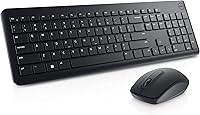
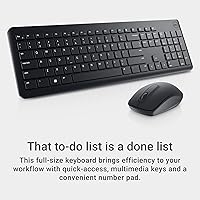
Dell KM3322W Wireless Keyboard and Mouse Combo

Dell KM3322W Wireless Keyboard and Mouse Combo — image 1
Dell KM3322W Wireless Keyboard and Mouse Combo — image 2

Dell KM3322W Wireless Keyboard and Mouse Combo — image 3

Dell KM3322W Wireless Keyboard and Mouse Combo — image 4
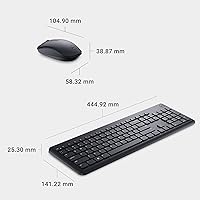
Dell KM3322W Wireless Keyboard and Mouse Combo — image 5
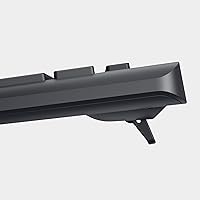
Dell KM3322W Wireless Keyboard and Mouse Combo — image 6
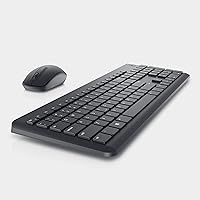
Dell KM3322W Wireless Keyboard and Mouse Combo — image 7
Dell KM3322W Wireless Keyboard and Mouse Combo — image 8
Dell KM3322W Wireless Keyboard and Mouse Combo — image 9
78%
22%

Overview

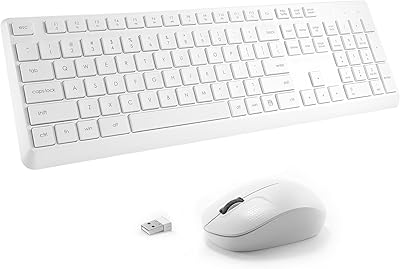
The Dell KM3322W Wireless Keyboard and Mouse Combo is Dell's answer to a straightforward question: can a well-known PC brand deliver a dependable wireless setup without asking much from your wallet? Plug the USB nano-receiver into any available port and you're up and running — no software downloads, no pairing rituals. The full-size layout comes with a numeric keypad, which makes a genuine difference if you're entering data or working in spreadsheets daily. Batteries are included, a small but appreciated touch. Just know going in that this Dell wireless combo is built for everyday reliability, not high-performance or gaming use.

Features & Benefits

The 2.4GHz RF connection handles the basics well — no fussing with Bluetooth, and the signal holds steady across a normal desk distance. The mouse runs on a 1000 DPI optical sensor, which is perfectly adequate for browsing, word processing, and general office work. Don't expect precision gaming performance, but for everyday tasks the cursor tracks cleanly. The scroll wheel is a practical three-button setup, handy for zooming into documents or flipping between browser tabs. Six multimedia shortcut keys sit along the top row of the keyboard, and the adjustable tilt leg lets you dial in a typing angle that actually works for your wrists.

Best For

This keyboard-and-mouse set fits a specific type of buyer well: someone who wants a clutter-free desk without a complicated setup. Home office workers and students will find it especially practical — plug it in and it just works across Windows, Mac, Chrome OS, Android, and even Linux. No app to install, no account to create. It also suits anyone making the jump from wired for the first time, since the learning curve is essentially zero. Broad OS support makes it a sensible choice for mixed-device households where the same combo rotates between a laptop and a desktop throughout the day.

User Feedback

With over 4,000 ratings and a 4.3-star average, the KM3322W has earned a broadly positive reception. Buyers consistently highlight easy setup and comfortable key travel as standout strengths — it's the kind of combo you unbox, plug in, and simply forget about. On the critical side, some users note the mouse runs on the smaller end and may feel cramped for those with larger hands, and a handful wish for a higher DPI ceiling. Battery life hasn't drawn major complaints, though with no rechargeable option you'll want spare AAs nearby. Long-term durability gets mixed marks — most find it holds up fine, but a few report key wobble after extended daily use.

Pros

  • Plug-and-play USB receiver means zero setup headaches — just plug in and start working.
  • Full-size layout with a numeric keypad makes data entry and spreadsheet work genuinely comfortable.
  • Broad OS compatibility covers Windows, Mac, Chrome OS, Android, and several Linux distributions.
  • The 2.4GHz RF connection holds steady and does not suffer from the pairing issues Bluetooth combos sometimes cause.
  • Six multimedia shortcut keys let you control volume, playback, and more without touching the screen.
  • Spill-resistant keyboard design adds a practical layer of protection for everyday desk environments.
  • Anti-fade key coating keeps the legends legible even after months of regular use.
  • Batteries are included out of the box, so you can start using it immediately.
  • At its price tier, buying from Dell means reasonable brand accountability if something goes wrong.
  • Adjustable tilt leg helps dial in a comfortable typing angle without needing a separate wrist rest.

Cons

  • The mouse offers no adjustable DPI settings, which limits its usefulness beyond basic office tasks.
  • Smaller hand users may adapt fine, but the mouse body feels noticeably compact during extended use.
  • No rechargeable battery option means ongoing cost and waste from disposable AA batteries.
  • Some long-term users report minor key wobble developing after sustained daily use.
  • The 1000 DPI ceiling makes the mouse a poor fit for graphic work or any detail-oriented cursor control.
  • There is no dedicated software for remapping keys or customizing the multimedia shortcuts.
  • The keyboard has no backlighting, which can be a real inconvenience in dimly lit workspaces.
  • Wireless range is functional but not generous — moving far from the receiver can cause occasional signal inconsistency.
  • The combo is only available in black, offering no color or style options for buyers with specific desk aesthetics.

Ratings

The scores below reflect an AI-driven analysis of thousands of verified global buyer reviews for the Dell KM3322W Wireless Keyboard and Mouse Combo, with spam, bot-generated, and incentivized feedback actively filtered out before scoring. Each category captures what real users praised and what genuinely frustrated them in day-to-day use. Both the strengths and the honest shortcomings of this keyboard-and-mouse set are reflected without bias.

Ease of Setup
94%
Users across skill levels consistently described setup as effortless — plug in the nano-receiver and both devices are immediately recognized. This was especially appreciated by first-time wireless peripheral buyers who expected complexity and were relieved to find none.
A small number of users on older Linux distributions or certain Chromebook configurations reported the receiver needing a different USB port before it was recognized. These cases were rare but worth noting for less common OS setups.
Value for Money
88%
At its entry-level price point, buyers repeatedly noted that getting a full-size keyboard with a numeric keypad and a functional wireless mouse from a brand like Dell felt like a strong deal. Many compared it favorably to generic no-name combos at a similar cost.
Some reviewers felt the mouse quality slightly lags behind the keyboard in terms of perceived value, and a few noted that spending a little more unlocks significantly better mouse ergonomics and DPI flexibility elsewhere on the market.
Typing Comfort
81%
19%
The plunger key mechanism provides a tactile feel that most casual typists found comfortable for long document sessions. The adjustable tilt leg was a frequently mentioned detail that let users fine-tune the angle to reduce wrist strain during extended work.
Power typists accustomed to mechanical switches found the key travel underwhelming and described the feedback as mushy over time. The keyboard is adequate for productivity use but falls short for anyone who types heavily and cares about tactile response quality.
Mouse Performance
67%
33%
For browsing, email, and general office navigation, the optical sensor tracks cleanly on most desk surfaces including wood and fabric mouse pads. Users doing everyday tasks rarely complained about the cursor behavior during normal use.
The fixed 1000 DPI ceiling was the most consistently cited limitation in negative reviews, particularly from users who expected even a basic sensitivity toggle. Those with larger hands also flagged the compact mouse body as fatiguing during long work sessions.
Build Quality
74%
26%
The keyboard chassis feels solid for its category, and the anti-fade key coating held up well for most users over six to twelve months of regular use. The spill-resistant design gave several buyers peace of mind working near beverages.
The mouse housing attracted criticism for feeling noticeably lighter and more hollow than the keyboard, which some users interpreted as a sign of fragility. A subset of longer-term owners reported key wobble developing after sustained daily use beyond a year.
Wireless Reliability
86%
The 2.4GHz RF connection performed consistently in typical home office and classroom environments, with virtually no dropout complaints under normal desk-distance conditions. Users switching from Bluetooth combos specifically appreciated the absence of pairing failures or reconnection delays.
A handful of reviewers in dense apartment buildings or office environments with many competing wireless signals reported occasional cursor stuttering. The range also diminished noticeably through walls, which matters for users hoping to operate the combo from across a room.
Battery Life
71%
29%
Most buyers reported going several months before needing to replace batteries under typical eight-hour workday usage, which aligns reasonably well with expectations for an RF wireless combo at this tier. The included AA batteries mean users are ready to go immediately out of the box.
The absence of any rechargeable option is a real inconvenience for environmentally conscious buyers or those who dislike managing disposable batteries. There is also no battery level indicator on the mouse, so users sometimes experienced sudden mid-session dropouts without warning.
Key Durability
76%
24%
The anti-fade coating on the keycaps performed noticeably better than bare plastic keys found on many no-name competitors, with most buyers reporting crisp, legible legends well into the first year of daily use. Heavy typists appreciated that letter wear was not an immediate concern.
Users who type six or more hours daily reported visible legend wear beginning around the twelve to eighteen month mark, particularly on high-frequency keys like E, A, and the spacebar. The coating is a genuine improvement but not a permanent solution for the heaviest users.
Multimedia Shortcuts
78%
22%
The six dedicated multimedia keys along the top row were consistently praised by buyers who work with music, video calls, or streaming in the background. Being able to mute, adjust volume, or pause media without alt-tabbing was a small but genuinely useful workflow improvement.
On Mac OS and Chrome OS, some of the shortcut keys did not map correctly without manual remapping, and there is no official Dell software to reassign them. Windows users had no complaints, but cross-platform users found the experience inconsistent.
Compatibility
91%
The breadth of OS support — spanning Windows, Mac OS, Chrome OS, Android, and multiple Linux distributions — was a genuine differentiator that multiple reviewers called out. Households running mixed devices found the combo moved between systems without any reconfiguration needed.
While the hardware itself is broadly compatible, some advanced function key behaviors are Windows-optimized and behave differently or not at all on other platforms. Users on niche Linux distributions occasionally needed to experiment with port placement before achieving stable recognition.
Mouse Ergonomics
58%
42%
For users with average or smaller hands, the mouse shape was comfortable enough for standard office workloads, and the three-button layout covered all the basics without unnecessary complexity. Lightweight users doing short computing sessions had few complaints.
Buyers with larger hands were the most vocal critics, describing the mouse as feeling cramped and causing discomfort during extended use. The lack of any side buttons or ergonomic contouring also made it a step behind even comparably priced standalone mice from other brands.
Scroll Wheel
79%
21%
The mechanical scroll wheel felt precise and responsive for document navigation and browser tab switching, which matched well with the productivity focus of the overall combo. Users who frequently zoom in on spreadsheets or images found the wheel behavior accurate and consistent.
The scroll wheel has no horizontal tilt function, which limits navigation in wide spreadsheets without using the keyboard. A few users also noted that the wheel click resistance felt slightly stiff compared to other mice they had used previously.
Noise Level
82%
18%
The plunger keys produced a quieter typing sound than most membrane keyboards, which was appreciated by remote workers on frequent video calls and buyers sharing open-plan office or living spaces. Multiple reviewers specifically mentioned the noise level as a positive surprise.
The keys are not silent — some co-workers and housemates in very quiet environments still found the typing audible during calls. Users expecting the near-silent action of premium quiet keyboards will find this combo falls short of that standard.
Portability
69%
31%
The single USB nano-receiver handling both devices simplifies the setup for users who occasionally move their combo between a desktop and a laptop. The receiver is small enough to leave plugged in during transport without risk of snapping it.
At 1.85 pounds and 20.5 inches wide, the full-size keyboard is not a natural travel companion and was never designed to be. Users who bought it hoping to pack it regularly reported that it felt bulky compared to compact or tenkeyless wireless alternatives.

Suitable for:

The Dell KM3322W Wireless Keyboard and Mouse Combo is a natural fit for anyone who wants a wire-free desk without the complexity or cost that usually comes with it. Home office workers who spend their days in documents, spreadsheets, and video calls will find it covers all the bases — the full-size layout with a numeric keypad is genuinely useful for data entry, and the plug-in USB receiver means setup takes under a minute. Students setting up a dorm workspace or remote workers furnishing a secondary workstation will appreciate that there is no software to install and no account to create. It also works across an unusually wide range of operating systems, making it a practical choice for households that run a mix of Windows machines, Macs, or Chromebooks. For buyers who want a recognizable brand name they can trust at an accessible price point, this keyboard-and-mouse set is a smart, low-risk pick.

Not suitable for:

The Dell KM3322W Wireless Keyboard and Mouse Combo is not the right tool for buyers who demand more from their peripherals. Gamers or creative professionals who rely on precise cursor control will hit the ceiling quickly — the 1000 DPI optical mouse simply cannot match the adjustability and accuracy of dedicated gaming or design mice. The mouse also skews toward a compact form factor, which can feel cramped during long sessions for users with larger hands. Since the combo runs entirely on AA batteries with no rechargeable option built in, power-conscious buyers or those who dislike managing disposable batteries may find that frustrating over time. Anyone who types heavily for hours on end and expects a premium tactile feel will likely find the plunger keys adequate but unremarkable. If your needs push beyond reliable everyday use, this keyboard-and-mouse set will feel like a compromise rather than a solution.

Specifications

  • Wireless Technology: Connects via a 2.4GHz RF USB nano-receiver for stable, low-latency input without requiring Bluetooth pairing.
  • Mouse Sensor: Uses an optical LED sensor with a fixed resolution of 1000 DPI, suitable for everyday computing tasks.
  • Mouse Buttons: Features three buttons: left-click, right-click, and a clickable scroll wheel for standard navigation.
  • Keyboard Layout: Full-size layout including a dedicated numeric keypad, function row, and standard punctuation keys.
  • Multimedia Keys: Includes 6 dedicated shortcut keys along the top row for quick access to volume, playback, and media controls.
  • Key Mechanism: Plunger-style keys with an anti-fade coating to maintain legible legends under prolonged daily use.
  • Spill Resistance: The keyboard is designed with spill resistance to help protect against minor liquid exposure during everyday use.
  • Tilt Adjustment: An adjustable tilt leg on the underside of the keyboard allows users to modify the typing angle for comfort.
  • Power Source: Both the keyboard and mouse are battery-powered, requiring 2 AA batteries total, which are included in the box.
  • Dimensions: The keyboard measures 20.5 x 5.8 x 1.8 inches, providing a standard desktop footprint suitable for most workspaces.
  • Weight: The combined weight of the keyboard and mouse is approximately 1.85 pounds.
  • Color: Available exclusively in black with a matte finish consistent with Dell's standard peripheral lineup.
  • Compatible OS: Works across Windows 7, 8, 10, and 11, Mac OS, Chrome OS, Android, FreeDOS, and Red Hat Enterprise Linux 6.
  • Compatible Devices: Designed for use with desktop PCs, laptops, tablets, and smartphones that support a USB connection.
  • Connectivity Port: Requires one standard USB Type-A port on the host device to accommodate the wireless nano-receiver.
  • Brand: Manufactured by Dell Technologies, a globally recognized enterprise PC and peripheral hardware brand.
  • Model Number: The official model designation is KM3322W, used across Dell's product documentation and support channels.
  • Date Available: This combo was first made available for purchase in February 2023.
  • Ratings: Has accumulated over 4,088 customer ratings on Amazon with an average score of 4.3 out of 5 stars.
  • Seller Rank: Ranked number 16 in the Computer Keyboard and Mouse Combos category on Amazon at time of review.

Related Reviews

Arteck HW192 Wireless Keyboard and Mouse Combo
78%
78%
Build Quality
72%
Typing Experience
63%
Mouse Comfort & Ergonomics
81%
Battery Life
69%
Wireless Connectivity
More
Letton Wireless Retro Keyboard and Mouse Combo
78%
93%
Visual Design & Aesthetics
91%
Setup & Ease of Use
61%
Typing Feel & Key Travel
84%
Wireless Reliability
58%
Mouse Performance
More
TKVPJYYI Wireless Retro Typewriter Keyboard and Mouse Combo
76%
88%
Design & Aesthetics
71%
Typing Experience
62%
Mouse Performance
58%
Build Quality
83%
Wireless Connectivity
More
EDJO Wireless Keyboard and Mouse Combo
76%
88%
Value for Money
94%
Ease of Setup
71%
Keyboard Typing Feel
63%
Mouse Performance
86%
Wireless Connectivity & Range
More
GEEZER Wireless Keyboard and Mouse Combo
72%
83%
Value for Money
91%
Aesthetic Design
94%
Ease of Setup
67%
Typing Feel
62%
Mouse Quality
More
GUKJOB iK6630 Wireless Keyboard and Mouse Combo
77%
88%
Value for Money
83%
Keyboard Typing Feel
91%
Aesthetic & Design
87%
Ease of Setup
61%
Mouse Performance
More
Vssoplor Wireless Keyboard and Mouse Combo
82%
91%
Value for Money
84%
Keyboard Typing Experience
61%
Mouse Ergonomics
88%
Wireless Connectivity & Stability
72%
Battery Life
More
Tayderley Wireless Keyboard and Mouse Combo

86%
88%
Typing Comfort
85%
Mouse Performance
94%
Battery Life
83%
Build Quality
92%
Ease of Setup
More
MARVO Wireless Keyboard and Mouse Combo

76%
91%
Value for Money
88%
Wireless Connectivity
79%
Mouse Performance
63%
Keyboard Typing Feel
67%
Ergonomics & Comfort
More
cimetech Wireless Keyboard and Mouse Combo
76%
94%
Ease of Setup
91%
Typing Noise Level
89%
Portability
83%
Key Layout & Usability
62%
Mouse Performance
More

FAQ

No, you do not. Just plug the USB nano-receiver into an open port on your computer and both the keyboard and mouse are recognized automatically. It works out of the box on all supported operating systems without any driver downloads or account setup.

You need two AA batteries in total — one for the keyboard and one for the mouse. The good news is that both batteries are included in the box, so you can start using the combo right away without a hardware store run.

It works across a wide range of operating systems, including Mac OS, Chrome OS, and several Linux distributions, in addition to Windows. You might find that a few Windows-specific shortcut keys have no function on Mac or Chrome OS, but core typing and mouse navigation work without any issues.

Unfortunately, no. The mouse is fixed at 1000 DPI with no software or hardware toggle to change it. For general office work and web browsing that is perfectly adequate, but if you need adjustable sensitivity for design work or gaming, this combo is not the right fit.

The 2.4GHz RF connection typically performs well at distances up to around 30 feet in an open environment, though walls and interference from other wireless devices can reduce that range. For a typical desk setup, signal consistency should not be an issue at all.

It is spill-resistant, not waterproof — there is an important difference. It can handle minor drips or a small splash without immediate damage, but submerging it or letting liquid pool inside is a different story. Think of it as a safety net for the occasional coffee drip, not a guarantee against serious spills.

This is one of the more consistent pieces of feedback from buyers, and it is worth taking seriously. The mouse is on the compact side, which works well for average or smaller hands but can feel cramped during long sessions if your hands are large. If hand size is a concern, it may be worth trying a standalone mouse with a more ergonomic profile.

Dell typically backs its peripherals with a one-year limited hardware warranty, though the exact terms can vary by region and purchase channel. It is always worth confirming the warranty terms with the retailer at the time of purchase to know what is covered.

No, the nano-receiver is paired to the specific keyboard and mouse it ships with and is not designed to hot-swap between computers. If you need to move between machines frequently, you would need to physically unplug and replug the receiver each time, which is manageable but not convenient.

Dell uses an anti-fade coating on the keycaps specifically to address this concern. Most buyers report the legends hold up well over time, though a small number of users who type heavily every day have noted some wear after a year or more of continuous use. Compared to basic uncoated keys, the coating makes a noticeable difference in longevity.

Where to Buy