




Overview

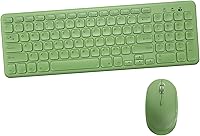
The Arcwares Wireless Keyboard and Mouse Combo sits in a crowded budget segment but carves out its own identity through a pastel green colorway and square keycaps that actually look good on a real desk. It is not trying to compete with performance peripherals — it is aimed squarely at students, home users, and anyone who wants a tidy wireless setup without spending much. A single nano receiver handles both devices and tucks neatly into the mouse body when not in use. Battery-powered with a three-stage auto sleep system, it is built for casual daily use on Windows. Mac users should know upfront that the function keys have real compatibility gaps worth considering before buying.

Features & Benefits

The full 104-key layout includes a number pad, which not every budget wireless set bothers to offer. The silent membrane switches are a genuine highlight — typing is noticeably muted, the kind of quiet that will not bother a roommate or anyone nearby. The 2.4 GHz connection has been reliable in day-to-day use, and there are no drivers or software to deal with; just plug in the receiver and go. The mouse offers three DPI levels to switch between, helpful when you shift between browsing and more precise work. The keyboard's slim profile and slight upward angle keep extended typing sessions reasonably comfortable for most people.

Best For

This keyboard-mouse set makes the most sense for students building out their first real desk setup or remote workers who want something that looks considered without obsessing over specs. It excels in quieter environments — dormitories, shared apartments, late-night sessions where loud typing is inconsiderate. It also shines as a secondary setup: plug it into a spare laptop and you are up and running in under a minute. Gift buyers respond well to it because it looks like more than it costs. If you run Windows and have no need for programmable keys or companion software, the Arcwares set delivers reliably on what it promises.

User Feedback

Across more than 3,000 ratings at 4.2 stars, the overall picture is fairly consistent. Buyers are genuinely pleased with how the set looks in person, noting that the colors closely match the product photos — not always a given in this price tier. The quiet keys come up repeatedly as a real-world positive, not just a spec on a page. On the downside, the mouse splits opinion: its lighter build works fine for some and feels insubstantial to others, so preference plays a role. The Mac compatibility gaps have caught a meaningful number of buyers off guard, which is a legitimate flag worth raising before purchase. Battery life generally earns positive marks.

Pros

  • Silent keys genuinely reduce noise in shared spaces — not just a spec, but a daily quality-of-life win.
  • The pastel green aesthetic and square keycaps look exactly like the product photos, which is rarer than it should be.
  • Full 104-key layout with a number pad included — a real advantage over most compact budget sets.
  • Plug-and-play nano receiver means zero software, zero setup headaches, and works immediately.
  • Three DPI levels on the mouse give enough flexibility for both casual browsing and more precise cursor work.
  • Auto sleep kicks in across three stages, meaningfully extending battery life for everyday users.
  • The nano receiver stores inside the mouse body, reducing the risk of losing it during travel or desk reorganization.
  • Slim keyboard profile with a slight upward angle keeps typing reasonably comfortable during longer sessions.
  • At this price point, the overall package consistently exceeds expectations for home and student use.

Cons

  • Mouse feels noticeably light in hand — users who prefer weighted peripherals may find it unsatisfying to grip.
  • Mac FN shortcut incompatibility is a significant limitation that is not clearly flagged before purchase.
  • Membrane key switches lack tactile feedback, which can affect typing accuracy for users switching from mechanical boards.
  • Both devices run on disposable batteries with no rechargeable option, adding an ongoing maintenance cost.
  • Losing the single shared nano receiver renders both devices unusable with no Bluetooth fallback available.
  • The mouse casing shows minor flex under firm grip pressure, which raises questions about long-term durability.
  • Keycap labels are small and can be hard to read in low-light conditions.
  • Not suited for heavy daily workloads over extended periods — build materials reflect the budget tier honestly.

Ratings

The scores below reflect an AI-driven analysis of verified global buyer reviews for the Arcwares Wireless Keyboard and Mouse Combo, with spam, bot activity, and incentivized feedback actively filtered out before scoring. Each category is rated on real-world performance patterns reported by actual users, not manufacturer claims. Both the strengths that keep buyers satisfied and the friction points that generate complaints are transparently represented here.

Value for Money
88%
For the price tier it occupies, this wireless combo consistently surprises buyers who expected less. Reviewers frequently note that the aesthetic alone would justify a higher cost, and the functional reliability on top of that makes the overall package feel like a fair deal for everyday home or student use.
Buyers who compare it against slightly pricier mid-range sets sometimes feel the gap in build quality becomes apparent after a few months. The value perception is strong at first but can soften if durability becomes a concern over extended use.
Aesthetic Design
91%
The pastel green colorway and square keycap profile genuinely stand out on a desk — this is one of the few budget peripherals where the product photos actually match reality, which reviewers explicitly call out. For buyers who want their workspace to feel considered and personal, this combo delivers something most budget sets cannot.
The design is polarizing by nature; buyers who prefer understated or all-black setups will find the color scheme too loud. There is no neutral colorway option within this specific variant, so it requires genuine commitment to the aesthetic.
Keyboard Typing Experience
76%
24%
The silent membrane switches make a real difference in shared living situations — dorm rooms, open-plan offices, and late-night sessions where noise matters. The slight upward angle of the keyboard body also helps with comfort during longer typing stretches without requiring a wrist rest.
The key travel and tactile feedback are typical of budget membranes, which means touch typists coming from mechanical keyboards will notice the difference immediately. There is no satisfying click or pronounced bump, which some users find reduces typing accuracy over time.
Mouse Performance
67%
33%
Three switchable DPI levels give users enough flexibility to shift between browsing and more precise tasks without needing software. At 800 DPI the cursor feels controlled for detail work; at 1600 it covers a large monitor without excessive wrist movement.
The mouse weighs just 80 grams and feels noticeably light in hand — for users who prefer a weighted, substantial mouse, this is a genuine drawback that affects daily comfort. A small but vocal group of reviewers describe it as feeling fragile rather than simply lightweight.
Wireless Connectivity
84%
The 2.4 GHz nano receiver performs reliably in typical home and office environments, with no reported lag during everyday tasks like document editing, browsing, or media playback. The plug-and-play setup means there is no installation hurdle — pull the receiver from the mouse body and you are connected in seconds.
At longer distances or in RF-crowded environments with many competing wireless devices, a small number of users reported occasional brief dropouts. This is not a common complaint, but it is worth noting for users who plan to operate the set more than a few meters from their computer.
Build Quality
62%
38%
For a battery-powered budget combo, the keyboard chassis holds up reasonably well on a flat desk surface. The keycaps feel smooth without being slippery, and the overall assembly does not flex noticeably under normal typing pressure.
This is not a premium-built product, and the materials reflect that honestly. The mouse casing in particular feels like it would not survive drops or rough handling well, and several reviewers noticed minor flex in the mouse body when gripping it firmly.
Battery Life
79%
21%
The three-stage auto sleep system — activating at one second, one minute, and eight minutes of inactivity — meaningfully extends battery longevity for users who step away from their desk frequently. Most reviewers report going weeks between battery changes under normal daily use.
Because both devices are battery-powered rather than rechargeable, users need to keep spare batteries on hand, which is a recurring minor inconvenience. Heavy users working eight-plus hours daily may find battery consumption higher than the lighter users the product seems optimized for.
Noise Level
89%
Silent keys are one of the most frequently praised aspects of this combo in real buyer reviews, and the praise reads as genuine rather than habitual. Users in libraries, shared bedrooms, and open offices specifically note that colleagues and housemates have commented positively on the quiet operation.
The mouse click buttons are quieter than average but not completely silent — in a very quiet room they remain audible. Buyers expecting total silence from both devices may find the mouse clicks slightly more noticeable than anticipated.
Mac Compatibility
41%
59%
The keyboard connects and basic typing functions work on macOS without any driver installation, which means it is usable in a pinch for Mac users who need a quick wireless solution for simple text input tasks.
The FN multimedia shortcuts are largely non-functional on Mac, and this limitation is not clearly communicated before purchase, which has generated frustration among buyers who assumed full compatibility. Mac-primary users should treat this as a Windows-optimized product and consider alternatives accordingly.
Setup & Ease of Use
93%
There is genuinely nothing to configure — the nano receiver slots into any USB-A port, both devices power on, and they connect instantly. Reviewers who are less technically confident specifically appreciate that there is no software, no Bluetooth pairing sequence, and no manual to consult.
The single shared receiver is convenient but also means that losing it renders both devices non-functional simultaneously. There is no Bluetooth fallback, so users on ultrabooks with no USB-A port will need a hub or adapter.
Keyboard Layout & Key Coverage
82%
18%
The full 104-key layout including a number pad is a meaningful advantage over the compact wireless sets common at this price point. Accountants, spreadsheet users, and anyone who relies on the numpad for data entry will appreciate that it was not sacrificed to cut costs.
The FN shortcut labeling is small and can be difficult to read under poor lighting conditions. Users who frequently use media controls by feel rather than sight may need a brief adjustment period to memorize key positions.
Portability & Storage
71%
29%
The keyboard is slim enough to slide into a laptop bag without adding meaningful bulk, and the compact mouse fits comfortably in a side pocket. The receiver storing inside the mouse body is a practical touch that prevents the common problem of losing the dongle during transport.
At 660 grams the keyboard is not ultralight, and the full-size layout means it occupies more bag space than a tenkeyless or compact alternative. Users who travel frequently might find a smaller form factor more practical despite the numpad trade-off.
Gifting Appeal
86%
The color-coordinated aesthetic, clean packaging, and immediate out-of-box usability make this combo a strong gifting option for students or anyone setting up a new home desk. It looks like a considered, personal gift rather than a generic tech purchase.
The narrow OS compatibility is a real risk for gift buyers who do not know the recipient uses a Mac. Without that knowledge confirmed in advance, there is a non-trivial chance the function key limitations will dampen the recipient's first impression.

Suitable for:

The Arcwares Wireless Keyboard and Mouse Combo is a strong fit for students, casual home users, and remote workers who want a functional, visually appealing desk setup without spending a lot. If you share a bedroom, work in a library, or sit in an open-plan space where loud typing is inconsiderate, the silent membrane keys solve a real daily problem. The full 104-key layout with a number pad also makes it more practical than it might look — spreadsheet users and anyone who handles data entry regularly will appreciate that the numpad was not cut to save costs. It also works well as a secondary or guest computer setup: plug in the nano receiver and both devices are ready instantly, with zero software to install. Gift buyers will find it an easy win too, since the color accuracy is genuinely close to the product photos and the out-of-box experience requires no setup knowledge from the recipient.

Not suitable for:

The Arcwares Wireless Keyboard and Mouse Combo has real limitations that make it the wrong choice for certain buyers, and it is worth being direct about them. Mac users are the most obvious group to steer away — basic typing works, but the FN multimedia shortcuts are largely non-functional on macOS, and that is not a minor inconvenience if you rely on media controls or brightness keys throughout the day. Mechanical keyboard enthusiasts or anyone accustomed to pronounced tactile feedback will find the membrane switches underwhelming and may struggle to match their usual typing accuracy. Users who prefer a heavier, more substantial mouse should also think carefully — at 80 grams the mouse is genuinely light, and while that suits some people, others will find it feels insubstantial during extended use. Power users who need programmable macros, dedicated software, or Bluetooth multi-device pairing will hit a hard ceiling quickly. Finally, anyone buying for long-term heavy-duty use should factor in that the build quality reflects the price tier honestly — it is not fragile, but it is not built to last years of intense daily punishment either.

Specifications

  • Connectivity: Both the keyboard and mouse connect via a single 2.4 GHz USB nano receiver, providing a stable wireless connection without Bluetooth pairing required.
  • Keyboard Layout: Full-size 104-key layout including a dedicated number pad and 12 FN multimedia shortcut keys mapped to F1 through F12.
  • Key Switch Type: Silent membrane switches are used across all keys, designed to minimize typing noise in shared or quiet environments.
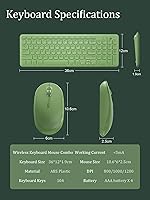
  • Mouse DPI: The mouse offers three selectable DPI levels — 800, 1200, and 1600 — switchable via a dedicated button on the mouse body.
  • Mouse Buttons: Three-button configuration includes left click, right click, and a clickable scroll wheel for standard navigation tasks.
  • Keyboard Dimensions: The keyboard measures 36 cm in length, 12 cm in depth, and 2 cm in height, providing a slim desktop footprint.
  • Mouse Dimensions: The mouse measures 10.6 cm in length, 6 cm in width, and 2.5 cm in height, sized for standard palm or claw grip use.
  • Keyboard Weight: The keyboard weighs 660 grams, giving it enough stability to remain in place during typing without feeling excessively heavy.
  • Mouse Weight: The mouse weighs 80 grams, making it one of the lighter options in its category — a noticeable characteristic during extended use.
  • Power Source: Both devices are powered by standard replaceable batteries; the keyboard and mouse each use their own separate battery compartment.
  • Auto Power Saving: A three-stage automatic sleep system activates after 1 second, 1 minute, and 8 minutes of inactivity to conserve battery life.
  • Receiver Storage: The nano USB receiver is stored in a dedicated compartment on the underside of the mouse when not in use.
  • Driver Requirement: No software or driver installation is required; the combo operates on a true plug-and-play basis across compatible systems.
  • OS Compatibility: Fully compatible with Windows operating systems; macOS supports basic keyboard and mouse input but FN multimedia shortcuts are not fully functional.
  • Multimedia Keys: Twelve FN shortcut keys provide quick access to media playback, pause, volume control, and other common functions on Windows systems.
  • Typing Angle: The keyboard features a built-in slight upward incline designed to provide a more comfortable wrist position during extended typing sessions.
  • Package Contents: The package includes one wireless keyboard, one wireless mouse, one shared nano USB receiver, and required batteries for initial use.
  • Brand: Manufactured and sold under the Arcwares brand, which positions this combo within the budget-friendly consumer peripheral segment.

Related Reviews

Arteck HW192 Wireless Keyboard and Mouse Combo

78%
78%
Build Quality
72%
Typing Experience
63%
Mouse Comfort & Ergonomics
81%
Battery Life
69%
Wireless Connectivity
More
VEILZOR UK418 Wireless Keyboard and Mouse Combo
81%
91%
Value for Money
84%
Typing Comfort
89%
Noise Level
82%
Wireless Reliability
76%
Mouse Ergonomics
More
MPTOG S801AG Wireless Keyboard and Mouse Combo
75%
88%
Aesthetic Design
93%
Ease of Setup
78%
Typing Feel
61%
Mouse Tracking Accuracy
82%
Wireless Reliability
More
MOWUX Wireless Keyboard and Mouse Combo
88%
91%
Typing Comfort
89%
Mouse Responsiveness
94%
Wireless Connectivity
85%
Build Quality
88%
Keycap Durability
More
Letton Wireless Keyboard and Mouse Combo
83%
89%
Design & Aesthetics
81%
Ergonomics & Comfort
75%
Wireless Connectivity
90%
Battery Life
92%
Value for Money
More
Links9+ Wireless Keyboard and Mouse Combo
85%
89%
Ergonomics and Comfort
92%
Wireless Performance and Connectivity
85%
Build Quality
94%
Ease of Use and Setup
80%
Battery Life
More
CHESONA Wireless Keyboard and Mouse Combo
86%
93%
Multi-device Connectivity
87%
Typing Experience
85%
Battery Life
91%
Design & Build Quality
78%
Ergonomics & Comfort
More
Vssoplor Wireless Keyboard and Mouse Combo
82%
91%
Value for Money
84%
Keyboard Typing Experience
61%
Mouse Ergonomics
88%
Wireless Connectivity & Stability
72%
Battery Life
More
RECCAZR Wireless Keyboard and Mouse Combo
86%
89%
Ergonomics & Comfort
86%
Build Quality & Durability
75%
Keyboard Responsiveness
91%
Mouse Precision & Quietness
94%
Ease of Setup
More
GUKJOB Wireless Keyboard and Mouse Combo
87%
88%
Typing Experience
91%
Design & Aesthetics
75%
Battery Life
95%
Ease of Setup
72%
Build Quality
More

FAQ

No installation needed at all. Just take the nano receiver out of the mouse compartment, plug it into a USB-A port on your computer, and both the keyboard and mouse connect automatically. Windows recognizes everything instantly with no drivers or software to deal with.

Basic typing and mouse functions will work on macOS without any issues. However, the FN multimedia shortcuts — things like media playback, volume, and brightness — are not fully compatible with Mac systems. If you rely on those shortcuts daily, this wireless combo is better suited to a Windows setup.

There is a small storage slot built into the underside of the mouse specifically for the nano receiver. It slots in securely so you are unlikely to lose it when moving the set between desks or packing it in a bag.

Most users report several weeks of normal daily use before needing to replace batteries in either device. The three-stage auto sleep feature helps meaningfully — the devices drop into low-power mode very quickly when idle, which adds up over time. Heavy all-day users may go through batteries faster than lighter users.

The mouse is genuinely lightweight at 80 grams, which some people love and others find unsatisfying. It is not fragile in normal use, but it does not have the solid, weighted feel of a premium mouse. If you prefer heavier mice with a more substantial grip, this one may feel underwhelming regardless of how it performs.

This combo is designed for standard computers with USB-A ports running Windows. Tablets and smart TVs vary widely in USB support and input device compatibility, so it may or may not work depending on the device. There is no Bluetooth mode or app-based pairing, so if your device does not recognize a standard USB HID device, it will not function.

The silent keys are one of the most consistently praised features in real buyer reviews, so it is not just a label. The keystrokes are noticeably muted compared to standard membrane keyboards — useful in shared bedrooms, open offices, or anywhere noise is a concern. The mouse clicks are quieter than average too, though not completely silent.

Unfortunately, losing the receiver means both devices stop working since there is no Bluetooth fallback or alternative pairing option. The receiver is shared between the keyboard and mouse, so a replacement would need to come from the manufacturer. The storage slot in the mouse body helps prevent this, but it is worth being mindful of during travel.

It is actually one of the better options for that scenario. The Arcwares Wireless Keyboard and Mouse Combo requires zero setup knowledge — plug in one receiver and everything works. The color accuracy matches the product photos closely, so it looks exactly as expected when unwrapped. Just confirm the recipient uses a Windows computer before buying.

No, this keyboard does not have backlighting. The keys are not illuminated, which is a common trade-off at this price tier. If you frequently type in low-light conditions and need to see the keys, you will either need to learn the layout by feel or consider a backlit alternative.







