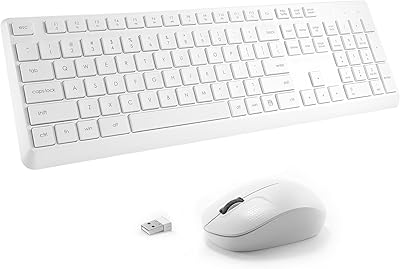
TopMate Wireless Keyboard and Mouse Combo


Overview
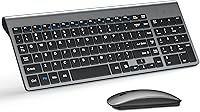
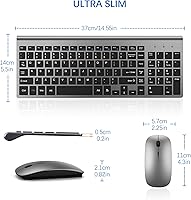
The TopMate Wireless Keyboard and Mouse Combo is a straightforward, budget-conscious wireless set aimed at home office users and everyday desktop setups. It ships in a clean gray-black colorway with a slim, low-profile build — the keyboard is just 2cm thick, which keeps your desk looking uncluttered. What stands out at this price point is what comes in the box: batteries are already included, and a keyboard dust cover is tucked in as well, something you rarely see at this tier. The nano USB receiver stores inside the mouse itself, so you're never hunting for it when you pack up and move. Lightweight and portable, this wireless combo works equally well at a fixed desk or a temporary workspace.
Features & Benefits
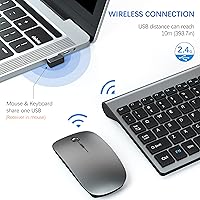
The 2.4GHz connection is reliable across a standard room — the claimed 10-meter range holds up well in typical home use, though walls and interference can reduce that in practice. The full-size layout keeps the numeric keypad intact, which anyone doing spreadsheet work or data entry will appreciate. Twelve media hotkeys handle volume, playback, and mail shortcuts without any extra software — just plug in the receiver and go. The scissor-switch keys are notably quiet, a real plus if you share a room or work late. On the mouse side, five DPI settings ranging from 800 up to 2400 let you toggle between precise document navigation and faster general use with a single button press.
Best For
This keyboard-and-mouse bundle is a natural fit for remote workers, students, and anyone who wants a clean, quiet desk setup without a complicated install process. If you regularly move between a home office and a secondary spot — a coffee shop, a library, a spare room — the compact form factor and self-storing receiver make packing up effortless. Windows users will get full value from every hotkey; Mac users should know upfront that hotkey compatibility is only partial, so some shortcuts simply will not respond as expected. It also suits anyone retiring a wired combo who does not need programmable macros or gaming-grade response times. Practical and unfussy — that is the core appeal here.
User Feedback
With over 8,000 ratings averaging 4.2 stars, the TopMate set clearly resonates with most buyers. Praise consistently focuses on easy plug-and-play setup and how quiet the typing experience is — exactly what people shopping in this category want confirmed. On the critical side, some users mention the mouse scroll wheel feels slightly cheap, and a few note that key travel is shallower than expected if coming from a standard membrane board. Battery life holds up reasonably well for most, though heavy daily users may find themselves replacing cells closer to the three-month mark rather than five. Unit consistency appears to be the bigger variable, with positive and negative reviews sometimes describing noticeably different experiences, pointing to some variance in build quality.
Pros
- Plug-and-play setup with no software required — working within seconds of plugging in the receiver.
- Scissor-switch keys are genuinely quiet, comfortable for long typing sessions in shared spaces.
- Full-size layout retains the numeric keypad, a real plus for data entry and spreadsheet work.
- Batteries and a keyboard dust cover are included, adding practical value right out of the box.
- Five adjustable DPI levels let you tune cursor speed to match the task at hand.
- The slim 2cm keyboard profile keeps desks tidy and slides easily into a laptop bag.
- Nano receiver stores inside the mouse body, so it is always with the combo when you travel.
- Over 8,000 verified ratings averaging 4.2 stars reflects broad, sustained buyer satisfaction.
- Two-year warranty provides meaningful coverage for a budget-tier peripheral.
- Works across a wide range of Windows versions and connects cleanly to Mac for basic input tasks.
Cons
- The mouse scroll wheel feels stiff and cheap to many users, noticeably lagging behind the keyboard in build quality.
- Battery life for heavy daily users falls well short of the five-month upper estimate.
- Mac hotkey compatibility is partial at best — volume, playback, and shortcut keys frequently do not respond correctly.
- No battery indicator light on the keyboard means you often discover dead batteries mid-session without warning.
- Key feel at the board edges is inconsistent on some units, suggesting variable quality control between batches.
- The mouse body has a hollow, lightweight feel that undermines confidence in its long-term durability.
- Only one color option available, limiting appeal for buyers with a color-coordinated workspace.
- The nano receiver is very small and easy to misplace during travel or desk reorganization.
- Wireless performance can degrade in high-interference environments like dense apartment buildings or shared offices.
- The keyboard cover material is thin and offers minimal protection beyond keeping off light dust.
Ratings
The TopMate Wireless Keyboard and Mouse Combo has been rated by our AI system after analyzing thousands of verified global purchases, with spam, bot-submitted, and incentivized reviews actively filtered out. Scores reflect the real distribution of buyer experiences — not just the highlights — so both consistent strengths and recurring frustrations are transparently captured in each category below.
Value for Money
Typing Experience
Mouse Performance
Build Quality
Wireless Reliability
Setup & Ease of Use
Battery Life
Noise Level
Mac Compatibility
Portability & Form Factor
Desk Aesthetics
Keyboard Cover Utility
Numeric Keypad Usability
Warranty & After-Sales Support
Suitable for:
The TopMate Wireless Keyboard and Mouse Combo is a practical choice for remote workers, students, and everyday home office users who want a clean, cable-free desk setup without spending a lot or wrestling with driver installations. If your daily computing revolves around documents, spreadsheets, emails, and general browsing, this keyboard-and-mouse bundle covers all of that without asking anything complicated of you. The full-size layout with a numeric keypad makes it especially appealing for anyone who does regular data entry or financial work and does not want to sacrifice that number row. People who move between a home desk and a secondary workspace — a guest room, a library, a shared office — will appreciate how little space this combo takes up in a bag and how quickly it gets running on a new machine. Windows users in particular get the most out of the hotkey row, and anyone upgrading from an aging wired set will find this a noticeable improvement in desk comfort and flexibility.
Not suitable for:
The TopMate Wireless Keyboard and Mouse Combo is not the right fit for buyers who prioritize tactile typing feedback, as the shallow scissor-switch keys will feel underwhelming to anyone accustomed to mechanical switches or deeper-travel keyboards. Gamers should look elsewhere entirely — there is no polling rate optimization, no anti-ghosting, and the mouse tracking is tuned for productivity rather than fast, precise in-game movement. Mac users who depend on media hotkeys for their daily workflow will run into real friction, since a meaningful portion of those function shortcuts simply do not map correctly to macOS, making them decorative rather than functional. If you need a mouse that feels substantial and precise in hand, the lighter plastic construction and scroll wheel quality may frustrate you over time. Anyone expecting the battery to last five months under heavy, all-day use should temper that expectation — real-world longevity for intensive users is considerably shorter than the upper estimate suggests.
Specifications
- Wireless Protocol: The combo uses a 2.4GHz wireless connection for stable, low-latency input across standard home and office environments.
- Range: The manufacturer rates the wireless range at up to 10 meters, though real-world performance may be reduced by walls, furniture, or wireless interference.
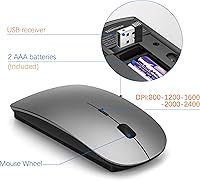
- Receiver: A single nano USB receiver serves both the keyboard and mouse, and it stores inside a dedicated slot in the mouse body when not in use.
- Keyboard Layout: The keyboard is full-size with a numeric keypad on the right side and 12 media function hotkeys across the top row.
- Key Switch: Scissor-switch mechanisms are used under each keycap, providing a shallow travel depth and quieter actuation compared to standard membrane keys.
- Keyboard Dimensions: The keyboard measures 37 x 14 x 2 cm (approximately 14.6 x 5.5 x 0.8 inches), with a uniform 2 cm thickness across the body.
- Mouse DPI Range: The mouse offers five selectable DPI levels: 800, 1200, 1600, 2000, and 2400, switchable via a dedicated button on the mouse body.
- Battery Requirements: The keyboard runs on AAA batteries and the mouse on AA batteries; both sets are included in the box.
- Battery Life: Under typical moderate usage conditions, battery life is estimated at three to five months per charge cycle, though heavy daily use shortens this considerably.
- Combined Weight: The full keyboard and mouse combo weighs approximately 1.54 pounds (around 700g), making it light enough for regular transport.
- OS Compatibility: The combo is compatible with Windows XP through Windows 11; Mac devices are supported for basic input, though media hotkey functionality is only partially compatible with macOS.
- Included Accessories: Each purchase includes AA and AAA batteries, a nano USB receiver, and a fitted keyboard dust cover.
- Color: The combo is available in a gray-black colorway with a matte-finish ABS plastic shell on both the keyboard and mouse.
- Warranty: TopMate provides a two-year warranty covering manufacturing defects, with a replacement unit offered for qualifying quality issues.
- Connectivity Type: The combo connects via a single USB-A nano receiver and requires no driver installation or pairing software on supported operating systems.
- Function Keys: Twelve hotkeys along the top of the keyboard provide shortcuts for media playback, volume control, and mail access on compatible systems.
Related Reviews

Arteck HW192 Wireless Keyboard and Mouse Combo

QUASIO Wireless Keyboard and Mouse Combo

MPTOG S801AG Wireless Keyboard and Mouse Combo

UBOTIE Wireless Keyboard and Mouse Combo

SABLUTE Wireless Backlit Keyboard and Mouse Combo

CHESONA Multi-Device Wireless Keyboard and Mouse Combo

Vssoplor Wireless Keyboard and Mouse Combo

HP 18H24AA Wireless Keyboard and Mouse Combo

RECCAZR Wave Keys Ergonomic Wireless Keyboard Mouse Combo