Overview

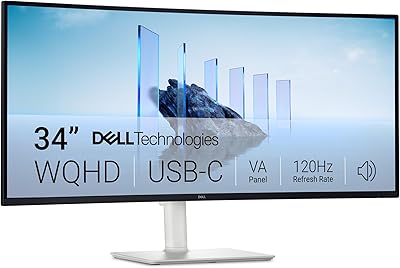
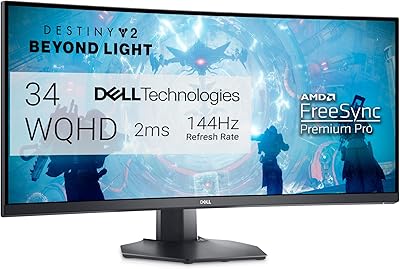
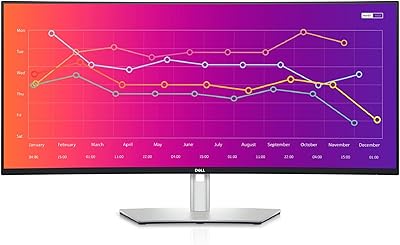
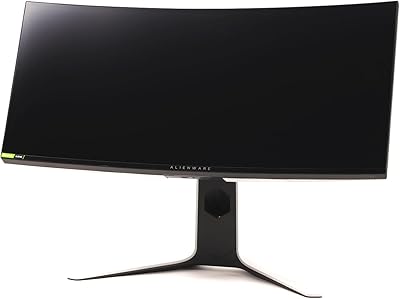
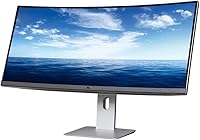
The Dell U3419W Ultrasharp 34-Inch Curved IPS Monitor is a large, high-performance monitor built to enhance productivity and immersion. Its 34-inch curved screen with a 3440x1440 resolution offers an ultra-wide 21:9 aspect ratio, making it perfect for multitasking or gaming. With an IPS panel, it delivers vibrant colors and wide viewing angles, while the USB-C connectivity allows for both easy laptop connection and charging. The built-in Picture-in-Picture and Picture-by-Picture features are designed to increase workflow efficiency, making this monitor a versatile option for both work and play.
Features & Benefits

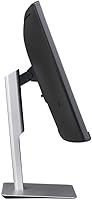
This curved monitor provides a truly immersive experience, ideal for professionals and gamers alike. The 1800R curvature ensures that the screen wraps around your field of view, making it easier to focus on multiple tasks or enjoy widescreen entertainment. USB-C connectivity stands out by offering 90W power delivery, so you can charge your devices while working. The ultra-wide 21:9 aspect ratio is excellent for running several applications side by side. Plus, the height-adjustable stand with tilt and swivel adjustments ensures you can maintain ergonomic comfort throughout the day, whether at work or during long gaming sessions.

Best For

The Dell U3419W Ultrasharp 34-Inch Curved IPS Monitor is best suited for a variety of users. It's perfect for professionals who require a spacious, immersive display to boost productivity. Content creators and designers will appreciate its accurate color reproduction for editing and visual work. If you're looking to free up desk space, this monitor is an ideal replacement for dual monitors. Additionally, gamers will enjoy its wide screen and immersive experience, offering a smooth and expansive view for gaming, media consumption, and multitasking.
User Feedback

User reviews highlight the monitor's sharp, vibrant display, with many praising its color accuracy and overall image quality. Some users have pointed out that the screen requires a bit of calibration out of the box to achieve the best results. Many also appreciate the convenience of the USB-C connection, which allows for both data transfer and charging with a single cable. On the downside, a few reviews mention that the monitor's stand, while adjustable, could be sturdier. Still, most users agree that its sleek design and ergonomic features make it a standout choice for both work and leisure.

Pros

  • The 34-inch curved display provides an immersive viewing experience, ideal for productivity and gaming.
  • Colors are vibrant and accurate thanks to the IPS panel, making it great for content creation.
  • USB-C connectivity simplifies both charging and data transfer, reducing cable clutter.
  • The ultra-wide 21:9 aspect ratio is perfect for multitasking, allowing multiple windows to be viewed side by side.
  • The height-adjustable stand with tilt and swivel ensures ergonomic comfort for long hours of use.
  • Picture-in-Picture and Picture-by-Picture features are convenient for users who need to monitor multiple inputs simultaneously.

Cons

  • Some users reported initial calibration issues, requiring manual adjustments to achieve optimal color accuracy.
  • The 60Hz refresh rate may not be sufficient for gamers who prioritize ultra-smooth gameplay.
  • The large screen and stand can be cumbersome for smaller desks or cramped workspaces.
  • While the USB-C port supports 90W power delivery, it may not be enough for high-power laptops.
  • The monitor is relatively heavy and may be difficult to move or mount without assistance.
  • Despite the high-quality display, the resolution may feel limiting for users seeking 4K displays for detailed work.

Ratings

The scores for the Dell U3419W Ultrasharp 34-Inch Curved IPS Monitor were derived from a comprehensive analysis of verified user reviews from diverse global sources, covering multiple languages and platforms. Spam, bot-generated, incentivized, and duplicate reviews were carefully filtered out, ensuring only authentic feedback influenced the ratings. Both the strengths and occasional drawbacks highlighted by users are reflected in the scores, providing a balanced and realistic picture of the product's performance across various use cases.
Display Quality
92%
Users consistently praise the sharpness and vibrant color reproduction of the screen. The IPS panel ensures excellent viewing angles, making it ideal for both professional work and entertainment. Many find the 3440x1440 resolution to be perfect for everyday tasks, multimedia consumption, and design work.
A few users mentioned that while the display is generally bright and clear, it may require some calibration right out of the box to achieve optimal color accuracy. Some also found that in certain lighting conditions, the reflections can be a bit distracting.
Ease of Setup
87%
Most buyers find this monitor easy to set up, with minimal assembly required. The included stand provides stable support and allows for quick adjustments, while the USB-C port simplifies connectivity to laptops and other devices. Users appreciate the plug-and-play experience, especially when using USB-C for both power and data transfer.
A handful of users have pointed out that the monitor's initial setup can be a bit tricky if you're using multiple input sources, as the on-screen display (OSD) menus can be somewhat unintuitive. Some also experienced difficulties in getting the display to properly align with certain devices.
Ergonomics & Adjustability
90%
The height, tilt, and swivel adjustments provide exceptional flexibility, allowing users to find the perfect viewing angle. Many reviewers highlight how comfortable it is for extended working hours, as it helps to reduce neck and back strain. This ergonomic adjustability is often cited as a key reason for choosing this monitor over other models.
While the ergonomic features are widely praised, some users have noted that the base could be a bit bulkier, taking up more desk space than expected. Additionally, users looking for more advanced height adjustments or a more compact base may find it somewhat lacking in these areas.
Connectivity
88%
The monitor's USB-C port is highly appreciated for its ability to deliver 90W of power while also transferring data, making it a convenient option for laptop users. In addition to USB-C, users enjoy the flexibility of DisplayPort and HDMI connectivity. The diverse ports ensure compatibility with a variety of devices, making it suitable for both work and play.
A few users experienced some connection issues when switching between multiple inputs or using the USB-C port for both charging and data. While generally stable, some have mentioned occasional flickering when using lower-end HDMI cables or non-USB-C devices.
Build Quality
85%
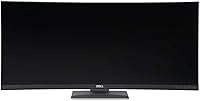
The overall build quality is solid, with many users appreciating the sturdy feel of the monitor. The sleek, modern design of the monitor fits well in most home or office setups, contributing to a premium look. Users find the materials to be durable, and the matte black finish helps keep fingerprints at bay.
A few buyers have mentioned that the stand feels slightly flimsy compared to the rest of the monitor. Though not a deal-breaker, some felt the construction could be improved in terms of the stand's stability, especially when adjusting the height frequently.
Immersive Experience
91%
The 1800R curvature of this device is a standout feature, providing an immersive experience that many users love for both work and gaming. The ultrawide 21:9 aspect ratio further enhances the experience by offering a more expansive field of view, ideal for multitasking or gaming. Many users find that the curvature reduces eye strain over long periods of use.
While the immersive experience is praised, some users found the curvature to be an adjustment at first, especially if they are used to flat screens. The wide screen can also make it harder to focus on tasks without using additional software or screen partitioning tools.
Software & Features
80%
20%
The Picture-in-Picture (PIP) and Picture-by-Picture (PBP) features are beneficial for users who need to display multiple sources at once. These features are particularly useful for professionals working with multiple applications or for those who multitask across devices.
Some users found that the PIP and PBP modes could be a bit glitchy at times, with certain applications not displaying correctly. The built-in software for customizing settings could also use improvement, as the interface is often described as somewhat cumbersome to navigate.
Calibration Accuracy
70%
30%
For the most part, the color accuracy of the display is praised once it’s properly calibrated. Many users are happy with the monitor’s ability to handle professional-grade photo and video work after some minor adjustments.
Several buyers reported that the monitor required substantial calibration out of the box to achieve optimal color accuracy. Some users felt that the factory settings were not accurate enough for precise design work, which could be frustrating for content creators expecting plug-and-play performance.
Color Accuracy
89%
Users who work with color-sensitive tasks, such as photo and video editing, appreciate the accurate and consistent color output once calibrated. The IPS panel ensures vibrant, true-to-life colors with good consistency across the screen. Many buyers find the color reproduction to be one of the standout features of this display.
Some users found that achieving perfect color accuracy out of the box was a challenge, especially when dealing with very specific color profiles. Additionally, a few reviewers felt that the colors were not as accurate as they expected without additional adjustments.
Long-Term Value
82%
18%
The monitor offers good value over time, especially for professionals looking for a reliable, versatile display. Its performance in both productivity and entertainment, combined with its build quality and ergonomic features, makes it a worthwhile investment for many users who need a single screen to handle various tasks.
Some users felt that while the monitor is good for the price, it falls short of higher-end models in terms of features like refresh rate and pixel density. There is a feeling that the product could have included more advanced functionalities for the price point.
Price Stability
78%
22%
The price of the monitor is relatively stable compared to other ultrawide monitors in this category. Many buyers appreciate that they aren’t seeing frequent price fluctuations, making it easier to budget for this device over time.
However, some users mentioned that the monitor still feels a bit pricey given the performance and feature set. While it's a solid option, some buyers believe there are more affordable ultrawide monitors with similar specifications available.
Gaming Performance
85%
For casual gamers, the wide screen and immersive experience make this monitor a solid choice. The 3440x1440 resolution offers crisp visuals, and the ultrawide aspect ratio provides an expansive view, improving the gaming experience overall.
While the gaming experience is good, some users felt the 60Hz refresh rate was limiting for fast-paced competitive gaming. The lack of higher refresh rates might be a downside for gamers looking for the smoothest possible performance during intense sessions.
Customer Support
75%
25%
Dell's customer support generally receives praise for being responsive and helpful in resolving issues, particularly when users need assistance with warranty or technical issues.
Some users, however, reported delays when contacting customer service and mentioned that their issues were not always resolved quickly. A few found the support experience lacking in certain regions, with long wait times for responses.

Suitable for:

The Dell U3419W Ultrasharp 34-Inch Curved IPS Monitor is ideal for professionals and content creators who require a wide, immersive display for productivity or design work. Its 3440x1440 resolution and accurate color reproduction make it well-suited for tasks that demand high visual fidelity, such as photo editing, graphic design, and video production. Additionally, users with limited desk space will appreciate the ultra-wide 21:9 aspect ratio, which can replace a dual-monitor setup, offering a clean, organized workspace. Gamers also benefit from the monitor’s immersive curved screen and smooth performance, making it a great option for those looking for an expansive gaming experience without sacrificing quality.
Not suitable for:

However, this monitor may not be the best choice for users seeking high refresh rates or those who engage in fast-paced competitive gaming. While it offers a solid experience for casual gaming, the 60Hz refresh rate could be limiting for gamers who prioritize ultra-smooth motion. Similarly, users expecting plug-and-play color accuracy may find the initial calibration process somewhat tedious, as some have reported that the colors require adjustment out of the box. The monitor's relatively bulky stand may also be a concern for those with very limited desk space, especially when compared to more compact models in this category.

Specifications

  • Screen Size: 34 inches, providing an ultrawide and immersive viewing experience.
  • Resolution: 3440x1440 WQHD resolution for sharp and detailed images.
  • Panel Type: IPS (In-Plane Switching) panel for wide color coverage and excellent viewing angles.
  • Curvature: 1800R curvature, enhancing the immersive experience with a gentle curve.
  • Aspect Ratio: 21:9 ultrawide aspect ratio, ideal for multitasking and immersive media.
  • Refresh Rate: 60Hz refresh rate, suitable for productivity tasks and casual gaming.
  • USB-C Power Delivery: Supports 90W power delivery via USB-C, enabling convenient laptop charging.
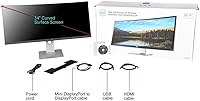
  • Ports: Connectivity options include USB-C, DisplayPort, and HDMI for versatile video input.
  • Height Adjustment: Height-adjustable stand with tilt and swivel capabilities for ergonomic comfort.
  • VESA Compatibility: Supports VESA mounting for flexible installation on compatible arms or wall mounts.
  • Built-in Features: Includes Picture-in-Picture (PIP) and Picture-by-Picture (PBP) for enhanced multitasking.
  • Weight: Weighs approximately 18.08 lbs, providing a stable and durable design.
  • Color: Sleek black finish with a modern, minimalistic look.
  • Dimensions: Product dimensions: 8.91 x 32.03 x 20.94 inches, with a slim profile.
  • Brightness: Typical brightness of 300 nits, offering good visibility in most environments.
  • Response Time: 5ms response time, suitable for general use and casual gaming.
  • Viewing Angle: Wide 178° horizontal and vertical viewing angles for consistent image quality from different positions.
  • Power Consumption: Typical power consumption is 60W, with energy-saving features for reduced power usage.
  • Compatibility: Compatible with Windows and macOS devices, supporting both USB-C and HDMI connections.

FAQ

The Dell U3419W Ultrasharp 34-Inch Curved IPS Monitor offers a 3440x1440 resolution on an ultrawide 34-inch curved display, providing an immersive viewing experience. It features an IPS panel for vibrant colors, a 21:9 aspect ratio ideal for multitasking, and USB-C connectivity that supports 90W power delivery for laptop charging.

While the Dell U3419W offers a wide screen and immersive curved display, its 60Hz refresh rate may not meet the high standards of competitive gamers who prefer faster response times. However, for casual gaming and a more cinematic experience, this monitor is a solid choice.

Yes, the 34-inch curved IPS display with accurate color reproduction makes the Dell U3419W ideal for content creators and designers who require a display with vibrant colors and wide viewing angles. It’s particularly useful for multitasking, allowing users to work with multiple applications side-by-side.

Setting up this monitor is straightforward: connect the power cable, and use the USB-C, HDMI, or DisplayPort connections for video input. The height-adjustable stand allows you to position the monitor comfortably, and you can also mount it on a VESA-compatible arm for additional flexibility.

Yes, the Dell U3419W has a USB-C port that supports 90W power delivery, which can charge compatible laptops while you use the monitor. This feature reduces the need for extra cables, making it a convenient choice for users with laptops that support USB-C charging.

The Dell U3419W has a refresh rate of 60Hz, which is generally fine for productivity tasks, movies, and casual gaming. However, if you’re into high-speed competitive gaming, a higher refresh rate (such as 120Hz or 144Hz) may be more desirable for smoother visuals and faster response times.

Some users report slight color calibration issues out of the box, which is common with monitors. You can manually adjust the settings in the OSD (on-screen display) menu, or use third-party calibration tools to get more accurate color reproduction. It's also helpful to check for any software updates from Dell.

Yes, the Dell U3419W is VESA-compatible, meaning you can mount it on a wall or a compatible desk arm. Just ensure that the mount supports the monitor's size and weight (18.08 lbs) for safe installation.

The 34-inch size and curved design make this monitor ideal for users who want a large, immersive screen in a relatively compact space. However, it may not be ideal for very small desks, as the monitor takes up significant desk real estate. Consider your available workspace before purchasing.

The Picture-in-Picture (PIP) and Picture-by-Picture (PBP) features allow you to display multiple input sources on the screen at once. PIP shows one source in a smaller window, while PBP splits the screen into two or more sections. These features are useful for multitasking or monitoring multiple devices simultaneously.