Overview

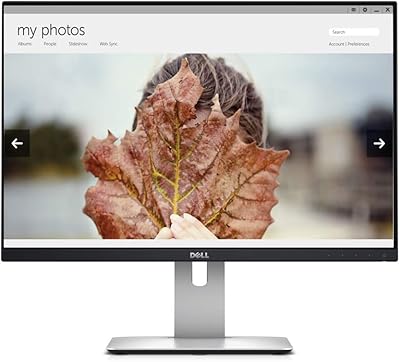
The Dell 1908FP 19-Inch Flat Panel Monitor is one of Dell's UltraSharp commercial LCD panels — a no-nonsense office display built for productivity rather than flash. Its 5:4 aspect ratio and 1280x1024 SXGA resolution are deliberate choices that suit document-heavy work better than widescreen formats do. You won't find this 19-inch office monitor on a gamer's desk or in a media editing suite — it was never meant to be there. What sets it apart at this size and price tier is the fully adjustable stand, which offers more ergonomic range than most budget alternatives. Think of it as a reliable workhorse: older by today's standards, but still genuinely useful in the right context.

Features & Benefits

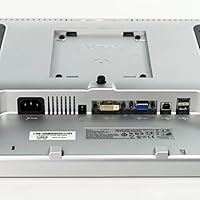
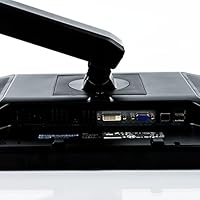
The 1280x1024 native resolution looks crisp for text — spreadsheets, code editors, and long documents all render cleanly without eye strain. The four-way stand adjustment covering height, tilt, swivel, and 90-degree pivot is the headline feature here; rotating to portrait mode for reading or coding is something many monitors at this size simply don't support. A built-in four-port USB hub sits quietly in the stand, which is more useful than it sounds when desk ports run short. Brightness holds up well under standard office lighting at 300 cd/m2, and the dual VGA and DVI inputs mean connecting to legacy machines is straightforward. Build quality is solid throughout — this is commercial-grade hardware made to last.

Best For

This Dell UltraSharp panel earns its place in a few specific scenarios. IT managers outfitting multiple workstations will appreciate the consistent build and predictable performance. Portrait mode users — developers, lawyers, or anyone reading long vertical documents — get real value from the pivot capability that is uncommon at this price point. It also works well as a secondary monitor alongside a widescreen primary display, giving you a taller viewport for reference material or communication tools. Home office users with tight desk space benefit from the height and swivel range without needing an aftermarket arm. Anyone running older hardware will find the dual input options a practical convenience. This is not the right fit for photo editing or video work.

User Feedback

Buyers who own the 1908FP tend to be quietly satisfied rather than enthusiastic — which, for office hardware, is probably the right outcome. The stand draws consistent praise, with ergonomic flexibility repeatedly cited as the deciding factor over cheaper alternatives. Text clarity gets positive mentions too, particularly from users doing long reading sessions. On the downside, some owners report backlight uniformity issues over time, with slight dimming near panel edges becoming noticeable after extended use. A number of buyers have flagged dead pixels on arrival, which is worth keeping in mind given that units often ship as refurbished stock. The USB hub gets mixed reviews — port placement feels awkward to some, depending on desk configuration.

Pros

  • The four-way adjustable stand — height, tilt, swivel, and 90-degree pivot — offers ergonomic range that most monitors at this size simply do not provide.
  • Portrait mode rotation works reliably and is genuinely useful for developers, readers, and anyone working with long vertical documents.
  • Text and spreadsheet content render cleanly at native resolution, making long work sessions comfortable on the eyes.
  • The integrated four-port USB hub in the stand keeps desk cables manageable without needing a separate hub.
  • Dual VGA and DVI inputs make it easy to connect to older systems or mix legacy and modern hardware.
  • Commercial-grade build quality means the physical components — stand, housing, controls — hold up well over time.
  • The 5:4 aspect ratio provides more vertical screen space than widescreen panels, which benefits document and code editing workflows.
  • Works well as a secondary display alongside a widescreen primary monitor, adding a tall reference pane without dominating desk space.
  • Plug-and-play setup is straightforward, with no driver installation required on most systems.

Cons

  • Units are widely sold as refurbished stock, raising the risk of cosmetic wear or pre-existing panel issues.
  • Backlight uniformity can degrade over time, with some owners noticing dimmer edges after extended use.
  • Dead pixels on arrival have been reported often enough to warrant inspecting the panel carefully before accepting a unit.
  • The glossy screen surface catches reflections in brightly lit rooms, which can cause eye strain during long sessions.
  • The USB hub port placement on the stand is awkward depending on desk configuration, making cable access inconvenient.
  • At 15 pounds, this 19-inch office monitor is noticeably heavy for its size, complicating repositioning or mounting adjustments.
  • No HDMI or DisplayPort input limits compatibility with newer laptops and devices that have dropped legacy video outputs.
  • The 1280x1024 resolution looks noticeably soft when placed next to any modern 1080p or higher display.
  • Color accuracy and viewing angles are average at best, making it unsuitable for any color-sensitive creative work.

Ratings

The Dell 1908FP 19-Inch Flat Panel Monitor has accumulated a substantial body of real-world user feedback across global markets, and our AI-driven scoring system has processed that data while actively filtering out incentivized, duplicate, and bot-generated reviews. The scores below reflect a transparent picture of where this 19-inch office monitor genuinely excels and where it falls short — no padding, no spin.

Ergonomic Stand
91%
The fully articulating stand is the single most praised aspect of this monitor across buyer feedback. Users working long office hours consistently highlight how the height adjustment, swivel, and tilt allow them to dial in a comfortable position without investing in a separate monitor arm. For people who alternate between sitting and standing desks, this flexibility is a meaningful daily benefit.
A small number of users report that the stand develops a slight wobble after extended use, particularly around the pivot joint. The monitor's 15-pound weight also means repositioning it frequently is more effort than expected, which reduces the practical ease of the adjustment range for some desk configurations.
Portrait Mode Rotation
88%
The 90-degree pivot into portrait orientation works reliably and is genuinely uncommon on monitors at this size and price tier. Developers reading long codebases and legal professionals scrolling through lengthy documents consistently note that the vertical format reduces the need to scroll constantly, improving their daily workflow in a concrete way.
Getting the most out of portrait mode requires manually adjusting the display rotation in your operating system, which trips up less technical users. There is also a minor clearance issue on some desks — the rotated panel can clip the base footprint depending on height setting, requiring a small adjustment to position.
Text Clarity
84%
At native 1280x1024 on a 19-inch panel, pixel density is sufficient to render text crisply for spreadsheets, documents, and code editors. Users who spend most of their day reading or writing find the image stable and easy on the eyes over long sessions, which is the core use case this monitor was built around.
Placed next to any modern 1080p or higher resolution display, the difference in sharpness becomes immediately obvious. Users who have upgraded their primary monitor but kept the 1908FP as a secondary screen frequently note that the resolution mismatch is visually jarring until you adjust to it.
Build Quality
82%
18%
The physical construction reflects Dell's commercial UltraSharp heritage — the housing, stand mechanism, and button controls all feel more substantial than consumer-grade monitors at comparable prices. IT managers deploying multiple units in office environments report consistent build quality across units, which matters when you are managing a fleet of displays.
The glossy plastic casing on refurbished units often shows visible scuffs, surface scratches, or faded areas from prior use. While this is cosmetic rather than functional, it is worth noting that the physical condition of used units varies considerably and does not always match product listing photos.
Value for Money
79%
21%
For buyers specifically needing a pivot-capable, ergonomically adjustable office monitor on a restrained budget, the 1908FP delivers a feature set that would cost noticeably more on a comparable modern panel. Users setting up secondary workstations or adding a portrait-mode display to an existing setup frequently describe it as one of the smarter budget decisions they made.
Buyers expecting a pristine, modern display experience may feel the value calculation does not hold up once they factor in adapter costs for newer laptops lacking DVI or VGA outputs. If the unit arrives with backlight or pixel issues, the return and replacement process can erode the perceived savings quickly.
Backlight Uniformity
61%
39%
Freshly refurbished units with good panel hours remaining tend to display reasonably even illumination across the screen for general office use. For document reading and spreadsheet work where the entire panel is rarely filled with a uniform color, minor inconsistencies are often not noticeable during normal daily use.
Backlight degradation is the most commonly flagged long-term reliability concern with this monitor. Users report edge dimming and uneven brightness zones developing over time, which becomes especially noticeable on light-colored backgrounds. For a monitor that may have already logged thousands of hours before resale, this is a realistic risk buyers should factor in.
Dead Pixel Risk
57%
43%
Units that arrive without pixel defects tend to remain stable for extended periods, and many buyers report years of clean panel performance after careful initial inspection. The panel itself, when defect-free, does not develop new dead pixels at an unusual rate under normal office use conditions.
Dead-on-arrival pixel issues appear with enough frequency in user feedback to warrant a specific mention. Given that most available units are refurbished, the absence of factory-fresh quality control means the pixel defect lottery is a real concern. Inspecting the panel against a solid white and solid black background immediately on arrival is strongly advised.
USB Hub Utility
72%
28%
Having four USB ports integrated into the stand is a practical convenience that buyers running lean desk setups genuinely appreciate. Connecting a keyboard, mouse, and a USB drive without reaching behind the computer or using a separate hub keeps cable management tidy, particularly in smaller home office setups.
Port placement on the stand draws consistent criticism — the angle and position make plugging in USB devices feel awkward, especially for items you connect and disconnect frequently. A handful of users also report that individual ports become intermittent over time on older refurbished units, suggesting some wear on the USB circuitry.
Connectivity Options
66%
34%
The dual VGA and DVI inputs make this monitor straightforward to connect to older desktops and workstations without any additional hardware. For IT environments still running legacy systems or for users repurposing older PCs, having both input types available without adapters is a practical advantage.
The absence of HDMI or DisplayPort is the single biggest compatibility headache for modern users. Most current laptops and mini PCs have dropped VGA and DVI entirely, meaning buyers will need adapters to connect — adding cost and occasionally introducing signal quality or resolution scaling issues.
Brightness & Office Glare
67%
33%
At 300 cd/m2, the panel holds up well in typical indoor office lighting with controlled ambient light. Users working in windowless or dimly lit offices report that the brightness level is comfortable and does not cause eye fatigue during standard eight-hour workdays.
The glossy screen surface is a persistent complaint in brighter workspaces. Near windows or under overhead fluorescent lighting, reflections can be distracting enough to affect focus. Users in bright environments consistently wish the surface were matte, and this is one area where many competing monitors at similar price points do better.
Setup & Compatibility
83%
Plug-and-play operation works cleanly on Windows systems, and most users report having the monitor up and running within minutes of unboxing without needing to hunt for drivers. The physical setup of the stand is also straightforward, with no confusing assembly steps.
Users connecting via adapter to modern systems occasionally encounter resolution or refresh rate detection issues that require manual configuration in display settings. Portrait mode rotation also needs to be set manually in the OS, which is a minor but occasionally confusing extra step for non-technical users.
Long-Term Reliability
63%
37%
Units that arrive in good condition and are used for standard office tasks tend to remain functional for several years without major issues. Dell's UltraSharp commercial build standard means the core components — stand mechanism, power circuitry, and panel housing — hold up better than typical consumer-grade monitors of similar age.
Because most available stock consists of units that have already seen years of prior use, the remaining operational lifespan is inherently uncertain. Backlight aging, USB port wear, and occasional capacitor degradation in older power supplies are realistic considerations that buyers accepting refurbished hardware should factor into their decision.

Suitable for:

The Dell 1908FP 19-Inch Flat Panel Monitor is a strong fit for anyone who needs a dependable, ergonomically flexible display for text-heavy work rather than visual entertainment. IT managers and small business owners will find it practical for outfitting multiple desks consistently and affordably. Developers and legal professionals who prefer portrait mode will appreciate the full 90-degree pivot capability, which is genuinely uncommon at this size and price tier. It also slots in well as a secondary monitor next to a widescreen primary display, giving users a taller viewport for email, documentation, or reference material without consuming much desk real estate. Home office workers on a careful budget who still care about proper ergonomics — adjustable height, swivel, tilt — will get more physical flexibility here than most comparably priced modern alternatives offer.

Not suitable for:

The Dell 1908FP 19-Inch Flat Panel Monitor is the wrong choice for anyone who needs accurate color reproduction, wide viewing angles, or a high-resolution panel for photo editing, video production, or graphic design work. Gamers should look elsewhere entirely — there is no fast refresh rate, no adaptive sync support, and the response time is not competitive by any modern standard. The 5:4 aspect ratio and 1280x1024 resolution, while suited to documents, will feel cramped and outdated to users accustomed to 1080p or higher widescreen displays. Buyers expecting a pristine, factory-fresh unit should also be cautious, since most available stock circulates as refurbished hardware and occasional issues with backlight uniformity or dead pixels have been reported. If your primary concern is image quality or modern connectivity like HDMI or DisplayPort, this panel will disappoint.

Specifications

  • Screen Size: The viewable display area measures 19 inches (481.9 mm) diagonally.
  • Panel Type: Uses a TFT active matrix LCD (thin-film transistor liquid crystal display) panel technology.
  • Native Resolution: Native resolution is 1280x1024 (SXGA), with full-screen support for lower resolutions.
  • Aspect Ratio: The panel uses a 5:4 aspect ratio, which provides more vertical space than standard widescreen formats.
  • Brightness: Maximum brightness is rated at 300 cd/m2, sufficient for standard indoor office environments.
  • Screen Surface: The screen surface is glossy, which enhances contrast but can produce reflections in brightly lit rooms.
  • Stand Adjustments: The included stand supports tilt, swivel, height extension, and 90-degree pivot rotation into portrait mode.
  • USB Hub: A four-port USB hub is integrated directly into the monitor stand for convenient peripheral connectivity.
  • Video Inputs: Connectivity includes both VGA and DVI inputs, supporting a range of older and contemporary systems.
  • Voltage: The monitor operates at 240 volts, compatible with standard international power supplies.
  • Dimensions: Physical dimensions with stand are approximately 19 x 9 x 16 inches, varying with height adjustment.
  • Weight: The monitor weighs 15 pounds including the stand, which is substantial for a 19-inch panel.
  • Plug and Play: Supports plug-and-play operation on compatible systems, requiring no additional driver installation for basic use.
  • Model Number: The official Dell model number is 1908FP, part of the UltraSharp commercial display lineup.
  • Manufacturer: Designed and manufactured by Dell under its commercial UltraSharp monitor series.

Related Reviews
Dell E2020H 19.5-Inch Monitor
73%
83%
Value for Money
61%
Display Clarity
79%
Eye Comfort
81%
Build Quality
44%
Ergonomics & Adjustability
More
Dell E2016H 20-inch Monitor
82%
85%
Display Quality
92%
Ease of Setup
80%
Design & Build Quality
89%
Value for Money
88%
Energy Efficiency
More
YOTETION MT019 19-Inch 1440x900 Monitor
71%
83%
Value for Money
78%
Image Clarity
81%
Eye Comfort
89%
Setup & Plug-and-Play
61%
Build Quality
More
Dell P2425 24″ WUXGA IPS Monitor
82%
88%
Image Quality
84%
Color Accuracy
93%
Connectivity
87%
Build Quality
83%
Ergonomics & Stand
More
Dell S2722DC 27-inch USB-C Monitor
77%
93%
USB-C Connectivity
88%
Image Clarity
91%
Ergonomic Stand
86%
Value for Money
82%
Build Quality
More
Cocar CCTVMON19 19-inch Security Monitor
70%
88%
BNC Connectivity
79%
Image Clarity
58%
Build Quality
72%
Value for Money
83%
Input & Port Variety
More
Dell P2214H 22-Inch IPS Monitor
78%
88%
Image Clarity
79%
Color Accuracy
54%
Glare & Reflections
91%
Ergonomics
86%
Build Quality
More
Dell SE2722HX 27-inch FHD Monitor
84%
91%
Value for Money
87%
Display Quality
83%
Build Quality
88%
Ease of Setup
85%
Ergonomics & Comfort
More
Dell P2721Q 27-inch 4K Monitor
75%
93%
Image Sharpness
81%
Color Accuracy
89%
USB-C Connectivity
63%
Build Quality
77%
Ergonomics & Adjustability
More
Dell UltraSharp U2417H 24-inch IPS Monitor
80%
88%
Image Clarity
84%
Color Accuracy
71%
Panel Uniformity
91%
Build Quality
93%
Ergonomic Stand
More

FAQ

It genuinely rotates 90 degrees — the stand physically pivots the panel into a vertical orientation. You will also need to set your display rotation in your operating system settings to match, but the hardware fully supports it. It is one of the more practical features on this monitor and works reliably.

The 1908FP only has VGA and DVI inputs, so if your laptop has HDMI or DisplayPort outputs, you will need an adapter. A DisplayPort-to-DVI or HDMI-to-DVI adapter typically works fine for basic office use, though it adds a small cost and an extra cable to manage.

For document-heavy work, yes — the 5:4 aspect ratio gives you more vertical space than a widescreen, which works well for email, reference material, or code alongside a primary display. Just go in with realistic expectations: it is older hardware and the resolution will look noticeably lower than a modern 1080p panel next to it.

The stand adjusts smoothly across a continuous height range rather than clicking into fixed steps, so you can dial in exactly the position you need. Tilt and swivel also move fluidly. It is genuinely one of the better-built stands you will find on a monitor this size.

The majority of units circulating now are refurbished, since this monitor has been on the market for many years. That is not necessarily a dealbreaker, but it does mean you should inspect the panel carefully when it arrives. Check for dead pixels, backlight uniformity, and any cosmetic damage before the return window closes.

It is adequate for most standard office lighting conditions, but the glossy screen surface can cause noticeable reflections in bright rooms or near windows. If your workspace gets a lot of direct natural light, you may want to position the monitor carefully or consider a matte-screen alternative.

It functions reliably for connecting mice, keyboards, and USB drives. The main complaint people have is port placement — the ports sit at an angle on the stand that some users find awkward depending on their desk setup. It is a useful feature, just not perfectly positioned.

Yes, the 1908FP is compatible with standard VESA mounting, which is worth knowing if you prefer a monitor arm or want to free up desk space. Check the VESA hole pattern specification before purchasing a third-party arm to ensure compatibility.

For reading documents, writing, coding, and spreadsheet work, the resolution is perfectly legible and comfortable on a 19-inch panel. Where it starts to show its age is when placed next to a 1080p or higher display — the difference becomes obvious. For pure text productivity, it holds up fine.

Power it on immediately and display a solid white or grey background to check for dead pixels and backlight uniformity. Look for any brighter or darker patches near the corners or edges. Also test all USB ports and both video inputs if possible. Doing this promptly ensures you can return or exchange the unit if there is an issue.