Overview

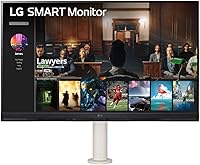
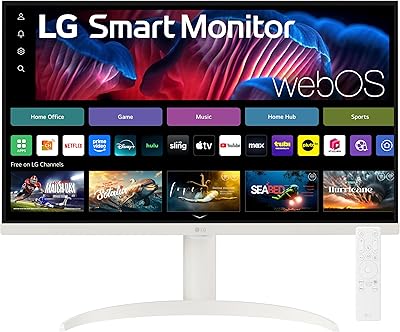
The LG 32SQ780S 32-inch 4K Smart Monitor occupies an interesting middle ground — part productivity display, part living room smart screen — and that dual identity is exactly what makes it worth considering. Unlike a standard monitor that just mirrors your laptop, this LG smart monitor runs webOS independently, meaning you can stream apps without any connected device at all. Its white finish feels more like something you'd find in a Scandinavian home office than a typical gamer's desk. LG has a strong reputation for panel quality, and at this price point, buyers reasonably expect that to show up in daily use. It largely does.
Features & Benefits

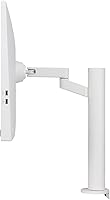
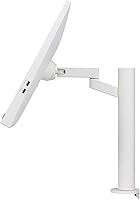
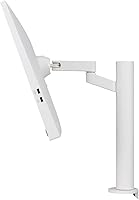
The picture on this 32-inch 4K display is the headline, and it holds up well. With 90% DCI-P3 color coverage, images look rich and accurate without the oversaturation common on cheaper panels — handy whether you're editing photos or watching a film. The built-in webOS platform lets you open streaming apps directly on screen, no Chromecast required. LG appliance owners get a genuine bonus: the ThinQ Home Dashboard lets you monitor connected devices without reaching for your phone. The ergo stand covers full pivot, swivel, height, and tilt — miles beyond a tilt-only budget stand. The USB-C port also delivers 65W, enough to charge most laptops while you work.

Best For

This LG smart monitor suits remote workers who want one screen for spreadsheets in the morning and streaming at night, no extra box required. If you live in the Apple ecosystem, AirPlay 2 makes mirroring from a MacBook or iPhone quick and reliable. Smart home users with LG appliances will appreciate having the ThinQ dashboard a click away. The clean white design also makes it a natural fit for a bedroom desk or a living room corner where aesthetics matter. However, skip it if you're a competitive gamer — the 5ms response time and standard refresh rate simply won't satisfy players who need every millisecond to count.

User Feedback

With a 3.8-star average across roughly 193 ratings, the 32SQ780S sits in respectable but not unanimous territory. Buyers consistently highlight the picture clarity and ergonomic stand flexibility, and many find real value in having streaming apps built directly into the screen. Criticism tends to cluster around two things: the webOS app library is narrower than what a proper smart TV offers, and some users report occasional Bluetooth and remote connectivity hiccups. A handful also question whether the asking price is fully warranted given those gaps. Setup is generally straightforward, though first-timers face a short learning curve navigating the webOS interface. With a moderate review count, outlier opinions shouldn't be weighted too heavily.

Pros

  • Sharp, color-accurate 4K panel with 90% DCI-P3 coverage makes content genuinely look good day-to-day.
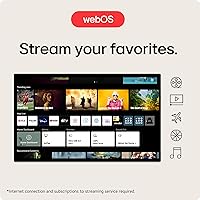
  • Built-in webOS lets you stream without any external dongle or media player connected.
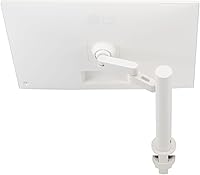
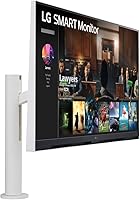
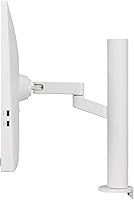
  • The ergo stand offers full pivot, swivel, height, and tilt adjustment — far more flexible than most monitors at this size.
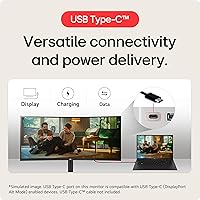
  • USB-C with 65W power delivery means one cable connects and charges your laptop simultaneously.
  • AirPlay 2 support makes screen mirroring from Apple devices quick and reliable.
  • ThinQ Home Dashboard is a practical, unique feature for households already using LG smart appliances.
  • The white colorway suits home office and living room setups that standard black monitors would clash with.
  • Wide 178-degree viewing angle keeps image quality consistent whether you are sitting straight on or off to the side.
  • Dual HDMI ports plus three USB ports offer solid flexibility for multi-device connectivity.
  • Magic Remote compatibility makes navigating the smart interface from across the room comfortable and intuitive.

Cons

  • The webOS app ecosystem is more limited than a dedicated smart TV, and some streaming services are absent entirely.
  • Bluetooth and Magic Remote connectivity can drop intermittently, which users find frustrating during everyday use.
  • At this price, the value proposition gets shaky if you only need a standard productivity monitor without smart features.
  • The 5ms response time is noticeably behind what gaming-focused displays offer, making fast motion less crisp.
  • Built-in speakers are thin and lack bass — adequate for video calls, but not satisfying for music or film audio.
  • The webOS interface has a learning curve that some buyers, particularly non-tech-savvy users, find unintuitive at first.
  • No high refresh rate option limits appeal for anyone who wants smoother visuals even outside of gaming contexts.
  • The 32SQ780S weighs 24.5 pounds, making repositioning or mounting more cumbersome than lighter alternatives.
  • Color calibration out of the box may require manual adjustment to get the most accurate results for photo work.
  • With only 193 ratings so far, long-term reliability data is still relatively thin compared to more established models.

Ratings

The scores below were generated by our AI after analyzing verified buyer reviews for the LG 32SQ780S 32-inch 4K Smart Monitor from global sources, with spam, bot activity, and incentivized feedback actively filtered out. The result is an honest, balanced snapshot that reflects both what users genuinely love and where the frustrations pile up. No score has been inflated to protect a brand relationship — the strengths and the trade-offs are represented equally.

Picture Quality
88%
Users consistently describe the 4K panel as a standout — colors look vivid without being artificially boosted, and the 90% DCI-P3 coverage makes everything from spreadsheets to Netflix feel noticeably richer. For a monitor in this category, the matte finish also handles window glare far better than glossy alternatives.
A subset of users note that out-of-the-box calibration skews slightly warm, requiring manual color temperature adjustment to hit accurate whites. Buyers coming from high-end IPS studio monitors may also find the peak brightness underwhelming in very bright rooms.
Smart Platform (webOS)
72%
28%
The ability to open Netflix, YouTube, or Amazon Prime Video without any dongle or connected laptop is genuinely useful, especially for users who want a clean desk setup. Most buyers appreciate not having to manage a separate streaming stick, and the webOS interface is responsive enough for daily navigation.
The app library is noticeably thinner than a full smart TV — regional streaming services and some popular apps are simply absent, which frustrates users who assumed they were getting a TV-equivalent experience. Updates to the platform also arrive less frequently than on LG's TV lineup, leaving some app gaps unresolved for months.
Ergonomic Stand
91%
This is one of the most frequently praised aspects across all user feedback — the full range of height, tilt, swivel, pivot, and extend-retract adjustment puts it well above what you typically get at this size class. Remote workers especially value being able to shift from a seated to a standing desk position without buying a separate arm.
The stand's footprint is larger than average, which can feel bulky on smaller desks. A handful of users also report that the pivot mechanism requires a noticeable amount of force to rotate, which makes fine portrait-mode adjustments slightly awkward.
Connectivity
86%
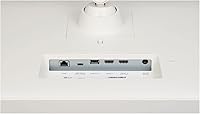
The 65W USB-C port is a genuine convenience for laptop users — one cable docks, charges, and carries video simultaneously, which keeps desk wiring minimal. Having dual HDMI ports plus three USB-A ports and a LAN jack means most multi-device home office setups are covered without a separate hub.
There is no DisplayPort input, which limits options for users with older workstations or those who prefer DP for higher bandwidth configurations. Some users also expected the USB-C to support higher wattage for power-hungry laptops, finding 65W slightly short under heavy load.
Value for Money
67%
33%
For buyers who actively use the smart features — streaming without a PC, AirPlay mirroring, ThinQ dashboard — the combination of capabilities in one device does justify a meaningful portion of the asking price. The ergo stand alone would cost extra on competing monitors that sell it as an optional upgrade.
Users who primarily want a 4K productivity monitor and skip the smart features feel they are paying a significant premium for hardware they do not use. At this price point, competing monitors offer faster response times, higher refresh rates, or better panel calibration, making the value case harder to defend for non-smart-feature users.
Build Quality & Design
79%
21%
The white finish is clean and modern — buyers frequently mention it as a reason they chose this over black alternatives, particularly for bedroom desks or living room setups. The overall construction feels solid and premium for a monitor in this segment, with no flex or wobble reported in the panel itself.
The white plastic can show smudges and dust more visibly than darker finishes, requiring more frequent wiping. A few users also note that the rear cable management design is limited, which partially undercuts the otherwise tidy aesthetic.
Wireless Performance
71%
29%
AirPlay 2 connectivity works reliably for the majority of Apple users, with MacBook mirroring and iPhone casting performing smoothly in typical home office Wi-Fi conditions. Screen Share with Android and Windows devices also functions without major complaints for casual use.
Bluetooth connectivity — particularly with the Magic Remote — draws the most consistent criticism, with intermittent dropout issues reported across multiple user accounts. Some buyers found themselves needing to re-pair the remote more often than expected, which disrupts the otherwise cable-free experience.
Audio Quality
53%
47%
The built-in 2x5W stereo speakers are usable for video calls and casual background streaming, which is more than can be said for the single mono drivers found in many competing monitors. Volume levels are sufficient for a quiet home office.
Audio lacks any meaningful bass and sounds thin at higher volumes — users listening to music or watching films with cinematic sound design will find it clearly lacking. Most buyers who care about audio quality ended up adding external speakers or headphones, making this feature largely a fallback rather than a genuine perk.
Smart Home Integration
77%
23%
For households with multiple LG ThinQ appliances, the dashboard is a surprisingly practical touch — checking the washing machine cycle or adjusting the smart air purifier without reaching for a phone is a small but real quality-of-life improvement.
The feature's value drops sharply if you own few or no LG smart appliances, making it irrelevant for a meaningful portion of buyers. The dashboard interface also lacks the depth of a dedicated smart home app, with limited control options for more complex device configurations.
Setup Experience
74%
26%
Physical assembly is straightforward — the stand clicks in without tools, and most connections are clearly labeled. Buyers with prior experience using smart TVs find webOS immediately familiar, reducing the time from unboxing to first use considerably.
First-time webOS users often face a noticeable learning curve navigating the smart interface, and the initial network and app setup requires more steps than a standard monitor connection. A few users flagged that the Magic Remote pairing process was not well-documented in the included quick-start guide.
Gaming Performance
44%
56%
For casual gaming — indie titles, older games, or slower-paced RPGs — the 4K resolution produces a genuinely attractive image, and most buyers who game occasionally report no serious complaints.
The 5ms response time and standard refresh rate make this a poor choice for competitive or fast-action gaming, where ghosting and input lag become noticeable. Buyers who purchased specifically for gaming performance were among the most dissatisfied in the review pool.
Viewing Angle
83%
The 178-degree viewing angle holds up well in practice — users who share screens during meetings or have colleagues viewing alongside them report consistent color and contrast without the need to reposition. Side-angle streaming in a bedroom setup also drew positive comments.
Minor brightness fall-off at extreme angles has been noted by detail-oriented users, though the majority do not encounter this in normal seated positions. It is not a significant issue but worth flagging for buyers planning to mount the screen in a wide shared-viewing arrangement.
App Ecosystem Depth
61%
39%
Core global streaming apps are present and perform reliably, which covers the typical use case for most buyers who want to drop the dongle. The app launch speed is snappy enough that switching between services feels natural rather than sluggish.
Regional and niche streaming services are often missing entirely, and the monitor version of the webOS store has a narrower catalog than LG's TV platform. Users who rely on specific apps not in the major-service tier should verify availability before purchasing.
Glare & Ambient Light Handling
81%
19%
The matte panel surface does a strong job of diffusing reflections in bright rooms, which is a meaningful practical advantage for home office users who cannot always control window light. Several buyers specifically called this out as a reason they preferred it over glossy-panel alternatives.
In very low ambient light conditions, the matte coating can slightly reduce perceived sharpness compared to glossy IPS panels, which some color-sensitive users find mildly frustrating during evening work sessions.

Suitable for:

The LG 32SQ780S 32-inch 4K Smart Monitor is a strong fit for remote workers and hybrid professionals who want a single screen that handles both focused work sessions and casual streaming without juggling extra devices. If you rely on Apple gear, AirPlay 2 makes mirroring from a MacBook or iPhone genuinely effortless, and Bluetooth connectivity keeps your desk tidy. Smart home enthusiasts with LG ThinQ appliances get a practical bonus — the built-in dashboard lets you glance at connected devices without ever picking up your phone. The 65W USB-C port means most laptop users can dock and charge with a single cable, which alone simplifies a cluttered workspace considerably. Its white finish and relatively compact ergo stand also make it a natural choice for bedroom desks, living room setups, or any space where aesthetics matter as much as functionality.
Not suitable for:

Buyers expecting a full smart TV experience may find the webOS app library on the LG 32SQ780S 32-inch 4K Smart Monitor narrower than anticipated — some popular streaming apps or regional services simply are not available on the monitor version of the platform. Competitive or even semi-serious gamers should look elsewhere: a 5ms response time and a standard refresh rate are well behind what purpose-built gaming monitors offer at a similar price. Professional creatives who need factory-calibrated color accuracy, wide gamut beyond DCI-P3 90%, or hardware calibration support will also find the spec sheet falls short of dedicated color-critical displays. At this price tier, buyers rightly have high expectations, and if your primary need is straightforward PC monitor performance without the smart features, there are more cost-efficient options that punch harder on pure display specs. The built-in 2x5W speakers are adequate for casual use but will disappoint anyone who cares about audio quality.
Specifications

  • Screen Size: The display measures 32 inches diagonally, offering generous screen real estate for both productivity tasks and media consumption.
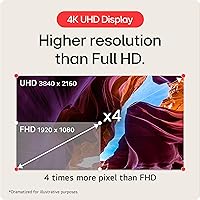
  • Resolution: Native resolution is 4K UHD (3840x2160), delivering sharp, detailed imagery across the full panel surface.
  • Color Coverage: The panel covers DCI-P3 90% (Typ.), providing accurate, rich color reproduction suited to everyday content and light creative work.
  • Aspect Ratio: Standard 16:9 widescreen aspect ratio, compatible with virtually all modern video formats and desktop layouts.
  • Response Time: Panel response time is rated at 5ms, which is adequate for general use but below the threshold recommended for competitive gaming.
  • Viewing Angle: Horizontal and vertical viewing angles reach 178 degrees, keeping color and contrast stable even when viewed from well off-center.
  • Stand Type: The included ergo stand supports extend, retract, swivel, pivot, height adjustment, and tilt — one of the most flexible stand configurations available at this size.
  • USB-C Port: A single USB-C port delivers up to 65W of power delivery, enabling single-cable laptop docking with simultaneous charging for most modern notebooks.
  • Other Ports: Additional connectivity includes two HDMI ports, three USB-A ports, and one LAN (Ethernet) port for wired network access.
  • Smart Platform: The monitor runs webOS 22, LG's smart TV operating system, allowing direct access to streaming apps without any external media device.
  • Smart Home: ThinQ Home Dashboard integration lets users monitor and control compatible LG smart appliances directly from the monitor's interface.
  • Wireless: Wireless connectivity includes AirPlay 2 for Apple device mirroring, Screen Share for broader casting support, and Bluetooth for peripherals and audio.
  • Speakers: Two built-in 5W stereo speakers provide basic audio output suitable for video calls and casual streaming, though not designed for critical listening.
  • Color Finish: The monitor is offered in a white finish, distinguishing it from typical black office monitors and making it well-suited to lifestyle-oriented desk setups.
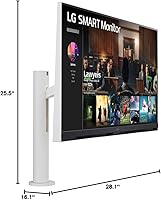
  • Dimensions: Overall product dimensions with stand measure 16.1 x 28.1 x 25.5 inches (H x W x D), requiring a reasonably deep desk for comfortable placement.
  • Weight: The unit weighs 24.5 pounds with the stand attached, which should be factored in if you plan to reposition it frequently or wall-mount it.
  • Power Input: The monitor operates on standard AC power at 240V, with no external power brick required for most regional configurations.
  • Surface Type: The panel features a matte screen surface, which reduces glare and reflections under bright ambient lighting conditions.

Related Reviews
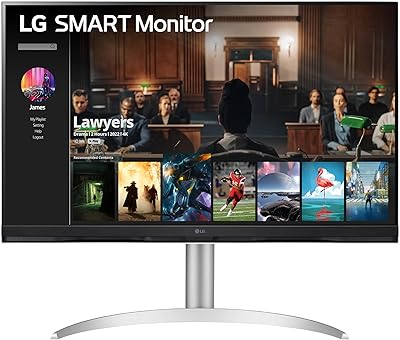
LG 32″ 4K UHD webOS Smart Monitor
76%
86%
Picture Quality
83%
Smart Platform (webOS)
88%
USB-C Connectivity
84%
AirPlay 2 & Apple Ecosystem
74%
Value for Money
More
LG 32UL500-W 32-Inch 4K VA Monitor
74%
88%
Picture Quality
83%
Color Accuracy
62%
HDR Performance
54%
Refresh Rate & Gaming
41%
Ergonomics & Stand
More
LG 32UP83A-W 32-inch 4K UHD Monitor
86%
94%
Display Quality
91%
Color Accuracy
88%
Build Quality
89%
Ergonomics/Adjustability
90%
Connectivity Options
More
LG 32UR500K-B 32-inch 4K UHD Monitor
74%
91%
Image Clarity & Sharpness
88%
Color Accuracy & Gamut
58%
HDR Performance
47%
Stand & Ergonomics
82%
Build Quality & Design
More
LG 32SR50F-B 32-inch Smart Monitor
72%
88%
Smart Platform (webOS)
77%
Picture Quality
82%
Value for Money
91%
Apple Ecosystem Integration
86%
Setup & Ease of Use
More
Samsung M8 32-Inch 4K Smart Monitor
71%
84%
Picture Quality
88%
Smart TV Experience
81%
Webcam Quality
73%
PC-Free Productivity
91%
Design & Aesthetics
More
LG 32GQ750-B 32-inch 4K Gaming Monitor
77%
91%
Image Clarity
86%
Refresh Rate & Smoothness
88%
HDMI 2.1 Compatibility
83%
Contrast & Black Levels
67%
Motion Clarity
More
LG 27SR75U-W 27-inch 4K Smart Monitor
77%
88%
Picture Quality
91%
Smart Platform
84%
Connectivity
79%
Value for Money
76%
Build Quality
More
LG 32G810SA-W 32-inch UltraGear Gaming Monitor

77%
88%
Color Accuracy
84%
Gaming Performance
58%
HDR Quality
81%
Smart Platform (webOS)
91%
Design & Aesthetics
More
ViewSonic VX3267U-4K 32-inch 4K IPS Monitor
74%
91%
Image Sharpness
83%
USB-C Functionality
76%
Color Accuracy
54%
HDR Performance
47%
Stand & Ergonomics
More

FAQ

Yes, and that is genuinely one of its strongest selling points. The built-in webOS platform lets you open streaming apps, browse content, and even control LG smart home devices entirely on its own. You only need a power cable to get started.

For most Apple users, AirPlay 2 works well for mirroring a MacBook screen or casting video from an iPhone without much fuss. Occasional hiccups have been reported — usually a brief disconnect that resolves on reconnect — but it is not a persistent issue for the majority of users.

It delivers 65W over USB-C, which is enough to charge most thin-and-light laptops, including many MacBook Air and MacBook Pro models, while simultaneously carrying video and data. Very power-hungry laptops may charge more slowly under load, but for most users it works as a true single-cable dock.

Not if gaming performance is a priority. The 5ms response time and standard refresh rate are well behind what dedicated gaming monitors offer, and you will notice the difference in fast-paced titles. It handles casual gaming fine, but competitive or high-frame-rate gaming is not where the 32SQ780S shines.

It is significantly better than average. Most monitors in this size range offer tilt only, or tilt plus limited height adjustment. This stand adds pivot, swivel, and an extend-retract range that lets you genuinely customize the viewing position for sitting, standing, or shared use. It is one of the hardware highlights buyers consistently mention.

The major ones — Netflix, Amazon Prime Video, Disney+, and YouTube — are present. However, the library is not as complete as a dedicated smart TV, and some regional or niche services may be missing entirely. If you rely on a specific app, it is worth checking LG's webOS app catalog before purchasing.

Yes. Beyond AirPlay 2 for Apple devices, the Screen Share feature supports Miracast-compatible Android phones and Windows laptops. Bluetooth is also available for connecting keyboards, mice, or audio devices directly to the monitor.

It works with as few LG ThinQ-compatible devices as you have registered, so even a single compatible fridge or washing machine will show up on the dashboard. The feature becomes more useful the more LG smart appliances you own, but it is not an all-or-nothing proposition.

White surfaces do show dust more visibly than black, so you may find yourself wiping it down more often. The material is a standard matte plastic, meaning it can pick up superficial marks over time, though nothing that a light cloth cannot address. It is a reasonable trade-off for those who value the look.

Yes, the 32SQ780S supports VESA mounting, which allows you to remove the ergo stand and attach it to a compatible wall mount or monitor arm. Just keep in mind the unit weighs 24.5 pounds, so make sure your mount and wall surface are rated to handle that load comfortably.

Where to Buy