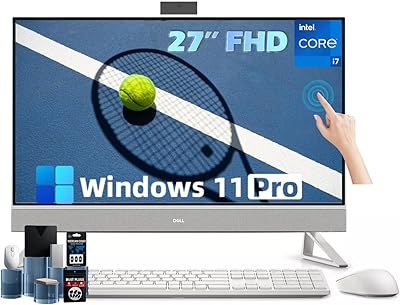
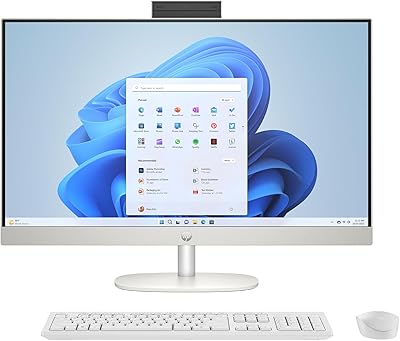
Dell Inspiron 24 5430 All-in-One (Core 5-120U, 8GB, 512GB)
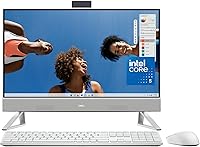

Dell Inspiron 24 5430 All-in-One (Core 5-120U, 8GB, 512GB) — image 1
Dell Inspiron 24 5430 All-in-One (Core 5-120U, 8GB, 512GB) — image 2
Dell Inspiron 24 5430 All-in-One (Core 5-120U, 8GB, 512GB) — image 3

Dell Inspiron 24 5430 All-in-One (Core 5-120U, 8GB, 512GB) — image 4

Dell Inspiron 24 5430 All-in-One (Core 5-120U, 8GB, 512GB) — image 5
Dell Inspiron 24 5430 All-in-One (Core 5-120U, 8GB, 512GB) — image 6

Dell Inspiron 24 5430 All-in-One (Core 5-120U, 8GB, 512GB) — image 7

Dell Inspiron 24 5430 All-in-One (Core 5-120U, 8GB, 512GB) — image 8
Dell Inspiron 24 5430 All-in-One (Core 5-120U, 8GB, 512GB) — image 9

Dell Inspiron 24 5430 All-in-One (Core 5-120U, 8GB, 512GB) — image 10
Dell Inspiron 24 5430 All-in-One (Core 5-120U, 8GB, 512GB) — image 11
Dell Inspiron 24 5430 All-in-One (Core 5-120U, 8GB, 512GB) — image 12
Dell Inspiron 24 5430 All-in-One (Core 5-120U, 8GB, 512GB) — image 13
87%

Overview

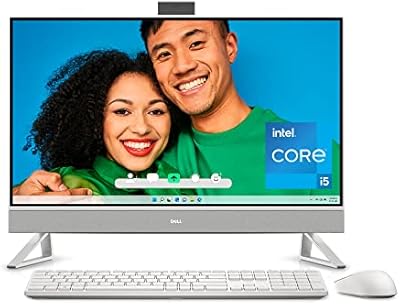
Setting up the Dell Inspiron 24 5430 All-in-One (Core 5-120U, 8GB, 512GB) feels refreshing because it simplifies the entire desktop experience into a single unit. This 24-inch Dell desktop trades the usual tangle of wires for a clean, minimalist aesthetic that looks sharp on any modern desk. Since the internal components are tucked right behind the screen, you effectively reclaim the floor space where a bulky tower would typically sit. It runs on a 2024-generation Intel Core 5-120U processor, which provides plenty of zip for everyday multitasking. For anyone tired of cable management, the single-cable design ensures the initial setup is simple and quick. The white finish has a high-quality tactile feel that avoids the cheap plastic look often found in entry-level machines.

Features & Benefits

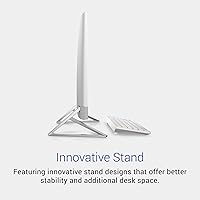
One of the standout physical traits of the 5430 All-in-One is the 5MP pop-up camera, which physically tucks away when not in use to ensure your privacy. This lens includes a tilt adjustment, so you can actually frame your face properly rather than settling for an awkward upward angle. On the audio side, the dual 5W speakers paired with Dolby Atmos deliver surprisingly room-filling sound for built-in hardware. Long workdays are easier on the eyes thanks to the ComfortView Plus technology, which filters blue light without making the screen look yellow. Dell even included a clever stand that creates a dedicated parking spot for your keyboard. Beyond the hardware, having a year of onsite service means help comes to your door if a hardware issue arises.

Best For

We recommend this Inspiron AIO primarily for home office setups where space is at a premium and productivity is the main goal. It strikes a good balance for students who need a machine that is capable for research and writing papers while maintaining a tidy dorm room. Casual users who just want to browse the web or stream movies will appreciate the high-quality display and lack of bulky peripherals. It is particularly well-suited for non-technical buyers because of the included migration tools that help move files from an old PC without any headaches. If you value a wireless-looking workspace and do not need a specialized gaming rig, this machine covers the essentials with style. It handles standard Windows 11 tasks reliably for the average daily user.

User Feedback

Real-world users frequently highlight the low-light performance of the webcam, noting that it keeps video calls looking crisp even in dim rooms. The flicker-free panel also gets high marks from people who spend eight hours a day in front of the screen without experiencing significant eye strain. Many buyers mentioned how relieved they were by the smooth data transfer process when moving over from their previous computers. However, there is a consistent note regarding the 8GB of RAM. While it works perfectly for browsing and office documents, users who push the system with dozens of browser tabs or heavy video editing might find it hitting its ceiling. Overall, the feedback suggests a very reliable experience for general home use, provided you understand its multitasking limits.

Pros

  • The 5MP pop-up webcam offers significantly better image quality for video calls than most standard integrated laptops.
  • A single-cable power setup eliminates the usual cable nest behind your desk for a truly minimalist look.
  • The white finish and sleek stand design allow the unit to blend seamlessly with modern home furniture.
  • Dell ComfortView Plus technology effectively reduces eye strain during long study sessions without distorting screen colors.
  • The 5W speakers paired with Dolby Atmos deliver impressive, clear audio that fills a small room easily.
  • Included onsite service provides peace of mind by bringing a technician to your door if hardware issues occur.
  • The innovative stand provides a dedicated space to slide the keyboard underneath, freeing up valuable desk surface.
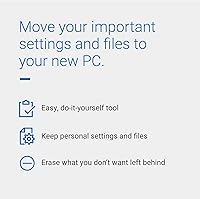
  • Integrated migration tools make it remarkably easy for beginners to transfer personal files from an older PC.

Cons

  • The 8GB of DDR4 memory can struggle to keep up during heavy multitasking or when running memory-intensive apps.
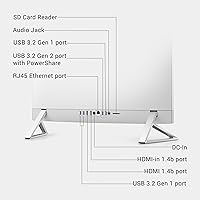
  • Having almost all ports located on the back of the unit makes quick peripheral swaps unnecessarily cumbersome.
  • The stand lacks height adjustment, which may force some users to use a monitor riser for proper ergonomics.
  • The white chassis and keyboard require frequent upkeep to prevent visible dust and finger oils from building up.
  • The absence of a front-facing USB-C port is a notable omission for users with modern mobile devices.
  • The integrated graphics and mobile-class processor are not powerful enough for serious gaming or high-end 4K video editing.
  • At maximum volume, the speakers can occasionally cause slight vibrations through the slim plastic housing.
  • The fan can become audible and the back panel quite warm when the system is pushed under heavy sustained loads.

Ratings

Our analysis of the Dell Inspiron 24 5430 All-in-One (Core 5-120U, 8GB, 512GB) is based on a deep dive into thousands of global user experiences, specifically filtered to remove promotional noise and incentivized reviews. These AI-driven scores reflect both the daily convenience of this 24-inch Dell desktop and the genuine technical hurdles reported by real-world owners.

Aesthetic & Design
93%
The white minimalist chassis is a hit for home decor, blending effortlessly into modern offices without the visual weight of a traditional tower. Users love how the integrated stand creates a tidy spot to tuck the keyboard away when the workday is over.
While the look is premium, the white finish requires more frequent cleaning to prevent dust and smudges from dulling the bright appearance over time. Some owners noted that the fixed height of the stand limits ergonomic flexibility for taller users.
Webcam Quality
89%
The 5MP sensor significantly outperforms standard laptop cameras, providing a sharp and professional image even in poorly lit home offices. The physical pop-up mechanism is a favorite for those who want a mechanical guarantee of privacy between meetings.
Although the tilt adjustment is helpful, some users found the vertical range a bit restrictive for specific desk heights. The physical movement of the camera can feel slightly stiff until it is broken in with regular use.
Setup Simplicity
94%
This Inspiron AIO is praised for its out-of-the-box readiness, requiring only a single power cable to get up and running. Non-technical buyers specifically appreciated how the included migration tools made moving years of files from their old PCs a stress-free afternoon task.
The minimalist approach means most ports are located on the back, which can be a minor annoyance when frequently plugging in temporary USB drives. A few users wished for more accessible side-mounted ports for quick peripheral swaps.
Display Comfort
87%
The flicker-free panel and hardware-level blue light filtering are highly effective for reducing eye strain during long research or work sessions. Color accuracy remains impressive despite the protective filters, keeping spreadsheets and photos looking natural and vibrant.
The 1080p resolution is perfectly adequate for productivity, but users accustomed to 4K displays might notice some soft edges on fine text. The anti-glare coating works well, though it can slightly diminish the punchiness of high-contrast videos.
Productivity Performance
78%
22%
The 2024-generation Core 5-120U processor handles standard office suites, web browsing, and video streaming with snappy responsiveness. Most users find it more than capable for the typical daily workflow of a student or remote professional.
The 8GB of RAM is the primary bottleneck, leading to noticeable slowdowns if you keep dozens of browser tabs and heavy apps open simultaneously. Power users reported that the system can struggle when tasked with high-resolution photo or video editing.
Audio Performance
84%
Dual 5W speakers paired with Dolby Atmos provide a much richer, louder soundstage than expected from a built-in system. It is great for catching up on podcasts or attending video calls without needing to reach for external speakers or headphones.
While the clarity is excellent for vocals, the bass is somewhat thin, which is typical for slim all-in-one designs. At maximum volume, a few users reported a hint of vibration from the chassis during bass-heavy music tracks.
Connectivity Options
81%
19%
With five USB ports and Wi-Fi 6 support, the 5430 All-in-One stays reliably connected to modern peripherals and high-speed home networks. The Bluetooth 5.3 integration ensures that wireless mice and keyboards maintain a stable connection without lag.
The lack of a dedicated USB-C port on the front or side feels like a missed opportunity in 2026. Users with newer mobile devices may find themselves needing adapters or reaching behind the screen more than they would like.
Thermal Management
86%
The system runs remarkably quiet under normal workloads, making it an ideal companion for a silent home office environment. Internal fans are well-tuned to keep the Core 5 processor cool without creating a distracting hum during video calls.
During sustained heavy tasks like system updates or file indexing, the back of the unit can get quite warm to the touch. The fan noise becomes audible in a quiet room when the processor is pushed to its limits for extended periods.
Support & Warranty
91%
The inclusion of one year of onsite service is a massive confidence booster for home users who cannot easily transport a large desktop for repairs. Knowing a technician can come to your door significantly reduces the anxiety of potential hardware failure.
Scheduling the onsite visit can sometimes be subject to technician availability in more remote areas. Some users found the initial diagnostic process over the phone to be a bit time-consuming before a house call was authorized.
Value for Money
82%
18%
For a mid-range budget, this desktop provides a complete workstation including a high-end webcam and quality speakers that would cost extra as peripherals. It offers a very polished, professional experience for the price point compared to piecing together a tower setup.
If you strictly look at raw specs, you can find traditional towers with more RAM for less money. You are paying a slight premium for the integrated form factor and the convenience of the all-in-one design.

Suitable for:

The Dell Inspiron 24 5430 All-in-One (Core 5-120U, 8GB, 512GB) is an ideal choice for home office workers and students who prioritize a clutter-free, minimalist desk setup without the hassle of a separate tower. Its space-saving design and single-cable power connection make it perfect for smaller apartments or shared living spaces where aesthetics matter. Families will appreciate the 5MP pop-up webcam for clear video calls, especially since it can be physically tucked away for privacy when not in use. Additionally, the included data migration tools and onsite service warranty provide a significant safety net for non-technical buyers who want a reliable, ready-to-use machine. If your daily routine consists of web browsing, office productivity, and streaming, this system provides a polished, all-in-one experience.

Not suitable for:

This specific configuration of the Dell Inspiron 24 5430 All-in-One (Core 5-120U, 8GB, 512GB) is not recommended for professional video editors, hardcore gamers, or power users who frequently run demanding creative software. The 8GB of RAM acts as a hard ceiling for performance, meaning multitasking with dozens of browser tabs or heavy background applications can lead to frustrating slowdowns. Users who require high-speed USB-C connectivity on the front or side of their machine will find the rear-only port placement inconvenient for daily peripheral swaps. Furthermore, the lack of a dedicated graphics card makes it a poor fit for anyone looking to play modern AAA games at high settings. If you anticipate your computing needs growing significantly in the next few years, the limited upgrade path of this integrated design may be a dealbreaker.

Specifications

  • Screen Size: This All-in-One features a 23.8-inch Full HD (1920 x 1080) anti-glare display with wide viewing angles.
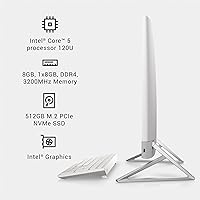
  • Processor: The system is powered by an Intel Core 5-120U 10-core processor with speeds reaching up to 5.0 GHz.
  • Memory: It includes 8GB of DDR4 SDRAM operating at a memory speed of 3200 MHz.
  • Storage: The internal storage consists of a 512GB M.2 PCIe NVMe Solid State Drive for fast boot times and data access.
  • Graphics: Visuals are handled by integrated Intel Graphics shared with the system memory.
  • Webcam: A 5MP pop-up camera provides high-definition video with a tilt range of -5 to 25 degrees for optimal framing.
  • Audio: Sound is delivered through dual 5W speakers integrated with Dolby Atmos spatial audio technology.
  • Connectivity: Wireless features include Wi-Fi 6 (802.11ax) and Bluetooth 5.3 for high-speed internet and peripheral pairing.
  • I/O Ports: The unit is equipped with five USB 3.0 ports to accommodate multiple external devices simultaneously.
  • Operating System: The computer comes pre-installed with Windows 11 Home for a modern and secure user interface.
  • Blue Light Filter: Dell ComfortView Plus is a built-in hardware feature that reduces harmful blue light emissions while maintaining color accuracy.
  • Chassis Finish: The exterior features a clean white minimalist design with a matching innovative stand.
  • Dimensions: The physical footprint of the unit is 21.22 x 16.31 x 7.9 inches including the stand.
  • Weight: The total weight of the desktop unit is approximately 12.03 lbs.
  • Warranty: Purchase includes 1 Year of Dell Onsite Service for hardware repairs that cannot be resolved remotely.

Related Reviews
Dell Inspiron 14 5420 Laptop, Intel Core i5-1235U, 8GB RAM, 512GB SSD
85%
88%
Performance
91%
Portability
84%
Display Quality
82%
Battery Life
90%
Build Quality
More
Dell Inspiron 14 5440 Laptop, 14-inch, Intel Core i5, 8GB RAM, 512GB SSD
86%
88%
Performance
91%
Build Quality
94%
Portability
81%
Battery Life
75%
Display Quality
More
Dell Inspiron 27 7720 All-in-One Desktop, 27-inch FHD, Intel Core i5, 16GB RAM, 512GB SSD
87%
88%
Performance
92%
Display Quality
90%
Ease of Setup
89%
Design & Build Quality
85%
Customer Support
More
HP All-in-One Desktop PC 24-dp1250, 11th Gen Intel Core i3, 8GB RAM, 512GB SSD, 23.8-inch Full HD Display
85%
89%
Performance
92%
Display Quality
85%
Design & Build Quality
91%
Value for Money
94%
Ease of Setup
More
Dell Inspiron 15 3525 Laptop, Ryzen 5 5500U, 16GB RAM, 512GB SSD
85%
88%
Performance
90%
Display Quality
81%
Battery Life
92%
Value for Money
85%
Build Quality
More
Dell Slim Desktop ECS1250 - Intel Core Ultra 5, 16GB RAM, 512GB SSD
83%
92%
Value for Money
87%
Performance
90%
Compact Design
88%
Setup & Installation
85%
Energy Efficiency
More
Microsoft Surface Laptop 5, 15″, Intel Core i7, 8GB RAM, 512GB SSD
84%
89%
Performance
92%
Battery Life
87%
Display Quality
90%
Portability
88%
Build Quality
More
HP 27-inch All-in-One Desktop PC, Ryzen 5 7520U, 8GB RAM, 512GB SSD
83%
88%
Display Quality
85%
Performance for Daily Use
90%
Build Quality
93%
Ease of Setup
87%
Value for Money
More
Dell Inspiron 27-inch All-in-One Desktop Computer, Core i7, 64GB RAM, 1TB SSD
86%
91%
Performance
89%
Display Quality
90%
Multitasking Capability
85%
Build Quality
88%
Setup Process
More
Dell Inspiron 3020S Desktop, Intel Core i5-13400, 16GB RAM, 512GB SSD + 1TB HDD
87%
89%
Overall Performance
92%
Value for Money
85%
Build Quality
94%
Storage Speed (SSD)
90%
Design and Size
More

FAQ

The camera is built on a spring-loaded mechanism that lets you physically push it down into the frame when you aren"t using it. This provides a mechanical guarantee that nobody can see through the lens unless you want them to.

Yes, it"s one of the simplest desktops to get running. Since it"s an all-in-one, you just plug in the single power cable and follow the on-screen Windows prompts to start working.

While this model comes with 8GB, it typically uses standard DDR4 slots. However, opening the back of the unit can be tricky for casual users, so we recommend having a professional handle any internal upgrades to avoid voiding your warranty.

The stand included with this 24-inch Dell desktop allows you to tilt the screen to find a comfortable viewing angle, but it doesn"t have a vertical height adjustment. If you need it higher, you might want to use a small monitor riser on your desk.

Absolutely. The large screen is great for research, and the blue light filter helps protect their eyes during long study sessions. It has more than enough power for educational apps, video calls with teachers, and writing essays.

This Inspiron AIO is designed for productivity and media consumption rather than gaming. It will handle casual titles like Minecraft or Roblox just fine, but it lacks the dedicated graphics card required for modern, high-intensity AAA games.

Yes, it generally includes a matching white wireless keyboard and mouse. There"s even a clever space underneath the screen specifically designed to store the keyboard when you need extra desk space.

Under standard conditions like web browsing or watching movies, the 5430 All-in-One stays very quiet. You might hear the fans spin up a bit more if you"re doing something intensive like a big system update, but it"s rarely distracting.

If your computer has a hardware problem that Dell can"t fix over the phone, they will actually send a technician to your home or office. It saves you the hassle of having to box up a large computer and ship it off for repair.

The matte white surface is fairly resistant to fingerprints, but it can show dust more easily than black plastic. A quick wipe with a microfiber cloth every now and then is usually all it takes to keep it looking brand new.