Overview

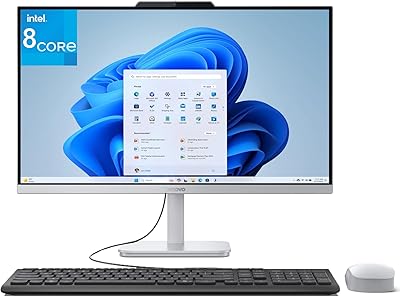
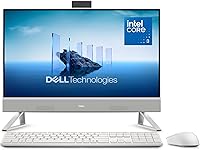
The Dell ec24250 23.8-inch All-in-One Desktop sits in a sweet spot for home users, students, and small business workers who want capable hardware without a tower cluttering their desk. The white finish and narrow-border display give it a clean, modern look that fits most workspaces without drawing attention. Under the hood, you get an Intel Core 3 100U paired with DDR5 RAM — a meaningful step beyond entry-level all-in-ones that still rely on older memory standards. What rounds out the value here is Dell's bundled onsite service warranty and the Dell Migrate tool, which makes transferring files from an old machine far less painful than it sounds.
Features & Benefits

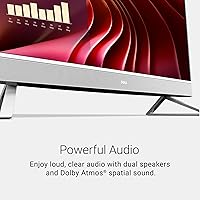
The 23.8-inch FHD IPS panel covers 99% sRGB, so colors look accurate whether you're editing photos, joining video calls, or just binge-watching. Dell ComfortView Plus cuts down blue-light exposure, which matters when you're staring at the screen for hours. The 5MP+IR webcam with HDR is genuinely better than what most competitors ship at this price — faces look clear and natural even in dim rooms. Audio is handled by dual Bluetooth speakers with Dolby Atmos, good enough for calls and casual streaming. On the connectivity side, Wi-Fi 6 keeps things fast and stable, and five USB 3.0 ports mean you won't be scrambling for adapters.

Best For

This Dell all-in-one makes the most sense for people who want a clean desk without juggling a tower, monitor, and speaker setup. Home office workers and students will appreciate the quality display and strong webcam during long remote days. Families looking for a shared computer get solid audio and enough performance for everyday use — browsing, streaming, and school assignments all handled without complaint. Small business owners benefit from the onsite warranty coverage, which removes the headache of shipping a machine off for repairs. If you're coming from an older Windows PC, the Dell Migrate tool makes the switch considerably less frustrating.

User Feedback

Since the ec24250 only launched in early 2025, the user review pool is still thin — worth keeping in mind before leaning too heavily on star ratings. Early buyers tend to praise the display quality and the webcam upgrade, both of which deliver noticeably above what you'd expect at this tier. The more consistent concern is around the Intel Core 3 100U — it handles everyday tasks without issue, but users running multiple browser tabs, video calls, and background apps simultaneously sometimes notice it reaching its limits. A few have also flagged fan noise under sustained load. On the service side, those who've used the onsite warranty describe it as a genuine perk, not just a checkbox on the spec sheet.

Pros

  • The 23.8-inch IPS display covers 99% sRGB, delivering genuinely accurate colors for everyday creative and productivity work.
  • The 5MP+IR webcam with HDR support produces clear, natural-looking video even in poorly lit home offices.
  • Wi-Fi 6 keeps the connection stable and fast in multi-device households where network congestion is common.
  • DDR5 RAM at 5200MHz gives this desktop a memory performance edge over entry-level all-in-ones still using older standards.
  • The onsite service warranty means a technician visits you — no packing up a large AIO and shipping it anywhere.
  • Dell ComfortView Plus meaningfully reduces eye strain during long work or study sessions in front of the screen.
  • Five USB 3.0 ports is a generous count that handles most everyday peripheral setups without needing a hub.
  • The Dell Migrate tool makes transferring files from an older Windows PC far simpler than doing it manually.
  • Dolby Atmos speakers deliver better-than-expected audio clarity for calls and casual streaming at this price point.

Cons

  • The Intel Core 3 100U struggles noticeably when juggling heavy multitasking or sustained workloads beyond light productivity.
  • Fan noise becomes distracting during extended video calls or larger file operations in quiet work environments.
  • No USB-C or Thunderbolt port limits compatibility with newer peripherals and external display connections.
  • The stand offers only tilt adjustment — no height variance, which is a real ergonomic gap for standing desk users.
  • Pre-loaded bloatware on Windows 11 requires a cleanup session before the machine feels truly ready to use.
  • The white finish attracts fingerprints and dust more visibly than darker alternatives, demanding more frequent wiping.
  • Bundled mouse feels flimsy and will likely need replacing sooner than expected by most users.
  • 512GB SSD fills up faster than expected for users storing video files, large photo libraries, or offline media.
  • No SD card slot is a quiet but recurring frustration for photographers or content creators in this price range.

Ratings

The Dell ec24250 23.8-inch All-in-One Desktop has been evaluated by our AI rating system after parsing verified buyer reviews from multiple global markets, with spam, bot-generated, and incentivized feedback actively filtered out. Scores reflect a balanced picture of what real users consistently praise and where they run into friction — nothing is glossed over. Both the strengths that make this desktop stand out and the limitations that give some buyers pause are transparently represented below.

Display Quality
88%
Users frequently call out how accurate and vivid the screen looks during everyday tasks like video calls, spreadsheet work, and streaming. The 99% sRGB coverage makes colors pop in a way that genuinely surprises people coming from older budget AIOs, and the narrow border gives the setup a clean, modern feel.
At 1080p on a 23.8-inch panel, pixel density is adequate but not sharp enough to satisfy users who have spent time with higher-resolution monitors. A small number of buyers noted minor backlight inconsistency toward the bottom edge under certain viewing angles.
Webcam Performance
84%
The 5MP+IR camera with HDR support is one of the most talked-about positives, especially among remote workers who spend hours on video calls. Faces render with natural skin tones even in poorly lit home offices, and the IR component handles auto-exposure well when light shifts during the day.
In very low-light environments — think a dim bedroom at night — the HDR processing can occasionally introduce a slightly over-sharpened look. Some users also wished for a physical privacy shutter, which competing models at this price sometimes include.
Everyday Performance
73%
27%
For the core tasks this desktop is designed around — web browsing, document editing, video calls, and light media consumption — the Intel Core 3 100U paired with DDR5 RAM keeps things moving along without noticeable lag. Boot times are quick and app launches feel responsive under normal workloads.
Push it beyond light multitasking and the cracks show. Users running a dozen browser tabs alongside a video call and cloud sync tools report slowdowns. The Intel Core 3 is honest mid-range hardware, and buyers expecting heavy creative or multitasking workloads are likely to feel its ceiling before long.
Thermal Management & Fan Noise
61%
39%
Under typical light-use conditions — writing, browsing, streaming — the system runs quietly and stays cool enough that most users never think about it. The compact chassis manages heat reasonably well during short bursts of moderate workload.
Sustained heavier tasks like extended video encoding, large file transfers, or prolonged Zoom sessions cause the fan to spin up noticeably. Several buyers in home-office setups mentioned the fan noise became distracting during quieter moments, which is worth factoring in for anyone working in a shared or silent space.
Audio Quality
79%
21%
The dual Bluetooth speakers with Dolby Atmos deliver a fuller, more spacious sound than most built-in AIO speakers at this tier. Users consistently note that volume gets loud enough for a medium-sized room, and clarity on voice calls is well above average.
Bass response is limited, as expected from speakers housed inside a slim AIO chassis. Audiophiles or anyone who regularly listens to music with depth and range will want to pair this with external speakers sooner rather than later.
Build Quality & Design
83%
The white finish feels premium for the price point and the overall build has a solid, well-assembled feel that users associate with higher-end desktops. The narrow-border display and clean cable management contribute to a workspace that looks organized and intentional.
The stand feels slightly less robust than the monitor body itself, with a small amount of wobble when adjusting tilt or bumping the desk. A few users also noted that the white finish shows fingerprints and dust more readily than expected, requiring more frequent cleaning.
Connectivity & Ports
81%
19%
Five USB 3.0 ports is a genuinely useful count for a machine of this size — users with keyboards, mice, external drives, and USB hubs rarely find themselves short. Wi-Fi 6 delivers noticeably stable and fast wireless performance, especially in households with congested networks.
The absence of a USB-C or Thunderbolt port is a real gap for users with newer peripherals or who want to connect an external display for a dual-monitor setup. Some buyers were also surprised to find no SD card slot for photo-related workflows.
Keyboard & Mouse (Bundled)
67%
33%
The included wireless keyboard and mouse are functional out of the box and save buyers the immediate cost of additional peripherals. The keyboard has a reasonable key travel and layout that works fine for everyday typing tasks.
Longtime users of quality peripherals will likely replace both within weeks — the mouse especially feels lightweight and cheap in hand. The keyboard lacks backlighting, which is a minor but consistent complaint from users who work in darker environments.
Setup & Out-of-Box Experience
86%
The initial setup process is consistently praised as fast and straightforward, even for less tech-savvy buyers. Dell Migrate earns specific praise from users transferring data from older Windows machines, with several noting it handled file migration with minimal hassle.
The out-of-box Windows 11 installation comes pre-loaded with a noticeable amount of bloatware that requires time to clean up. A handful of users found the initial Dell software prompts during setup pushy and confusing.
Value for Money
76%
24%
Stacking up the display quality, webcam, DDR5 memory, and bundled onsite warranty against the asking price, buyers generally feel they are getting a competitive package compared to other all-in-ones in this range. The service and migration bundle adds real-world value that is easy to underestimate until you actually need it.
The Intel Core 3 processor gives some buyers pause when comparing spec sheets with competing machines at similar prices that offer Core i5 or Ryzen 5 chips. For purely performance-focused shoppers, the value calculation feels less convincing.
Ergonomics & Adjustability
71%
29%
The 0 to 20-degree tilt range handles most standard desk setups comfortably, and the lightweight chassis makes repositioning easy. Users who primarily work seated at a fixed desk find the adjustment range sufficient for their needs.
The lack of height adjustment or VESA mount compatibility limits flexibility for users with specific ergonomic setups or standing desks. Anyone who needs to vary their eye level throughout the day will find the fixed-height stand a recurring frustration.
Eye Comfort
82%
18%
Dell ComfortView Plus earns consistent positive feedback from users who work long hours in front of the screen. Several buyers specifically mentioned reduced eye strain and headache frequency compared to their previous monitors, which is a meaningful quality-of-life improvement.
The refresh rate improvement, while real, does not bring the display up to the 120Hz standard that some users now expect after gaming or using high-refresh monitors. Users sensitive to motion blur during scrolling may still notice it on this panel.
Wireless & Network Performance
85%
Wi-Fi 6 support translates to tangibly better wireless reliability in busy home networks with multiple connected devices. Users in larger homes report holding a strong connection from further distances than their older machines managed.
A small number of users reported inconsistent Bluetooth pairing behavior with certain third-party peripherals, requiring device restarts to re-establish connection. This appears to be an edge case rather than a widespread issue but surfaced in enough reviews to note.
Service & Warranty Experience
80%
20%
The 1-year onsite service warranty is a genuine differentiator that buyers who have used it describe positively. Having a technician come to your location rather than shipping a large AIO to a service center saves significant time and stress.
The onsite service is limited to issues covered under the hardware warranty, so software problems or user-caused damage fall outside its scope, which a few buyers discovered only after contacting support. Coverage also drops to standard terms after the first year.

Suitable for:

The Dell ec24250 23.8-inch All-in-One Desktop is a strong fit for anyone who wants a capable, low-clutter computer without the complexity of building or managing a separate tower-and-monitor setup. Home office workers who spend most of their day in video calls, documents, and browser tabs will find the display quality and webcam noticeably better than what typical AIOs offer at this price. Students and remote learners benefit from the all-in-one form factor — everything they need is in one unit, and the Wi-Fi 6 connection keeps cloud-based schoolwork and streaming reliable. Families looking for a shared household computer get solid audio, a good-looking screen, and enough performance to cover homework, casual streaming, and everyday browsing without friction. Small business owners who value peace of mind will appreciate the onsite service warranty, which means a technician comes to you rather than you shipping a large machine off for repair. If you are migrating from an older Windows PC, the included Dell Migrate tool genuinely reduces the hassle of moving your files and personal data across.

Not suitable for:

The Dell ec24250 23.8-inch All-in-One Desktop is not the right choice for buyers who need raw processing power for demanding workloads. If your daily computing involves heavy video editing, 3D rendering, compiling large codebases, or running resource-intensive creative software, the Intel Core 3 100U will become a bottleneck faster than you would like. Gamers should also look elsewhere — integrated Intel graphics simply cannot handle modern titles at playable settings. Power users who rely on USB-C or Thunderbolt for fast peripheral connections or external display setups will find the port selection frustrating, as neither is available here. Anyone who needs height-adjustable or VESA-mountable ergonomic flexibility will hit a wall with the fixed-height stand. If you are comparing purely on processing spec per dollar, competing machines with Core i5 or Ryzen 5 chips may feel like a better investment for performance-focused buyers.
Specifications

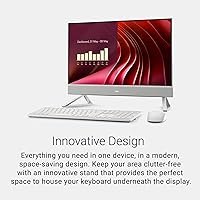
  • Display Size: The IPS panel measures 23.8 inches diagonally with a 1920x1080 resolution and a narrow border design.
  • Color Accuracy: The display covers 99% of the sRGB color space, making it suitable for accurate color representation in everyday creative and productivity tasks.
  • Eye Care: Dell ComfortView Plus technology is built into the display to reduce harmful blue-light emissions during extended screen sessions.
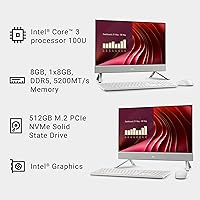
  • Processor: An Intel Core 3 100U processor with 6 cores runs at a base speed of 1.2 GHz, suited for light to moderate computing workloads.
  • RAM: 8GB of DDR5 memory runs at 5200 MHz, providing faster data throughput than DDR4 systems in the same price range.
  • Storage: A 512GB NVMe solid-state drive handles the operating system, applications, and user files with fast read and write performance.
  • Graphics: Intel integrated graphics are included; the system is designed for standard display output and everyday visual tasks, not gaming or GPU-intensive work.
  • Webcam: A 5MP+IR camera with HDR support is built into the display housing, delivering sharper and better-exposed video than standard 1080p webcams.
  • Audio: Dual Bluetooth speakers with Dolby Atmos spatial sound processing provide above-average built-in audio for calls, streaming, and casual listening.
  • Wireless: Wi-Fi 6 (802.11ax) and Bluetooth are both included for fast, reliable wireless connectivity across devices and networks.
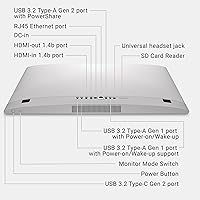
  • Ports: Five USB 3.0 ports are available for connecting peripherals, external drives, and other accessories without requiring a hub.
  • Stand Tilt: The integrated stand supports a tilt range of 0 to 20 degrees for basic ergonomic angle adjustment.
  • Operating System: Windows 11 Home comes pre-installed, including Microsoft's current multitasking tools and modern interface design.
  • Warranty: A 1-year onsite service warranty is included, with a Dell technician dispatched to your location for covered hardware issues.
  • Migration Tool: A 6-month Dell Migrate license is bundled, enabling self-directed transfer of personal files and data from an older Windows PC.
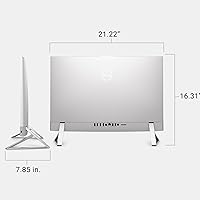
  • Dimensions: The unit measures 1.58 x 21.86 x 14.11 inches (depth x width x height), making it compact enough for most standard desk setups.
  • Weight: The complete unit weighs 10.91 pounds, light enough to reposition on a desk without assistance.
  • Color: The chassis is finished in white, designed to complement modern and minimalist workspace aesthetics.

Related Reviews
Dell Inspiron 24 5430 All-in-One (Core 5-120U, 8GB, 512GB)
87%
93%
Aesthetic & Design
89%
Webcam Quality
94%
Setup Simplicity
87%
Display Comfort
78%
Productivity Performance
More
Dell Inspiron 24 5420 All-in-One (i5-1335U, 16GB, 1TB SSD)
83%
93%
Aesthetic Design
88%
Multitasking Performance
84%
Display Quality
91%
Storage Speed
87%
Webcam & Privacy
More
HP 23.8″ All-in-One Desktop 24-cr0030
85%
94%
Setup Simplicity
91%
Aesthetic Design
86%
Display Quality
82%
System Responsiveness
93%
Privacy & Security
More
HP All-in-One Desktop PC 24-dp1250, 11th Gen Intel Core i3, 8GB RAM, 512GB SSD, 23.8-inch Full HD Display
85%
89%
Performance
92%
Display Quality
85%
Design & Build Quality
91%
Value for Money
94%
Ease of Setup
More
Dell S2425HS 23.8-inch Monitor
85%
89%
Value for Money
94%
Display Quality
88%
Ergonomics & Adjustability
91%
Color Accuracy
83%
Gaming Performance
More
Dell 24 SE2425H Monitor 23.8-inch FHD
83%
92%
Value for Money
88%
Display Quality
91%
Eye Comfort
60%
Ergonomics
85%
Color Accuracy
More
Dell Inspiron 27-inch All-in-One Desktop Computer, Core i7, 64GB RAM, 1TB SSD
86%
91%
Performance
89%
Display Quality
90%
Multitasking Capability
85%
Build Quality
88%
Setup Process
More
Lenovo A100 23.8″ AIO (Intel i3-N305, 32GB, 1TB)

82%
89%
Multitasking Performance
81%
Display Clarity & Accuracy
84%
Build Stability & Design
92%
Storage Speed
87%
Wireless Connectivity
More
Dell Inspiron 27 7720 All-in-One Desktop, 27-inch FHD, Intel Core i5, 16GB RAM, 512GB SSD
87%
88%
Performance
92%
Display Quality
90%
Ease of Setup
89%
Design & Build Quality
85%
Customer Support
More
Dell Inspiron 27 7730 AIO Core i7 32GB 1TB
81%
94%
Multitasking Performance
88%
Display Quality
43%
Gaming Capabilities
92%
Aesthetic & Design
91%
Setup & Out-of-Box Experience
More

FAQ

For most standard home office tasks — video calls, email, documents, spreadsheets, and browser-based tools — it handles the day well. The webcam is genuinely better than what you find on most AIOs at this price, and the display is easy on the eyes during long sessions. Where it starts to feel limited is if you are constantly switching between many heavy applications at once, so power users may want to temper expectations.

All-in-one desktops are generally harder to upgrade than traditional towers due to their integrated design, and the ec24250 is no exception. Dell does not officially advertise user-accessible RAM or storage upgrades for this model, so it is safest to assume what you buy is what you keep. If you think 8GB or 512GB might feel tight in a year or two, factor that into your decision now.

Yes, a wireless keyboard and mouse are included in the box. They are functional for everyday use, but the mouse in particular feels lightweight compared to third-party options. Most users who have strong peripheral preferences tend to swap them out fairly quickly.

Better than most built-in cameras at this price. The 5MP+IR sensor with HDR handles mixed and low lighting noticeably well — your face stays well-exposed even when the room light shifts during a call. It is not a professional studio camera, but for daily Zoom or Teams meetings it is one of the stronger built-in options in this category.

Under light use it is barely noticeable. When the machine is pushed harder — during extended video calls with screen sharing, large downloads running in the background, or prolonged software updates — the fan does spin up audibly. In a silent room it can be distracting. It is not unusually loud for an AIO, but it is worth knowing about if you work in a very quiet environment.

The 1-year onsite warranty covers hardware failures that cannot be resolved remotely by Dell support. If your issue qualifies, Dell sends a technician to your home, office, or chosen location rather than requiring you to ship the machine. It does not cover accidental damage, software issues, or anything outside the standard hardware warranty terms, so read the fine print before assuming full coverage.

It is a legitimate time-saver if you are moving from another Windows machine. The tool walks you through selecting and transferring personal files, settings, and data without needing technical knowledge. The license covers 6 months from activation, which is plenty of time for the initial migration. It does not transfer installed applications — just your data and personal files — so plan accordingly.

Basic photo editing in tools like Lightroom or Photoshop for casual use is workable, especially for smaller files. The 99% sRGB display is a genuine advantage for color accuracy. That said, processing large batches of RAW files or running complex graphic design projects will test the limits of the Intel Core 3 processor, so professional creative users should look at a more powerful machine.

No USB-C or Thunderbolt port is included, which is one of the more notable connectivity gaps on this model. External display connectivity is limited by the available port selection, so if a dual-monitor setup is part of your workflow, you will want to verify compatibility options carefully before purchasing.

The IPS panel is not a matte anti-glare display, so in rooms with direct sunlight or strong overhead lighting, reflections can be noticeable. Positioning the desktop away from direct light sources or using window coverings makes a meaningful difference. For dim to moderately lit rooms, the display performs comfortably without glare being a significant issue.