Dell KM5221W Wireless Keyboard and Mouse Combo





Overview
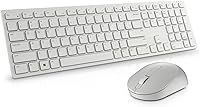
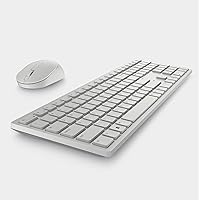
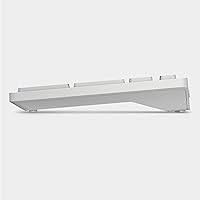
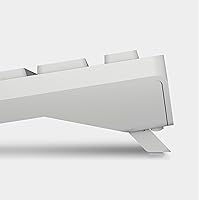
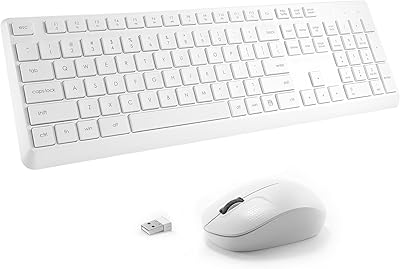
The Dell KM5221W Wireless Keyboard and Mouse Combo sits comfortably in the mid-range of the wireless peripheral market, backed by a brand that has shipped reliable office hardware for decades. The all-white design keeps things looking clean and professional — the kind of setup that doesn't look out of place on a corporate desk or a home office. Connection is handled by a 2.4 GHz USB dongle that plugs in and just works without any software installation. Batteries are included, so you are up and running immediately. What really stands out at this price point is the 3-year Advanced Exchange Service, a level of post-purchase support you rarely see bundled in at this tier.
Features & Benefits
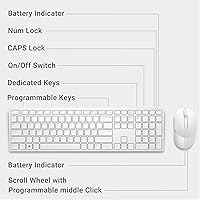
Plug the nano receiver into any available USB port and the KM5221W is ready to go — no drivers, no pairing rituals. The dedicated media hotkeys for volume and mute are genuinely useful if you spend time on calls or bounce between music and meetings; hitting a physical mute key beats fumbling through a video conferencing app every time. The keyboard layout feels familiar and spacious, with enough key travel to make long typing sessions comfortable rather than punishing. The optical mouse covers the basics well: three buttons and solid tracking on most surfaces. It runs on a single AA battery, and with typical office use, you won't be swapping it out often.
Best For
This keyboard-and-mouse set is a natural fit for a few specific types of buyers. If you work from home and want a clean desk without a tangle of cables, this Dell wireless combo handles that without any fuss. It is also a smart pick for anyone already in the Dell ecosystem — the white finish pairs well with Dell monitors and towers. Remote workers who jump in and out of video calls will appreciate having a physical mute button within easy reach. And if long-term reliability matters more to you than flashy specs, the three-year exchange warranty makes this a genuinely sensible choice for a permanent desk setup.
User Feedback
Buyers tend to be satisfied with the KM5221W, and the praise is pretty consistent: plug-and-play setup is mentioned constantly, with most people reporting they were typing within a minute of unboxing. Key feel and battery life also come up often and positively — the typing experience is described as quiet and comfortable, and batteries seem to last far longer than expected. The mouse, though, draws a more mixed response. It does its job, but users accustomed to adjustable DPI or extra buttons will find it basic. A handful of reviewers flagged the nano dongle as easy to misplace. Still, for an office-focused set, most buyers walk away feeling they got good value.
Pros
- Plug-and-play setup via USB nano receiver takes under a minute with zero software required.
- The 3-year Advanced Exchange Service is a rare and genuinely reassuring warranty at this price level.
- Dedicated mute and volume hotkeys make a real difference during back-to-back video calls.
- Key travel feels comfortable and quiet enough for shared or open-plan workspaces.
- Battery life is impressively long with typical office use, reducing how often you think about replacements.
- The full-size keyboard layout feels familiar and spacious, reducing adjustment time for new users.
- Clean white design looks professional and fits neatly into modern desk aesthetics.
- Stable 2.4 GHz wireless connection holds up reliably without dropouts or lag during normal use.
Cons
- The included mouse offers no DPI adjustment, which limits its usefulness for anything beyond basic navigation.
- Only three mouse buttons means no side buttons or extra shortcuts that many users now consider standard.
- The nano USB receiver is small enough to lose easily and there is no on-board storage for it.
- Bluetooth is not supported, so you are committed to using a USB port permanently on your machine.
- No backlighting on the keyboard makes this a poor fit for dim environments or late-night work sessions.
- Windows-only optimization means Mac or Linux users will miss out on full hotkey functionality.
- The mouse may feel light or cheap to users accustomed to heavier, more premium-feeling peripherals.
- No dedicated software means zero customization options for key remapping or sensitivity tuning.
Ratings
Our scores for the Dell KM5221W Wireless Keyboard and Mouse Combo are generated by AI after analyzing thousands of verified global user reviews, with spam, incentivized feedback, and bot activity actively filtered out before any score is calculated. The result is an honest, data-driven picture of where this keyboard-and-mouse set genuinely excels and where real buyers have run into frustrations. Both sides of the experience are reflected transparently in every category below.
Ease of Setup
Keyboard Typing Feel
Wireless Reliability
Mouse Performance
Battery Life
Value for Money
Build Quality
Hotkey Functionality
Ergonomic Comfort
Mouse Ergonomics
Warranty & Support
Portability
Noise Level
Aesthetic Design
Suitable for:
The Dell KM5221W Wireless Keyboard and Mouse Combo is a strong match for anyone who wants a dependable, no-fuss wireless setup for daily office or home office work. Remote workers who spend hours on video calls will find real practical value in the dedicated mute and volume hotkeys — small conveniences that genuinely reduce friction across a long workday. If you are already using Dell hardware and want peripherals that look cohesive on your desk, the clean white design fits right in without any mismatch. First-time wireless keyboard buyers will appreciate how completely painless the setup is: plug in the nano receiver and you are done. Perhaps most importantly, anyone who has been burned by peripherals dying just outside a standard one-year warranty window will find the three-year Advanced Exchange Service a meaningful reason to choose this set over cheaper alternatives.
Not suitable for:
The Dell KM5221W Wireless Keyboard and Mouse Combo is not the right tool for buyers who expect a high-performance mouse. The optical mouse included here covers the basics and nothing more — there is no DPI adjustment, no extra programmable buttons, and no software customization, which will frustrate anyone coming from a gaming or precision-focused peripheral. Power users who rely on macros, backlighting, or multi-device Bluetooth pairing will also hit a wall quickly, as this set offers none of those features. Mac users should be cautious too, since the layout and hotkeys are optimized entirely for Windows. If you are building a productivity setup where the mouse does heavy lifting — photo editing, detailed spreadsheet navigation, or CAD work — this keyboard-and-mouse set is the wrong foundation and you should budget for a dedicated mouse separately.
Specifications
- Brand: Manufactured by Dell Computers, a globally recognized brand with a long track record in business and consumer PC peripherals.
- Model Number: The official model identifier for this keyboard-and-mouse set is KM5221W, part of the Dell Pro KM5221 series.
- Wireless Technology: Uses a 2.4 GHz radio frequency connection for stable, low-latency input without the interference issues common with older wireless standards.
- Connection Method: A single USB nano receiver handles both the keyboard and mouse simultaneously, requiring just one USB-A port on the host machine.
- Keyboard Layout: Full-size US English QWERTY layout with a standard key arrangement familiar to most Windows users.
- Hotkeys: Includes three dedicated media hotkeys: volume up, volume down, and mute, located for quick one-press access during calls or media playback.
- Mouse Buttons: The included optical mouse features three buttons — left click, right click, and a clickable scroll wheel — covering standard navigation needs.
- Mouse Tracking: Optical LED tracking technology provides reliable cursor movement on most standard desk surfaces without requiring a mouse pad.
- Power Source: Both the keyboard and mouse are battery-powered; the keyboard uses AA batteries and the mouse uses AA batteries, all included in the box.
- Operating System: Designed and optimized for Windows operating systems; hotkeys and full functionality are not guaranteed on macOS or Linux.
- Product Weight: The combined weight of the keyboard and mouse unit is approximately 1.58 pounds, making it light enough to transport if needed.
- Dimensions: The keyboard measures 17.8 x 5.4 x 2.9 inches, offering a full desktop footprint without a numeric-pad-free compromise.
- Color: Available in a clean all-white finish suited for professional and home office environments where aesthetics matter.
- Warranty: Covered by Dell's 3-year Advanced Exchange Service, which provides a replacement unit before the defective one is returned.
- Ergonomic Design: The keyboard profile is shaped to support a natural wrist angle during extended typing sessions, reducing strain over long work periods.
Related Reviews

Arteck HW192 Wireless Keyboard and Mouse Combo

TKVPJYYI Wireless Retro Typewriter Keyboard and Mouse Combo
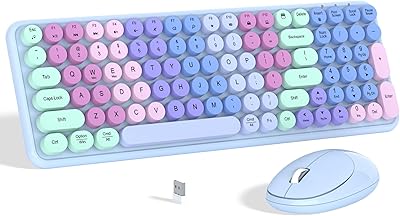
Links9+ Rainbow Wireless Keyboard Mouse Combo
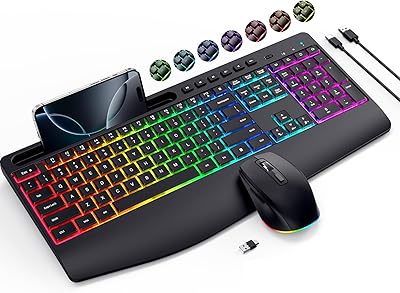
VEILZOR UK418 Wireless Keyboard and Mouse Combo

RECCAZR Wave Keys Ergonomic Wireless Keyboard Mouse Combo

MPTOG S801AG Wireless Keyboard and Mouse Combo

CHESONA Multi-Device Wireless Keyboard and Mouse Combo
Tayderley Wireless Keyboard and Mouse Combo

SABLUTE Wireless Backlit Keyboard and Mouse Combo

UBOTIE Wireless Keyboard and Mouse Combo