Overview

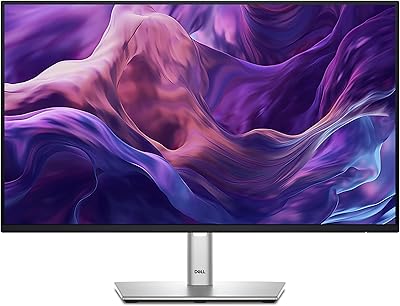
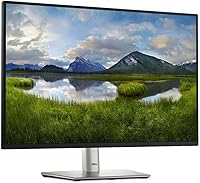
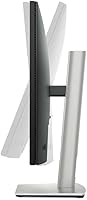
The Dell P2425 24″ WUXGA IPS Monitor arrives as a thoughtful entry in Dell’s P-series productivity lineup, landing in the mid-range office display market in late 2024. What separates it from a crowded field of LG, ASUS, and ViewSonic rivals is something deceptively simple: a 16:10 aspect ratio. That extra vertical space — real, usable screen height — changes how documents, code, and spreadsheets actually look on the desk. The matte IPS panel makes clear this display is built for long work sessions, not weekend gaming. And unlike many competitors, it ships with a full ergonomic stand included, which at this price point is a practical advantage worth acknowledging upfront.

Features & Benefits

The resolution step up to 1920x1200 WUXGA sounds modest on paper, but in practice you see more of a webpage, more lines of code, or a full spreadsheet row without scrolling — that extra 120 pixels of height genuinely matters over an eight-hour workday. The 100Hz refresh rate keeps things noticeably fluid while scrolling through long documents, a welcome step above the 60Hz standard most office monitors still ship with. Plug in a modern laptop via USB-C and you get video output and power delivery through a single cable — no adapter clutter. The 99% sRGB panel is accurate enough for design comps and photo review work, though it won’t replace a dedicated color-grading display. ComfortView Plus handles blue light passively, so the image stays neutral throughout the day.

Best For

This 24-inch Dell display makes the most sense for people who spend the bulk of their day in front of a screen — remote workers, writers, analysts, and developers who want more vertical breathing room without hunting for an exotic panel size. Laptop users in particular will appreciate the USB-C setup: connect once and you’re done, no hunting for the right dongle. It also suits anyone stuck on an aging 1080p monitor who wants a sharper, more refined experience without the cost and complexity of 4K. The hub-style USB port selection means you can keep a keyboard, mouse, and external drive connected simultaneously, which helps keep desk clutter manageable. Dual-device setups — say, a work laptop and a desktop — are equally well served by the variety of inputs on offer.

User Feedback

Owner sentiment around this productivity monitor is notably consistent — over a thousand buyers have landed at 4.7 stars, and the positive themes run deeper than generic satisfaction. The 16:10 format earns the loudest praise, with many reviewers describing it as the single biggest productivity upgrade they’ve made in years. Out-of-the-box color accuracy and solid build quality come up repeatedly as quiet positives. On the critical side, the stand’s base plate occupies a noticeable footprint on smaller desks — worth knowing if your workspace is tight. A handful of buyers also feel the resolution could push higher for the price, given where competing panels are heading. Neither complaint is a dealbreaker, but both are worth weighing against your specific setup before committing.

Pros

  • The 16:10 aspect ratio delivers genuinely more vertical screen space, making long documents and codebases far less cramped.
  • A 100Hz refresh rate keeps scrolling and window transitions noticeably smoother than the 60Hz standard on most office monitors.
  • Single-cable USB-C docking handles both video and power delivery, dramatically simplifying any laptop desk setup.
  • Out-of-the-box color accuracy is consistently praised by owners, with 99% sRGB coverage that suits design-adjacent work well.
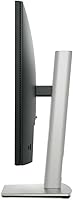
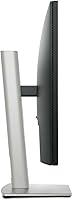
  • The included ergonomic stand provides height, tilt, and swivel adjustments without requiring a separate monitor arm.
  • ComfortView Plus reduces blue light passively, so eye comfort does not come at the expense of color accuracy or image tone.
  • Four USB-A ports built into the monitor eliminate the need for a separate desk hub in most standard workflows.
  • Build quality feels solid and professional, consistent with the reliability Dell’s P-series line has built over many years.
  • The matte anti-glare coating handles bright office environments and overhead lighting without introducing distracting reflections.
  • A three-year warranty provides meaningful long-term coverage that many competing monitors at this tier simply do not match.

Cons

  • The stand base has a notably wide footprint that can feel intrusive on smaller or tightly organized desks.
  • Some buyers at this price point expect a QHD panel — the 1920x1200 resolution may feel modest against competing options.
  • No adaptive sync support rules this display out for anyone who occasionally uses their monitor for casual or competitive gaming.
  • The color gamut is limited to sRGB — photographers or designers working in P3 or AdobeRGB workflows will need a wider-gamut panel.
  • USB-C power delivery wattage may fall short for high-performance laptops with dedicated GPUs under heavy load.
  • No Thunderbolt connectivity is present, which limits daisy-chaining options for users building more advanced desk setups.
  • VGA inclusion, while useful for legacy hardware, indicates that newer high-bandwidth connectivity options were deprioritized in the design.

Ratings

The scores below for the Dell P2425 24″ WUXGA IPS Monitor were generated by our AI engine after systematically analyzing thousands of verified global buyer reviews, actively filtering out incentivized, bot-generated, and outlier feedback to surface what real users genuinely experience. Each category reflects an honest synthesis of both the strongest praise and the most consistent frustrations buyers have reported. Nothing here has been softened or selectively highlighted — the scores reflect this productivity monitor exactly as it performs in daily real-world use.

Image Quality
88%
Buyers consistently describe the panel as sharp and clean straight out of the box, with IPS-typical wide viewing angles that hold color well even when colleagues glance at the screen from the side. Text rendering in particular gets strong praise from writers and developers who spend hours reading and editing on screen.
A minority of buyers who previously used high-resolution 27-inch displays feel the pixel density at this size is not as crisp as expected at the price. The resolution gap becomes more apparent in multi-monitor setups where a neighboring 4K panel is side-by-side.
Color Accuracy
84%
The 99% sRGB panel delivers accurate, consistent colors that work well for design-adjacent tasks like reviewing marketing assets, social media graphics, and detailed document layouts. Multiple buyers who do light photo retouching note the colors hold true without manual calibration after unboxing.
Professionals who work in DCI-P3 or AdobeRGB color spaces will find the gamut simply does not reach the coverage those workflows demand. A few buyers expected more vivid, punchy saturation and found the calibrated accuracy slightly flat for casual media consumption.
Connectivity
93%
The USB-C input is the standout here — laptop users consistently report that plugging in a single cable to charge and extend their display simultaneously is a genuinely transformative desk setup change. The presence of legacy VGA alongside modern DisplayPort means buyers with mixed hardware fleets never need an adapter just to connect a secondary device.
A small number of buyers note that USB-C power delivery tops out around 65W, which is enough for thin-and-light laptops but falls short for power-hungry machines under sustained load. Thunderbolt pass-through is absent, which limits daisy-chaining potential for more advanced multi-display configurations.
Build Quality
87%
The panel housing feels solid and premium for its segment, with minimal flex when adjusting the ergonomic stand and no visible light bleed along the bezels that buyers have flagged as a quality-control issue with competing displays. Dell’s P-series reputation for durability comes through in how the physical product is received.
The stand pivot point develops a very slight looseness for a handful of buyers after extended height adjustments over months of use. The matte plastic finish, while professional-looking, attracts fingerprints on the rear panel during initial assembly.
Ergonomics & Stand
83%
Having a height-adjustable, tilting, and swiveling stand included at this price tier is something buyers explicitly appreciate, with many noting that competing monitors at similar pricing require a separate arm purchase just to achieve proper neck-level alignment. The adjustment range covers most seated desk postures without bottoming out.
The stand base is wider than the norm for a 24-inch display, and on compact or L-shaped desks it occupies space that would otherwise be usable. Buyers who work at small writing desks or shared surfaces flag this as a genuine inconvenience rather than a minor aesthetic complaint.
Value for Money
76%
24%
The combination of a 16:10 panel, 100Hz refresh, USB-C docking, and a full ergonomic stand in one package is recognized by most buyers as a strong overall proposition relative to what competing brands offer piecemeal. The three-year warranty adds tangible long-term value that buyers factor into the comparison.
A notable segment of buyers feels the pricing could be more aggressive given that similarly priced competitors are beginning to offer QHD resolution or wider color gamuts. Buyers coming from budget-tier monitors may find the jump in cost harder to justify when the resolution remains below 2K.
Eye Comfort
91%
ComfortView Plus earns consistent praise precisely because it works without any intervention — buyers who previously dealt with headaches and eye strain after long work sessions report a noticeable improvement that they attribute to the always-on passive blue light filtering. The matte coating also reduces fatigue from ambient light in naturally bright office environments.
A small number of buyers who are particularly sensitive to flicker report that the display’s backlight behavior still causes mild discomfort at lower brightness settings. The passive blue light reduction, while effective, is not adjustable for those who want finer control over filtering intensity.
Display Sharpness
79%
21%
At standard viewing distances the pixel density is comfortable and text appears crisp enough for reading-heavy workflows without scaling or font size adjustments. Buyers upgrading from older 1080p monitors consistently describe the jump in clarity as immediately visible, particularly in fine interface elements.
Buyers coming from a QHD or retina-class display will find the sharpness feels like a step back, and this gap is especially noticeable when rendering fine typographic details or high-resolution photography. At 24 inches the pixel density sits at roughly 94 PPI, which is adequate but trails what competitors in the same segment now offer.
Refresh Rate & Smoothness
78%
22%
The 100Hz ceiling makes everyday multitasking noticeably fluid compared to the 60Hz panels this display competes against, and document scrolling in particular benefits from the smoother motion. Remote workers who use cloud-based tools and virtual desktops appreciate the responsiveness during video calls and screen sharing.
The lack of adaptive sync means buyers who use this display for fast-paced gaming will encounter tearing artifacts in demanding titles. The 5ms response time, while adequate for productivity, is not competitive against gaming-oriented panels at similar prices.
Port Selection
89%
The four USB-A hub ports built directly into the monitor genuinely replace the need for a separate desk hub for the majority of buyers, who connect keyboards, external drives, and USB audio devices without adding another power brick to the setup. The breadth of video inputs means buyers rarely need a converter regardless of what hardware they are connecting.
There is no USB-B upstream port for connecting non-USB-C computers to the hub, which limits the hub functionality for desktop PC users who want pass-through connectivity without a USB-C capable machine. A front-facing USB port for easier flash drive access is absent, which some buyers miss.
Setup & Installation
86%
Assembly takes under five minutes for most buyers — the stand clips to the panel with a satisfying positive lock and no tools are required. Out-of-box color settings are accurate enough that the majority of buyers report no need to visit the on-screen menu to adjust anything before starting work.
The on-screen display menu itself uses a five-button joystick-style control on the rear panel that can be disorienting to locate and navigate during initial setup. A few buyers note the cable management routing on the stand arm is not as intuitive as the rest of the assembly process.
Desk Footprint
57%
43%
For buyers working at a standard full-size desk, the stand base accommodates comfortably alongside a keyboard and mouse without consuming the entire surface. The relatively low weight of 6.93 pounds makes repositioning the monitor a single-handed task if the desk layout needs to change.
The base width is a genuinely recurring complaint in buyer reviews, not just a fringe opinion — it encroaches noticeably on smaller desks and sitting-standing adjustable surfaces. Buyers with compact home office setups may find the only practical solution is a VESA arm swap, which adds cost and effort.
Warranty & Support
82%
18%
Dell’s three-year limited warranty is above the one-to-two year standard common across competing brands at this price point, and buyers who have needed to contact support for panel defects generally report a straightforward replacement process. The warranty coverage gives buyers genuine confidence in the long-term value of the purchase.
A handful of buyers report that navigating Dell’s support ticketing system requires patience before reaching a resolution, particularly for issues that fall outside clear-cut hardware failure categories. Dead pixel policy thresholds occasionally frustrate buyers who expect zero-tolerance coverage at this price tier.
Sustainability
73%
27%
Dell’s use of recycled materials in the chassis construction is acknowledged positively by environmentally conscious buyers, and the packaging reflects a genuine effort to reduce unnecessary plastic. Buyers who factor sustainability into purchasing decisions treat this as a meaningful differentiator over less transparent competing brands.
The sustainability claims are difficult for the average buyer to verify independently, and some note that the recycled materials usage is not broken down in accessible detail. Buyers looking for ENERGY STAR certification details or precise carbon footprint disclosures find the available information harder to locate than expected.

Suitable for:

The Dell P2425 24″ WUXGA IPS Monitor is purpose-built for professionals who spend the majority of their working day in text-heavy or data-dense environments. Developers scrolling through long codebases, writers working in full-screen document editors, and analysts managing sprawling spreadsheets will all notice an immediate real-world difference from the 16:10 aspect ratio — you simply see more content without constant vertical scrolling. Remote workers connecting a laptop to a desk display will find the USB-C input genuinely practical: one cable handles both video and power delivery, keeping the workspace tidy without adapter clutter. Those upgrading from an older 1080p display will get a meaningful resolution and color accuracy improvement without the setup complexity that 4K panels can introduce. Anyone running a dual-device workflow — say, a personal laptop alongside a work machine — will also benefit from the breadth of port options, which removes the need for a separate hub entirely.

Not suitable for:

Buyers seeking a dedicated gaming display should consider their options carefully before purchasing the Dell P2425 24″ WUXGA IPS Monitor, as it lacks adaptive sync technologies like G-Sync or FreeSync, which competing panels at this price tier increasingly offer as standard. The 5ms response time and 100Hz refresh are more than adequate for productivity work but won’t satisfy competitive gamers who prioritize sub-millisecond response. Professional photographers and video colorists should also look elsewhere — 99% sRGB covers web and print design comps well, but it falls short of the P3 or AdobeRGB gamuts required for color-critical production work. Buyers with very compact desks should factor in the stand base’s wider-than-average footprint before committing. And anyone specifically looking for a large-format display for immersive media or presentations will likely find 24 inches limiting.

Specifications

  • Screen Size: The display measures 24 inches diagonally, offering a comfortable single-monitor footprint suited to standard desk environments.
  • Resolution: Native resolution is 1920x1200 (WUXGA), delivering a taller pixel area than standard 1080p due to the 16:10 panel format.
  • Aspect Ratio: The 16:10 aspect ratio provides 120 additional vertical pixels compared to a 16:9 panel of equivalent width.
  • Panel Type: An IPS panel ensures consistent color accuracy and wide viewing angles, making the image reliable from off-axis positions.
  • Refresh Rate: The panel supports a maximum refresh rate of 100Hz, surpassing the 60Hz ceiling common across most office-class monitors.
  • Response Time: Rated at 5ms response time, which handles everyday document work, web browsing, and light media use without noticeable ghosting.
  • Color Coverage: The display covers 99% of the sRGB color space, producing accurate colors for web content, presentations, and light creative work.
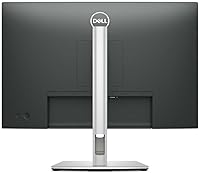
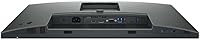
  • Connectivity: Input ports include one USB-C, one HDMI, one DisplayPort, and one VGA, accommodating both current and older source hardware.
  • USB Hub: Four USB-A ports are built into the monitor body, allowing peripherals to connect through the display without a separate hub.
  • Eye Care: ComfortView Plus technology reduces blue light output passively at the hardware level, requiring no software toggle and causing no color temperature shift.
  • Stand Adjustments: The bundled ergonomic stand supports approximately 130mm of height travel, plus tilt and swivel adjustment for personalized positioning.
  • Screen Surface: A matte anti-glare coating diffuses overhead and ambient light without the haze that heavier coatings can introduce to fine text.
  • Dimensions: With stand attached, the unit measures 20.94 x 7.16 x 20.13 inches (L x W x H), including a moderately wide base footprint.
  • Weight: The assembled monitor weighs 6.93 pounds, light enough for straightforward repositioning while remaining stable under typical desk conditions.
  • VESA Mounting: The panel is compatible with 100x100mm VESA mounts, allowing the included stand to be swapped for a third-party monitor arm.
  • Warranty: Dell provides a 3-year limited warranty covering hardware defects and panel failures under standard operating conditions.

Related Reviews

Dell P2419H 24-Inch IPS Monitor

84%
88%
Color Accuracy
91%
Viewing Angles
89%
Eye Comfort
93%
Stand Ergonomics
87%
Build Quality
More
Dell E2420H 24-inch FHD IPS Monitor
88%
88%
Display Quality
90%
Color Accuracy
87%
Viewing Angles
92%
Ease of Setup
91%
Energy Efficiency
More
Dell P2422H 24-inch IPS Monitor
81%
83%
Image Clarity
91%
Eye Comfort
88%
Ergonomics & Stand
84%
Build Quality
79%
Matte Screen Surface
More
ViewSonic VG2448A 24-inch IPS Monitor
83%
93%
Ergonomic Adjustability
88%
Eye Comfort
86%
Connectivity & Port Selection
74%
Image Quality
81%
Build Quality
More
Dell UltraSharp U2417H 24-inch IPS Monitor
80%
88%
Image Clarity
84%
Color Accuracy
71%
Panel Uniformity
91%
Build Quality
93%
Ergonomic Stand
More
ViewSonic VA2456-MHD 24-inch IPS Monitor
76%
88%
Color Accuracy
74%
Panel Uniformity
83%
Refresh Rate & Smoothness
78%
FreeSync Performance
86%
Eye Comfort
More
Dell P2425H 24-inch FHD IPS Monitor
81%
93%
Eye Comfort & Low Blue Light
81%
Color Accuracy
61%
Brightness & Visibility
94%
Connectivity & Port Selection
63%
Stand & Ergonomics
More
Dell SE2422HX 24-inch Monitor
75%
83%
Image Quality
88%
Eye Comfort
76%
Build Quality
47%
Ergonomics & Adjustability
74%
Refresh Rate & Smoothness
More
Dell P2214H 22-Inch IPS Monitor

78%
88%
Image Clarity
79%
Color Accuracy
54%
Glare & Reflections
91%
Ergonomics
86%
Build Quality
More
Dell UltraSharp U2415 24-inch Monitor
79%
88%
Color Accuracy
86%
Panel Uniformity
93%
Ergonomics & Stand
91%
Connectivity & Ports
89%
Screen Real Estate
More

FAQ

Yes, the Dell P2425 24″ WUXGA IPS Monitor accepts a single USB-C connection from a compatible laptop and handles both video signal and power delivery — up to 65W — through that one cable. The four USB-A ports built into the monitor body mean your keyboard, mouse, and a storage drive can all stay plugged in as well. One cable in and your desk is essentially organized.

It is subtle rather than dramatic, but genuinely useful in a work context. The extra vertical pixels let you see a bit more of a webpage, a few additional lines of code, or an extra row of a spreadsheet before needing to scroll. Over a full workday, that adds up and reduces the constant repositioning of windows.

Standard 16:9 video will display with thin horizontal letterbox bars at the top and bottom, which is expected and barely noticeable in practice. Productivity content like browsers, document editors, and terminals adapts naturally and simply shows more vertical content. The only area requiring attention is desktop wallpapers, which are best chosen in a native 16:10 resolution.

Yes. This 24-inch Dell display is VESA 100x100mm compatible, so any standard monitor arm or wall mount will fit. The stand detaches cleanly, and switching to an arm is a practical solution if the base footprint feels too wide for your desk.

No, and that is the meaningful difference from legacy blue light modes. ComfortView Plus works passively at the panel hardware level rather than applying a software overlay, so the image stays visually neutral with no color shift. There is nothing to toggle on or off — it is simply always active.

Casual and single-player gaming at 100Hz is comfortable enough. The gap becomes clear in fast-paced competitive titles where adaptive sync would normally prevent screen tearing, since this panel does not support G-Sync or FreeSync. For a productivity-first user who games occasionally, the experience is fine; for anyone gaming regularly or competitively, a monitor with adaptive sync is the stronger choice.

It works cleanly with modern MacBook Pro and MacBook Air models via USB-C. macOS recognizes the 1920x1200 resolution natively without any manual configuration. DisplayPort and HDMI connections are equally straightforward for Mac users who prefer those inputs over USB-C.

The stand provides roughly 130mm of height travel, which is enough range for most people at a standard desk height to position the panel at a comfortable eye level. Tilt runs from about -5 to +21 degrees, and swivel covers 45 degrees in each direction, making it one of the more genuinely flexible stands in this price range.

The base is wider than average for a 24-inch monitor, and on a compact desk it can feel intrusive alongside a keyboard, mouse pad, and other items. If space is tight, measuring beforehand is worthwhile. The practical fix is switching to a VESA monitor arm, which removes the base entirely and reclaims the desk area.

It is a solid choice for design work involving web and screen-oriented content, document layouts, and social media graphics, where sRGB is the standard color space. It is not a substitute for a wide-gamut display covering DCI-P3 or AdobeRGB, so professional photographers and print production designers who need those gamuts should look at panels built specifically for that purpose.

Where to Buy