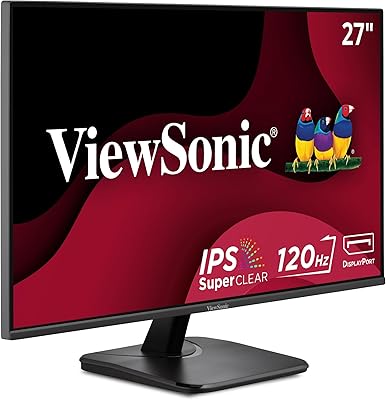
ViewSonic VA2456-MHD 24-inch IPS Monitor


Overview
The ViewSonic VA2456-MHD 24-inch IPS Monitor sits in a crowded budget segment but earns its place by offering something most rivals at this price skip: a genuine IPS panel. That matters in practice. TN panels at similar prices look washed out at any angle beyond dead-center, while this ViewSonic monitor holds color consistency whether you are sitting straight on or slightly off to the side. The 100Hz refresh rate is a quiet but meaningful upgrade over the 60Hz displays that dominate this tier, making everyday scrolling and video noticeably smoother. Build-wise, the bezels are slim, the footprint modest, and the anti-glare coating handles ambient light well enough that you will not be constantly repositioning it.
Features & Benefits
At 1920x1080 on a 24-inch screen, sharpness is comfortable for everyday computing — text is crisp, photos look accurate, and the wide viewing angles mean a second person can glance at the screen without color shifting. The 100Hz panel paired with AMD FreeSync keeps motion fluid during casual gaming sessions; do not expect this 24-inch IPS display to replace a dedicated gaming monitor, but it handles lighter titles without obvious tearing. For anyone logging eight-plus hours at a desk, the Flicker-Free backlight and Blue Light Filter are practical rather than gimmicky — eyes genuinely feel less strained after long sessions. Connectivity covers HDMI, DisplayPort, and VGA, plus two USB 2.0 ports, which is a generous spread for a display at this price.
Best For
This ViewSonic monitor makes the most sense for remote workers and students who spend the majority of their day in documents, spreadsheets, and video calls — tasks where color accuracy and eye comfort actually matter. Casual gamers who play at a relaxed pace will appreciate the FreeSync and 100Hz without needing to pay more for a higher-spec panel. It is also a practical pick for anyone juggling multiple devices, since the three input types let you switch between a laptop and a desktop without a dongle pile. Multi-monitor users will find the thin bezels make side-by-side arrangements look cleaner. Just know upfront that the stand only tilts — if height adjustment is a priority, budget for a VESA arm separately.
User Feedback
The VA2456-MHD earns its 4.5-star average honestly. Verified buyers consistently note that colors look accurate straight out of the box with little calibration needed, and setup is straightforward enough that most people are up and running within minutes. The build feels solid for the price, and the stand, while basic, does not wobble. The most common complaint — and it comes up often enough to take seriously — is that the stand offers only tilt adjustment: no height, no pivot. Buyers who work long hours frequently end up adding a third-party arm. A handful of reviews mention minor backlight bleed along edges, though this appears isolated rather than a consistent defect. The built-in speakers exist but are rarely praised; an external option is worth considering.
Pros
- The IPS panel delivers accurate, consistent colors without the washed-out look typical of TN monitors at this price.
- A 100Hz refresh rate makes everyday scrolling and casual gaming noticeably smoother than standard 60Hz displays.
- AMD FreeSync reduces screen tearing during gaming without requiring a premium graphics card.
- Flicker-Free technology and a Blue Light Filter genuinely reduce eye strain during long work sessions.
- Three input options — HDMI, DisplayPort, and VGA — cover virtually every device you might connect.
- Thin bezels make this 24-inch IPS display a clean choice for side-by-side dual-monitor arrangements.
- The anti-glare coating handles typical room lighting well and reduces the need to constantly reposition the screen.
- Setup is straightforward, with most users reporting they are up and running within minutes of unboxing.
- VESA mount compatibility gives buyers the flexibility to upgrade to a third-party arm if needed.
- Color accuracy is consistently praised by verified buyers as solid out of the box with little adjustment required.
Cons
- The stand only tilts — there is no height, swivel, or pivot adjustment, which is a real ergonomic shortfall.
- Built-in speakers are weak and will disappoint anyone expecting usable audio without external help.
- At 1080p, the VA2456-MHD may feel limiting for users who want sharper text on a 24-inch screen.
- Some verified buyers report minor backlight bleed along panel edges, though this is not universal.
- The 100Hz refresh rate, while useful, leaves a gap for anyone who later decides to game more seriously.
- No USB-C input means modern laptops often require an adapter for a clean single-cable connection.
- Color gamut coverage is adequate for general use but insufficient for professional photo or video editing.
- The base stand, while stable, looks and feels utilitarian compared to monitors with more premium build materials.
Ratings
The scores below reflect an AI-driven analysis of verified global buyer reviews for the ViewSonic VA2456-MHD 24-inch IPS Monitor, with spam, incentivized, and bot-flagged submissions actively filtered out before any scoring was applied. Each category captures what real users consistently praised or complained about after weeks and months of daily use — not just first impressions. Both the standout strengths and the honest frustrations are represented here so you can make a genuinely informed decision.
Color Accuracy
Panel Uniformity
Refresh Rate & Smoothness
FreeSync Performance
Eye Comfort
Ergonomics & Adjustability
Connectivity
Setup & Ease of Use
Build Quality
Anti-Glare Coating
Audio Quality
Value for Money
Multi-Monitor Compatibility
Response Time
Suitable for:
The ViewSonic VA2456-MHD 24-inch IPS Monitor is a strong fit for remote workers and students who need a reliable, comfortable display they can stare at all day without their eyes paying the price. The IPS panel keeps colors consistent whether you are dead-center or glancing from an angle, which matters when you are sharing your screen with someone nearby or working across multiple windows. The 100Hz refresh rate and FreeSync support make it a reasonable choice for casual gamers who play lighter titles and want smoother motion without buying a purpose-built gaming monitor. Anyone juggling a laptop and a desktop will appreciate having HDMI, DisplayPort, and VGA all available on one screen. It also works well as part of a dual-monitor setup, where the thin bezels keep the visual gap between panels minimal.
Not suitable for:
Buyers who spend long hours at a desk and need precise ergonomic positioning will run into a real limitation with the ViewSonic VA2456-MHD 24-inch IPS Monitor: the stand only tilts, with no height or pivot adjustment built in. If your eye level does not naturally align with the screen as-shipped, you will either need to stack it on books or invest in a separate VESA-compatible arm. Serious gamers chasing competitive play should also look elsewhere — 100Hz is a step up from 60Hz, but it falls well short of the 144Hz or higher panels designed for fast-paced titles. Photographers, video editors, or anyone doing professional color work will find that this panel, while accurate for everyday use, lacks the color depth and calibration precision that creative work demands. Finally, if you were hoping to skip external speakers, the built-in audio on this display is functional at best and disappointing in practice.
Specifications
- Panel Type: Uses an IPS (In-Plane Switching) panel, which provides accurate color reproduction and wide viewing angles compared to TN alternatives.
- Screen Size: 24-inch diagonal display with a 16:9 aspect ratio suited for standard home and office desk setups.
- Resolution: Native resolution of 1920x1080 (Full HD), delivering crisp text and clear visuals for everyday computing tasks.
- Refresh Rate: Supports a 100Hz refresh rate, offering smoother motion than the 60Hz panels common at this price tier.
- Adaptive Sync: AMD FreeSync compatible, which reduces screen tearing and stuttering when paired with a supported AMD graphics card.
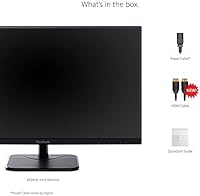
- Inputs: Equipped with one HDMI port, one DisplayPort, and one VGA input to support a wide range of devices and connection types.
- USB Ports: Includes two USB 2.0 ports for connecting peripherals such as keyboards, mice, or storage devices directly to the monitor.
- Screen Surface: Features an anti-glare coating with a hard 3H rating, reducing reflections from ambient light sources in typical office environments.
- Eye Care: Incorporates Flicker-Free backlight technology and a built-in Blue Light Filter to reduce eye fatigue during extended viewing sessions.
- View Presets: Offers five display presets — Game, Movie, Web, Text, and Mono — allowing quick optimization for different content types.
- Ergonomics: The included stand supports tilt adjustment only; height, swivel, and pivot adjustments are not available without a third-party mount.
- VESA Mount: VESA mount compatible, allowing the panel to be attached to most standard third-party monitor arms or wall mounts.
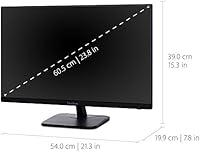
- Dimensions: Measures 21.3″ wide, 15.3″ tall, and 7.8″ deep with the stand attached, making it suitable for standard desk configurations.
- Weight: Weighs approximately 8.58 pounds with the stand, which is typical for a 24-inch desktop monitor in this class.
- Audio Output: Includes built-in speakers; audio quality is basic and intended for light system sounds rather than media or music listening.
- Power Input: Operates at up to 240 volts, compatible with standard power outlets across a range of international electrical systems.
- Manufacturer: Designed and produced by ViewSonic, a brand with a long-standing focus on display products for consumer and business markets.
- Availability: The VA2456-MHD has been available since March 2018 and is confirmed as not discontinued by the manufacturer.
Related Reviews
ViewSonic VA2456A-MHD 24-inch IPS Monitor

ViewSonic VG2448A 24-inch IPS Monitor
ViewSonic VX2467-MHD 24-inch Gaming Monitor

ViewSonic VP2468a 24-Inch IPS Monitor
ViewSonic VX2476-SMHD 24-inch IPS Monitor
ViewSonic VX3276-MHD 32-inch 1080p IPS Monitor
ViewSonic VA2409M 24-inch IPS Monitor
ViewSonic VG2455-2K 24-inch QHD IPS Monitor
ViewSonic VA2256-MHD 22-inch IPS 1080p Monitor