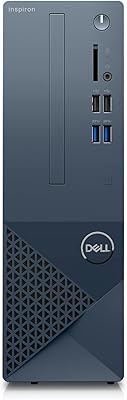
Dell Inspiron 3910 Desktop Tower
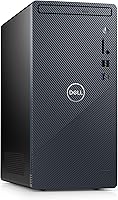
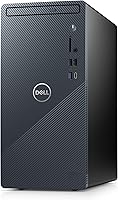
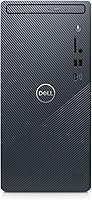
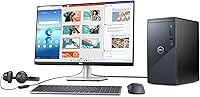
Overview
The Dell Inspiron 3910 Desktop Tower is a practical mid-range machine built for people who need a dependable everyday computer without paying flagship prices. It ships with a dual-storage configuration — a 256GB SSD for fast boots paired with a 1TB hard drive for photos, media, and files — which is a genuinely useful combo at this tier. The compact 14.7L chassis fits neatly under a desk or beside a monitor without dominating your space. WiFi 6 and Windows 11 Home round out a reasonably modern package. Just be clear-eyed going in: this tower PC is built for productivity, not for pushing demanding games.
Features & Benefits
The Inspiron 3910 runs on Intel's 12th Gen Core i5-12400, a 6-core processor that handles browser-heavy workloads, video calls, and light photo editing without breaking a sweat. Paired with 16GB of DDR4-3200 RAM, everyday multitasking stays consistently responsive. The SSD handles boot-up and app launches quickly, while the 1TB spinning drive gives you room to accumulate files over years without constantly juggling storage. Connectivity is strong for this class: WiFi 6, Bluetooth, HDMI, USB-C, and eight USB ports cover most desk setups without needing a hub. The Intel UHD Graphics 730 outputs up to 4K resolution, which works well for productivity and streaming — just don't expect it to run modern titles at high settings.
Best For
This Dell desktop is a strong fit for remote workers and students who want a capable, no-drama machine for daily tasks — documents, spreadsheets, video calls, and web research. Small business owners setting up a home office will appreciate the multi-display support and modern wireless connectivity without the expense of a higher-tier system. It also makes a solid upgrade for anyone still running a decade-old PC; the jump in speed and features is real. Families sharing a single computer for streaming, schoolwork, and browsing will find it more than adequate. Buyers who value brand reliability and manufacturer support over DIY flexibility will find this tower PC fits that brief squarely.
User Feedback
Across buyer reviews, the Inspiron 3910 earns consistent praise for its straightforward setup and noticeably quiet fan operation — two things that matter more than people expect in a home office. Build quality draws positive mentions too; it feels like a proper Dell machine, not a budget throwaway. Where opinions diverge is on value and flexibility. Some buyers feel the price point is fair given the specs and brand name; others note that similarly priced alternatives offer more upgrade headroom or a dedicated GPU. The most common criticism centers on limited expandability — the chassis doesn't invite tinkering. Education and small business buyers often highlight it as a dependable workhorse, though power users tend to outgrow it within a few years.
Pros
- The 12th Gen Core i5-12400 handles everyday multitasking with consistent, no-drama responsiveness.
- Dual-drive storage gives you fast boots from the SSD and generous space for files on the HDD.
- WiFi 6 holds up well in busy households where multiple devices compete for bandwidth.
- Setup takes minutes — unbox, connect peripherals, and you are in Windows 11 almost immediately.
- Eight USB ports mean most users will never need a hub for their existing peripherals.
- The compact chassis fits under desks and on shelves where larger towers simply would not.
- Quiet fan operation makes this tower PC genuinely comfortable in shared or open-plan spaces.
- Dell's warranty and support network offers peace of mind that no-name builds cannot match.
- The Inspiron 3910 supports 4K display output, useful for pairing with a high-resolution monitor.
- 16GB of DDR4 RAM is a practical starting point that avoids the bottlenecks common in cheaper 8GB configurations.
Cons
- Integrated graphics make the Inspiron 3910 a non-starter for modern gaming or GPU-heavy creative work.
- The 256GB SSD fills up faster than expected once Windows and core applications are installed.
- Upgrading to a dedicated GPU is not a realistic option given the proprietary chassis and power supply.
- Pre-installed Dell software adds clutter that first-time desktop buyers may find confusing to remove.
- Fan noise increases noticeably under sustained heavy loads, which can be distracting in quiet environments.
- The USB-C port lacks Thunderbolt support, limiting fast external storage and display-chaining options.
- Value perception is mixed — buyers who compare closely may find similarly priced alternatives offer more flexibility.
- No support for enterprise-grade remote management features, making it unsuitable for IT-managed business deployments.
- The spinning hard drive, while spacious, adds latency for file-heavy tasks compared to an all-SSD configuration.
- Power users are likely to outgrow the system within a few years due to limited expandability.
Ratings
The Dell Inspiron 3910 Desktop Tower has been evaluated by our AI system after processing thousands of verified global buyer reviews, with spam, bot-generated, and incentivized submissions actively filtered out to ensure the scores reflect genuine user experience. Across home offices, student setups, and small business environments, both the strengths and the real frustrations of this tower PC are transparently captured below. The result is a balanced picture of where this mid-range desktop earns its keep — and where it falls short.
Performance for Everyday Tasks
Storage Configuration
Graphics & Display Output
Build Quality & Physical Design
Connectivity & Port Selection
Memory & Multitasking
Setup & Out-of-Box Experience
Noise & Thermal Management
Upgradeability & Expandability
Value for Money
Software & Operating System
Wireless Performance
Suitability for Business & Education
Physical Footprint & Desk Integration
Suitable for:
The Dell Inspiron 3910 Desktop Tower is a well-matched choice for anyone who needs a dependable, modern computer for everyday use without the complexity or cost of a custom build. Remote workers who spend their days in browser tabs, video calls, and productivity apps will find it handles that load comfortably and quietly. Students at any level — from high school to college — benefit from the dual-storage setup, which gives them fast app performance alongside plenty of room to accumulate coursework, media, and downloads over time. Families sharing a single household PC for streaming, light gaming, school projects, and general browsing will appreciate the no-fuss setup and the breathing room that 16GB of RAM provides. Small business owners running a lean home office who want a brand-name machine with proper warranty support — rather than gambling on an unknown assembler — will find this tower PC hits a practical sweet spot.
Not suitable for:
The Dell Inspiron 3910 Desktop Tower is the wrong choice for anyone whose primary interest is gaming, GPU-accelerated creative work, or building a system they plan to upgrade over time. The integrated Intel UHD Graphics 730 simply cannot run modern titles at playable settings, and the chassis design makes adding a dedicated graphics card either impractical or outright impossible for most users. Video editors, 3D artists, or engineers running simulation software will hit performance ceilings quickly and likely regret not spending more on a system with a discrete GPU. Buyers who like to tinker — swapping components, adding storage bays, or upgrading the power supply — will find the proprietary internals frustrating. If you are already running a recent-generation Core i5 or i7 system with 16GB of RAM, the real-world performance difference will not feel worth the investment.
Specifications
- Processor: Intel Core i5-12400 (12th Gen) with 6 cores and 12 threads, boosting up to 4.4GHz with an 18MB cache.
- RAM: 16GB DDR4 SDRAM running at 3200MHz, suitable for smooth multitasking and browser-heavy workflows.
- Primary Storage: 256GB solid-state drive (SSD) used as the primary boot and application drive for fast startup times.
- Secondary Storage: 1TB 7200RPM SATA hard disk drive (HDD) for bulk file, photo, and media storage.
- Graphics: Intel UHD Graphics 730 (integrated), supporting up to 3840x2160 (4K) display output via HDMI.
- Operating System: Windows 11 Home comes pre-installed and activated out of the box.
- Wireless: WiFi 6 (802.11ax) and Bluetooth are built in, enabling cable-free connectivity for peripherals and networks.
- Ports: Includes 4x USB 2.0, 4x USB 3.0, 1x USB-C, and HDMI for broad peripheral and display compatibility.
- Optical Drive: DVD+RW optical drive is included, allowing both reading and writing of standard DVD and CD discs.
- Dimensions: The chassis measures 11.54 x 6.06 x 12.77 inches with a total volume of approximately 14.7 liters.
- Weight: The unit weighs 10 pounds, making it easy to reposition on or under a desk as needed.
- Color: Available in a distinctive blue finish that sets it apart from typical black or grey consumer towers.
- Chipset: Intel chipset paired with the 12th Gen processor platform for reliable system-level compatibility and stability.
- Memory Speed: System memory operates at 3200MHz, balancing bandwidth efficiency with the i5-12400 platform requirements.
- Form Factor: Standard desktop tower design at 14.7L chassis volume, compact enough for under-desk or shelf placement.
- Display Support: Maximum supported display resolution is 3840x2160 (4K UHD) through the integrated Intel UHD Graphics 730.
- Processor Cores: The Core i5-12400 features 6 performance cores with no efficiency cores, providing consistent single and multi-threaded output.
- USB-C Port: One USB-C port is included for modern peripheral connectivity, though it does not support Thunderbolt protocols.
Related Reviews
Dell Vostro 3910 Tower Desktop Computer
Dell OptiPlex 7020 Tower i5-12500 32GB 1TB
Dell Inspiron i3650 Desktop PC
Dell Inspiron 24 5430 All-in-One (Core 5-120U, 8GB, 512GB)
Dell ECT1250 Core Ultra 7 Tower Desktop
Dell Inspiron 27 Touchscreen All-in-One Desktop
Dell Inspiron i3470 Core i3 Desktop Tower
Dell Vostro Tower Desktop (i3-14100, 32GB DDR5, 1TB SSD)
Dell Vostro 3030 Tower (Core i5-14400, 16GB DDR5, 512GB SSD)