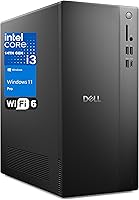
Dell Vostro Tower Desktop (i3-14100, 32GB DDR5, 1TB SSD)


Overview
The Dell Vostro Tower Desktop (i3-14100, 32GB DDR5, 1TB SSD) sits in an interesting spot — built for business reliability rather than raw power, targeting small offices and home professionals who need a dependable daily machine without overspending. Dell's Vostro line has long occupied the space between consumer-grade hardware and the pricier OptiPlex family, and this tower follows that same tradition. The form factor is compact enough to fit comfortably on or under most desks. One honest caveat upfront: there is no discrete GPU here, so if your work involves video editing, 3D rendering, or anything visually intensive, this machine will hit a ceiling fairly quickly.
Features & Benefits
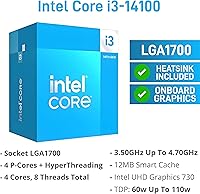
The i3-14100 is a 4-core, 8-thread chip that boosts up to 4.7GHz — capable, but firmly entry-level. Don't expect it to chew through heavy video renders or large data compilations. Where the Vostro desktop genuinely impresses is the 32GB of DDR5 RAM, which is unusually generous at this price bracket and keeps multitasking smooth even with dozens of browser tabs and office applications open simultaneously. The 1TB PCIe Gen 4 SSD adds real-world snap — Windows boots fast, apps launch quickly. Wi-Fi 6 and Gigabit Ethernet cover connectivity bases, and Windows 11 Pro is included, meaning BitLocker encryption and Remote Desktop come ready straight out of the box.
Best For
This Dell Vostro tower is a solid pick for anyone running a home office or small business on everyday productivity tools — think Microsoft 365, accounting software, video conferencing, and web-based workflows. The dual-monitor output via HDMI 2.1 and DisplayPort 1.4 is genuinely useful for people who prefer spreading work across two screens without a graphics card upgrade. IT teams will appreciate the Windows 11 Pro license for domain joining and Azure AD integration. It also suits buyers replacing an aging, slow desktop — the jump to a PCIe SSD setup feels dramatic. Anyone who values a trusted brand with real business support behind it will find that reassuring here.
User Feedback
Buyers consistently highlight two things: how fast this business tower PC feels day-to-day thanks to the SSD, and how surprisingly quiet it runs under normal workloads. Build quality earns positive mentions too — it feels like a proper business machine, not something thrown together. On the critical side, the i3 processor shows its limits when tasks get heavier, such as compiling code or running virtual machines. A few buyers found the included keyboard and mouse underwhelming — functional, but basic. Dell support earns mixed reactions; some report smooth warranty experiences while others describe slower-than-expected response times. Most buyers agree the RAM spec alone makes this machine stand out from similarly priced competitors.
Pros
- 32GB of DDR5 RAM is genuinely rare at this price tier and keeps multitasking smooth under real office workloads.
- The PCIe Gen 4 SSD makes boot times and application launches noticeably faster than most budget desktops in this class.
- Windows 11 Pro is included out of the box — a meaningful saving for business deployments needing BitLocker or Remote Desktop.
- Wi-Fi 6 and Gigabit Ethernet together cover both wired and wireless connectivity without compromise.
- Dual-monitor support via HDMI 2.1 and DisplayPort 1.4 works cleanly without needing a dedicated graphics card.
- Dell's Vostro build quality feels solid and business-appropriate — not the flimsy plastic of no-name alternatives.
- The compact tower form factor fits under most desks without dominating the workspace.
- A Type-C and USB 3.2 port on the front panel reduces desk cable clutter for everyday peripheral use.
- The machine runs quietly under normal workloads, making it unobtrusive in shared or open-plan office settings.
- Upgrading from a SATA-based desktop to this Vostro desktop feels dramatic — the SSD speed difference is immediately obvious.
Cons
- The i3-14100 processor is entry-level and will bottleneck performance once workloads step beyond everyday office tasks.
- Integrated graphics rule out any form of gaming, video editing, or color-critical design work entirely.
- The bundled keyboard and mouse feel noticeably cheap and most buyers will want to replace them immediately.
- 1TB of storage fills up faster than expected; there is no second drive included and expansion requires manual effort.
- Dell consumer-tier support responsiveness has drawn criticism — resolution times can be slow on standard warranty claims.
- Some buyers found the chassis less straightforward to open for upgrades than the tower form factor implies.
- Pre-installed Dell software like SupportAssist adds unwanted startup items that require manual removal.
- The mix of USB 2.0 and USB 3.2 ports can feel limiting for users running multiple high-bandwidth peripherals simultaneously.
Ratings
The Dell Vostro Tower Desktop (i3-14100, 32GB DDR5, 1TB SSD) scores below are generated by AI after analyzing thousands of verified buyer reviews from global markets, with spam, incentivized, and bot-flagged submissions actively filtered out. This business tower PC attracts a specific type of buyer — productivity-focused, budget-aware, and brand-conscious — and the scores reflect what that audience actually experienced, both the standout strengths and the frustrations worth knowing before you buy.
Value for Money
Performance — Everyday Tasks
RAM Capacity & Speed
Storage Speed & Capacity
Graphics & Display Output
Build Quality & Design
Noise & Thermal Management
Connectivity & Ports
Setup & Out-of-Box Experience
Software & OS Experience
Upgradeability
Dell Support & Warranty
Footprint & Desk Fit
Suitable for:
The Dell Vostro Tower Desktop (i3-14100, 32GB DDR5, 1TB SSD) is well-matched for small business owners, remote workers, and home office professionals whose daily workload revolves around productivity software, video conferencing, and cloud-based tools. If you spend your day in Microsoft 365, a browser with fifteen tabs open, and a CRM or accounting platform running in the background, the 32GB of DDR5 RAM means you will rarely feel the machine struggling to keep up. IT administrators will appreciate the Windows 11 Pro license straight out of the box, making domain join, BitLocker deployment, and Azure AD integration straightforward without extra licensing costs. The dual-display output via HDMI 2.1 and DisplayPort 1.4 makes this Vostro desktop a practical choice for anyone who relies on a two-monitor setup to stay organized — no GPU upgrade needed for that use case. It also makes a compelling upgrade target for anyone still running a years-old desktop with a spinning hard drive, where the step up to a PCIe SSD alone will feel transformative.
Not suitable for:
The Dell Vostro Tower Desktop (i3-14100, 32GB DDR5, 1TB SSD) draws a clear line at visually or computationally intensive work, and buyers on the wrong side of that line will find it frustrating. Video editors, motion graphics designers, 3D modelers, and anyone working with color-critical visual output will hit the ceiling of Intel UHD 730 integrated graphics almost immediately — there is no discrete GPU here, and no easy consumer-level path to add one without verifying the power supply and chassis compatibility first. The i3-14100, while a competent chip for everyday tasks, is not built for sustained heavy computation — developers compiling large codebases, data analysts running local machine learning pipelines, or engineers using simulation software will notice real slowdowns. Gamers should look elsewhere entirely; this business tower PC was never designed with gaming in mind, and even moderately demanding titles will perform poorly on integrated graphics. Anyone who anticipated a powerhouse based on the impressive RAM spec alone may come away surprised by how much the processor acts as a bottleneck in the wrong workloads.
Specifications
- Processor: Intel Core i3-14100 (14th Gen), 4 cores / 8 threads, base clock 3.5GHz, boost up to 4.7GHz, 12MB cache.
- RAM: 32GB DDR5 SDRAM installed, providing fast dual-channel memory bandwidth suited to multitasking and memory-intensive applications.
- Storage: 1TB PCIe Gen 4 SSD offering high sequential read/write speeds and significantly faster boot and load times than traditional SATA drives.
- Graphics: Intel UHD Graphics 730 integrated GPU, supporting up to two simultaneous displays via HDMI 2.1 and DisplayPort 1.4 outputs.
- Operating System: Windows 11 Professional 64-bit, pre-activated and ready for domain join, BitLocker encryption, and Remote Desktop use.
- Wireless: MediaTek Wi-Fi 6 (MT7920), 802.11ax, 2x2 MU-MIMO configuration with Bluetooth also included on the same wireless card.
- Ethernet: Single RJ-45 Gigabit Ethernet port (1Gbps) located on the rear panel for wired network connectivity.
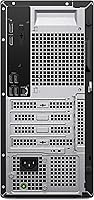
- Display Outputs: One HDMI 2.1 port and one DisplayPort 1.4 port, both located on the rear panel, enabling a native dual-monitor setup.
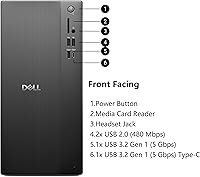
- Front Ports: Two USB 2.0 Type-A, one USB 3.2 Gen 1 Type-A (5Gbps), one USB 3.2 Gen 1 Type-C (5Gbps), one headset jack, and a media card reader.
- Rear Ports: Two USB 3.2 Gen 1 Type-A, two USB 2.0 Type-A, one RJ-45 Ethernet, one HDMI 2.1, and one DisplayPort 1.4.
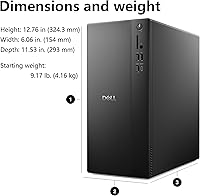
- Dimensions: The tower measures 12.76 x 6.06 x 11.53 inches (L x W x H), making it compact enough to fit under most standard desks.
- Weight: The unit weighs approximately 15 pounds, light enough for a single person to reposition without difficulty.
- Form Factor: Compact tower desktop chassis, designed for placement on a desk surface or in a standard under-desk tower position.
- Included Accessories: A wired Dell keyboard and wired Dell mouse are included in the box alongside the tower unit and power cable.
- Optical Drive: No optical drive is included or built into this configuration; disc-based media requires an external USB optical drive.
- Warranty: Standard Dell limited hardware warranty applies; business-tier support upgrade options are available separately through Dell's support portal.
Related Reviews
Dell ECT1250 Core Ultra 7 Tower Desktop
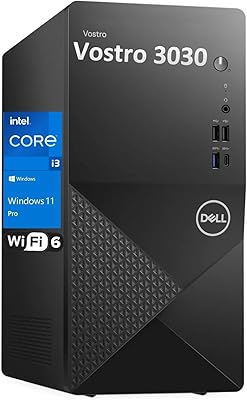
Dell Vostro 3910 Tower Desktop Computer
Lenovo IdeaCentre Business Desktop | Intel Core i3-12100 | 32GB RAM | 1TB SSD + 1TB HDD
HP Pavilion Tower Desktop, Ryzen 5 5600G, 32GB RAM, 1TB SSD
Lenovo ThinkCentre Neo 50t Tower Desktop, Intel Core i7-13700, 32GB RAM, 1TB SSD
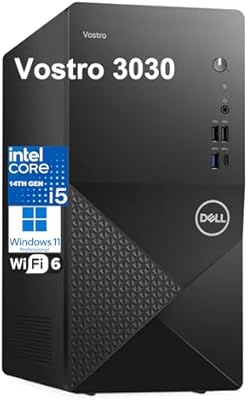
Dell Vostro 3030 Tower (Core i5-14400, 16GB DDR5, 512GB SSD)
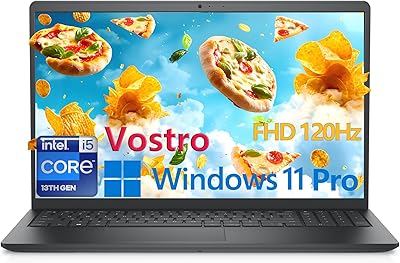
Dell Vostro 3530 15.6″ Laptop (i5-1334U, 32GB RAM, 1TB SSD)
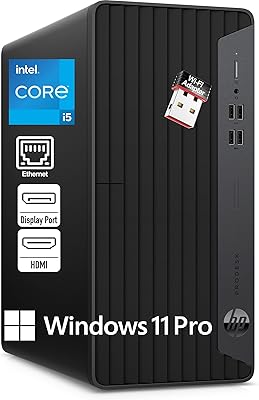
HP ProDesk 400 G7
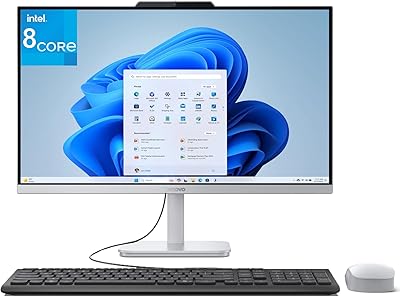
Lenovo A100 23.8″ AIO (Intel i3-N305, 32GB, 1TB)