Overview

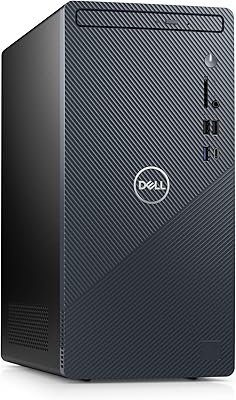
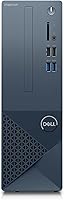
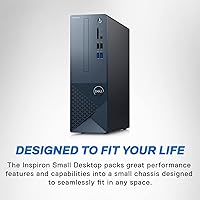
The Dell Inspiron 3020S Core i5 Compact Desktop is a no-nonsense Windows 11 machine built for people who want a real desktop without dedicating half their desk to it. At roughly the size of a thick hardcover book, it fits neatly on a shelf, under a monitor, or tucked beside a desk — yet it runs a proper 13th Gen processor and offers both an SSD and a traditional hard drive. This isn't a powerhouse for video editing or gaming; it's designed for productivity, reliability, and everyday computing. Dell also bundles in Premium Support and a migration tool, which genuinely lowers the barrier for buyers switching from an older machine.
Features & Benefits

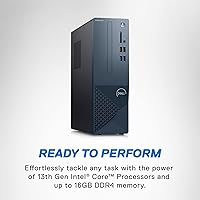
The Intel Core i5-13400 processor handles everyday multitasking comfortably — you can have a video call running, a browser with a dozen tabs open, and a spreadsheet in the background without things grinding to a halt. Paired with 16GB of DDR4 RAM, the experience stays responsive throughout the workday. Storage is well thought out: a 512GB SSD keeps Windows and your main apps snappy, while the 1TB hard drive gives you room to store years worth of files. WiFi 6 support helps in busy home networks where multiple devices compete for bandwidth. The machine can also drive up to three FHD monitors, which is a genuine productivity advantage for multi-window workers.

Best For

This compact Dell desktop is a strong fit for home office workers who spend their day in browser tabs, video calls, and documents — tasks that don't demand a discrete graphics card. Students and remote employees will find it more than adequate, and the dual storage makes organizing schoolwork or client files straightforward. It's also a solid step up for anyone running an aging all-in-one or entry-level laptop who wants something more dependable and expandable. Small businesses that need consistent, easy-to-manage Windows machines across a team will appreciate the standardized hardware and bundled support coverage. Gamers and video editors, though, should look elsewhere.

User Feedback

Owners of the Inspiron 3020S consistently mention fast boot times and how quietly the machine runs as top positives — several describe being surprised by how straightforward the setup was, even without technical experience. The Mist Blue color tends to read as more muted and professional in person than product photos suggest, which most buyers consider a good thing. On the critical side, the integrated graphics draw a clear ceiling: anyone dabbling in photo editing or light video work will hit its limits. Dell's Premium Support is frequently praised, though it's bundled into the price rather than genuinely free. The Dell Migrate tool gets mixed marks — useful in principle, but occasionally unreliable in practice.

Pros

  • The 13th Gen Core i5 handles everyday multitasking — calls, tabs, documents — without breaking a sweat.
  • Dual storage means fast app launches from the SSD and plenty of room for files on the hard drive.
  • WiFi 6 delivers noticeably more stable wireless performance in busy home networks with many devices.
  • Runs near-silently under normal workloads, making it unobtrusive in quiet home office environments.
  • Triple-monitor support gives productivity-focused users genuine flexibility for multi-window workflows.
  • The compact chassis fits on a shelf or beside a monitor without consuming valuable desk real estate.
  • Windows 11 Home comes pre-activated and ready, making out-of-box setup quick and painless.
  • Bundled Premium Support gives less tech-savvy buyers a reliable safety net for the first year of ownership.
  • The Mist Blue finish looks more professional and understated in person than online photos imply.
  • 16GB of DDR4 RAM keeps the system responsive even when juggling multiple demanding browser sessions.

Cons

  • No USB-C port is a real omission for buyers with modern peripherals or newer monitors.
  • Integrated graphics rule out any serious photo editing, video work, or gaming use cases.
  • The hard drive is noticeably slow for large file transfers compared to an all-SSD configuration.
  • Pre-installed bloatware requires time to clean out before the machine feels fully your own.
  • The Dell Migrate tool, while useful in concept, has a track record of errors during data transfers.
  • Premium Support is priced into the machine — it is not a free bonus, and renewal costs can surprise buyers.
  • No tool-free access panel makes minor internal changes more involved than on competing small desktops.
  • The rear port placement makes swapping cables awkward when the unit is tucked into a tight space.
  • RAM upgrade options are limited, and the process is less accessible for non-technical users.
  • At this price tier, competing compact desktops are beginning to offer USB-C and faster memory standards.

Ratings

The Dell Inspiron 3020S Core i5 Compact Desktop was evaluated by our AI rating engine after analyzing thousands of verified purchase reviews from global buyers, with spam, incentivized, and bot-generated feedback actively filtered out. The scores below reflect a balanced picture — genuine strengths as well as the frustrations real users encountered in day-to-day use. Whether this small form factor PC fits your needs or falls short depends heavily on what you're actually asking it to do, and this breakdown aims to make that clear.
Everyday Performance
84%
For the tasks this machine is designed around — browser-heavy workdays, video calls, spreadsheets, and light multitasking — the 13th Gen Core i5 handles the load without complaint. Users frequently describe it as snappy and consistent, even with multiple apps running simultaneously throughout an eight-hour work session.
Push it toward anything more demanding, like running a virtual machine, batch processing photos, or editing long video clips, and the cracks show. A handful of users noted CPU throttling during sustained workloads, which is partly a consequence of the compact chassis limiting thermal headroom.
Storage Configuration
88%
The dual-drive setup is one of the most practical decisions Dell made here. The SSD keeps Windows and everyday apps launching quickly, while the 1TB hard drive gives users a dedicated place to store years of photos, downloads, and backups without constantly managing space.
The 512GB SSD is on the smaller side if you install several large applications alongside the OS. A few users noted the HDD is noticeably slower for file transfers compared to an all-SSD setup, which can feel jarring when moving large folders between drives.
Build Quality & Chassis
76%
24%
The shell feels solid enough for a compact desktop in this price range — no alarming flex or rattling. The Mist Blue finish reads as more understated and professional in person than product images suggest, which most buyers appreciated for a home office or business desk environment.
The plastic panels do not feel premium up close, and the chassis is not tool-free to open, which makes minor upgrades more involved than expected. A few reviewers mentioned the material picks up fingerprints and dust more visibly than anticipated.
Graphics & Display Capability
58%
42%
For productivity use — documents, spreadsheets, web browsing, and even HD video streaming — the integrated Intel UHD 730 performs adequately. The triple-monitor support is a genuine advantage for users who rely on extended screen real estate to work across multiple windows.
This is the most significant limitation of the Inspiron 3020S for buyers who underestimate it. Photo editing in Lightroom feels sluggish, and even light video exports take considerably longer than on machines with a discrete GPU. Gaming beyond basic titles is not a realistic expectation.
RAM & Multitasking
83%
16GB of DDR4 RAM is a comfortable amount for the target audience. Users running video conferencing tools alongside a browser with 15 to 20 tabs, a cloud sync client, and a productivity app reported that the system stayed responsive without noticeable slowdown.
RAM is not user-upgradeable without some technical effort and research, and the DDR4 specification means it is not the fastest memory standard available in 2024. Power users who anticipated easy expansion found the upgrade process less straightforward than expected.
Wireless Connectivity
86%
WiFi 6 support is a meaningful real-world improvement for households with multiple connected devices. Users in crowded apartment buildings or busy home networks noted more consistent speeds and fewer dropped connections compared to their previous WiFi 5 machines.
A small number of users reported that the wireless card required a driver update out of the box before achieving stable performance. Ethernet-dependent users should also note that the port is present but positioned in an awkward spot at the rear for some desk configurations.
Setup & Ease of Use
91%
Out-of-box setup was consistently praised, particularly by less tech-savvy buyers. The machine boots into a clean Windows 11 Home environment quickly, and Dell's packaging and included documentation made the first-use experience straightforward for users who were not upgrading from a recent PC.
Dell's pre-installed software bundle includes several apps that not all users want, and cleaning out the bloatware takes time. The Dell Migrate tool, while helpful in concept, received mixed feedback — some users found data transfers smooth, while others encountered errors mid-migration that required contacting support.
Noise & Thermal Performance
82%
18%
Under typical workloads, the machine runs quietly — quiet enough that most users forget it is running. This was a recurring highlight in reviews from home office users who are sensitive to fan noise during calls or focused work sessions.
During heavier tasks, the single small fan spins up noticeably and the chassis gets warm along the vents. The compact design inherently limits airflow, and extended high-load sessions can push temperatures higher than users might expect from a desktop form factor.
Port Selection & Expandability
72%
28%
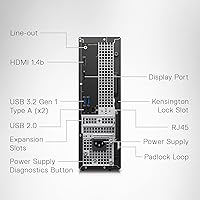
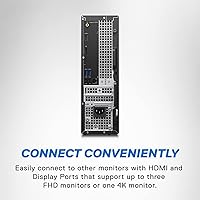
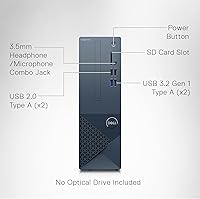
Eight USB ports total — split between USB 2.0 and USB 3.0 — covers most day-to-day peripheral needs without requiring a hub. Having both HDMI and DisplayPort on the rear is a practical touch that makes multi-monitor setup straightforward with common cables.
There is no USB-C port, which is an increasingly noticeable omission for users with modern peripherals or who want to connect newer monitors. Internal expansion is also limited by the compact chassis — adding a discrete GPU or a second M.2 drive is not a realistic option for most users.
Value for Money
78%
22%
When assessed against what the machine actually delivers — a capable, quiet, small footprint Windows 11 desktop with dual storage and WiFi 6 — the pricing sits in a reasonable range for the configuration. The bundled support coverage adds genuine perceived value, especially for buyers who want a safety net.
Competing mini-PC and compact desktop options at similar price points increasingly offer faster RAM, USB-C, or more modern chipsets. Buyers who scrutinize spec-per-dollar may find the Inspiron 3020S slightly behind the curve, particularly given that the integrated graphics place a hard ceiling on the machine's long-term versatility.
Dell Premium Support Experience
79%
21%
Users who reached out to Dell Premium Support reported faster response times and more knowledgeable agents compared to standard consumer support channels. For non-technical buyers who needed help with setup, configuration, or troubleshooting, having priority access made a tangible difference.
It is worth noting clearly that this support tier is priced into the product — it is not a free add-on. Some users felt the one-year window passed quickly, and renewal pricing surprised buyers who had come to rely on the service. International support quality was also reported as inconsistent by some travelers.
Footprint & Desk Compatibility
93%
At just over 11 inches wide and under 4 inches deep, this small form factor PC is genuinely compact by desktop standards. Users consistently praised its ability to disappear onto a shelf, mount behind a monitor, or tuck beside a laptop docking station without consuming valuable desk space.
The placement of rear ports means that adding or swapping cables requires moving the unit or working behind it, which can be inconvenient if the machine is mounted or positioned against a wall. The vented areas also need clearance, which slightly limits how flush it can sit in tight spaces.
Operating System & Software
74%
26%
Windows 11 Home runs without friction on this hardware, and the experience feels polished for daily productivity tasks. Users appreciated that the OS came pre-activated and ready to use, with no confusing setup steps beyond the standard Microsoft account configuration.
Pre-installed Dell and third-party applications add clutter that experienced users will want to remove promptly. Some reviewers also noted that Windows 11 Home lacks certain features — like local account setup flexibility — that more advanced users or IT administrators would prefer to have out of the box.
Long-Term Reliability
81%
19%
Dell's track record with the Inspiron line for longevity is generally solid, and users who have owned earlier Inspiron compact desktops for several years report reasonable durability under normal workloads. The 7200 RPM hard drive is a mature, well-tested storage format unlikely to cause early failures under light use.
Because the chassis is compact, heat management over years of use remains a question mark for some buyers. A few longer-term owners noted that fan bearings became audible after 18 to 24 months of daily use, suggesting the cooling system may benefit from occasional maintenance.

Suitable for:

The Dell Inspiron 3020S Core i5 Compact Desktop was built with a clear audience in mind, and it genuinely delivers for that audience. Home office workers who spend their days in video calls, cloud apps, and browser-heavy workflows will find it reliable and quiet without taking over their workspace. Students who need a stable machine for research, writing, and online learning get solid performance in a form factor that fits a dorm desk. Remote employees handling spreadsheets, document management, and light data tasks will appreciate the dual-storage setup — the SSD keeps things responsive while the hard drive handles file accumulation over time. Small businesses looking to standardize around a dependable, low-maintenance Windows 11 machine with built-in support coverage will also find it a practical fit. And for anyone upgrading from a years-old all-in-one or entry-level laptop, the step up in responsiveness and desk flexibility feels meaningful.
Not suitable for:

If your work or hobbies push past everyday productivity, the Dell Inspiron 3020S Core i5 Compact Desktop is likely to frustrate you. The integrated Intel UHD 730 graphics are a hard ceiling — photo editors working in Lightroom or Photoshop, video creators doing even light color grading, and 3D rendering enthusiasts will hit that wall quickly and consistently. Gamers should look elsewhere entirely; this machine is not designed for gaming and will struggle with anything beyond casual browser-based titles. Buyers who anticipate significant hardware upgrades down the line — adding a GPU, swapping in faster RAM, or expanding storage — will find the compact chassis limiting and the upgrade path less accessible than a standard mid-tower. Power users who need USB-C connectivity for modern peripherals or external drives will also be disappointed by its absence. If long-term future-proofing is a priority, the spec ceiling here means you may find yourself outgrowing it sooner than expected.
Specifications

  • Processor: Intel Core i5-13400 (13th Gen) with 10 cores, up to 4.6 GHz boost clock, and 20MB cache.
  • RAM: 16GB DDR4 memory running at 3200 MHz for responsive everyday multitasking.
  • Primary Storage: 512GB solid-state drive handles the operating system and applications with fast read and write speeds.
  • Secondary Storage: 1TB 7200 RPM hard drive provides ample space for files, photos, backups, and media libraries.
  • Graphics: Intel UHD Graphics 730 integrated GPU supports up to three FHD monitors or one 4K display via rear outputs.
  • Display Outputs: One HDMI port and one DisplayPort on the rear panel enable multi-monitor productivity setups.
  • Operating System: Windows 11 Home comes pre-installed and pre-activated, ready to use out of the box.
  • Wireless: WiFi 6 (802.11ax) delivers faster speeds and improved stability in environments with many connected devices.
  • USB Ports: Eight USB ports total: four USB 2.0 and four USB 3.0 for connecting peripherals, drives, and accessories.
  • Dimensions: The chassis measures 11.53 x 3.65 x 11.42 inches, making it one of the more compact desktop towers in its class.
  • Weight: The unit weighs 8.03 pounds, light enough to reposition easily on or under a desk.
  • Form Factor: Small form factor desktop tower designed to fit in tight spaces without requiring a dedicated full-size PC footprint.
  • Color: Available in Mist Blue, a subdued and professional-looking finish that reads more neutral in person than in product photos.
  • Ethernet: A rear Ethernet port provides wired network connectivity as an alternative to the built-in WiFi 6 adapter.
  • Premium Support: One year of Dell Premium Support is included, offering priority access to dedicated technical experts around the clock.
  • Migration Tool: Six months of Dell Migrate access is included to help users transfer files and data from an older PC.
  • Chipset: Intel chipset platform underpins the system, providing compatibility with standard DDR4 memory and SATA storage.
  • Hard Drive Interface: The 1TB secondary drive connects via Serial ATA, a widely supported and proven interface for mechanical storage.

Related Reviews

Dell Inspiron 3910 Desktop Tower
76%
84%
Performance for Everyday Tasks
81%
Storage Configuration
58%
Graphics & Display Output
79%
Build Quality & Physical Design
83%
Connectivity & Port Selection
More
Dell Inspiron 24 5420 All-in-One (i5-1335U, 16GB, 1TB SSD)
83%
93%
Aesthetic Design
88%
Multitasking Performance
84%
Display Quality
91%
Storage Speed
87%
Webcam & Privacy
More
Dell Inspiron 27 7720 All-in-One Desktop, 27-inch FHD, Intel Core i5, 16GB RAM, 512GB SSD
87%
88%
Performance
92%
Display Quality
90%
Ease of Setup
89%
Design & Build Quality
85%
Customer Support
More
Dell OptiPlex 3070 Desktop - Intel Core i5-9500, 8GB RAM, 256GB SSD
86%
91%
Value for Money
89%
Performance for Everyday Tasks
88%
Build Quality & Durability
92%
Space-Saving Design
93%
Ease of Setup
More
Dell Inspiron 27-inch All-in-One Desktop Computer, Core i7, 64GB RAM, 1TB SSD
86%
91%
Performance
89%
Display Quality
90%
Multitasking Capability
85%
Build Quality
88%
Setup Process
More
Dell Inspiron 15 3520 Laptop, 32GB RAM, 2TB SSD, Intel Core i5-1155G7
84%
89%
Performance
94%
Storage Capacity
83%
Display Quality
90%
Build Quality
80%
Battery Life
More
Dell Inspiron 14 5420 Laptop, Intel Core i5-1235U, 8GB RAM, 512GB SSD
85%
88%
Performance
91%
Portability
84%
Display Quality
82%
Battery Life
90%
Build Quality
More
Dell OptiPlex 3050 Micro Desktop, Intel Core i5-7500T, 8GB RAM, 256GB SSD
87%
84%
Performance
91%
Build Quality
92%
Value for Money
89%
Reliability
95%
Compactness/Size
More
Dell Vostro 3030 Tower (Core i5-14400, 16GB DDR5, 512GB SSD)
80%
88%
Performance for Everyday Tasks
84%
Value for Money
93%
Setup & Out-of-Box Experience
79%
Build Quality & Chassis
71%
Storage Capacity & Speed
More
Dell Inspiron 14 5440 Laptop, 14-inch, Intel Core i5, 8GB RAM, 512GB SSD
86%
88%
Performance
91%
Build Quality
94%
Portability
81%
Battery Life
75%
Display Quality
More

FAQ

No, the Dell Inspiron 3020S Core i5 Compact Desktop ships as a tower only — no display, keyboard, or mouse is included in the box. You will need to source those separately, which is standard for desktop towers in this category.
Yes, the rear panel has both an HDMI and a DisplayPort output, and the system supports up to three FHD monitors simultaneously or one 4K display. If you want a true three-monitor setup, you may need an adapter or a DisplayPort hub, depending on your monitor connections.

For most remote work scenarios — video calls, browser-based apps, email, documents, and spreadsheets — this compact Dell desktop handles the load comfortably. The 16GB of RAM means you can have plenty of apps and browser tabs open at once without things slowing to a crawl. Just keep in mind it is not suited for demanding creative software or anything GPU-intensive.

Technically yes, but it is not as simple as it sounds. The chassis is compact and not designed for tool-free access, so adding RAM or a second SSD requires opening the case and some familiarity with PC internals. If upgradeability is a priority for you, it is worth factoring in that this machine has fewer expansion slots than a standard mid-tower.

Under typical workloads, it runs very quietly — most users describe barely noticing it during calls or focused work. The fan does spin up audibly when the processor is under sustained load, like during a software update or a heavier task, but it settles back down quickly once the load drops.

No, the Inspiron 3020S does not include a USB-C port. All eight USB ports are Type-A, split between USB 2.0 and USB 3.0. If you rely on USB-C for peripherals, external drives, or monitors, you would need to use an adapter or a hub.

It depends on your situation. For buyers switching from an older Windows PC, Dell Migrate can save a lot of manual file moving and settings reconfiguration. That said, some users have reported the tool hitting errors mid-transfer, so it is a good idea to back up your data independently before relying on it completely.

It can open and run those applications, but you will feel the limitations. The integrated Intel UHD 730 graphics are not designed for GPU-accelerated editing tasks, so exports, filters, and rendering previews will be noticeably slower than on a machine with a discrete graphics card. For occasional casual edits it is manageable, but for regular photo work it will likely frustrate you.

The included Premium Support gives you one year of priority phone and chat access to dedicated Dell technicians, available around the clock including when traveling internationally. It is a paid tier of support bundled into the purchase price rather than a complimentary add-on, so it is already reflected in what you paid. Users who have needed it report faster, more knowledgeable responses compared to Dell's standard consumer line — it is most valuable for buyers who are not comfortable troubleshooting technical issues on their own.

Most buyers say it looks noticeably more subdued and professional in person than online product images suggest. It reads closer to a soft grey-blue than a bold color, which means it tends to blend into home office environments rather than stand out. If you were hoping for a statement color, it may underwhelm; if you wanted something that looks clean and unobtrusive, it usually exceeds expectations.