Overview

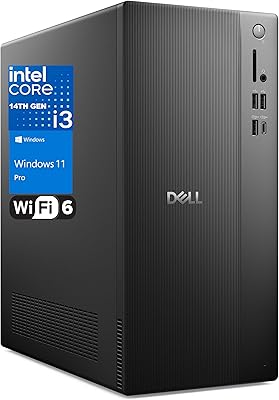
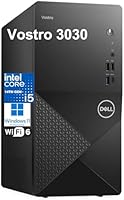
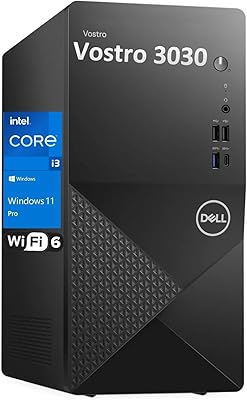
The Dell Vostro 3030 Tower (Core i5-14400, 16GB DDR5, 512GB SSD) is a compact business-class desktop built for everyday productivity rather than raw horsepower. At roughly 12.77 x 6.06 x 11.5 inches, this Dell tower fits comfortably on a cluttered desk without dominating it. It ships ready to go with Windows 11 Pro, a wired keyboard, and a mouse, so there is no hunting for an OS license or peripherals on day one. Mid-range business reliability is the core pitch here: modern DDR5 memory and a 14th Gen processor in a package aimed at home offices and small teams, not enthusiasts chasing benchmarks.
Features & Benefits

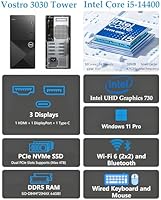
The Vostro 3030 runs on an Intel Core i5-14400, a 10-core, 16-thread chip that handles multi-tab browsing, video calls, spreadsheets, and light coding without breaking a sweat. Paired with 16GB of DDR5 memory, it offers noticeably snappier response times than older DDR4 systems when switching between several open applications. The 512GB PCIe NVMe SSD keeps boot times short and apps launching quickly, though users storing large media libraries will likely want an external drive or an internal upgrade down the line. Wi-Fi 6 and Bluetooth come built in, and the port selection covers USB-C, multiple USB-A, DisplayPort, HDMI, and a dedicated Ethernet jack across both front and rear panels.

Best For

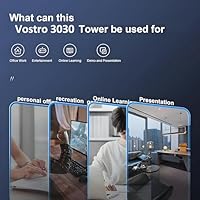
This compact desktop is a natural pick for home office and remote workers who want a dependable, no-fuss machine for documents, video calls, and everyday computing. Small business owners will appreciate the Windows 11 Pro license, which brings BitLocker encryption and Remote Desktop support without an extra purchase. Students and educators running online classes or light development work will find it equally capable. It also suits anyone upgrading from a five- or six-year-old machine, where the DDR5 memory and current-gen processor represent a genuine step forward. One honest caveat: the integrated Intel UHD 730 graphics handles dual-monitor office work fine, but this is not a gaming machine.

User Feedback

Buyers consistently point to the quick out-of-box setup as a standout positive — plug in, power on, and you are working within minutes. The quiet fan operation and small footprint earn repeat praise from people in shared or tight spaces. On the critical side, the 512GB drive is the most common complaint; users doing video editing or storing large file collections hit the ceiling faster than expected. The bundled keyboard and mouse draw a lukewarm reception — functional but unremarkable, and many buyers swap them out early. Long-term reliability feedback skews positive overall, which aligns with the Vostro line carrying a solid business-grade reputation.

Pros

  • Clean Windows 11 Pro installation ships with no significant bloatware, saving time on setup day.
  • The Vostro 3030 is genuinely quiet under typical office workloads, making it comfortable in shared spaces.
  • Wi-Fi 6 and Bluetooth are built in, reducing cable clutter without needing a separate adapter.
  • A generous port layout — including front USB-C — means most users will never need a separate hub.
  • 16GB of DDR5 memory handles real-world multitasking noticeably better than older DDR4 systems at this price.
  • Dual video outputs let you run two monitors for productivity without spending extra on a discrete GPU.
  • The compact tower footprint fits comfortably on a desk without dominating the space around it.
  • Windows 11 Pro includes BitLocker and Remote Desktop out of the box — a real cost saving for small businesses.
  • The PCIe slot and DDR5 platform leave a clear upgrade path for RAM or storage expansion later.
  • Dell brand reliability and business-grade support infrastructure add meaningful long-term peace of mind.

Cons

  • 512GB fills up quickly for users managing project files, recorded calls, or development environments.
  • The bundled keyboard and mouse feel budget-grade and most buyers replace them within the first few weeks.
  • HDMI output is version 1.4b, which limits compatibility with 4K or high-refresh-rate displays.
  • Integrated graphics will disappoint anyone who expects even light gaming performance from this machine.
  • The Realtek Wi-Fi card shows inconsistent range performance compared to Intel-based wireless alternatives.
  • No discrete GPU option is available at purchase, locking graphics-dependent buyers out of this platform entirely.
  • Chassis panels feel thinner and less premium than older business-tier Dell towers in the same price range.
  • Some Dell utility software pre-installed on the system requires manual removal for a fully clean environment.
  • Long-term reliability data is still limited given the relatively recent product launch date.
  • Users with memory-intensive workloads like virtual machines may outgrow 16GB sooner than expected.

Ratings

The Dell Vostro 3030 Tower (Core i5-14400, 16GB DDR5, 512GB SSD) earns a well-rounded but honest assessment based on AI analysis of verified global buyer reviews, with spam, bot-generated, and incentivized feedback actively filtered out. Across thousands of real-world impressions from home office workers, small business owners, and students, this compact desktop shows clear strengths in daily productivity and setup convenience — alongside a few recurring frustrations worth knowing before you buy.
Performance for Everyday Tasks
88%
Users running Microsoft 365, browser-heavy workflows, and video conferencing tools consistently report that the Vostro 3030 handles everything without lag or hesitation. The 10-core i5-14400 paired with DDR5 memory makes switching between a dozen open tabs, a Zoom call, and a spreadsheet feel genuinely effortless for most buyers.
Buyers who occasionally push into light video editing or batch file conversion do notice the system slowing down more than expected. It is capable enough for occasional heavier tasks, but it is not a machine you want to stress-test regularly at that level.
Value for Money
84%
Getting a 14th Gen Intel processor, DDR5 memory, a PCIe NVMe SSD, Wi-Fi 6, and a genuine Windows 11 Pro license at this price tier is difficult to match from competing brands. Buyers upgrading from five-year-old machines are especially impressed by how much more they are getting without paying flagship prices.
A handful of reviewers feel the bundled peripherals and integrated-only graphics make the asking price feel slightly stretched compared to custom-built alternatives. Those comfortable building their own PC can get marginally better specs for the same budget.
Setup & Out-of-Box Experience
93%
Almost universally praised — buyers report being fully up and running within 15 to 20 minutes of opening the box. The clean Windows 11 Pro installation with no excessive bloatware resonates strongly with small business buyers who do not want to spend an hour uninstalling trial software.
A small number of users noted that the included keyboard and mouse, while functional, feel noticeably budget-grade and many replaced them within the first week. The setup experience itself is smooth, but the accessory quality does undercut the otherwise polished first impression.
Build Quality & Chassis
79%
21%
The tower chassis feels solid and well-assembled for a business-tier machine — panels are firm, there is no flexing, and the overall fit is clean. Users appreciate that it does not feel cheap despite its compact size, and the matte finish does a reasonable job resisting fingerprints.
It is clearly a cost-managed enclosure rather than a premium shell. A few buyers noted thin plastic panels that feel less reassuring than older Vostro or OptiPlex towers, and some wished the front I/O panel had a cleaner, more professional aesthetic.
Storage Capacity & Speed
71%
29%
The 512GB PCIe NVMe SSD delivers fast and responsive day-to-day performance — Windows boots in seconds, applications open quickly, and there is no noticeable stutter during normal use. For standard office workflows, the speed is a clear upgrade from SATA SSDs or hard drives in older systems.
512GB fills up faster than many buyers anticipate, especially anyone storing project files, recorded video calls, or software development environments. This is the single most common complaint across buyer reviews, and the lack of a secondary drive bay option mentioned upfront catches some users off guard.
Graphics & Display Output
62%
38%
The integrated Intel UHD 730 is more than adequate for office work, web browsing, and HD video playback across two monitors simultaneously. Users running dual-display setups for productivity — one screen for email, another for a browser — report no issues at all.
Anyone expecting to run modern games, use GPU-accelerated design software, or do any serious video rendering will hit a hard wall quickly. The UHD 730 is a business-class chip, and multiple buyers who did not read the specs carefully were disappointed to discover there is no discrete GPU option in this configuration.
Connectivity & Ports
91%
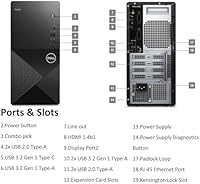
The port selection is one of the more generous in this class — front-panel USB-C access, multiple USB 3.2 Gen1 Type-A ports, dedicated Ethernet, and dual video outputs make it easy to connect a full desk setup without reaching for a hub. Buyers with older USB 2.0 peripherals appreciate that those ports are still present alongside modern ones.
The HDMI output is version 1.4b rather than 2.0, which limits maximum resolution and refresh rate on newer monitors. It is a minor point for most office users, but buyers with 4K displays or high-refresh-rate monitors will want to use the DisplayPort connection instead.
Wireless & Networking
83%
Wi-Fi 6 support makes a noticeable real-world difference for buyers in homes or offices with crowded wireless networks. Buyers working from apartments with many competing networks report more stable connections compared to older Wi-Fi 5 machines they replaced.
The Realtek Wi-Fi card occasionally draws mild criticism for range consistency compared to Intel-based wireless solutions. A small but vocal segment of users in larger office spaces noted the signal weakened more than expected at moderate distances from the router.
Noise & Thermal Management
86%
Quiet operation is one of the most frequently volunteered compliments in user reviews. The Vostro 3030 runs almost inaudibly during standard office tasks, making it a comfortable companion in open-plan workspaces, shared home offices, or video call environments where fan noise would be disruptive.
Under sustained heavier loads — like extended video exports or prolonged multi-application stress — the fan does spin up noticeably. It never becomes disruptive, but the difference from idle to load is more pronounced than some buyers anticipated from a machine this quiet at rest.
Software & OS Experience
89%
The Windows 11 Pro installation is clean and ready to configure immediately, with BitLocker, Remote Desktop, and domain-join capabilities available from the start. IT administrators and small business owners specifically appreciate not having to manage a license upgrade from Home to Pro separately.
A few buyers flagged some Dell-specific pre-installed utilities as unnecessary additions, though the overall bloatware situation is far lighter than what many competitors ship. Removing those utilities takes only a few minutes but is a mildly annoying step on a machine marketed as business-ready.
RAM & Multitasking
87%
16GB of DDR5 SDRAM handles the multitasking needs of the vast majority of buyers in this segment comfortably. Running a video call, a browser with multiple tabs, a spreadsheet, and a messaging app simultaneously produces no meaningful slowdown under real-world office conditions.
Power users running virtual machines, large data sets, or memory-intensive development environments may start to feel constrained over time. The DDR5 platform does support upgrades, but buyers should factor in the additional cost if they know their workloads are memory-hungry from day one.
Upgradeability & Expandability
74%
26%
The PCIe slot and available internal space give technically confident users a meaningful upgrade path — adding a discrete GPU or a second storage drive is a viable option down the road. The DDR5 memory slots also allow for future RAM expansion without replacing the motherboard.
Casual buyers who expect plug-and-play upgradability may find the internals more involved than anticipated for a compact tower. Dell does not extensively market the upgrade paths, and documentation for internal expansion is not always straightforward to locate through standard support channels.
Bundled Keyboard & Mouse
53%
47%
They work, they are included, and for buyers who already own quality peripherals, this is a non-issue. The wired connection keeps things simple and reliable without any pairing or battery concerns.
The bundled keyboard and mouse are among the weakest points buyers flag consistently. Key travel on the keyboard feels shallow and plasticky, and the mouse sensitivity is basic at best — most buyers who plan to use this machine seriously for more than occasional tasks end up replacing both within the first month.
Reliability & Longevity
82%
18%
The Vostro line carries a longstanding reputation for durability in business environments, and the early feedback on this model reflects that history. Buyers who have previously owned Vostro or OptiPlex machines often cite brand trust as a key reason for returning to Dell at this price point.
Long-term reliability data is still maturing given the product launch date. A small percentage of buyers reported minor firmware or driver issues in the early weeks post-setup, though most resolved these through standard Windows Update or Dell support without hardware intervention.

Suitable for:

The Dell Vostro 3030 Tower (Core i5-14400, 16GB DDR5, 512GB SSD) is a strong fit for anyone whose daily computing revolves around productivity rather than performance extremes. Remote workers and home office setups will find it handles video conferencing, document editing, and multi-tab browsing without complaint, while staying quiet enough to use in shared spaces. Small business owners get genuine value from the included Windows 11 Pro license — BitLocker encryption and Remote Desktop support are built in, with no additional licensing cost to factor in. Students and educators running online classes, research tools, or entry-level coding environments will find it more than capable for their day-to-day needs. It also makes a compelling upgrade target for anyone still running a machine from 2017 or earlier, where the jump to DDR5 memory and a current-gen 10-core processor represents a meaningful real-world improvement without requiring a premium budget.
Not suitable for:

The Dell Vostro 3030 Tower (Core i5-14400, 16GB DDR5, 512GB SSD) is the wrong choice for anyone whose work or hobby demands dedicated graphics performance. Video editors, 3D artists, motion designers, or anyone relying on GPU-accelerated software will quickly hit the ceiling of the integrated Intel UHD 730 — this chip was built for spreadsheets and browser tabs, not rendering pipelines. Gamers should look elsewhere entirely; even older or mid-range titles will struggle at playable settings on integrated graphics. Users who store large media libraries, recorded footage, or sizable software development environments locally will also find 512GB constraining sooner than expected, and there is no user-friendly secondary drive pre-installed to absorb the overflow. Finally, buyers who want a machine they can configure heavily before purchase — custom RAM tiers, discrete GPU options, or larger SSD choices from the factory — will find the available configurations more limited than competitors in this category.

Specifications

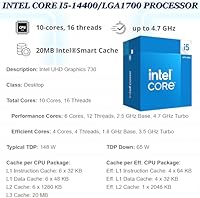
  • Processor: Intel Core i5-14400 with 10 cores (6 Performance + 4 Efficiency), 16 threads, a base clock of 2.5 GHz, and a boost clock up to 4.7 GHz.
  • Cache: 20MB Intel Smart Cache shared across all cores for faster repeated data access.
  • RAM: 16GB DDR5 SDRAM provides modern memory bandwidth suited to multitasking and productivity workloads.
  • Storage: 512GB PCIe NVMe SSD (x4 interface) delivers fast boot times and responsive application loading.
  • Graphics: Integrated Intel UHD Graphics 730 supports dual-monitor output but carries no dedicated video memory.
  • Operating System: Windows 11 Pro 64-bit is pre-installed, including BitLocker encryption and Remote Desktop capabilities.
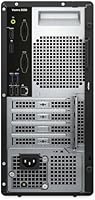
  • Display Outputs: One HDMI 1.4b port and one DisplayPort on the rear panel support simultaneous dual-monitor configurations.
  • Wireless: Realtek Wi-Fi 6 (RTL8852BE), 802.11ax, 2x2 MU-MIMO for fast and stable wireless connectivity in congested network environments.
  • Bluetooth: Bluetooth is included via the same Realtek wireless card, enabling cordless peripherals without a separate adapter.
  • Front Ports: Front I/O includes 2x USB 2.0, 1x USB 3.2 Gen 1 Type-A, 1x USB 3.2 Gen 1 Type-C, and 1x combo audio jack.
  • Rear Ports: Rear I/O includes 2x USB 3.2 Gen 1 Type-A, 2x USB 2.0, 1x HDMI 1.4b, 1x DisplayPort, 1x RJ-45 Ethernet, and 1x Line out.
  • Ethernet: One RJ-45 Gigabit Ethernet port on the rear panel provides a wired network connection alongside the wireless option.
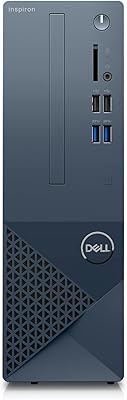
  • Form Factor: Small tower chassis (Vostro 3030) measuring 12.77 x 6.06 x 11.5 inches for a compact desk footprint.
  • Weight: The unit weighs approximately 15 pounds, making it easy to reposition on or under a desk without difficulty.
  • Included Accessories: A wired USB keyboard and wired USB mouse are included in the box, providing a complete ready-to-use setup.
  • Optical Drive: No optical drive is included or available in this configuration, reflecting the current standard for business compact towers.
  • Processor Brand: Intel is the processor manufacturer, and the platform is built on the LGA1700 socket used across 12th through 14th Gen desktop CPUs.
  • Memory Type: DDR5 SDRAM is the memory standard used, offering higher bandwidth and lower voltage compared to DDR4 at equivalent capacities.

Related Reviews
Dell Vostro 3910 Tower Desktop PC, 12th Gen Intel Core i3, 16GB RAM, 512GB SSD
85%
86%
Performance
92%
Value for Money
90%
Ease of Setup
88%
Quietness & Energy Efficiency
84%
Connectivity & Ports
More
Dell Vostro Tower Desktop (i3-14100, 32GB DDR5, 1TB SSD)
77%
83%
Value for Money
81%
Performance — Everyday Tasks
91%
RAM Capacity & Speed
88%
Storage Speed & Capacity
54%
Graphics & Display Output
More
Dell Inspiron 3020S Desktop, Intel Core i5-13400, 16GB RAM, 512GB SSD + 1TB HDD
87%
89%
Overall Performance
92%
Value for Money
85%
Build Quality
94%
Storage Speed (SSD)
90%
Design and Size
More
Dell Inspiron 27 7720 All-in-One Desktop, 27-inch FHD, Intel Core i5, 16GB RAM, 512GB SSD
87%
88%
Performance
92%
Display Quality
90%
Ease of Setup
89%
Design & Build Quality
85%
Customer Support
More
Dell Slim Desktop ECS1250 - Intel Core Ultra 5, 16GB RAM, 512GB SSD
83%
92%
Value for Money
87%
Performance
90%
Compact Design
88%
Setup & Installation
85%
Energy Efficiency
More
HP 2023 17 Laptop, Intel Core i5-1335U, 16GB RAM, 512GB SSD
82%
92%
Display Quality
88%
Performance
72%
Battery Life
67%
Portability
89%
Value for Money
More
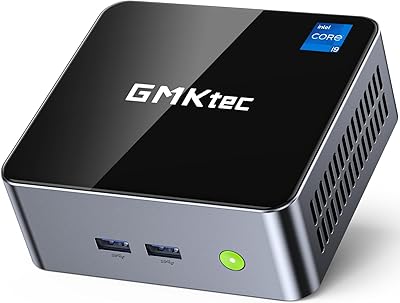
GMKtec Mini Desktop Computer M3, Intel Core i5-12450H, 16GB RAM, 512GB SSD
86%
88%
Performance
85%
Build Quality
91%
Ease of Setup
87%
4K Support
90%
Connectivity
More
Dell XPS 13 (9310) Laptop, Intel Core i7-1185G7, 16GB RAM, 512GB SSD
85%
91%
Performance
95%
Display Quality
88%
Portability
75%
Battery Life
92%
Build Quality
More
Dell Inspiron 14 5420 Laptop, Intel Core i5-1235U, 8GB RAM, 512GB SSD
85%
88%
Performance
91%
Portability
84%
Display Quality
82%
Battery Life
90%
Build Quality
More
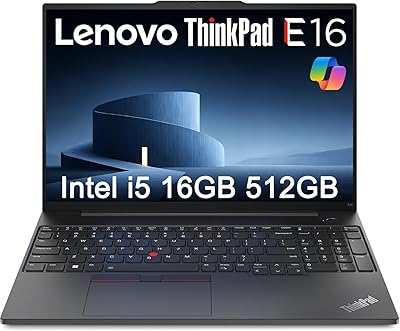
Lenovo ThinkPad E16 Business Laptop, Intel Core i5-1335U, 16GB RAM, 512GB SSD
83%
88%
Performance
80%
Battery Life
90%
Build Quality
85%
Display Quality
70%
Portability
More

FAQ

Yes, the Vostro 3030 uses a standard DDR5 SODIMM or DIMM configuration with available slots, and the PCIe interface supports additional or replacement NVMe drives. If you know upfront that 512GB will feel tight for your workflow, budgeting for an external or internal expansion drive early is a smart move. Dell does not always make internal upgrade documentation easy to find, so checking the service manual on their support site before opening the chassis is worthwhile.

It handles dual-monitor setups well for office and productivity use, thanks to the dedicated HDMI and DisplayPort outputs on the rear. Both screens can run simultaneously at up to 1920x1080 without any configuration headaches. Just keep in mind the HDMI port is version 1.4b, so if you have a 4K or high-refresh-rate monitor, use the DisplayPort connection to avoid limitations.

It ships with a genuine, activated Windows 11 Pro 64-bit license — not a trial or Home edition that needs upgrading. That means BitLocker encryption, Remote Desktop, and domain-join features are available from the moment you power it on, which is a real advantage for small business buyers who would otherwise pay separately for a Pro license.

Absolutely — video calls are squarely within the comfort zone of the Vostro 3030. The i5-14400 and 16GB of DDR5 handle Zoom, Teams, or Google Meet while keeping other applications open in the background without any noticeable slowdown. The machine also runs quietly during these tasks, which matters if you are on calls in a shared space.

Honestly, no — and it is worth being direct about this. The integrated Intel UHD 730 graphics chip is designed for office tasks and HD video playback, not gaming. Even older or lighter titles will struggle to run at acceptable frame rates and settings. If gaming is any part of your intended use, you need a machine with a discrete GPU.

Under standard office workloads — browsing, documents, video calls — the fan is nearly inaudible. You will only notice the fan spin up during more sustained tasks like extended file transfers or running multiple demanding applications simultaneously, and even then it does not become disruptive. This is consistently one of the most praised aspects of the machine among buyers who work in quiet environments.

Wi-Fi 6 gives this compact desktop strong wireless performance in most home and small office environments. That said, the Realtek wireless card has drawn some criticism for range consistency compared to Intel-based Wi-Fi solutions, particularly in larger spaces or environments with thick walls. If your router is in a different room or you need rock-solid stability, plugging into the rear RJ-45 Ethernet port is always the better call.

The Windows 11 Pro installation is relatively clean compared to many consumer-grade PCs, but there are a handful of Dell-specific utilities pre-installed that not everyone will want. Nothing egregious, and removing them takes only a few minutes — but if you are expecting a completely bare OS, budget a short time after first boot for a quick cleanup.

The front USB-C port is a USB 3.2 Gen 1 data port, not a full-function Thunderbolt or DisplayPort Alt Mode connector, so it will not drive a display on its own. For video output, you need to use the HDMI or DisplayPort connections on the rear panel. The front USB-C is still handy for connecting storage drives, phones, or other peripherals quickly without reaching around to the back.

Dell typically covers Vostro desktop systems with a one-year limited hardware warranty that includes next-business-day onsite service in many regions, though coverage terms can vary by seller and location. Extended warranty plans through Dell ProSupport or similar programs are available for purchase if you want longer coverage. It is always worth confirming the warranty terms with the seller at the time of purchase, particularly when buying through a third-party marketplace listing.