Deco Gear 39-inch Curved Ultrawide Gaming Monitor
Deco Gear 39-inch Curved Ultrawide Gaming Monitor — image 1

Deco Gear 39-inch Curved Ultrawide Gaming Monitor — image 2
Deco Gear 39-inch Curved Ultrawide Gaming Monitor — image 3
Deco Gear 39-inch Curved Ultrawide Gaming Monitor — image 4
Deco Gear 39-inch Curved Ultrawide Gaming Monitor — image 5
Deco Gear 39-inch Curved Ultrawide Gaming Monitor — image 6
Deco Gear 39-inch Curved Ultrawide Gaming Monitor — image 7
Deco Gear 39-inch Curved Ultrawide Gaming Monitor — image 8
77%
23%

Overview

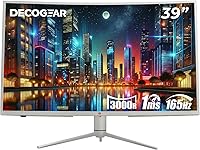
The Deco Gear 39-inch Curved Ultrawide Gaming Monitor enters a competitive mid-range segment where buyers constantly weigh screen real estate against pixel density and price. At QHD resolution spread across 39 inches, sharpness is solid rather than exceptional — text stays clear and images look defined, though you won't get the crispness of a smaller 27-inch QHD panel. What immediately stands out is the white limited edition finish. For anyone building a clean or minimal setup, matching display options are genuinely scarce at this price tier, making this curved ultrawide a practical and distinctive choice for aesthetics-conscious buyers.

Features & Benefits

The 3000R curve is aggressive enough to feel genuinely immersive in gaming without becoming disorienting during long work sessions. Paired with near-full sRGB coverage, colors come across as consistent and reliable — useful for photo editing or any workflow where accuracy matters. The 165Hz refresh rate delivers noticeably smoother motion than a typical 144Hz panel, particularly in fast-paced games where split-second responsiveness counts. The 65W USB-C port is a standout practical feature — one cable connects and charges compatible laptops, cutting real desk clutter. That said, HDR400 is a modest certification; it adds some contrast improvement in supported content, but falls well short of the depth you would get on a proper OLED or Mini-LED panel.

Best For

This curved ultrawide hits a sweet spot for a fairly specific kind of buyer. Gamers who want the peripheral-vision advantage of the ultrawide format — without committing to 4K hardware costs — will find the refresh rate and response time genuinely capable. Content creators working in sRGB-calibrated environments can rely on the color output for most production tasks, though dedicated print professionals may still want a more rigorously color-managed display. Remote workers juggling multiple applications will appreciate the wide canvas and Picture-by-Picture mode, which lets two sources run simultaneously. Laptop users wanting to simplify their desk will find the USB-C setup a practical, low-friction solution.

User Feedback

Owners of the Deco Gear 39-inch generally report positive impressions of the panel's color vibrancy and how straightforward the initial setup is. The stand draws consistent praise — it feels sturdy, and the adjustment range covers most desk configurations comfortably. On the critical side, low brightness is the most frequently mentioned drawback; at 350 nits, the display can struggle in rooms with strong overhead or natural lighting. A portion of users with power-hungry laptops have found 65W charging underwhelming under heavy load. The ultrawide format tends to divide opinion: most buyers feel the extra horizontal real estate justifies stepping up from a standard 27-inch QHD, while a smaller group prefers the tighter pixel density of a more compact panel.

Pros

  • The ultrawide curved format creates genuine immersion in gaming without requiring an expensive GPU upgrade to drive 4K.
  • A 165Hz refresh rate keeps motion smooth and responsive, noticeably more fluid than standard 144Hz panels in fast-paced games.
  • Near-full sRGB color coverage makes this curved ultrawide reliable for photo editing, video review, and general creative work.
  • The 65W USB-C port genuinely simplifies desk setups — one cable connects and charges compatible laptops simultaneously.
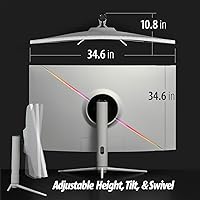
  • The ergonomic stand covers tilt, swivel, and height adjustment, accommodating a wide range of desk heights and seating positions.
  • Flicker-Free and Blue Light Reduction modes make extended work or gaming sessions more comfortable over time.
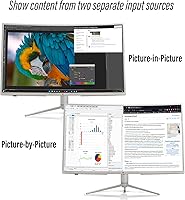
  • Picture-by-Picture and Picture-in-Picture modes let users run two input sources at once, which is practical for multitaskers.
  • The white limited edition finish is a genuine rarity at this price tier, offering real aesthetic value for matching setups.
  • Adaptive Sync support reduces screen tearing without requiring a specific GPU brand, keeping it compatible across most systems.
  • Setup is straightforward, and the stand assembly is consistently reported as quick and hassle-free.

Cons

  • At 350 nits, the panel can look washed out in bright rooms with strong ambient or natural light.
  • HDR400 delivers only a modest improvement over standard dynamic range — it is not comparable to OLED or Mini-LED HDR performance.
  • Spreading QHD resolution across 39 inches results in lower pixel density than smaller QHD displays, which some users find slightly soft for text.
  • The 65W USB-C charging is insufficient for high-performance laptops that draw more power under load, leaving them to discharge during heavy use.
  • At nearly 38 pounds, this white ultrawide monitor is heavy and cumbersome to reposition once placed on a desk.
  • The 16:9 aspect ratio limits the ultrawide benefit compared to true 21:9 panels, offering less horizontal expansion than some buyers expect.
  • No factory calibration report is included, so color-critical professionals may need to calibrate manually for accurate output.
  • Port selection is limited — users with multiple desktop peripherals may find themselves needing a separate hub or switch.

Ratings

The scores below reflect our AI-driven analysis of verified global buyer reviews for the Deco Gear 39-inch Curved Ultrawide Gaming Monitor, with spam, incentivized, and bot-generated feedback actively filtered out before scoring. Each category captures both what real users consistently praised and the friction points that surfaced across thousands of purchase experiences worldwide. Nothing has been softened — the numbers reflect honest sentiment, including where this curved ultrawide falls short of expectations.

Display Clarity
76%
24%
Most users find the QHD image sharp and well-defined for gaming and everyday computing at typical desk distances. Colors appear vibrant out of the box, and the non-glare coating keeps things readable without strong reflections interfering during daytime use.
Spreading QHD resolution across 39 inches results in a pixel density that some users — particularly those coming from a compact 27-inch QHD monitor — find noticeably softer, especially for small text in productivity applications.
Color Accuracy
83%
The near-full sRGB coverage earns consistent praise from photographers and video editors who rely on predictable color output without manual calibration. For web content production and social media work, users report that colors translate reliably between the screen and final published output.
No factory calibration report ships with the display, so professionals with stricter requirements may need to invest in a colorimeter to dial it in. Coverage beyond sRGB — particularly DCI-P3 — is not a strength, limiting appeal for cinema-grade color work.
Refresh Rate & Motion
89%
The high refresh rate makes a tangible difference in competitive gaming, with users regularly noting that fast-moving scenes feel fluid and easy to track compared to their previous 60Hz or 144Hz displays. Adaptive Sync works reliably across both major GPU brands without needing proprietary enrollment.
The improvement over 144Hz is real but incremental rather than transformative for casual gamers. Users who primarily use the display for productivity or media consumption will not notice much practical difference from the elevated refresh rate in daily use.
HDR Performance
44%
56%
HDR400 certification does provide a subtle boost to highlight rendering in supported games and streaming content, and some users who have not owned higher-tier HDR displays find the improvement acceptable for the price point.
Buyers familiar with OLED or Mini-LED HDR are almost universally disappointed — the 350-nit brightness ceiling and lack of local dimming mean HDR mode adds minimal visible impact. Several reviewers recommend simply leaving HDR disabled and using a well-tuned SDR profile instead.
USB-C Connectivity
81%
19%
For laptop users, the single-cable setup genuinely simplifies desk life — video, data, and up to 65W of charging all travel through one connection, which keeps the workspace cleaner and reduces cable management headaches significantly.
The 65W power delivery ceiling is a real limitation for users with power-hungry laptops; under sustained GPU and CPU load, 65W cannot fully offset consumption, meaning the laptop battery slowly drains even while connected. Buyers with older or non-USB-C laptops get no benefit from this feature at all.
Build Quality
78%
22%
The stand assembly draws consistent positive feedback for feeling solid and stable, with minimal wobble once positioned. The white chassis finish is clean and well-executed, and the overall construction feels appropriate for the price tier without obvious flex or creaking.
A few users note that the white plastic shows handling marks and minor scuffs more readily than a black finish would, particularly during the initial setup process. The build does not match the premium rigidity of higher-end brands like LG or Dell UltraSharp at twice the price.
Ergonomics
82%
18%
The stand covers a practical range of height, tilt, and swivel adjustments that accommodate a variety of desk heights and seating positions, which users switching from fixed-position monitors find immediately useful. VESA mount compatibility gives additional flexibility for those who prefer a monitor arm.
The swivel range is adequate but not as wide as some competing stands, and a small number of taller users report that the maximum height position still falls slightly below their ideal eye level when using a standing desk setup.
Brightness
52%
48%
In dim to moderately lit rooms — typical evening gaming sessions or windowless offices — the brightness level is sufficient and the non-glare surface keeps things comfortable without eye fatigue over extended periods.
At 350 nits, the display visibly loses impact in well-lit rooms with natural sunlight or strong overhead lighting. Multiple users report needing to close blinds or reposition the monitor to maintain watchable image quality during daytime use, which is a real inconvenience.
Gaming Immersion
86%
The 3000R curvature wraps convincingly around the viewer's peripheral vision, making open-world, racing, and simulation titles feel more enveloping than a flat display. At 39 inches, the screen presence is commanding without requiring an extreme viewing distance to take it all in comfortably.
The 16:9 aspect ratio limits the ultrawide immersion compared to true 21:9 panels — horizontal field of view expansion is more modest, and some games do not treat 16:9 ultrawide as a distinct format, reducing the immersive benefit in those titles.
Multitasking Capability
84%
The wide canvas makes side-by-side application use genuinely practical, and the PiP and PbP modes add real flexibility for users switching between a laptop and a desktop or monitoring a secondary feed while working. Remote workers and students consistently highlight this as one of the display's most useful everyday strengths.
PbP mode splits the already modest pixel density further across two sources, which can make each window feel cramped at higher application zoom levels. Power users who frequently run three or more application panels simultaneously may still prefer a dual-monitor setup for the additional flexibility.
Eye Comfort
79%
21%
Flicker-Free operation and the built-in Blue Light Reduction mode are appreciated by users who spend five or more hours per day at the display, with several reporting reduced end-of-day eye strain compared to their previous monitors that lacked these features.
Blue Light Reduction does introduce a warm color cast that affects color-critical work, requiring users to toggle between modes depending on the task. The feature set is standard at this tier and does not offer the more granular controls found on higher-end display calibration software.
Value for Money
73%
27%
For buyers who specifically want a large curved display with USB-C docking capability and a white finish, the pricing is competitive and options from established brands like LG or Samsung at this size tend to cost meaningfully more. The feature set relative to cost feels justified for the target use case.
Buyers comparing it purely on panel performance metrics — brightness, HDR quality, and pixel density — will find comparably priced 27-inch QHD or even some 32-inch displays offering a sharper, more capable image. The value proposition is tied specifically to the size, aesthetic, and USB-C combination rather than raw display performance.
Setup Experience
85%
Assembly is consistently described as intuitive and quick, with the stand snapping together without tools and cable routing channels keeping things tidy from the start. Most users report being fully up and running within fifteen to twenty minutes of opening the box.
The OSD menu interface is functional but not especially intuitive, and navigating between input sources or adjusting color settings takes a few minutes of exploration before it becomes second nature. The physical OSD buttons are small and positioned in a way that some users find awkward to reach.
Aesthetic Design
88%
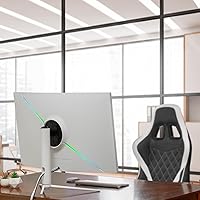
The white limited edition colorway is genuinely distinctive in a market dominated by black monitors, and users building light-toned or minimalist setups specifically seek it out because matching white peripherals are otherwise difficult to source at this price tier. The near-frameless borders keep the look clean and modern.
The all-white finish is polarizing — buyers who prefer a more neutral or stealthy look have no option to choose an alternative colorway within this model line. The white plastic also demands more consistent cleaning maintenance to stay looking its best over time.

Suitable for:

The Deco Gear 39-inch Curved Ultrawide Gaming Monitor is a strong fit for buyers who want a meaningful upgrade from a standard widescreen display without crossing into premium pricing territory. Casual to mid-core gamers will appreciate the high refresh rate and wide field of view that makes open-world and racing titles feel noticeably more immersive. Remote workers and students who constantly juggle browser tabs, documents, and communication tools will find the extra horizontal canvas genuinely productive, especially with Picture-by-Picture mode that lets two input sources share the screen simultaneously. Laptop users in particular stand to benefit from the USB-C connectivity — one cable handles both video output and device charging, which keeps desk setups clean and simple. The white colorway also makes this curved ultrawide a rare find for anyone building a light-toned or minimalist battlestation, where most monitor options default to black.

Not suitable for:

The Deco Gear 39-inch Curved Ultrawide Gaming Monitor is not the right call for buyers who prioritize peak brightness or true HDR performance. At 350 nits with an HDR400 certification, it simply cannot match the contrast depth or highlight intensity of OLED or Mini-LED panels — anyone coming from that class of display will likely feel underwhelmed. Professional photographers or print-focused designers who need wide color gamut coverage beyond sRGB, such as DCI-P3 or AdobeRGB, should look elsewhere, as this monitor does not address those workflows. Buyers with laptops that draw significantly more than 65 watts under load may also find the USB-C charging insufficient to keep up during demanding tasks. Finally, those who prefer the tighter pixel density and sharper text clarity of a smaller 27-inch QHD panel may find that spreading the same resolution across 39 inches feels slightly soft in everyday productivity use.

Specifications

  • Screen Size: The display measures 39 inches diagonally, offering a wide viewing area suited to both gaming and multitasking workflows.
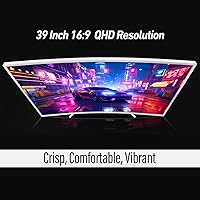
  • Resolution: Native resolution is 2560 x 1440 (QHD Wide), delivering clear detail across the panel without the GPU demand of 4K output.
  • Aspect Ratio: The panel uses a 16:9 aspect ratio, which is standard for most content but narrower than true 21:9 ultrawide displays.
  • Refresh Rate: A 165Hz refresh rate supports smooth motion rendering, particularly beneficial in fast-paced games where frame timing is critical.
  • Response Time: The panel is rated at 1ms MPRT, reducing motion blur during high-speed sequences in gaming and video playback.
  • Curvature: The 3000R curve radius bends the screen moderately toward the viewer, improving peripheral immersion without distorting flat content.
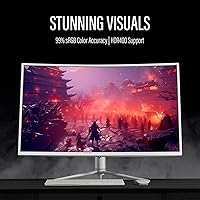
  • HDR Support: HDR400 certification indicates basic high dynamic range support, providing modest contrast improvement over SDR but not approaching OLED-level depth.
  • Color Gamut: Coverage reaches 99% of the sRGB color space, making it reliable for color-accurate work in web, video, and photo editing workflows.
  • Brightness: Peak brightness is rated at 350 nits, which is adequate for dim to moderate lighting environments but may appear washed out in bright rooms.
  • Contrast Ratio: A static contrast ratio of 3000:1 allows for reasonably deep blacks and visible shadow detail compared to standard IPS panels.
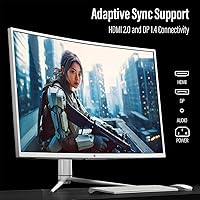
  • Connectivity: Input options include HDMI 2.0, DisplayPort 1.4, and a USB-C port that also handles up to 65W of power delivery for compatible laptops.
  • USB-C Power: The integrated 65W USB-C port allows single-cable connection for video and charging, compatible with laptops that support USB-C PD input.
  • Adaptive Sync: Adaptive Sync support reduces screen tearing and stuttering across compatible AMD and NVIDIA graphics cards without requiring brand-specific enrollment.
  • Eye Care: Built-in Blue Light Reduction and Flicker-Free technology are included to reduce eye strain during extended sessions at the display.
  • Multi-Source Modes: Picture-in-Picture and Picture-by-Picture modes allow two separate input sources to share the screen simultaneously for multitasking flexibility.
  • Ergonomics: The stand supports tilt, swivel, and height adjustment, covering a practical range of positions for different desk and seating configurations.
  • Surface Finish: The panel uses a non-glare matte coating that diffuses ambient light reflections to maintain image clarity in mixed lighting conditions.
  • Dimensions: With the stand attached, the monitor measures approximately 34.6 inches wide, 25.4 inches tall, and 11.3 inches deep.
  • Weight: The complete unit including stand weighs 37.8 pounds, which is substantial and should be accounted for when planning desk placement.
  • Edition: This is the Limited White Edition variant, featuring an all-white chassis finish that distinguishes it from the standard black model.

Related Reviews
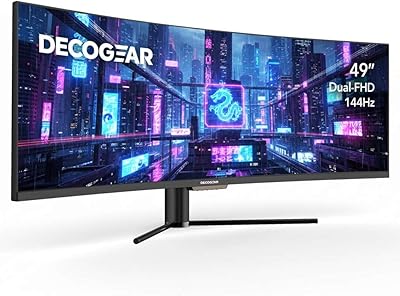
Deco Gear DGVIEW490 49-inch Curved Ultrawide Gaming Monitor
85%
92%
Immersive Gaming Experience
88%
Display Quality (Resolution & HDR)
85%
Multitasking & Productivity
90%
Refresh Rate & Performance
80%
Build Quality & Durability
More
Deco Gear 34-Inch Curved Ultrawide Monitor DGLUX340
81%
90%
Value for Money
86%
Display Quality
83%
Ergonomics & Adjustability
75%
Gaming Performance
87%
Color Accuracy
More
Deco Gear DGVIEW495K 49″ Curved Ultrawide Monitor
74%
93%
Immersion & Screen Real Estate
88%
Color Accuracy
79%
Refresh Rate & Gaming Smoothness
67%
Response Time
84%
Value for Money
More
Deco Gear VIEW401 40″ Ultrawide Monitor

78%
88%
Color Accuracy
91%
Screen Resolution & Sharpness
93%
Productivity & Multitasking
84%
USB-C Connectivity & Power Delivery
79%
Build Quality & Materials
More
Westinghouse 34-inch Curved Ultrawide Gaming Monitor
86%
87%
Display Quality
91%
Gaming Performance
92%
Value for Money
85%
Ease of Setup
78%
Built-in Speakers
More
Raywego Q34DB45-1 34-inch Curved Gaming Monitor

72%
88%
Value for Money
84%
Gaming Performance
74%
Image Quality
51%
HDR Performance
67%
Build Quality
More
INNOCN 45C1R 45-Inch Ultrawide Curved Gaming Monitor
85%
91%
Value for Money
94%
Display Quality
88%
Ergonomics & Adjustability
85%
Connectivity
92%
Ease of Setup
More
LG 39GS95QE Ultragear OLED Curved Gaming Monitor 39-inch
88%
95%
Display Quality
94%
Gaming Performance
89%
Build Quality
87%
Connectivity Options
91%
Immersion (Curvature)
More
Sealan 34-inch Ultrawide Curved Gaming Monitor Q34P4D-1
83%
91%
Visual Quality
88%
Gaming Performance
79%
Build Quality
93%
Color Accuracy
85%
Connectivity Options
More
Skytech Gaming Moonshadow 27-inch Curved Gaming Monitor
83%
88%
Image Quality
91%
Refresh Rate Performance
86%
Adaptive-Sync
83%
VA Panel Contrast
84%
Stand & Ergonomics
More

FAQ

Yes, it does. The Adaptive Sync implementation on this curved ultrawide is not locked to a specific GPU brand, so it functions with compatible AMD Radeon and NVIDIA GeForce cards. You may need to enable the feature manually through your GPU control panel, but it is broadly supported.

It depends on your laptop. For most thin-and-light laptops and ultrabooks, 65W is sufficient to maintain or slowly charge the battery during normal use. However, if you have a high-performance laptop with a dedicated GPU drawing significant power, 65W may not fully keep pace under heavy load and the battery could gradually drain during demanding tasks.

The 3000R curvature is moderate — not as pronounced as the tighter curves you find on ultra-curved gaming monitors, but clearly visible and comfortable. At typical desk distances of two to three feet, it wraps your peripheral vision naturally and reduces eye travel across the screen without making flat content look distorted.

It is a solid option for editors working in sRGB-calibrated environments, which covers the majority of web and broadcast production. The wide canvas and color accuracy make timeline work comfortable. That said, if your work requires DCI-P3 or AdobeRGB coverage, this panel does not fully address those color spaces, and a display with wider gamut coverage would serve you better.

Yes. The Picture-by-Picture mode lets you display two separate inputs side by side on the same screen simultaneously. You can connect one device via DisplayPort and another via HDMI or USB-C, then use the monitor's OSD to arrange how the two sources are displayed. It is practical for anyone managing a personal and work machine at the same desk.

Honestly, HDR400 is the entry tier of HDR certification and the improvement over standard dynamic range is subtle rather than dramatic. Highlights gain a small amount of additional punch and shadow detail improves slightly in supported content, but do not expect the vivid HDR experience you would get from a high-end OLED or Mini-LED display. If strong HDR performance is a priority for you, this white ultrawide monitor is not the right tool for that.

The stand is generally well-regarded by owners. It holds the panel securely without significant wobble at a normal desk, and the height, tilt, and swivel adjustments move smoothly. It is not a professional-grade monitor arm replacement, but it performs better than many budget monitor stands in this category.

The matte white surface resists fingerprints reasonably well compared to glossy white finishes, but it is worth being careful during setup since scuffs on light plastics are more visible than on black chassis. Routine cleaning with a soft dry cloth keeps it looking clean without much effort.

At 39 inches with QHD resolution, you land at roughly 75 pixels per inch, which is noticeably lower than a 27-inch QHD display at around 109 pixels per inch. Text and UI elements are readable and clear at a normal desk distance, but if you sit very close or are particularly sensitive to pixel density, you may notice the display looks softer than a more compact QHD monitor.

The included stand handles most standard desk setups comfortably, with enough range in height and tilt for different chair and desk combinations. If you want to wall-mount the display or use a third-party monitor arm, the panel does support VESA mounting, giving you flexibility to reconfigure your setup later if needed.

Where to Buy