Overview

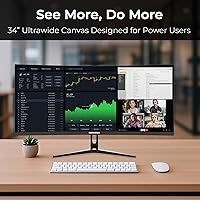
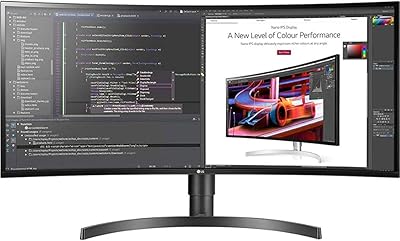
The Deco Gear DGLUX340 34″ Curved Ultrawide Monitor arrived in early 2025 as a notably affordable entry in a segment where most brands charge considerably more. At its core, the value is straightforward: a 34-inch VA panel at 3440x1440 resolution gives you substantial horizontal workspace — the kind that genuinely replaces two monitors on a crowded desk. That said, realistic expectations matter. The 250-nit typical brightness is modest, and an external power adapter rather than an internal supply ships in the box. Strong specification sheet for the price tier, but a few practical trade-offs are worth understanding before committing.
Features & Benefits

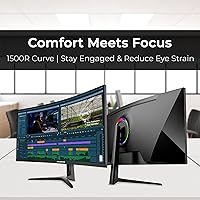
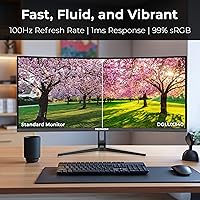
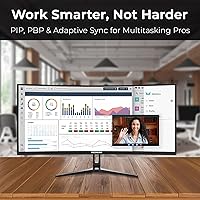
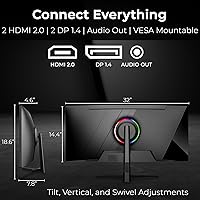
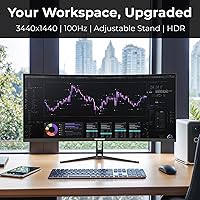
The 1500R curve radius does real work here — at 34 inches, it keeps the far edges of the panel within comfortable viewing angles rather than forcing you to crane your neck. The 100Hz refresh rate and 1ms response time are solid for spreadsheets, video calls, and occasional casual gaming, though nobody should mistake this for a dedicated gaming display. Connectivity is genuinely generous: two HDMI 2.0 ports plus two DisplayPort 1.4 inputs let you keep a laptop and desktop plugged in simultaneously. PIP/PBP support then lets you view both sources side by side — a practical feature many competitors skip at this price. The stand adds 100mm of height travel and 30 degrees of swivel in either direction.

Best For

This curved ultrawide is a natural fit for anyone working from home who has grown tired of juggling two separate monitors, two sets of cables, and two power bricks. Data-heavy professionals — analysts, traders, developers — will appreciate having that much horizontal real estate for keeping reference panels and active documents open at once. Students or early-career creatives who need reasonably accurate color reproduction without a large outlay will find the 99% sRGB coverage genuinely useful day-to-day. And if you regularly switch between a personal laptop and a work machine, flexible input switching with PIP makes that routine considerably less friction-filled than it tends to be on single-input displays.

User Feedback

Early buyers of the Deco Gear 34-inch display are trending positive, with a 4.3-star average — though the review pool is still relatively small given this monitor only launched in April 2025, so take the consensus with some caution. Commonly praised points include straightforward assembly, the ergonomic stand range, and the sheer sense of space the ultrawide format provides in a home office. Recurring concerns center on brightness: in well-lit or sunlit rooms, 250 nits can feel limiting. Some users also flag out-of-box calibration as needing manual adjustment, and the external power brick draws occasional comments about desk tidiness. Overall, the feedback reads as cautiously optimistic rather than unanimously enthusiastic.

Pros

  • The 34-inch ultrawide format effectively replaces two monitors, clearing desk clutter without sacrificing screen space.
  • Four video inputs — two HDMI and two DisplayPort — make multi-device setups genuinely practical and flexible.
  • PIP/PBP support lets you run two sources side by side on a single panel, a feature many rivals skip at this price.
  • The adjustable stand covers tilt, height, and swivel, offering ergonomic range that is above average for this price band.
  • A 3000:1 static contrast ratio gives the VA panel deep, punchy blacks that IPS alternatives in this range typically cannot match.
  • 99% sRGB color coverage is credible and useful for everyday creative work without requiring an expensive display.
  • Adaptive-Sync support reduces screen tearing during casual gaming or video playback without any extra setup.
  • Low Blue Light mode and a matte screen surface make extended work sessions noticeably easier on the eyes.
  • At under 12 pounds, the Deco Gear 34-inch display is light enough to reposition or transport without much effort.
  • Setup is consistently reported as straightforward, with most buyers assembling and connecting the monitor in under 20 minutes.

Cons

  • At 250 nits typical brightness, this curved ultrawide can look washed out in sunlit or brightly lit rooms.
  • Out-of-box color calibration often needs manual adjustment before it looks accurate for detail-oriented work.
  • The external power adapter adds an extra cable and brick to manage, which disrupts otherwise clean desk setups.
  • The review pool is still small as of mid-2025, making it harder to assess long-term reliability with confidence.
  • HDR performance at 300 nits maximum is too limited to deliver a meaningful HDR experience on demanding content.
  • The 75x75mm VESA pattern is less common than the standard 100x100mm, which may limit third-party arm compatibility.
  • No USB hub or USB-C connectivity means fewer docking options for laptop users who want a single-cable setup.
  • The 100Hz ceiling leaves little headroom for users whose workloads or habits may shift toward higher frame rate content over time.
  • Brand recognition and after-sale support infrastructure for Deco Gear remain less established than larger monitor manufacturers.
  • The default 7500K color temperature runs noticeably cool and will likely need adjustment for warm or natural-toned work.

Ratings

Our AI rating engine analyzed verified global buyer reviews for the Deco Gear DGLUX340 34″ Curved Ultrawide Monitor, actively filtering out incentivized, bot-generated, and low-signal feedback to surface what real users genuinely experience day to day. The scores below reflect an honest synthesis of both the strengths buyers consistently celebrate and the friction points that come up repeatedly across independent sources. Nothing has been glossed over — if a category underwhelms in practice, the score and commentary say so plainly.

Value for Money
88%
Buyers repeatedly express surprise at how much monitor they get for the outlay — a 34-inch curved ultrawide with four video inputs, an adjustable stand, and 99% sRGB coverage is a genuinely competitive package at this price tier. For home office workers replacing two monitors, the cost-per-feature math feels very favorable.
A handful of buyers note that a few compromises — the external power adapter, modest brightness ceiling, and limited VESA pattern — are visible reminders of where costs were trimmed. For buyers who compare this strictly against similarly priced flat 1080p displays, the value calculus is less obvious.
Screen Real Estate
91%
The 21:9 ultrawide format consistently earns praise from productivity users who describe opening two full-width application windows side by side as feeling natural rather than cramped. Analysts and developers in particular mention how much reference content they can keep visible during active work without constantly resizing windows.
A small number of users note that certain older productivity software and web-based tools do not fully optimize for 21:9, resulting in awkward letterboxing or unusable side margins. It is not a deal-breaker, but it is an occasional friction point for legacy workflow users.
Brightness & Visibility
58%
42%
In controlled lighting environments — dim home offices, evening work sessions, or windowless rooms — the panel holds up acceptably well, and most users in those conditions do not raise brightness as a concern at all.
This is the most consistent pain point in the review pool. At 250 nits typical output, the display struggles noticeably in rooms with natural daylight or bright overhead lighting, with multiple buyers describing visible washout on lighter content. Users who work near windows during the day should treat this as a primary evaluation factor.
Connectivity & Inputs
89%
Four video inputs — two HDMI 2.0 and two DisplayPort 1.4 — place this monitor well above the typical single or dual-input competition at this price. Multi-device users switching between a work laptop and personal desktop report that having everything permanently plugged in and switchable via the OSD is a genuine daily convenience.
The absence of USB-C input is a recurring wish among laptop-first users who would prefer a single-cable docking connection. There is also no integrated USB hub, which limits the monitor's utility as a central desk hub for peripherals.
Ergonomics & Stand
83%
The stand's combination of 100mm height travel, 30-degree swivel, and meaningful tilt range is consistently noted as a standout feature for this price band. Users who previously owned monitors with fixed or tilt-only stands describe the adjustability as a noticeable quality-of-life improvement during long work sessions.
The 75x75mm VESA pattern is a recurring complaint from buyers who want to mount the display on a third-party arm, as many popular arms default to or favor the 100x100mm standard. A few users also note the stand base has a moderate footprint that competes for desk space.
Color Accuracy
76%
24%
At 99% sRGB, the panel performs credibly for digital-output creative work — social media graphics, UI mockups, and general photo editing for web use look clean and reasonably true-to-life once the display is calibrated. Early-career designers report it as more than adequate for their day-to-day work.
The default 7500K color temperature skews noticeably cool out of the box, and buyers doing color-sensitive work typically need to spend time in the OSD to reach a more neutral result. NTSC coverage of 72% also means this display is not suitable for print-targeted color work or broadcast video production.
Contrast & Black Levels
84%
The VA panel's 3000:1 static contrast ratio delivers noticeably richer blacks and more visual depth than IPS alternatives in the same price range. Users watching dark-scene video content or working with dark-mode interfaces describe the black levels as punchy and satisfying.
Some users report a degree of black smearing — a known VA panel characteristic — when dark objects move quickly across the screen. It is more visible in gaming scenarios than in productivity use, but worth flagging for buyers who mix work and entertainment.
PIP/PBP Multitasking
79%
21%
Buyers who regularly switch between a laptop and desktop specifically call out PIP/PBP as a practical feature that punches above its weight for the price. Being able to monitor a secondary device in a split-screen arrangement without buying a second display resonates strongly with multi-device home office users.
The OSD interface for configuring PIP/PBP is described by some users as unintuitive on first use, requiring a few minutes of trial and error to set up correctly. Once configured it works reliably, but the initial learning curve is higher than it should be.
Setup & Assembly
86%
Assembly is one of the most consistently praised aspects across early reviews. Most buyers describe attaching the stand and connecting cables as a 15-to-20-minute process with no tools required, and the input labeling on the rear of the panel is clear enough to avoid confusion.
The included documentation is minimal, and a few users note that the OSD menu layout is not immediately intuitive when adjusting picture settings for the first time. Nothing technically difficult, but a more detailed quick-start guide would reduce initial friction.
Refresh Rate & Motion
72%
28%
For productivity tasks, video conferencing, and casual gaming, 100Hz with Adaptive-Sync delivers a smooth, tear-free experience that is noticeably better than standard 60Hz displays. Users who game at a relaxed pace consistently report that the display feels fluid without any distracting stuttering.
The 100Hz ceiling is a clear limitation for anyone whose habits drift toward competitive or fast-paced gaming over time, and the VA panel's black smearing behavior can slightly undercut the 1ms spec in high-motion sequences. This monitor does not aspire to be a gaming display, and buyers expecting that performance will be disappointed.
Eye Comfort
81%
19%
The matte screen coating effectively diffuses glare in moderately lit environments, and the Low Blue Light mode combined with flicker-reduction features earns positive mentions from users who log long hours in front of the display. Several buyers specifically note reduced eye fatigue compared to their previous monitors.
At lower brightness settings — which some users adopt as a workaround for the modest peak luminance — the panel can exhibit slightly elevated perceptible flicker depending on ambient conditions. It is not universal, but buyers with elevated flicker sensitivity should be aware.
HDR Performance
47%
53%
HDR mode is present and functional, and for buyers who simply want the feature to exist on paper — for software compatibility or basic Windows HDR support — it satisfies that requirement without issue.
At a 300-nit peak, the practical HDR experience is underwhelming. Content that should display with vivid highlights and deep shadows instead looks only marginally different from standard mode, and several users describe enabling HDR as barely worth the effort on this particular panel. This is a known limitation of entry-level HDR implementations.
Build Quality & Materials
74%
26%
The overall construction feels solid for the price — the stand does not wobble noticeably during typing, and the rear panel finish is clean and professional-looking in a home office context. Most buyers describe the physical build as meeting or slightly exceeding their expectations.
The plastics used throughout the chassis feel unmistakably budget-grade up close, and a small number of buyers report minor flex in the panel surround when handling or adjusting the display. Nothing structural, but it is a reminder that material quality is one area where the price tier shows.
Cable & Power Management
61%
39%
The four-input design means fewer cable swaps for most users, and the rear port placement is accessible enough to make initial wiring straightforward. Buyers with cable management channels or under-desk trays report that the setup looks tidy once routed properly.
The external power adapter is the most commented-on design gripe outside of brightness — it adds a second cord segment to the desk run that internal-supply monitors avoid. Users with minimal cable management infrastructure find it noticeably clutters the area behind the desk.
Review Confidence
63%
37%
The existing verified buyer feedback is largely coherent and consistent in what it praises and flags, suggesting genuine user experiences rather than coordinated or incentivized reviews. The 4.3-star average, while based on a modest sample, aligns credibly with the objective specification profile of the display.
As a product launched in April 2025, the review volume remains limited, which makes statistical confidence in any single category score lower than it would be for a monitor with a year or more of market exposure. Scores here reflect best-available synthesis and should be revisited as the review base grows.

Suitable for:

The Deco Gear DGLUX340 34″ Curved Ultrawide Monitor is well-matched to home office workers who want to consolidate a two-monitor setup into a single, cleaner desk arrangement without spending a lot to do it. Remote employees handling video calls, document editing, and browser-heavy research simultaneously will find the 21:9 format genuinely useful rather than just visually appealing. Financial analysts, developers, and data professionals will particularly appreciate how much horizontal content they can keep visible at once — reference data on one side, active work on the other — especially when PIP/PBP lets them feed two devices into a single screen. Students and early-career creatives working in design, photo editing, or video production on a tight budget will find the 99% sRGB coverage more than adequate for color-sensitive work. If you regularly switch between a personal laptop and a work machine, the four available video inputs make that daily routine far less tedious than it tends to be on monitors with only one or two ports.
Not suitable for:

Buyers who work in a bright room with large windows or strong overhead lighting should think carefully before committing to this business monitor — 250 nits of typical brightness is on the lower end for well-lit environments, and image washout can become a genuine daily frustration. Competitive or enthusiast gamers chasing high frame rates will also find this curved ultrawide unsuitable; 100Hz is a reasonable ceiling, and the panel prioritizes productivity over low-latency visual performance. Color professionals working in print production or commercial photography may find the color calibration requires meaningful manual adjustment out of the box, and the 72% NTSC gamut falls short of what serious color-critical workflows demand. Anyone sensitive to desktop cable clutter should note that the external power adapter adds an extra brick and cable run to manage. Finally, given that the Deco Gear DGLUX340 34″ Curved Ultrawide Monitor only launched in April 2025, buyers who rely heavily on a large, established review base to make confident purchasing decisions may want to give the market a few more months to build a fuller picture.
Specifications

  • Panel Type: The display uses a VA (Vertical Alignment) panel, which delivers a 3000:1 static contrast ratio and deeper blacks compared to IPS alternatives at this price point.
  • Screen Size: The viewable screen measures 34 inches diagonally, presented in a 21:9 ultrawide aspect ratio.
  • Resolution: Native resolution is 3440x1440 pixels (WQHD Ultrawide), offering noticeably sharper detail than standard 1080p ultrawide panels.
  • Curve Radius: The panel uses a 1500R curve radius, meaning the screen forms a circle with a 1500mm radius, keeping edges comfortably within the viewer's natural field of view at typical desk distances.
  • Refresh Rate: Maximum refresh rate is 100Hz, sufficient for smooth productivity work, video playback, and casual gaming.
  • Response Time: Rated response time is 1ms, which helps reduce motion blur during fast-moving content when OverDrive mode is active.
  • Brightness: Typical brightness is 250 nits with a maximum of 300 nits, which is adequate for dim to moderately lit environments but may fall short in bright or sunlit rooms.
  • Color Gamut: The panel covers 99% of the sRGB color space and 72% of the NTSC gamut, making it suitable for general creative work but not professional print production.
  • HDR Support: HDR is supported at a display level, though the 300-nit peak brightness means the HDR effect will be subtle rather than dramatic on high-dynamic-range content.
  • Connectivity: Input options include two HDMI 2.0 ports, two DisplayPort 1.4 inputs, and one 3.5mm audio output jack.
  • PIP/PBP: Picture-in-Picture and Picture-by-Picture modes are supported, allowing two separate video sources to be displayed on screen simultaneously.
  • Adaptive Sync: Adaptive-Sync technology is built in to reduce screen tearing during gaming or video playback without requiring specific GPU vendor certification.
  • Stand Adjustment: The included stand supports tilt from -5° to +15°, 100mm of height adjustment, and 30° of swivel in both left and right directions.
  • VESA Mounting: The monitor is compatible with 75x75mm VESA wall or arm mounts, though buyers should verify third-party arm compatibility before purchasing.
  • Power Supply: Power is delivered via an external DC adapter rated at 12V/4A, with a maximum AC power consumption of 48W during operation.
  • Dimensions: With the stand attached, the monitor measures 32 inches wide, 7.8 inches deep, and 18.6 inches tall; without the stand it is 4.6 inches deep and 14.4 inches tall.
  • Weight: The complete unit including the stand weighs 11.9 pounds, making it manageable for a single person to position or reposition on a desk.
  • Display Colors: The panel supports up to 1.07 billion colors via 8-bit processing, providing smooth gradients and reduced color banding in everyday use.
  • Low Blue Light: A built-in Low Blue Light mode reduces high-energy blue wavelength output, which is intended to reduce eye fatigue during extended viewing sessions.
  • Release Date: The monitor was first made available for purchase in April 2025, making it a relatively recent product with a still-developing user review base.

Related Reviews
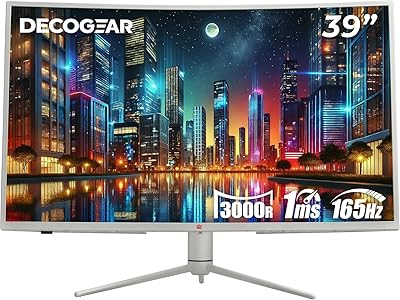
Deco Gear 39-inch Curved Ultrawide Gaming Monitor
77%
76%
Display Clarity
83%
Color Accuracy
89%
Refresh Rate & Motion
44%
HDR Performance
81%
USB-C Connectivity
More
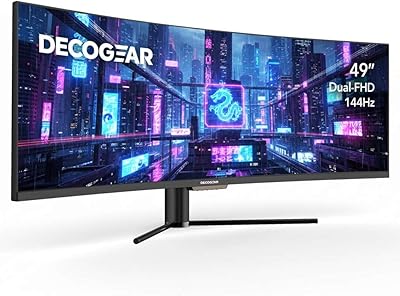
Deco Gear DGVIEW495K 49″ Curved Ultrawide Monitor
74%
93%
Immersion & Screen Real Estate
88%
Color Accuracy
79%
Refresh Rate & Gaming Smoothness
67%
Response Time
84%
Value for Money
More
Deco Gear VIEW490 49-inch Curved Ultrawide Monitor
74%
91%
Immersion & Display Experience
83%
Gaming Performance
88%
Contrast & Black Levels
89%
Connectivity & Hub Features
86%
Value for Money
More
Deco Gear VIEW401 40″ Ultrawide Monitor
78%
88%
Color Accuracy
91%
Screen Resolution & Sharpness
93%
Productivity & Multitasking
84%
USB-C Connectivity & Power Delivery
79%
Build Quality & Materials
More
Gawfolk GF340A 34″ Ultrawide Curved Monitor
87%
94%
Display Quality
91%
Color Accuracy
92%
Refresh Rate Performance
89%
Build Quality
88%
Eye Comfort
More
XUNDEFINED X34U180A 34-inch Curved Ultrawide Gaming Monitor
71%
83%
Gaming Performance
88%
Image Contrast & Blacks
81%
Resolution & Sharpness
69%
Color Accuracy & Vibrancy
51%
HDR Experience
More
Westinghouse 34-Inch Curved Ultrawide Gaming Monitor
72%
84%
Value for Money
78%
Image Quality
81%
Refresh Rate & Motion
82%
Adaptive Sync
83%
Curve & Immersion
More
Raywego Q34DB45-1 34-inch Curved Gaming Monitor
72%
88%
Value for Money
84%
Gaming Performance
74%
Image Quality
51%
HDR Performance
67%
Build Quality
More
Sceptre 34-inch Curved UltraWide Monitor C345W-2560UN
82%
89%
Value for Money
84%
Gaming Performance
87%
Display Quality
80%
Ergonomics & Comfort
75%
Build Quality
More
Deco Gear VM284K 28″ 4K Ultrawide IPS Monitor
86%
89%
Display Quality
93%
Color Accuracy
90%
Viewing Angles
88%
Performance for Design Work
85%
Build Quality
More

FAQ

For most productivity tasks — email, spreadsheets, browser tabs, video calls — yes, the 34-inch ultrawide format genuinely covers what two standard 27-inch monitors would. The 3440x1440 resolution means you have enough horizontal pixels to keep two full-width windows open side by side without things feeling cramped. If your workflow involves three or more distinct application windows simultaneously, you may still feel the pull of a third screen, but for the typical home office setup this curved ultrawide handles dual-monitor replacement well.

It is a real consideration rather than a dealbreaker, but it does add a brick to your cable run. The adapter sits between the wall outlet and the monitor, so you will have a cord running to the brick and then a second cord from the brick to the display. If you use a cable management tray or channel under your desk, it is easy enough to tuck away. Just factor it into your setup plan rather than discovering it after the fact.

It depends heavily on your room. In a north-facing room or a space where you can control ambient light reasonably well, 250 nits is workable. However, if your desk sits directly in front of or adjacent to a window that gets direct sunlight during the day, you are likely to see image washout, particularly on lighter-colored content. This is probably the single most important practical consideration for buyers evaluating this display.

Yes, and this is one of the stronger practical arguments for this monitor. With two HDMI 2.0 and two DisplayPort 1.4 inputs, you can keep four devices plugged in and switch between them using the on-screen input menu. Better still, the PIP/PBP mode lets you show both sources on screen at once — handy if you need to reference something on one machine while actively working on another.

It is compatible with VESA mounting, but the pattern is 75x75mm rather than the more common 100x100mm standard. Most premium monitor arms support both patterns via included adapters, but it is worth double-checking the arm you have or plan to buy before assuming compatibility. If you are purchasing an arm alongside this display, specifically confirm 75x75mm support in the arm's spec sheet.

At 99% sRGB, this business monitor covers the standard web and digital display color space well, which makes it suitable for social media graphics, UI design, and general photo editing intended for screen output. It is not a strong choice if your work requires precise NTSC or DCI-P3 coverage for print or video production, since NTSC coverage sits at 72%. For early-career creatives or students working in digital-first contexts, the color performance is more than adequate.

Early user reports suggest the default color temperature (set to 7500K) runs noticeably cool, which gives whites and neutrals a slightly blue tint out of the box. Dropping the color temperature setting toward the Warm preset or manually tuning the RGB balance typically brings it to a more natural-looking result fairly quickly. It is not a difficult fix, but it is worth spending 10 to 15 minutes in the OSD menu before settling into daily use.

Casual gaming works fine on the Deco Gear 34-inch display. The 100Hz refresh rate and Adaptive-Sync support handle most single-player and co-op gaming scenarios without issue, and the ultrawide format adds genuine immersion in games that support 21:9. Where it falls short is competitive multiplayer — the 100Hz ceiling and the overall character of the VA panel are not optimized for the kind of split-second responsiveness that fast-paced shooters demand.

Assembly is consistently described as one of the stronger points in early buyer feedback. The stand attaches to the panel without tools in most cases, and the input labeling on the back of the monitor is clear enough that connecting cables is straightforward. Most people report being up and running within 20 minutes of opening the box, which is a reasonable experience for a monitor in this size and price category.

That is a fair concern to raise. As of mid-2025, the review volume is still relatively modest given the April 2025 launch date, which means the current 4.3-star average reflects a narrower sample than you would see on a monitor that has been on the market for a year or two. The early sentiment is positive, but it is worth revisiting the review section in a few months if you want a more statistically reliable consensus before making your decision.