






Overview

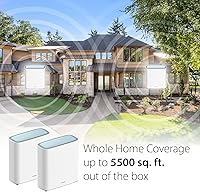
The D-Link AX3200 Mesh WiFi 6 System 2-Pack sits in a practical middle ground — not a budget throwaway, not a premium splurge, but a capable dual-band mesh setup built for homes where a single router simply stops being enough. D-Link has decades of networking experience behind it, though the brand rarely commands the attention that Eero or Orbi tend to get. Worth stating upfront: this model has been discontinued by the manufacturer, which usually translates to better pricing but also raises fair questions about long-term firmware support. With two nodes covering up to 5,500 square feet, it targets mid-size to larger homes with stubborn dead zones — and that remains a genuinely compelling offer.

Features & Benefits

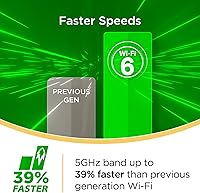
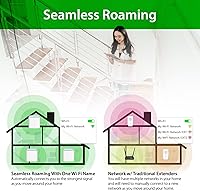
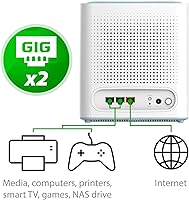
The M32 2-pack runs on Wi-Fi 6, which in real-world terms means your network can actually keep pace with a house full of devices. OFDMA and MU-MIMO let the router serve multiple devices at once rather than making them queue up — the difference becomes obvious when two people are streaming in 4K while someone else is on a video call and a dozen smart home gadgets are active. The built-in AI optimization does make a measurable difference over time, adjusting channel usage and signal paths quietly in the background. Four Gigabit Ethernet ports add flexibility for wired setups, and the app-based parental controls — with scheduling, domain blocking, and a quick internet pause — are practical enough that a parent could configure them with no technical background whatsoever.

Best For

This D-Link mesh system makes the most sense for homes in the 2,000-to-5,000-square-foot range where a single router leaves whole rooms struggling for signal. It handles device-dense environments well — 25 to 40 gadgets all active at once is well within its capabilities, covering everything from smart speakers and security cameras to laptops and gaming consoles. Families will appreciate having parental controls baked in at no extra cost; being able to pause the internet or block specific sites on a schedule is the kind of feature that actually gets used day to day. On the flip side, this Eagle Pro AI setup is not a good match for power users who need tri-band backhaul, smaller-apartment dwellers, or anyone who needs long-term manufacturer support guarantees.

User Feedback

Across more than 600 customer ratings, the M32 2-pack holds a 4-star average — not a runaway hit, but a steady and credible score for a mesh system in this tier. The most consistent praise centers on ease of setup: the Eagle Pro AI app guides new users through the process clearly, and most report being up and running in well under an hour. Coverage improvement over older single-router setups comes up frequently as well. The frustrations are worth noting too — some users report that the companion app crashes or behaves inconsistently, and a handful needed to reboot nodes to restore connectivity. Advanced settings are thin, which will bother technically inclined buyers. There is also a fair concern about post-discontinuation support, given that firmware updates may eventually slow or stop entirely.

Pros

  • Two nodes cover up to 5,500 square feet right out of the box, with no extra hardware needed.
  • Wi-Fi 6 support means faster, more reliable connections across a wide mix of modern devices.
  • OFDMA and MU-MIMO significantly reduce slowdowns in homes with dozens of simultaneously connected devices.
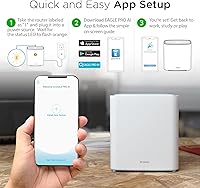
  • App-guided setup is genuinely beginner-friendly — most users are online within 30 minutes.
  • Built-in parental controls include scheduling, site blocking, and internet pause at no subscription cost.
  • Four Gigabit Ethernet ports let you hardwire consoles, desktops, or smart TVs for the fastest possible speeds.
  • WPA3 encryption provides stronger network security than older mesh systems in this price range.
  • The M32 2-pack works with virtually every major ISP without compatibility headaches.
  • AI-driven self-optimization quietly adjusts performance over time with no manual intervention required.
  • Voice control via Alexa and Google Assistant adds a useful layer of hands-free network management.

Cons

  • The manufacturer has discontinued this model, raising legitimate concerns about future firmware and security updates.
  • The Eagle Pro AI app has a history of occasional crashes and inconsistent behavior reported by multiple users.
  • Some users report needing to manually reboot nodes to restore full connectivity after drops.
  • Dual-band design means backhaul and client traffic share the same spectrum, which can hurt throughput in larger homes.
  • Advanced network settings are thin — power users will quickly hit the ceiling of what the app exposes.
  • No tri-band option means this system is less future-proof than competing mesh platforms in a similar price bracket.
  • Long-term availability of replacement nodes or expansion units is uncertain given the discontinued status.
  • The companion app is required for most configuration tasks, with little fallback for users who prefer a browser-based interface.
  • Performance in very large or unusually shaped homes may require a third node that is no longer easy to source.
  • Users accustomed to detailed analytics or real-time network monitoring will find the app reporting fairly basic.

Ratings

The scores below were generated by AI after analyzing hundreds of verified global user reviews for the D-Link AX3200 Mesh WiFi 6 System 2-Pack, with spam, bot submissions, and incentivized feedback actively filtered out to protect accuracy. Both what buyers genuinely appreciated and where they ran into frustration are transparently reflected in each category — no cherry-picking, no inflated averages. The result is an honest, data-grounded picture of where this D-Link mesh system delivers and where it falls short.

Coverage & Range
86%
The two-node setup consistently earns praise from buyers in larger homes who finally eliminated the dead zone in a back bedroom, basement, or detached garage. Users moving up from a single router routinely report that signal reaches areas they had given up on, without needing to reposition nodes repeatedly.
A minority of buyers in homes with unusually thick concrete walls or complex multi-floor layouts found the coverage claim optimistic compared to real-world results. In those edge cases, two nodes were not always enough to fully eliminate weak spots without a third unit that is now difficult to source.
Network Speed
79%
21%
For day-to-day tasks — 4K streaming in multiple rooms, video calls, and heavy browsing all running simultaneously — the M32 2-pack holds up well and rarely produces the buffering or lag that plagued users on their previous routers. The jump from older Wi-Fi 5 hardware is noticeable and appreciated.
Peak throughput figures are theoretical, and real-world speeds over the wireless backhaul between nodes are measurably lower, particularly when the satellite node is placed at distance. Buyers expecting near-gigabit performance throughout the entire coverage area may find the numbers humbling on a speed test.
Setup Experience
91%
The Eagle Pro AI app guides new users through setup in a way that earns genuine compliments — even self-described non-technical buyers report getting both nodes online and fully configured in under half an hour. The step-by-step flow removes virtually all guesswork from the process.
A small but consistent group of reviewers encountered app connectivity issues during initial pairing, requiring a restart of the process from scratch. Users on older smartphones occasionally reported compatibility hiccups with the app's setup screens that added friction to what should be a smooth experience.
App Reliability
61%
39%
When the Eagle Pro AI app behaves as intended, it is a genuinely capable management tool — the dashboard gives a clear view of connected devices, signal strength per node, and built-in speed test results without needing to log into a browser interface.
App stability is the most commonly cited frustration in user reviews, with crashes and unresponsive screens appearing across both iOS and Android feedback. Several buyers noted that day-to-day management became unreliable enough that they stopped using the app regularly after the initial setup was complete.
Device Capacity
83%
Households with 25 to 40 simultaneously connected devices — the typical smart home mix of phones, laptops, streaming sticks, smart plugs, cameras, and voice speakers — report that this Eagle Pro AI setup keeps everything online without visible congestion. OFDMA support makes a real difference in these dense environments.
At the higher end of the device count range, some users noticed increased latency during peak household activity hours, particularly when multiple 4K streams and active gaming sessions overlapped. The dual-band architecture has inherent limits that a tri-band system would handle more gracefully.
Parental Controls
84%
Parents specifically call out the scheduling and internet pause features as practical and easy to use on a daily basis — being able to cut access for a child's devices at bedtime without touching a router is cited as a genuine quality-of-life improvement. No subscription fee makes the value proposition clear.
The domain blocking feature works for explicit site addresses but lacks the category-based filtering that more advanced parental control platforms offer, making it less effective at catching unfamiliar or newly emerged sites. A few parents noted the controls could be bypassed with a VPN, which is a limitation shared across most consumer-grade solutions.
Value for Money
78%
22%
As a discontinued model, this D-Link mesh system frequently becomes available at a meaningful discount compared to its original pricing, which shifts the value equation noticeably in the buyer's favor. For the coverage area and feature set offered, the price-to-performance ratio is reasonable against active competing systems.
The discontinued status introduces a longer-term value risk — buyers are effectively getting a product without a guaranteed firmware future, which complicates the return on investment calculation for security-conscious households. Against similarly priced active alternatives with ongoing support, the value argument is less clear-cut.
Build & Design
74%
26%
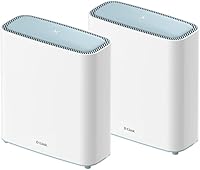
The upright cylindrical design is compact enough to blend into a shelf or stand on a side table without demanding attention, and the clean white finish does not clash with typical home decor the way some router hardware tends to. Users appreciate that it does not look overtly technical or industrial.
The physical construction feels solidly functional rather than premium — the plastic casing has a lightweight quality that a few buyers flagged as feeling less durable than competing products. There are no mounting options included, which limits placement flexibility in homes where floor or shelf space is tight.
Advanced Settings
47%
53%
For mainstream users who simply want reliable whole-home Wi-Fi without touching a single advanced setting, the app-first approach is appropriate and keeps the experience clean. SmartConnect automatically assigns devices to the right band, removing one decision point entirely.
Power users looking for VLAN support, detailed traffic prioritization, custom DNS configuration, or granular QoS controls will hit a hard wall very quickly — these features are largely absent from the Eagle Pro AI platform. There is no browser-based admin interface available as a fallback for advanced configuration.
Wired Connectivity
81%
19%
Four Gigabit Ethernet ports spread across both nodes give buyers real flexibility for hardwiring devices that benefit from it most — a gaming console in the living room, a smart TV, and a desktop PC can all get wired connections without a separate switch in most home configurations.
The distribution of ports between the two nodes is not equal, which requires some planning around device placement before finalizing where each node will live. Buyers wanting to wire several devices at a single location may still need an additional switch to avoid running long cables between rooms.
Backhaul Performance
63%
37%
When the satellite node is placed at a reasonable distance from the primary unit with a clear line of sight or minimal wall interference, the wireless backhaul performs consistently enough for most household workloads and rarely produces a noticeably degraded experience for end users.
The dual-band architecture means backhaul traffic and client device traffic compete for the same spectrum, which creates a measurable throughput ceiling that tri-band systems avoid by dedicating a separate band exclusively to node-to-node communication. This limitation becomes more apparent the farther apart the two nodes are placed.
Long-Term Support
44%
56%
At the time of purchase, the system operates on current firmware and the Eagle Pro AI app remains functional, so day-one buyers are not inheriting an immediately neglected product. Automatic firmware updates are still being delivered as of recent user reports.
The official discontinuation by D-Link is a genuine long-term concern — without a commitment to ongoing updates, security vulnerabilities discovered after support ends will remain unpatched, which is a meaningful risk for a device sitting at the center of a household network. This is the category that most directly separates this system from currently active competitors.
ISP Compatibility
88%
Compatibility across major internet providers is one of the cleaner strengths of this Eagle Pro AI setup — users on AT&T, Xfinity, Spectrum, Cox, Verizon, and several regional ISPs all report smooth integration without needing to call support or change modem settings beyond the basics.
A separate modem is required for most broadband connections, which adds cost and a setup step that first-time mesh buyers sometimes do not anticipate. In rare cases involving ISPs with non-standard connection types, a brief ISP support call was needed to get the configuration working correctly.
Voice Control Integration
72%
28%
Both Alexa and Google Assistant compatibility work as advertised for the basic commands most users actually want — pausing internet access, running a speed check, or getting a quick network status without picking up a phone. For households already embedded in either smart home ecosystem, this is a genuinely useful convenience.
The voice control feature is limited to fairly surface-level commands and does not extend to deeper network management tasks, so users hoping to replace app interaction with voice entirely will be disappointed. It functions more as a shortcut layer than a full alternative to the Eagle Pro AI app.

Suitable for:

The D-Link AX3200 Mesh WiFi 6 System 2-Pack is a strong fit for households in the 2,000-to-5,000-square-foot range where a single router has been losing the battle against dead zones, thick walls, or multi-floor layouts. If your home regularly has 20 or more devices competing for bandwidth — a mix of phones, laptops, smart TVs, security cameras, and voice assistants — this system handles that load without the network visibly buckling. Families will find the built-in parental controls genuinely useful; being able to set a bedtime schedule for internet access or block specific sites across a child's profile takes maybe five minutes in the app and actually works. It also appeals to buyers who want to step into Wi-Fi 6 without committing to the premium pricing that brands like Eero or Orbi command. ISP compatibility is broad, so whether you are on Xfinity, AT&T, Verizon, or most regional providers, this system slots in without friction.

Not suitable for:

The D-Link AX3200 Mesh WiFi 6 System 2-Pack is not the right call for technically advanced users who want granular control over their network — VLANs, custom DNS, detailed traffic prioritization, and similar features are largely absent from the Eagle Pro AI app. Anyone living in a studio or smaller apartment is also paying for coverage they will never use; a single good Wi-Fi 6 router would serve that space better and cost less. Power users who rely on a dedicated wireless backhaul between nodes should look at tri-band systems, since this dual-band setup shares the same radio spectrum for both client traffic and node-to-node communication, which can reduce real-world throughput in larger deployments. The discontinuation status is a practical concern worth weighing honestly: firmware updates and app support may become infrequent or eventually stop altogether, which introduces long-term risk for security-conscious buyers. If ongoing manufacturer support and a guaranteed upgrade path matter to you, a currently active product line is the safer bet.

Specifications

  • WiFi Standard: Both nodes operate on the 802.11ax (Wi-Fi 6) standard, with backward compatibility for 802.11ac, 802.11n, and 802.11g devices.
  • Frequency Bands: Dual-band design covers both the 2.4 GHz band for range and the 5 GHz band for higher-speed, shorter-range connections.
  • Max Speed: Combined wireless throughput reaches up to 3,200 Mbps, split across 800 Mbps on the 2.4 GHz band and 2,402 Mbps on the 5 GHz band.
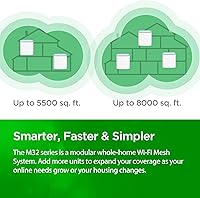
  • Coverage Area: The 2-pack is rated to cover up to 5,500 square feet of whole-home Wi-Fi when both nodes are optimally placed.
  • Node Count: The system ships with two nodes — one configured as the primary router and one as a satellite mesh point.
  • Ethernet Ports: A total of four Gigabit Ethernet ports are distributed across both nodes, supporting wired device connections at full gigabit speeds.
  • Data Streams: The system supports up to 8 simultaneous data streams, allowing more devices to receive data concurrently with reduced wait times.
  • Key Technologies: OFDMA, MU-MIMO, BSS Coloring, and SmartConnect are all included to improve efficiency and reduce interference in busy network environments.
  • Security: WPA3 encryption is supported natively, providing stronger authentication and data protection compared to the older WPA2 standard.
  • AI Features: The system uses onboard AI to continuously monitor network conditions and self-adjust channel usage and node connections for more consistent performance.
  • Voice Control: Both Amazon Alexa and Google Assistant are supported, allowing basic network commands to be issued by voice through compatible smart speakers.
  • Management App: The Eagle Pro AI app, available for iOS and Android, handles setup, parental controls, speed testing, and ongoing network monitoring.
  • Node Dimensions: Each node measures 6.1 x 2.53 x 6.81 inches, giving it a compact, upright footprint suited to shelves or countertop placement.
  • Node Weight: Each individual node weighs 1.1 pounds, making repositioning or wall-adjacent placement straightforward without specialized mounting hardware.
  • Parental Controls: The app provides profile-based parental controls including internet scheduling, specific domain blocking, and an instant internet pause function.
  • ISP Compatibility: This system works with all major internet service providers and requires a separate modem for most broadband connections.
  • Auto Updates: Automatic firmware updates are supported, though future update frequency may be limited given the product has been officially discontinued by D-Link.
  • Product Status: D-Link has officially discontinued this model, meaning new unit availability is limited to existing stock and third-party sellers.

Related Reviews

TP-Link Deco S4 2-Pack Mesh WiFi System

75%
91%
Setup & Installation
74%
Coverage & Range
83%
Connection Stability
88%
Value for Money
72%
App Experience
More
TP-Link Deco BE95 Wi-Fi 7 Mesh System 2-Pack
78%
88%
Wireless Performance
83%
Coverage & Range
93%
Wired Connectivity
86%
Setup & Installation
79%
App & Management Experience
More
D-Link AX3000 M30 WiFi 6 Mesh Router
78%
74%
WiFi Coverage & Range
78%
WiFi Speed & Throughput
88%
Setup & Installation
71%
App Experience
83%
Parental Controls
More
TP-Link Deco X20 1-Pack Mesh WiFi System
78%
93%
Ease of Setup
71%
Coverage Reliability
84%
Multi-Device Performance
88%
App Experience
86%
Parental Controls
More
TP-Link Deco X55 1-Pack Mesh Wi-Fi System
81%
91%
Ease of Setup
84%
WiFi Speed & Throughput
78%
Coverage Reliability
72%
App & Management Experience
88%
Value for Money
More
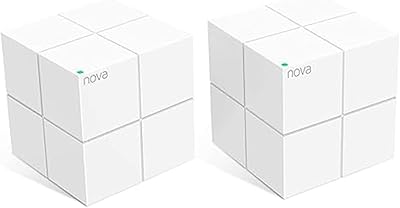
Tenda Nova MW6 2-Pack Mesh WiFi System
76%
93%
Ease of Setup
78%
Coverage & Dead Zone Elimination
72%
Network Stability
69%
Wi-Fi Speed Performance
88%
Value for Money
More
TP-Link Deco X95 2-Pack Mesh WiFi System
76%
83%
Coverage & Range
81%
Network Performance
88%
Setup & Installation
71%
App Experience
67%
Value for Money
More
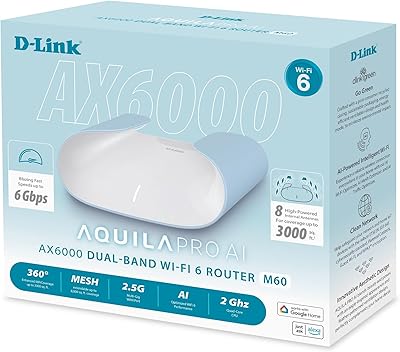
D-Link M60 AX6000 Wi-Fi 6 Mesh Router
83%
88%
Wi-Fi Speed & Throughput
74%
Wi-Fi Coverage & Range
93%
Design & Aesthetics
91%
Setup & Initial Configuration
83%
App Experience & Management
More
TP-Link Deco X68 2-Pack Mesh WiFi System
76%
91%
Setup Experience
78%
WiFi Coverage
83%
Network Performance
74%
App & Management
58%
HomeShield Value
More
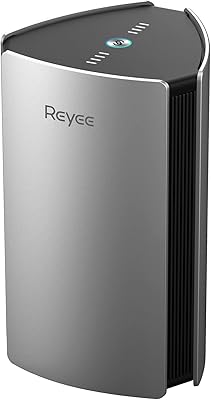
Reyee RG-R6 AX3200 Mesh WiFi 6 System (1-Pack)
71%
88%
Value for Money
91%
Setup & Ease of Use
76%
WiFi Coverage
79%
Network Speed & Throughput
82%
Multi-Device Performance
More

FAQ

Not at all. The Eagle Pro AI app walks you through the entire process step by step, from plugging in the first node to placing the second one for best coverage. Most users report being fully connected in under 30 minutes with no prior networking experience needed.

In almost all cases, yes. The M32 2-pack is compatible with virtually every major ISP including Xfinity, AT&T, Verizon, Spectrum, Cox, and most regional providers. You will just need to make sure you have a separate modem, since this system does not include one.

Discontinued means D-Link has stopped producing new units, but existing stock is still available for purchase. The practical risk is that firmware and security updates may slow down or eventually stop entirely. If you are comfortable with that trade-off — and the pricing often reflects it — it can still be a solid buy for the right home. If ongoing manufacturer support is a priority for you, a currently active product line would be a safer long-term investment.

The D-Link AX3200 Mesh WiFi 6 System 2-Pack handles 20 to 40 connected devices comfortably in typical household use. Wi-Fi 6 technologies like OFDMA allow the router to serve multiple devices simultaneously rather than one at a time, which is where the real performance benefit shows up in crowded homes.

Technically the system does support expansion, but since D-Link has discontinued the M32 line, sourcing an additional compatible node has become more difficult. You may find units through third-party sellers, but availability is not guaranteed and pricing can be unpredictable.

Yes, for most households it handles that combination well. The 5 GHz band delivers strong throughput for gaming and high-resolution streaming, and MU-MIMO means multiple devices can run demanding tasks simultaneously without fighting over bandwidth. That said, this is a dual-band system, so if you have an extremely large home or many walls between nodes, throughput between nodes may be somewhat reduced.

Through the Eagle Pro AI app, you create a profile for each child and assign their devices to it. From there, you can set a daily schedule — for example, cutting internet access at 9 PM on school nights — or block specific websites by domain. There is also a quick internet pause button for when you just need to get everyone off their screens immediately. No subscription is required for any of this.

The setup experience through the app is generally smooth and well-regarded. However, a meaningful portion of user reviews mention the app crashing or behaving inconsistently after the initial setup phase. It is not a universal problem, but it is frequent enough to be worth knowing about before you buy — especially if you plan to use the app regularly for monitoring or parental control management.

This D-Link mesh system holds its own on coverage and device capacity, and the built-in parental controls with no subscription fee give it a concrete advantage over some Eero tiers. Where it falls short is in app polish, advanced settings depth, and the ecosystem maturity that Eero and Orbi have built over more product generations. If brand support longevity and a richer app experience matter more to you than upfront cost savings, those alternatives are worth considering.

Only the primary node connects to your modem via the included Ethernet cable. The satellite node communicates wirelessly with the primary unit and just needs a power outlet wherever you place it. You can also wire the satellite node via Ethernet if you have a cable running to that location, which generally improves backhaul performance.

Where to Buy