

Overview

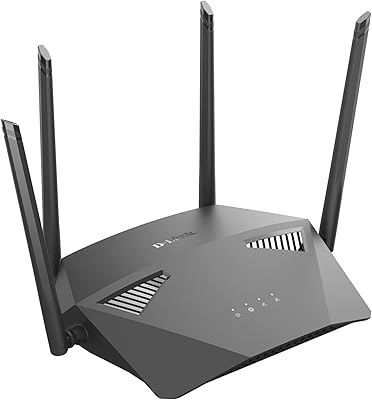
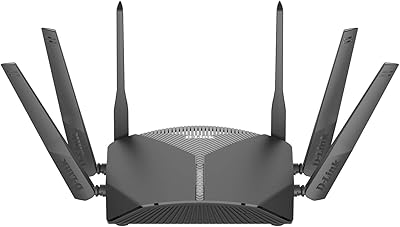
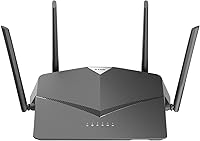
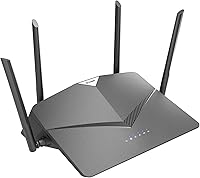
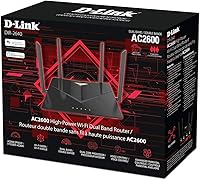
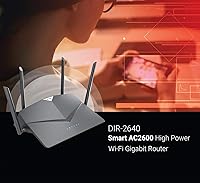
The D-Link DIR-2640 WiFi Router AC2600 is a dual-band router designed to offer reliable, high-speed internet. This Wi-Fi device supports speeds up to AC2600 (800 + 1733 Mbps) and is ideal for users who need consistent connectivity for streaming, gaming, and everyday browsing. With its dual-core processor, it handles multiple devices without lag. Additionally, it offers MU-MIMO and Smart Connect to ensure smooth performance even when many devices are connected. The router is compact and easy to set up, making it a solid choice for households seeking a dependable, user-friendly internet solution.

Features & Benefits

This AC2600 router delivers impressive performance with its dual-core processor, which helps to boost overall network efficiency. The inclusion of Gigabit Ethernet ports ensures fast, stable wired connections, making it perfect for devices that need a constant, high-speed link. The D-Link router also offers advanced parental controls, giving families the ability to manage internet access and restrict content for specific devices. Setup is straightforward through the D-Link Wi-Fi app, allowing for a hassle-free installation and ongoing management. With its strong range, it’s built to meet the needs of users in medium to large-sized homes.

Best For

The D-Link DIR-2640 WiFi Router AC2600 is best suited for households with several devices, such as smart TVs, gaming consoles, and smartphones. It’s a great choice for users who need a reliable, high-speed connection for activities like 4K streaming or online gaming. Families looking for customizable control over internet access will also appreciate the parental controls, which allow for easy management of when and how devices access the network. Additionally, it’s ideal for those who want a simple and effective solution for handling multiple devices without compromising performance.

User Feedback

User feedback on this D-Link router is generally positive, with many highlighting its easy setup via the D-Link app and consistent performance for gaming and streaming. Most users report that the router offers solid speeds, with minimal buffering during 4K content streaming. However, some users mention that the range could be improved for larger homes or areas with many walls. While the overall build and performance are praised, a few have pointed out that the router may struggle in very large or multi-story houses where coverage is crucial.

Pros

  • This router offers reliable high-speed performance, ideal for 4K streaming and online gaming.
  • The MU-MIMO feature ensures stable connections even with multiple devices connected.
  • Easy setup and management through the intuitive D-Link Wi-Fi app is appreciated by many users.
  • The dual-core processor enhances the router's overall network performance, even with heavy traffic.
  • Advanced parental controls allow for easy monitoring and management of internet access.
  • Gigabit Ethernet ports ensure fast and reliable wired connections for devices like consoles and desktops.

Cons

  • Some users report that the range is limited, particularly in larger homes or multi-floor settings.
  • While setup is easy, some find the app’s interface a bit basic or unintuitive for advanced configurations.
  • Occasional performance drops can occur with too many connected devices, especially in larger households.
  • Not the best choice for users on a tight budget, as its feature set may be overkill for basic needs.
  • A few users noted that the router can get quite warm under heavy use, though it doesn't seem to affect performance.
  • The router's price may not justify the features for those who don't require high-speed, multi-device management.

Ratings

After analyzing verified user reviews from multiple countries, languages, and platforms, we've compiled feedback for the D-Link DIR-2640 WiFi Router AC2600. Only authentic, high-quality feedback was considered, filtering out spam, bot-generated, and off-topic reviews. The scores below reflect both the product's strengths and any notable areas for improvement, offering a comprehensive view of how this router performs in real-world usage across diverse households and needs.

Setup & Installation
94%
Many users have praised the easy setup process through the D-Link mobile app. The quick installation and intuitive interface make it accessible even for those with limited technical knowledge. This ease of use helps save time and effort, making it a great choice for users who want a hassle-free experience right out of the box.
Despite the generally positive feedback, some users found the initial setup process a bit slower than expected, especially when connecting multiple devices. A few also reported occasional issues with app connectivity during setup, though these seem to be isolated incidents.
Wi-Fi Performance
88%
This device offers reliable and fast Wi-Fi speeds, especially for activities like gaming and streaming. Reviewers often note the smooth 4K streaming and minimal buffering, even in more demanding setups. The dual-band performance allows for better distribution of devices across the 2.4 GHz and 5 GHz networks, leading to fewer dropouts and faster speeds overall.
While most users are happy with the performance, a few have mentioned that speeds can drop when multiple devices are connected to the 2.4 GHz band. There were also some reports of occasional drops in connection, particularly during heavy usage or in environments with high interference.
Range & Coverage
79%
21%
Many users report decent coverage for medium-sized homes, with strong signals in most rooms. The router's design ensures that it can handle a variety of devices without significantly affecting performance. It's often appreciated for its ability to cover areas where other routers struggle to maintain stable connections.
However, several users in larger homes noted that the range could be better. The signal strength tends to weaken in distant rooms or on higher floors, which can be frustrating for those needing a consistent connection across a larger area. Some suggested adding a range extender for optimal coverage.
Parental Controls
87%
The advanced parental controls are one of the standout features for many families. Users appreciate the ability to block websites, schedule internet access, and monitor device activity, making it easier to manage internet use for children. The interface for controlling these settings is straightforward and user-friendly.
On the downside, some users reported that the parental controls could be a bit restrictive when trying to customize certain features. A few noted occasional glitches where settings didn't sync across devices, though this is not a widespread issue.
App Experience
91%
Users consistently highlight the D-Link app as a convenient tool for managing the router. The app allows for easy configuration, performance monitoring, and troubleshooting. The ability to control settings remotely is especially useful for users who want to adjust their router's settings on the go.
While the app generally receives positive reviews, a small group of users experienced occasional crashes or bugs, especially after app updates. Some also mentioned that the app could benefit from more detailed network analysis features.
Gaming & Streaming
85%
This device excels in performance for gaming and streaming, providing low-latency connections and uninterrupted 4K streaming. Many users have praised it for handling high-demand tasks without noticeable buffering or lag. The dual-band support ensures that gaming consoles and streaming devices can operate smoothly alongside other household devices.
However, a few users reported that while gaming performance is solid, there are occasional spikes in latency, especially during peak usage hours. Some have also suggested that a tri-band option could further improve gaming performance by dedicating a band specifically for high-priority devices.
Reliability & Stability
90%
Users appreciate the overall stability of the router, with consistent performance over extended periods. It's generally reliable for handling multiple devices without significant slowdowns. Many reviewers mentioned that this router offers a stable connection that stays up and running for days or weeks at a time without requiring a reboot.
Despite the overall reliability, some users encountered occasional connection drops or required frequent restarts to restore optimal performance. These issues were typically resolved with firmware updates, but they were an inconvenience for a small number of buyers.
Value for Money
92%
Many buyers feel this router offers excellent value for money, especially considering its performance in gaming, streaming, and multi-device management. The features, such as MU-MIMO, Smart Connect, and advanced parental controls, make it a well-rounded router without breaking the bank. For those looking for a high-performance router at a reasonable price, it's considered a solid investment.
A few users, however, felt that the price was slightly high compared to other options in the market, particularly when it comes to long-term value. Some noted that while the router works well initially, it could be outperformed by newer models in the future.
Device Management (MU-MIMO)
83%
MU-MIMO support is a big plus for users with many devices. It allows for smoother, more efficient connections across multiple devices, making it ideal for households with a lot of smart devices, gaming consoles, and other connected products. This feature helps prevent bottlenecks and ensures consistent performance across devices.
However, a few users felt that the MU-MIMO functionality didn't perform as seamlessly as expected. Some devices still experienced slower speeds when connected to the router, especially if several high-bandwidth applications were running simultaneously.
Build Quality
80%
20%
The build quality of this device is solid, with a durable plastic construction that feels well-made. It's sturdy enough to withstand daily use, and the design is simple yet functional, with adequate ventilation to prevent overheating during extended use.
A few users mentioned that the plastic body feels a bit lightweight and could be prone to scratches. Some also expressed concerns that the device might not be as visually appealing in more design-conscious home setups.
Customer Support
78%
22%
The customer support is generally helpful, with many users praising the timely responses from the D-Link support team. Those who encountered technical issues often found solutions through customer service or the extensive online knowledge base.
However, some users found the customer support experience frustrating, particularly when dealing with complex technical issues. Response times could be slow, and a few users reported that they had to escalate their issues for resolution.
Compatibility
88%
This device is compatible with a wide range of devices, from smartphones to laptops, smart TVs, and gaming consoles. Users appreciate the flexibility and seamless connection process, making it a versatile router for most household setups.
A small group of users had trouble connecting certain older devices or specific smart home gadgets. While compatibility is generally good, a few noted that older Wi-Fi standards sometimes resulted in slower speeds or connection difficulties.

Suitable for:

The D-Link DIR-2640 WiFi Router AC2600 is ideal for households with multiple connected devices, including smart TVs, gaming consoles, and streaming devices. Its high-speed performance, especially for 4K streaming and gaming, makes it perfect for users who need reliable internet for bandwidth-intensive activities. Families will benefit from the advanced parental controls, which allow for easy monitoring and restriction of internet access. With dual-band Wi-Fi and MU-MIMO support, this router is also great for large homes or multi-device setups where stable and fast internet is essential.

Not suitable for:

This router may not be the best option for users with very large homes or those who need extremely high-range coverage, as some users have reported that the signal strength can weaken in distant areas. Additionally, if you only need a basic router for occasional browsing or light tasks, the D-Link DIR-2640 may be overkill, as its advanced features like MU-MIMO and Smart Connect might not be fully utilized. Users with a limited budget might find more affordable routers that better suit their needs, especially if range and performance are not a primary concern.

Specifications

  • Wi-Fi Standard: Supports 802.11ac Wi-Fi standard for high-speed internet connectivity.
  • Max Speed: Delivers combined Wi-Fi speeds of up to AC2600 (800 Mbps on 2.4 GHz and 1733 Mbps on 5 GHz).
  • Dual-Band: Operates on two Wi-Fi bands: 2.4 GHz and 5 GHz, allowing for optimized device connections.
  • Processor: Equipped with a dual-core processor to enhance overall network performance and stability.
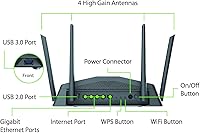
  • Ethernet Ports: Includes four Gigabit Ethernet ports for reliable wired device connections.
  • MU-MIMO: Supports MU-MIMO technology, allowing for simultaneous data transmission to multiple devices.
  • Smart Connect: Smart Connect feature automatically selects the optimal band for each device for better performance.
  • Parental Controls: Advanced parental controls enable customization of internet access and usage restrictions.
  • Setup Method: Can be easily set up and managed via the D-Link Wi-Fi mobile app.
  • Dimensions: Measures 6.75 x 10.5 x 2.75 inches, offering a compact design for most home setups.
  • Weight: Weighs approximately 1.4 lbs, making it lightweight and easy to place in various locations.
  • Security: Supports WPA3 encryption for enhanced wireless security and data protection.
  • Compatibility: Compatible with most major Internet Service Providers (ISPs) for flexible use.
  • App Management: Can be fully managed through the D-Link Wi-Fi app for ease of control and monitoring.
  • Wi-Fi Coverage: Designed to provide strong Wi-Fi coverage suitable for medium to large-sized homes.
  • Wireless Standards: Supports wireless AC, offering higher performance compared to older wireless N routers.
  • Warranty: Comes with a standard warranty to ensure product reliability and support.
  • Color: Available in a sleek black finish to blend seamlessly into most home environments.
  • Device Handling: Can handle multiple connected devices simultaneously, making it ideal for busy households.

FAQ

Setting up this router is straightforward with the D-Link Wi-Fi app. Simply plug in the device, follow the app’s step-by-step instructions, and you’ll be online in minutes. The app helps with both setup and ongoing management, making it accessible even for those not very tech-savvy.

This router delivers excellent performance, especially for high-bandwidth activities like gaming and 4K streaming. With dual-band AC2600 speeds (800 Mbps on 2.4 GHz and 1733 Mbps on 5 GHz), you can expect fast, consistent speeds with minimal buffering, even with multiple devices connected.

Yes, this router supports MU-MIMO (Multi-User, Multiple Input, Multiple Output), which means it can communicate with multiple devices simultaneously rather than one at a time. This significantly improves performance in households with several devices, ensuring faster and more reliable connections for everyone.

Yes, this router offers advanced parental controls that allow you to manage which websites or apps are accessible and set time limits on internet usage. It’s a great feature for families looking to monitor and restrict online activity for children.

While the D-Link DIR-2640 provides robust coverage, some users have noted that the range may not be sufficient for very large homes or multi-floor buildings. You might need to consider additional range extenders if you experience coverage issues in distant rooms.

Yes, the D-Link DIR-2640 is compatible with most major ISPs (Internet Service Providers) and works with any broadband connection that supports a router. Just connect your modem to the router, and you should be good to go.

This router is compatible with a wide range of devices, including smartphones, laptops, smart TVs, gaming consoles, and IoT devices. Its dual-band Wi-Fi (2.4 GHz and 5 GHz) supports both older and newer devices, making it flexible for any home setup.

While this router is designed for heavy traffic, some users have noted it can get warm during extended use. Ensure it’s placed in a well-ventilated area and not stacked on other electronics. If overheating continues, consider placing it on a cooling pad or checking for firmware updates that might improve efficiency.

Yes, the D-Link DIR-2640 comes with four Gigabit Ethernet ports, providing fast, reliable wired connections for devices like desktop computers, gaming consoles, and smart TVs. These ports are great for users who prefer stable, wired connections alongside wireless use.

Absolutely. This router excels in environments with multiple devices, such as large families or smart homes, due to its MU-MIMO support and strong performance. The ability to handle multiple devices at once without significant drops in speed makes it ideal for households that need reliable internet for gaming, streaming, and general browsing.