

Overview

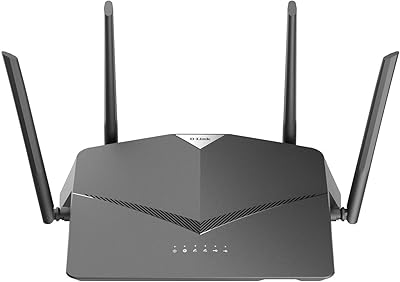
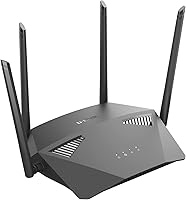
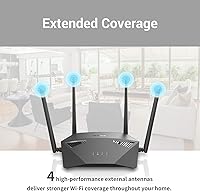
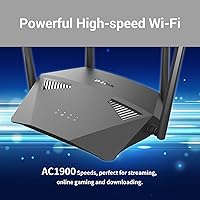
The D-Link DIR-1950 AC1900 Wi-Fi Router launched in early 2020 as a practical, no-nonsense option for home users who want reliable performance without paying a premium. D-Link has been a well-known name in consumer networking for years, and the DIR-1950 occupies a sensible spot in their mid-range lineup — not their top-tier hardware, but built with real everyday use in mind. Physically, it is low-profile and flat, with four external antennas that give it a solid, purposeful presence on a desk or shelf. At this price tier, finding voice assistant support and mesh expansion capability in the same box is genuinely unusual.

Features & Benefits

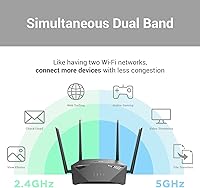
This D-Link router runs on the AC1900 standard, splitting bandwidth across 2.4 GHz and 5 GHz bands to serve a range of devices efficiently. Its MU-MIMO technology lets multiple devices pull data simultaneously rather than taking turns, which matters when someone is streaming video while another person is on a video call. Smart Connect handles band steering automatically, so no one needs to manually select the faster 5 GHz network. AC SmartBeam focuses the signal toward active devices rather than broadcasting in all directions, which can noticeably improve real-world range. Rounding it out are per-profile parental controls and compatibility with Alexa, Google Assistant, and IFTTT — practical additions that stand out at this price.

Best For

This AC1900 router is a solid pick for apartments and smaller homes where you are juggling five to fifteen connected devices on any given day. Renters and lighter users who find full mesh systems overkill but still want dependable coverage throughout their space will get good value here. Parents benefit most from the per-device scheduling — setting internet curfews by profile without needing a paid third-party service is a genuinely handy feature. If your household already uses Amazon Echo or Google Home speakers, the built-in voice control support slots in naturally. Casual gamers will also appreciate stable, consistent connectivity without the cost of upgrading to Wi-Fi 6 hardware.

User Feedback

Across several hundred ratings, satisfaction trends positive, especially among buyers who understood what they were getting before they plugged it in. Setup and app management consistently draw praise — the mobile app gets people up and running quickly, and the interface is clear enough that non-technical users rarely get stuck. Parental controls are another frequent highlight, particularly for families who tried more complicated solutions elsewhere. The honest weak spot is range: buyers in larger homes or multi-story houses report that wall penetration falls short of their expectations, and this is the most repeated complaint by some distance. A smaller number of users mention firmware update inconsistencies and the unit running hotter than expected under sustained load.

Pros

  • Quick, app-guided setup has most users connected and running within minutes, even without technical experience.
  • Dual-band MU-MIMO handles multiple simultaneous streams without the lag you would expect at this price.
  • Per-profile parental controls let you schedule internet access by device and by person, with no subscription required.
  • Smart Connect automatically routes devices to the best available band, removing the need for manual configuration.
  • Voice assistant compatibility with Alexa and Google Assistant works reliably out of the box.
  • Mesh expansion support means you can add compatible D-Link extenders later if your coverage needs grow.
  • Four high-gain external antennas and AC SmartBeam beamforming deliver noticeably better directional signal than many competitors at this tier.
  • The flat, low-profile form factor fits easily on a shelf or entertainment center without looking intrusive.
  • Overall value for the price paid is consistently praised across a broad base of real-world buyers.

Cons

  • Signal range falls noticeably short in larger homes, multi-story layouts, or spaces with thick interior walls.
  • The firmware update process can require manual steps and has been inconsistent for a meaningful portion of users.
  • No Wi-Fi 6 support means the DIR-1950 will feel dated faster as newer client devices become standard.
  • The unit runs warm under sustained heavy use, which may concern users in poorly ventilated spaces.
  • No USB port means you cannot share a storage drive or printer across the network.
  • The 2.4 GHz band tops out at 600 Mbps, limiting throughput for devices unable to reach the 5 GHz channel.
  • No built-in VPN server support rules it out for remote workers who need secure network tunneling.
  • Advanced configuration options are limited, and support documentation can be sparse when less common issues arise.

Ratings

The scores below were generated by our AI system after analyzing hundreds of verified buyer reviews for the D-Link DIR-1950 AC1900 Wi-Fi Router, with automated filters actively removing incentivized, bot-generated, and duplicate submissions to ensure only genuine real-world experiences are reflected. Each category score is calibrated to surface both the genuine strengths that make this router worth considering and the specific pain points that actual users have encountered in everyday home use. Nothing has been softened — if a category underperforms, the score and commentary say so directly.

Setup & Installation
88%
The mobile app-guided setup is one of the most consistently praised aspects across buyer feedback. Even users with minimal networking experience describe getting from box to fully connected in under ten minutes, with clear on-screen prompts handling everything from modem pairing to password creation.
A small number of buyers report that the initial firmware installation triggered during setup occasionally stalls or requires a manual router restart to complete. This is an edge case rather than the norm, but it is worth knowing before you begin if your internet provider uses a less common modem configuration.
Wi-Fi Range & Coverage
63%
37%
In apartments and single-story homes under roughly 1,500 square feet, the four external antennas and AC SmartBeam beamforming deliver consistent coverage across most rooms. Buyers in compact spaces rarely report dead zones, and signal quality holds up well when devices stay within a moderate distance of the router.
Range becomes a meaningful limitation in larger homes, multi-story layouts, or any space with thick concrete or brick walls. A consistent pattern in lower-rated reviews shows signal weakening significantly beyond two rooms or one floor, and wall penetration in particular draws repeated criticism from buyers who expected broader coverage.
Connection Speed
78%
22%
For everyday tasks — streaming HD video, video calls, casual browsing — the DIR-1950 delivers smooth, reliable throughput that satisfies most households. The 5 GHz band in particular handles bandwidth-hungry devices like smart TVs and laptops without noticeable buffering during peak usage periods.
The AC1900 specification shows its age against newer Wi-Fi 6 routers, and the 2.4 GHz band's 600 Mbps ceiling limits older devices on crowded channels. Users running simultaneous 4K streams across several devices have reported occasional slowdowns that a higher-tier router would handle more comfortably.
Multi-Device Handling
76%
24%
MU-MIMO support means the router can serve multiple devices at the same time rather than cycling through them in sequence, which makes a real difference in households where several people are streaming or video calling simultaneously. Smart Connect reinforces this by keeping devices on the most appropriate band automatically.
Beyond roughly twelve to fifteen active devices, some buyers notice a drop in per-device performance, particularly when several heavy-bandwidth users are online at once. The router handles average household loads well, but it is not engineered for the device density you might find in a smart home with thirty-plus connected endpoints.
Parental Controls
84%
The per-profile scheduling system is a genuine standout at this price point, and families consistently highlight it as a primary reason for their positive reviews. Being able to set individual internet curfews for each child's devices — without a web portal login or a paid third-party service — is both practical and easy to manage from the app.
The controls cover time scheduling and device-level restrictions well, but content filtering by category — blocking specific website types rather than just time windows — is limited compared to premium routers with dedicated security suites. Parents who need granular content-based filtering may find themselves reaching the ceiling of what this system offers fairly quickly.
Value for Money
82%
18%
At its price tier, the combination of dual-band AC1900 performance, MU-MIMO, voice assistant support, and mesh expansion capability is difficult to match in a single package. Buyers who compared this D-Link router against similarly priced alternatives consistently report feeling they received more features per dollar than expected.
The value case weakens for buyers in larger homes who end up needing a mesh extender anyway, pushing the total outlay closer to mid-tier mesh system territory. If whole-home coverage from a single device is the goal, the DIR-1950 alone may not deliver it, making the effective cost of entry higher than the initial price implies.
App Experience
79%
21%
The D-Link Wi-Fi app handles the tasks most buyers actually need — device monitoring, parental schedule adjustments, and guest network toggling — without requiring any technical background. The interface is clean enough that the majority of users navigate it confidently within their first session.
Beyond the basics, the app falls short on depth — there is no granular QoS control, no per-device bandwidth analytics, and no detailed traffic logging. A recurring complaint is that the app occasionally drops its connection to the router and requires a full refresh, which is frustrating when trying to make quick changes.
Build Quality
73%
27%
The flat, low-profile chassis sits cleanly on a shelf or entertainment unit, and the matte black finish avoids the aggressive styling common to gaming-branded routers. The four external antennas feel solid and hold their adjusted position well, which is a small but genuinely appreciated quality detail.
The plastic housing reads as functional rather than premium, and the build materials are consistent with the price tier rather than above it. A subset of reviewers note that the chassis becomes warm to the touch during prolonged high-traffic use, suggesting that open placement is preferable to tucking it into a closed shelf.
Voice Integration
77%
23%
For households already running Amazon Echo or Google Home speakers, the voice control integration adds a hands-free layer that works reliably for basic router tasks. IFTTT support extends this to custom smart home routines, which is a genuine bonus that most comparable routers at this price skip entirely.
The range of voice-controllable functions is fairly narrow, limited mostly to toggling network features rather than accessing detailed settings or running diagnostics. Users hoping for deeper integration — such as automatically prioritizing a specific device through a voice routine — will find the feature set here less capable than the marketing implies.
Mesh Compatibility
71%
29%
The ability to pair this AC1900 router with D-Link mesh extenders gives it a realistic upgrade path for users whose coverage needs grow after purchase. Setting up a mesh node through the app is straightforward, and the unified network name means devices transition between the router and extender transparently.
Mesh expansion is locked to D-Link compatible devices, which means users who own extenders from other brands cannot take advantage of this feature without replacing their hardware. The mesh network is also bounded by the router's AC1900 throughput ceiling, so expanding coverage does not increase the total available bandwidth.
Gaming Performance
69%
31%
For casual online gaming on a console or PC — standard multiplayer sessions, online co-op, or ranked play in moderate-traffic environments — the 5 GHz band keeps latency low and connectivity stable. Buyers who game a few evenings a week rarely flag lag or disconnections as issues under normal network conditions.
The DIR-1950 lacks dedicated gaming-focused tools like traffic prioritization by device, QoS presets, or a dedicated gaming VLAN, which limits its appeal for competitive players who need every performance advantage. Running multiple simultaneous gaming sessions alongside 4K streaming workloads pushes the router toward its performance ceiling more visibly than gaming-specific hardware would.
Firmware & Updates
57%
43%
When firmware updates apply successfully, they deliver measurable improvements to stability and occasionally expand app functionality in useful ways. Users who take a proactive approach and check for updates manually through the admin panel every few months tend to report a more consistent overall experience than those relying on automatic notifications.
A meaningful share of reviewers describes the automatic update process as unreliable, with updates failing silently, requiring multiple attempts, or occasionally triggering connectivity loss that needs a full factory reset to resolve. For a networked device where firmware currency directly affects household security, this inconsistency is one of the more concerning weaknesses in the overall package.
Heat Management
61%
39%
Under typical everyday workloads — moderate streaming, a handful of connected devices, standard web traffic — the router operates at a perfectly reasonable temperature and does not require any special placement considerations. Most buyers who use it within normal parameters never identify heat as a factor in their experience.
Under sustained heavy traffic — continuous high-bitrate streaming across multiple screens or extended large file transfers — a notable portion of reviewers describe the chassis becoming uncomfortably warm to the touch. No buyers have attributed hardware failures directly to heat, but the thermal behavior in demanding scenarios does raise questions about long-term reliability under peak conditions.
Wired Connectivity
83%
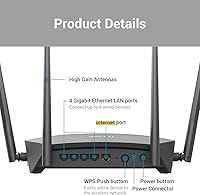
Four Gigabit Ethernet ports give the router enough wired capacity to handle a desktop, a gaming console, a smart TV, and a network switch simultaneously without any speed compromise. Wired connections deliver full, consistent throughput that is unaffected by the wireless range limitations that impact some buyers in larger spaces.
The absence of a USB port is a genuine gap for buyers who expected to share network storage or a printer through the router — a feature that several competing routers at similar price points include as standard. There is also no link aggregation or multi-gigabit port option, which limits flexibility for users running faster-than-gigabit internet services.

Suitable for:

The D-Link DIR-1950 AC1900 Wi-Fi Router is a strong match for households in apartments or smaller single-story homes that need reliable everyday coverage without investing in a premium networking setup. If you have between five and fifteen devices active at any given time — phones, laptops, a smart TV, maybe a gaming console — this router handles that load without requiring you to touch complicated settings. Parents will find real day-to-day value in the per-profile parental controls: scheduling internet access by device and by person, without needing a paid third-party service, is a practical feature that most routers at this price simply do not include. Buyers already embedded in the Amazon Echo or Google Home ecosystem will also find the voice control integration genuinely useful rather than a gimmick. Finally, casual gamers who want consistent, low-latency connections for online play without the cost of jumping to Wi-Fi 6 hardware will get solid performance from this D-Link router.

Not suitable for:

The D-Link DIR-1950 AC1900 Wi-Fi Router is not the right fit for larger homes, multi-story houses, or layouts where the signal has to push through multiple walls and floors. If your space exceeds roughly 1,500 to 2,000 square feet, or if you already notice dead zones in distant rooms, you are likely to hit the ceiling of what this hardware can reliably deliver. Power users running dozens of simultaneous connections, 4K streams on multiple screens, or competitive online gaming where every millisecond of latency counts would be better served by a Wi-Fi 6 or tri-band router that provides significantly more headroom. Anyone who depends on a built-in VPN server for secure remote access should also look further up the product ladder. Finally, buyers who prefer hands-off, automatic firmware management may find the update process here more involved than they expect.

Specifications

  • Wi-Fi Standard: This router operates on the 802.11ac (Wi-Fi 5) standard and maintains backward compatibility with 802.11b, 802.11g, and 802.11n devices.
  • Frequency Bands: Dual-band architecture broadcasts on both the 2.4 GHz and 5 GHz bands simultaneously, allowing different device types to connect on the most appropriate channel.
  • Max Wi-Fi Speed: Combined wireless throughput is rated at AC1900, delivering up to 600 Mbps on the 2.4 GHz band and up to 1300 Mbps on the 5 GHz band.
  • MU-MIMO: MU-MIMO (Multi-User, Multiple Input, Multiple Output) technology enables multiple devices to transmit and receive data concurrently, reducing wait times under heavy multi-device loads.
  • Antennas: Four high-performance external antennas work in conjunction with AC SmartBeam beamforming to focus the wireless signal toward active client devices rather than broadcasting blindly in all directions.
  • LAN Ports: Four Gigabit Ethernet LAN ports support wired connections to computers, gaming consoles, smart TVs, or network switches at speeds up to 1000 Mbps per port.
  • WAN Port: One Gigabit Ethernet WAN port connects the router to a broadband modem, supporting cable, DSL, or fiber internet services.
  • Dimensions: The unit measures 7 x 8.5 x 1.75 inches with a flat, horizontal chassis designed to lie on a desk or shelf rather than stand vertically.
  • Weight: At 14.7 oz, the router is light enough to reposition easily during initial setup or when adjusting antenna placement.
  • Smart Connect: The Smart Connect feature automatically steers each connecting device to the 2.4 GHz or 5 GHz band based on real-time signal conditions and device capability.
  • Parental Controls: Per-profile parental controls let administrators assign specific devices to family member profiles and set customized internet access schedules on a per-device basis.
  • Voice Assistants: The router is compatible with Amazon Alexa, Google Assistant, and IFTTT, enabling voice-triggered commands and smart home automation workflows without additional hardware.
  • Mesh Support: D-Link Wi-Fi Mesh compatibility allows the router to act as a hub node, pairing with supported D-Link extenders to broaden coverage under a single unified network name.
  • App Management: The free D-Link Wi-Fi app, available on iOS and Android, handles guided setup, real-time network monitoring, device management, and remote access controls.
  • WPS: WPS (Wi-Fi Protected Setup) support allows compatible devices to join the network securely with a single button press, eliminating the need to manually enter a password.
  • Model Number: The official model designation is DIR-1950-US, identifying the North American variant within the broader D-Link DIR-1950 product family.
  • Color: The router ships in matte black with a low-profile horizontal design intended to blend into most home desk or entertainment center setups.
  • Release Date: The DIR-1950-US was first made available in February 2020 and has not been discontinued as of its most recent product listing.

Related Reviews
D-Link DIR-3040 AC3000 Tri-Band Wi-Fi Router
83%
88%
Performance
91%
Mesh Networking Coverage
85%
Ease of Setup
78%
Voice Control Integration
90%
Parental Controls
More
D-Link DIR-605L N300 Wireless Router
66%
83%
Ease of Setup
54%
Wireless Range
51%
Throughput Speed
78%
Value for Money
67%
Build Quality
More
Linksys EA6900 AC1900 Dual-Band Wi-Fi Router
73%
91%
Ease of Setup
78%
Wi-Fi Speed & Performance
67%
Wireless Range
73%
Beamforming Effectiveness
74%
Build Quality & Design
More
D-Link DIR-2640 WiFi Router AC2600
86%
94%
Setup & Installation
88%
Wi-Fi Performance
79%
Range & Coverage
87%
Parental Controls
91%
App Experience
More
TP-Link Archer BE400
80%
88%
Wireless Performance
91%
Setup & Ease of Use
78%
Coverage & Range
87%
Wired Port Performance
83%
Multi-Device Handling
More
TP-Link Archer AX55
TP-Link Archer AX55
76%
83%
Wireless Performance
74%
Coverage & Range
86%
Device Handling & Congestion
91%
Setup & Ease of Use
78%
Build Quality & Design
More
D-Link AX1800 Mesh Wi-Fi 6 Range Extender
84%
90%
Wi-Fi Range and Coverage
85%
Setup and Installation
88%
Device Compatibility
80%
Wi-Fi Speed and Stability
93%
Security Features
More
TP-Link Archer GE650 Wi-Fi 7 Gaming Router
79%
91%
Wireless Performance
93%
Gaming-Specific Features
89%
Wired Connectivity
86%
Setup & Ease of Use
71%
Software & App Experience
More
ARRIS SBG6900AC Cable Modem Wi-Fi Router
72%
88%
Ease of Setup
74%
Wi-Fi Range & Coverage
91%
Value for Money
71%
Wi-Fi Speed & Throughput
63%
Build Quality & Durability
More
TP-Link Archer GE800
80%
91%
Wireless Performance
94%
Wired Connectivity
88%
Gaming Latency & Prioritization
83%
Build Quality & Design
69%
RGB Lighting
More

FAQ

Not at all. The D-Link Wi-Fi app guides you through the entire process on your phone with step-by-step instructions, and most people are online in under ten minutes. You plug in the router, open the app, and follow the prompts — there is no need to log into a browser interface or wrestle with manual configuration.

It depends on the size and layout of the space. The D-Link DIR-1950 AC1900 Wi-Fi Router can cover a compact two-story home reasonably well, but signal strength tends to drop when pushing through multiple ceilings and thick walls in larger layouts. If dead zones become an issue on upper floors, pairing it with a compatible D-Link mesh extender is a straightforward fix.

You create a profile in the app for each family member and then assign their devices to that profile. From there, you set scheduling rules — for example, cutting off internet access after 9 PM on school nights — and the router enforces those rules automatically. You can adjust the schedules anytime from your phone, and no subscription is required to use any of it.

Yes. The DIR-1950 integrates with both Amazon Alexa and Google Assistant, so you can use voice commands for tasks like enabling or disabling a guest network. IFTTT support extends this further, letting you build custom automations that connect the router to other compatible smart home devices.

No. With Smart Connect enabled on this AC1900 router, band selection happens automatically in the background. Each device gets routed to whichever frequency offers it the best balance of speed and signal strength at any given moment, without any manual input from you.

For casual and moderate online gaming it performs well, particularly when devices connect on the 5 GHz band where latency stays low and throughput is higher. If you are a competitive gamer running multiple bandwidth-heavy devices at once, a Wi-Fi 6 or tri-band router would give you more headroom — but for everyday gaming, this D-Link router handles the job reliably.

Yes. The DIR-1950 supports D-Link Wi-Fi Mesh, meaning you can add compatible D-Link extenders to push coverage into rooms the router cannot reach on its own. The mesh configuration keeps everything under one network name, so your devices transition between the router and extender in the background without you needing to switch networks manually.

Home routers are designed to operate continuously, and the DIR-1950 handles that without issue under normal everyday conditions. A small number of buyers have reported it running warmer than expected during sustained periods of heavy traffic, so placing it in an open, well-ventilated spot rather than inside a cabinet or enclosed shelf is a sensible precaution.

You can check for and apply firmware updates through the D-Link Wi-Fi app or the router's browser-based admin panel. Automatic updates are an option, but some users have found the process inconsistent, so manually checking every few months is a good habit to ensure you are running the latest version for security patches and stability improvements.

No, this model does not have a USB port, so you cannot attach external storage or a printer directly to the router. If USB sharing is something you need, you would want to look at a higher-tier D-Link model such as the DIR-2640 or DIR-3040, both of which include USB connectivity as part of their feature set.