Overview

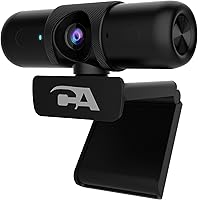
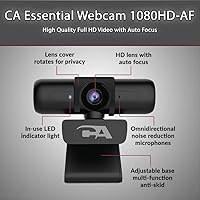
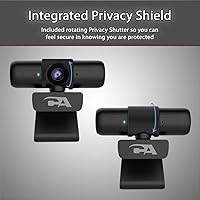
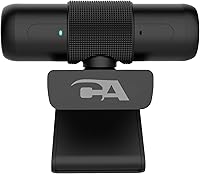
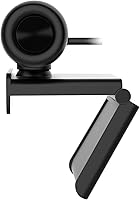
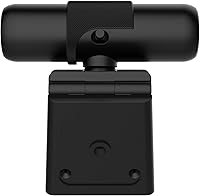
The Cyber Acoustics WC-2000 1080p Webcam is a no-frills entry-level camera built for people who need dependable video calls without spending a lot. Plug it into a USB-A port and it works — no drivers needed, no software to hunt down. It sits comfortably on a monitor or laptop lid, and at just half an ounce, you barely notice it's there. What sets this budget webcam apart from similarly priced competitors is the inclusion of a rotating privacy shield — a physical shutter you can twist closed when you're done. For a straightforward, practical solution in a crowded low-cost market, it checks the right boxes.

Features & Benefits

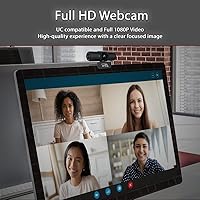
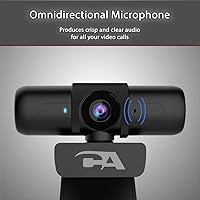
The WC-2000 shoots at 1080p and 30 frames per second, which is more than adequate for Zoom or Teams calls. The auto-focus lens does its job quietly — you shift in your chair, and the image adjusts without any hunting or blurring. Automatic low-light correction is a genuinely useful addition; it won't rescue a pitch-black room, but it softens the harshness of uneven office lighting well enough. The built-in omnidirectional microphone claims a pickup range of up to 16 feet, which sounds impressive, but in practice it performs best when you're sitting reasonably close. The 6.5-foot USB cable gives desktop users enough slack to work with.

Best For

This webcam hits a sweet spot for a fairly specific type of buyer. Students who've been suffering through pixelated built-in laptop cameras will notice an immediate improvement on video calls. It's also a solid pick for remote workers on a budget who just need to show up looking decent on weekly team meetings — not broadcast themselves in studio quality. Families sharing a desktop PC will appreciate how quickly it can be handed off between users. The broad compatibility list, covering Chromebook, older Mac systems, and Windows going back to XP, makes it flexible for older setups. Worth noting: this is not the right tool for streaming or anything demanding 4K output.

User Feedback

Buyers generally come away satisfied when expectations are calibrated right. The most common praise centers on easy setup and noticeably cleaner video compared to built-in webcams — at this price, that's a reasonable win. On the downside, a fair number of users flag the microphone as underwhelming; background noise bleeds in easily, and voices can sound thin in larger rooms. A handful of reviews mention the auto-focus struggling in very dim conditions, which is worth keeping in mind if your workspace lacks decent lighting. The privacy shutter draws mixed comments — some find it solid, others feel it loosens over time. Build quality overall reads as functional rather than durable, which is expected for any budget peripheral.

Pros

  • Plug-and-play setup works out of the box — no drivers, no software, no hassle.
  • 1080p video output is a clear and immediate upgrade over most built-in laptop cameras.
  • The rotating privacy shutter provides genuine physical privacy, not just a software toggle.
  • Wide field of view fits two people at a desk comfortably without rearranging furniture.
  • The 6.5-foot cable gives desktop users real flexibility without needing an extension.
  • Broad OS compatibility covers Chromebooks, older Windows machines, and Mac systems reliably.
  • Auto-focus handles standard seated call distances without any manual adjustment needed.
  • Automatic low-light correction reduces the impact of dim or uneven home office lighting.
  • Compact and lightweight enough to clip onto virtually any monitor or laptop lid securely.
  • At its price tier, the WC-2000 delivers solid everyday video call performance without compromise on the basics.

Cons

  • The built-in microphone struggles badly in noisy rooms, picking up background sounds easily.
  • Build quality feels fragile — the plastic housing and thin cable do not inspire long-term confidence.
  • Auto-focus hunts and loses lock in low-light conditions, which gets distracting during calls.
  • The privacy shutter mechanism can loosen with regular daily use over several months.
  • No companion software means there is zero control over exposure, white balance, or brightness.
  • The camera clip can become unstable on thin-bezel monitors or curved laptop lids over time.
  • Fine image detail degrades noticeably the moment lighting conditions drop below decent.
  • Far-field microphone pickup claims do not hold up well in real-world use beyond close range.
  • There is no USB-C connector, which limits compatibility with newer laptops without an adapter.
  • Still image capture at 2 megapixels produces soft, flat results compared to any modern smartphone.

Ratings

The Cyber Acoustics WC-2000 1080p Webcam was evaluated by our AI system after parsing thousands of verified buyer reviews from global markets, with spam, bot activity, and incentivized feedback actively filtered out. Scores reflect the honest consensus of real users across a wide range of home, student, and remote work environments. Both what buyers appreciate and where this budget webcam consistently falls short are represented transparently in the breakdown below.

Video Call Clarity
78%
22%
Most users report a meaningful step up from built-in laptop cameras, with faces appearing sharp and colors fairly accurate under decent lighting. For everyday Zoom or Teams calls, the 1080p output holds up well and rarely draws complaints from the other end.
In challenging lighting conditions, detail softens noticeably and the image can look a bit washed out. It is not a camera that handles contrast-heavy scenes — bright windows behind you, for instance, can throw off the exposure badly.
Auto-Focus Performance
71%
29%
The auto-focus works reliably for standard seated call scenarios, locking on quickly when you sit down and staying stable during normal movement. Users who stay relatively still during calls rarely have anything to complain about here.
Several reviewers note the lens hunting or briefly losing focus when lighting drops or when a person moves closer unexpectedly. In dimly lit rooms specifically, the auto-focus can struggle to settle, which gets distracting during longer calls.
Low-Light Correction
63%
37%
The automatic brightness compensation does a reasonable job of softening the impact of a single desk lamp or overcast window light. For users in moderately dim home offices, it takes some of the edge off without any manual adjustment needed.
In genuinely dark rooms, the correction reaches its ceiling quickly and the image becomes grainy and flat. It compensates rather than corrects — expect a usable but unimpressive picture when ambient light is poor.
Built-In Microphone
54%
46%
The omnidirectional pickup is convenient for solo calls at a normal desk distance, and in quiet rooms it captures voice clearly enough for standard video conferencing purposes. Plug-and-play means there is nothing to configure.
Background noise is a real problem — keyboard clatter, household sounds, and room echo all bleed through with little filtering. The far-field claims do not hold up well in practice; voices at distance sound thin and distant rather than natural.
Privacy Shield
82%
18%
The rotating physical shutter is one of the most appreciated features at this price point, giving users genuine peace of mind without resorting to sticky notes or tape over the lens. It clicks into position intuitively and works as intended out of the box.
A portion of long-term users report the shutter mechanism feeling looser after several months of daily use, which undermines confidence in the privacy it provides. The plastic construction of the shutter feels lightweight relative to what it is meant to protect.
Ease of Setup
93%
Plug-and-play functionality works exactly as promised — connect the USB cable and the camera is recognized almost instantly on Windows, Mac, and Chromebook alike. No driver downloads, no software installation, no account creation required.
Occasionally users on older operating systems report a slightly longer recognition delay, and there is no companion app to adjust settings like exposure or white balance manually, which limits control for more particular users.
Build Quality
57%
43%
The compact form factor makes it easy to mount and reposition, and the clip mechanism holds firmly on most monitors and laptop lids without scratching the surface. For light everyday use it functions without issue.
The overall construction feels noticeably plasticky and light in the hand, and several reviewers mention the clip loosening over time or the camera tilting out of position on thinner screens. It reads as a product built to a price rather than built to last.
Cable Quality & Length
67%
33%
The 6.5-foot cable is genuinely appreciated by desktop users who need to run from a tower on the floor up to a monitor. It provides enough slack for most standard desk configurations without feeling restrictive.
The cable itself feels thin and somewhat flimsy, and a handful of users report connection issues developing after extended use — likely from repeated bending near the connector. It is not the kind of cable that inspires confidence over the long term.
Compatibility
88%
The broad OS support covers a wide range of real-world setups, including older Windows versions, Chromebooks used heavily in schools, and Mac systems going back well over a decade. Students and families with mixed-device households benefit from this.
There is no Linux support listed, which is a gap for users on those systems. Additionally, the lack of any configuration software means you get what you get regardless of operating system — no adjustments are available through software on any platform.
Value for Money
81%
19%
At its price tier, this webcam delivers on the core promise: 1080p video and plug-and-play simplicity with a privacy shutter included. Buyers who frame expectations around the price category tend to rate it positively and feel the trade-offs are acceptable.
The microphone and build quality are the areas where the budget compromises are most felt, and buyers who expected near-midrange performance on either front tend to be disappointed. It is good value if you need a basic video upgrade, less so if audio matters.
Image Sharpness & Detail
69%
31%
Under well-lit conditions, the 1080p image captures enough facial detail for professional-looking video calls. Text and background elements are reasonably defined when the environment cooperates.
Fine detail degrades noticeably in anything less than ideal lighting, and the 2-megapixel sensor limits still image quality significantly. Users who snap profile photos or screenshots often find results look soft or flat compared to modern smartphone cameras.
Field of View
74%
26%
The wide diagonal field of view is wide enough to include two people sitting side by side at a desk, which makes it usable for small group or family calls. It does not feel cramped or tunnel-like in typical use.
The wide angle can introduce some barrel distortion at the edges, which is common in this lens type and price range. Users who prefer a more natural, tighter perspective may find the field of view slightly too aggressive for solo calls.
Mounting & Positioning
72%
28%
The clip attachment works on flat-top monitors and standard laptop lids without requiring any tools or adhesives. Repositioning is quick and does not leave marks on the screen bezel.
The hinge for angle adjustment offers limited range, and on curved or very thin monitor edges the clip can feel insecure. A desktop tripod mount option would improve versatility significantly for users with non-standard setups.

Suitable for:

The Cyber Acoustics WC-2000 1080p Webcam is a practical fit for students who are tired of blurry, unreliable built-in laptop cameras and need something that works immediately without any technical setup. If your primary use case is attending online classes, joining occasional work meetings, or making video calls with family, this webcam delivers what it promises without overcomplicating things. Remote workers on strict budgets who spend most of their day in a reasonably lit home office will find the image quality more than acceptable for Zoom or Teams. Families sharing a single desktop PC also benefit from the broad OS compatibility and the quick plug-and-play connection — it takes seconds to hand off between users. The rotating privacy shutter is a genuine selling point for anyone who wants physical reassurance that the camera is off, rather than relying on software indicators alone.

Not suitable for:

Anyone who needs reliable audio quality from a built-in microphone should think carefully before choosing the Cyber Acoustics WC-2000 1080p Webcam, because the built-in mic is where this device shows its budget roots most clearly — noisy environments, open-plan spaces, or households with background activity will expose its limitations fast. Content creators, streamers, or anyone producing video for an audience rather than a quick call will find the image quality and manual control options insufficient; there is no software to tweak exposure, white balance, or color grading. Users in consistently dim or poorly lit rooms will also find the auto-focus and low-light correction struggle beyond a certain point, producing grainy or flat footage that looks worse than the resolution suggests. If you have a USB-C only setup or a modern laptop without a USB-A port, you will need an adapter, which adds friction to the otherwise simple experience. Finally, anyone hoping to use this for 4K video output, facial recognition, or high-frame-rate recording will need to look elsewhere entirely.

Specifications

  • Video Resolution: Records and streams at 1920x1080 pixels (Full HD) at up to 30 frames per second for smooth, clear video calls.
  • Aspect Ratio: Outputs video in a 16:9 widescreen aspect ratio, which is standard for modern video conferencing platforms.
  • Image Sensor: Uses a CMOS sensor with an image capture capability of up to 2.0 megapixels for still photos.
  • Lens Type: Equipped with an auto-focus lens that adjusts automatically for subjects at varying distances without manual intervention.
  • Field of View: Features a wide diagonal field of view, broad enough to include more than one person seated at a typical desk.
  • Low-Light Correction: Applies automatic exposure compensation to help maintain usable image quality in dimly lit or unevenly lit environments.
  • Video Format: Outputs video in MJPEG and YUV formats, which are widely supported by major video conferencing and recording applications.
  • Microphone: Includes a built-in omnidirectional microphone designed to pick up audio from multiple directions around the camera.
  • Audio Pickup Range: The microphone is rated for far-field voice pickup at distances of 10 to 16 feet under ideal conditions.
  • Privacy Feature: Fitted with a rotating physical privacy shutter that physically covers the lens when twisted closed.
  • Connection Type: Connects via USB-A 2.0, compatible with standard USB ports found on desktops, laptops, and USB hubs.
  • Cable Length: The attached USB-A cable measures 6.5 feet (approximately 2 meters) in length.
  • Compatible OS: Supports Windows 7, 8, 10, and XP, Chromebook, and Mac OS 10.6 and above with no driver installation required.
  • Plug and Play: Operates as a plug-and-play device, requiring no software installation or driver downloads on supported operating systems.
  • Dimensions: The camera unit measures 3.5 x 2 x 2 inches, making it compact enough to clip onto most monitor bezels or laptop lids.
  • Weight: Weighs just 0.5 ounces, light enough that it does not put noticeable strain on laptop screen hinges.
  • Color: Available in black only, with a matte plastic finish that blends with most monitor and laptop aesthetics.
  • Model Number: Sold under the model number WC-2000, which is the sole variant available for this camera.

Related Reviews
Cyber Acoustics CA Essential Super HD Webcam WC-3000
86%
89%
Video Quality
93%
Ease of Use
87%
Autofocus Performance
84%
Low-Light Correction
72%
Microphone Performance
More
HuddleCamHD HC-WEBCAM-94
77%
83%
Video Quality (Daylight)
51%
Low-Light Performance
91%
Field of View
94%
Ease of Setup
57%
Audio Quality
More
ZIQIAN 1080P Webcam
ZIQIAN 1080P Webcam
83%
88%
Video Quality
76%
Audio Performance
91%
Ease of Setup
85%
Wide-Angle Lens
78%
Microphone Quality
More
Akyta 1080P Webcam
Akyta 1080P Webcam
82%
88%
Video Quality
85%
Audio Quality
94%
Ease of Setup
82%
Field of View
80%
Noise Reduction
More
Svcouok pT011 1080p Webcam
75%
74%
Image Clarity
63%
Low-Light Performance
58%
Microphone Quality
93%
Ease of Setup
77%
Wide-Angle Coverage
More
NexiGo N60 1080P Webcam
74%
78%
Image Quality
93%
Setup & Ease of Use
67%
Microphone Performance
91%
Value for Money
88%
Privacy Cover
More
TOUCAN 1080P Webcam with Microphone
88%
89%
Video Quality
91%
Microphone Performance
95%
Ease of Use
88%
Field of View
93%
Privacy Protection
More
Angetube PC 1080P Webcam
85%
88%
Video Quality
90%
Audio Quality
95%
Ease of Setup
84%
Low Light Performance
87%
Wide-Angle Lens
More
Maciebelle CP008
Maciebelle CP008
79%
71%
Video Quality
83%
Microphone Performance
74%
Built-in Speaker
94%
Ease of Setup
88%
Privacy Controls
More
MTORED 1080p USB Webcam
84%
89%
Video Quality
94%
Ease of Setup
78%
Microphone Quality
85%
Wide-Angle Lens
82%
Build Quality
More

FAQ

No, not at all. Just plug the USB cable into any available USB-A port and your computer should recognize it automatically within a few seconds. This holds true for Windows, Mac, and Chromebook. There is no companion app or driver download involved.

Yes, the WC-2000 is listed as compatible with Windows 7 as well as Windows 8, 10, and even XP. Plug-and-play recognition should work on those older systems without any extra setup, though individual results can vary depending on your specific hardware configuration.

The built-in mic is decent for quiet rooms — your voice will come through clearly enough for standard video calls when there is not much background noise. If you have a loud household, an open-plan space, or a lot of ambient sound nearby, expect it to pick that up too. For anything more than casual calls, a dedicated USB microphone will make a noticeable difference.

Absolutely. This budget webcam works with all major video conferencing platforms including Zoom, Google Meet, Microsoft Teams, Skype, and similar apps. Since it is recognized as a standard USB camera by the operating system, any application that supports webcams should detect it automatically.

It is genuinely useful. The rotating shutter physically blocks the lens when you twist it closed, which gives you real hardware-level privacy rather than relying on a software indicator. Some users have noted the mechanism can feel a little looser after extended daily use, so treat it with reasonable care rather than snapping it back and forth constantly.

The clip mount should attach to most standard monitor bezels and typical laptop lids without much trouble. On very thin-bezel ultrabooks or curved screen edges, the grip may not feel as secure, and the camera might tilt slightly over time. It is worth checking the bezel thickness of your specific laptop before assuming a perfect fit.

The cable is 6.5 feet long, which is long enough for most standard desktop setups where the tower sits on or beside the desk. If your PC is on the floor across the room, you might need a USB extension cable, but for typical home office arrangements it should reach comfortably.

Yes, the wide diagonal field of view is broad enough to include two people seated side by side at a regular desk. It will not fit a large group, but for a parent and child, two coworkers, or a couple on a video call, both people should appear in the frame without anyone needing to squeeze.

The Cyber Acoustics WC-2000 1080p Webcam uses a standard USB-A 2.0 connector, so it will not plug directly into a USB-C port. If your laptop only has USB-C ports, you will need a USB-A to USB-C adapter or a hub that includes USB-A ports. Adapters are inexpensive and widely available.

You can use it for basic streaming in a pinch, but it is not really built for that purpose. The 1080p output and lack of any manual controls for exposure or color mean the image quality ceiling is limited compared to dedicated streaming cameras. If your content quality matters to your audience, this budget webcam is better suited to casual video calls than to a regular broadcast setup.