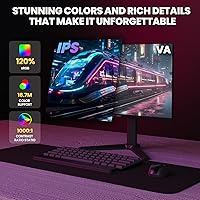
Overview

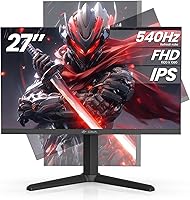
The CRUA CR270F 27-inch 540Hz Gaming Monitor enters a crowded mid-range market with an unusually bold specification: a refresh rate that most competing displays at this price simply don't offer. To put 540Hz in context, the majority of gamers won't perceive a meaningful difference beyond 240Hz without a highly controlled environment and elite-level reflexes — so this is a monitor built for a specific kind of buyer. CRUA is a newer brand, and that warrants some scrutiny. The honest trade-off here is 1080p resolution on a 27-inch panel, which yields a lower pixel density than many would prefer. The ergonomic stand, however, is a genuine bonus worth noting from the start.

Features & Benefits

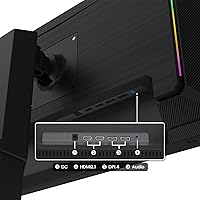
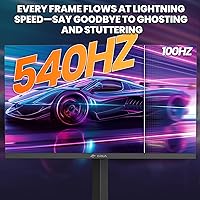
The headline spec is the 540Hz refresh rate paired with a 1ms MPRT response time, which translates to noticeably smoother motion in fast-paced titles like Valorant or CS2 — though you'll need a capable GPU to push frame rates high enough to actually exploit it. The IPS panel covers 120% sRGB, so colors are richer and more accurate than typical TN alternatives at this tier, which matters if you do any light content work between sessions. AMD FreeSync eliminates screen tearing for Radeon GPU owners without the G-Sync premium. Connectivity is strong: HDMI 2.1 and DisplayPort 1.4 handle the bandwidth demands comfortably. The built-in speaker exists, but treat it as a last resort, not a feature.

Best For

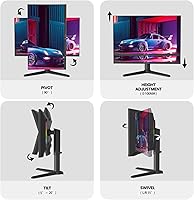
This 540Hz gaming monitor is best suited to competitive gamers who need every frame they can get in esports titles — the kind of players who run 1080p deliberately to maximize GPU output. It also works well as a dual-purpose desk setup: the 90-degree pivot lets you flip to portrait mode for coding, reading long documents, or browsing vertical content without buying a second display. AMD GPU users get extra value from FreeSync here without paying a G-Sync tax. Anyone building a hybrid home-office and gaming setup will appreciate the adjustable stand — real height, tilt, and swivel range makes long sessions more comfortable than a fixed-position monitor ever could.

User Feedback

Buyers who play fast-paced competitive titles consistently praise the motion clarity at 540Hz, describing it as visibly smoother than their previous 144Hz or 240Hz setups. Stand assembly gets positive marks too — straightforward and sturdy. Where feedback gets more divided is pixel density: at 27 inches, 1080p is noticeable up close, and some users wish the resolution scaled up. A handful of buyers report the display benefits from manual color calibration out of the box to look its best. As for CRUA's support, most interactions described are responsive, which helps offset the uncertainty that naturally comes with a less-established brand. Just keep expectations low on the speaker.

Pros

  • 540Hz refresh rate delivers genuinely smoother motion in fast-paced esports titles compared to 240Hz panels.
  • IPS panel provides better color accuracy and wider viewing angles than TN alternatives at this price.
  • 120% sRGB coverage makes colors vibrant enough for casual content creation alongside gaming.
  • AMD FreeSync eliminates screen tearing without requiring a G-Sync-certified display premium.
  • HDMI 2.1 and DisplayPort 1.4 connectivity handles high-bandwidth demands without bottlenecking the panel.
  • The ergonomic stand offers real flexibility — height, tilt, swivel, and a full 90-degree portrait pivot.
  • 75x75mm VESA compatibility means wall mounting is straightforward if you prefer a cleaner desk setup.
  • Matte anti-glare coating reduces reflections in brighter room environments without washing out the image.
  • Users report responsive customer support from CRUA, which is reassuring given the brand's newer market presence.
  • Portrait mode rotation makes this a practical dual-use display for coding or document-heavy workflows.

Cons

  • 1080p resolution on a 27-inch screen results in noticeably lower pixel density — text and fine detail can look soft up close.
  • Color calibration out of the box may need manual adjustment before the image looks its best.
  • CRUA is a newer, lesser-known brand with a shorter reliability track record than established competitors.
  • You need a very powerful GPU to push frame rates high enough to actually benefit from 540Hz.
  • The built-in speaker delivers minimal audio quality and is not suitable as a primary sound output.
  • Most users will not perceive a meaningful difference between 240Hz and 540Hz without a highly competitive setup.
  • The 1000:1 static contrast ratio means dark scenes lack the depth that VA panels or OLEDs can achieve.
  • At 16.12 pounds, the monitor is on the heavier side, which makes repositioning or wall mounting slightly more involved.

Ratings

The scores below reflect AI-driven analysis of verified global buyer reviews for the CRUA CR270F 27-inch 540Hz Gaming Monitor, with spam, bot-submitted, and incentivized feedback actively filtered out before scoring. Each category is evaluated on real-world usage patterns — not spec sheets — so both the standout strengths and the honest frustrations are represented without softening either side. If this esports-focused screen is being considered for your setup, these ratings are designed to give you the clearest possible picture before you commit.

Motion Clarity
91%
Competitive gamers consistently report that fast-paced titles like CS2 and Valorant feel noticeably smoother on this 540Hz gaming monitor compared to their previous 144Hz or 240Hz panels. The 1ms MPRT response time keeps ghosting to a minimum even during rapid camera sweeps and high-speed gunfights.
The benefit is highly context-dependent — users running mid-range GPUs that cap out below 300fps see limited real-world gains from 540Hz specifically. A handful of reviewers noted that the improvement over 240Hz felt marginal without a high-end graphics card feeding the panel.
Refresh Rate Value
83%
Offering 540Hz at this price tier is genuinely uncommon, and buyers who specifically sought that ceiling praised the value proposition relative to competing panels that charge significantly more for similar specs. For esports-oriented buyers, getting this refresh rate without a luxury price tag felt like a real win.
The caveat is that most buyers cannot perceptibly distinguish 540Hz from 240Hz in everyday play without a direct A/B comparison and a GPU capable of sustaining those frame rates. A few users admitted in hindsight they would have been just as satisfied with a 240Hz option at lower cost.
Image Quality
74%
26%
The IPS panel with 120% sRGB delivers colors that are noticeably richer and more saturated than TN-based gaming monitors in a similar bracket. Users doing light content creation or streaming alongside gaming appreciated that color accuracy held up reasonably well for casual work.
Out-of-the-box calibration drew recurring criticism — several buyers noted that default settings produced overly warm or slightly oversaturated colors that required manual tuning to look natural. Contrast depth in dark scenes also falls short of what VA panels or OLED displays can deliver at comparable price points.
Pixel Density
56%
44%
For users sitting further back from their desk — around 80 to 100cm — the 1080p resolution at 27 inches is adequate for gaming, and the fast panel more than compensates during active play where fine detail is secondary to motion.
This is the most consistently flagged limitation across buyer feedback. At close viewing distances, text edges look soft, fine UI elements feel unclear, and the gap versus a 1440p panel of the same size is obvious to anyone who has used both. Productivity users in particular found it genuinely distracting for extended work sessions.
Ergonomics & Stand
86%
The adjustable stand received strong praise for a monitor in this segment — height, tilt, swivel, and the 90-degree portrait pivot all function smoothly, and users who rotate to portrait mode for coding or document review found the switch quick and practical in a real dual-use setup.
A small number of users noted the stand feels slightly less premium to the touch compared to its functional range, with some minor flex in the neck under swivel adjustments. At 16.12 pounds, repositioning the panel on the desk also takes more effort than lighter competitors.
Build Quality
77%
23%
For the price tier, the overall construction feels solid enough that most buyers were satisfied — the panel housing has minimal flex, the base is stable under normal desk use, and the stand assembly came in for specific praise as sturdy rather than wobbly.
CRUA is a newer brand, and some buyers expressed uncertainty about long-term durability given the lack of an extended reliability track record. A few noted minor cosmetic inconsistencies in the bezel finish, though none reported functional defects from this.
Connectivity
88%
Having both HDMI 2.1 and DisplayPort 1.4 on a monitor at this price is a genuine bonus — users appreciated being able to connect a gaming PC via DisplayPort while keeping an HDMI 2.1 port free for a console or secondary device without needing a switch.
There is no USB hub built into the display, which some buyers flagged as a missed convenience at this price point. A small number of users also reported needing to manually configure refresh rate settings after connecting, as the display occasionally defaulted to a lower rate than expected.
AMD FreeSync Performance
84%
AMD Radeon GPU users reported smooth, tear-free gameplay across the variable refresh range, with no significant flickering or black screen events that sometimes plague FreeSync implementations on cheaper panels. For Radeon owners, this is a clean pairing.
NVIDIA users do not get a guaranteed G-Sync Compatible certification, so tear-free performance on green-team GPUs is inconsistent depending on driver version and system configuration. Buyers who did not check compatibility before purchasing expressed frustration at this limitation.
Color Accuracy
71%
29%
The 120% sRGB coverage gives this esports-focused screen a color richness that works well for gaming atmospheres and casual content consumption — vibrant enough that most non-professional users were pleased with what they saw after a calibration pass.
Factory calibration consistency is uneven according to multiple buyers, with some units arriving with noticeable green or warm tints requiring OSD adjustment. For anyone needing reliable color accuracy without manual intervention, this adds friction that premium display brands typically avoid.
Setup & Assembly
89%
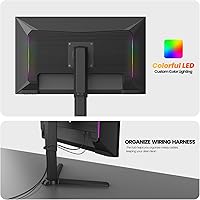
Unboxing and setup consistently came in as a positive experience — most buyers had the monitor standing and connected within 15 minutes, and the stand assembly was described as intuitive without needing the included instructions. Cable management through the stand neck also helped keep desks tidy.
The included documentation is minimal, and for users unfamiliar with display settings, getting to 540Hz in Windows or macOS required some trial and error. A more detailed quick-start guide covering refresh rate activation would reduce post-setup confusion.
Audio Output
41%
59%
The 3.5mm headphone jack works reliably and is a convenient pass-through for headset audio, which most serious gamers will use anyway. Having any audio output at all adds marginal flexibility for quick video calls or low-volume background content.
The built-in speaker is the most consistently criticized aspect of this display — buyers describe it as thin, low-volume, and lacking any bass presence. It is widely treated as a placeholder feature rather than something usable in a real listening context, even casually.
Portrait Mode Usability
82%
18%
Users who specifically bought this 540Hz gaming monitor for its portrait pivot found the feature genuinely useful for coding, GitHub browsing, and long-form document reading. The physical rotation is smooth, and once the OS display settings are updated, the experience is seamless for vertical workflows.
At 1080p in landscape, the portrait resolution becomes 1080 pixels wide — which is adequate but not spacious for side-by-side windows or complex IDE layouts. Users expecting a high-density vertical workspace may find the pixel count limiting compared to a dedicated vertical display.
Brand Reliability
63%
37%
Customer support interactions with CRUA were described as responsive and helpful by the majority of buyers who needed assistance, which is reassuring for a newer market entrant. Most units arrived without defects, and the brand appears to take post-purchase support seriously.
CRUA simply does not have the years of documented reliability data that established monitor brands carry, and some buyers admitted this gave them pause. Long-term durability beyond the first year remains an open question, and the absence of strong third-party repair or service networks adds risk for cautious buyers.
Value for Money
78%
22%
For buyers who specifically need 540Hz and are willing to accept 1080p as the trade-off, the price-to-specification ratio is hard to argue with — comparable refresh rates from established brands cost noticeably more. The ergonomic stand adds tangible value that budget monitors in this bracket typically omit.
For buyers who do not have a setup capable of sustaining high frame rates, or who care more about resolution than refresh rate, the value case weakens considerably. Spending at this level for a 1080p panel feels less defensible if the 540Hz headline spec cannot be fully utilized.

Suitable for:

The CRUA CR270F 27-inch 540Hz Gaming Monitor is purpose-built for competitive gamers who treat frame rate as a non-negotiable priority — specifically those grinding ranked play in fast-twitch titles like Valorant, CS2, or Apex Legends, where motion clarity at high frame rates can genuinely influence reaction-time performance. AMD GPU users get the most out of this esports-focused screen, since FreeSync works natively without any added cost or compatibility friction. It also suits developers or productivity-focused users who want a secondary display they can rotate to portrait mode for reading code, reviewing long documents, or managing vertical workflows — the stand makes that kind of switching genuinely painless. Buyers building a hybrid home-office and gaming desk will find the full ergonomic range — height, tilt, swivel, and pivot — worth more than it might sound on paper, especially over long daily sessions. If your priority is raw refresh rate and you are willing to accept 1080p as the resolution trade-off, this 540Hz gaming monitor punches above its weight class at this price tier.

Not suitable for:

The CRUA CR270F 27-inch 540Hz Gaming Monitor is a harder sell for anyone who does visually demanding work where pixel density matters — at 1080p across 27 inches, text and fine details look noticeably softer than they would on a QHD or 4K display of the same size, and that is simply a physics trade-off no software setting can fully compensate for. Creative professionals doing photo editing, illustration, or video color work at a serious level will want a display with a higher resolution panel and factory-calibrated accuracy rather than relying on manual adjustments out of the box. Casual gamers and general home users who play at 60Hz or 120Hz will see almost no perceptible benefit from a 540Hz panel — the gap between 240Hz and 540Hz is far less obvious than the jump from 60Hz to 144Hz, and spending for that headroom without a GPU capable of pushing those frame rates is simply wasted. Buyers who strongly prefer established monitor brands with long track records and transparent warranty programs may feel less comfortable with CRUA at this price point. And anyone hoping for a usable built-in audio solution should look elsewhere — the onboard speaker is there as a convenience fallback, not a feature to rely on.

Specifications

  • Screen Size: The display measures 27 inches diagonally, using an IPS panel with a matte anti-glare surface finish.
  • Resolution: Native resolution is 1920x1080 (Full HD), delivering a 16:9 aspect ratio across the full panel area.
  • Refresh Rate: The panel runs at a maximum 540Hz refresh rate, designed for ultra-smooth motion in high-frame-rate gaming scenarios.
  • Response Time: Rated at 1ms MPRT (Moving Picture Response Time), which minimizes perceived motion blur during fast on-screen movement.
  • Color Coverage: Covers 120% sRGB color space and supports 16.7 million colors for visibly richer saturation compared to standard sRGB panels.
  • Brightness: Peak brightness reaches 400 cd/m², offering adequate visibility in moderately lit room environments.
  • Contrast Ratio: Static contrast ratio is rated at 1000:1, which is typical for IPS panels but limited in very dark scene rendering.
  • Sync Technology: AMD FreeSync is supported natively, eliminating screen tearing for compatible AMD Radeon GPU users without additional hardware requirements.
  • Connectivity: Ports include one HDMI 2.1, one DisplayPort 1.4, and one 3.5mm audio output jack for headphone or speaker connection.
  • Built-in Audio: A built-in speaker is included for basic audio output, though it is not intended as a primary listening solution.
  • Ergonomic Range: The stand supports 120mm height adjustment, tilt from -5° to 15°, swivel from -15° to 15°, and a full 90° portrait pivot.
  • VESA Mount: Wall mounting is supported via a 75x75mm VESA pattern, compatible with most standard third-party monitor arms and wall brackets.
  • Panel Type: Uses an In-Plane Switching (IPS) panel, which provides wider viewing angles and better color consistency than TN-type alternatives.
  • Dimensions: The monitor measures 9.9 x 24 x 19.7 inches with the stand attached, occupying a standard mid-sized desktop footprint.
  • Weight: Total weight with stand is 16.12 pounds, which is on the heavier side for a 27-inch panel and relevant for wall mount planning.
  • Model Number: The official model identifier is CR270F, manufactured and sold under the CRUA brand.
  • Availability: This monitor was first made available in January 2025 and is sold primarily through Amazon in a black colorway.

Related Reviews
CRUA CR270C 27″ Curved Gaming Monitor

71%
83%
Value for Money
78%
Image Quality
81%
Refresh Rate Performance
86%
Panel Contrast & Blacks
67%
Build Quality
More
Skytech Gaming Moonshadow 27-inch Curved Gaming Monitor

83%
88%
Image Quality
91%
Refresh Rate Performance
86%
Adaptive-Sync
83%
VA Panel Contrast
84%
Stand & Ergonomics
More
Raywego Z270B13 27-inch Gaming Monitor
70%
88%
Value for Money
83%
Picture Quality
84%
Refresh Rate Performance
62%
Build Quality
81%
Eye Comfort
More
Viewedge CS27FM 27-inch Gaming Monitor
72%
91%
Refresh Rate Performance
76%
Panel & Image Quality
61%
Resolution & Sharpness
74%
Color Accuracy
52%
HDR Experience
More
FYHXele 27-inch 4K 120Hz Gaming Monitor
72%
83%
Value for Money
88%
Image Sharpness
79%
Panel Response & Motion
76%
Color Accuracy
47%
HDR Performance
More
Sealan 27-inch Curved Gaming Monitor
82%
85%
Display Quality
90%
Ease of Setup
91%
Value for Money
87%
Performance in Gaming
83%
Color Accuracy
More
KOORUI G2721E 27-inch Gaming Monitor

78%
93%
Refresh Rate Performance
88%
Image Clarity & Resolution
84%
Color Accuracy
81%
Motion Handling
52%
HDR Quality
More
memzuoix 27-inch QHD 165Hz Gaming Monitor
70%
88%
Image Clarity
84%
Refresh Rate Performance
91%
Value for Money
82%
Adaptive Sync (FreeSync/G-Sync)
77%
Color Accuracy
More
Amazon Basics 27-inch 1080p Gaming Monitor

76%
88%
Value for Money
79%
Display Quality
91%
Refresh Rate Performance
86%
Response Time
67%
Build Quality
More
Dell G2725D 27-inch Gaming Monitor
78%
91%
Image Sharpness
88%
Refresh Rate Performance
83%
Motion Clarity
79%
Color Accuracy
86%
AMD FreeSync
More

FAQ

Honestly, for most players, 240Hz is more than sufficient. The perceptible difference between 240Hz and 540Hz is much smaller than the jump from 60Hz to 144Hz, and you will only notice it in highly competitive scenarios with a GPU capable of pushing frame rates that high. If you play casual or single-player games, the extra headroom is largely wasted. It is genuinely meaningful for top-tier esports players where every millisecond counts.

It depends on how close you sit and what you are used to. At 27 inches, 1080p gives you a pixel density around 82 PPI, which is noticeably lower than a 1440p panel of the same size. Text edges can look slightly soft, especially if you sit within arm's reach. For gaming at speed, it is rarely a problem, but for reading documents or detailed work, it is a real trade-off worth considering before you buy.

The CRUA CR270F 27-inch 540Hz Gaming Monitor supports AMD FreeSync natively, but it will still function normally as a display with any NVIDIA GPU — you just won't get adaptive sync benefits unless NVIDIA's driver recognizes it as G-Sync Compatible, which varies by system. For tear-free variable refresh, an AMD Radeon card is the safest pairing.

To run at a full 540Hz over DisplayPort 1.4, you need a GPU powerful enough to render your game above 540 frames per second — which in practice requires a high-end card and typically a lightweight, well-optimized esports title like CS2 or Valorant. Most people will run it at a lower frame rate that still benefits from FreeSync smoothing. Make sure you set the refresh rate manually in your display settings after connecting, as it may default lower.

HDMI 2.1 has enough bandwidth to support 1080p at very high refresh rates, but whether it reaches the full 540Hz over HDMI depends on your source device's HDMI 2.1 implementation. For guaranteed maximum refresh rate performance, DisplayPort 1.4 is the more reliable choice. Check your GPU's port specifications before assuming either cable will hit the panel's ceiling.

Most users report that setup is fairly straightforward — the stand attaches to the panel without tools in most configurations, and the base screws in quickly. The included documentation is basic but gets the job done. Expect around 10 to 15 minutes from unboxing to having it on your desk.

Yes, the 90-degree pivot is a genuine feature rather than a checkbox item. Rotating the display to portrait orientation works smoothly with the stand, and at 1080p wide (now tall), you get a long vertical canvas that suits code editors, terminal windows, and long web pages well. You will need to adjust your display rotation settings in Windows or macOS after physically rotating the panel.

The 120% sRGB coverage is above average for a gaming monitor at this price, which makes it decent for casual creative work. However, it likely ships without full factory calibration, so colors out of the box may need some manual adjustment. For professional photo or video editing where accuracy is critical, a purpose-built color-calibrated display would be a safer choice.

CRUA is a newer brand in the monitor market, which naturally raises questions about long-term reliability and support. Based on available user feedback, their customer service responsiveness is generally described as positive. That said, they lack the multi-decade track record of brands like LG, ASUS, or BenQ. If warranty security is a top priority for you, factor that into your decision — and keep documentation of your purchase in case you need support.

Plan on external audio. The built-in speaker exists as a convenience for quick situations — a video call, background music at low volume — but it will not satisfy anyone expecting clear, full-bodied sound. A basic desktop speaker set or a decent headset will make a far more noticeable difference to your daily experience than any other accessory you could add to this esports-focused screen.