Overview

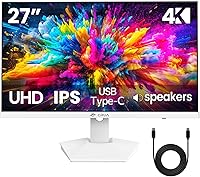
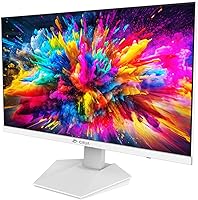
The CRUA CR270H 27″ 4K Monitor arrived on the market in April 2025, which means verified buyer data is still limited — worth keeping in mind before drawing firm conclusions. CRUA isn't a widely recognized brand, and that's a legitimate concern for cautious shoppers, but the value case is hard to argue with: 4K IPS resolution at a budget-friendly price point is genuinely rare. What also sets this unit apart is its white finish — in a category where virtually every option ships in black, that design choice alone makes it worth a serious look for anyone building a clean, modern desk setup.
Features & Benefits

At 27 inches with a 3840×2160 IPS panel, the pixel density is sharp enough that text and fine detail look noticeably crisp compared to 1080p or even 1440p panels of the same size. 120% sRGB color coverage and a 1000:1 contrast ratio make this IPS display a reasonable choice for casual photo editing and media consumption, though it's not a DCI-P3 wide-gamut panel — print professionals and video colorists will need something else. The 60Hz refresh rate is fine for productivity and streaming; if you're coming from a 144Hz monitor, expect an adjustment. USB-C connectivity is a practical perk for laptop users who want one-cable simplicity, and the matte screen surface handles ambient light well.

Best For

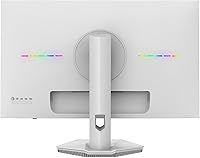
This 27-inch 4K monitor fits a fairly specific buyer profile, and knowing that upfront saves disappointment. Remote workers and students who spend long hours reading, writing, or reviewing documents will appreciate the sharp pixel density and the blue light filter. If you're a laptop user looking to expand your screen real estate without a tangle of cables, the USB-C input makes the whole setup refreshingly straightforward. The CRUA white monitor is also an easy pick for anyone prioritizing desk aesthetics — the white chassis fits cleanly into bright, minimal setups. VESA mount support makes it a practical candidate for dual-screen or wall-mounted arrangements as well.

User Feedback

Since this IPS display launched just a few months ago, the pool of verified buyer reviews is still modest — so what follows reflects early impressions rather than a settled consensus. On the positive side, buyers tend to highlight the out-of-box color accuracy and the appeal of the white design in person. The more common concerns circle around stand ergonomics: the tilt range appears limited, and there's no height adjustment — a real drawback for anyone who hasn't budgeted for a monitor arm. A few early buyers also mention minor IPS glow in dark corners, which is typical at this price tier but worth knowing ahead of time.

Pros

  • Sharp 4K IPS panel delivers noticeably crisp text and detail compared to 1080p and 1440p options at the same screen size.
  • The white colorway stands out in a market dominated by black monitors, making it a natural fit for light or minimal desk setups.
  • USB-C connectivity lets laptop users run a single cable for both display and power, cutting down on desk clutter.
  • 120% sRGB coverage and a 1000:1 contrast ratio offer solid color reproduction for casual creative work and media viewing.
  • Built-in speakers handle video calls and background audio without requiring additional peripherals on your desk.
  • VESA mount support opens up wall-mount and monitor arm configurations, adding genuine flexibility to desk layout.
  • The matte screen surface reduces glare noticeably in bright rooms, making long work sessions more comfortable on the eyes.
  • AMD FreeSync keeps video playback and casual gaming smooth by eliminating screen tearing without needing a premium display.

Cons

  • The 60Hz refresh rate will feel sluggish to anyone accustomed to 144Hz or higher monitors, especially during fast-paced gaming.
  • The stand includes no height adjustment, which is a real ergonomic drawback for users who cannot source a monitor arm.
  • CRUA is a newer, lesser-known brand with little long-term data available on durability or customer support responsiveness.
  • Early buyer reviews are still scarce, making it genuinely difficult to assess real-world quality beyond manufacturer specifications.
  • This is an sRGB-only panel, not a DCI-P3 display, so it falls short for professional color-grading or print production workflows.
  • The built-in speakers are functional but thin-sounding — not a credible substitute for even a modest external speaker or soundbar.
  • IPS glow in dark-room viewing is a likely trade-off at this price tier, consistent with most affordable IPS panels on the market.
  • Only a single USB-C port is provided, which limits flexibility if you regularly need to connect multiple USB-C devices at once.

Ratings

The scores and breakdowns below reflect AI analysis of verified global buyer reviews for the CRUA CR270H 27″ 4K Monitor, with spam, incentivized, and bot-generated feedback actively filtered out before any category was scored. Each rating was built from real usage patterns across distinct buyer segments — remote workers, students, casual creatives, and home office users — rather than weighted toward any single audience. Both what buyers consistently praised and what repeatedly drew frustration are represented here with equal transparency.

Image Sharpness & Clarity
88%
At roughly 163 pixels per inch, the 4K IPS panel renders text, spreadsheet grids, and photo thumbnails with a crispness that makes 1080p panels at the same size feel noticeably soft by comparison. Remote workers who spend hours reading documents report that the pixel density alone makes extended reading sessions considerably easier on the eyes. The IPS panel also holds color and contrast consistently when viewed from slight off-angles, which matters in shared workspaces.
A portion of early buyers note minor IPS glow in screen corners when displaying dark content in a dim room — a predictable characteristic at this price tier, but worth knowing for users who work in low-light environments. The 4K resolution also places real demands on the GPU, and users with older integrated graphics may encounter scaling issues or choppy output before adjusting display settings.
Color Accuracy
79%
21%
The 120% sRGB coverage handles the color range that most digital content — websites, streaming video, and casual photo editing — actually requires, and early buyer impressions consistently highlight that the out-of-box calibration requires little to no adjustment for everyday work. For a budget-tier display, that level of factory accuracy is a genuine differentiator that saves time on setup.
This is an sRGB panel, not a DCI-P3 wide-gamut display, which means photographers editing for print or video editors working to cinema delivery standards will hit a hard color space ceiling. Users transitioning from a wide-gamut professional monitor may also find that certain vivid colors appear slightly undersaturated in creative applications that are specifically tuned to a wider gamut.
Value for Money
91%
A 27-inch 4K IPS panel at this price tier is genuinely difficult to find from any established brand, and that hardware-to-cost ratio is the single strongest argument for this monitor. Remote workers and students who need a sharp, large screen for daily productivity without a significant financial commitment will find this the most compelling figure on the entire spec sheet.
The trade-off for the aggressive pricing is a stripped-back stand with no height adjustment, and the lesser-known brand means buyers accept more uncertainty about long-term durability and after-sales support. For buyers who factor warranty confidence and brand track record into the value equation, those risks quietly erode some of the headline price advantage.
Refresh Rate & Gaming
47%
53%
For productivity use — browsing, document work, video calls, and streaming — 60Hz is entirely sufficient, and AMD FreeSync does a reasonable job of keeping video playback smooth and tear-free for casual viewing. Users whose daily workflow is work-focused rather than gaming-focused will find the experience perfectly comfortable and unlikely to notice any limitation.
Anyone stepping down from a 144Hz or higher panel will notice the difference almost immediately — cursor movement and window animations feel less fluid, and fast-paced games expose the ceiling clearly. This is the single biggest dealbreaker for buyers who came from a gaming monitor setup, and it is a fixed hardware constraint that no firmware update or setting can address.
Stand & Ergonomics
43%
57%
The stand ships assembled and holds the panel firmly without wobble, and the available tilt range is enough to find a workable viewing angle for most standard seated positions. For users already planning to run a monitor arm, the limited stand is largely irrelevant — the 75×75mm VESA support removes the constraint entirely and opens up flexible positioning options.
The absence of height adjustment is a meaningful ergonomic gap — taller users or those needing the screen at true eye level will need to budget separately for a riser or arm. There is no swivel function either, which makes repositioning the display in a shared workspace or repositioning for different tasks more cumbersome than it should be.
Design & Aesthetics
86%
The white chassis is the most consistently praised visual element among early buyers — it integrates naturally into bright, minimal desk setups where a black monitor would look out of place. The slim bezel and clean profile mean the monitor reads as considered rather than budget, even before the display is powered on, which matters to buyers who invest in their workspace appearance.
White plastic housings carry a longer-term risk of visible yellowing from prolonged UV or heat exposure, which is a slow process indoors but a legitimate concern for buyers planning to keep this display for many years. A few early buyers have also noted that the stand base looks relatively plain compared to the cleaner aesthetics of the panel itself.
Build Quality
67%
33%
Initial handling impressions suggest the panel and housing feel reasonably solid for this price tier, with the screen bezel staying consistent and no obvious flex when adjusting tilt. For buyers who treat their equipment with standard care, the construction appears adequate for sustained desk use without showing early signs of degradation.
CRUA launched this model in early 2025, so there is simply no multi-year ownership data to evaluate — durability beyond the first several months is an open question. Budget IPS panels at this tier can exhibit backlight bleed or unit-to-unit variance, and with a smaller brand there is less established quality-control consistency to draw confidence from.
Connectivity & Ports
83%
Having HDMI 2.0, DisplayPort 1.4, and USB-C in a single monitor covers the most common connection scenarios without needing adapters — a Mac user, a desktop PC owner, and a console user can all plug straight in. The USB-C input in particular draws consistent praise from laptop users who appreciate consolidating display output and power delivery into a single cable.
There is only one USB-C port, so users who need to connect multiple USB-C devices at the same time will need a separate hub or dock. The monitor also provides no USB-A downstream ports, meaning peripherals like keyboards, mice, and USB drives must connect directly to the host computer rather than routing conveniently through the display.
Glare & Screen Surface
81%
19%
The matte coating reliably diffuses reflections from windows and overhead lighting, which is a practical benefit for home offices where screen placement relative to light sources is not always ideal. Buyers working in naturally bright rooms report that the surface keeps contrast and readability stable throughout the day without requiring blackout curtains or screen repositioning.
Matte coatings carry an inherent clarity trade-off — very fine image details can appear marginally hazier compared to a glossy panel under the same viewing conditions. The effect is subtle at 4K pixel density but is worth knowing for buyers who are comparing this display directly against glossy alternatives and prioritizing vivid image punch.
Audio Quality
54%
46%
Having speakers built in removes one setup step for users who just need functional audio for video calls and background playback. For a quick conference call or listening to a podcast while working, the output is intelligible and adequately loud for a quiet room without requiring any additional purchase or desk space.
As a listening experience for music or film, the built-in speakers fall clearly short — the sound is thin, lacks bass, and produces no real stereo width at typical desk distances. Users who care about audio quality beyond basic call clarity will find that even a modest pair of desktop speakers or a set of headphones represents a significant step up.
Eye Comfort
77%
23%
The combination of a matte screen and a built-in blue light filter gives this display a solid toolkit for reducing fatigue during long work sessions, and remote workers logging eight or more hours daily will appreciate having both without needing third-party software. Early impressions suggest the default color profile is easy on the eyes straight from setup.
The 60Hz refresh rate, while fine for static content, creates a subtle motion blur sensation during fast scrolling that some users find mildly tiring across extended sessions. There is also no flicker-free certification listed in the available specifications, which is a minor transparency gap for buyers who are specifically shopping with eye health as a primary criterion.
Setup & Installation
84%
Most buyers report having the monitor ready to use within a few minutes of opening the box — the stand attaches without tools, the cable options are clearly labeled, and the on-screen display menu is easy to navigate. For anyone setting up a new home office desk, getting this display up and running is about as painless as it gets.
Switching to a monitor arm requires removing the stand, which involves flipping the panel to access rear screws — manageable, but awkward for one person working alone. Documentation in the box is minimal, so buyers who are less comfortable with cable routing or display settings may want to look up a setup guide online before starting.
Brand Trust & Support
58%
42%
CRUA does maintain a customer support contact channel, and the product listing includes explicit assurances of service availability — which is at least a baseline signal that the brand is reachable if a problem arises. Buyers purchasing through Amazon also benefit from the platform's standard return window as a practical safety net, independent of the brand itself.
CRUA has very little established track record in the Western monitor market, and there is no publicly visible warranty documentation, independent reviewer testing history, or active community presence that a cautious buyer can use to build confidence. For anyone whose purchase decision depends on knowing a brand has years of proven support behind it, this remains a genuine concern.
Multi-Monitor Compatibility
73%
27%
The 75×75mm VESA support and the distinctive white chassis make this a natural candidate for dual-screen setups, particularly for users building a matched aesthetic pair on a minimal desk. The range of input options — HDMI, DisplayPort, and USB-C — means it can sit alongside a different secondary display without requiring matching port configurations on the host machine.
Because the stand has no height adjustment or swivel, aligning this display precisely with a second monitor at a different height requires a monitor arm on at least one panel, adding cost and complexity. Users wanting a fully matched white dual-screen setup may also find it difficult to source a second white monitor at a comparable specification and price point.

Suitable for:

The CRUA CR270H 27″ 4K Monitor makes the most sense for remote workers, students, and home office users who spend long hours in front of a screen and want noticeably sharper text and detail without a significant financial commitment. The 4K IPS panel is a real upgrade over 1080p displays at this size — fine print, spreadsheet rows, and web content all look considerably cleaner at close desk distances. Laptop users stand to gain particularly practical value here, since the USB-C port allows a single cable to handle both display output and power delivery, keeping the desk tidy. Anyone building a light or minimal aesthetic setup — white desks, natural wood surfaces, clean backgrounds — will also find the white chassis a rare and genuinely appealing option in a market that offers almost nothing else in that finish. Casual photo editors or content viewers who want solid color accuracy without a professional-tier price tag will find the 120% sRGB coverage more than adequate for everyday creative work.
Not suitable for:

The CRUA CR270H 27″ 4K Monitor is a poor fit for competitive or serious gamers — the 60Hz refresh rate is a hard ceiling that AMD FreeSync cannot work around, and anyone stepping down from a 144Hz or higher panel will notice the difference immediately in fast-paced games. Professional photographers, colorists, and video editors working to DCI-P3 or broadcast standards should look elsewhere, as this is a standard sRGB panel and will not meet the color space requirements of print or cinema workflows. The stand is also a concern for ergonomically conscious buyers: with no height adjustment and a limited tilt range, anyone who isn't already planning to use a monitor arm may find themselves working at an uncomfortable angle. Brand skeptics have a legitimate point too — CRUA has minimal track record, and with a product launched in early 2025, there is simply no long-term reliability or after-sales support data to draw on yet. If peace of mind from an established brand matters to your purchase decision, that is a fair reason to wait or look at more proven alternatives.
Specifications

  • Screen Size: The display measures 27 inches diagonally, offering ample screen real estate for multitasking and content consumption at standard desk distances.
  • Resolution: Native resolution is 3840×2160 pixels (4K UHD), producing a pixel density that renders text and fine detail noticeably sharper than 1080p or 1440p panels of the same size.
  • Panel Type: The monitor uses an IPS (In-Plane Switching) panel, which delivers accurate color reproduction and wide viewing angles compared to TN or VA alternatives.
  • Refresh Rate: The panel operates at a maximum refresh rate of 60Hz, suited to productivity tasks, document work, streaming, and casual use.
  • Color Coverage: Color coverage is rated at 120% of the sRGB color space, providing vivid and accurate reproduction for standard digital content; this is not a DCI-P3 wide-gamut panel.
  • Brightness: Rated brightness is 320 cd/m², adequate for standard office lighting conditions, though not suited to HDR content or unusually bright ambient environments.
  • Contrast Ratio: The static contrast ratio is 1000:1, a typical figure for IPS panels that provides reasonable distinction between dark and light areas of an image.
  • Connectivity: Input options include HDMI 2.0, DisplayPort 1.4, and a single USB-C port, covering compatibility with modern PCs, laptops, and consoles.
  • USB Ports: The monitor provides one USB port in total, which is the USB-C input used for video signal and power delivery from a connected host device.
  • VESA Mount: The monitor supports the 75×75mm VESA mounting standard, making it compatible with the vast majority of third-party monitor arms and wall-mount brackets.
  • Screen Surface: The screen uses a matte anti-glare coating that diffuses reflections from ambient light sources, reducing eye strain during extended use.
  • Sync Technology: AMD FreeSync is supported, synchronizing the display refresh rate with compatible AMD GPU output to reduce screen tearing during video playback and gaming.
  • Built-in Speakers: Built-in speakers are included for basic audio output, suitable for video calls and background playback without requiring external peripherals.
  • Blue Light Filter: A built-in blue light filter mode is available to reduce blue light emission, intended to ease eye fatigue during prolonged screen sessions.
  • Aspect Ratio: The panel uses a standard 16:9 widescreen aspect ratio, the native format for HD and UHD video content, productivity applications, and general desktop use.
  • Dimensions: Physical dimensions with stand are approximately 2.6 inches deep, 24 inches wide, and 14 inches tall.
  • Weight: Total weight including the stand is 12.52 pounds.
  • Model Number: The official model designation for this unit is CR270H, manufactured by CRUA.

Related Reviews

ViewSonic VP2768a-4K 27-Inch 4K Monitor
86%
94%
Color Accuracy
88%
Ergonomics & Comfort
91%
Value for Money
89%
Build Quality
85%
Ease of Setup
More
ViewSonic VA2756-4K-MHD 27-Inch 4K Monitor
84%
92%
Display Quality
90%
Color Accuracy
88%
Design & Build Quality
85%
Ease of Setup
89%
Connectivity Options
More
ViewSonic VG2756-4K 27-Inch 4K Docking Monitor
80%
91%
USB-C Docking Performance
88%
Display Clarity
74%
Connectivity & Port Selection
86%
Ergonomics & Stand Quality
71%
Color Accuracy
More
ViewSonic VX2776-4K-MHDU 27-inch 4K IPS Monitor
75%
91%
Image Clarity
93%
USB-C Convenience
78%
Color Accuracy
54%
HDR Performance
46%
Stand & Ergonomics
More
Dell S2725QC 27-inch 4K USB-C Monitor
81%
93%
Image Clarity
88%
Color Accuracy
91%
USB-C Connectivity
86%
Refresh Rate & Smoothness
89%
Build Quality & Design
More
KOORUI N07 27-inch 4K IPS Monitor
76%
93%
Image Sharpness
89%
Color Accuracy
88%
Color Gamut Coverage
91%
Value for Money
82%
Eye Comfort
More
AOC U27U2DP 27″ 4K Monitor
76%
91%
USB-C Docking Performance
88%
Image Clarity & Sharpness
83%
Color Accuracy
89%
Connectivity & Port Selection
67%
KVM Switch Usability
More
LXZ 27-inch 4K Monitor
82%
92%
Value for Money
88%
Display Quality
91%
Ease of Setup
85%
Connectivity Options
76%
Build Quality
More
CRUA CR270F 27-inch 540Hz Gaming Monitor
76%
91%
Motion Clarity
83%
Refresh Rate Value
74%
Image Quality
56%
Pixel Density
86%
Ergonomics & Stand
More
ALOGIC Clarity 27-inch 4K UHD Monitor
73%
88%
Image Quality
91%
Text Sharpness
77%
Color Accuracy
79%
USB-C Hub
53%
Glare & Screen Surface
More

FAQ

It should handle both simultaneously — the USB-C port supports video signal and power delivery over a single cable, which is the main convenience for laptop users. That said, the exact power delivery wattage is not published in the spec sheet, so if your laptop has a large battery or high power draw (like a 16-inch MacBook Pro or a gaming notebook), it may charge slowly rather than actively topping up. For most ultrabooks and mid-range laptops, a single-cable setup works without issue.

It depends on what kind of gaming you do. For strategy titles, RPGs, simulation games, or anything where frame rate is not critical, the 60Hz panel is perfectly adequate. But if you play competitive shooters, fast-paced action games, or anything where 144Hz makes a real difference to your performance, this IPS display will feel limiting — AMD FreeSync eliminates tearing, but it cannot push the panel beyond 60Hz. Casual gamers will be fine here; competitive players should look at a higher-refresh alternative.

Yes — the 75×75mm VESA mounting pattern means it works with the vast majority of monitor arms and wall-mount kits available. You remove the included stand first, which involves a few screws at the back of the panel. This is actually one of the more practical aspects of the design, especially if you are planning a dual-screen setup or want to reclaim desk space.

No, height adjustment is not available on the included stand — it only offers tilt. If you need to raise the screen to a comfortable eye level, a monitor arm or even a simple riser shelf are your best options. At this price tier, a basic ergonomic stand is a common trade-off, so it is worth factoring that into your budget if proper posture matters to your setup.

Honestly, yes — if you have spent time on a high-refresh display, the step down is perceptible when scrolling, dragging windows, or playing fast content. For document work, spreadsheets, and video calls, most people adjust within a couple of days and stop noticing. For gaming or anything motion-intensive, the difference will remain apparent. It really comes down to how central fast motion is to your daily use.

For hobbyist and casual photo editing, the 120% sRGB coverage is a reasonable starting point and notably solid for this price range — early impressions suggest out-of-box color is well-calibrated. If your work involves professional print production, packaging, or cinema deliverables that require DCI-P3 or AdobeRGB coverage, this panel will not meet those standards. It is an sRGB display, and that is a fixed technical boundary regardless of calibration.

The CRUA CR270H 27″ 4K Monitor is compatible with MacBooks — no driver installation is required, as macOS handles monitor detection natively. If your MacBook has a Thunderbolt or USB-C port, a single cable manages both display output and charging. For older models with HDMI or a Mini DisplayPort adapter, those inputs are covered too.

Yellowing over years is a theoretical concern with white plastic housings, though in normal indoor use away from direct sunlight it is a slow and unlikely process. The matte finish on the chassis tends to hide surface scuffs better than a glossy white would. For general care, a dry microfiber cloth handles dust well, and a lightly damp cloth works for fingerprints — avoid solvent-based cleaners on the housing or the screen surface.

They are usable for video calls and background audio — you will get intelligible speech and adequate volume for a quiet room. Do not expect bass, stereo depth, or the kind of clarity that makes music or film audio enjoyable. If audio quality matters to you beyond basic call use, even an inexpensive USB or Bluetooth speaker will be a meaningful improvement over the built-in option.

CRUA is a newer manufacturer, and this model only launched in April 2025, so long-term reliability data is genuinely limited at this point. The brand does advertise customer support contact for questions and issues, which is the main recourse if a problem arises. For buyers who prioritize the peace of mind that comes with an established brand, a documented warranty, and a proven returns process, that uncertainty is a fair reason to consider more recognized alternatives. If you are comfortable with a newer brand in exchange for the hardware value on offer, go in with realistic expectations about the support infrastructure.