Overview

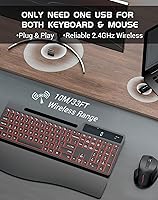
The COUTSALL K670 Wireless Keyboard Mouse Combo entered the market in late 2024 as a full-size ergonomic option targeting home office users who want more than just the basics without spending heavily. It connects via a 2.4GHz USB receiver — plug it in and you're running, no drivers needed — and a USB-C adapter is included for newer laptops. The rechargeable design means no hunting for AA batteries mid-workday. For a set that ranked in the top 600 in its Amazon category shortly after launch, it's clearly resonating with buyers who want a capable, clutter-reducing desk setup without overcomplicating their workspace.
Features & Benefits

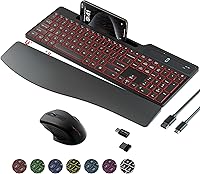
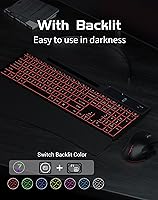
What makes this wireless desk set stand out in a crowded field is the thoughtful combination of practical extras. The built-in calculator with a digital display is genuinely useful — it sits right on the keyboard frame, so you're not alt-tabbing or reaching for a separate unit. The phone holder is a similar story: small enough not to feel intrusive, but handy when you need your screen in view while typing. Backlighting spans seven color effects across three brightness levels, which works well in dim rooms. The magnetic wrist rest snaps on firmly, and the adjustable tilt stand lets you dial in your preferred angle. The mouse covers 800 to 1600 DPI, handling most everyday tasks without fuss.

Best For

This ergonomic combo makes the most sense for remote workers and students who want an organized, comfortable desk setup without the cost of buying each peripheral separately. If you regularly glance at your phone while working — for messages, timers, or calls — the integrated holder alone could justify the purchase. Late-night users will appreciate the backlit keys, bright enough to be practical without being harsh on the eyes. It's also a solid pick for open-plan offices where keyboard noise actually matters to colleagues. Mac and Windows users can both run it out of the box. Just don't expect it to replace a dedicated mechanical keyboard if typing feel is your top priority.

User Feedback

Users consistently point to all-day typing comfort and the backlit keyboard as the strongest selling points, with many noting they didn't expect this level of polish at this price tier. The wrist rest holds well during regular use, though a few buyers mention it can shift on particularly smooth desk surfaces. Battery life exceeds most expectations, though the 24-month standby figure is best understood as an ideal-conditions estimate rather than a hard promise. The mouse draws the most mixed reactions — quiet and functional, but anyone upgrading from a quality standalone mouse may notice a difference in hand feel. On the plus side, the calculator and phone holder earn genuine praise as practical daily additions rather than throwaway gimmicks.

Pros

  • Plug-and-play setup works immediately on both Windows and Mac with zero driver installation.
  • The built-in calculator with a digital display is a practical desk tool, not just a spec-sheet feature.
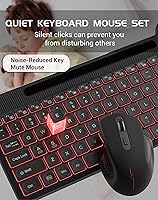
  • Silent keys and a quiet-click mouse make this ergonomic combo genuinely office-friendly in shared spaces.
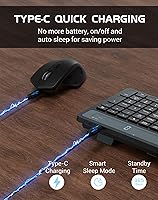
  • USB-C rechargeable design eliminates the ongoing cost and inconvenience of disposable batteries.
  • Seven backlight colors and three brightness levels give real control over low-light typing visibility.
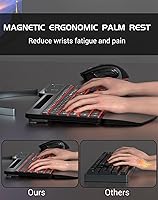
  • The magnetic wrist rest adds meaningful comfort during long typing sessions without requiring tools to attach.
  • Integrated phone holder keeps your screen visible while working, reducing the need for a separate stand.
  • A USB-C adapter is included in the box, so modern laptop users are covered without extra purchases.
  • Full-size key layout with 16 shortcut keys supports efficient, familiar typing for productivity tasks.
  • Wireless range of up to 30 feet handles most room-scale setups without signal issues.

Cons

  • The single USB receiver controls both peripherals — lose it and the entire setup stops working.
  • No companion software means backlight customization and key remapping are limited to onboard controls only.
  • The mouse shell feels noticeably lightweight and hollow, which undermines confidence in long-term durability.
  • Wrist rest can slide sideways on glass or polished desk surfaces, defeating its ergonomic purpose.
  • Real-world battery life with backlighting active is considerably shorter than the advertised standby figure.
  • The phone holder struggles to grip larger devices securely, especially those in bulky protective cases.
  • Keyboard feet grips show early wear signs on smooth surfaces, causing the unit to shift during heavy typing.
  • No Bluetooth option means one USB port is permanently occupied, which is a limitation on port-light devices.
  • The calculator lacks memory functions and percentage shortcuts that regular number-crunchers would expect.
  • Scroll wheel feedback on the mouse is soft and imprecise, which some users find unsatisfying for detailed work.

Ratings

The COUTSALL K670 Wireless Keyboard Mouse Combo scores below are generated by AI after systematically analyzing verified global user reviews, with spam, bot submissions, and incentivized feedback actively filtered out. What remains reflects the honest experience of everyday buyers — remote workers, students, and office users — who put this wireless desk set through real daily use. Both the standout strengths and the genuine frustrations are weighted transparently into every score you see here.
Typing Comfort
83%
Most users report that extended typing sessions feel noticeably less fatiguing than with standard flat keyboards, largely due to the cushioned wrist rest and the gentle key travel. The full-size layout with well-spaced keys also reduces mistyping during fast-paced work, which home office users specifically called out as a daily benefit.
A few users with larger hands found the key spacing slightly tighter than expected for a full-size board, and the key travel depth felt shallow compared to what typists coming from mechanical keyboards are used to. It is comfortable for most, but not universally so.
Backlight Quality
78%
22%
The seven color options with three brightness levels give users meaningful control over their workspace atmosphere, and several buyers specifically noted how useful the backlight is during late-night work sessions without overhead lighting. The key legends stay legible under illumination, which is not always guaranteed at this price tier.
A portion of users noted uneven backlight distribution across the key surface, with some keys appearing noticeably brighter than others. The lowest brightness setting is also still relatively bright for very dark rooms, which can be distracting for some nighttime users.
Mouse Performance
67%
33%
The three-stage DPI adjustment covers the range most everyday users need — from slower precision tasks at 800 DPI to more fluid navigation at 1600 DPI. The silent click mechanism is genuinely quiet, making it a practical choice for shared workspaces where mouse noise can become irritating over time.
Users upgrading from a quality standalone mouse frequently noted that the ergonomic shape, while adequate, lacks the refined contouring of purpose-built mice. Scroll wheel feedback also feels somewhat light, and those accustomed to higher-end sensors may notice a slight lag in cursor tracking during faster movements.
Build Quality
71%
29%
The keyboard chassis feels reasonably solid for its category, with minimal flex when pressing keys firmly. Most users found the carbon black finish held up well against everyday fingerprint smudging, and the included wrist rest attaches securely enough for daily use without rattling or misaligning during sessions.
The mouse shell in particular drew criticism for its plastic feel, with some users describing it as hollow-sounding when tapped. A few buyers also reported that the keyboard feet show early signs of wear on the rubberized grips, which can cause the unit to slide on smooth desk surfaces after extended use.
Wrist Rest Attachment
74%
26%
The magnetic connection system works well on flat desk surfaces, snapping into place without requiring any manual alignment. For users who work on wood or textured surfaces, it stays put reliably through a full workday, and the foam padding provides a softer resting surface than rigid plastic alternatives at this price.
On glass or highly polished desks, the wrist rest can shift sideways during typing without much force required, which undermines the ergonomic benefit. Several users wished for a stronger magnet or a secondary locking mechanism to make it feel more permanently attached.
Battery Life
76%
24%
Under realistic daily use of six to eight hours, most buyers report going weeks between charges for both the keyboard and mouse, which aligns reasonably well with the product's efficiency claims. The USB-C charging is a practical touch — no proprietary cables to track down, and charging while using is possible in a pinch.
The advertised 24-month standby figure applies almost exclusively to storage conditions with backlighting off, and active users with backlighting enabled report much shorter real-world cycles. A small number of buyers also experienced faster-than-expected battery drain in the mouse within the first few months.
Calculator Functionality
72%
28%
For users who frequently run quick number calculations while working — finance tasks, invoicing, basic math — the built-in calculator with its small digital display is a genuinely useful addition that removes the need for a phone or separate device. It functions reliably and the display is readable in normal office lighting.
The calculator is basic in scope, handling only standard arithmetic without memory functions or percentage shortcuts that power users might want. A few buyers also noted that the display can be hard to read at an angle or in very bright ambient light, limiting its usefulness in some desk configurations.
Phone and Tablet Holder
69%
31%
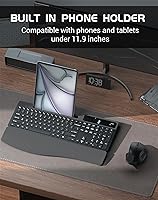
The integrated holder is stable enough for standard smartphones and smaller tablets, and users who keep a video call or recipe reference open while working found it genuinely convenient for keeping screens at eye level without a separate stand. It reduces desk clutter in a real, measurable way.
Larger tablets and phones with thick cases can feel insecure in the holder, and a few users reported their device slipping forward when the desk angle was not perfectly level. The holder is also fixed in position, so users who prefer their phone off to the side rather than above the keyboard may find it less practical.
Wireless Connectivity
86%
The 2.4GHz USB receiver delivers a stable, lag-free connection within normal desktop and home office ranges. Users working across a room or through minor obstructions reported no noticeable signal drops, and the included USB-C adapter is a thoughtful addition that saves newer laptop users from needing a separate hub.
There is only a single USB receiver for both the keyboard and mouse, meaning if that small dongle is lost, both peripherals become unusable simultaneously. A few buyers also wished for Bluetooth connectivity as a secondary option, particularly for devices with limited USB ports.
Noise Level
88%
This is consistently one of the most praised aspects across buyer reviews. Both the keyboard and mouse operate at a noticeably low volume, and users in open-plan offices or shared living spaces specifically highlighted how it allows them to work late or in meetings without being disruptive to those around them.
While quieter than average membrane keyboards, some users with particularly noise-sensitive environments — recording spaces or very quiet libraries — found the keystroke sound still slightly audible under complete silence. It is quiet, but not completely silent, which matters in specific use cases.
Setup and Compatibility
91%
The plug-and-play nature works exactly as advertised — multiple users noted it was fully operational within seconds of plugging in the receiver, with no driver installation prompts on either Windows or Mac OS. The USB-C adapter being included in the box removes a common friction point for modern laptop owners.
There is no dedicated software for remapping keys or customizing backlight patterns beyond the physical controls on the keyboard itself. Power users or those who want granular control over shortcut functions will find the lack of companion software a meaningful limitation.
Ergonomic Design
77%
23%
The combination of a tilting stand, cushioned wrist rest, and curved key layout creates a setup that most users find comfortable for multi-hour work sessions. Several buyers with prior wrist discomfort noted improvement during the first weeks of use, which speaks to the thoughtfulness of the ergonomic intent behind the design.
The ergonomic benefits are most pronounced for users with average hand sizes and neutral wrist positioning. Those with specific ergonomic needs — such as users managing carpal tunnel or looking for a split-key layout — will find this combo falls short of what purpose-built therapeutic keyboards offer.
Value for Money
84%
Considering the number of features packed in — backlit keys, rechargeable batteries, wrist rest, phone holder, and a built-in calculator — most buyers feel the price is fair for what they receive. It consistently earns praise in reviews from users who compare it favorably against piecemeal setups that would cost significantly more.
For buyers whose priority is pure typing quality or a premium mouse experience, the value equation shifts. The combo format means you are accepting mid-tier performance in each individual component, and buyers who already own a good mouse, for example, may feel they are paying for things they do not need.
Portability and Weight
66%
34%
At just under three pounds for the full package, this wireless desk set is manageable enough to move between a home office and a second desk location. The cable-free design and compact receiver make the transition between spaces reasonably convenient for users who split their time between locations.
This is not a compact or travel-friendly keyboard by any measure — the full-size layout with attached wrist rest takes up significant desk real estate and bag space. Users who travel frequently or work primarily from laptops on the go will likely find it impractical for anything beyond a fixed desk setup.

Suitable for:

The COUTSALL K670 Wireless Keyboard Mouse Combo is a strong fit for remote workers and students who want a complete, ergonomic desk setup without sourcing each piece separately. If you spend several hours a day at a fixed desk — writing reports, managing spreadsheets, or attending video calls — the cushioned wrist rest and quiet keys will make a noticeable difference by the end of the week. People who habitually prop their phone next to the keyboard to monitor messages or follow a tutorial will find the built-in holder genuinely useful rather than a novelty. It also works well for anyone setting up a secondary workstation or a shared family computer, where a reliable all-in-one kit with no software fuss is more valuable than cutting-edge individual components. Late-night workers or anyone in a dimly lit space will appreciate the backlit keys, which add practical visibility without requiring a lamp adjustment. On the compatibility front, it handles both Windows and Mac without any configuration, which makes it a sensible pick for households or small offices running mixed devices.
Not suitable for:

The COUTSALL K670 Wireless Keyboard Mouse Combo is not the right call for buyers whose top priority is typing feel or mouse precision above everything else. If you are coming from a mechanical keyboard and value that tactile feedback, the membrane keys here will feel flat by comparison — no amount of backlight makes up for that difference in the fingertips. Serious gamers should also look elsewhere; the mouse tops out at 1600 DPI with no software customization, which simply does not meet the demands of fast-paced gaming. Frequent travelers or people who want a portable setup to use across multiple locations will find the full-size layout and attached wrist rest too bulky to move around comfortably. Users who need advanced ergonomic solutions — such as a split-key layout or a vertical mouse — will find this wireless desk set too conventional for therapeutic use. And if you already own a quality standalone mouse you are happy with, the combo format means you are essentially paying for a second peripheral you will not use.
Specifications

  • Connectivity: The keyboard and mouse connect via a 2.4GHz USB wireless receiver, with a USB-C adapter included for devices that lack a standard USB-A port.
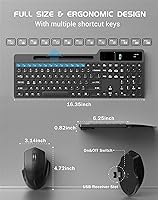
  • Keyboard Layout: Full-size layout with 112 keys and 16 dedicated shortcut keys for media, volume, and system controls.
  • Backlighting: Seven backlit color effects are available with three adjustable brightness levels, controlled directly from onboard keys.
  • Mouse DPI: The wireless mouse offers three selectable DPI levels — 800, 1200, and 1600 — switchable via a dedicated button on the mouse body.
  • Charging: Both the keyboard and mouse charge via USB-C cable, which is included in the box; no disposable batteries are required.
  • Standby Time: The keyboard is rated for up to 24 months of standby time under low-use, backlight-off conditions.
  • Wireless Range: Reliable wireless operation is supported at distances of up to 30 feet between the receiver and the peripherals.
  • Wrist Rest: A magnetic, detachable foam wrist rest attaches to the front edge of the keyboard without clips or screws.
  • Tilt Stand: A folding tilt stand on the underside of the keyboard allows for adjustable typing angle elevation.
  • Calculator: A built-in calculator with a small integrated digital display is embedded in the upper-right section of the keyboard frame.
  • Phone Holder: An integrated phone and tablet holder is built into the top edge of the keyboard, designed to prop up devices for hands-free viewing.
  • Auto Sleep: Both the keyboard and mouse feature an automatic sleep mode that activates after a period of inactivity to conserve battery charge.
  • OS Compatibility: The combo is compatible with Windows and Mac OS operating systems and requires no driver installation on either platform.
  • Package Dimensions: The packaged unit measures 17.87 x 7.68 x 2.72 inches, reflecting the full-size keyboard footprint with accessories included.
  • Package Weight: The complete package weighs 2.75 pounds, inclusive of the keyboard, mouse, wrist rest, USB receiver, and charging cable.
  • Key Noise: The keyboard uses noise-dampened membrane keys designed to minimize audible click sound during typing in shared environments.
  • Mouse Clicks: The mouse features silent-click left and right buttons engineered to reduce click noise without sacrificing tactile response.
  • Power Switches: Separate physical power switches for the keyboard backlight and the main power function allow independent control over battery consumption.
  • Included Accessories: The box includes a USB-C charging cable, a 2.4GHz USB-A receiver, a USB-C adapter, and the detachable wrist rest.
  • Manufacturer: This product is manufactured by YUNSHAN-US under the COUTSALL brand, with the unit first made available in August 2024.

Related Reviews

Arteck HW192 Wireless Keyboard and Mouse Combo

78%
78%
Build Quality
72%
Typing Experience
63%
Mouse Comfort & Ergonomics
81%
Battery Life
69%
Wireless Connectivity
More
Atelus Wireless Keyboard and Mouse Combo
83%
94%
Ease of Setup
88%
Ergonomics & Comfort
90%
Design & Aesthetics
80%
Mouse Performance
86%
Keyboard Performance
More
RECCAZR Wireless Keyboard and Mouse Combo
86%
89%
Ergonomics & Comfort
86%
Build Quality & Durability
75%
Keyboard Responsiveness
91%
Mouse Precision & Quietness
94%
Ease of Setup
More
TopMate Wireless Keyboard and Mouse Combo
77%
91%
Value for Money
78%
Typing Experience
68%
Mouse Performance
63%
Build Quality
83%
Wireless Reliability
More
Hayyiesh KG659-01 Wireless Keyboard and Mouse Combo
75%
88%
Value for Money
79%
Keyboard Comfort & Ergonomics
74%
Key Feel & Typing Experience
58%
Mouse Build Quality
86%
Noise Level
More
MARVO Wireless Keyboard and Mouse Combo
76%
91%
Value for Money
88%
Wireless Connectivity
79%
Mouse Performance
63%
Keyboard Typing Feel
67%
Ergonomics & Comfort
More
Links9+ Wireless Keyboard and Mouse Combo
85%
89%
Ergonomics and Comfort
92%
Wireless Performance and Connectivity
85%
Build Quality
94%
Ease of Use and Setup
80%
Battery Life
More
HP 18H24AA Wireless Keyboard and Mouse Combo
79%
91%
Value for Money
93%
Ease of Setup
74%
Keyboard Typing Experience
63%
Mouse Comfort & Ergonomics
86%
Wireless Reliability
More
QUASIO Wireless Keyboard and Mouse Combo

77%
88%
Value for Money
93%
Setup & Ease of Use
79%
Typing Comfort
84%
Wireless Connectivity & Range
72%
Mouse Performance
More
SABLUTE Wireless Keyboard and Mouse Combo
84%
88%
Typing Comfort
92%
Battery Life
85%
Ergonomics
73%
Connectivity Stability
80%
Backlighting Performance
More

FAQ

No, there is nothing to install. Just plug the USB receiver into your computer and both the keyboard and mouse are recognized automatically. It works the same way on Windows and Mac, which makes initial setup take about ten seconds flat.

Yes, a USB-C adapter is included in the box specifically for this situation. You plug the adapter into your MacBook, insert the wireless receiver into the adapter, and you are connected. No hub or additional purchase needed.

With the backlight active, expect considerably less runtime than the advertised 24-month standby figure, which assumes backlight-off, minimal-use conditions. In practical daily use with backlighting on for several hours, most users charge every few weeks rather than every few months. Turning the backlight off when you do not need it extends life significantly.

The cushioned magnetic wrist rest does reduce wrist strain compared to typing without support, and many users with mild wrist fatigue report noticeable improvement. That said, this is not a medical ergonomic device — if you have a diagnosed condition like carpal tunnel syndrome, a purpose-built ergonomic keyboard with a split or curved layout would be more appropriate.

It handles most standard-sized smartphones comfortably, but larger phones in bulky protective cases can feel a bit unstable in the holder. If your phone is on the bigger side — think a Pro Max model with an OtterBox-style case — it is worth testing before fully relying on it.

Backlight colors and effects are cycled through directly on the keyboard using dedicated keys — there is no companion software for this combo. Similarly, the shortcut keys are fixed functions and cannot be remapped, so what you see on the keycaps is what you get.

It is designed for Windows and Mac OS computers, so compatibility with smart TVs or consoles depends entirely on whether that device supports standard USB HID input. Some smart TVs do recognize it for basic text input, but gaming consoles typically do not support wireless keyboard combos of this type without platform-specific adapters or software.

The keys are noticeably quieter than a standard membrane keyboard and considerably quieter than any mechanical keyboard. In a typical open office, the sound is low enough to avoid drawing attention. In a very quiet library or recording environment, you might still hear a soft thud, but it is not disruptive in most real-world settings.

Yes, both can be used while charging via the USB-C cable. It is not the most elegant setup since you are briefly tethered, but it means a dead battery does not force you to stop working while they recharge.

The receiver is a single dongle that controls both the keyboard and mouse, so losing it does render the whole setup unusable wirelessly. Replacement receivers are sometimes available through the manufacturer directly, but it is worth keeping the dongle stored carefully — plugging it into a USB hub rather than a laptop port it could be knocked loose from is a practical habit worth building.