Overview

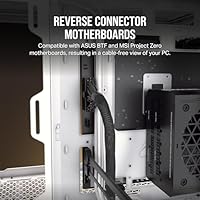
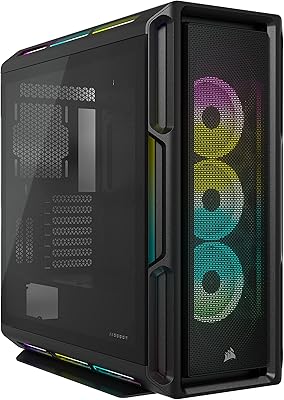
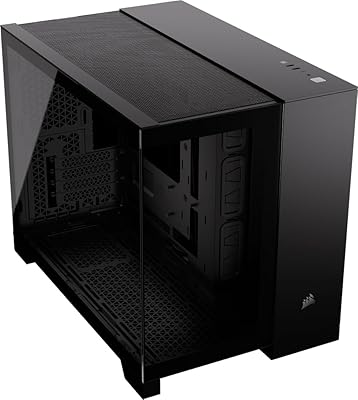
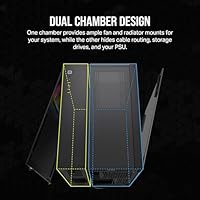
The Corsair iCUE LINK 6500X RGB PC Case is built for enthusiasts who want their rig to look as good as it performs — no compromises on either front. At the heart of this mid-tower is a dual-chamber design that physically separates your components from the mess of cables, drives, and the PSU. Two panoramic tempered glass panels wrap around the build, giving it an almost gallery-like quality. What makes this case genuinely forward-thinking is its validation for reverse-connector motherboards like the ASUS BTF and MSI Project Zero. If aesthetics drive your build decisions as much as thermals do, this is the case designed with you in mind.
Features & Benefits

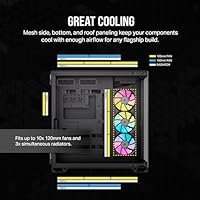
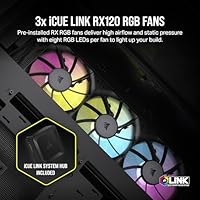
The dual-chamber layout does real work here — your PSU, cables, and storage stay tucked away in a separate compartment, so the main chamber stays clean and breathable. Corsair also ships the 6500X RGB with three RX120 RGB fans already installed and an iCUE LINK System Hub in the box, which cuts down significantly on the usual fan-wiring headache. Cooling flexibility is serious: there's room for up to ten 120mm fans and 360mm radiators across the roof, bottom, and side. The panoramic glass on two sides means you can actually appreciate all of it. Front I/O covers two USB 2.0 and two USB 3.0 ports — functional, if not exceptional.

Best For

This Corsair case makes the most sense for builders who are already invested in, or planning to build around, the iCUE LINK ecosystem for unified fan and lighting control. It's an especially strong pairing with ASUS BTF or MSI Project Zero motherboards, where the reverse-connector design eliminates visible cables entirely. Content creators and streamers who keep their rig on camera will appreciate the showpiece factor. It also suits anyone running a high-end cooling setup — multiple radiators, dense fan configurations — without wanting to move into full-tower territory. If you're upgrading from an older mid-tower and need real cable management space, this delivers it.

User Feedback

Owners consistently praise the build quality and glass clarity, and the iCUE LINK hub is frequently called out as a genuine convenience rather than a gimmick. That said, buyers at this price point are discerning, and some feel the value proposition gets competitive pressure from alternatives offering similar space at a lower cost. First-time dual-chamber builders occasionally note a steeper-than-expected learning curve during installation. A handful of users flagged iCUE software stability as a minor irritant — not a dealbreaker, but worth knowing. At nearly 33 pounds and close to 19 inches tall, it's also larger in person than some expected. Long-term satisfaction trends positive, especially among those fully committed to the Corsair ecosystem.

Pros

  • Dual-chamber design keeps cables and PSU physically hidden, resulting in a genuinely clean front chamber without heroic cable management effort.
  • Three RGB fans and an iCUE LINK hub are included, saving meaningful cost and setup time compared to buying separately.
  • Panoramic tempered glass on two sides offers an impressive, near-360-degree view of the entire build.
  • Cooling headroom is exceptional — up to ten 120mm fans and 360mm radiators across multiple mounting positions.
  • Validated for reverse-connector motherboards, enabling a fully wire-free front chamber when paired with compatible boards.
  • Steel and glass construction feels premium and holds up well over time, with no reports of warping or panel misalignment.
  • Internal volume comfortably accommodates long GPUs, tall CPU coolers, and large radiators without tight clearances.
  • iCUE LINK hub simplifies fan wiring significantly compared to managing individual fan headers on the motherboard.

Cons

  • iCUE software has a documented history of instability — fan profile resets and hub detection issues appear regularly in long-term user reports.
  • The front I/O lacks a USB-C port, which is a noticeable gap for a case at this price point in 2024.
  • At nearly 33 pounds, moving or repositioning this mid-tower after a full build is genuinely cumbersome.
  • The rear compartment can feel cramped once a large PSU, thick cable bundles, and multiple drives are installed together.
  • Included fans can produce a noticeably high-pitched tone at maximum RPM, which carries in quieter environments.
  • The reverse-connector compatibility feature only benefits buyers using a supported ASUS BTF or MSI Project Zero motherboard — a still-limited market segment.
  • Tempered glass panels are fingerprint magnets and require consistent upkeep to maintain the showpiece appearance.
  • Builders outside the Corsair ecosystem will find limited justification for the price premium compared to competing alternatives.

Ratings

The Corsair iCUE LINK 6500X RGB PC Case earns its place at the premium end of the mid-tower market, and our scores reflect an AI-driven analysis of verified buyer reviews from across global markets — with spam, bot submissions, and incentivized feedback actively filtered out. The ratings below capture where this Corsair case genuinely excels and where real builders have hit friction, so you get an honest picture before committing to a purchase at this price tier.
Build Quality
91%
Owners consistently describe the steel and tempered glass construction as solid and confidence-inspiring right out of the box. The panels fit flush, the glass resists flex under handling, and the overall assembly feels like it belongs in a higher price bracket than many competing mid-towers.
A small number of buyers reported minor sharp edges on internal metal brackets during installation, which is a recurring gripe across steel cases at this tier. It's infrequent but worth wearing gloves during the build process.
Aesthetic Design
93%
The dual panoramic glass panels are the standout feature for most buyers — the near-360-degree view of the internals turns a functional box into a display piece. Streamers and desk-setup enthusiasts in particular rate this aspect extremely highly.
The all-black exterior, while clean, divides opinion. Some buyers wanted more visual interest on the exterior panels themselves, and a few noted that fingerprints on the glass require frequent wiping to maintain the showpiece look.
RGB Lighting
88%
The three pre-installed RX120 RGB fans produce vibrant, well-distributed lighting that photographs and streams beautifully. When synced through the iCUE LINK hub, the lighting effects feel cohesive rather than chaotic, which is harder to achieve than it sounds.
Out of the box, the RGB is only as good as your willingness to engage with the iCUE software. Users who prefer hardware-level control or third-party lighting apps have reported limited flexibility, which is a genuine limitation for mixed-ecosystem builds.
Cable Management
79%
21%
The dual-chamber layout is a structural answer to cable clutter — by physically isolating the PSU and cable runs in a separate compartment, the visible build stays remarkably clean with relatively little effort compared to single-chamber cases.
Several builders noted that the rear chamber, while spacious in theory, can feel tight once a large PSU, multiple SATA drives, and thick cable bundles are packed in. First-time dual-chamber builders in particular reported more trial and error than expected.
Cooling Performance
87%
Supporting up to ten 120mm fans and 360mm radiators across three mounting positions gives builders serious thermal headroom. Users running high-end GPU and CPU combinations reported stable temperatures even under extended gaming or rendering workloads.
The three included fans are a good start, but buyers running demanding systems found they needed additional fans to fully exploit the case's cooling potential, adding to the overall build cost. Airflow optimization in the dual-chamber layout also requires some planning.
Ease of Installation
71%
29%
Experienced builders appreciated the thoughtful layout and the fact that the iCUE LINK hub simplifies fan wiring considerably. The tool-free panel removal and clearly positioned motherboard standoffs made initial assembly feel well-organized.
For builders new to dual-chamber designs, the learning curve is real. Routing cables through the correct passages, managing the rear chamber, and configuring the iCUE LINK hub simultaneously added time and frustration for a notable portion of first-time buyers.
iCUE Software Experience
66%
34%
When it works well, iCUE gives builders unified control over fans, RGB, and temperatures from a single interface — a genuine convenience that dedicated Corsair ecosystem users appreciate and rely on for day-to-day tuning.
Software stability is the most frequently mentioned long-term pain point. Some users reported crashes, fan profile resets after updates, and occasional hub detection failures. For a case at this price point, the software experience should be more polished than buyers currently report.
Reverse Connector Compatibility
89%
Validation for ASUS BTF and MSI Project Zero motherboards is a forward-thinking inclusion that a growing number of buyers specifically sought out this case for. When paired with a compatible board, the front chamber is genuinely wire-free — it looks extraordinary.
This feature only pays off if you own or plan to buy a supported motherboard, which represent a still-small slice of the market. Buyers on standard ATX boards get no practical benefit from this validation, making it a future-proofing feature rather than an immediate one.
Fan Noise Levels
74%
26%
At moderate loads and fan speeds, the included RX120 fans run quietly enough that most users in typical home environments reported no issues during everyday tasks, media playback, or casual gaming.
Under full load or when fan curves ramp up aggressively, some buyers described the noise as more noticeable than expected for a premium case. A handful noted the fans have a slightly high-pitched tone at maximum RPM that can carry in quieter rooms.
Value for Money
68%
32%
The inclusion of three RGB fans and an iCUE LINK hub genuinely offsets some of the upfront cost, and buyers who priced those components separately acknowledged they were getting a meaningful bundle advantage for the money.
At this price tier, competition from established alternatives is stiff, and several buyers felt the overall package only justified the cost if they were already committed to the Corsair ecosystem. For ecosystem-agnostic builders, the value calculus is tighter.
Size & Footprint
72%
28%
Despite being a mid-tower, the internal volume is genuinely generous — long GPUs, tall CPU coolers, and large radiators all fit without the contortions some competing cases demand. Builders with ambitious component lists appreciated the breathing room.
At nearly 33 pounds and roughly 19 inches tall, this Corsair case is noticeably larger and heavier than many buyers anticipated from product photos. Desk space and transport are real considerations — several reviewers flagged the size as a surprise upon unboxing.
Front I/O
62%
38%
Having four USB ports on the front panel covers the basics for most users — plugging in peripherals, charging devices, or connecting a headset without reaching around to the back of the build is a convenience that gets used daily.
For a premium build, two USB 2.0 ports feel dated. Builders working with USB-C peripherals or high-bandwidth external storage noted the absence of a USB-C front port as a meaningful omission, especially given what competing cases at similar prices now offer.
Glass Panel Durability
83%
The tempered glass on both panels held up well for the vast majority of owners, with no reported cracking under normal handling. Buyers who have owned the case for six months or more reported no degradation in clarity or fit.
Replacement panels are not trivially sourced if one does break, and a few buyers reported micro-scratches appearing after cleaning with unsuitable cloths. The glass is also a fingerprint magnet that requires a dedicated microfiber cloth to keep looking sharp.
Long-Term Reliability
81%
19%
Most long-term owners report that the physical case holds up well over time — no warping, no panel misalignment, and the RGB fans have continued functioning without hardware failures for the majority of users past the one-year mark.
Long-term satisfaction is more closely tied to iCUE software behavior than to the hardware itself. Users who experienced repeated software-side issues — fan profiles not persisting, hub connectivity drops — rated long-term satisfaction noticeably lower than hardware-only evaluators.

Suitable for:

The Corsair iCUE LINK 6500X RGB PC Case is built squarely for enthusiast-level builders who treat their rig as both a performance machine and a visual centerpiece. If you are already invested in the Corsair iCUE LINK ecosystem — or planning to go all-in — the included hub and pre-installed fans give you a genuine head start on a unified, low-clutter setup. Builders pairing this case with an ASUS BTF or MSI Project Zero reverse-connector motherboard will get the most out of it, achieving a front chamber that is completely free of visible cabling. Content creators and streamers who keep their PC on camera will appreciate how the dual panoramic glass turns the internals into a living display. It also suits anyone planning a serious cooling configuration — multiple radiators, dense fan arrays — who wants the internal volume of a larger chassis without committing to a full tower footprint.
Not suitable for:

The Corsair iCUE LINK 6500X RGB PC Case is a harder sell for builders who are not already committed to the Corsair ecosystem, since much of what justifies the price depends on using iCUE software and compatible components to their full potential. If software-driven fan and lighting control sounds like an annoyance rather than a convenience, the iCUE dependency will quickly become a friction point. Budget-conscious builders or those who simply need a functional enclosure without the aesthetic ambitions will find better value elsewhere at this price tier. The physical size and weight — nearly 33 pounds and close to 19 inches tall — make it impractical for small desks, LAN party transport, or compact room setups. First-time builders who are unfamiliar with dual-chamber layouts may also find the installation process more demanding than a conventional mid-tower, particularly when managing the rear compartment alongside the iCUE LINK hub setup. Anyone prioritizing front-panel USB-C connectivity should also note that the front I/O does not include it, which is an increasingly relevant omission.
Specifications

  • Case Type: Mid-Tower ATX form factor designed to accommodate standard ATX, Micro-ATX, and Mini-ITX motherboards.
  • Dimensions: The case measures 18.94″ long by 12.91″ wide by 19.53″ tall, making it larger than a typical mid-tower.
  • Weight: Fully unloaded, the case weighs 32.7 pounds, which is notably heavy for a mid-tower due to its dual-chamber steel construction.
  • Material: Primary construction uses steel for the chassis and frame, with tempered glass panels on two sides for component visibility.
  • Chamber Design: Dual-chamber layout physically separates the main component area from the PSU, cable routing, and drive storage compartment.
  • Included Fans: Three Corsair RX120 RGB 120mm fans come pre-installed in the case at the factory.
  • Fan Support: The case supports up to ten 120mm fans or up to seven 140mm fans across all available mounting positions.
  • Radiator Support: 360mm radiators can be mounted in the roof, bottom, and side positions, offering broad liquid cooling flexibility.
  • iCUE LINK Hub: An iCUE LINK System Hub is included in the box, enabling daisy-chained fan and RGB control with reduced cabling.
  • Front I/O Ports: The front panel provides two USB 2.0 ports and two USB 3.0 ports; no USB-C port is included.
  • PSU Mounting: The power supply mounts in the rear chamber at the back of the case, fully concealed from the main viewing area.
  • Motherboard Compatibility: Validated for use with ASUS BTF and MSI Project Zero reverse-connector motherboards in addition to standard ATX boards.
  • Glass Panels: Two panoramic tempered glass panels are installed on the front and side, providing a near-360-degree view of the build interior.
  • Model Number: The official Corsair model number for this case is CC-9011269-WW.
  • Color: Available in Black; the exterior uses a matte black finish on all steel surfaces.
  • Fan Size: All pre-installed and supported fans use the 120mm standard form factor, with optional 140mm compatibility at designated positions.
  • Drive Storage: Drive bays and storage mounts are located in the rear chamber, keeping the main chamber visually uncluttered.
  • Release Date: This case was first made available for purchase on March 15, 2024.

Related Reviews
Corsair iCUE Link Titan 360 RX RGB AIO
83%
88%
Thermal Performance
84%
Noise Level
91%
Installation Experience
93%
Cable Management
67%
Software & Ecosystem Integration
More
Corsair iCUE 5000T RGB Mid-Tower Case
87%
91%
Build Quality
89%
Cooling Performance
87%
Ease of Setup
92%
Design & Aesthetics
85%
Cable Management
More
Corsair iCUE Link QX120 RGB 120mm Case Fan
79%
93%
Lighting Quality
88%
Noise Level
82%
Airflow & Cooling Performance
91%
Cable Management & Daisy-Chain System
84%
Build Quality & Materials
More
Corsair iCUE 4000X RGB Mid-Tower Case
81%
88%
Build Quality
71%
Airflow Performance
93%
RGB Lighting Quality
86%
Cable Management
74%
iCUE Software Integration
More
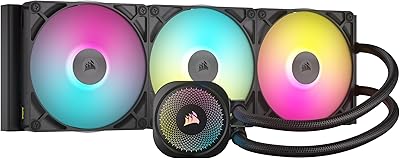
Corsair iCUE Link Titan 420 AIO Cooler
81%
88%
Thermal Performance
84%
Noise Level
93%
Cable Management
81%
Installation Experience
62%
Case Compatibility
More
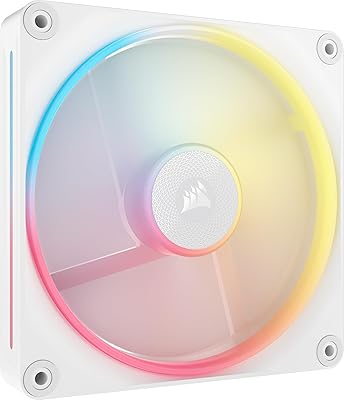
Corsair iCUE Link LX140-R RGB 140mm PWM Fan
81%
93%
RGB Lighting Quality
91%
Reversed Rotor Design
78%
Noise Level
83%
Airflow & Cooling Performance
81%
iCUE LINK Ecosystem Integration
More
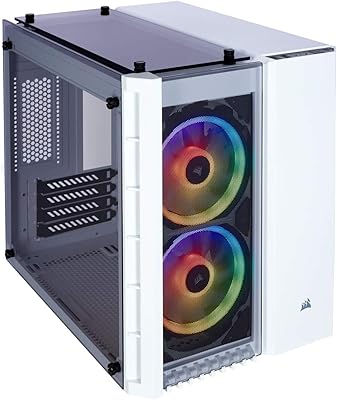
Corsair Crystal 280X RGB Micro-ATX Case
77%
94%
Aesthetics & Visual Design
91%
RGB Lighting Quality
88%
Build Quality & Materials
74%
Cable Management
87%
Cooling Potential
More
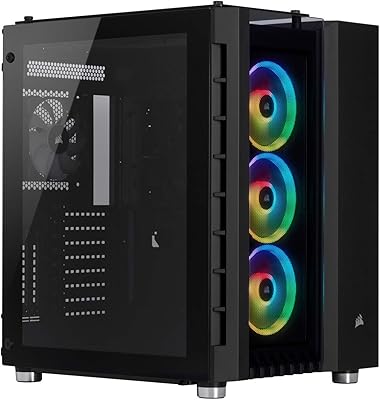
Corsair Crystal Series 680X RGB ATX Case
85%
91%
Airflow & Cooling Performance
88%
Ease of Assembly
94%
Cable Management
87%
RGB Lighting Customization
90%
Build Quality & Materials
More
Corsair 2500X Tempered Glass mATX PC Case
85%
91%
Build Quality
88%
Cooling Performance
85%
Ease of Setup
92%
Cable Management
72%
Component Fit & Space
More
Corsair FRAME 4000D RS Mid-Tower Case
82%
91%
Airflow Performance
88%
Build Quality
86%
Modularity & Upgradability
83%
Fan Mounting System
78%
GPU Compatibility
More

FAQ

It works with standard ATX motherboards without any issues — the reverse-connector compatibility is an added feature for builders using ASUS BTF or MSI Project Zero boards, not a requirement. If you are on a conventional board, you will still get all the benefits of the dual-chamber design and cooling headroom, just with cables routed in the traditional way.

The three included RX120 fans are a solid starting point, but if you are running a high-end CPU and GPU combination with a 360mm liquid cooler, you will likely want to add more fans to fill the available mounts. The case supports up to ten 120mm fans total, so there is plenty of room to expand as your cooling needs grow.

You can run the fans without iCUE installed, but the RGB lighting and fan curve customization require iCUE to function properly. The iCUE LINK hub is designed around Corsair's software ecosystem, so builders who prefer hardware-level or third-party RGB control will find their options limited with this setup.

It is manageable, but expect a steeper learning curve than a conventional single-chamber mid-tower. The main challenge is understanding which cables need to pass through which routing channels to stay hidden in the rear compartment. Taking time to plan your cable run before installing components makes a significant difference and is worth doing before you start.

Yes, the internal dimensions comfortably accommodate even the longest and thickest current-generation graphics cards. Builders using triple-fan flagship GPUs have reported no clearance problems with the main chamber layout.

At moderate fan speeds, the RX120 fans are reasonably quiet and unlikely to be noticeable in a typical home environment. At maximum RPM under heavy load, some users have noted a slightly high-pitched tone that can be audible in a quiet room, though adjusting fan curves in iCUE can bring noise levels back down if thermals allow.

The panels are designed to be removed without tools for cleaning access, which makes maintenance straightforward. For fingerprints, a dry or lightly dampened microfiber cloth works best — avoid paper towels or glass sprays, which can leave residue or micro-scratches over time.

It is noticeably larger and heavier than the average mid-tower, coming in at nearly 19 inches tall and close to 33 pounds empty. This is partly due to the dual-chamber construction requiring extra depth for the rear compartment. Make sure to measure your desk space before buying, because several owners were surprised by how much footprint it actually takes up.

Clearance between a roof-mounted 360mm radiator and tall memory modules can be tight depending on your specific cooler and RAM combination. It is worth checking the radiator thickness alongside your RAM height before committing, as some thicker radiators with fans attached may require low-profile RAM to avoid contact.

Corsair does sell replacement panels through their accessories store and authorized retailers, but they are not always immediately in stock and can take time to source. It is worth handling the panels carefully during initial installation and any future moves, as sourcing a replacement is less straightforward than with more common case designs.

Where to Buy