Overview

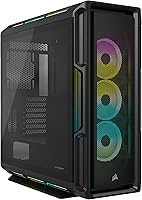
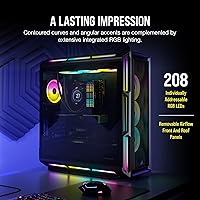
The Corsair 5000T RGB Mid-Tower PC Case arrived in early 2022 as Corsair's boldest visual statement in the 5000-series lineup — and it shows. Where most mid-towers play it safe with flat panels and understated trim, the 5000T RGB goes full angular, with contoured edges and accents that genuinely set it apart on a desk or open shelf. At its price point, it sits comfortably in enthusiast territory, competing against other premium RGB showcases. For builders already running Corsair peripherals or components, the iCUE ecosystem integration is a real draw — everything talks to everything, and that unified control matters more than it might sound on paper.

Features & Benefits

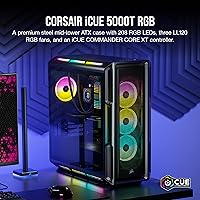
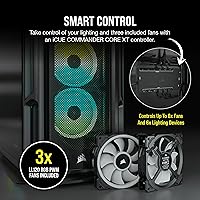
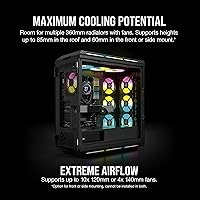
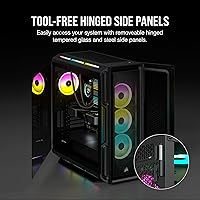
The headline number here is 208 individually addressable RGB LEDs, but what that actually means in practice is lighting that wraps around the front intake, spills across the roof, and even glows from the floor — omnidirectional coverage rather than just a front-panel gimmick. Three LL120 RGB fans come included out of the box, which trims your day-one accessory spend, and they're all managed alongside up to six PWM fans through the COMMANDER CORE XT controller. The case handles 360mm radiators in multiple mounting positions, making it a credible platform for a custom water loop. Cable routing is genuinely well-organized, and the alloy steel construction feels appropriately substantial.

Best For

This RGB case makes the most sense for builders already living in the Corsair ecosystem — if your RAM, cooler, or keyboard is already iCUE-compatible, the lighting synchronization across everything is genuinely satisfying. Gamers and streamers who keep their rig on camera or on display will appreciate how striking the 5000T RGB looks in person; it earns attention without trying too hard. It's also a solid pick for anyone planning a custom liquid cooling loop, since the flexible radiator mounting gives you real options. On the flip side, if you lean toward a clean, minimal look or would rather skip fan-management software entirely, this Corsair mid-tower probably isn't your best match.

User Feedback

Most buyers land at 4.6 out of 5, and reading through what they actually say, two things come up constantly: the RGB lighting hits harder in person than expected, and the build quality feels genuinely premium. The steel chassis earns repeat compliments for solidity. Criticisms are real, though. The iCUE software dependency frustrates users who prefer hardware-only control — you're committing to Corsair's software stack to unlock the full lighting feature set. Some builders also note that the shrouded front panel restricts airflow more than an open-mesh design would, which matters in high-TDP builds. Cable routing inside can be fiddly for first-timers. No notable patterns of LED or controller hardware failures among long-term owners.

Pros

  • 208 individually addressable RGB LEDs cover the front, roof, and floor panels for genuinely full-surround lighting coverage.
  • Three LL120 RGB fans are included in the box, meaningfully reducing what you'd otherwise spend on day-one accessories.
  • The COMMANDER CORE XT controller centralizes fan speed and RGB management for up to six PWM fans from one interface.
  • 360mm radiator support in multiple positions makes this a credible foundation for a serious custom liquid cooling loop.
  • Alloy steel construction gives the chassis a premium, solid feel that holds up well and resists flex during builds.
  • Angular, sculpted panel design stands out sharply from the generic rectangular look of most competing mid-towers.
  • Cable management channels are thoughtfully laid out, making interior cleanup easier than expected for a case this feature-dense.
  • Deep iCUE integration means every Corsair component in your build can sync lighting effects from a single software dashboard.
  • Holds a 4.6 out of 5 rating from real buyers, with consistent praise for out-of-the-box visual impact and build quality.

Cons

  • Full RGB customization requires iCUE software to be running — there is no meaningful hardware-only lighting control fallback.
  • The shrouded front intake panel restricts airflow compared to open-mesh designs, which can matter in thermally demanding builds.
  • The chassis is notably heavy, making repositioning or transporting the build more cumbersome than lighter alternatives.
  • iCUE software has a learning curve that can frustrate builders new to the Corsair ecosystem, especially for complex lighting setups.
  • At its price point, buyers not interested in RGB are paying a significant premium for aesthetics they will largely ignore.
  • Some builders report that cable routing inside the case can be fiddly, particularly for first-time or less experienced builders.
  • GPU clearance with large modern cards and simultaneously installed 360mm front radiators can be tighter than the specs suggest.
  • Long-term software support for iCUE depends entirely on Corsair continuing to maintain it, introducing a future reliability variable.

Ratings

Our scores for the Corsair 5000T RGB Mid-Tower PC Case were generated by AI after analyzing thousands of verified buyer reviews worldwide, with spam, bot submissions, and incentivized feedback actively filtered out. The resulting ratings reflect an honest synthesis of what real builders consistently praise and where genuine frustrations surface — not a curated highlight reel. Strengths and pain points carry equal weight in every category score.

Build Quality
89%
The alloy steel chassis earns consistent praise from builders who have handled a lot of plastic-heavy cases — it feels substantial the moment you lift it, and panels do not flex or rattle under normal use. Long-term owners rarely report structural issues, which counts for a lot in a case you plan to keep for years.
The weight — a direct consequence of the steel construction — is one of the more common gripes in user feedback. Moving or transporting a completed build inside this chassis is genuinely awkward, and working inside a heavy case on a desk for an extended session can be tiring for some builders.
RGB Lighting
93%
This is where the 5000T RGB genuinely earns its name — reviewers repeatedly mention being surprised by how vibrant and complete the lighting looks straight out of the box. With 208 addressable LEDs wrapping the front, roof, and floor panels, the glow is omnidirectional in a way that is rare at any price point.
The full lighting experience is locked behind iCUE software — without it running, you get a default pattern with no real customization available. For buyers who do not want to install and maintain yet another background software suite, this is a meaningful limitation that some competitors with hardware-controlled lighting simply do not impose.
Airflow Performance
67%
33%
At moderate thermal loads, the three included LL120 fans keep temperatures in a reasonable range, and builders running mid-tier CPUs and GPUs report no issues during everyday gaming or productivity tasks. The 360mm radiator compatibility also gives builders a clear upgrade path to better thermal management when needed.
The shrouded front panel is a real intake restriction, and in high-TDP builds combining a power-hungry GPU with a demanding CPU, thermal penalties under sustained load are consistently reported by users. Builders running flagship-class hardware alongside overclocked processors specifically flag this as a concern worth taking seriously before purchasing.
Cable Management
74%
26%
The routing channels behind the motherboard tray are laid out logically, and there are enough tie-down anchor points to keep things organized with some effort. Builders who take time to route carefully report clean, photogenic interiors that complement the RGB presentation particularly well.
The sheer volume of RGB and fan cables generated by the included components is the central challenge — the COMMANDER CORE XT alone creates a dense web of connections that can feel overwhelming, particularly for less experienced builders. Several reviewers mention spending significantly more time on cable management than they had anticipated.
Cooling Flexibility
86%
Support for 360mm radiators across multiple positions — front, roof, and bottom — gives builders genuine freedom when planning a custom water cooling loop, a level of flexibility that is not guaranteed at this case size. Enthusiasts building around an AIO or a custom loop consistently cite this as one of the most practical standout features.
GPU clearance becomes tight when a 360mm front radiator is paired with a very long, triple-slot graphics card, and some builders have had to choose between their preferred cooling configuration and their GPU of choice. This is worth researching carefully against your specific component combination before purchasing.
Ease of Build
71%
29%
The tool-friendly design, pre-routed cable zones, and pre-installed fans mean that an experienced builder can get a system running without repeatedly consulting the manual. The interior layout is logical, with the PSU shroud cleanly separating the power supply area from the main motherboard compartment.
First-time builders consistently flag this as a more complex case to work inside than expected, largely because the RGB wiring and controller connections add steps that a simpler build would not require. The chassis weight also makes it harder to maneuver on a desk during installation compared to lighter alternatives.
Software & Ecosystem
63%
37%
For builders already running Corsair hardware, iCUE genuinely delivers on its promise — managing fan curves, lighting profiles, and component synchronization from a single dashboard is convenient and works reliably once configured. The COMMANDER CORE XT is a capable controller that handles the full fan and lighting load without strain.
iCUE has a documented history of being resource-heavy and occasionally buggy after updates, which frustrates users who are new to the Corsair ecosystem. Any future abandonment of software support would leave the lighting and fan controller without a proper management interface, making long-term software dependency a real consideration.
Value for Money
72%
28%
The three bundled LL120 RGB fans and the included COMMANDER CORE XT controller add genuine monetary value — purchasing those components separately would cost a meaningful fraction of the case price on its own. For builders going all-in on a Corsair build, the ecosystem cohesion adds practical utility beyond just the hardware.
For builders outside the Corsair ecosystem, or those who do not prioritize RGB, the premium is difficult to justify against competitors offering better airflow or more neutral aesthetics at a lower price point. The value equation is built around a specific buyer profile and does not stretch well outside of it.
Aesthetic Design
92%
The angular panel geometry and sculpted contours set the 5000T RGB apart from the boxy, rectangular look that dominates the mid-tower market — reviewers frequently describe it as the most visually distinctive case they have owned. On a desk or open shelf, it commands attention in a way that feels deliberate rather than excessive.
The bold, angular aesthetic is a strong stylistic statement that will not suit every taste or room setup — builders going for a minimalist or professional workspace look will find it visually dominant in a way that can conflict with the surrounding environment. There is no low-key or neutral variant of this design in the lineup.
Fan Quality & Inclusion
84%
Shipping with three pre-installed LL120 RGB 120mm fans is a genuinely useful inclusion — these are mid-range fans Corsair sells separately, so getting them bundled removes a real line item from the build budget. Their PWM range allows reasonable control between quiet operation at idle and stronger airflow during demanding tasks.
The LL120 fans are solid performers but not top-tier — builders focused on maximum static pressure for dense radiator configurations often end up upgrading them anyway. Three fans also leave several available mounting positions unfilled, meaning a thorough cooling setup may still require purchasing additional fans after the initial build.
Front I/O
77%
23%
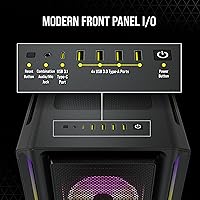
The four USB ports split between USB-A 3.0 and 2.0 cover the day-to-day needs of most builders — plugging in controllers, thumb drives, or peripherals during a session without reaching around to the rear panel is a practical convenience. The combined audio jack is a useful touch for headset users who prefer front-panel audio.
The absence of a USB-C front panel port is a notable omission for a premium case released in 2022, and reviewers with modern motherboards and USB-C peripherals specifically call this out as a missed opportunity. As USB-C continues to replace USB-A across devices, this gap will become increasingly inconvenient over the lifespan of the build.
Noise Levels
78%
22%
At lower PWM-controlled speeds during idle or light workloads, the included LL120 fans are genuinely quiet — users running moderate builds report no intrusive noise from the case during everyday use. The steel construction also helps dampen vibration better than thinner plastic-panel alternatives.
Under heavy, sustained gaming loads the fans ramp up noticeably, and the restricted front intake forces the system to work harder for sufficient airflow, pushing fan speeds higher than an open-mesh case would typically require. Builders who are particularly sensitive to fan noise in quiet environments may find this more intrusive than expected.
Interior Space & Layout
82%
18%
The interior is well-proportioned for a mid-tower, with a logical separation between the PSU bay and main build area that makes the space feel organized even before components are installed. Most standard ATX configurations fit comfortably, and the multiple radiator mounts give the layout real adaptability for different build approaches.
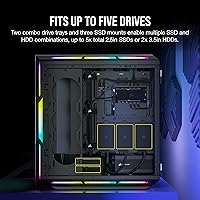
Fitting a very long GPU alongside a front-mounted 360mm radiator is the one scenario where the interior can feel tighter than the exterior dimensions suggest — it is workable with planning, but catches some builders off guard. Storage expansion options are also somewhat limited for users who need several drive bays beyond the basics.

Suitable for:

The Corsair 5000T RGB Mid-Tower PC Case was built for a specific kind of builder, and if you match that profile, it delivers in a way few cases at this tier can. If you're already running Corsair components — an AIO cooler, iCUE RAM, a Corsair keyboard or mouse — the synchronized lighting ecosystem alone makes this a compelling centerpiece. Streamers, content creators, and anyone who keeps their rig on display will find that the 5000T RGB genuinely commands attention in person; the 208 addressable LEDs wrap the entire chassis in light rather than just accenting the front panel. Builders planning a high-end water cooling loop will also appreciate the flexibility here, since 360mm radiator support across multiple positions gives you real configuration options without compromise. Mid-to-advanced builders who don't mind working with software-based fan and lighting control will find the included COMMANDER CORE XT controller a capable and centralized tool for managing the whole build.

Not suitable for:

If you're not already invested in the Corsair ecosystem, the value equation for this RGB case gets harder to justify. The full RGB experience is gated behind iCUE software, which means first-time Corsair users are signing up for a learning curve and a permanent software dependency — buyers who prefer set-it-and-forget-it hardware control will find this frustrating. The shrouded front panel design is a real airflow trade-off; in a high-TDP build running a hot GPU and CPU simultaneously, the restricted intake can push thermals higher than an open-mesh alternative would. Budget-conscious builders and minimalists should also look elsewhere — the premium is priced into the RGB presentation, and if that's not a priority for your build, you're paying for features you won't use. Finally, anyone tight on desk space or building in a cramped area should note that this is a heavy, substantial chassis that takes up meaningful room and isn't easy to reposition once placed.

Specifications

  • Case Type: Mid-Tower ATX form factor, accommodating standard ATX, Micro-ATX, and Mini-ITX motherboards.
  • Dimensions: Exterior measures 20.81″ long by 9.89″ wide by 22.03″ tall (L × W × H).
  • Material: Primary chassis is constructed from alloy steel, providing a rigid, flex-resistant build with a premium feel.
  • RGB LEDs: Features 208 individually addressable RGB LEDs integrated across the front, roof, and floor panels, plus the three included fans.
  • Included Fans: Ships with three Corsair LL120 RGB 120mm fans, each equipped with 16 individually addressable RGB LEDs.
  • Fan Speed: Included LL120 fans are PWM-controlled and operate across a speed range of 600 to 1,500 RPM.
  • Radiator Support: Supports radiators up to 360mm in multiple positions including the front intake, roof, and bottom of the chassis.
  • Fan Controller: The bundled iCUE COMMANDER CORE XT manages up to six PWM fans and operates dual independent RGB lighting channels.
  • PSU Mount: Power supply installs in a rear-bottom shrouded bay, isolating PSU cables from the main motherboard compartment.
  • Front I/O: Front panel provides two USB-A 3.0 ports, two USB-A 2.0 ports, and a combined headphone and microphone audio jack.
  • Motherboard Fit: Officially supports Mini-ITX and ATX form factors, with likely compatibility for E-ATX boards within standard width limits.
  • Lighting Software: Full RGB customization and synchronized lighting control require Corsair iCUE software, available free for Windows and macOS.
  • Cooling Method: Supports both air and liquid cooling, with dedicated radiator mounts accommodating configurations up to 360mm.
  • Model Number: Official Corsair model code is CC-9011230-WW, used for warranty registration and replacement part identification.

Related Reviews
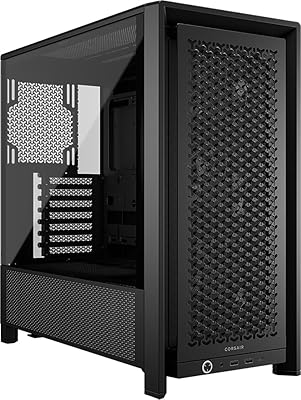
Corsair FRAME 4000D RS Mid-Tower Case
82%
91%
Airflow Performance
88%
Build Quality
86%
Modularity & Upgradability
83%
Fan Mounting System
78%
GPU Compatibility
More
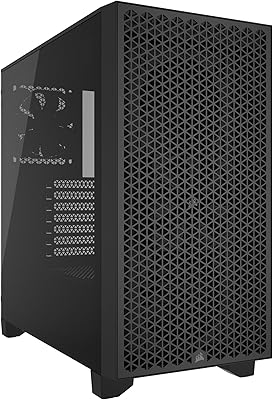
Corsair 3000D Airflow Mid-Tower PC Case
81%
93%
Airflow Performance
88%
Build Quality & Materials
91%
Thermal Management Design
84%
Cable Management
61%
Included Fans Quality
More
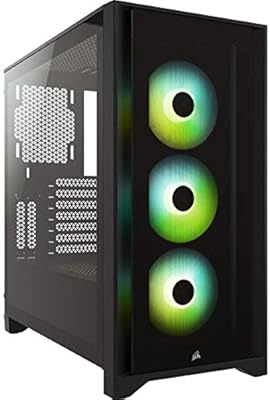
Corsair iCUE 4000X RGB Mid-Tower Case
81%
88%
Build Quality
71%
Airflow Performance
93%
RGB Lighting Quality
86%
Cable Management
74%
iCUE Software Integration
More
Corsair 3500X ARGB Mid-Tower PC Case
78%
93%
Aesthetic Design
91%
ARGB Lighting
88%
Build Quality
87%
Interior Space
86%
Fan Inclusion
More
Corsair iCUE LINK 6500X RGB PC Case
79%
91%
Build Quality
93%
Aesthetic Design
88%
RGB Lighting
79%
Cable Management
87%
Cooling Performance
More
NZXT H5 Flow RGB Mid-Tower PC Case

83%
93%
Airflow Performance
54%
Noise Level
82%
Build Quality
91%
Ease of Building
84%
Cable Management
More
SAMA V60 Mid Tower PC Case
80%
93%
Out-of-Box Cooling Value
78%
Airflow Performance
91%
AIO & Radiator Flexibility
88%
Tempered Glass & Aesthetics
71%
Build Quality & Materials
More
SAMA S40 Mid Tower ATX PC Case
79%
88%
Airflow Performance
83%
Included Fan Quality
79%
Build Quality & Finish
92%
GPU Compatibility
61%
Cable Management
More
NZXT H6 Flow RGB Mid-Tower Case
80%
88%
Build Quality & Materials
84%
Airflow Performance
91%
Cable Management
79%
Glass Panel Quality
82%
Included RGB Fans
More
Zalman S4 Mid-Tower ATX PC Case
75%
72%
Build Quality
88%
Value for Money
91%
Ease of Assembly
67%
Airflow Performance
63%
Cable Management
More

FAQ

Not for basic lighting — the case will display a default lighting pattern on first boot without any software installed. However, if you want to customize colors, set effects, sync with other Corsair components, or adjust fan curves, iCUE is required. Think of the out-of-box lighting as a demo mode; real control lives entirely inside the software.

Not in the same position — a 360mm front radiator replaces the three 120mm fan slots at the front intake, so you cannot use both there simultaneously. You can relocate the included fans to other available mounts on the roof or rear, but it does require planning your cooling layout before you start the build.

Corsair officially lists ATX and Mini-ITX support, but many E-ATX boards will physically fit depending on their exact width — boards up to around 272mm wide generally clear without issue. If you are running an oversized E-ATX board, cross-reference its exact dimensions against Corsair's official support documentation before purchasing.

It is manageable, but the sheer number of RGB and fan cables generated by the included components adds up faster than you might expect. The case has a reasonable set of routing channels and anchor points behind the motherboard tray, but first-time builders should set aside extra time. Experienced builders will handle it fine with a bit of patience.

It can, and it is worth being honest about. The shrouded front panel restricts intake airflow compared to an open-mesh design, and in builds combining a power-hungry GPU with a demanding CPU, you may see temperatures run a few degrees Celsius higher under sustained load. For mid-range systems, the difference is largely negligible, but enthusiast-tier builds pushing thermal limits should factor this trade-off into their planning.

Without a front radiator, the case accommodates graphics cards up to approximately 420mm in length. With a 360mm front radiator installed, that clearance shrinks considerably, and very long triple-slot cards may not fit cleanly alongside it. Always check your specific GPU length against the radiator depth before committing to a front-mounted liquid cooling setup.

Yes — you can bypass the controller and plug the fans directly into your motherboard PWM headers for speed control. The catch is that you will lose all RGB lighting control for those fans, since the LEDs are managed through the iCUE controller and not the motherboard. If avoiding iCUE software entirely is a priority, this is not the ideal case for that workflow.

It can work for a first build, but it adds complexity that a simpler case would not. Between the COMMANDER CORE XT wiring, the volume of RGB connectors, and the iCUE software setup, there is more to manage here than in a typical beginner-friendly case. If the aesthetics are the draw, go in with extra time budgeted and follow a build guide that covers Corsair controller wiring specifically.

The chassis supports up to seven 120mm fan positions — three at the front, three on the roof, and one at the rear. The bundled COMMANDER CORE XT handles up to six PWM fan connections, so you can manage nearly every slot without adding a separate hub. If you fill all seven positions, one fan will need to connect directly to a motherboard header.

Based on available user feedback, neither the LED panels nor the controller show a notable pattern of early hardware failure — most long-term owners report both remaining stable well into their build's lifespan. The more practical reliability concern is software: future operating system updates or iCUE version changes occasionally introduce compatibility hiccups, which is worth keeping in mind for a build you plan to run for several years.

Where to Buy

Performance-PCs.com
In stock $359.95
Grooves-Inc.com
In stock $378.43

