Overview

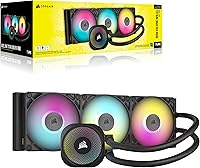
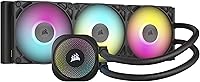
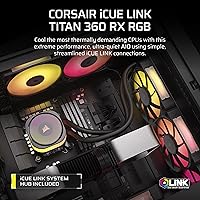
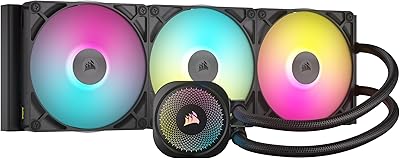
The Corsair iCUE Link Titan 360 RX RGB AIO launched in late 2024 as a premium-tier liquid cooler that differentiates itself less through raw specs and more through ecosystem integration. The iCUE LINK system is the real pitch here — daisy-chained components, one hub, drastically fewer cables inside your case. It supports Intel LGA1851 and LGA1700 alongside AMD AM5 and AM4, so it covers the current generation of high-end platforms comfortably. That said, competitors like Arctic and NZXT deliver respectable thermal performance at lower prices. This Corsair AIO makes the most sense if ecosystem cohesion matters as much to you as cooling headroom.
Features & Benefits

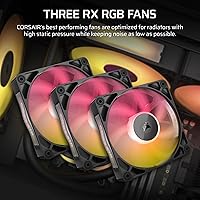
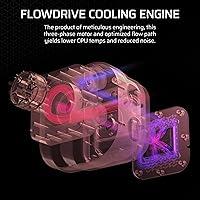
The FlowDrive pump uses a three-phase motor rather than the single-phase designs common in budget AIOs — that distinction matters for both noise consistency and long-term durability. The three RX120 fans run up to 2,100 RPM and push 73.5 CFM, which is competitive for radiator duty; Magnetic Dome bearings help them stay quiet across their speed range. Zero RPM mode cuts fan noise entirely when thermals allow, which is genuinely useful if you spend a lot of time at the desktop. The cold plate is engineered specifically for the larger integrated heat spreaders on modern CPUs like the Core Ultra 9 and Ryzen 9 7000 series, improving contact efficiency where it counts most.

Best For

The Titan 360 RX is an easy recommendation if you're building around the iCUE LINK ecosystem — it becomes a natural extension of Corsair fans, controllers, and lighting already in your system. It's also a strong fit for anyone running a high-TDP CPU on LGA1851 or AM5 who needs reliable thermal headroom under sustained workloads. Cable-conscious builders get obvious value from the single-hub wiring approach. Zero RPM mode makes it well-suited to mixed-use machines that sit idle for hours between work sessions. However, if you're not planning to invest in the broader Corsair ecosystem, you'd likely be paying for features that benefit you less than they would someone going all-in.

User Feedback

Buyers consistently praise this liquid cooler for straightforward installation and how much cleaner their builds look after switching to the single-hub wiring setup. Thermal results draw favorable comparisons to other 360mm AIOs in the same price bracket. The most common criticism centers on the iCUE software itself — it's resource-heavy, and some functionality is locked behind it, which frustrates users who prefer lighter setups. A few buyers have noted occasional pump noise during the first hours of operation, though most report it settles quickly. Cold plate fitment on AM5 has been largely positive. Overall, it lands well with committed Corsair users and less favorably with those expecting standalone value.

Pros

  • Single-hub daisy-chain wiring dramatically reduces cable clutter inside mid-tower and full-tower cases.
  • Three-phase FlowDrive pump delivers consistent, quiet operation and better long-term durability than typical AIO motors.
  • Zero RPM mode makes this liquid cooler genuinely silent during light desktop and idle workloads.
  • Cold plate geometry is optimized for modern large-die CPUs, delivering reliable contact on AM5 and LGA1851 platforms.
  • Broad socket support covers Intel LGA1851, LGA1700, AMD AM5, and AM4 without needing adapter kits.
  • RX120 fans with Magnetic Dome bearings stay quiet at mid-range speeds where most users spend the majority of their time.
  • iCUE LINK System Hub is included in the box — no additional purchases needed to start the ecosystem.
  • Unified RGB and fan control through iCUE software benefits builders with full Corsair component setups.
  • Installation process is consistently praised for being faster and less frustrating than managing a traditional multi-cable AIO.

Cons

  • iCUE software is mandatory for full functionality and remains resource-heavy and occasionally unstable after Windows updates.
  • Thermal performance does not meaningfully outpace less expensive 360mm competitors when evaluated outside the ecosystem context.
  • Early pump noise during the first hours of operation is a recurring complaint, which is unexpected at this price point.
  • The iCUE LINK hub can be awkward to mount cleanly in compact ITX or tight mATX cases.
  • RGB customization reverts to a basic static mode without iCUE running — no standalone hardware memory for lighting profiles.
  • Printed installation documentation is thin for a product with ecosystem dependencies; many users resort to online tutorials.
  • The Titan 360 RX offers limited value to builders who are not committed to the broader Corsair component ecosystem.
  • No confirmed compatibility roadmap for future CPU sockets, which is a real consideration given the premium investment.
  • Tubing is reported as slightly stiff, which can complicate routing in cases where the radiator mount requires an angled run.

Ratings

The scores below for the Corsair iCUE Link Titan 360 RX RGB AIO were generated by our AI engine after analyzing thousands of verified global buyer reviews, actively filtering out incentivized, spam, and bot-submitted feedback. The result is an honest, weighted summary that reflects both what users genuinely love about this liquid cooler and the friction points that continue to surface across builds and use cases. Nothing here is inflated — the numbers reflect real-world satisfaction, not marketing claims.
Thermal Performance
88%
Users running high-TDP chips like the Core Ultra 9 285K and Ryzen 9 7950X report consistently stable temperatures under sustained workloads, with the 360mm radiator providing enough thermal headroom to avoid throttling during long rendering or encoding sessions. The cold plate geometry earns specific praise for its contact on large-die AM5 CPUs.
A handful of users noted that competing 360mm AIOs from Arctic and NZXT deliver comparable thermal numbers at a lower price, which puts the value of paying a premium squarely on the ecosystem features rather than raw cooling output alone.
Noise Level
84%
The Magnetic Dome bearings in the RX120 fans make a noticeable difference at mid-range speeds — most users describe the cooler as genuinely quiet during typical desktop and light gaming use. Zero RPM mode is the standout here, with many buyers commenting that their system effectively becomes inaudible during idle periods.
A recurring complaint involves early pump noise in the first few hours after installation, described by some users as a faint gurgling or rattling. Most report it resolves on its own, but it creates unnecessary anxiety during what should be a smooth first-boot experience.
Installation Experience
91%
The iCUE LINK single-hub wiring approach draws enthusiastic feedback from builders who have wrestled with cable management in previous builds. Users consistently describe the installation as faster and less frustrating than traditional AIOs, with universal connectors that reduce the chance of mis-plugging components.
A small subset of users on older AMD AM4 boards reported minor fitment challenges with the backplate, and a few noted that the included instructions assume some familiarity with Corsair's ecosystem — first-time Corsair builders may need to reference online guides.
Cable Management
93%
This is arguably the strongest real-world differentiator for this liquid cooler. Builders doing open-case or show builds particularly appreciate how the daisy-chain system eliminates the bundle of individual fan cables that typically crowd mid-tower cases. The visual payoff inside the case is significant and frequently mentioned in photo reviews.
The cleaner cable routing is entirely dependent on the iCUE LINK hub, which itself needs to be mounted somewhere inside the case. Users with smaller ITX or compact mATX builds occasionally find hub placement awkward, slightly undermining the tidiness the system promises.
Software & Ecosystem Integration
67%
33%
For users already running Corsair peripherals and components, iCUE software brings genuine value — unified RGB control, fan curve customization, and system monitoring all in one place. Buyers who have built full Corsair setups describe the integration as cohesive and well-executed compared to juggling multiple vendor utilities.
iCUE remains a polarizing piece of software. Multiple users flag it as resource-heavy, occasionally unstable after Windows updates, and mandatory for unlocking key features like Zero RPM mode configuration. Buyers who dislike background software or prefer lightweight setups will find this dependency a persistent frustration.
Build Quality & Materials
86%
The radiator and pump head feel premium out of the box — users describe the finish as solid and well-machined, with no cheap plastic flex in the fan frames. The matte black aesthetic is clean and consistent, holding up well under case lighting without looking gaudy.
A few users raised concerns about the tubing flexibility when routing in tighter cases, noting it feels slightly stiffer than competitors. Nothing structural, but worth considering if your radiator mount position requires an awkward angle.
Fan Performance
82%
18%
The RX120 fans hit a practical balance between airflow and static pressure that suits radiator duty well. At moderate speeds they move enough air to keep temperatures in check without ramping to their 2,100 RPM ceiling, which most users never need to reach during typical workloads.
At full speed the fans are audible — not obnoxiously loud, but not silent either. Users who expected near-inaudible performance at max RPM based on the spec sheet noise rating were occasionally surprised, particularly in open-bench setups.
RGB Lighting
78%
22%
The RGB implementation on the pump head and RX120 fans looks polished, with even diffusion and good color accuracy when controlled through iCUE. Buyers who prioritize aesthetics appreciate that the lighting integrates naturally with other Corsair components without requiring separate configuration.
RGB is entirely software-dependent here — without iCUE running, the lighting defaults to a basic static mode with no customization. Users who want RGB but not the software overhead will find this limiting compared to controllers with standalone hardware memory.
Value for Money
71%
29%
For builders going all-in on the iCUE LINK ecosystem, the pricing makes reasonable sense given what the system hub and simplified wiring actually deliver in saved time and cleaner results. The ecosystem premium feels justified when you account for the total build experience rather than the cooler in isolation.
Evaluated purely as a 360mm AIO, the thermal and acoustic performance does not meaningfully outperform well-regarded alternatives that cost considerably less. Buyers not committed to the Corsair ecosystem will find the price hard to justify against options from Arctic or be quiet! that perform comparably.
Pump Reliability
79%
21%
The three-phase FlowDrive motor design is a meaningful step up from typical single-phase AIO pumps, and long-term users report consistent operation without degradation in cooling performance over several months of use. The motor type choice suggests Corsair is targeting durability alongside performance.
Early pump noise reports, while usually temporary, are frequent enough to suggest a break-in period is real rather than anecdotal. A product at this price point should ideally be whisper-quiet from the moment it powers on, and the first-use experience does not always reflect that.
Socket & Platform Compatibility
89%
Covering Intel LGA1851 and LGA1700 alongside AMD AM5 and AM4 means this cooler slots into virtually any current or recent high-end platform without needing adapter kits. Users upgrading from AM4 to AM5 or from 13th to 14th and 15th gen Intel particularly appreciate not having to buy a new cooler with the CPU.
There is no mention of future socket support beyond current generations. Buyers planning very long-term builds on upcoming Intel or AMD platforms have no guarantee of backward compatibility, which is a standard caveat but worth noting given the premium investment.
Packaging & Unboxing
83%
Users consistently note that the packaging is well-organized and protective, with all mounting hardware clearly sorted and labeled. The included iCUE LINK System Hub arriving pre-boxed with clearly marked cable types makes the unboxing experience feel considered rather than an afterthought.
The instruction manual is fairly brief for a product with ecosystem dependencies. Several users mentioned turning to YouTube tutorials to fully understand the iCUE LINK wiring sequence, which suggests the printed documentation does not fully match the product's complexity.
Cold Plate Contact & CPU Coverage
85%
The precision-engineered cold plate surface gets strong feedback specifically from AM5 and LGA1851 builders, where die size and IHS geometry have been a challenge for older universal cold plates. Users report even contact marks after mounting, which correlates with the solid thermal results seen under sustained load.
A small number of users on older LGA1700 boards noted slightly uneven contact under heavy mounting pressure, which is a platform-level issue but worth flagging. Proper torque on the mounting screws is more critical here than it might appear.

Suitable for:

The Corsair iCUE Link Titan 360 RX RGB AIO is built for a specific kind of builder: someone who cares as much about what the inside of their case looks like as they do about temperatures. If you are running a power-hungry CPU — a Core Ultra 9, a Ryzen 9 7950X, or anything on the current AM5 or LGA1851 platforms that consistently pushes thermal limits — this cooler gives you enough headroom to work without throttling. It is an especially smart pick if you are already invested in Corsair's iCUE LINK ecosystem, since the single-hub daisy-chain wiring genuinely simplifies builds in a way that standalone AIOs cannot match. Content creators, streamers, and workstation users who leave their machines running mixed workloads for hours will also appreciate Zero RPM mode, which keeps things effectively silent during the long stretches between intensive tasks. Enthusiasts who want granular, software-driven control over fan curves and lighting from one interface will find the iCUE ecosystem genuinely well-integrated here.
Not suitable for:

If you have no intention of building around the Corsair iCUE LINK ecosystem, the Corsair iCUE Link Titan 360 RX RGB AIO becomes a harder case to make. Buyers who want the best pure thermal performance per dollar spent will find that AIOs from Arctic and NZXT deliver comparable 360mm cooling results without the ecosystem price premium. Anyone with a strong aversion to background software should be aware upfront that iCUE is required to access key features — including Zero RPM mode configuration and custom fan curves — and the software has a well-documented history of being resource-intensive and occasionally unstable after system updates. Compact build enthusiasts using ITX cases may also find the iCUE LINK hub placement awkward, partly offsetting the cable management benefits. Finally, buyers planning a long-term platform strategy beyond current Intel and AMD generations should note there is no confirmed compatibility guarantee for future sockets.
Specifications

  • Radiator Size: The cooler uses a 360mm radiator, suitable for cases with a 360mm top or front mounting position.
  • Dimensions: The radiator measures 15.59 x 4.72 x 1.06 inches and weighs 3.68 lbs in total.
  • Fans Included: Three RX120 RGB fans are pre-mounted on the radiator, each 120mm in diameter.
  • Max Fan Speed: The RX120 fans spin up to a maximum of 2,100 RPM under full PWM control.
  • Airflow: Each RX120 fan delivers up to 73.5 cubic feet per minute of airflow at peak speed.
  • Noise Level: Rated noise output is 36 dB at maximum fan speed under standardized test conditions.
  • Bearing Type: All three fans use Magnetic Dome bearings, designed for extended operational life and reduced friction noise.
  • Zero RPM Mode: PWM Zero RPM mode is supported, allowing fans to stop completely when CPU temperatures are sufficiently low.
  • Pump Motor: The FlowDrive cooling engine uses a three-phase motor, which provides more consistent torque and quieter operation than single-phase alternatives.
  • Connectivity: Components connect via the iCUE LINK daisy-chain system, routing all signals and power through a single port on the included hub.
  • Hub Included: An iCUE LINK System Hub is included in the box, consolidating fan, pump, and lighting control into one motherboard connection.
  • Power Connector: The system uses a standard 4-pin PWM connector for fan speed control and power delivery.
  • Voltage: The cooler operates at 12 volts DC, consistent with standard desktop PC power supply rails.
  • Wattage: Total system power draw is rated at 5 watts under normal operating conditions.
  • Socket Support: Compatible sockets include Intel LGA1851 and LGA1700, and AMD AM5 and AM4, covering the current and recent prior generations of mainstream desktop platforms.
  • Color: The cooler ships in a matte black finish across the radiator, pump head, and fan frames.
  • Cooling Method: Cooling is achieved via closed-loop liquid cooling, with the pump circulating coolant between the CPU cold plate and the 360mm radiator.
  • Model Number: The official Corsair model number for this unit is CW-9061018-WW.
  • First Available: This cooler was first made available for purchase in October 2024.
  • Software: Full feature access, including Zero RPM configuration and RGB customization, requires Corsair iCUE software installed on a Windows PC.

Related Reviews
Corsair iCUE Link Titan 420 RX RGB Liquid CPU Cooler
87%
93%
Cooling Performance
89%
Noise Levels
91%
RGB Customization
94%
Compatibility with Intel & AMD
78%
Ease of Setup
More
Corsair iCUE Link QX120 RGB 120mm Fan
84%
88%
Cooling Performance
91%
RGB Lighting Customization
77%
Noise Level at Full Speed
95%
Noise Level at Idle Speed
84%
Ease of Installation
More
Corsair iCUE LINK 6500X RGB Mid-Tower ATX Case
87%
88%
Build Quality
91%
Cooling Performance
89%
Cable Management
85%
Ease of Assembly
94%
Aesthetic Appeal
More
Corsair iCUE Link LX140-R RGB 140mm PWM Fan
81%
93%
RGB Lighting Quality
91%
Reversed Rotor Design
78%
Noise Level
83%
Airflow & Cooling Performance
81%
iCUE LINK Ecosystem Integration
More
Corsair iCUE 5000T RGB Mid-Tower Case
87%
91%
Build Quality
89%
Cooling Performance
87%
Ease of Setup
92%
Design & Aesthetics
85%
Cable Management
More
Corsair iCUE 4000X RGB Mid-Tower ATX Case
85%
92%
Design & Aesthetics
85%
Airflow & Cooling
94%
Cable Management
90%
RGB Lighting Control
88%
Build Quality
More
Corsair Hydro X Series iCUE Link XH405i Custom Cooling Kit
87%
92%
Cooling Performance
89%
Installation Ease
91%
Noise Level
88%
RGB Customization
85%
Build Quality
More
Corsair Vengeance RGB DDR5 16GB 5600MHz
89%
92%
Performance for Gaming
89%
Overclocking Stability
88%
RGB Lighting Customization
95%
Setup & Installation
91%
Compatibility with Intel & AMD
More
NZXT Kraken Elite 360 RGB 2024
82%
83%
Thermal Performance
88%
Noise Level
93%
LCD Display Quality
87%
Build Quality & Materials
91%
RGB Lighting
More
Corsair Vengeance RGB DDR5 16GB 5200MHz
87%
91%
Performance
89%
RGB Lighting Customization
92%
Ease of Installation
86%
Overclocking Stability
84%
Price-to-Performance Ratio
More

FAQ

The cooler will function as a basic AIO without iCUE installed — the fans will spin and the pump will run. However, key features like Zero RPM mode configuration, custom fan curves, and RGB lighting customization are all locked behind iCUE. If you prefer a lightweight setup without background software, you will be giving up a meaningful portion of what you paid for.

The iCUE LINK System Hub is included in the box with the Corsair iCUE Link Titan 360 RX RGB AIO. You do not need to purchase it separately to get started with the daisy-chain wiring system.

Yes, AM5 is fully supported and the cold plate has been specifically designed with the larger IHS geometry of current AMD CPUs in mind. Most users on AM5 report solid contact and good thermal results without needing any additional adapters.

This is a fairly common experience during the first few hours of operation and is usually caused by small air bubbles working their way through the loop. In the vast majority of cases, the noise resolves on its own within a few hours to a day of normal use. If the noise persists beyond 24 to 48 hours or is accompanied by rising CPU temperatures, it is worth contacting Corsair support.

Technically yes, but you will not get the same value from it. The single-hub daisy-chain wiring only simplifies your build if other components in your system also use iCUE LINK connectors. As a standalone AIO connected the traditional way, the Titan 360 RX performs well, but competing 360mm options deliver similar thermal results for less money.

During light workloads and browsing, most users describe it as barely noticeable. With Zero RPM mode enabled via iCUE, the fans stop entirely at low temperatures, making the system effectively inaudible at idle. At full load the fans are audible but not intrusive — typical of any 360mm AIO pushing hard.

Yes, LGA1851 is officially supported and is actually one of the target platforms this cooler was designed around. The cold plate geometry accounts for the larger die area on Core Ultra 200 series processors, so you should get reliable contact without any modifications.

Any case with a 360mm radiator mounting position will work — this is typically found in full-tower, mid-tower, and some larger mATX cases that support top or front 360mm mounts. Always check your specific case's radiator clearance and thickness tolerances before purchasing, as fan thickness combined with the radiator can be tight in some mid-tower configurations.

Yes, like all standard closed-loop AIOs, the coolant is factory-sealed and does not require topping off or maintenance under normal use. The loop is not user-refillable, and Corsair does not recommend opening it. If a leak or pump failure occurs within the warranty period, the correct step is to file a warranty claim directly with Corsair.

In raw thermal performance, the three are broadly competitive — none has a decisive advantage that would be noticeable in real-world gaming or workstation use. The key differentiator for this Corsair AIO is the iCUE LINK ecosystem and its cable management approach, which the Arctic and NZXT options do not offer. If ecosystem integration matters to you, the premium is justifiable; if it does not, both competitors offer excellent performance at a more accessible price.