Overview

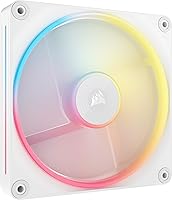
The Corsair iCUE Link LX140-R RGB 140mm PWM Fan arrives as a direct answer to one of PC building's most persistent annoyances: intake fans that hide their RGB ring against the case panel. By flipping the rotor orientation, Corsair keeps the light-emitting side facing outward even when the fan pulls air inward. It slots into the iCUE LINK ecosystem, daisy-chaining to other fans via bridge connectors and running back to a hub on a single cable. Built on a Magnetic Dome Bearing, it targets builders who want longevity and lower noise alongside the aesthetics. Released in late 2024, it is clearly aimed at mid-to-high-end windowed builds.
Features & Benefits

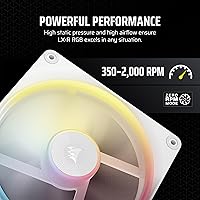
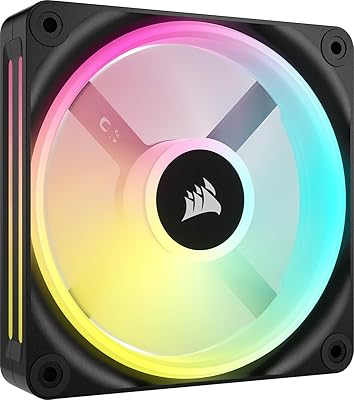
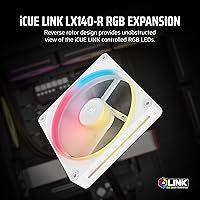
The reversed rotor design is the headline feature here. Most standard fans, when mounted for intake, end up with the motor hub and cable side facing outward — hiding the LEDs behind the frame. This reverse-rotor fan sidesteps that entirely. Its 18 LEDs are arranged across two distinct loops — inner and outer — creating a layered glow rather than a flat ring of light. PWM control spans a wide range, with a Zero RPM mode that cuts the fan entirely under light loads, keeping things whisper-quiet at idle. Static pressure sits high enough to push air through a radiator effectively, so this is not purely a show fan.

Best For

The LX140-R RGB makes most sense for builders putting together windowed, aesthetic-forward cases where intake fans are visible and the lighting actually matters. If you are already in the Corsair iCUE ecosystem — using their hubs, controllers, or other LINK fans — adding this fits without friction. It also works well on AIO radiator mounts where you want decent static pressure without sacrificing the look. Frequent upgraders will appreciate the QuikTurn screws that make pulling and reinstalling fans less of a chore. If you are building a strictly performance-first rig with no window panel, the visual premium here probably is not the right fit.

User Feedback

Buyers consistently praise the lighting quality and — perhaps more often — simply the fact that the reversed rotor actually works as advertised. Seeing the RGB face outward on an intake mount without awkward workarounds earns genuine appreciation. The iCUE LINK connector system gets positive marks for reducing cable clutter, though some note the hub is sold separately, which adds to the overall cost when buying multiple fans. On the noise front, most find it acceptably quiet at mid-range speeds, though a handful flag that pushing it toward max RPM produces noticeable turbulence. A few users on older systems report iCUE software hiccups, though this tends to be a software update issue rather than a hardware fault.

Pros

  • The reversed rotor design keeps RGB fully visible during intake mounting — a genuinely useful fix, not a gimmick.
  • Dual inner and outer LED loops create a layered lighting effect that looks noticeably richer than single-ring fans.
  • Zero RPM mode makes this reverse-rotor fan completely silent during light desktop use or idle states.
  • Static pressure is high enough to use on AIO or custom loop radiators, not just open case panels.
  • Bridge connectors reduce cable clutter significantly when chaining multiple fans back to a single hub port.
  • QuikTurn screws make fan removal and reinstallation fast — a real convenience for iterative builders.
  • The Magnetic Dome Bearing runs quietly at mid-range speeds and is built for long-term reliability.
  • iCUE integration allows lighting sync across an entire Corsair peripheral setup from one software interface.
  • The white finish is clean, consistent, and holds up well visually inside a themed build over time.
  • PWM range is wide enough to balance near-silent operation with meaningful performance headroom when loads spike.

Cons

  • The iCUE LINK hub is sold separately, adding real cost when buying enough fans to fill a case.
  • iCUE software can be resource-heavy and occasionally unstable, particularly after major version updates.
  • At full speed, fan noise becomes noticeably turbulent compared to some competing 140mm options.
  • Only available in white — builders with dark or mixed-theme cases have no reversed rotor alternative from Corsair.
  • Long-term bearing reliability data is still limited given the product only launched in late 2024.
  • A few users report brief spin-up judder at very low RPM, noticeable in otherwise silent environments.
  • LED brightness can vary slightly between individual fan units, which shows when fans are mounted side by side.
  • The iCUE LINK connector can be fiddly to route neatly inside smaller or more cramped mid-tower cases.
  • Setup instructions for the daisy-chain system are too minimal for first-time LINK users without external help.
  • Pure performance buyers will find cheaper 140mm fans that move equivalent air without the RGB premium.

Ratings

The Corsair iCUE Link LX140-R RGB 140mm PWM Fan scores below are generated by AI after analyzing verified global buyer reviews, with spam, bot-submitted, and incentivized feedback actively filtered out. This reverse-rotor fan earned strong marks in several areas, but real-world users also surfaced a handful of recurring pain points that are reflected here without sugarcoating. Both the highlights and the frustrations are represented fairly so you can make a genuinely informed decision.
RGB Lighting Quality
93%
The dual light loop layout — with LEDs running both an inner and outer ring — produces a noticeably richer, more dimensional glow than single-ring competitors. Builders in windowed white cases consistently report that the lighting looks polished even without tweaking iCUE profiles out of the box.
A small number of users noticed slight LED brightness inconsistency between units in a multi-fan setup, which becomes more visible when fans are mounted side by side. This is not universal, but it is worth inspecting closely if visual uniformity is critical to your build.
Reversed Rotor Design
91%
This is the fan's defining practical feature, and buyers who understand it tend to rate it highly. Mounting it as an intake fan on a front panel keeps the illuminated face pointing outward through the mesh, which standard fans simply cannot do without ugly workarounds like reversing the airflow direction entirely.
Buyers who did not research the reversed rotor concept before purchasing occasionally felt confused during installation. The benefit requires a specific mounting orientation to realize, and the packaging could do a better job explaining this to newcomers building their first system.
Noise Level
78%
22%
At mid-range speeds, around 1,000 to 1,400 RPM, most users describe the fan as comfortably quiet — easy to tune out during typical workloads. Zero RPM mode at idle is genuinely appreciated by those running silent or near-silent systems who only spin fans up under load.
Push this fan toward its 2,000 RPM ceiling and turbulence noise becomes noticeable. Several buyers flagged that high-speed operation produces a slightly uneven sound profile compared to some competing 140mm fans at similar price points, particularly in acoustically sensitive setups.
Airflow & Cooling Performance
83%
With real-world airflow sitting around the high-80s CFM range and enough static pressure to push air through a radiator, this fan performs well beyond pure aesthetics. Builders pairing it with 240mm or 280mm AIOs report stable temperatures without needing to run the fan aggressively.
Purely performance-focused buyers may find that non-RGB 140mm fans at a lower price point deliver equivalent or marginally better airflow. The cooling performance is solid, but it is not class-leading — the reversed rotor and lighting are the primary differentiators here, not raw thermal output.
iCUE LINK Ecosystem Integration
81%
19%
For builders already using Corsair hubs, controllers, or other LINK components, adding this fan slots in cleanly. The bridge connector system genuinely reduces cable runs — connecting three or four fans back to the hub on a single cable makes a real difference inside a tidy build.
The iCUE LINK hub is sold separately, and that cost adds up quickly when buying multiple fans. A handful of users on older platforms also reported occasional iCUE software recognition issues, typically resolved through driver updates but frustrating during initial setup.
Installation Experience
86%
QuikTurn screws live up to their name — builders who swap components regularly appreciate being able to mount or remove a fan without hunting for a screwdriver. The bridge connectors click together with a satisfying, confident feel that suggests decent build quality in the connector housing.
The iCUE LINK connector orientation can be fiddly inside cramped cases where there is limited clearance around the fan corners. Some users with smaller mid-tower cases noted that routing the bridge connector cables neatly took more trial and error than expected.
Build Quality & Materials
84%
The fan frame feels solid rather than cheap, and the mix of aluminum and reinforced plastic gives it a premium impression compared to budget alternatives. The white finish is consistent and holds up well, with no reports of discoloration or surface wear under normal use after several months.
A few buyers noted that the fan blades, while functional, feel slightly less rigid than those found on Corsair's higher-tier lines. This is a minor observation and does not appear to affect performance, but it does create a slight contrast with the otherwise premium feel of the frame.
Software (iCUE)
67%
33%
When iCUE is running smoothly, the lighting customization available for this fan is extensive — syncing profiles across keyboards, mice, and other Corsair peripherals from one interface is a genuine convenience that competing ecosystems have not fully matched.
iCUE remains polarizing. Occasional crashes, high background CPU usage, and version compatibility issues surface regularly in user feedback. Builders not already invested in the Corsair ecosystem may find the software overhead more hassle than benefit compared to simpler fan controllers.
Value for Money
72%
28%
Buyers who understand what they are paying for — reversed rotor, dual-loop RGB, Magnetic Dome Bearing, and LINK compatibility — generally feel the price is justified for a single premium fan in an aesthetic build. The QuikTurn screws and bridge connectors add practical value beyond the lighting alone.
Purchasing enough fans to fill a case, plus the required iCUE LINK hub, pushes the total investment noticeably higher than equivalent non-RGB or non-reversed setups. Budget-conscious builders will find cheaper 140mm options that cool just as well if lighting and intake aesthetics are not a priority.
Compatibility
74%
26%
The 4-pin PWM connector covers the vast majority of modern motherboards, and the fan works fine as a standard PWM fan even without the iCUE LINK hub connected. This flexibility means it is not entirely locked into the Corsair ecosystem if you simply want to use it as a standalone fan.
Full feature access — particularly the RGB lighting — requires the iCUE LINK hub, which is not universally compatible with all case layouts and connector configs. A small number of users on niche or older AM4 platforms reported intermittent detection issues that required workarounds.
Packaging & Unboxing
79%
21%
The fan arrives well protected with the bridge connectors and QuikTurn screws included and clearly organized. The presentation feels appropriately premium for the price tier, and everything needed for a single-fan install is present without hunting through filler packaging material.
Some buyers felt that the instructions for the iCUE LINK connector system were too brief for first-time LINK users. A clearer visual guide for the daisy-chain setup would reduce the number of users who end up consulting YouTube tutorials before getting the lighting to work properly.
Aesthetic Design
89%
The white colorway is clean and consistent, and the overall frame shape reads as deliberately designed rather than utilitarian. In a white or monochrome build with a tempered glass panel, this fan looks intentional and polished rather than like an afterthought bolted to the front panel.
The fan is only available in white, which limits its appeal for darker or mixed-theme builds. Builders running black or gray interiors will need to look at the standard LX140 RGB variants instead, as there is no dark colorway equivalent for the reversed rotor model currently.
Longevity & Bearing Reliability
82%
18%
The Magnetic Dome Bearing design reduces metal-on-metal contact compared to standard sleeve bearings, which translates to less friction and theoretically longer operational life. Early adopters who have been running these fans for several months report no degradation in noise level or spin stability.
As a product launched in late 2024, long-term reliability data is still accumulating. The bearing technology is an evolution of proven magnetic levitation designs, but buyers expecting five-plus years of silent operation should note that the real-world endurance track record is still being established.
Fan Speed Range & PWM Control
81%
19%
The wide PWM range gives system builders meaningful control — dialing down to near-silent operation during light desktop use and ramping up for sustained gaming or rendering loads feels responsive. Zero RPM mode cuts in reliably, making it a solid fit for semi-passive cooling profiles.
At the lower end of the speed range, a handful of users noted a brief startup judder before the fan reaches stable rotation — a minor quirk but occasionally noticeable in very quiet environments. PWM response is otherwise smooth across the mid and upper speed ranges.

Suitable for:

The Corsair iCUE Link LX140-R RGB 140mm PWM Fan is purpose-built for PC builders who care deeply about how their intake fans look from outside the case — not just how they perform. If you have a windowed mid-tower or full-tower with front or top mesh panels, this is one of the few 140mm fans that actually solves the visibility problem without compromising airflow direction. It fits naturally into white or light-themed builds where every component in the sightline matters. Corsair ecosystem users especially benefit here, since the iCUE LINK daisy-chain system keeps cable runs clean and lighting synchronized with other Corsair peripherals from a single software interface. Watercooling enthusiasts running 280mm or 360mm radiators will also find the static pressure sufficient for the job, meaning you are not sacrificing thermal performance for the sake of aesthetics. Frequent builders who swap fans regularly will appreciate the QuikTurn screws, which make pulling and reinstalling fans noticeably less tedious over time.

Not suitable for:

The Corsair iCUE Link LX140-R RGB 140mm PWM Fan is a poor fit for builders focused purely on cooling performance per dollar. If your case has no window panel or you simply do not care about fan aesthetics, the reversed rotor design brings you nothing you could not get from a cheaper, higher-performing 140mm alternative. Buyers new to the Corsair ecosystem should also factor in the cost of the iCUE LINK hub, which is sold separately and is required to unlock the RGB functionality — that hidden cost can meaningfully change the value equation when you are buying three or more fans at once. The iCUE software itself is a consideration: if you run a lean system without background applications, or if you have had frustrations with Corsair software in the past, that overhead is real. Black or dark-themed builds are also out of luck, as this fan is only available in white, with no dark colorway equivalent for the reversed rotor variant currently on the market. Finally, buyers on tight budgets who need strong airflow first and RGB second will find better raw performance elsewhere at a lower price point.

Specifications

  • Fan Size: The fan measures 140mm in diameter, fitting standard 140mm case mounts and radiator brackets.
  • Dimensions: Overall unit dimensions are 5.51 x 5.51 x 0.98 inches, consistent with typical 140mm fan frame depth.
  • Weight: Each fan weighs 8.16 ounces, reflecting the aluminum and metal components used in the frame construction.
  • Rotor Type: The fan uses a reversed rotor orientation so the illuminated face remains visible when the fan is mounted for intake airflow.
  • Bearing Type: A Magnetic Dome Bearing reduces metal-on-metal contact, lowering friction and operating noise compared to standard sleeve bearings.
  • LED Count: Each fan contains 18 individual LEDs arranged across two concentric light loops — one inner and one outer ring.
  • Max Fan Speed: PWM control allows the fan to spin up to a maximum of 2,000 RPM under full load conditions.
  • Airflow: Rated airflow is 90.6 CFM according to Corsair specifications, with real-world figures typically measured around 84.6 CFM under standard test conditions.
  • Static Pressure: Static pressure is rated at 4.22mm H2O, providing enough force to push air effectively through radiator fins.
  • Noise Level: Specified noise output is 38.3 dB at maximum speed, with significantly lower levels achievable at mid-range PWM settings.
  • Zero RPM Mode: The fan supports a Zero RPM mode that stops blade rotation entirely during low-load or idle conditions for silent operation.
  • Connector Type: A standard 4-pin PWM connector is used for power and speed control, compatible with the vast majority of modern motherboards and fan controllers.
  • Ecosystem: The fan is designed for the Corsair iCUE LINK system, enabling daisy-chain connections via included bridge connectors to reduce overall cable count.
  • Bridge Connectors: iCUE LINK bridge connectors are included in the box, allowing multiple fans to be chained together before running a single cable back to the hub.
  • Mounting Screws: Corsair QuikTurn screws are included, designed for fast hand-tightened installation and removal without requiring a screwdriver.
  • Materials: The fan is constructed from a combination of plastic, aluminum, iron, neodymium, and metal components.
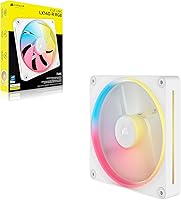
  • Color: This variant is finished in white throughout, covering the fan frame, blades, and outer housing.
  • Compatibility: Compatible with desktop PC cases and graphics card cooling brackets that accept standard 140mm fans with 4-pin PWM connections.
  • Model Number: The official Corsair model number for this fan is CO-9051055-WW, which identifies the single white unit configuration.
  • Hub Requirement: Full RGB lighting functionality requires the iCUE LINK System Hub, which is sold separately and not included with this single-fan package.

Related Reviews

Corsair iCUE Link QX120 RGB 120mm Fan
84%
88%
Cooling Performance
91%
RGB Lighting Customization
77%
Noise Level at Full Speed
95%
Noise Level at Idle Speed
84%
Ease of Installation
More
Corsair iCUE Link Titan 360 RX RGB AIO
83%
88%
Thermal Performance
84%
Noise Level
91%
Installation Experience
93%
Cable Management
67%
Software & Ecosystem Integration
More
Corsair iCUE LINK 6500X RGB Mid-Tower ATX Case
87%
88%
Build Quality
91%
Cooling Performance
89%
Cable Management
85%
Ease of Assembly
94%
Aesthetic Appeal
More
Corsair iCUE Link Titan 420 RX RGB Liquid CPU Cooler
87%
93%
Cooling Performance
89%
Noise Levels
91%
RGB Customization
94%
Compatibility with Intel & AMD
78%
Ease of Setup
More
Corsair iCUE 5000T RGB Mid-Tower Case
87%
91%
Build Quality
89%
Cooling Performance
87%
Ease of Setup
92%
Design & Aesthetics
85%
Cable Management
More
Corsair iCUE 4000X RGB Mid-Tower ATX Case
85%
92%
Design & Aesthetics
85%
Airflow & Cooling
94%
Cable Management
90%
RGB Lighting Control
88%
Build Quality
More
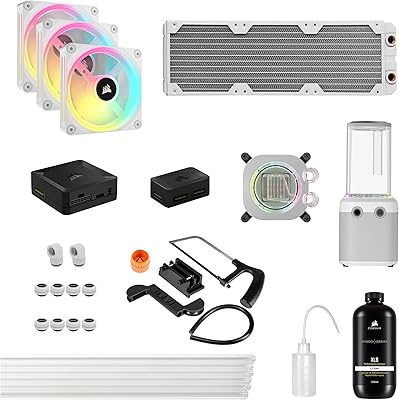
Corsair Hydro X Series iCUE Link XH405i Custom Cooling Kit
87%
92%
Cooling Performance
89%
Installation Ease
91%
Noise Level
88%
RGB Customization
85%
Build Quality
More
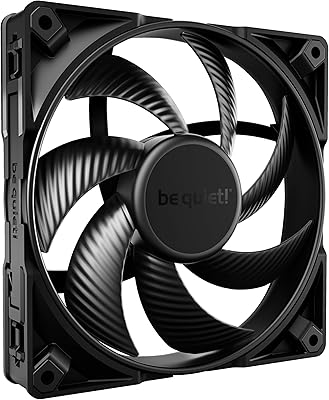
be quiet! Silent Wings Pro 4 140mm PWM High Speed Cooling Fan
86%
93%
Noise Level
90%
Cooling Performance
88%
Build Quality
78%
Ease of Installation
89%
Durability
More
Lian Li UNI Fan SL-INF 120 RGB Infinity Mirror ARGB 120mm Fan
86%
93%
Aesthetics and RGB Lighting
88%
Noise Level/Quiet Operation
91%
Build Quality and Durability
85%
Ease of Installation
87%
Cooling Efficiency
More
Corsair 280X RGB Micro-ATX Case
87%
94%
Build Quality
91%
Cooling Performance
88%
RGB Lighting Control
90%
Cable Management
86%
Installation Ease
More

FAQ

Yes — the RGB on this fan is controlled through the iCUE LINK ecosystem, which requires a Corsair iCUE LINK System Hub that is sold separately. Without the hub, the fan will still spin and move air using the 4-pin PWM connector, but the lighting will not function. If you are buying multiple fans, one hub can handle several of them chained together, which helps offset the extra cost a bit.

On a standard fan, the motor hub and cable side faces outward when you mount it as an intake — meaning the LED ring ends up pointing into the case where nobody can see it. The Corsair iCUE Link LX140-R RGB 140mm PWM Fan flips the rotor so the illuminated face points outward even when drawing air inward. It is a straightforward solution to a problem that has frustrated builders for years, and it works exactly as described.

Yes, the fan operates as a standard 4-pin PWM fan without iCUE installed at all — your motherboard or fan controller will handle speed based on temperature curves as normal. You just will not have access to RGB lighting control or Zero RPM mode customization outside of iCUE. For builders who want simple plug-and-spin functionality, it works fine without any software.

At mid-range speeds it is quite manageable, and most builders never run it at full tilt during normal use. Push it close to 2,000 RPM and you will notice more turbulence noise — it is not silent at that range. For everyday workloads, setting a sensible PWM curve in iCUE or your motherboard BIOS will keep things quiet without sacrificing much cooling headroom.

It will. The static pressure rating of 4.22mm H2O is sufficient for pushing air through typical radiator fin stacks, so it is not limited to open case panel use. Many builders use this reverse-rotor fan on front-mounted radiators specifically because it maintains good static pressure while keeping the RGB facing outward through the case mesh.

Corsair's iCUE LINK hub typically supports up to six fans per port depending on the hub model, and the bridge connector system is designed so you run one cable from the hub to the first fan, then short bridge cables between each subsequent fan. This keeps cable runs very clean compared to running individual cables back to a controller for every fan.

Based on user feedback over the months since launch, the white finish has held up well under normal indoor use with no reported yellowing or discoloration. Prolonged direct sunlight exposure could theoretically affect any plastic component over time, but inside a standard PC case that is not a realistic concern for most builders.

It is genuinely useful if you swap or reposition fans with any regularity. The screws are designed to tighten securely by hand without needing a screwdriver, which saves time during initial installs and makes future adjustments less tedious. Builders who rarely open their cases will not notice much difference, but for iterative builders it is a small quality-of-life improvement that adds up.

Yes, the LX140-R RGB integrates with the same iCUE LINK ecosystem as other LINK-compatible fans. Lighting profiles, speed curves, and synchronization all work together through the same hub and software interface. The reversed rotor is a physical design choice and does not affect software compatibility within the LINK system.

The core difference is rotor orientation — the standard LX140 RGB is a conventional fan where the LED-facing side points into the case when used as intake. This reverse-rotor variant flips that so the lighting is visible from outside the case during intake mounting. Performance specs are broadly similar, so the decision comes down almost entirely to whether intake-facing RGB visibility matters for your specific build layout.