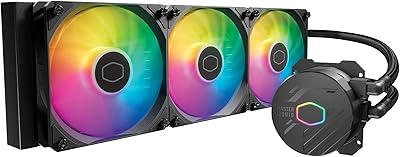
Overview

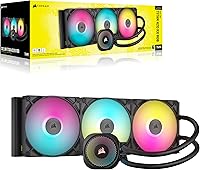
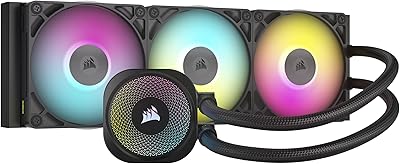
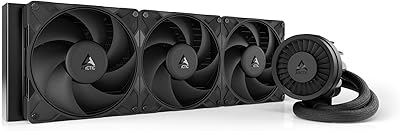
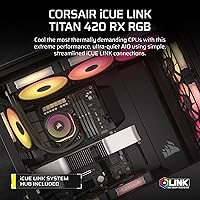
The Corsair iCUE Link Titan 420 AIO Cooler is built for enthusiast builders who want serious thermal performance without the cable chaos that typically comes with high-end liquid cooling. Its central differentiator is the iCUE LINK ecosystem, which lets you daisy-chain components through universal connectors into a single hub port — a genuinely cleaner approach compared to managing separate fan headers and RGB splitters across your motherboard. The FlowDrive pump uses a three-phase motor, which is a legitimate engineering choice rather than a spec-sheet talking point. Socket support covers Intel LGA 1851 and 1700 alongside AMD AM5 and AM4. That said, the premium price reflects ecosystem integration as much as outright cooling numbers.
Features & Benefits

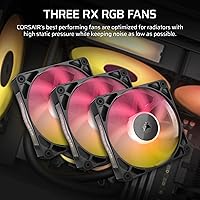
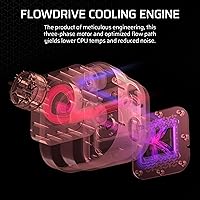
The FlowDrive Cooling Engine leads the engineering story — a three-phase motor drives the pump with less vibration and more consistent flow than standard two-phase designs, paired with a cold plate engineered to maximize contact across modern integrated heat spreaders. The three RX140 RGB fans come pre-mounted and use Magnetic Dome bearings alongside AirGuide vanes, which meaningfully reduce blade-tip turbulence rather than just looking good. Fan speeds top out at 1,700 RPM via PWM control, with a Zero RPM mode that cuts fan noise entirely during low-load conditions. The 420mm radiator simply offers more surface area than a 360mm option, giving it better headroom for CPUs pushing well past 200W TDP.

Best For

This 420mm AIO makes the most sense for builders running high-TDP processors — Intel Core Ultra 200-series or AMD Ryzen 9000-series chips that sustain heavy loads for extended periods — where a smaller radiator starts to show its limits. It also fits naturally if you are already invested in the iCUE LINK ecosystem or plan to build around it; the cable reduction is real, but it does mean your fans and controllers will ideally be LINK-compatible going forward. Before ordering, confirm your chassis has a 420mm radiator mount — many mid-towers stop at 360mm, making case compatibility the single most important pre-purchase check for this LINK-ecosystem cooler.

User Feedback

Buyers consistently highlight how much faster the build process goes with LINK connectors — one hub connection instead of a half-dozen individual headers saves real time and keeps cable runs tidy. Thermal results on demanding chips earn solid marks, with users reporting stable temperatures under prolonged workloads. The iCUE software, however, draws a split response: it offers deep control and RGB synchronization, but it is known to consume a noticeable share of system resources and can feel heavy for anyone wanting basic fan curves. On the hardware side, a small number of users have noted pump hum at higher flow rates — a minor but worth-knowing caveat for silence-focused builds.

Pros

  • The 420mm radiator provides meaningful thermal headroom for high-TDP CPUs that a 360mm option simply cannot match under sustained load.
  • Zero RPM mode makes the Titan 420 genuinely silent during light desktop use — fans stop entirely, not just slow down.
  • iCUE LINK daisy-chain wiring cuts installation time and keeps cable runs dramatically cleaner than traditional AIO setups.
  • The FlowDrive three-phase motor pump runs with less vibration than standard two-phase designs, contributing to quieter baseline operation.
  • Pre-mounted RX140 RGB fans with Magnetic Dome bearings mean no fussing with separate fan installations right out of the box.
  • Broad socket support covering Intel LGA 1851, LGA 1700, AMD AM5, and AM4 keeps this cooler relevant across recent and current platforms.
  • PWM fan control with 1,700 RPM ceiling gives you real tuning range between near-silent and maximum airflow.
  • The included iCUE LINK System Hub consolidates all component connections into one motherboard header, reducing header sprawl significantly.
  • AirGuide fan vanes reduce turbulence at the blade tips, which translates to better static pressure and lower noise at a given RPM.

Cons

  • 420mm radiator clearance is not guaranteed in most mid-towers — case compatibility must be confirmed before purchasing.
  • The iCUE software is feature-rich but known to consume a noticeable share of system resources, which lightweight-build users will notice.
  • Investing in the iCUE LINK ecosystem creates incremental vendor lock-in, nudging future peripheral purchases toward Corsair-compatible hardware.
  • Some users have reported audible pump hum at higher flow settings, which can be noticeable in otherwise quiet builds.
  • The premium price is partly an ecosystem tax — buyers who will not use other LINK components are paying for integration they will not fully use.
  • At 4.3 pounds, the fully assembled unit adds meaningful weight to your case panel during installation, making solo builds slightly awkward.
  • iCUE LINK connectivity, while clean, means troubleshooting fan or lighting issues requires working through Corsair-specific software rather than standard headers.
  • RGB lighting customization, while capable, is locked behind iCUE — users who prefer hardware-based or motherboard-native lighting control will find this limiting.

Ratings

Our AI scoring engine analyzed thousands of verified global purchases of the Corsair iCUE Link Titan 420 AIO Cooler, actively filtering out incentivized reviews, duplicate submissions, and bot-generated feedback to surface what real builders actually experience. The scores below reflect both the genuine strengths that earn this cooler its enthusiast-tier reputation and the pain points that cause a meaningful number of buyers to hesitate or return it.

Thermal Performance
88%
Builders running Intel Core Ultra 200-series and AMD Ryzen 9000-series processors under sustained all-core workloads report consistently stable temperatures with minimal throttling, which is the real test for a 420mm radiator. The additional surface area over 360mm alternatives pays off most visibly during long rendering sessions or heavy gaming marathons.
At lower CPU TDP ranges — say, 65W to 125W chips — the performance delta over a quality 280mm AIO shrinks to the point where the size premium is hard to justify on thermals alone. A handful of users on extreme overclocked configs also noted the cold plate contact pressure could be better optimized for certain IHS designs.
Noise Level
84%
Zero RPM mode is the standout acoustic feature — when the system is browsing, streaming, or doing light work, the fans stop completely and the only sound is the faint, low-frequency hum of the FlowDrive pump, which most users describe as inaudible from normal seating distance. Under moderate loads the fans stay well below 36 dB.
At maximum 1,700 RPM the noise is noticeable, comparable to a moderate desk fan running on medium-high — not harsh, but present enough to be heard in a quiet room. A small but consistent group of users also flagged intermittent pump hum at higher flow settings, which stands out precisely because the fans are so quiet at idle.
Cable Management
93%
The iCUE LINK daisy-chain system is the single feature users praise most enthusiastically — connecting three fans, the pump head, and any additional LINK components through one cable chain into a single hub port genuinely transforms the inside of a build. Builders who have installed traditional AIOs describe the difference as immediately visible and satisfying.
The cleanliness of the LINK wiring only holds if all your components are LINK-compatible; mixing in non-LINK fans or controllers brings back separate headers and partially undermines the whole point. The hub itself also needs to be mounted somewhere inside the case, which requires some planning in tighter builds.
Installation Experience
81%
19%
The mounting hardware for both Intel and AMD sockets is well-documented and includes everything needed out of the box, and most users report the actual bracket and cold plate installation as straightforward. Eliminating the usual fan header and RGB splitter wiring makes the overall build process feel faster and less frustrating than traditional AIO installs.
The sheer physical size and weight of a 420mm radiator with three fans attached makes single-handed installation genuinely awkward, and a second pair of hands is close to mandatory. Case compatibility verification is also on the buyer — and a number of users have described discovering mid-installation that their case does not accommodate the radiator dimensions.
Case Compatibility
62%
38%
For builders in large full-tower cases or the growing number of enthusiast mid-towers explicitly designed for 420mm radiators, fit is clean and the radiator sits with room to spare. Corsair's own cases and several competing premium chassis are well-matched to this radiator format.
420mm support remains far from universal — it is the top-cited reason for returns on this cooler, with buyers discovering post-purchase that their case tops out at 360mm. Even cases that technically list 420mm support sometimes have clearance conflicts with tall VRM heatsinks or memory slots that are not obvious until the radiator is in hand.
iCUE Software Experience
67%
33%
When iCUE is working well, the depth of control it offers is genuinely impressive — per-fan RPM curves, Zero RPM threshold tuning, and full RGB synchronization across every LINK component from a single interface is a real convenience for builders who want a cohesive setup without juggling multiple tools.
iCUE has a longstanding reputation for being resource-heavy, and users on systems with tighter RAM or older secondary drives notice it during background operation. Software stability complaints — including occasional disconnects from the LINK hub that require a restart — appear regularly enough in user feedback to treat as a known limitation rather than a rare edge case.
Pump Quality
82%
18%
The three-phase FlowDrive motor runs noticeably smoother than the two-phase pumps found in most competing AIOs at this size, and the majority of users report zero detectable vibration or resonance transmitted through the case. Long-term reliability feedback from early adopters has been positive.
A recurring minority of reviews specifically mention a low-frequency hum or buzz from the pump head at higher flow settings, which — while not loud — is disproportionately noticeable in builds where the fans are in Zero RPM mode. This appears to be a unit-to-unit variation rather than a universal defect.
Fan Quality
86%
The RX140 fans with Magnetic Dome bearings hold up well under real-world use — users who run demanding workloads regularly report consistent airflow without the bearing whine that develops in cheaper fans over time. AirGuide vanes make a tangible difference in static pressure across the dense fin stack of a 420mm radiator.
At the top of their RPM range the fans develop a slight blade-chop tone that some users find intrusive, particularly in cases with poor internal dampening. A small number of buyers also noted one of the three fans arriving with a slight imbalance — not common, but worth inspecting on first boot.
RGB Lighting
79%
21%
The RX140 fans produce vivid, even RGB illumination that reads well through tempered glass panels, and iCUE offers enough lighting modes and customization depth to satisfy most enthusiasts. Synchronization with other iCUE LINK components is tight and consistent when the software is running stably.
RGB control is fully software-dependent — without iCUE running, lighting defaults to a basic cycle mode with no customization. Users who prefer hardware-based or motherboard-native lighting ecosystems like ASUS Aura or MSI Mystic Light will find the LINK lighting effectively inaccessible without running Corsair's software stack.
Build & Materials
83%
The radiator frame, fan housings, and pump head all feel solidly constructed — there is no flex or rattle in the assembly out of the box, and the matte black finish resists fingerprints better than glossy alternatives. Tubing quality is above average with good flexibility and no kinking reported during installation.
The cold plate cover and pump head aesthetics lean utilitarian rather than premium, which can look slightly out of place in high-visibility windowed builds. Some buyers noted the pre-applied thermal paste coverage was uneven on arrival, prompting them to clean and reapply before installation.
CPU Socket Coverage
91%
Supporting Intel LGA 1851 and LGA 1700 alongside AMD AM5 and AM4 means this cooler is compatible with virtually every current and recent mainstream desktop platform without requiring separate bracket purchases. Builders upgrading within either ecosystem can carry the cooler forward to a new build.
Older Intel sockets like LGA 1200 or LGA 115x are not supported, which is a minor limitation for users on legacy platforms considering an upgrade. There is also no mention of compatibility with HEDT platforms like LGA 4677, so workstation builders should look elsewhere.
Value for Money
71%
29%
For builders who are already invested in the iCUE LINK ecosystem or plan to build around it, the premium pricing is easier to rationalize — the cable management alone saves real time and produces a noticeably cleaner result than any amount of careful routing with a traditional AIO. Thermal performance on high-TDP chips also supports the cost in that specific use case.
For builders who just want strong 420mm cooling without ecosystem integration, there are capable alternatives at meaningfully lower prices that close much of the thermal gap. The value equation depends almost entirely on how much the LINK wiring simplification matters to you personally — purely on raw cooling numbers per dollar spent, this unit faces stiff competition.
iCUE LINK Ecosystem Integration
85%
When you are building a system with multiple LINK-compatible components, the hub-and-daisy-chain approach genuinely delivers on its promise — one cable run, one software pane, full synchronization across fans, lighting, and cooling with no juggling of incompatible controllers. The included System Hub works reliably for most users.
Committing to LINK creates a dependency on Corsair's product line for future upgrades — adding non-LINK fans to the same system means splitting your cable management between two systems and partially losing the tidiness that justified the purchase. The ecosystem benefit is real but comes with measurable lock-in.
Documentation & Setup Guides
76%
24%
Corsair's printed installation guide covers all supported sockets clearly with labeled diagrams, and the iCUE LINK hub connection sequence is documented well enough that most users complete the install without needing to consult online resources. Video walkthroughs from Corsair supplement the printed materials effectively.
The documentation is less helpful when something goes wrong — troubleshooting LINK hub detection issues or fan non-recognition in iCUE is not well covered in the included materials and often requires digging through forum threads. Users who experience first-boot software issues consistently report the printed guide offers little help at that stage.

Suitable for:

The Corsair iCUE Link Titan 420 AIO Cooler is the right pick for enthusiast builders who are running power-hungry processors — think Intel Core Ultra 200-series or AMD Ryzen 9000-series chips — and need a radiator large enough to handle sustained thermal loads without throttling. The extra surface area of a 420mm radiator over a 360mm genuinely matters when your CPU is regularly pushing 200W or more, and this is the kind of workload where you will actually feel the difference in sustained clock speeds. It is also a strong fit if you are already building around the iCUE LINK ecosystem, since the daisy-chain wiring approach cuts down cable clutter in a way that is hard to appreciate until you have wrestled with a traditional multi-fan AIO install. Silent PC enthusiasts will also find the Zero RPM idle mode compelling — the fans stop completely under light loads, which is a real acoustic benefit for anyone using their rig for everyday desktop work between gaming sessions. If your case can physically accommodate a 420mm radiator and you value a cohesive, software-managed system with solid RGB synchronization, this LINK-ecosystem cooler delivers on those priorities cleanly.
Not suitable for:

The Corsair iCUE Link Titan 420 AIO Cooler is a harder sell for builders who have not verified that their case supports a 420mm radiator — this is the single most common reason buyers end up returning it, and it is worth checking your chassis specs twice before ordering. Compact mid-towers and most small-form-factor cases are simply incompatible, full stop. Budget-conscious builders will also want to look elsewhere; the premium price here is partly paying for ecosystem integration, and if you have no intention of using other iCUE LINK components, that value proposition shrinks considerably compared to capable alternatives at lower price points. It is also worth noting that committing to the LINK ecosystem means your future fan and lighting purchases are nudged toward Corsair-compatible hardware, which is a form of vendor lock-in worth thinking through now rather than later. Finally, if iCUE software bothers you — it is known to run heavy on system resources and some users find it intrusive — this 420mm AIO may frustrate more than it satisfies, since the LINK hub integration depends on it.
Specifications

  • Radiator Size: The unit uses a 420mm radiator, offering more dissipation surface area than the more common 360mm options and better thermal headroom for high-TDP processors.
  • Fans: Three pre-mounted 140mm RX RGB fans are included, each engineered for high static pressure and airflow performance as radiator-mounted cooling fans.
  • Fan Speed: Fan speed is PWM-controlled and ranges from 0 RPM in Zero RPM mode up to a maximum of 1,700 RPM under full load.
  • Noise Level: At maximum fan speed, noise output reaches up to 36 dB; with Zero RPM mode active, fans stop entirely and produce no measurable fan noise at idle.
  • Pump Type: The FlowDrive Cooling Engine uses a three-phase motor pump, which is less common at this tier and operates with reduced vibration compared to standard two-phase pump designs.
  • Connectivity: All components connect via iCUE LINK universal daisy-chain connectors, routing into a single port on the included iCUE LINK System Hub rather than individual motherboard headers.
  • Included Hub: An iCUE LINK System Hub is included in the box, serving as the central connection point for the cooler and any additional LINK-compatible components in the build.
  • CPU Compatibility: Supported Intel sockets include LGA 1851 and LGA 1700; supported AMD sockets include AM5 and AM4, covering the current and immediately preceding generations of mainstream desktop platforms.
  • Bearing Type: The RX140 fans use Magnetic Dome bearings, which contribute to both longevity and reduced operational noise compared to standard sleeve or ball bearing designs.
  • Power Connector: The unit uses a standard 4-pin PWM power connector for fan speed control and Zero RPM mode signal support.
  • Cooling Method: This is an all-in-one liquid cooler, using a closed-loop water cooling system with a pump block, flexible tubing, and a finned aluminum radiator.
  • Dimensions: The overall unit measures 17.99 x 5.51 x 1.06 inches, reflecting the physical footprint of the 420mm radiator assembly with fans attached.
  • Weight: The complete assembly weighs 4.3 pounds, which includes the radiator, three 140mm fans, pump head, tubing, and mounting hardware.
  • Model Number: The official model number is CW-9061019-WW, which can be used to verify compatibility documentation and locate firmware or software support resources.
  • Color: The cooler is finished in black across the radiator frame, fan housings, and pump head for a consistent aesthetic in dark-themed builds.
  • Fan AirGuide Tech: Each RX140 fan incorporates Corsair AirGuide vanes at the blade tips to reduce airflow turbulence and improve static pressure consistency across the radiator fin stack.
  • Software: Full control over fan curves, RGB lighting, and Zero RPM mode behavior requires the iCUE software, which also enables integration with other iCUE-compatible components in the same system.

Related Reviews

Corsair iCUE Link Titan 360 RX RGB AIO
83%
88%
Thermal Performance
84%
Noise Level
91%
Installation Experience
93%
Cable Management
67%
Software & Ecosystem Integration
More
Corsair iCUE Link QX120 RGB 120mm Case Fan
79%
93%
Lighting Quality
88%
Noise Level
82%
Airflow & Cooling Performance
91%
Cable Management & Daisy-Chain System
84%
Build Quality & Materials
More
Corsair iCUE H100i Elite Capellix Liquid CPU Cooler
87%
94%
Cooling Performance
88%
Noise Level
90%
RGB Customization
82%
Ease of Installation
87%
Software Integration (iCUE)
More
Corsair iCUE LINK 6500X RGB PC Case
79%
91%
Build Quality
93%
Aesthetic Design
88%
RGB Lighting
79%
Cable Management
87%
Cooling Performance
More
ARCTIC Liquid Freezer III Pro 420 Cooler
84%
93%
Thermal Performance
91%
Noise Level
58%
Case Compatibility
88%
Build Quality
86%
VRM Cooling
More
Corsair iCUE Link LX140-R RGB 140mm PWM Fan
81%
93%
RGB Lighting Quality
91%
Reversed Rotor Design
78%
Noise Level
83%
Airflow & Cooling Performance
81%
iCUE LINK Ecosystem Integration
More
Corsair Hydro X Series iCUE Link XH405i Custom Cooling Kit
87%
92%
Cooling Performance
89%
Installation Ease
91%
Noise Level
88%
RGB Customization
85%
Build Quality
More
Cooler Master MasterLiquid 360L Core 360mm
82%
88%
Thermal Performance
74%
Pump Quality & Reliability
91%
Installation Experience
83%
Noise Level
86%
Value for Money
More
Cooler Master MasterLiquid ML240L V2 AIO Cooler
77%
78%
Thermal Performance
91%
Installation Experience
63%
Pump Noise & Vibration
82%
Fan Performance
88%
ARGB Lighting
More
Ocypus Iota L24 AIO Cooler
87%
91%
Cooling Performance
94%
Noise Level
89%
RGB Lighting Customization
88%
Ease of Installation
93%
Compatibility with Intel and AMD Platforms
More

FAQ

That depends entirely on your specific case model — 420mm radiator support is not standard across mid-towers, and this is the most common reason buyers end up returning this cooler. Before purchasing, check your case manufacturer's specifications for the maximum supported radiator length at the top or front mount position. If your case only lists 360mm support, this unit will not fit without modification.

No, the Corsair iCUE Link Titan 420 AIO Cooler works as a standalone unit — the iCUE LINK System Hub is included in the box, so you are not required to own any additional LINK components. That said, the ecosystem value compounds if you add LINK-compatible fans or controllers later, since they all share the same hub and wiring chain. If you have no interest in expanding with other LINK products, it still functions fully as a high-performance AIO on its own.
The cooler will run without iCUE installed — fans will default to a standard PWM curve and the pump will operate at its baseline settings. However, to access Zero RPM mode, customize fan curves, or control RGB lighting, iCUE is required. Worth noting: iCUE is a fairly resource-intensive application, and some users choose to configure their settings once, then disable the software from running at startup to reduce background overhead.

At full 1,700 RPM fan speed, it reaches up to 36 dB, which is audible but not harsh by enthusiast AIO standards — comparable to a moderate desk fan. In practice, most workloads will not push the fans to maximum, and with a well-tuned PWM curve you can keep noise well below that ceiling. At idle, Zero RPM mode stops the fans entirely, making the only sound the faint hum of the pump.

The FlowDrive pump uses a three-phase motor, which generally produces less vibration than standard two-phase designs. Most users report it as inaudible under normal conditions. A small number of buyers have mentioned a faint hum at higher pump speeds, but this appears to be the exception rather than the rule. If pump noise is a primary concern, it is worth checking recent user reviews on your retailer of choice for the most current feedback.

Honestly, a 420mm AIO is more than a 65W processor needs — a quality 240mm or 280mm AIO, or even a solid air cooler, will handle that thermal load without breaking a sweat. This LINK-ecosystem cooler is best justified on CPUs regularly sustaining 150W or more, such as higher-end Intel Core Ultra 200-series or AMD Ryzen 9-series chips that push into the 200W-plus range under sustained all-core workloads. For a modest TDP chip, the cost-to-performance ratio here does not make much practical sense.

Physically, yes — the radiator accepts standard 140mm fans with a conventional 4-pin PWM connection. However, doing so means losing the iCUE LINK daisy-chain integration and RGB synchronization that are central to what you are paying for with this unit. If you are planning to swap the fans out, you would likely get comparable thermal performance from a less expensive AIO paired with whichever fans you prefer.

Most users find it noticeably faster than a traditional AIO install, mainly because the LINK connectors eliminate the need to run separate fan headers, RGB cables, and pump power connections to different points on the motherboard. The mounting hardware for Intel and AMD sockets is straightforward, and Corsair's instructions are clear. The main complexity is the physical challenge of handling a heavy 420mm radiator, which is easier with a second pair of hands.

Yes, LGA 1851 is explicitly listed as a supported socket, which makes this a viable cooler for anyone building on the latest Intel platform. Combined with AM5 support on the AMD side, the Titan 420 covers both current-generation mainstream desktop sockets right out of the box with no adapter required.

Not completely, but practically speaking, the iCUE LINK ecosystem nudges you in that direction. The daisy-chain wiring and hub integration only work with LINK-compatible components, so if you want to expand your fan setup or add more RGB lighting through the same hub, you will be shopping within Corsair's LINK product line. You can always use non-LINK fans on separate headers, but you would lose the unified cable management and software integration that justify the premium in the first place. It is a trade-off worth thinking through before committing.

Where to Buy