Overview

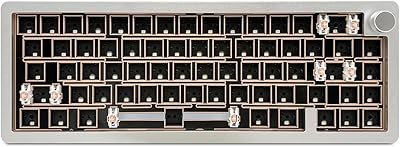
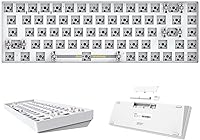
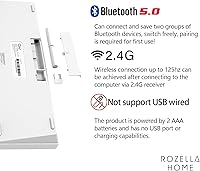
The CIY GK68 65% Wireless Hotswap Keyboard Kit is one of the more compelling entry points into the custom keyboard hobby, largely because it bundles wireless connectivity and hot-swap capability into a single affordable package. The 65% layout keeps things compact — you lose the numpad and most function keys, but gain real desk real estate and portability. Before ordering, know that this is a bare kit: no switches, no keycaps are included, so budget for those separately. Power comes from two AAA batteries with no USB charging port anywhere on the board. The shell is ABS plastic paired with a metal positioning plate — a reasonable combination at this price tier.
Features & Benefits

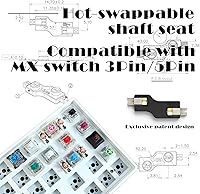
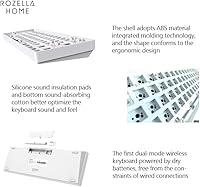
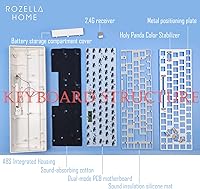
The GK68 kit's two standout capabilities are its dual wireless modes and its solderless hot-swap PCB. The 2.4G dongle delivers a low-latency connection ideal for focused work sessions, while Bluetooth 5.0 lets you pair across multiple devices and toggle between them using FN key shortcuts — though there is no LED indicator to confirm which mode is active, which takes some getting used to. The hot-swap sockets accept both 3-pin and 5-pin MX switches, making swapping genuinely tool-free. Internally, a silicone sandwich mat and bottom foam layer absorb vibration and reduce case resonance, giving the board a quieter character than you might expect. The metal plate adds noticeable rigidity throughout.

Best For

This hot-swap board makes the most sense for people new to the custom keyboard world who want to experiment with different switches without ever touching a soldering iron. It is also a solid pick for remote workers and students who want a compact, wireless desk without cables running everywhere. If you already have a stash of MX-compatible switches and keycaps sitting around, this wireless keyboard kit gives you a low-cost platform to put them on. Frequent travelers will appreciate the small 65% footprint. That said, if you regularly rely on a numpad or need wired connectivity as a fallback, this layout and power system will likely frustrate you.

User Feedback

Buyers consistently point to the value-to-feature ratio as the GK68 kit's biggest draw — getting both wireless and hot-swap capability at this price is genuinely uncommon. The battery-only power system, however, divides opinion sharply. Some users appreciate not worrying about a degrading built-in battery; others find it frustrating that there is no option to plug in and keep working when cells run low. The ABS shell gets described as feeling a bit hollow, which is understandable for the price. First-timers frequently report bent switch pins during installation — this issue comes up often enough in buyer reviews that watching a proper tutorial before building is strongly recommended.

Pros

  • Hot-swap sockets support both 3-pin and 5-pin MX switches, so you can swap and experiment without any tools or soldering.
  • Dual wireless modes — 2.4G dongle for low latency and Bluetooth 5.0 for multi-device pairing — cover most everyday wireless needs.
  • Two AAA batteries reportedly last up to two months, which is a genuinely long run time compared to rechargeable alternatives.
  • The metal positioning plate adds surprising rigidity and switch stability that you do not typically find at this price.
  • A silicone sandwich mat and bottom foam dampen sound noticeably, reducing the hollow case ping common in budget boards.
  • The 65% layout frees up significant desk space and makes the board easy to carry between locations.
  • Using disposable batteries means no degrading built-in cell over time — a real long-term reliability advantage for some users.
  • At this price, combining wireless connectivity and a hot-swap PCB in one kit is genuinely rare in the market.
  • The one-piece ABS shell is lightweight and durable enough for daily desk use without feeling fragile.

Cons

  • No switches or keycaps are included, so the true out-of-pocket cost is meaningfully higher than the kit price alone.
  • There is no USB wired mode — if the batteries die mid-session, you cannot simply plug in and keep working.
  • No USB port means no charging option at all; you are entirely dependent on having spare AAA batteries on hand.
  • The FN-key mode switching system has no LED indicator, making it hard to confirm which wireless mode is currently active.
  • Some buyers report the ABS shell feels noticeably hollow and lightweight in hand, which can undermine confidence in the build.
  • Bent switch pins during installation are a recurring issue in user reviews, especially for first-timers unfamiliar with hot-swap sockets.
  • Bluetooth connectivity can be inconsistent on certain operating systems, and troubleshooting requires reaching out to customer support.
  • Keycap and switch compatibility questions are common, suggesting the documentation and setup guidance could be clearer for newcomers.
  • Battery life varies considerably depending on which wireless mode you use, so the two-month claim should be treated as a best-case figure.

Ratings

The scores below reflect AI-driven analysis of verified global buyer reviews for the CIY GK68 65% Wireless Hotswap Keyboard Kit, with spam, bot activity, and incentivized feedback actively filtered out before scoring. Each category captures both the genuine enthusiasm and the recurring frustrations real users have reported, giving you an honest picture of where this kit excels and where it asks for compromise.

Value for Money
91%
Across hundreds of verified reviews, buyers repeatedly express surprise at how much functionality is packed into this price range. Getting a dual wireless board with a genuine hot-swap PCB for under fifty dollars is nearly unheard of in the mechanical keyboard market, and that combination consistently generates strong positive sentiment among budget-conscious hobbyists.
The value calculation changes once buyers factor in the cost of switches and keycaps, which can easily double or triple the total spend. A few reviewers felt misled by the kit-only nature of the listing, expecting a ready-to-type board rather than a bare foundation requiring further investment.
Hot-Swap Performance
88%
Users who have swapped switches multiple times report that the sockets hold up well over repeated cycles, with no noticeable loosening after several rounds of changes. The dual 3-pin and 5-pin compatibility is widely praised, since it removes the guesswork of wondering whether a particular switch will fit.
First-time builders frequently report bent pins during initial installation, which can damage both the switch and the socket if forced. The sockets require a very straight vertical insertion technique, and the lack of detailed printed instructions in the box means new users often discover this the hard way.
Wireless Reliability
74%
26%
In 2.4G mode, the connection is consistently described as stable and responsive for everyday typing and light office tasks. Users who primarily work at a fixed desk with the dongle plugged in report essentially no dropout issues during normal use.
Bluetooth performance is more polarizing, with a meaningful subset of reviewers reporting intermittent dropout or difficulty pairing on macOS and certain Linux distributions. Switching between wireless modes without any visual indicator on the board also causes confusion, particularly when troubleshooting a dropped connection.
Battery Life
71%
29%
Users who rely primarily on 2.4G connectivity and leave the board to sleep naturally when not in use report battery runs that genuinely approach the two-month claim. The use of standard AAA batteries also means you are never stranded — a fresh pair is available at any corner store.
Bluetooth-heavy users report noticeably shorter battery cycles, sometimes under three weeks with regular all-day use. Several reviewers also note that the smart sleep activation is not always immediate, meaning idle boards can drain faster than expected if left on through the night.
Build Quality
67%
33%
The metal positioning plate is a genuine bright spot, adding rigidity that prevents the flex and wobble common in similarly priced plastic-only boards. Most buyers acknowledge that the overall construction is respectable given the price tier, and the one-piece ABS shell has no reported issues with cracking or fitting misalignment.
The ABS shell is consistently described as feeling hollow and lightweight in hand, which undermines the tactile confidence some buyers expect from a keyboard they will use every day. A handful of reviewers noted that the case amplifies a slight rattle from certain switch types, suggesting the dampening is effective but not complete.
Sound & Acoustics
73%
27%
The silicone sandwich mat and bottom foam layer make a noticeable difference compared to bare budget boards, reducing the high-pitched ping that plagues many ABS cases. Buyers who pair the GK68 kit with foam or tape-modded switches report a surprisingly pleasant, muted typing sound for the price.
The acoustic performance is still heavily dependent on which switches and keycaps you install, so results vary widely across users. A few reviewers found that certain switch types still produce a hollow thock through the ABS shell that the internal dampening cannot fully suppress.
Switch Compatibility
86%
The broad MX compatibility — covering both 3-pin and 5-pin variants — means buyers can drop in virtually any popular switch brand without worrying about fit. Reviewers who use Gateron, Kailh, and Akko switches all report clean, rattle-free seating once installed correctly.
The hot-swap sockets are tighter than some high-end boards, which makes initial insertion require more deliberate force. This contributes to the bent-pin problem among new users who apply pressure at an angle rather than pressing straight down.
Keycap Compatibility
82%
18%
Standard MX-stem keycaps fit without any issues, and the 65% layout is common enough that finding a keycap set that covers all positions is straightforward. Buyers note that even affordable keycap sets sit firmly and look clean on the board.
The non-standard bottom row used in some 65% layouts means a handful of specialty or artisan keycap sets may not cover every key without leaving gaps. This comes up most often among buyers upgrading from a full-size board who assume universal compatibility without verifying the layout first.
Ease of Setup
63%
37%
Experienced keyboard hobbyists report that getting the board up and running — once switches and keycaps are sourced — takes under thirty minutes. The wireless pairing process via FN shortcuts is relatively quick for users who read the instructions first.
Complete beginners face a steeper learning curve than the product listing implies. Between sourcing compatible components, learning proper hot-swap technique, and navigating mode switching without indicator lights, the setup process generates a disproportionate share of one-star reviews from buyers who expected a simpler experience.
Portability
84%
At just over fourteen ounces and with a footprint small enough to slide into a laptop bag side pocket, this hot-swap board is among the more travel-friendly options in its class. Remote workers who carry their peripherals between home and office consistently highlight the compact form factor as a daily convenience.
The 65% layout means leaving behind the numpad and function row, which takes genuine adjustment for users transitioning from a full-size or tenkeyless board. A few frequent travelers also noted that carrying spare AAA batteries adds a small but real logistical overhead compared to boards that charge via USB.
Multi-Device Connectivity
69%
31%
The ability to store two Bluetooth profiles alongside the 2.4G dongle connection gives users a practical three-device setup without any additional hardware. Students who switch between a personal laptop and a school-issued device during the day find this genuinely useful.
Profile switching is not instantaneous and reconnection times can feel sluggish compared to premium multi-device keyboards. Without an indicator light, users cannot confirm which device profile is active, leading to repeated accidental inputs on the wrong screen.
Typing Feel
76%
24%
The metal plate provides a firm, consistent typing surface that most users appreciate after spending time on wobbly plastic boards. Paired with a well-matched linear or tactile switch, the GK68 kit delivers a typing feel that punches above its weight class.
The baseline typing experience is entirely dependent on the switches chosen, which means dissatisfied buyers sometimes blame the board for switch characteristics it has no control over. Users who install budget switches without testing them first are more likely to leave negative feedback about the typing feel overall.
Documentation & Support
52%
48%
CIY provides a basic setup guide and video reference for switch installation, and the customer support team is noted in some reviews as responsive when contacted directly for Bluetooth troubleshooting. The vendor appears willing to assist with post-sale questions.
The included printed documentation is minimal and largely inadequate for a true first-time builder. Questions about mode switching, switch compatibility, and Bluetooth pairing are among the most frequently repeated buyer inquiries, indicating that the guidance provided in the box does not preemptively address the most common pain points.

Suitable for:

The CIY GK68 65% Wireless Hotswap Keyboard Kit is genuinely well-suited to anyone taking their first real steps into the custom mechanical keyboard hobby on a tight budget. If you want to experiment with different switch feels without committing to soldering, the hot-swap PCB gives you that freedom right out of the box — as long as you already own, or plan to buy, MX-compatible switches and keycaps separately. Remote workers and students who want a clean, cable-free desk will appreciate the dual wireless setup, since you can run 2.4G for low-latency daily use and flip to Bluetooth when connecting a second device like a tablet or laptop. Travelers or anyone working across multiple machines will find the compact 65% footprint genuinely practical. This hot-swap board also makes an excellent low-risk second build for hobbyists who already have a switch collection sitting unused and want a platform to try something new without spending heavily.

Not suitable for:

The CIY GK68 65% Wireless Hotswap Keyboard Kit will likely disappoint buyers who expect a fully assembled, plug-and-play experience — this is a bare kit, and you will need to source switches and keycaps separately before the board is even usable. If you rely on a numpad for spreadsheet work, data entry, or number-heavy tasks, the 65% layout simply does not offer one, and no amount of key remapping fully replaces that muscle memory. The battery-only power system is also a genuine dealbreaker for users who prefer the reliability of a wired connection or the convenience of USB-C charging, since there is no port on the board at all. Buyers who work across non-PC ecosystems or need broad cross-platform Bluetooth reliability may encounter occasional pairing frustrations, particularly on certain operating systems. Finally, anyone expecting premium build quality — dense ABS construction, significant heft, or a polished out-of-box acoustic experience — should look at higher-tier kits, as this board reflects its accessible price point in tangible ways.
Specifications

  • Layout: The board uses a 65% compact layout with 68 keys, omitting the numpad and standalone function row while retaining arrow keys.
  • Dimensions: The board measures 12.2″ long by 3.97″ wide by 1.22″ tall, making it one of the more portable options in the 65% category.
  • Weight: The assembled kit weighs 14.4 ounces without switches or keycaps installed.
  • Wireless Modes: Two wireless modes are supported: Bluetooth 5.0 for multi-device pairing and a 2.4G USB dongle connection for lower-latency use.
  • Power Source: The board runs on two standard AAA batteries; there is no built-in rechargeable cell and no USB charging port.
  • Battery Life: CIY claims up to two months of battery life under typical conditions, assisted by an automatic smart sleep mode when the board is idle.
  • Switch Support: The hot-swap PCB accepts both 3-pin and 5-pin MX-style mechanical switches, allowing tool-free installation and removal.
  • PCB Type: A double-layer thick PCB is paired with hot-swap sockets, which is designed to extend socket durability over repeated switch changes.
  • Shell Material: The outer case is constructed from one-piece molded ABS plastic, offering a lightweight and impact-resistant enclosure.
  • Plate Material: A metal positioning plate sits inside the shell, providing structural rigidity and more consistent switch seating than a pure plastic plate would offer.
  • Sound Dampening: The internal acoustic stack includes a silicone sandwich mat between the PCB and plate, plus sound-absorbing foam at the bottom of the case.
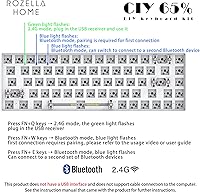
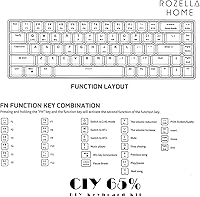
  • Mode Switching: Wireless mode changes are handled via FN key shortcuts: FN+Q for 2.4G, FN+W or FN+E to cycle Bluetooth profiles.
  • Color Options: The kit is available in White; no additional color variants are listed in the current product line.
  • Switches Included: No switches are included; buyers must source MX-compatible 3-pin or 5-pin switches separately before the board is functional.
  • Keycaps Included: No keycaps are included in the kit; any standard MX-compatible keycap set purchased separately will fit the board.
  • OS Compatibility: The board is listed as compatible with PC and any device that supports Bluetooth connectivity, though cross-platform performance may vary.

Related Reviews

BOYI GMK67 65% Mechanical Keyboard Kit
80%
91%
Build Quality
88%
Typing Feel
74%
Wireless Performance
89%
Value for Money
61%
Software & Programmability
More
Cooler Master CK721 65% Wireless Mechanical Keyboard
77%
84%
Build Quality
81%
Wireless Performance
83%
Typing Experience
61%
Battery Life
53%
Software (MasterPlus+)
More
Arteck HW192 Wireless Keyboard and Mouse Combo
78%
78%
Build Quality
72%
Typing Experience
63%
Mouse Comfort & Ergonomics
81%
Battery Life
69%
Wireless Connectivity
More
Cherry Stream Wireless Keyboard
88%
88%
Typing Comfort
92%
Wireless Performance
78%
Build Quality
85%
Ergonomics
95%
Setup and Installation
More
JLab JBuds Wireless Keyboard
88%
87%
Typing Comfort
94%
Multi-Device Switching
85%
Build Quality
92%
Battery Life
90%
Portability
More
JOYACCESS JKB888BP Wireless Ergonomic Keyboard
77%
91%
Typing Noise Level
88%
Value for Money
83%
Wireless Reliability
61%
Key Feel & Travel
64%
Build Quality
More
TECKNET TK-EKB01040BS01 Wireless Keyboard
76%
83%
Ergonomic Comfort
86%
Typing Noise Level
79%
Wireless Reliability
62%
Build Quality
88%
Value for Money
More
Lenovo 300 Wireless Keyboard
75%
94%
Ease of Setup
88%
Typing Noise
91%
Value for Money
62%
Build Quality
86%
Battery Life
More
Soueto WK713 Wireless RGB Keyboard
78%
83%
Value for Money
91%
Ease of Setup
61%
Typing Experience
84%
Backlight Quality
88%
Device Holder
More
Redragon BK7114 98-Key Wireless Low-Profile Keyboard
70%
83%
Wireless Reliability
71%
Typing Feel
88%
Noise Level
68%
Multi-Device Workflow
62%
Build Quality
More

FAQ

You need to buy them separately. The kit includes the PCB, case, plate, dampening materials, and the 2.4G receiver, but no switches or keycaps. Budget for those additions before you order, since the board is not usable out of the box without them.

No, there is no wired mode. The board has no USB port at all, so when the batteries die, your only option is to swap in fresh AAA cells. If reliable wired fallback is important to you, this is a meaningful limitation to consider before buying.

You use FN key shortcuts: FN+Q activates 2.4G mode, while FN+W and FN+E switch between two saved Bluetooth profiles. There is no LED indicator to confirm which mode is currently active, so it takes a little practice to get comfortable with the system.

Any standard MX-style switch with either 3-pin or 5-pin configurations will work. That covers the vast majority of popular switches from brands like Cherry, Gateron, Akko, and Kailh, so you have a wide selection to choose from.

The two-month claim is realistic if you primarily use 2.4G mode with light-to-moderate daily typing and let the board sleep when idle. Bluetooth tends to draw more power, so heavy Bluetooth use will shorten that window noticeably. Keep a spare pair of AAAs nearby just in case.

The CIY GK68 65% Wireless Hotswap Keyboard Kit can technically pair via Bluetooth to any Bluetooth-enabled device, but the manufacturer officially lists PC compatibility. Some buyers have reported occasional pairing inconsistencies on macOS and Linux, so results may vary depending on your specific setup.
It is straightforward once you know what to watch for. The main pitfall beginners run into is bending the pins on 5-pin switches before insertion. Always check that all pins are perfectly straight, align the switch carefully before pressing down, and insert it straight rather than at an angle. Watching a short video tutorial before your first installation will save you a lot of frustration.

Yes, the board supports two Bluetooth profiles, so you can pair it to two devices — say a laptop and a tablet — and switch between them using the FN+W and FN+E shortcuts. The 2.4G dongle connects to a third device via the included receiver.

No, the GK68 kit does not include RGB or any backlight functionality in its standard configuration. If under-key lighting is important to your setup, you would need to look at a different board.

It works fine for casual gaming, particularly in 2.4G mode where latency is low enough for most genres. The hot-swap board lets you install tactile or linear switches suited to gaming with no soldering required. That said, competitive gamers who demand sub-millisecond polling rates and a wired connection would likely want a dedicated gaming keyboard instead.