Overview

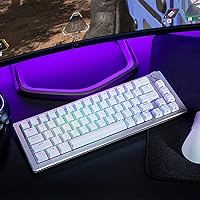
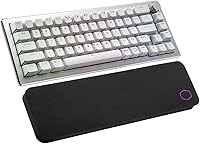
The Cooler Master CK721 65% Wireless Mechanical Keyboard sits in a crowded market, but it carves out a clear identity with its silver/white aluminum build — a look that's genuinely hard to find at this price tier. Most compact wireless keyboards either feel plasticky or cost significantly more. This one strikes a reasonable middle ground. The hybrid wireless support is the other standout: not many boards in this segment offer both 2.4GHz and Bluetooth alongside a wired fallback. If you want a clean, portable board for multi-device use, the CK721 is worth serious attention. Heavy FPS gamers chasing top polling rates may want to look elsewhere.
Features & Benefits

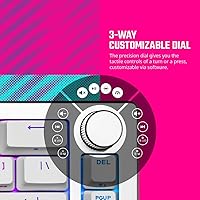
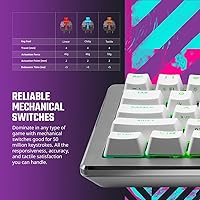
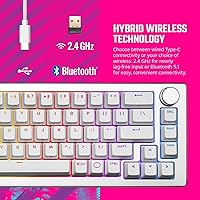
The CK721's triple connectivity options are its most practical strength. Toggle between 2.4GHz for near-zero wireless lag during gaming, Bluetooth 5.1 for pairing with a phone or tablet, or plug in via USB-C when the battery runs low — all switchable with a function key combo. The tactile brown switches feel snappy without being loud, comfortable for both long typing sessions and gaming. A 3-way customizable dial sits at the top right, handling volume or media control by default but fully remappable through Cooler Master's software. Onboard memory stores up to three profiles, so your settings travel with the board even without software installed.

Best For

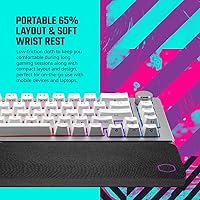
This 65% wireless board makes the most sense for people who move between devices throughout the day — think a work laptop in the morning, a desktop in the afternoon, and an iPad in the evening. The 65% layout is a smart compromise: smaller than a tenkeyless but still keeps dedicated arrow keys that many 60% boards drop entirely. Students working in coffee shops will appreciate the portable lightweight build. Design-conscious buyers drawn to minimal white desk setups will like the clean aesthetic. It is less suited for those who need a numpad or prefer heavy clicky switches over the softer tactile bump brown switches deliver.

User Feedback

Cooler Master's compact wireless keyboard holds a solid 4-star average, and the praise is consistent: buyers love the build quality for the price, the satisfying tactile bump on every keystroke, and how reliably the wireless modes switch. The included wrist rest earns points for comfort, though a few users note the cloth surface showing wear faster than expected. The main friction point is MasterPlus+ software, which some find confusing to navigate and occasionally buggy. Battery life is another variable — advertised figures do not always match real-world use, especially with RGB on. Most buyers would recommend it, particularly for typing and everyday work rather than competitive gaming.

Pros

  • Tri-mode wireless — 2.4GHz, Bluetooth 5.1, and USB-C wired — gives genuine flexibility for multi-device users.
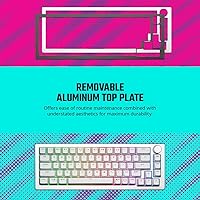
  • The aluminum top case feels noticeably more solid than most keyboards competing at this price point.
  • Tactile brown switches strike a comfortable balance between typing comfort and light gaming use.
  • Dedicated arrow keys make the 65% layout far more practical than a 60% for everyday productivity.
  • The 3-way dial is a small but genuinely useful addition for quick volume and media control.
  • Per-key RGB with onboard memory means your lighting profiles survive even without software installed.
  • Cross-platform compatibility covers Windows, macOS, Android, and iOS without any hardware changes.
  • The bundled soft wrist rest adds real comfort during long sessions — rare to see included at this tier.
  • Silver and white colorway stands out visually in a market dominated by all-black boards.
  • Compact footprint makes it easy to pack for travel or hot-desk setups without a dedicated case.

Cons

  • MasterPlus+ software can be unintuitive and has reported stability issues that frustrate new users.
  • Real-world battery life with RGB enabled falls noticeably short of marketing claims for many buyers.
  • No dedicated dongle storage slot, making it easy to misplace the 2.4GHz receiver during travel.
  • The cloth wrist rest shows surface wear faster than expected with daily use over several months.
  • Brown switches may feel underwhelming to users coming from clicky or premium tactile switch options.
  • Bluetooth connection switching, while functional, can feel slower to respond compared to dedicated Bluetooth keyboards.
  • At 2.6 pounds with the wrist rest, portability is more limited than truly ultraportable compact boards.
  • No hot-swap switch support, so you are locked into brown tactile with no easy upgrade path.

Ratings

The ratings below for the Cooler Master CK721 65% Wireless Mechanical Keyboard were generated by our AI system after analyzing verified purchase reviews from buyers worldwide, with spam, bot-submitted, and incentivized feedback actively filtered out. Each score reflects the honest consensus of real daily users — remote workers, students, and gamers alike — weighted for recency and purchase verification. Both the genuine strengths and the recurring frustrations are transparently represented so you can make a fully informed decision.
Build Quality
84%
The aluminum top case consistently earns respect from buyers who expected a plastic-heavy board at this price. Users coming from budget membrane keyboards frequently mention how solid the CK721 feels on a desk — no flex, no rattle, and a satisfying weight that keeps it planted during intense typing sessions.
The bottom shell is plastic, and while it does not feel cheap, it is noticeably less premium than the top. A few long-term users have reported that the feet can wear down or lose grip over time, particularly on smooth glass or lacquered desk surfaces.
Wireless Performance
81%
19%
The 2.4GHz connection handles daily gaming and productivity tasks without noticeable lag for the vast majority of users. Buyers who switch between a desktop PC via dongle and a tablet via Bluetooth throughout the workday find the transition fast and reliable once they get used to the key shortcuts.
Bluetooth switching, while functional, occasionally takes a few extra seconds to re-establish — more noticeable when jumping between three paired devices quickly. A handful of users report intermittent Bluetooth drops in environments with heavy wireless interference, though this is not a widespread complaint.
Typing Experience
83%
Brown switches hit a comfortable middle ground that long-session typists genuinely appreciate — enough tactile bump to feel confident about each keypress without the noise that makes open-office or library use awkward. Writers and coders who spend hours at the keyboard tend to be the most satisfied segment of buyers.
Enthusiasts already accustomed to premium tactile switches like Holy Pandas or Topre find the stock browns underwhelming in comparison. The switches are soldered, so there is no easy upgrade path for buyers who want a different feel without moving to a different board entirely.
Battery Life
61%
39%
With RGB lighting disabled or dimmed to low levels, the CK721 can comfortably last through a standard workday and then some on a single charge. Users who prioritize wireless freedom over aesthetics and simply turn the lights off report a noticeably better experience.
Buyers who run RGB at full brightness — which is most of them initially — often find themselves charging every one to two days, well below what the marketing language implies. Real-world variance is significant enough that battery life has become one of the most common disappointments cited in critical reviews.
Software (MasterPlus+)
53%
47%
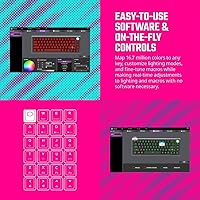
The software does cover all the bases when it works — RGB customization, dial remapping, and macro programming are all accessible in one place. Users who invest time learning the interface and stick to Windows find it capable enough for setting up a few solid profiles.
MasterPlus+ has accumulated consistent complaints about crashes, an unintuitive interface, and limited functionality on macOS. Many users simply give up on customization and rely on the default profiles, which undermines what should be a key selling point of the keyboard.
Value for Money
82%
18%
Tri-mode wireless, an aluminum build, per-key RGB, and an included wrist rest in a single package at this price tier is genuinely hard to argue with. Buyers who shop around competing options quickly realize that getting all of these features together usually costs meaningfully more elsewhere.
The value calculation shifts if you factor in software frustrations or shorter-than-expected battery life, both of which reduce the day-to-day appeal. Users who need deep software control or reliable all-day wireless with lighting may feel the real cost of those limitations over time.
Connectivity Flexibility
88%
Having three distinct connection modes on a compact board is a genuine differentiator, and users who actually exploit all three — dongle for gaming, Bluetooth for their iPad, USB-C when traveling — consistently highlight it as the keyboard's strongest selling point. Cross-platform support covering Windows, macOS, Android, and iOS makes it unusually versatile.
There is no dedicated storage slot for the 2.4GHz USB dongle, which is a small but recurring annoyance for users who frequently travel or pack up their setup. Losing the dongle effectively eliminates the low-latency wireless mode with no easy replacement solution.
RGB Lighting
76%
24%
Per-key RGB on a board at this price looks impressive out of the box, with vibrant colors and several pre-loaded effects that require no software to enable. The silver and white keycap legends let the colors show through cleanly, which enhances the visual impact compared to boards with darker legends.
Deep customization requires MasterPlus+, and the software experience detracts from what should be a fun feature. Additionally, keeping RGB on at full brightness has a direct and significant impact on battery life, forcing users to choose between aesthetics and practical wireless endurance.
Layout & Usability
86%
Retaining dedicated arrow keys in a 65% form factor is a smart call that consistently earns positive mentions from productivity-focused buyers. The layout feels natural within a day or two of adjustment, and the function layer covers most missing keys without requiring uncomfortable key combinations.
The absence of a function row is a real adjustment for users coming from full-size or tenkeyless keyboards, particularly those who rely on F-keys for shortcuts in creative software. Some buyers also note the lack of dedicated media keys above the number row, making the dial a necessary workaround rather than a bonus.
Wrist Rest
69%
31%
Getting a bundled wrist rest at all is uncommon at this price, and for users who type for long stretches it adds real comfort by keeping the wrist at a more neutral angle. The low-friction cloth surface feels pleasant under the palm and does not create heat buildup during extended sessions.
Durability is a legitimate concern — several buyers note visible wear and pilling on the cloth surface within a few months of daily use. The rest also lacks a non-slip base, making it prone to shifting on smooth desk surfaces unless the keyboard's own weight holds it in place.
Portability
78%
22%
The compact 65% footprint means the CK721 slips into a laptop bag without taking up significant space, a practical advantage for users who commute or work from multiple locations. The rechargeable battery eliminates the need to carry spare batteries, simplifying travel logistics.
At 2.6 pounds with the wrist rest, it is heavier than truly ultraportable boards, and there is no included carrying case or pouch. Users who travel light may prefer a sleeker, lighter 60% alternative that sacrifices arrow keys in exchange for a smaller, lighter package.
Aesthetics & Design
87%
The silver and white colorway genuinely stands out in a market flooded with all-black peripherals, and buyers building light-themed or minimal desk setups frequently call it one of the best-looking boards at this price. The aluminum top case adds a clean, premium appearance that photos and in-person impressions both support.
White keycaps can show yellowing or grime over time with heavy use, particularly on boards that see daily handling with oily hands. Users who care deeply about long-term aesthetic consistency may want to plan for occasional keycap cleaning or replacement.
Gaming Suitability
72%
28%
For casual to mid-level gaming the CK721 performs competently — the 2.4GHz wireless keeps latency low enough for most genres, and the compact layout actually suits gaming-focused desk setups by freeing up mouse room. Buyers who game part-time and work part-time get good dual-purpose value from it.
Dedicated competitive gamers will find the polling rate, switch options, and overall wireless architecture less optimized than purpose-built gaming keyboards. Brown switches also divide opinion for fast-paced gaming — their tactile bump is comfortable for typing but not universally preferred for rapid multi-key gaming inputs.
Setup & Out-of-Box Experience
79%
21%
The keyboard works immediately after unboxing without needing software — plug in the dongle or connect via Bluetooth and you are ready to type within minutes. Default RGB effects and dial behavior are sensible choices that serve most users well without any configuration.
The pairing and channel-switching process can feel opaque initially, as the keyboard relies entirely on function-key shortcuts with no on-screen feedback or guided setup. New users often have to consult the manual or online resources to confidently navigate between wireless modes.

Suitable for:

The Cooler Master CK721 65% Wireless Mechanical Keyboard is an excellent fit for people who juggle multiple devices as part of their daily routine — remote workers, students, and hybrid-office folks who type on a work laptop in the morning and a personal desktop at night will get real mileage out of the tri-mode wireless setup. The 65% layout is a thoughtful middle ground, keeping dedicated arrow keys that productivity users genuinely rely on while still freeing up meaningful desk space. Anyone building a clean, minimal white or silver desk aesthetic will appreciate that this board actually looks the part rather than just being another black slab. Casual to mid-level gamers who want wireless freedom without paying a premium for it will also find the CK721 a compelling option. The included wrist rest adds everyday comfort that most boards at this price simply do not bundle in.
Not suitable for:

The Cooler Master CK721 65% Wireless Mechanical Keyboard is not the right call for competitive or professional gamers who demand the lowest possible wireless latency and the highest polling rates — dedicated gaming keyboards from brands like Razer or Logitech G still hold an edge there. Anyone who relies on a numpad for data entry, accounting, or spreadsheet-heavy work will find the 65% layout a frustrating compromise regardless of how good the board is otherwise. Users who want a deeply customizable keyboard experience through intuitive software should be aware that MasterPlus+ has a learning curve and has drawn complaints about stability. If you plan to run RGB lighting continuously and expect advertised battery life figures to hold up, be prepared for some disappointment — real-world battery performance varies noticeably. Finally, buyers on the hunt for clicky or linear switches will need to look elsewhere, as brown tactile is the only option in this colorway.

Specifications

  • Layout: 65% compact form factor with dedicated arrow keys, retaining essential navigation without a numpad or function row.
  • Switch Type: Tactile mechanical brown switches rated for 50 million keystrokes, offering a noticeable bump without an audible click.
  • Connectivity: Supports three connection modes: 2.4GHz wireless via USB dongle, Bluetooth 5.1, and wired USB-C.
  • Bluetooth: Bluetooth 5.1 allows pairing with up to three devices, switchable via function key combinations.
  • RGB Lighting: Per-key RGB backlighting supports 16.7 million colors, customizable through MasterPlus+ software.
  • Onboard Memory: 512KB of onboard storage saves up to three lighting and macro profiles directly on the keyboard.
  • Processor: Powered by a 32-bit ARM Cortex microcontroller for input processing and profile management.
  • Dial: 3-way customizable dial supports rotational and press inputs, defaulting to volume control and remappable via software.
  • OS Support: Compatible with Windows 8 and above, macOS 10.10 and above, Android, and iOS.
  • Dimensions: The keyboard measures 13.15 x 4.65 x 1.46 inches, making it compact enough for travel and minimalist desk setups.
  • Weight: The unit weighs 2.6 pounds including the wrist rest, which is moderate for a compact wireless board.
  • Build Material: Top case is aluminum for rigidity and a premium feel, with a plastic base to keep overall weight manageable.
  • Power Source: Rechargeable internal battery is included in the box and charges via the USB-C port.
  • Wrist Rest: A soft cloth low-friction wrist rest is included, attaching magnetically or by alignment below the keyboard.
  • Switch Lifespan: Brown mechanical switches are rated for 50 million keystrokes, supporting years of heavy daily use.
  • Software: MasterPlus+ software on Windows and macOS enables RGB customization, dial remapping, and macro programming.
  • Cable: USB-C to USB-A cable is included for wired mode and charging the internal battery.
  • Polling Rate: Operates at a standard 1000Hz polling rate in wired mode for responsive input registration.

Related Reviews

Merdia Triple Mode 100-Key Wireless Mechanical Keyboard

74%
88%
Value for Money
84%
Wireless Connectivity
81%
Typing Experience
83%
Hot-Swap Functionality
67%
Build Quality
More
Keychron K8
Keychron K8
80%
91%
Typing Feel & Switch Quality
88%
Noise Level
86%
Multi-Device Connectivity
67%
Build Quality & Materials
72%
Battery Life
More
Pauroty 60% Wireless Mechanical Keyboard
86%
88%
Connectivity Options
75%
Battery Life
93%
Portability
84%
Ergonomics
91%
RGB Customization
More
Higround Trailhead 65% Mechanical Gaming Keyboard
80%
91%
Out-of-Box Sound Quality
88%
Switch Feel & Smoothness
84%
Build Quality & Weight
61%
Stabilizer Quality
89%
Hot-Swap Functionality
More
Logitech MX Mechanical
81%
88%
Typing Feel & Switch Quality
91%
Noise Level
86%
Build Quality & Materials
93%
Battery Life
87%
Multi-Device Connectivity
More
Keychron K2 V2 75% Mechanical Keyboard
79%
91%
Build Quality
84%
Typing Experience
86%
Wireless Connectivity
89%
Battery Life
88%
Hot-Swap Feature
More
Keychron K4 Bluetooth Wireless Mechanical Keyboard
86%
91%
Build Quality
88%
Battery Life
85%
Typing Experience
90%
Connectivity & Versatility
82%
RGB Backlighting
More
NuPhy Air75 V2 Wireless Mechanical Keyboard
85%
91%
Typing Feel
88%
Wireless Reliability
93%
Battery Life
87%
Build Quality
84%
Multi-Device Switching
More
NocFree Wireless Ergonomic Split Mechanical Keyboard
81%
88%
Wireless Reliability
83%
Ergonomic Design
91%
Typing Experience
92%
Switch Customization
54%
Learning Curve
More
AULA F75 Pro
AULA F75 Pro
82%
91%
Typing Sound & Feel
83%
Build Quality & Construction
89%
Hot-Swap & Customizability
86%
Wireless Performance
82%
Battery Life
More

FAQ

Yes, the CK721 supports pairing with multiple devices across Bluetooth and 2.4GHz simultaneously. You can assign different devices to different Bluetooth channels and switch between them with a quick function key shortcut. It works reliably across Windows, macOS, Android, and iOS without needing to re-pair each time.

Honestly, it depends heavily on your RGB settings. With lighting turned off or set to low brightness, many users report multi-day battery life. With RGB running at full brightness, expect to charge every day or two. The advertised figures assume lighter use conditions, so treat them as a ceiling rather than a guarantee.

For casual to mid-level gaming it performs well with near-imperceptible latency. That said, if you are playing at a high competitive level where every millisecond matters, a dedicated gaming keyboard with a purpose-built low-latency wireless system may give you a slight edge. For most players, the 2.4GHz mode on this board is perfectly fine.

No, the keyboard works out of the box without any software. Basic functions, connectivity switching, and even the dial all operate normally without MasterPlus+ installed. You only need the software if you want to remap keys, customize RGB lighting patterns, or reprogram the dial function.

MasterPlus+ does have a macOS version, though user feedback suggests it is less polished than the Windows counterpart. Core remapping and RGB features work, but some users have reported occasional crashes or limited functionality on Mac. If deep software customization on macOS matters to you, it is worth keeping that in mind.

By default it controls volume — turn it to raise or lower audio, and press it to mute. Through MasterPlus+ software you can remap it to control media playback, scroll speed, or custom macros. It is a small feature that becomes surprisingly useful once you get used to having it.

The wrist rest sits flush against the bottom edge of the keyboard and stays reasonably stable during normal typing. It is not magnetically attached or locked in, so it can shift if you type aggressively or move the keyboard often. On a smooth desk surface, a small non-slip mat underneath can help keep everything in position.

Brown switches sit between the two extremes. They have a light tactile bump that lets you feel when a keypress registers, but without the loud click of blue switches. Red switches are completely smooth and linear with no bump at all. Browns are a solid all-rounder for mixed typing and gaming use — not the best at either extreme, but comfortable for both.

No, the switches are soldered onto the PCB, so you cannot swap them out without soldering experience and the right tools. If you want a different switch feel down the line, you would need to either desolder them yourself or look at a different board that supports hot-swap out of the box.

Unfortunately there is no dedicated dongle slot built into the keyboard itself, which is a common convenience feature on competing boards. The dongle is small and easy to misplace, so it is worth storing it in a small pouch or cable organizer when traveling to avoid losing it.

Where to Buy