Overview

The Cisco Catalyst C1300-24XTS Managed Network Switch is the kind of hardware you start considering when gigabit infrastructure simply can't keep pace — think high-volume NAS transfers, virtualization stacks, or video production pipelines running simultaneously. What genuinely sets this 10G managed switch apart at its price tier is the no subscription model: you pay once and own it outright, with no recurring licensing fees eating into your budget. Management options span the Cisco Business mobile app, a local web UI, and the Cisco Business Dashboard, giving different types of administrators a comfortable starting point.
Features & Benefits

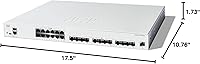
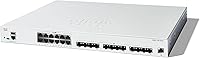
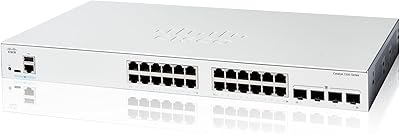
Port layout is worth clarifying upfront: the Cisco Catalyst 1300-24XTS provides 12 10G copper RJ45 ports for direct device connections and 12 10GE SFP+ slots for fiber or high-speed uplinks, plus a dedicated GE management port that keeps administrative traffic fully off your production network. On security, IP-MAC port binding locks down which devices can communicate on specific ports, while IPv6 First Hop Security guards against address spoofing — protection that once required separate appliances. IEEE 802.3az compliance quietly reduces power draw during low-traffic periods, and the whole package comes backed by a limited lifetime warranty.

Best For

This Cisco SMB switch is a natural fit for small-to-medium businesses running bandwidth-heavy workloads — local NAS arrays, virtual machine clusters, or video editing suites — where gigabit connections have become a genuine bottleneck. It also suits IT-light offices where the person handling setup isn't a full-time engineer; the mobile app lowers the barrier, though you'll still need a basic grasp of VLANs and IP addressing to get the most out of it. Organizations prioritizing access-layer security without additional hardware, and those who want no ongoing licensing costs, will find this a well-structured long-term investment.

User Feedback

Buyers broadly appreciate how quickly the Cisco Business app gets this 10G managed switch running, with several reviewers noting that initial configuration wrapped up in under an hour. Build quality draws consistent praise — the unit feels solid and rack-mounts cleanly. That said, a recurring concern involves SFP+ module compatibility; some users report that third-party transceivers require extra verification before committing. A few have also flagged the firmware update process as less intuitive than initial setup. On value, those who've priced enterprise alternatives tend to view the no-license structure as a genuine cost saver long-term, while others still find the upfront outlay a hard pill to swallow.

Pros

  • No recurring subscription or licensing fees — the total cost of ownership is predictable from day one.
  • Hybrid port layout with 12x copper RJ45 and 12x SFP+ slots covers both direct device connections and fiber uplinks in one unit.
  • Dedicated out-of-band management port keeps administrative traffic cleanly separated from production traffic.
  • IP-MAC port binding and IPv6 First Hop Security deliver meaningful access-layer protection without additional hardware.
  • IEEE 802.3az Energy Efficient Ethernet compliance quietly reduces power consumption during low-traffic periods.
  • The Cisco Business mobile app makes initial setup approachable for those without a dedicated IT team.
  • Limited lifetime hardware warranty offers strong long-term coverage that many rivals at this tier do not match.
  • Solid rack-mount build quality earns consistent praise from buyers who handle physical deployments regularly.
  • Complimentary one-year technical support from Cisco provides a safety net during the critical first year of deployment.
  • 10G copper performance has met or exceeded expectations for buyers running NAS, VMs, and video workflows.

Cons

  • Third-party SFP+ transceivers may not work out of the box — module compatibility should be verified before purchasing.
  • The firmware update process is less intuitive than initial setup, and some users find the documentation thin.
  • Twelve 10G copper ports may feel limiting faster than expected for growing teams with many high-bandwidth devices.
  • The upfront hardware cost is steep, making it a tough internal justification for businesses with tight capital budgets.
  • Fanless operation is not guaranteed across all configurations — buyers should confirm their specific unit variant.
  • The Cisco Business Dashboard, while useful, requires some familiarity with network management concepts to use effectively.
  • Heat dissipation at sustained high loads has drawn occasional concern from users in poorly ventilated installations.
  • No built-in redundant power supply option, which may be a drawback for businesses requiring higher availability standards.

Ratings

The Cisco Catalyst C1300-24XTS Managed Network Switch earns a well-rounded but nuanced set of scores based on AI analysis of verified buyer reviews collected globally, with spam, bot-submitted, and incentivized feedback actively filtered out before scoring. This 10G managed switch draws strong praise for its hardware performance and no-license cost model, but real users also surface friction points around third-party compatibility and firmware management that are worth knowing before you buy. Both the highlights and the honest shortcomings are reflected in the scores below.

Port Performance
91%
Buyers running NAS arrays, virtual machine hosts, and collaborative video editing workflows consistently report that the 10G copper ports deliver exactly what is advertised — sustained, stable throughput without throttling under real office workloads. The hybrid layout combining RJ45 and SFP+ in a single 1U unit is a practical arrangement that saves space and avoids needing a second device.
Twelve copper ports can feel limiting faster than expected in growing environments where multiple high-bandwidth devices compete for access. A few users have noted that pushing all ports to sustained high loads simultaneously does generate noticeable heat, which requires attention to rack ventilation.
Value for Money
78%
22%
For businesses that have priced out enterprise-grade 10G switches with annual licensing fees, the one-time cost model of this Cisco SMB switch becomes a genuinely compelling argument over a three-to-five year horizon. Reviewers who made that direct comparison tend to rate the long-term value highly.
The upfront hardware investment is steep by small business standards, and buyers expecting gigabit-level pricing are often caught off guard. For workloads that do not actually saturate gigabit links, the cost-per-port math is difficult to justify.
Ease of Setup
74%
26%
The Cisco Business mobile app receives consistent praise for making initial configuration approachable, with guided steps that walk users through basic network setup in a reasonable amount of time. IT-light teams particularly appreciate the visual interface compared to CLI-only alternatives.
Setup confidence drops quickly once users move past basic configuration into VLANs, port security policies, and SFP+ provisioning — areas where the app provides limited hand-holding. Buyers with zero networking background report needing to supplement the app with external documentation or community forums.
Build Quality
88%
The physical unit earns consistently strong marks for its solid, rack-ready construction. Users handling installation in professional wiring closets and server rooms describe the fit and finish as on par with what you would expect from a Cisco product at this tier, with clean rack-mount alignment and a reassuring weight to it.
The case material varies between plastic and metal depending on the production batch shipped, which creates inconsistency in perceived quality between buyers. A small number of reviewers noted cosmetic inconsistencies on the chassis, though none reported structural or functional issues as a result.
Security Features
93%
IP-MAC port binding and IPv6 First Hop Security are the kind of access-layer protections that used to require dedicated appliances in SMB environments, and buyers with a security background recognize their value immediately. Network administrators managing multi-tenant offices or retail locations highlight these features as a meaningful risk reduction tool.
These features require deliberate configuration to be effective — they are not active in a meaningful way out of the box. Buyers without security operations experience may enable them incorrectly or leave them unconfigured, which reduces their practical value in less supervised deployments.
SFP+ Compatibility
61%
39%
When using Cisco-approved or Cisco-branded SFP+ transceivers, the ports operate cleanly and reliably with no reported functional issues. Users running fiber uplinks to compatible upstream switches or storage hardware in validated configurations report no complaints.
Third-party transceivers are a recurring source of frustration — some modules are simply not recognized, and others trigger compatibility warnings that require firmware-level intervention to resolve. This forces buyers to either stick with Cisco optics at a higher cost or spend time troubleshooting module recognition before getting their uplinks online.
Management Interface
79%
21%
Having three management options — mobile app, local web UI, and the Cisco Business Dashboard — gives different types of administrators a starting point that suits their comfort level. Network managers already familiar with Cisco Business products find the Dashboard integration particularly efficient for multi-device oversight.
The three interfaces do not always offer feature parity, and some advanced configuration options are only accessible through the web UI, forcing users to switch between tools mid-deployment. The Dashboard itself has a learning curve that can slow down teams hoping to use it as their primary management layer.
Energy Efficiency
84%
IEEE 802.3az compliance means the switch actively scales down power consumption when ports are idle or carrying light traffic, which translates to measurable reductions in electricity draw over the course of a year in a typical office deployment. Buyers with energy-conscious facilities management teams appreciate this as a genuine operational benefit.
The power savings are more noticeable in environments with variable traffic patterns and are less significant in always-on, high-utilization deployments where ports rarely idle. Some users expected greater power reduction than the standard actually delivers under continuous load.
Firmware & Updates
58%
42%
Firmware updates do address known bugs and occasionally add feature improvements, and Cisco does release updates for this product line with reasonable regularity. Buyers who stay current on firmware report a more stable overall experience over time.
The firmware update process itself is one of the more commonly cited pain points — users describe it as less intuitive than the initial setup experience, with limited in-app guidance on how to safely apply updates. A small number of reviewers reported needing to factory reset after a failed update procedure.
Warranty & Support
86%
A limited lifetime hardware warranty is a meaningful differentiator at this price tier, and buyers who have had to replace failed hardware under warranty report a functional, if not always fast, claims process. The included one-year technical support gives newer network administrators a safety net during the learning curve.
After the complimentary support year expires, extended support coverage requires an additional purchase, which adds cost for businesses that rely heavily on vendor assistance. A subset of reviewers found Cisco support response times slower than expected for a product positioned at this market level.
Acoustic Profile
81%
19%
In configurations where fanless operation applies, this Cisco SMB switch is genuinely silent — a meaningful quality-of-life benefit for open office environments, creative studios, or any space where rack noise is a concern. Buyers specifically seeking quiet hardware mention it as one of the unit's more practical real-world advantages.
Fanless operation is not universal across all shipped units, and Cisco does not always make it simple to confirm the exact thermal management configuration before purchase. Buyers who assumed fanless and received a unit with active cooling report disappointment, particularly when the switch is located in a quiet workspace.
Rack Integration
87%
The 1U form factor integrates cleanly into standard 19-inch racks, and the included mounting hardware is complete enough that most users do not need to source anything separately. Physical installation is one of the smoother steps in the deployment process according to the majority of reviewers.
At 5.89 kg, the unit is on the heavier side for a solo rack installation, and a few users recommend having a second person present for mounting. Cable management around the dense 24-port front panel also requires some planning in tighter rack environments.
Thermal Management
67%
33%
Under typical mixed workloads in a reasonably ventilated rack or wiring closet, the switch maintains stable operating temperatures without issue. Buyers running it in standard server room conditions with adequate airflow report no thermal concerns over extended operation.
In poorly ventilated installations or when all ports are pushed to sustained high utilization, heat buildup has been flagged as a concern by a minority of users. The 40°C upper operating limit leaves less headroom than some buyers would prefer for warm equipment rooms or summer deployments without climate control.
Documentation Quality
63%
37%
Cisco provides a reasonably structured set of online documentation for the Catalyst 1300 line, and the mobile app does include contextual help prompts during initial setup that cover the most common configuration steps adequately for basic deployments.
Advanced configuration scenarios — particularly around SFP+ module provisioning, security policy setup, and firmware management — are documented with less clarity than users expect from a vendor at this price point. Community forums frequently fill the gaps that official documentation leaves open.

Suitable for:

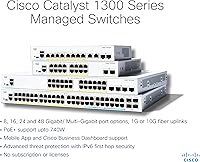
The Cisco Catalyst C1300-24XTS Managed Network Switch is built for small and medium-sized businesses that have hit a real wall with gigabit networking — teams running NAS arrays, local virtualization hosts, or collaborative video editing workflows will feel the difference immediately. It particularly shines in environments where 10G copper connectivity needs to coexist with fiber uplinks, since the hybrid port layout handles both without requiring a second device. Businesses that want robust access-layer security without bolting on separate appliances will find the built-in IP-MAC binding and IPv6 protections genuinely useful. IT-light offices where a non-specialist handles network duties can get up and running through the Cisco Business mobile app, though a baseline understanding of networking concepts is still needed. Perhaps most compelling for budget-conscious buyers is the one-time cost model — no subscriptions, no license renewals — which makes long-term total cost of ownership far more predictable than comparable managed switches from vendors who charge for feature access.
Not suitable for:

The Cisco Catalyst C1300-24XTS Managed Network Switch is a hard sell for anyone who genuinely only needs gigabit speeds — the price premium simply isn't justified if your workloads max out at a few hundred megabits. Home users or freelancers looking to manage a handful of personal devices will find this level of hardware far beyond what they need, both in port count and in management complexity. Pure beginners with no networking background may also struggle; the mobile app simplifies setup, but concepts like VLANs, port security policies, and SFP+ module selection still require some foundational knowledge to configure correctly. Buyers on tight hardware budgets should also weigh the upfront cost carefully — while the no-license model saves money over time, the initial outlay is substantial. If your team requires more than 12 direct 10G copper connections, the port count may also become a limiting factor sooner than expected.
Specifications

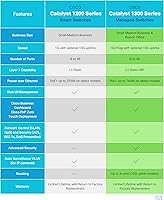
  • Copper Ports: The switch includes 12 x 10G Base-T RJ45 ports, each capable of sustained 10 Gigabit per second throughput for direct device connections.
  • SFP+ Ports: Twelve 10GE SFP+ slots are available for fiber or DAC cable uplinks, enabling high-speed connections to servers, storage arrays, or upstream switches.
  • Management Port: A dedicated 1GE out-of-band management port isolates administrative traffic from the production network for cleaner and more secure operations.
  • Dimensions: The unit measures 17.5″L x 10.76″W x 1.73″H, occupying a standard 1U rack space.
  • Weight: The switch weighs 5.89 kg (12.96 lbs), which is typical for a 1U 10G-class managed switch.
  • Data Rate: All data ports operate at up to 10 Gigabits per second, supporting full wire-speed switching across the port matrix.
  • Max Temperature: The switch is rated for operation at ambient temperatures up to 40°C, suitable for most server room and wiring closet environments.
  • Energy Standard: The unit complies with IEEE 802.3az Energy Efficient Ethernet, automatically reducing power consumption during periods of low network activity.
  • Security Features: IP-MAC port binding and IPv6 First Hop Security are built in, providing access-layer protection against spoofing and man-in-the-middle attacks without additional hardware.
  • Management Options: The switch can be configured and monitored via the Cisco Business mobile app, a local web interface, or the Cisco Business Dashboard.
  • Licensing Model: No subscription, software license, or recurring fee is required to access the full feature set of this switch.
  • Warranty: Cisco provides a limited lifetime hardware warranty covering manufacturing defects for the operational life of the unit.
  • Technical Support: One year of complimentary technical support from Cisco is included at no additional cost from the date of purchase.
  • Case Material: The chassis is constructed from plastic or metal depending on the specific production variant shipped.
  • In-Box Contents: The package includes the switch, a power cord or adapter, a USB Type-C cable, and rack mounting hardware.
  • Interface Types: Physical connectivity is provided through RJ45 (copper) and SFP+ (fiber or DAC) interface standards.
  • Model Number: The official Cisco model designation is C1300-24XTS, which identifies this specific 24-port 10G configuration within the Catalyst 1300 family.

Related Reviews

Cisco Catalyst 1300-24MGP-4X Managed Switch
88%
88%
Setup and Installation
91%
Build Quality and Durability
94%
Performance (Speed and Connectivity)
92%
Security Features
89%
Power over Ethernet (PoE) Performance
More
Cisco Catalyst C1200-8T-D 8-Port Gigabit Smart Switch
79%
88%
Ease of Setup
84%
Build Quality
91%
Network Performance
79%
Management Interface
83%
Security Features
More
Cisco Catalyst C1200-24T-4G 24-Port Smart Switch
83%
78%
Ease of Setup
84%
Build Quality
91%
Network Performance
76%
Management Interface
88%
Security Features
More
TP-Link Festa FS328G 28-Port Gigabit Smart Managed Network Switch
84%
88%
Ease of Setup
85%
Performance and Reliability
91%
Cloud Management Features
80%
Build Quality
87%
Value for Money
More
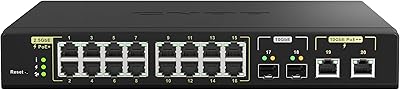
QNAP QSW-M2116P-2T2S 20-Port 10GbE PoE++ Managed Network Switch
86%
93%
Performance & Speed
89%
PoE Support
91%
Ease of Setup
88%
Build Quality & Durability
90%
Management Interface (QSS)
More
HPE Instant On 1830 8-Port PoE Switch
82%
91%
Ease of Setup
74%
PoE Performance
88%
Build Quality
77%
Management Software
83%
Value for Money
More
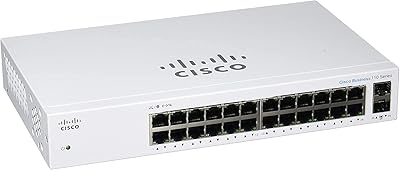
Cisco CBS110-24T Unmanaged Network Switch
84%
96%
Ease of Setup
88%
Build Quality
91%
Port Performance
97%
Noise Level
78%
Value for Money
More
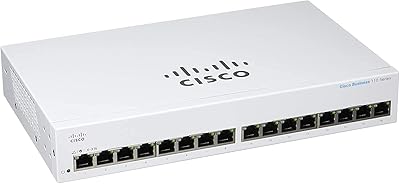
Cisco CBS110-16T 16-Port Unmanaged Network Switch
84%
96%
Ease of Setup
88%
Network Performance
74%
Build Quality
67%
Value for Money
97%
Noise Level
More
Cisco CBS110-5T-D 5-Port Unmanaged Switch
84%
97%
Ease of Setup
91%
Network Performance & Speed
96%
Noise Level
72%
Build Quality & Materials
83%
Value for Money
More
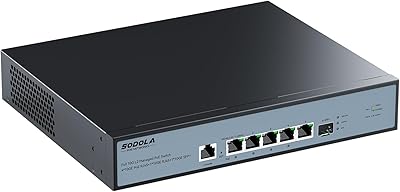
MikroTik CRS305-1G-4S+IN Network Switch
85%
92%
Value for Money
88%
Performance
93%
Build Quality & Durability
80%
Ease of Setup
91%
Fanless Design
More

FAQ

No, and that is genuinely one of its stronger selling points. The full feature set — including security functions, VLAN support, and management tools — is accessible right out of the box with no recurring cost attached.

You can attempt to, but it is not guaranteed to work cleanly. Cisco hardware is tested and validated against Cisco-branded or approved optics, and some third-party modules may not be recognized or may trigger compatibility warnings. It is worth verifying against Cisco's compatibility matrix before committing to a specific transceiver brand.

The Cisco Business mobile app does a reasonable job of walking you through initial configuration with step-by-step prompts. That said, if you have never touched concepts like VLANs, port security, or IP addressing before, you will likely hit a point where the app alone is not enough. Some basic networking knowledge is still needed to get the most out of it.

The 12 RJ45 copper ports use standard Ethernet cables and are typically where you plug in servers, workstations, or NAS devices directly. The 12 SFP+ slots are designed for fiber optic cables or DAC (direct attach copper) twinax cables, and are more commonly used for uplinks to other switches or high-speed storage connections. They serve different roles, so the total of 24 ports is split between two distinct connection types.

Fanless operation is available on select models within the Catalyst 1300 line, so it depends on the specific unit you receive. Before purchasing with acoustics as a primary concern, confirm the exact configuration you are ordering includes the fanless variant.

Yes, it integrates natively with the Cisco Business Dashboard, which allows centralized monitoring and management across multiple Cisco Business devices on your network. It also works with the Cisco Business mobile app and the local web UI, giving you several options depending on your preference.

Cisco backs it with a limited lifetime hardware warranty, which covers manufacturing defects for the life of the product. You also get one year of complimentary technical support included, which can be helpful during initial deployment or if you run into configuration issues early on.

Yes, this is actually one of the most practical use cases for it. If you are running a NAS with 10G network cards or a hypervisor host that benefits from high-bandwidth connectivity, the 10G copper ports will give you a significant throughput improvement over a standard gigabit switch. Multiple reviewers have confirmed solid, consistent performance in exactly these scenarios.

The dedicated GE management port is completely separate from the 24 data ports, meaning you can access the switch for configuration and troubleshooting even if your main network has issues. It keeps administrative traffic off your production network, which is both a security and a reliability benefit — especially useful during maintenance windows or incident response.

That depends largely on your situation. If you are comparing it to gigabit-only managed switches, the gap is significant. However, if you are comparing it to enterprise 10G switches from Cisco or competitors that charge annual licensing fees, the no-subscription model can make the math work out over three to five years. For businesses with genuine 10G workload needs, the long-term value tends to hold up — but for lighter workloads, the investment is harder to justify.