QNAP QSW-M2116P-2T2S 20-Port Managed Network Switch



Overview
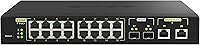
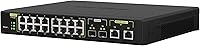
The QNAP QSW-M2116P-2T2S 20-Port Managed Network Switch sits in an interesting middle ground — above the no-frills unmanaged switches most small offices default to, but well below the complexity of full enterprise Layer 3 gear. Its port layout tells you exactly who it is built for: sixteen 2.5GbE PoE+ ports for devices like wireless access points and IP cameras, two 10GbE copper uplinks for fast backbone connections, and two SFP+ slots for fiber or direct-attach cables. If you are already running QNAP NAS hardware, the integration feels natural. That said, be clear going in — this is a 1U rack unit, not something you casually drop on a desk and forget about.
Features & Benefits
What sets the QSW-M2116P-2T2S apart is its power delivery range. The sixteen PoE+ ports each handle up to 30 watts — solid for most access points and cameras — while the two PoE++ ports reach 90 watts each, supporting power-hungry devices like PTZ cameras or high-wattage outdoor radios. Combined, that is a 280-watt PoE budget across 18 ports. The dual 10GbE RJ45 uplinks auto-negotiate across five speeds (100M through 10G), so you are not forced to replace existing cabling. The SFP+ slots — small form-factor ports that accept fiber modules or DAC cables — handle backbone links to core switches or NAS. Management runs through a browser-based interface with VLAN segmentation, LACP link aggregation, and ACL access controls built in, none of which require command-line expertise.
Best For
This 20-port PoE switch is a strong fit for anyone who has outgrown basic gigabit infrastructure but is not ready — or willing — to invest in full enterprise hardware. It is particularly well-suited to small businesses or home lab setups deploying Wi-Fi 6 or 6E access points, since many of those APs now ship with 2.5GbE uplinks and need a switch that can actually meet that speed. Security installers benefit too: you can run a mix of PoE IP cameras and high-bandwidth devices simultaneously without buying external power injectors. If your network already includes QNAP storage, the integration is straightforward. It also consolidates older 1GbE gear alongside newer multi-gigabit devices under a single managed roof.
User Feedback
With 64 ratings and a 3.9-out-of-5 average, this QNAP managed switch occupies a credible but cautious spot. The review pool is small — this is specialized gear with a narrow audience — so treat the score as directional rather than definitive. Buyers who praise it consistently highlight the port density at this speed tier and how approachable the QSS management interface is for admins who would rather not live in a terminal. The recurring criticism is genuine though: fan noise under sustained load is audible, which matters if the switch is going into a quiet office or a home environment without a dedicated rack closet. A handful of users also flag occasional firmware quirks, and anyone needing routing between network segments will hit the ceiling of Layer 2 fairly quickly.
Pros
- Sixteen PoE+ ports all run at 2.5GbE — rare at this price tier, where most competitors cap PoE ports at 1GbE.
- The 280-watt total PoE budget is generous enough to simultaneously power multiple PTZ cameras, access points, and VoIP phones.
- Two 90-watt PoE++ ports handle high-draw devices like outdoor radios or pan-tilt-zoom cameras without a separate injector.
- Dual 10GbE copper uplinks auto-negotiate down to 100M, so existing Cat5e or Cat6 cabling stays usable.
- SFP+ slots accept fiber modules or DAC cables for low-latency backbone links to core switches or NAS devices.
- The browser-based QSS interface makes VLAN setup and link aggregation accessible without any command-line experience.
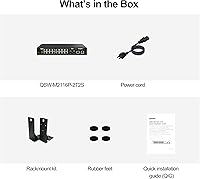
- Rackmount kit and rubber feet are both included, giving flexibility for either a rack install or temporary bench deployment.
- QNAP NAS users get notably smoother integration compared to third-party switches at a similar speed tier.
- At under a thousand dollars, the combination of port count, PoE wattage, and multi-gigabit speeds represents solid value for SMB builds.
- LLDP support helps automatically map and document connected devices, which is a real time-saver in mixed-device environments.
Cons
- Fan noise under sustained load is a consistent complaint — not suitable for quiet or noise-sensitive spaces.
- Strictly Layer 2 only; no inter-VLAN routing means a separate router is required for traffic between network segments.
- Occasional firmware bugs have been reported by users, with some requiring rollbacks or workarounds after updates.
- The review pool of 64 ratings is small for a product at this price, making it harder to gauge long-term reliability with confidence.
- No console or CLI access limits troubleshooting options for advanced network engineers who prefer command-line control.
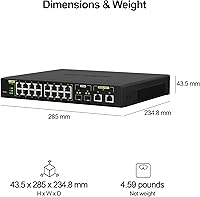
- The 1U rack form factor and 6-pound weight make this a poor fit for anyone without a structured install environment.
- The QSS OS, while approachable, has fewer advanced features than management platforms found on Cisco or Netgear enterprise switches.
- Total PoE budget of 280 watts can be consumed quickly if multiple high-wattage devices are connected simultaneously on the PoE++ ports.
- No redundant power supply option, which may be a concern for business-critical deployments that require high availability.
Ratings
The QNAP QSW-M2116P-2T2S 20-Port Managed Network Switch has been scored below by our AI system after analyzing verified buyer reviews from global markets, with spam, bot-generated, and incentivized feedback actively filtered out. The scores reflect the honest consensus of real-world deployments — from small business server rooms to home lab racks — capturing both what this switch genuinely excels at and where it falls short of expectations.
Port Density & Speed Mix
PoE Power Delivery
Web Management Interface
Value for Money
Fan Noise & Acoustics
Layer 2 Feature Set
Build Quality
QNAP Ecosystem Integration
Firmware Stability
Setup & Initial Configuration
10GbE Uplink Performance
Rackmount & Physical Install
Backward Compatibility
Suitable for:
The QNAP QSW-M2116P-2T2S 20-Port Managed Network Switch is a strong match for small businesses and prosumer home lab builders who have genuinely outgrown standard gigabit infrastructure and need a structured, manageable upgrade path. It is especially well-suited to environments deploying Wi-Fi 6 or 6E access points, since many of those devices ship with 2.5GbE uplinks that a typical 1GbE switch simply cannot feed at full speed. Security integrators running mixed deployments of PoE IP cameras and bandwidth-heavy endpoints will appreciate having 280 watts of total PoE capacity spread across 18 ports, eliminating the need for external power injectors. If you are already invested in the QNAP ecosystem — particularly running a QNAP NAS for centralized storage — the QSS management interface and 10GbE uplink options make this switch a natural fit that reduces integration friction. IT administrators who want real network controls like VLAN segmentation, link aggregation, and access lists without the steep learning curve of command-line-only enterprise gear will find the browser-based management genuinely practical.
Not suitable for:
The QNAP QSW-M2116P-2T2S 20-Port Managed Network Switch will frustrate buyers who need inter-VLAN routing or any Layer 3 functionality, because it stops firmly at Layer 2 — traffic cannot be routed between separate network segments at the switch level. Anyone planning to install this in a quiet home office, a recording studio, or any noise-sensitive space should factor in that the fans are audible under sustained load; this is not a silent appliance. Users who want a truly plug-and-play experience will find the rack-oriented form factor and management overhead more than they bargained for. Budget-conscious buyers who only need basic connectivity at standard gigabit speeds are paying for capabilities they will never use. Finally, organizations that anticipate rapid network growth or need dynamic routing protocols like OSPF or BGP in the near term will hit the ceiling of this switch sooner than expected and should look at full Layer 3 managed options from the start.
Specifications
- Total Ports: The switch provides 20 ports in total, combining 2.5GbE PoE+, 10GbE BASE-T, and 10GbE SFP+ connections in a single 1U chassis.
- 2.5GbE Ports: Sixteen RJ45 ports operate at 2.5GbE and each delivers up to 30W of PoE+ power to connected devices.
- 10GbE RJ45 Ports: Two 10GBASE-T copper ports support five auto-negotiated speeds — 100M, 1G, 2.5G, 5G, and 10G — and each can supply up to 90W via PoE++.
- SFP+ Ports: Two 10GbE SFP+ slots accept fiber modules or direct-attach copper cables for high-throughput uplinks to core switches, routers, or NAS devices.
- PoE Budget: The total PoE power budget across all 18 powered ports is 280W, with a maximum single-port output of 90W on the two PoE++ ports.
- PoE Standards: The two 10GbE RJ45 ports support IEEE 802.3bt (PoE++), while the sixteen 2.5GbE ports support IEEE 802.3at (PoE+).
- Management: Network management is handled through QNAP's QSS browser-based GUI, operating at Layer 2 with no CLI required for standard configuration tasks.
- Protocols: Supported Layer 2 protocols include VLAN (802.1Q), LACP link aggregation (802.3ad), ACL-based access control, and LLDP device discovery.
- Form Factor: The unit is a 1U rackmount appliance measuring 4 x 16 x 12 inches; a rackmount kit and rubber feet for desktop use are both included in the box.
- Weight: The switch weighs 6 pounds, which is typical for a metal-reinforced 1U managed switch of this port density.
- Case Material: The chassis combines a metal frame for structural rigidity with plastic panel elements, consistent with mid-range managed switch construction standards.
- In the Box: The package includes the switch unit, a rackmount kit, rubber feet, and a power cord; no SFP+ modules or DAC cables are included.
- OS Platform: The switch runs QNAP Switch System (QSS), a proprietary switch operating system designed to integrate with other QNAP hardware and QuCPE environments.
- Data Rate: Maximum data transfer rate across the 10GbE uplink ports is 10 Gigabits per second, with the 2.5GbE access ports capped at 2.5 Gigabits per second each.
- Market Rank: As of the most recent data available, the QSW-M2116P-2T2S holds a rank of #977 in the Computer Networking Switches category on Amazon.
Related Reviews
QNAP QSW-2104-2T Unmanaged Network Switch
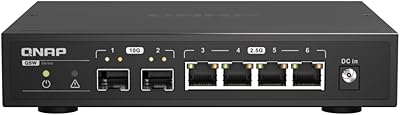
QNAP QSW-2104-2S Unmanaged Network Switch

TP-Link Festa FS328G 28-Port Gigabit Switch
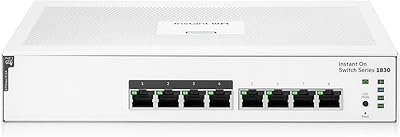
HPE Instant On 1830 8-Port PoE Switch
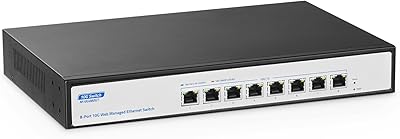
YuLinca 8-Port 10G Managed Network Switch
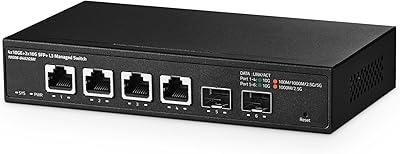
Binardat 6-Port 10G L3 Managed Switch
Cudy GS1016E 16-Port Managed Gigabit Switch
MokerLink 12-Port 10G SFP+ Managed Switch
HPE Networking Instant On 1430 26-Port Switch