Overview

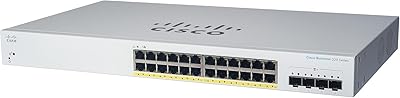
The Cisco C1300-24MGP-4X Managed Switch sits in an interesting spot — it's not an entry-level unmanaged box, but it's also not asking you to budget like an enterprise shop. What Cisco has built here is a mid-tier managed switch with a genuinely useful hybrid port layout: standard gigabit, 2.5GE, and 10GE SFP+ uplinks all in one unit. That mix is rare at this price band. What really stands out, though, is the no-subscription model — you pay once and manage it indefinitely, with no annual licensing fees eating into your budget. A limited lifetime warranty and a year of complimentary technical support round out a solid value proposition for growing businesses.

Features & Benefits

The port breakdown is where this Cisco Business switch earns its keep. Sixteen standard GE ports handle everyday client traffic, while the eight 2.5GE ports give Wi-Fi 6 access points the bandwidth they actually need — a detail many cheaper switches ignore entirely. Four 10GE SFP+ uplinks handle core aggregation without becoming a bottleneck. The 375W shared PoE budget is worth understanding clearly: it is distributed across all active PoE ports, so heavy deployments of cameras and APs together require some planning. Security-wise, IP-MAC port binding and IPv6 First Hop Security add meaningful protection without complex configuration. Cisco Business Dashboard ties it all together for centralized management across multiple sites.

Best For

This managed PoE switch is a strong fit for small businesses building out infrastructure around wireless access points, IP cameras, or VoIP systems — essentially anywhere you need to power and manage devices without running separate power lines. The mobile app and web interface make initial setup approachable even for staff without deep networking backgrounds. Organizations already using Cisco Business gear will appreciate ecosystem compatibility out of the box. The 10GE uplinks give forward-thinking teams room to scale without hardware replacement down the road. At 1U with universal voltage support, it fits cleanly into most rack setups. Not a budget buy, but a practical long-term infrastructure investment.

User Feedback

With 68 ratings averaging 4.3 stars, the C1300-24MGP-4X draws solid marks across the board. Buyers consistently praise reliable PoE performance and the straightforward initial setup experience, particularly those coming from less capable unmanaged switches. IT professionals tend to appreciate the security feature depth, while small business owners lean on the mobile app to get things running fast. On the critical side, some users note the web UI feels dated compared to newer competitors, and a handful mention that documentation could be clearer for edge-case configurations. A few reviewers compare it favorably against Netgear and TP-Link alternatives at similar price points, citing Cisco brand reliability and the warranty as deciding factors.

Pros

  • No recurring subscription or licensing fees — you own the functionality outright after purchase.
  • The 2.5GE ports give Wi-Fi 6 access points the throughput they were designed to use.
  • Four 10GE SFP+ uplinks provide meaningful headroom for network growth without a hardware swap.
  • Limited lifetime warranty is a strong signal of long-term reliability from a brand with a proven track record.
  • Cisco Business Dashboard makes centralized management practical for small IT teams managing multiple locations.
  • The mobile app lowers the barrier for initial setup, even for non-technical staff.
  • IP-MAC port binding and IPv6 security features add enterprise-grade protection without complex configuration.
  • IEEE 802.3az compliance quietly reduces power draw during low-traffic periods, cutting operational costs over time.
  • Universal voltage input (100–240V) makes it practical for international deployments or office relocations.
  • One year of complimentary technical support is included, reducing early-stage troubleshooting risk.

Cons

  • The 375W PoE budget is shared across all ports — heavy mixed deployments of cameras and APs require careful planning.
  • The web management interface feels dated compared to newer competitors and can frustrate first-time users.
  • Official documentation has gaps that experienced network admins may find aggravating in edge-case configurations.
  • Plastic chassis construction feels inconsistent with the premium price tag for buyers who care about build quality.
  • At nearly 16 pounds, rack installation is a two-person job without proper cable management tools.
  • No built-in routing or firewall features — you will still need a separate gateway device.
  • The 40-degree Celsius upper operating temperature limit may be a concern in poorly ventilated server rooms.
  • Buyers coming from consumer-grade switches may underestimate the learning curve of managed switch concepts.
  • Resale value can drop quickly as competing switches add 2.5GE ports more broadly across lower price tiers.

Ratings

The scores below reflect an AI-driven analysis of verified global buyer reviews for the Cisco C1300-24MGP-4X Managed Switch, with spam, bot activity, and incentivized feedback actively filtered out before scoring. Each category is rated independently to surface what this Cisco Business switch genuinely does well — and where real users have hit friction. Both the strengths and the honest trade-offs are reflected without softening.

Port Versatility
93%
Buyers consistently highlight the hybrid port layout as a practical advantage over similarly priced alternatives. Having standard GE, 2.5GE, and 10GE SFP+ uplinks in one unit means most small business networks can be fully wired without a secondary switch, which simplifies both the rack and the budget.
A small number of reviewers wish the ratio of 2.5GE to standard GE ports were reversed, particularly those running newer workstations that could benefit from faster copper speeds. The four SFP+ uplink count is also seen as limiting for businesses with more complex multi-switch stacking needs.
PoE Performance
88%
Users powering mixed deployments of Wi-Fi 6 access points, IP cameras, and VoIP phones report stable, consistent power delivery without the port-level dropouts seen on cheaper alternatives. The PoE+ support on all eligible ports is a genuine differentiator for denser installations.
The 375W shared budget catches some buyers off guard — those who did not plan their device load carefully report running into power constraints sooner than expected. A few reviewers note that Cisco's documentation could be clearer about per-port power limits under full load.
Management Experience
74%
26%
Small business owners who are not network specialists consistently praise the mobile app for getting the switch online quickly. The Cisco Business Dashboard is well-regarded among users managing multiple locations, who appreciate having a single pane of glass without paying for enterprise software.
The local web UI draws repeated criticism for looking and feeling dated compared to competitors like Netgear's Insight platform. Power users attempting advanced configurations — custom QoS profiles, granular ACLs — report that the interface becomes less intuitive the deeper you go.
Security Features
91%
IT professionals specifically call out IP-MAC port binding and IPv6 First Hop Security as features that typically require a higher-tier switch to obtain. For businesses handling sensitive client data or running surveillance networks, having man-in-the-middle protection built in without extra licensing is a real operational win.
A handful of reviewers with enterprise backgrounds note that the security feature set, while solid for small business, does not match what Cisco's own Catalyst 9000 series offers — so organizations expecting full enterprise-grade threat visibility may feel the gap. Documentation for configuring advanced security policies is also noted as thin.
Setup & Onboarding
81%
19%
Non-technical staff report being able to complete basic setup using the step-by-step mobile app in under 30 minutes, which is a genuine achievement for a managed switch at this complexity level. Cisco's guided onboarding reduces the barrier for small businesses without dedicated IT support.
Users who bypassed the app and went straight to the web UI for initial configuration reported a steeper experience, with some spending hours troubleshooting default settings. Initial firmware update prompts also drew some frustration from buyers who expected the device to be production-ready out of the box.
Build Quality
67%
33%
The chassis feels solid in hand and shows no signs of flex or poor tolerancing at the port faces, which matters for rack installations where cables are routinely plugged and unplugged. Rack ears are well-aligned and the included mounting hardware is complete.
The plastic enclosure is the most polarizing physical attribute — reviewers spending at this price tier routinely expect a metal chassis, and several explicitly compare it unfavorably to metal-bodied competitors from Netgear and TP-Link in the same bracket. It does not affect function, but it affects perceived value.
Thermal Management
69%
31%
In typical office rack environments with reasonable airflow, the switch runs warm but within normal operating parameters. Users in well-ventilated server rooms report no heat-related incidents over multi-month deployments, and the Energy Efficient Ethernet compliance helps reduce heat generation during idle periods.
Buyers in warmer climates or equipment closets with poor ventilation report the unit running hotter than expected, with a few noting thermal throttling concerns near the 40-degree Celsius rated limit. This is a more common complaint from users in small offices without dedicated cooling infrastructure.
Value for Money
76%
24%
The no-subscription model is the single most frequently praised value attribute — buyers who compared the total 5-year cost of ownership against subscription-dependent alternatives consistently rate this switch favorably once recurring costs are factored in. The lifetime warranty adds further long-term confidence.
The upfront price is steep for a small business on a tight capital budget, and several reviewers acknowledge that unmanaged alternatives cost a fraction of the price for simpler use cases. A portion of buyers feel the plastic chassis and dated web UI do not fully justify the premium ask.
2.5GE Port Utility
86%
Among reviewers who specifically mention the 2.5GE ports, the feedback is strongly positive — particularly from those running Wi-Fi 6 or Wi-Fi 6E access points that were previously bottlenecked at 1GE. Several buyers cite this feature as the primary reason they chose this switch over comparable alternatives.
Buyers with older infrastructure who do not yet have 2.5GE-capable devices feel the ports go unused, which can feel like paying for capacity that has no immediate value. The niche nature of 2.5GE also means fewer cable and NIC options available at the time of purchase for some users.
Ecosystem Compatibility
84%
Users already running Cisco Business wireless access points and routers report a noticeably smoother management experience, with the Business Dashboard recognizing and auto-configuring connected Cisco devices with minimal manual input. This tight integration is a real time-saver in multi-device environments.
Buyers mixing this switch with non-Cisco networking gear find that the ecosystem benefits largely disappear, reducing the Business Dashboard to a basic management console. Some users report that certain third-party SFP+ transceivers are not reliably detected, requiring Cisco-branded modules instead.
Warranty & Support
89%
The lifetime hardware warranty is consistently mentioned as a major trust signal, particularly by buyers making a long-term infrastructure commitment. The included first-year technical support is also well-rated by users who needed help during initial deployment — response times are generally described as acceptable.
After the complimentary first year, ongoing technical support requires a separate support contract, which surprises some buyers who assumed lifetime warranty implied lifetime support. A few reviewers note that self-service documentation quality varies, and finding clear answers for non-standard configurations can require significant effort.
Energy Efficiency
82%
18%
Buyers who monitored power draw over several months report measurable savings compared to older non-EEE-compliant switches, particularly in offices with significant overnight idle periods. The switch automatically adjusts power consumption without any manual configuration, which is appreciated by operations-focused buyers.
Energy savings are modest in environments where the switch runs at high PoE load around the clock, since the EEE benefits primarily materialize during low-traffic windows. A few buyers running 24/7 surveillance networks note the efficiency gains are less impactful than Cisco's marketing implies for always-on deployments.
Documentation Quality
58%
42%
Basic setup documentation is clear enough for straightforward deployments, and the Quick Start guide included in the box covers the essentials for getting a simple VLAN and PoE configuration running without needing to consult external resources.
Advanced configuration documentation is repeatedly flagged as insufficient — buyers attempting to configure RADIUS authentication, complex ACLs, or multi-switch stacking consistently report having to rely on third-party forums and community guides rather than official Cisco resources. This gap is particularly frustrating for smaller teams without enterprise IT backgrounds.
Physical Footprint
87%
The 1U form factor fits cleanly into standard rack enclosures, and the broad voltage compatibility means it can be deployed internationally or relocated without concern. At just under 18 inches long, it does not consume unusual rack depth compared to competitors in this category.
At nearly 16 pounds, solo rack installation is awkward and reviewers recommend having a second person assist — a minor but real operational note for small offices without dedicated IT personnel. The USB Type-C management port placement is also noted as inconveniently located by a few reviewers.

Suitable for:

The Cisco C1300-24MGP-4X Managed Switch is built for small and mid-sized businesses that need real infrastructure — not a stopgap solution. If you're running a growing office with Wi-Fi 6 access points, IP cameras, and VoIP phones, this switch handles all three without requiring separate power runs or compromising on management visibility. The eight 2.5GE ports are a genuine differentiator for anyone deploying modern wireless APs that can actually use that extra bandwidth. Teams already invested in the Cisco Business ecosystem will find compatibility straightforward, and the Cisco Business Dashboard makes multi-site management practical even with a lean IT team. The no-subscription model is a real financial advantage for organizations that plan to hold onto hardware for five or more years. Anyone who has been burned by competitor switches requiring annual cloud licenses will appreciate not having that recurring cost on the books.
Not suitable for:

Buyers on a tight budget should be honest with themselves before considering the Cisco C1300-24MGP-4X Managed Switch — this is a premium-tier product, and there are capable unmanaged or lightly managed alternatives at a fraction of the price if your needs are basic. Home lab enthusiasts or hobbyists who want advanced routing features will find that this is a Layer 2 managed switch, not a router, and it doesn't replace a dedicated firewall or gateway device. Very large deployments spanning dozens of switches will likely outgrow the Cisco Business Dashboard's scope and need a full enterprise management platform instead. If your environment runs entirely on flat, unmanaged networking with no PoE devices, no VLANs, and no security requirements, the feature set here is simply more than you need and you'll be paying for capabilities that sit unused. Users expecting a metal chassis at this price point may also be mildly disappointed, as the unit ships with a plastic housing.
Specifications

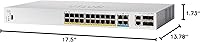
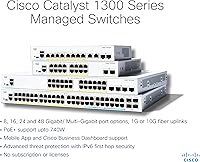
  • Port Layout: The switch provides 16 ports at 10/100/1000 Mbps, 8 ports at 2.5GE, and 4 ports at 10GE via SFP+ for a total of 24 copper ports plus 4 fiber uplinks.
  • PoE Budget: Total PoE and PoE+ power budget is 375W, shared across all active PoE-enabled ports simultaneously.
  • Uplink Speed: Four 10GE SFP+ uplink ports support a maximum aggregate data transfer rate of 40 Gbps.
  • Dimensions: The unit measures 17.5″ long by 13.78″ wide by 1.73″ high, fitting a standard 1U rack space.
  • Weight: The switch weighs 15.82 pounds, requiring two people for safe rack installation in most configurations.
  • Power Input: Input voltage ranges from 100 to 240V AC, making it compatible with power systems in most countries worldwide.
  • Max Power Draw: Maximum power consumption is 375W under full PoE load; idle draw is significantly lower due to IEEE 802.3az compliance.
  • Operating Temp: The rated upper operating temperature is 40 degrees Celsius, requiring adequate ventilation in enclosed rack environments.
  • Chassis Material: The enclosure is constructed from plastic, which keeps weight down but differs from the metal chassis found on enterprise-tier alternatives.
  • Management Options: The switch supports three management interfaces: the Cisco Business mobile app, a local web-based UI, and the Cisco Business Dashboard for multi-device oversight.
  • Security Features: Built-in security includes IP-MAC port binding, IPv6 First Hop Security, and protection against man-in-the-middle attacks on IPv6 networks.
  • Energy Standard: Compliant with IEEE 802.3az Energy Efficient Ethernet, the switch reduces power consumption automatically during periods of low network activity.
  • Warranty: Cisco provides a limited lifetime hardware warranty on this switch, covering manufacturing defects for the life of the unit.
  • Tech Support: One year of complimentary technical support is included with purchase, accessible through Cisco's business support channels.
  • Licensing: No software subscription or recurring license is required to access any management or security features on this switch.
  • Form Factor: Designed for standard 1U rack mounting; rack ears and mounting hardware are included in the box.
  • In the Box: Package contents include the switch, a power cord or adapter, a USB Type-C cable, and rack-mounting hardware.
  • Interface Types: The switch supports PoE, PoE+, and SFP+ interface types across its port complement.
  • Model Number: The official Cisco model identifier is C1300-24MGP-4X, and the Amazon ASIN is B0CZM4CZ2B.
  • Availability Date: This product was first made available for purchase in April 2024.

Related Reviews
Cisco Catalyst C1300-24XTS Managed Network Switch
78%
91%
Port Performance
78%
Value for Money
74%
Ease of Setup
88%
Build Quality
93%
Security Features
More
YuanLey YS24040GSM 28-Port Managed Switch
76%
93%
Value for Money
89%
Feature Depth
96%
Noise & Cooling
67%
Management Interface
51%
Documentation Quality
More
Cisco CBS110-16T 16-Port Unmanaged Network Switch
84%
96%
Ease of Setup
88%
Network Performance
74%
Build Quality
67%
Value for Money
97%
Noise Level
More
Cisco CBS110-24T Unmanaged Network Switch
84%
96%
Ease of Setup
88%
Build Quality
91%
Port Performance
97%
Noise Level
78%
Value for Money
More
Sodola 10Gb L2 Managed PoE Switch
87%
92%
Performance
89%
Power Output
85%
Ease of Setup
93%
Quiet Operation
88%
Reliability
More
YuLinca 8-Port 10G Managed Network Switch
79%
92%
Port Speed & Auto-Negotiation
89%
Throughput & Switching Performance
88%
Build Quality & Chassis
71%
Web Management Interface
86%
L2 Feature Set Depth
More
Binardat 6-Port 10G L3 Managed Switch
77%
91%
10G Port Performance
88%
Multi-Speed Compatibility
84%
L3 Feature Depth
89%
Value for Money
77%
Web Management Interface
More
Cisco CBS220-24P-4G Smart Switch
87%
89%
Ease of Setup
92%
Reliability
87%
PoE Power Efficiency
90%
Network Speed/Performance
85%
Security Features
More
Cisco CBS110-5T-D 5-Port Unmanaged Switch
84%
97%
Ease of Setup
91%
Network Performance & Speed
96%
Noise Level
72%
Build Quality & Materials
83%
Value for Money
More
Cisco CBS110-8T-D 8-Port Unmanaged Network Switch
84%
96%
Ease of Setup
83%
Build Quality
91%
Network Performance
88%
Value for Money
97%
Noise Level
More

FAQ

No, and that is genuinely one of its strongest selling points right now. You buy the hardware once and every management and security feature is available indefinitely. Several competing switches in this category have moved to subscription-gated cloud management, so this is a meaningful difference if you are planning a five-plus year deployment.

Think of it as a shared pool, not a per-port guarantee. If you plug in twelve PoE+ devices drawing 30W each, that is already your ceiling. Before deploying, add up the maximum draw of every PoE device you plan to connect — cameras, access points, VoIP handsets — and make sure the total stays comfortably under 375W with some headroom to spare.

Yes, and this is where this Cisco Business switch genuinely stands out over cheaper alternatives. Wi-Fi 6 access points can push throughput well beyond standard gigabit, so connecting them to a 1GE port creates a bottleneck at the switch level. The 2.5GE ports remove that constraint and let those APs operate closer to their actual capability.

For basic setup, yes. The Cisco Business mobile app walks you through initial configuration with guided steps, and most straightforward deployments — VLANs, PoE management, basic security — are accessible through the web UI without deep networking knowledge. That said, more complex configurations like advanced QoS or multi-site dashboard management will benefit from someone with networking experience.

An unmanaged switch just forwards traffic — no configuration, no visibility, no security controls. This managed PoE switch lets you segment traffic into VLANs, set port-level security policies, monitor device status, prioritize traffic types, and manage PoE power allocation per port. For any business environment with more than a handful of devices, that control matters.

Absolutely. It uses standard networking protocols and will interoperate with access points, cameras, computers, and phones from any manufacturer. The Cisco Business Dashboard and mobile app are most useful when paired with other Cisco Business gear, but the core switching and PoE functions work fine in mixed-brand environments.

Fan noise depends on the specific configuration — some models in the Catalyst 1300 line are fanless, which means completely silent operation. If noise is a concern for your environment, confirm whether the specific unit you are purchasing is a fanless configuration, as this varies within the product family.

The four 10GE SFP+ ports accept standard SFP+ transceivers, including both direct-attach copper cables and fiber optic modules. Cisco-branded modules are the safest choice for guaranteed compatibility, but many third-party SFP+ modules also work. Just verify the module supports 10GE and matches your cabling infrastructure before purchasing.

The rated upper operating temperature is 40 degrees Celsius, which covers most office environments but can be tight in a poorly ventilated equipment closet during summer. Ensure there is adequate airflow around the unit in the rack — leave at least one rack unit of clearance above and below if possible, and avoid stacking hot equipment directly adjacent to it.

For a fixed rack installation, the plastic housing is generally fine — it is not being handled or moved regularly, so the material has minimal impact on real-world longevity. Where you might care is in environments with high humidity or temperature extremes, where metal chassis switches can be more resilient. For a standard office rack, the plastic build is unlikely to cause problems over the lifespan of the hardware.

Where to Buy