Overview

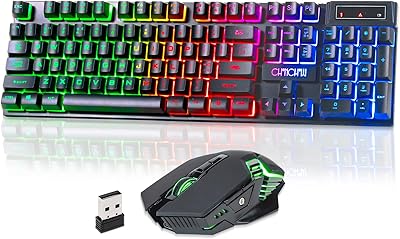
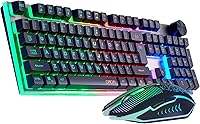
The CHONCHOW G312 Wireless Gaming Keyboard Mouse Combo is one of those rare budget peripherals that actually looks more expensive than it is. The brushed stainless steel panel gives it a sharp, distinctive appearance you don't typically find at this price tier — most combos in this range use plain plastic throughout. Connection runs through a single 2.4GHz USB dongle that covers both the keyboard and mouse simultaneously, so you're only sacrificing one USB-A port on your machine. It works on Windows and macOS out of the box, and even supports Raspberry Pi. Launched in April 2025, it has already climbed into the top 500 of its Amazon category.
Features & Benefits

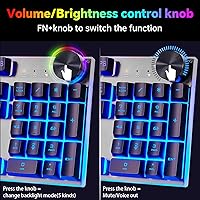
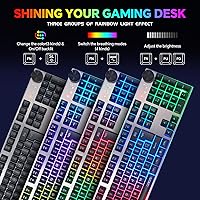
The standout feature here is the multi-function control knob. Tap it to switch between media mode and RGB mode; then rotate to adjust volume or brightness. No software, no hunting through menus. It sounds small, but once you use it, going back to keyboard shortcuts for volume feels like a step backward. The keyboard also covers 19 anti-ghosting keys, which handles most in-game scenarios without missed inputs. The mouse tops out at 4200 DPI and includes side buttons, solid for light gaming or scrolling long documents. Both devices charge via Type-C and together offer 40-plus hours of use with backlighting on, auto-sleeping after five idle minutes.

Best For

This wireless gaming set makes the most sense for people who want a wire-free desk without spending a lot. Think students setting up a first workstation, remote workers tired of cable tangles, or casual gamers who play a few hours a week and don't need hyper-precise peripherals. The cross-platform compatibility is a genuine plus for anyone bouncing between a Windows PC and a Mac — one dongle, no re-pairing needed. The built-in knob also makes it a natural pick for anyone who constantly adjusts volume during video calls or music sessions. If you're a competitive gamer demanding sub-millisecond response, look elsewhere; this is built for comfort and convenience, not tournament play.

User Feedback

Buyers who've spent time with the G312 combo tend to single out two things: the solidity of the stainless panel and how reliably the wireless holds up across a normal room. The typing experience gets decent marks for an entry-level board — not clicky or tactile by any stretch, but acceptable for both work and casual play. The main friction point is the mouse. Its 500 mAh battery is noticeably smaller than the keyboard's, and some users find it needs charging more often than expected. The stainless surface also attracts fingerprints readily. Overall, at this price point, the consensus is that the set delivers more than most people anticipate.

Pros

  • The brushed stainless steel panel looks noticeably more premium than plastic alternatives at this price point.
  • A single USB dongle connects both devices, keeping your port usage and cable chaos to a minimum.
  • The dual-mode control knob handles volume and RGB brightness without any software install required.
  • Keyboard battery rated at 2500 mAh holds up well, easily lasting multiple days of regular use per charge.
  • Both devices charge via Type-C, so no proprietary cables to track down or lose.
  • Auto-sleep kicks in after five idle minutes, quietly preserving battery without any manual intervention.
  • Compatible with Windows, macOS, and even Raspberry Pi out of the box with zero configuration.
  • The 4200 DPI mouse includes side buttons, which is a welcome addition at this price tier.
  • Five RGB lighting effects are switchable on the fly directly from the knob, no app needed.
  • Wireless stability across a normal room is consistently reported as reliable by real-world buyers.

Cons

  • The mouse battery at 500 mAh is quite small and may need recharging every couple of days for heavier users.
  • The stainless panel, while attractive, picks up fingerprints and smudges with regular daily handling.
  • Only 19 anti-ghosting keys limits simultaneous input options for gamers with complex key-binding setups.
  • No dedicated software means zero options for remapping keys, adjusting DPI steps, or saving profiles.
  • The typing feel is average at best — not satisfying enough for enthusiasts who care about switch quality.
  • Mouse size and shape details are vague in official listings, making ergonomic fit hard to assess before buying.
  • RGB customization is limited to five preset effects with no per-key control or color configuration.
  • As a newer brand with limited long-term track record, durability beyond the first year is still an open question.

Ratings

Our AI rating system analyzed verified global user reviews for the CHONCHOW G312 Wireless Gaming Keyboard Mouse Combo, actively filtering out incentivized, bot-generated, and low-credibility submissions to surface what real everyday buyers actually experienced. Scores reflect an honest, balanced picture — strong scores where the combo genuinely delivers, and lower ones where recurring frustrations surfaced across multiple buyer segments. Both the highlights and the rough edges are represented transparently below.

Value for Money
88%
At its price point, buyers consistently feel they are getting more than expected — a stainless steel panel, rechargeable batteries, a functional media knob, and a capable mouse all in one package is a combination that is hard to match without spending more. The perceived value per dollar is one of the most frequently praised aspects across reviews.
A handful of buyers noted that certain premium-feeling elements, like the panel finish, raise initial expectations that the switches and mouse sensor do not fully sustain. When compared directly to purpose-built budget alternatives with better switches, the value calculation becomes less clear-cut for typists.
Build Quality
82%
18%
The brushed stainless steel panel is the most talked-about physical trait, and most users agree it feels unexpectedly solid for a budget combo. Long-term users report no visible warping, flex, or structural degradation in the keyboard frame after extended desk use.
The mouse construction feels noticeably lighter and more plasticky compared to the keyboard, which creates a slight mismatch in perceived quality between the two devices. A few reviewers noted that the stainless panel attracts fingerprints heavily in bright office environments.
Wireless Stability
84%
The 2.4GHz single-dongle connection is consistently described as stable and dropout-free across normal home and office distances. Users working at typical desk setups — dongle plugged into a desktop tower or laptop within two or three meters — report no meaningful lag or disconnection issues.
A smaller portion of users noted occasional micro-stutters when the dongle was placed behind a large desktop tower or when operating in environments with heavy wireless interference. Range performance at the outer limits, beyond four or five meters, is less consistent according to a subset of reviewers.
Keyboard Battery Life
86%
The 2500 mAh keyboard battery earns genuine praise for lasting multiple days of regular use on a single charge, even with backlighting active. Users who forget to charge their peripherals regularly find the keyboard forgiving enough that it rarely interrupts their workflow.
Auto-sleep kicks in at five minutes, which most users appreciate but some power users find triggers too early during reading or passive monitoring sessions where the keyboard is idle. Charge time from empty is not well documented, leaving some users uncertain about planning their charging schedule.
Mouse Battery Life
58%
42%
The Type-C charging port is a practical convenience, and users appreciate that both devices share the same cable type, reducing desk clutter from proprietary chargers. Quick top-up charging during lunch breaks mitigates the issue for some users with predictable daily routines.
The 500 mAh mouse battery is the single most complained-about aspect of the entire combo — many users find it needs recharging every one to two days under moderate use, which is notably more frequent than competing standalone mice in the same price range. For users who rely on their mouse continuously through long work sessions, this becomes a genuine daily annoyance.
Typing Experience
67%
33%
For casual typing, browsing, and light office work, most users find the keyboard comfortable and responsive enough to use for extended periods without fatigue. The full 104-key layout covers all standard keys, which home users and students appreciate for document and spreadsheet work.
Enthusiast typists and anyone coming from a mechanical keyboard will find the feedback underwhelming — the switches lack distinct tactile feel or satisfying sound. Several reviewers specifically noted the typing experience feels soft and mushy compared to even entry-level mechanical alternatives at similar prices.
Gaming Performance
71%
29%
For casual gaming — RPGs, turn-based strategy, indie titles, or light shooters — the combo handles well enough that most users report no complaints about input accuracy or missed keystrokes. The 19-key anti-ghosting prevents the dropped inputs that plague cheaper keyboards during multi-key scenarios.
Competitive or fast-paced gaming sessions expose the limits of the wireless latency and the relatively modest anti-ghosting ceiling. Users playing battle royale or high-APM strategy games reported occasional moments where the hardware felt like it was holding them back compared to dedicated gaming peripherals.
Media Control Knob
91%
The knob is consistently one of the most positively highlighted features in buyer reviews, praised for making volume adjustment and backlight control feel intuitive and immediate. Users on video calls or streaming music throughout the workday specifically call it out as something they did not expect to enjoy so much.
The knob mechanism itself, while functional, feels slightly loose or imprecise to some users who prefer a more deliberate, stepped resistance in rotary controls. Switching between media and backlight modes requires a click pattern that takes a brief learning curve before it becomes second nature.
Mouse Precision
73%
27%
At 4200 DPI maximum, the mouse covers everyday computing tasks and light gaming comfortably, and the inclusion of side buttons adds practical shortcuts for browsing or in-game actions that users at this price tier do not always expect. Most users describe tracking as smooth and accurate on standard desk surfaces.
Power users who need reliable DPI step switching or precision tuning for graphic work or competitive play will find the mouse lacking in configurability. The absence of dedicated software means DPI settings cannot be finely calibrated, leaving users with limited control over their exact sensitivity curve.
RGB Lighting
77%
23%
Five preset lighting effects cover the most popular RGB aesthetics — static, breathing, and wave-style patterns — which satisfies most buyers who want an ambient glow without spending hours in a software suite. The knob-based brightness adjustment is immediate and genuinely useful in low-light environments.
There is no per-key customization, and the five effects cannot be modified or mixed, which underwhelms buyers who anticipated more depth from the RGB system. In brighter office lighting, the stainless panel's reflectivity can actually wash out some lighting effects, reducing their visual impact.
Setup & Ease of Use
93%
Plug the dongle in, and both devices work immediately — no software download, no pairing sequence, no account creation. This zero-friction setup is praised repeatedly by non-technical buyers and users who simply want hardware that works without an installation process.
The lack of software is also a limitation for anyone who wants to customize anything beyond what the onboard knob controls. Users who expected even a basic configuration utility were surprised to find there is genuinely no companion app available for this combo.
Cross-Platform Compatibility
87%
Working reliably across Windows, macOS, and even Raspberry Pi without any reconfiguration is a meaningful practical advantage for users who operate in mixed-device environments. Teachers, developers, and students with heterogeneous setups consistently praise this aspect.
Some Mac users noted that certain function key behaviors default to Windows conventions and require manual workarounds to reassign standard macOS shortcuts. The lack of software makes correcting these key mapping discrepancies more cumbersome than it would be with a driver-supported keyboard.
Panel Durability
79%
21%
The stainless steel construction holds up well against the kind of daily wear — minor impacts, key residue buildup, and surface contact — that degrades standard painted plastic panels over time. Users who have owned the keyboard for several months report no visible surface degradation or discoloration.
Despite the smudge-resistant marketing claim, real-world use in bright or glossy lighting conditions reveals that the panel does collect fingerprints and oils noticeably. Regular wiping with a cloth keeps it looking good, but users expecting a truly maintenance-free surface may find this mildly disappointing.
Ergonomics & Comfort
69%
31%
The full-size layout gives ample key spacing for comfortable extended typing, and most users find hand positioning natural during both keyboard and mouse use over a standard workday. The combo's weight feels stable on a desk without sliding during typical use.
There is no wrist rest included, and the keyboard offers limited or no adjustable tilt options based on buyer reports, which can create discomfort during multi-hour sessions for users who prefer elevated typing angles. Mouse ergonomics are generic and may not suit users with larger hands or strong grip preferences.

Suitable for:

The CHONCHOW G312 Wireless Gaming Keyboard Mouse Combo is a smart pick for anyone who wants a clutter-free desk setup without committing to a premium price. Students furnishing their first workstation will appreciate getting a full keyboard, a capable mouse, and a single USB receiver in one affordable package. Home office workers who spend hours on video calls or streaming music will find the built-in media control knob genuinely useful day-to-day — adjusting volume or pausing playback without touching the screen is a small convenience that adds up quickly. Casual gamers who play a few evenings a week, or those transitioning from a wired setup for the first time, will find the wireless performance more than adequate for their needs. The cross-platform support also makes this a practical choice for people who regularly switch between a Windows machine and a Mac, since the single dongle handles both devices without any re-pairing hassle.

Not suitable for:

The CHONCHOW G312 Wireless Gaming Keyboard Mouse Combo is not the right tool for competitive or hardcore gamers who demand low-latency, high-polling-rate peripherals. If you play fast-paced shooters or strategy games where every millisecond counts, the entry-level wireless performance here will likely frustrate you, and the 19-key anti-ghosting ceiling may not be enough for complex multi-key bindings. Heavy typists or writers who value a satisfying keystroke experience — tactile feedback, audible click, or a specific actuation force — should try before they buy, as the switches here are built for accessibility and affordability, not enthusiast preferences. Users who leave their mouse running for long stretches without charging breaks may find the 500 mAh mouse battery inconvenient, especially compared to standalone mice in the same price range with larger cells. Finally, professionals who need advanced per-key macros, onboard profiles, or dedicated software customization should look at a more feature-rich ecosystem, since this set is intentionally driver-free and simple.

Specifications

  • Brand: Manufactured by CHONCHOW under model number G312.
  • Connectivity: Uses a 2.4GHz wireless connection via a single USB-A dongle shared by both keyboard and mouse.
  • Key Layout: Full-size 104-key layout covering all standard alphanumeric, function, and navigation keys.
  • Anti-Ghosting: Supports up to 19 simultaneous non-conflicting key inputs for uninterrupted multi-key use.
  • Control Knob: Dual-mode rotary knob switches between media control and RGB backlight adjustment with a single click.
  • RGB Lighting: Five built-in lighting effects are selectable directly via the knob with no software or drivers required.
  • Panel Material: Keyboard top panel is constructed from low-carbon brushed stainless steel for a smudge-resistant, non-mirror finish.
  • Keyboard Battery: Rechargeable 2500 mAh lithium polymer cell charges via Type-C and supports over 40 combined hours of backlit use.
  • Mouse Battery: Rechargeable 500 mAh lithium polymer cell charges via Type-C; smaller capacity than the keyboard may require more frequent charging.
  • Battery Life: Combined rated battery life exceeds 40 hours with RGB backlighting active under normal usage conditions.
  • Auto-Sleep: Both devices enter a low-power sleep state automatically after 5 minutes of inactivity and wake on any key or button press.
  • Mouse DPI: Mouse offers up to 4200 DPI maximum tracking sensitivity for adjustable precision across tasks.
  • Mouse Buttons: Mouse includes dedicated side buttons in addition to standard left, right, and scroll-wheel inputs.
  • OS Support: Compatible with Windows 8, 10, and 11, macOS, and Raspberry Pi without additional driver installation.
  • Dimensions: Packaged unit measures 17.6 x 9.06 x 1.97 inches, suitable for standard desk and drawer storage.
  • Weight: Combined package weight is 2.09 pounds including both keyboard and mouse.
  • Charging Port: Both the keyboard and mouse use a Type-C charging port, eliminating the need for proprietary or micro-USB cables.
  • First Available: The G312 combo was first listed for sale on Amazon in April 2025.

Related Reviews

CHONCHOW G220 Wireless Keyboard and Mouse Combo
77%
88%
Value for Money
79%
Wireless Reliability
71%
Keyboard Typing Feel
83%
RGB Lighting Quality
74%
Battery Life
More
RedThunder K10 Wireless Keyboard and Mouse Combo
77%
84%
Value for Money
63%
Typing Feel
74%
Build Quality
71%
Wireless Performance
88%
RGB Lighting
More
Attoe 75% Wireless Keyboard and Mouse Combo
79%
88%
Value for Money
83%
Connectivity & Wireless Reliability
91%
Multi-Device Pairing
79%
Keyboard Typing Feel
67%
Mouse Performance
More
Rii RK707 3-in-1 Wireless Game Controller, Keyboard, and Mouse Combo
83%
86%
Ease of Use
80%
Build Quality
84%
Performance in Gaming
88%
Battery Life
65%
Ergonomics
More
Arteck HW192 Wireless Keyboard and Mouse Combo
78%
78%
Build Quality
72%
Typing Experience
63%
Mouse Comfort & Ergonomics
81%
Battery Life
69%
Wireless Connectivity
More
KNOWSQT Wireless Keyboard and Mouse Combo
87%
89%
Wireless Performance
83%
Build Quality
86%
Ergonomics & Comfort
91%
Design & Aesthetics
76%
Battery Life
More
ULSOU Wireless Keyboard and Mouse Combo
85%
88%
Ergonomics and Comfort
92%
Battery Life
84%
Typing Experience
87%
Wireless Connectivity
80%
Mouse Performance
More
QUASIO Wireless Keyboard and Mouse Combo
77%
88%
Value for Money
93%
Setup & Ease of Use
79%
Typing Comfort
84%
Wireless Connectivity & Range
72%
Mouse Performance
More
Harburfine Wireless Keyboard and Mouse Combo
85%
88%
Ergonomics & Comfort
93%
Quietness & Noise Level
85%
Wireless Connectivity & Range
84%
Battery Life & Power Management
90%
Setup & Installation
More
MPTOG S801AG Wireless Keyboard and Mouse Combo
75%
88%
Aesthetic Design
93%
Ease of Setup
78%
Typing Feel
61%
Mouse Tracking Accuracy
82%
Wireless Reliability
More

FAQ

No drivers or software are needed at all. Just plug the USB dongle into any available USB-A port and both devices connect automatically. The knob controls and RGB effects work entirely through onboard hardware, so there is nothing to download or configure.

Yes, one dongle handles both devices simultaneously. You only use one USB-A port on your computer, which is convenient for laptops with limited ports. The 2.4GHz connection is stable enough for normal home and office distances.

The keyboard's 2500 mAh battery comfortably lasts multiple days under typical use with the backlight on. The mouse is a different story — its 500 mAh cell is noticeably smaller and may need topping up every day or two for heavier users. Keeping a Type-C cable nearby for the mouse is a good habit.

It works on macOS out of the box without any extra setup. The CHONCHOW G312 Wireless Gaming Keyboard Mouse Combo is also compatible with Raspberry Pi, so it covers a wider range of devices than most combos at this price point.
The brushed finish resists light scratches better than painted plastic, but it does attract fingerprints over daily use. A quick wipe with a microfiber cloth keeps it looking clean. The non-mirror surface helps reduce how obvious smudges appear under most lighting conditions.

Just click the knob to toggle into backlight mode, then click again to cycle through the five lighting effects. You can rotate the knob to dial in your preferred brightness. No keyboard shortcuts or software menus are involved, which makes it quick and intuitive.

It sits comfortably in the middle. The 19-key anti-ghosting handles most gaming scenarios well enough for casual play, and the wireless connection is stable for everyday sessions. Competitive gamers who need ultra-low latency or complex key mapping will want a more specialized board, but for casual and mid-level gaming it holds its own.

After five minutes without any input, both the keyboard and mouse automatically enter a low-power sleep mode to conserve battery. Pressing any key or moving the mouse wakes them up almost instantly. There is no noticeable lag when coming out of sleep.

The listed maximum is 4200 DPI, but detailed documentation on how many DPI steps are available or how to switch between them is limited in official materials. If precise DPI tuning is important to your workflow, it is worth verifying the exact step options before purchasing.

The combo is rechargeable via Type-C, and in most cases devices like this can be used in a wired charging mode while plugged in. That said, CHONCHOW does not explicitly confirm pass-through wired use for this model, so treating it primarily as a wireless set with scheduled charging intervals is the safer assumption.