
Overview

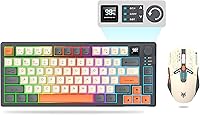
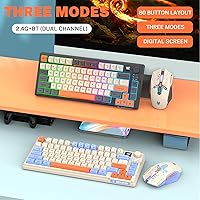
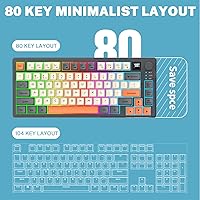
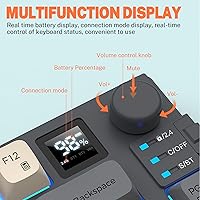
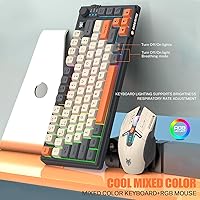
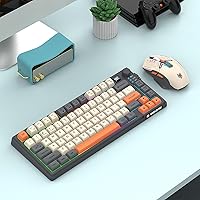
The Attoe 75% Wireless Keyboard and Mouse Combo arrived on the scene in late 2024, and for a budget-tier peripheral from a lesser-known brand, it makes a strong first impression. The 75% layout keeps things compact without gutting functionality — you still get dedicated arrow keys and a physical volume knob, which is rare at this price. The MDA keycap profile gives it a distinctive look, especially in the black-and-orange colorway. What really separates this wireless combo from similar options is its tri-mode connectivity: Bluetooth 5.0, 2.4GHz wireless, and USB-C wired, all packed into one affordable package.

Features & Benefits

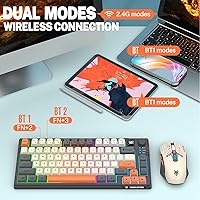
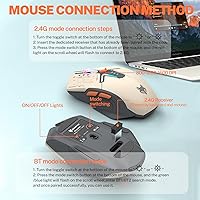
The Attoe 75% kit punches above its weight on connectivity. The keyboard supports up to 5 devices via Bluetooth 5.0, and switching between them is as simple as hitting an FN shortcut — genuinely useful if you work across a laptop, tablet, and desktop in the same day. Both keyboard and mouse share a single USB dongle for the 2.4GHz mode, so you are not filling up ports. The mouse covers four DPI levels from 1200 up to 3600, with 4000 FPS tracking and 10G acceleration. Battery life hits around 8 hours with RGB running, and the auto-sleep feature kicks in after two minutes of idle time to stretch things even further.

Best For

This compact keyboard-mouse set slots nicely into a few specific lifestyles. Students who carry peripherals between classes and home will appreciate how little space it takes in a bag. Remote workers juggling multiple devices daily will find the multi-device Bluetooth pairing genuinely practical rather than a gimmick. Casual gamers playing FPS or MOBA titles at a relaxed pace will get solid performance without paying a premium. It also suits anyone running a minimalist desk setup where a full-size keyboard simply takes up too much room. If you need pro-level switches or ultra-bright RGB, look elsewhere — but for everyday gaming and productivity, this kit makes a compelling case.

User Feedback

With over 240 ratings averaging 4.1 out of 5 stars, this wireless combo has earned a genuinely positive reception. Buyers frequently call out the MDA keycap feel as a pleasant surprise — more comfortable than expected for a budget set. The multi-device switching gets consistent praise from people who actually use it day to day. On the downside, RGB brightness draws the most complaints; it looks decent in a dimly lit room but will not impress anyone coming from a mid-range gaming keyboard. The mouse's lightweight build splits opinion — some love the portability, others miss the heft. A handful of buyers noted the wireless range needed a full charge cycle to stabilize properly.

Pros

  • Tri-mode connectivity — Bluetooth 5.0, 2.4GHz, and USB-C — is rare and genuinely useful at this price point.
  • Pairing with up to five Bluetooth devices makes daily switching between a PC, laptop, and tablet effortless.
  • The 75% layout keeps a full arrow key cluster and a volume knob without hogging desk space.
  • Both devices share one USB dongle, so you only sacrifice a single port for 2.4GHz wireless.
  • MDA keycaps feel more comfortable than most buyers expect from a budget peripheral.
  • Auto-sleep and instant wake work reliably, helping stretch the battery through a full workday.
  • RGB backlighting on both keyboard and mouse adds visual personality without requiring any companion software.
  • The combo works across PC, laptop, tablet, and smartphone, making it unusually versatile for the category.
  • At its price, the overall build quality and feature set are consistently noted as exceeding buyer expectations.

Cons

  • RGB brightness is noticeably modest — dim rooms help, but it will not impress anyone used to mid-range gaming keyboards.
  • The mouse battery is only 500mAh, meaning it needs charging more frequently than the keyboard during heavy use.
  • Wireless range may feel inconsistent until the devices complete a full initial charge cycle.
  • The lightweight mouse build divides buyers — those with larger hands or a palm grip may find it uncomfortable long-term.
  • Attoe is a newer brand with a limited support history, which makes warranty follow-through harder to predict.
  • Eight-hour battery life applies only with RGB on and active use — real-world results vary significantly with brightness settings.
  • No dedicated software means RGB customization and macro programming are either unavailable or limited to hardware shortcuts.
  • The mouse tops out at 3600 DPI with no side buttons, which feels limiting if you want it for anything beyond casual gaming.

Ratings

Our AI rating system analyzed verified global buyer reviews for the Attoe 75% Wireless Keyboard and Mouse Combo, actively filtering out incentivized, duplicate, and bot-generated feedback to surface what real users actually experience day to day. The scores below reflect both the genuine strengths that make this kit stand out in its price bracket and the honest pain points that could matter depending on your use case. Nothing is glossed over — if buyers consistently flagged an issue, it shows up here.

Value for Money
88%
For the asking price, getting tri-mode wireless connectivity, RGB on both devices, and multi-device Bluetooth pairing in a single package is genuinely hard to beat. Most buyers feel they are getting considerably more than they paid for, and that sentiment shows up consistently across reviews from students and budget-focused remote workers alike.
A few buyers who compared it directly against slightly pricier alternatives felt the mouse quality lagged behind the keyboard in terms of perceived value. The combo feels like a strong deal overall, but the mouse alone would struggle to justify its share of the price if sold separately.
Connectivity & Wireless Reliability
83%
Tri-mode support covering Bluetooth 5.0, 2.4GHz, and USB-C wired is a practical advantage that users who switch between devices throughout the day genuinely appreciate. The 2.4GHz mode is consistently described as stable and lag-free for everyday typing and casual gaming sessions.
A handful of reviewers reported that wireless range felt inconsistent during initial use, with performance improving noticeably only after completing a full charge cycle. This is a minor but real inconvenience for buyers who expect everything to work perfectly right out of the box.
Multi-Device Pairing
91%
The ability to pair with up to five Bluetooth devices and switch between them using a simple FN shortcut is one of the most praised features by remote workers and students who move between a laptop, desktop, and tablet throughout the day. For multitaskers, this alone justifies the purchase over simpler single-device combos.
The switching process, while quick, is not instantaneous — there is a brief reconnection pause that some users find mildly disruptive during fast-paced workflows. Additionally, the mouse does not share Bluetooth pairing, relying solely on the USB dongle, which limits full cable-free flexibility on Bluetooth-only devices.
Keyboard Typing Feel
79%
21%
The MDA keycap profile consistently surprises buyers who expect a flat, low-quality feel from a budget board. Reviewers frequently describe the typing experience as comfortable for extended sessions, and the dedicated arrow keys and physical volume knob add a tactile satisfaction that is uncommon at this price point.
The switches are not hot-swappable and the actuation feel is described as adequate rather than satisfying by enthusiasts accustomed to mechanical keyboards. Long typing sessions may reveal some inconsistency in key travel, and the overall sound profile is not particularly quiet despite the ergonomic listing.
Mouse Performance
67%
33%
For casual gaming and everyday desktop navigation, the mouse covers the basics well. Four DPI steps up to 3600 give enough range for different screen sizes, and the 4000 FPS optical sensor tracks smoothly across standard mouse pads without stuttering during relaxed gameplay.
Competitive or frequent gamers will quickly notice the limitations — no side buttons, a lightweight build that some find slippery under a palm grip, and a polling rate that does not match dedicated gaming mice at comparable prices. The mouse is clearly the weaker component of this combo and is best treated as a functional inclusion rather than a standalone performer.
RGB Lighting
62%
38%
Having RGB on both the keyboard and mouse without needing any software installation is a convenient touch, and in a dimly lit room the lighting creates a pleasant ambient effect. The volume knob and key lighting work together to give the setup a visual identity that punches above a basic budget aesthetic.
Buyers coming from mid-range gaming keyboards will find the brightness noticeably subdued — the LEDs look fine in low light but wash out almost entirely in a bright room or under overhead office lighting. There is also limited customization depth since all adjustments are done through hardware shortcuts rather than a dedicated app.
Battery Life
74%
26%
The 2000mAh keyboard battery is a meaningful size for this form factor, and for users who dim or disable RGB lighting, real-world runtime extends well beyond the marketed 8-hour figure. The auto-sleep function is reliable and kicks in quickly during reading or video breaks, helping preserve charge passively.
The 8-hour battery claim applies specifically when RGB is running at full brightness — a detail that trips up buyers who expect all-day use without compromise. The mouse battery at 500mAh runs down faster than the keyboard, and users in longer sessions may find themselves charging the mouse more frequently than expected.
Build Quality & Materials
69%
31%
The keyboard chassis feels reasonably solid for its weight class, and the keycaps show no visible defects or uneven coating in most units buyers received. The overall construction is consistent with what you would expect from a well-made budget peripheral rather than a throwaway accessory.
The mouse housing feels noticeably lightweight and slightly hollow, which some buyers interpret as flimsiness rather than portability. A few users also noticed minor flex in the keyboard deck when pressing keys near the center, which is common at this price tier but worth knowing if build rigidity matters to you.
Portability
86%
At roughly 10 inches wide and under 1.5 pounds for the full combo, this compact keyboard-mouse set is genuinely backpack-friendly in a way that tenkeyless or full-size boards simply are not. Students who commute between home, class, and library consistently highlight the size as a practical everyday advantage.
The shared USB dongle needs to be stored carefully when traveling — losing it means losing 2.4GHz wireless for both devices simultaneously. The mouse, while compact, does not have a designated storage slot or carrying pouch included in the box, so it travels loose alongside the keyboard.
Setup & Ease of Use
92%
Plug-and-play setup in 2.4GHz mode is genuinely instant — insert the dongle, power on both devices, and they connect without any driver installation or pairing steps. Bluetooth pairing is similarly straightforward and works reliably across Windows, Mac, and Android devices without needing any companion software.
Switching between the three connectivity modes requires learning a few FN key combinations that are not immediately intuitive, and the printed manual is brief. Users who are not technically comfortable may need a few attempts before the mode-switching process feels natural.
Compatibility
84%
The wireless combo works across a broad range of platforms including Windows, macOS, Android tablets, and smartphones, making it one of the more versatile options in its category. Buyers who use a mix of operating systems daily report no meaningful compatibility issues for standard typing and navigation tasks.
Some Mac-specific shortcuts behave unexpectedly due to the Windows-oriented key labeling, and there is no remapping software to fix this easily. Advanced function keys or media controls may not translate perfectly on every platform, which could be a friction point for heavy Mac or Linux users.
Noise Level
71%
29%
The keyboard is quieter than many membrane boards and produces a subdued, muted click that is unlikely to disturb people nearby during daytime use. In shared spaces like dorm rooms or open-plan offices, most buyers find the noise level acceptable for standard typing speeds.
The switches are not explicitly silent, and at faster typing speeds the sound becomes more noticeable. Buyers expecting near-silent keys — such as for nighttime use in a shared bedroom — may find the sound level slightly higher than anticipated despite the ergonomic and quiet tags on the listing.
Aesthetics & Design
78%
22%
The black-and-orange colorway in particular draws consistent compliments for looking sharp and deliberate rather than generic. The MDA keycap profile gives the board a slightly retro personality that stands out from the sea of flat-keycap budget keyboards flooding the market.
Color consistency between the keyboard and mouse is passable but not perfectly matched in person, which some aesthetically particular buyers notice when the two are side by side. The overall design is stylish for the price but would not satisfy anyone looking for a premium, uniform aesthetic across their desk setup.

Suitable for:

The Attoe 75% Wireless Keyboard and Mouse Combo is a natural fit for anyone who needs a capable, clutter-free setup without spending a lot. Students are probably the ideal audience — the compact footprint slides easily into a backpack, and the ability to pair with up to five devices means it can jump between a personal laptop, a school computer, and a tablet without fuss. Remote workers who split their day across multiple machines will also find the multi-device Bluetooth switching genuinely practical rather than a spec-sheet novelty. Casual gamers who enjoy FPS or MOBA titles in their downtime, but have no interest in paying a premium for pro-grade hardware, will get reliable enough performance to have fun. If your desk is small, shared, or simply something you prefer to keep clean and minimal, this compact keyboard-mouse set makes that much easier to manage.

Not suitable for:

The Attoe 75% Wireless Keyboard and Mouse Combo is honestly not the right call for serious or competitive gamers. The mouse, while functional, is lightweight and lacks the programmable buttons, adjustable weight systems, or ultra-low latency polling rates that dedicated gaming mice offer. The RGB lighting, while present on both devices, is noticeably dimmer than what mid-range gaming peripherals deliver — if an impressive light show matters to you, this kit will disappoint. Users who prefer a heavier mouse with a substantial grip will likely find the mouse undersized and too light for comfort over long sessions. The brand itself is still relatively new with a limited track record, so buyers who prioritize long-term after-sales support or warranty confidence may want to stick with an established name. Anyone who regularly types for hours on end professionally should also consider that MDA keycaps and budget switches, while pleasant for casual use, are not a substitute for a dedicated typing-focused keyboard.

Specifications

  • Brand: Manufactured by Attoe, a budget peripherals brand that entered the market in late 2024.
  • Model Number: The model identifier for this combo is JSTZK92-001f.
  • Layout: The keyboard uses a 75% compact layout with 80 keys, including dedicated arrow keys and a volume knob.
  • Keycap Profile: MDA profile keycaps are used across the keyboard, providing a sculpted, comfortable typing surface.
  • Connectivity: Supports three connection modes: Bluetooth 5.0, 2.4GHz wireless via USB dongle, and USB-C wired.
  • Multi-Device Pairing: The keyboard can store and switch between up to 5 paired Bluetooth devices using FN key shortcuts.
  • USB Receiver: A single USB dongle handles 2.4GHz wireless for both the keyboard and mouse simultaneously.
  • Keyboard Battery: The keyboard contains a built-in 2000mAh lithium battery, providing up to 8 hours of use with RGB lighting active.
  • Mouse Battery: The mouse uses a 500mAh lithium battery, which supports several hours of use before requiring a recharge.
  • Mouse DPI: The optical mouse offers 4 adjustable DPI settings: 1200, 1800, 2400, and 3600.
  • Mouse Tracking: The mouse sensor operates at up to 4000 frames per second with 10G acceleration for responsive cursor movement.
  • RGB Backlighting: Both the keyboard and mouse feature RGB backlighting with multiple lighting effects, requiring no companion software to operate.
  • Auto-Sleep: Both devices automatically enter sleep mode after 2 minutes of inactivity and wake instantly upon any keypress or mouse movement.
  • Dimensions: The keyboard measures approximately 10 x 3 x 1 inches, making it compact enough to fit in most laptop bags.
  • Combined Weight: The keyboard and mouse together weigh approximately 1.48 pounds.
  • Compatible Devices: Works with Windows and Mac PCs, laptops, tablets, and smartphones that support Bluetooth or USB connectivity.
  • Charging Interface: Both the keyboard and mouse recharge via a USB-C cable, which is included in the box.
  • Package Contents: The box includes one keyboard, one mouse, one shared USB receiver, and one USB-C charging cable.

Related Reviews

Arteck HW192 Wireless Keyboard and Mouse Combo
78%
78%
Build Quality
72%
Typing Experience
63%
Mouse Comfort & Ergonomics
81%
Battery Life
69%
Wireless Connectivity
More
GEEZER Wireless Keyboard and Mouse Combo
72%
83%
Value for Money
91%
Aesthetic Design
94%
Ease of Setup
67%
Typing Feel
62%
Mouse Quality
More
Vssoplor Wireless Keyboard and Mouse Combo
82%
91%
Value for Money
84%
Keyboard Typing Experience
61%
Mouse Ergonomics
88%
Wireless Connectivity & Stability
72%
Battery Life
More
EDJO Wireless Keyboard and Mouse Combo
76%
88%
Value for Money
94%
Ease of Setup
71%
Keyboard Typing Feel
63%
Mouse Performance
86%
Wireless Connectivity & Range
More
HP 18H24AA Wireless Keyboard and Mouse Combo
79%
91%
Value for Money
93%
Ease of Setup
74%
Keyboard Typing Experience
63%
Mouse Comfort & Ergonomics
86%
Wireless Reliability
More
GUKJOB iK6630 Wireless Keyboard and Mouse Combo
77%
88%
Value for Money
83%
Keyboard Typing Feel
91%
Aesthetic & Design
87%
Ease of Setup
61%
Mouse Performance
More
Cimetech Wireless Keyboard and Mouse Combo
88%
91%
Value for Money
88%
Ease of Use
83%
Connectivity
94%
Portability
85%
Ergonomics
More
MARVO Wireless Keyboard and Mouse Combo

76%
91%
Value for Money
88%
Wireless Connectivity
79%
Mouse Performance
63%
Keyboard Typing Feel
67%
Ergonomics & Comfort
More
Tayderley Wireless Keyboard and Mouse Combo

86%
88%
Typing Comfort
85%
Mouse Performance
94%
Battery Life
83%
Build Quality
92%
Ease of Setup
More
Letton Wireless Keyboard and Mouse Combo
83%
89%
Design & Aesthetics
81%
Ergonomics & Comfort
75%
Wireless Connectivity
90%
Battery Life
92%
Value for Money
More

FAQ

The mouse connects wirelessly only through the shared 2.4GHz USB dongle — it does not support Bluetooth on its own. If you want Bluetooth-only mode, you would need to use the keyboard paired via Bluetooth and plug in the dongle just for the mouse, or use USB-C wired for one of them. It is worth keeping in mind if you are working on a device without a USB port.

Yes, the keyboard pairs with tablets over Bluetooth 5.0 and works well for basic typing and navigation. Most standard keys function correctly, though some function-layer shortcuts may behave differently depending on the operating system. It is a handy option if you occasionally use a tablet for notes or light work.

You switch by holding the FN key and pressing one of the designated number keys assigned to each paired device — the specific key combination is outlined in the included manual. The transition takes just a second or two, which makes it practical for moving between a laptop and a desktop throughout the day.

It works on both Windows and Mac. You may need to remap a few keys for a comfortable Mac workflow since there is no dedicated Mac layout, but basic typing and shortcuts function without any driver installation required.

Exact charge times are not officially published, but given the 2000mAh keyboard battery and 500mAh mouse battery, expect roughly 2 to 3 hours for the keyboard and under 1.5 hours for the mouse from a standard USB-A charger. It is a good habit to do a full charge before first use, as a few buyers noted the wireless range improved noticeably after the initial complete charge cycle.

Yes, RGB backlighting is active regardless of the connection mode you are using. Keep in mind that running RGB continuously will reduce battery life — the stated 8-hour runtime applies with lighting on, so turning RGB off or using a dimmer mode will extend usage between charges.

Quite a bit, actually. A tenkeyless board still includes the number row and full function row at full width, while a 75% layout trims that down considerably to roughly 10 inches wide. That extra few inches of horizontal space matters when you are trying to give a mouse more room or just keep a tidier workspace.

No, the mouse does not include side buttons. It has a standard three-button layout with a scroll wheel and a DPI cycle button, which is functional for everyday use and casual gaming but may feel limiting if you rely on side buttons for productivity shortcuts or in-game commands.

Yes, plug-and-play USB-C wired mode works without any pairing or software setup. This is also a convenient fallback if the battery runs low during a session or if you are using a device that does not support Bluetooth.

In practice, the 2-minute idle timer is short enough that it kicks in regularly during reading or video watching, but the wake response is immediate — a single keypress or mouse movement brings both devices back online with no perceptible lag. Most users adjust quickly and do not find it disruptive in day-to-day use.