Rii RK707 3-in-1 Wireless Game Controller Keyboard
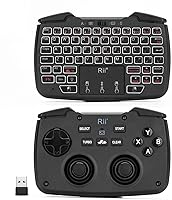
Rii RK707 3-in-1 Wireless Game Controller Keyboard — image 1
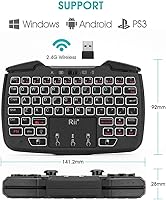
Rii RK707 3-in-1 Wireless Game Controller Keyboard — image 2
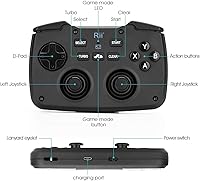
Rii RK707 3-in-1 Wireless Game Controller Keyboard — image 3
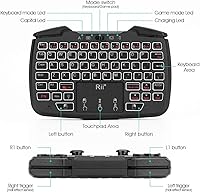
Rii RK707 3-in-1 Wireless Game Controller Keyboard — image 4
Rii RK707 3-in-1 Wireless Game Controller Keyboard — image 5
Rii RK707 3-in-1 Wireless Game Controller Keyboard — image 6
Rii RK707 3-in-1 Wireless Game Controller Keyboard — image 7
66%
34%

Overview

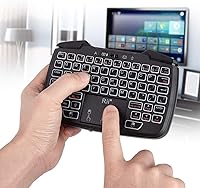
The Rii RK707 3-in-1 Wireless Game Controller Keyboard is one of those rare devices that tries to solve a very specific problem: what do you use when you're sitting on the couch, connected to an Android TV box or Raspberry Pi, and you need to both navigate menus and occasionally play a game? This wireless combo controller handles all three input modes — gamepad, keyboard, and mouse — in a palm-sized unit weighing just over nine ounces. The built-in rechargeable battery means no hunting for AAs, and the white backlit keys make it perfectly usable in a dim living room. It's a niche device, but within that niche, it has almost no direct competition.

Features & Benefits

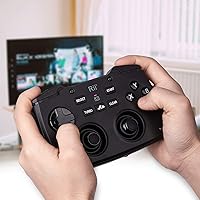
Switching between modes is where the Rii RK707 earns its keep. A single button toggles between gamepad and keyboard/mouse mode — no re-pairing, no fuss. In gamepad mode, you get a full D-pad layout plus ABXY, shoulder buttons (L1/R1/L2/R2), Turbo, and vibration. The controller also supports three sub-modes — PC/PS3, Xbox 360, and Android — cycled by holding the Home button for about three seconds, which is worth knowing upfront since the manual isn't always clear on this. The plug-and-play USB dongle works without installing drivers on most systems, and the auto-sleep function kicks in after five minutes of inactivity to conserve battery.

Best For

This 3-in-1 gamepad keyboard really shines in living room and bedroom media setups. Raspberry Pi users who want a single device instead of a separate keyboard, mouse, and controller will find it particularly practical. Android TV and smart TV owners dealing with clunky on-screen keyboards will appreciate being able to type a search query without reaching for their phone. It also suits minimalist or travel setups where packing light matters more than premium build feel. Serious gamers should look elsewhere — this isn't designed for fast-paced titles. But for retro gaming, casual emulation, or just navigating a media center from the couch, it covers the bases well.

User Feedback

Buyers of the wireless combo controller are generally satisfied, though opinions split predictably along expectations. The most consistent praise goes to mode-switching convenience — people appreciate not having to re-pair or restart anything when flipping between controller and keyboard. Battery life also earns positive marks. Where frustration surfaces is build quality: the plastic feels hollow, and the buttons lack the satisfying click of a dedicated controller. Touch-typists will also struggle with the compact 62-key layout. One recurring technical issue worth flagging: signal interference near large screens is common, but moving the USB receiver from a rear port to a front-facing one usually resolves it.

Pros

  • Switches between gamepad, keyboard, and mouse mode with a single button — no re-pairing needed.
  • Built-in rechargeable battery eliminates the ongoing cost and hassle of disposable AAs.
  • White backlight makes the keys readable in dark rooms without being harsh on the eyes.
  • Plug-and-play USB dongle works on most platforms without any driver installation.
  • Supports three gamepad sub-modes covering PC, Xbox 360 layout, and Android devices.
  • Wireless range of up to 10 meters gives genuine couch-to-TV usability.
  • Auto-sleep after five minutes of inactivity helps preserve battery between sessions.
  • Compact enough to store easily on a shelf or inside a media console drawer.
  • Turbo and vibration functions are a welcome bonus for casual retro gaming use.
  • One of the few devices in this category that genuinely combines all three input types in one unit.

Cons

  • Plastic construction feels hollow and cheap — buttons lack satisfying tactile feedback.
  • Signal interference near large TV screens can cause lag or missed inputs in some setups.
  • The 62-key layout frustrates anyone who types quickly or relies on standard key positioning.
  • Holding the Home button to cycle controller sub-modes is not intuitive and poorly documented.
  • Gamepad ergonomics are mediocre for extended play sessions — hand fatigue sets in faster than with dedicated controllers.
  • The mouse function is functional but slow, making it impractical for anything beyond basic navigation.
  • Charge time is rarely specified clearly, leaving users guessing when the device is ready to use.
  • Small key size makes precision input difficult for users with larger hands.

Ratings

The Rii RK707 3-in-1 Wireless Game Controller Keyboard has been evaluated by our AI rating system after analyzing thousands of verified global user reviews, with spam, bot submissions, and incentivized feedback actively filtered out. The scores below reflect a transparent picture of where this wireless combo controller genuinely delivers and where real buyers have run into frustration. Both the strengths and the trade-offs are represented honestly across every category.

Versatility
83%
The ability to switch between gamepad, keyboard, and mouse in a single handheld unit is the core reason most people buy this 3-in-1 gamepad keyboard, and it delivers on that promise. Users setting up Raspberry Pi stations or Android TV boxes consistently highlight that having one device replace three peripherals is a genuine quality-of-life improvement.
The versatility comes with compromise in each individual mode — it is not exceptional as a keyboard, controller, or mouse on its own. Buyers expecting full performance in any one area tend to be disappointed when they push beyond basic use cases.
Mode Switching
79%
21%
Toggling between keyboard and controller mode with a single button click without re-pairing is one of the most praised aspects of the Rii RK707. For living room users who casually alternate between typing a search query and playing a retro game, the transition feels intuitive and quick.
The secondary sub-mode switching for controller layouts — holding the Home button to cycle through PC, Xbox 360, and Android modes — confuses a notable portion of buyers who do not realize three distinct sub-modes exist. The documentation does not make this mechanic clear enough, leading to frustration during initial setup.
Build Quality
47%
53%
The compact plastic shell is lightweight and easy to hold with one hand, which suits the couch-use scenario it was designed for. For occasional and light use, the construction holds up adequately over time without obvious signs of early failure in most reports.
The hollow plastic feel is one of the most repeated criticisms across user reviews — buttons feel mushy and lack the satisfying click or travel that dedicated controllers offer. At this price point some leniency is expected, but the tactile feedback gap versus even entry-level standalone gamepads is hard to ignore.
Wireless Reliability
61%
39%
Under typical conditions — a clear line of sight, moderate distance, and the dongle in a front-facing USB port — the 2.4GHz connection is stable and responsive enough for casual gaming and navigation at up to 10 meters. Many users in smaller rooms report no connectivity issues whatsoever.
Signal interference near large screen panels and media cabinets is a documented recurring problem, with some users experiencing missed inputs or reduced range when the USB dongle is plugged into a rear port. The fix usually works, but the fact that placement matters this much is a design limitation buyers should prepare for.
Keyboard Usability
58%
42%
For hunt-and-peck typing on a TV — entering Wi-Fi passwords, searching streaming apps, or navigating web content — the 62-key backlit keyboard is genuinely more convenient than any on-screen alternative. The white backlight is a practical addition that makes the device usable in dark living rooms.
Touch-typists and anyone who types quickly will find the compact key layout a source of consistent errors, with smaller-than-standard key sizes causing frequent mis-presses. The layout sacrifices several keys found on full-size boards, which makes certain shortcuts and punctuation harder to reach.
Gamepad Performance
44%
56%
For casual retro gaming, light emulation, or navigating Android game menus, the gamepad section covers the basics adequately — D-pad, ABXY, and all four shoulder buttons are present, and the Turbo function adds some niche utility for repetitive inputs.
Serious gamers will find the analog-free layout and mushy button feel a significant limitation for any game requiring precision or fast reaction times. Vibration feedback, while functional, is faint compared to full-sized controllers and does little to compensate for the overall lack of tactile responsiveness.
Mouse Functionality
51%
49%
The integrated mouse mode is functional enough to move a cursor across a TV screen and click on interface elements, which is all most users in a media center context actually need from it. It removes the need for a separate pointer device in basic navigation scenarios.
Precision is poor, and the mouse is uncomfortable to use for anything beyond simple point-and-click navigation. Speed and accuracy fall short for any task involving dragging, scrolling through long pages, or selecting small interface elements.
Battery Life
74%
26%
Most users report satisfying battery duration for the kind of intermittent, session-based use this device is designed for — an evening of TV browsing and casual gaming rarely drains it in one sitting. The auto-sleep function meaningfully extends battery longevity between charges.
Exact charge times are not officially specified and rarely discussed in user feedback, leaving buyers uncertain about planning around low battery situations. A few users have noted the battery indicator — where present — is not always reliable in signaling remaining charge accurately.
Setup & Compatibility
86%
Plug-and-play functionality is one of this combo controller's most consistent wins — insert the USB dongle and the device is recognized on PC, Android TV, and Raspberry Pi without driver installation in most cases. This zero-friction setup is a significant advantage for less technical users.
Compatibility with non-standard platforms like certain smart TV brands or older Android versions can be hit-or-miss, and the three controller sub-modes add a layer of setup complexity that occasional users may find confusing without a clearly written guide.
Value for Money
77%
23%
Within the narrow category of all-in-one wireless input devices for media centers and mini-PCs, the Rii RK707 competes with very few direct alternatives at its price, which gives it strong value for buyers who genuinely need the 3-in-1 functionality. Replacing three separate budget peripherals would likely cost more.
Buyers who primarily want a keyboard or primarily want a controller will find better quality at similar or slightly higher prices by buying dedicated devices. The value proposition only holds if you truly need all three functions consolidated into one unit.
Portability
81%
19%
At just over nine ounces and roughly the size of a large TV remote, this wireless combo controller fits easily into a bag, drawer, or laptop case. Travelers and users who move between rooms frequently appreciate not having to carry multiple peripherals.
The small form factor that makes it portable also limits its ergonomics during extended sessions, since the hand position required for comfortable controller use is not ideal for longer typing stretches and vice versa.
Backlight Quality
69%
31%
The white LED backlight does exactly what it needs to in a living room context — it makes the keys visible in a dim or dark room without creating glare on a nearby TV screen. Users watching shows in the dark while occasionally typing find it genuinely helpful.
There is no brightness adjustment and no color customization, which limits its appeal for users who want more control over their setup aesthetics. In well-lit rooms the backlight is also largely invisible, making it a feature that only benefits specific lighting conditions.
Ergonomics
52%
48%
The compact size makes it easy to grip with one or two hands for short sessions, and the lightweight build reduces fatigue during brief interactions. For casual couch use — a few minutes of typing here, a quick game there — it is comfortable enough.
Extended gaming or typing sessions reveal the ergonomic limitations quickly, as the device is not shaped to support proper hand positioning for either activity over long periods. Users with larger hands in particular report cramping and discomfort after more than 20 to 30 minutes of continuous use.

Suitable for:

The Rii RK707 3-in-1 Wireless Game Controller Keyboard was built for a very specific kind of user, and if you fit that profile, it delivers real value. Raspberry Pi hobbyists will find it especially practical — instead of juggling a separate keyboard, mouse, and controller across a cramped desk or side table, this wireless combo controller consolidates everything into one palm-sized device. Android TV and smart TV users who are tired of pecking through on-screen keyboards just to search for a show will appreciate the ability to flip into keyboard mode instantly and type like a normal person. It also makes a sensible choice for anyone building a compact media center or retro gaming setup, where couch-friendly control matters more than high-performance input. Travelers and minimalists who want fewer cables and gadgets in their bag will find the all-in-one form factor genuinely useful.

Not suitable for:

If you are a dedicated gamer expecting the tactile responsiveness of a real controller, the Rii RK707 3-in-1 Wireless Game Controller Keyboard will likely disappoint. The gamepad section is made of lightweight plastic and the buttons lack the satisfying feedback that serious gaming requires — it is a convenience tool, not a performance peripheral. Touch-typists will also run into friction quickly, as the 62-key compact layout means some keys are smaller or repositioned compared to a standard keyboard, making accurate fast typing frustrating. Users who plan to use this as their primary keyboard for productivity work should look at a full-sized option instead. Additionally, if your TV or set-top box is housed in a media cabinet with rear-facing USB ports and limited access, the signal interference issue — which is real and affects some setups — may be harder to work around than the simple front-port fix suggests.

Specifications

  • Wireless Technology: Connects via 2.4GHz radio frequency using a compact USB dongle receiver included in the box.
  • Range: Operates reliably at distances of up to 10 meters between the device and the USB receiver under typical conditions.
  • Input Modes: Functions as three distinct input types — a gamepad controller, a 62-key keyboard, and a mouse — switchable on the fly.
  • Key Count: The keyboard section features 62 keys in a compact layout, with white LED backlighting across all keys.
  • Backlight: White LED backlight illuminates the keys for use in low-light environments without color customization options.
  • Controller Buttons: Gamepad mode includes a D-pad, ABXY face buttons, L1, R1, L2, R2 shoulder buttons, plus Turbo and Vibration functions.
  • Controller Modes: Three gamepad sub-modes are available: PC and PS3, Xbox 360 layout, and Android, cycled by holding the Home button for approximately three seconds.
  • Battery: Powered by a built-in rechargeable lithium-ion battery; no disposable batteries are required and the battery ships included.
  • Auto Sleep: The device enters a low-power sleep state automatically after five minutes of inactivity and wakes upon any input.
  • Dimensions: Measures 5.56 x 3.62 x 1.1 inches, making it small enough to hold in one hand or store in a media drawer.
  • Weight: Weighs 9.2 ounces, keeping it light enough for extended handheld use without significant fatigue.
  • Compatible Devices: Designed to work with PC, Android TV boxes, Smart TVs, Raspberry Pi, Mac, and PlayStation 3 systems.
  • Connection Setup: Plug-and-play via the included USB dongle; no driver installation is required on most supported operating systems.
  • Signal Interference: Large display devices or thick enclosures near the USB receiver may cause signal degradation; front-port placement is recommended in those cases.
  • Manufacturer: Produced by Riitek, a brand specializing in compact wireless input devices for media center and mini-PC use cases.

Related Reviews
Perixx PERIDUO-606A Wireless Ergonomic Keyboard Mouse Set
71%
78%
Ergonomic Design
54%
Keyboard Feel
76%
Vertical Mouse Comfort
82%
Wireless Reliability
91%
Setup & Ease of Use
More
MSI MPG A850G 850W ATX Power Supply
83%
91%
Build Quality
88%
Power Delivery Stability
83%
Noise Level
93%
Modularity & Cable Management
86%
Efficiency & Thermal Performance
More
Alienware Pro Wireless Gaming Keyboard
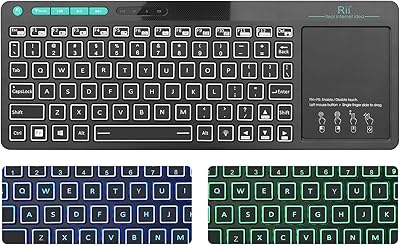
87%
93%
Connectivity
89%
Customization (Hot-Swappable Switches)
91%
Ergonomics and Layout
88%
RGB Lighting
85%
Battery Life
More
Rii K22S Wireless Bluetooth Touchpad Keyboard
68%
78%
Value for Money
71%
Connectivity Reliability
53%
Touchpad Performance
62%
Typing Experience
74%
Build Quality
More
Rii RT518S Wireless Keyboard
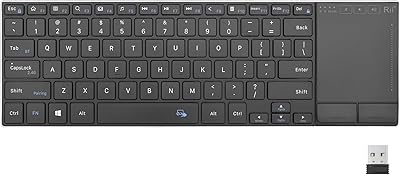
75%
78%
Trackpad Responsiveness
83%
Dual-Mode Connectivity
61%
Build Quality
67%
Backlight Quality
81%
Battery Life
More
Rii K18 Plus Wireless Keyboard with Trackpad
83%
88%
Battery Life
85%
Trackpad Performance
91%
Portability
80%
Build Quality
79%
Compatibility
More
Womier SK65 65% Wireless Mechanical Keyboard
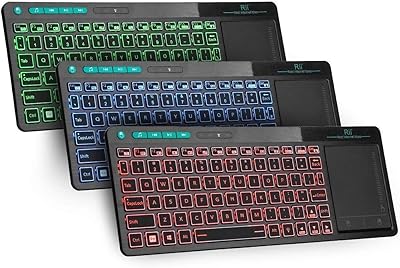
78%
88%
Build Quality
84%
Typing Feel
81%
Wireless Performance
83%
Sound Profile
86%
Hot-Swap Experience
More
Attoe 75% Wireless Keyboard and Mouse Combo
79%
88%
Value for Money
83%
Connectivity & Wireless Reliability
91%
Multi-Device Pairing
79%
Keyboard Typing Feel
67%
Mouse Performance
More
CHONCHOW G312 Wireless Gaming Keyboard Mouse Combo
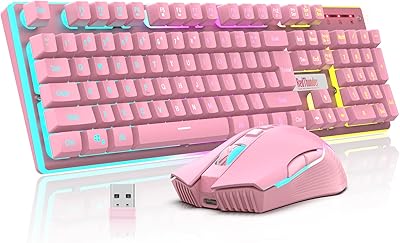
79%
88%
Value for Money
82%
Build Quality
84%
Wireless Stability
86%
Keyboard Battery Life
58%
Mouse Battery Life
More
RedThunder K10 Wireless Keyboard and Mouse Combo
77%
84%
Value for Money
63%
Typing Feel
74%
Build Quality
71%
Wireless Performance
88%
RGB Lighting
More

FAQ

The wireless combo controller is primarily designed for Android TV boxes and devices that support standard HID input via USB. Fire TV Sticks use a micro-USB port for power only and do not support USB peripherals directly, so it won't work there without a powered USB hub and OTG adapter on supported Fire TV models. Roku devices similarly don't support third-party USB controllers in any standard way.

There is a dedicated mode-toggle button on the device that swaps between gamepad and keyboard/mouse mode without any re-pairing or system interaction. It's one of the more practical features in daily use. Just keep in mind that switching gamepad sub-modes (between PC/PS3, Xbox 360, and Android layouts) is a separate action — you hold the Home button for about three seconds to cycle through those.

Yes, in most cases it's plug-and-play on Raspberry Pi. You insert the USB dongle, boot up, and the device should be recognized as a standard keyboard and mouse. For gamepad functionality in emulators, you may need to map the buttons within the emulator software itself, but no special drivers are needed at the OS level.

Battery life varies depending on usage and whether the backlight is on, but most users report getting through several hours of typical use per charge. The auto-sleep function helps conserve power during idle periods. Exact charge time from empty is not officially specified, so plan to charge it overnight if you're not sure of its current level.

Almost certainly not. Signal interference from large screen panels and the electronics inside media cabinets is a known quirk with 2.4GHz devices at close range. The most effective fix is moving the USB receiver from a rear port on your device to a front-facing USB port, which gets it out from behind the TV panel and usually restores full responsiveness.

Yes, the mouse mode is functional for basic navigation — moving a cursor and clicking on screen elements. That said, it is not a precision mouse by any stretch; think of it as good enough to click through menus or select input fields, not for fine-grained work. For media center navigation it does the job fine.

Yes, it works with Windows 11 as a plug-and-play device. The keyboard and mouse functions are recognized immediately without drivers. For the gamepad mode, Windows should detect it as a generic HID controller, though some games may require you to configure button mappings manually depending on the game's input settings.

The vibration function does work in gamepad mode, but it's relatively subtle given the compact size and light weight of the unit. Do not expect the rumble feedback you would feel from a full-sized DualShock or Xbox controller. For casual gaming it adds a small touch of immersion, but it is clearly not the device's primary strength.

In theory, each dongle operates on its own 2.4GHz channel, but two units on the same system is not an officially supported or tested configuration by the manufacturer. Some users have had success with it depending on the platform and game, but it is not guaranteed, and interference between the two dongles is a real risk in that setup.

No, the white backlight is fixed at a single brightness level and cannot be dimmed or adjusted. It is bright enough to see the keys in a dark room without being distractingly harsh, but if you want customizable RGB or variable brightness, this device does not offer that.

Where to Buy