Overview

The RedThunder K10 Wireless Keyboard and Mouse Combo sits squarely in the budget-friendly tier, built for casual PC users and light gamers who want a capable, good-looking setup without overspending. The pink colorway is genuinely attractive — not garish — and the option to pick black or white means it fits different desk aesthetics. Connection runs through a shared 2.4G USB receiver, which keeps the setup clean and instant. Better still, both devices are rechargeable, which is a thoughtful touch you do not always find at this price point. Plug in the dongle, flip the power switches, and you are ready to go — no drivers, no software, no fuss.
Features & Benefits

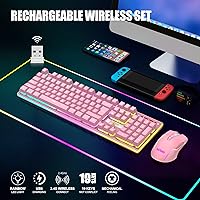
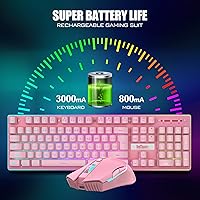
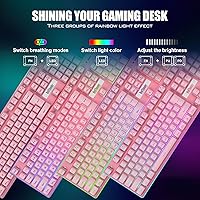
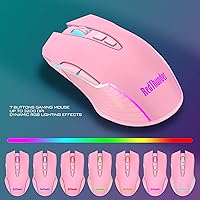
The keys use a membrane-based mechanical feel — worth clarifying upfront, because these are not true mechanical switches. That said, they have a satisfying tactile response for typing and casual gaming, and anti-ghosting support keeps inputs accurate during busier moments. The RGB lighting is genuinely pretty, offering rainbow cycling, breathing modes, and four brightness levels. The mouse goes up to 3200 DPI across seven steps, which covers everything from document work to fast-paced casual play. The keyboard battery is a generous 3000mAh; the mouse carries 800mAh. Both sleep automatically after two minutes of inactivity — handy for battery life, though it can catch you off guard after a short pause.

Best For

This keyboard-and-mouse bundle makes the most sense for students, remote workers, or anyone putting together their first real desk setup on a budget. If you are coming from a basic wired combo and want to cut the cables without spending much, this is a practical upgrade. It also suits casual gamers who care more about how their setup looks than hitting peak competitive performance. The pink version, in particular, works well for anyone building a color-coordinated workstation. One thing to keep in mind: the keyboard and mouse share a single USB receiver, so treat that dongle carefully — losing it means losing both devices at once.

User Feedback

Across thousands of reviews, the K10 set earns consistent praise for its looks — the pink finish and RGB lighting regularly get called out as highlights. Typing feel is more divisive: most casual users find it comfortable, but anyone accustomed to genuine mechanical keyboards may find it underwhelming. Wireless range is another point of debate, with some buyers noting drop-offs in larger rooms or through walls. Battery life tends to hold up well for moderate daily use. A recurring minor complaint is that the mouse scroll wheel feels cheaper relative to the rest of the build. At a 3.9 out of 5 rating, it is well-liked, but not without its trade-offs.

Pros

  • Rechargeable batteries in both devices remove the need to ever buy disposable AAs.
  • Plug-and-play setup works immediately with zero driver installation required.
  • The pink colorway is genuinely well-executed and looks great on a themed desk.
  • RGB backlighting offers real variety with breathing modes, static options, and four brightness levels.
  • Double-shot ABS keycaps keep legends sharp and readable even after heavy daily use.
  • The metal top plate gives the keyboard a surprisingly solid, premium feel for the price tier.
  • Seven adjustable DPI steps on the mouse cover everything from precise document work to casual gaming.
  • Both devices auto-sleep to conserve battery, noticeably extending time between charges.
  • The K10 set is available in multiple colorways, making it easy to match different desk aesthetics.
  • Anti-ghosting support handles everyday multi-key combinations reliably for typing and light gaming.

Cons

  • The shared USB receiver means losing one small dongle disables both keyboard and mouse simultaneously.
  • Mouse scroll wheel feels noticeably cheaper than the keyboard, creating an inconsistent quality impression.
  • Auto-sleep triggers after just two minutes of inactivity, causing brief reconnection delays on return.
  • Wireless signal weakens through walls or over longer distances in larger rooms.
  • The mouse lighting cycles automatically with no option to lock it to a single static color.
  • Keyboard takes up to eight hours for a full initial charge, which requires planning ahead.
  • The mouse battery at 800mAh drains faster than the keyboard and needs more frequent charging.
  • ABS keycaps develop a shiny wear patch on high-use keys over time, which bothers some buyers.
  • No simultaneous dual-device charging solution is included — you swap the cable between devices manually.
  • Competitive or fast-paced gaming exposes the limits of both the sensor precision and key rollover support.

Ratings

The RedThunder K10 Wireless Keyboard and Mouse Combo has been evaluated by our AI rating system after analyzing thousands of verified global purchases, actively filtering out incentivized, duplicate, and bot-generated feedback to surface what real everyday buyers actually experienced. Scores reflect both where this wireless bundle genuinely delivers and where it falls short, giving you an honest picture before you commit.
Value for Money
84%
For a rechargeable wireless combo at this price tier, the K10 set punches above its weight. Students and budget-conscious buyers consistently note that getting RGB lighting, wireless freedom, and a matching mouse in one package feels like a strong deal compared to buying peripherals separately.
A few buyers who stretched their budget expecting near-premium performance were left wanting more. The value proposition holds best for casual users; anyone hoping to replace a mid-range mechanical keyboard will likely feel the gap.
Typing Feel
63%
37%
For daily typing tasks — emails, documents, light browsing — the membrane keys with their mechanical-feel design are comfortable and responsive enough. The tactile feedback satisfies users coming from flat laptop keyboards or older membrane boards.
This is not a true mechanical keyboard, and buyers who know the difference will notice immediately. The key travel and actuation feel softer and less defined than genuine switches, which draws consistent criticism from anyone with mechanical keyboard experience.
Build Quality
74%
26%
The frosted metal top plate gives the keyboard a noticeably more solid feel than most competitors in this price range. Double-shot ABS keycaps mean the legends stay sharp after extended use, and the overall chassis feels stable on a desk without excessive flex.
The mouse tells a slightly different story — particularly the scroll wheel, which multiple buyers flagged as feeling hollow and cheap relative to the keyboard body. The quality gap between the two devices in the bundle is a recurring observation.
Wireless Performance
71%
29%
In standard desktop setups — keyboard and mouse within a metre or two of the USB receiver — the 2.4G connection holds steady with no perceptible lag during casual gaming or everyday use. Most users in typical home office environments report a clean, reliable signal.
Range drops off more noticeably than expected when walls or other devices are between the receiver and peripherals. Users with larger rooms or unconventional desk setups reported occasional disconnections, and the shared receiver means both devices are affected simultaneously when signal weakens.
RGB Lighting
88%
The lighting is genuinely one of this bundle's strongest selling points. The rainbow backlight modes, breathing effects, and four brightness levels create a visually appealing setup that regularly earns praise — especially on the pink version, where the lighting complements the colorway beautifully.
The mouse lighting runs a fixed 7-color cycling gradient with no way to lock it to a static color or sync it with the keyboard mode. For users who want a coordinated, controlled lighting aesthetic, this lack of customization is a real limitation.
Battery Life
76%
24%
The 3000mAh keyboard battery holds up well for moderate daily use, typically lasting through several workdays before needing a charge. The auto-sleep function after two minutes of inactivity actively extends runtime, which regular users appreciate during long work sessions.
The auto-sleep timer is aggressive enough that short pauses — stepping away briefly, reading a document — can trigger it, leading to a brief reconnection delay on return. The mouse battery at 800mAh drains faster than the keyboard, requiring more frequent top-ups for heavy users.
Mouse Ergonomics
72%
28%
The mouse shape fits a standard palm grip comfortably, and the textured anti-sweat surface keeps it manageable during longer sessions. Users doing extended document work or light gaming found it easy to use for an hour or two without notable hand fatigue.
The mouse is sized for average to smaller hands and may feel cramped for users with larger palms during extended sessions. It is not ambidextrous in any meaningful ergonomic sense, and the side buttons, while functional, have a slightly mushy click.
DPI and Mouse Precision
69%
31%
Seven DPI steps up to 3200 covers the practical range for casual gaming, web browsing, and productivity work. Switching between sensitivity levels on the fly is straightforward, and lower DPI settings track smoothly on standard desk surfaces.
At maximum DPI, tracking accuracy becomes inconsistent on certain surfaces, particularly glossy or very dark mousepads. Competitive gamers accustomed to high-precision sensors will find this mouse sensor underwhelming, but for casual use it is adequate.
Ease of Setup
93%
Plug-and-play works exactly as advertised. Insert the shared USB receiver, power on both devices, and they connect instantly — no drivers, no pairing rituals, no app required. This simplicity is a genuine advantage for users who just want things to work.
The only friction comes if the connection drops, which requires a manual reset and re-pairing process that is not immediately intuitive from the packaging alone. Losing the shared USB dongle also disables both devices with no easy workaround.
Keycap Durability
81%
19%
Double-shot injection molding means the legends are part of the keycap structure rather than printed on top, so fading is not a concern even with heavy daily use. Users who have owned the combo for six months or more report the lettering remains crisp.
The ABS plastic, while durable for legend retention, develops a slight shine on high-use keys over time — a known characteristic of ABS rather than PBT material. This does not affect function but bothers buyers who prefer a consistently matte texture.
Aesthetic Design
86%
The pink colorway is well-executed — soft enough to work in a professional home office while still making a visual statement on a gaming desk. The combination of pastel body tones and RGB lighting creates a cohesive look that photo reviews consistently highlight positively.
Color accuracy in product photos can set unrealistic expectations; some buyers noted the pink shade in person leans slightly more muted or different in tone depending on lighting conditions. The white and black variants are more neutral but receive less consistent aesthetic praise.
Anti-Ghosting Performance
77%
23%
Anti-ghosting support handles typical multi-key combinations well for casual gameplay and fast typing bursts. Users playing lighter action games or typing-heavy work report no missed inputs during normal use patterns.
This is not a full N-key rollover implementation, so very rapid simultaneous key presses in competitive gaming scenarios can still produce occasional missed inputs. For the intended casual audience this rarely matters, but it is worth noting for anyone pushing the combo harder.
Charging Convenience
73%
27%
Having rechargeable batteries in both devices removes the ongoing cost and inconvenience of disposable AAs — a practical advantage that budget peripheral buyers do not always get. Charging via USB is straightforward and compatible with most desk setups.
Both devices charge via a single cable but not simultaneously, meaning you need to manually swap between them during charging cycles. There is no charging dock or dual-port solution included, and the keyboard takes up to eight hours for a full initial charge.

Suitable for:

The RedThunder K10 Wireless Keyboard and Mouse Combo is a natural fit for students, remote workers, and casual PC users who want a clean, attractive desk setup without spending a lot. If you are building your first real workstation — moving away from a tangle of cables and a basic keyboard that came bundled with an old desktop — this combo delivers a meaningful upgrade at an accessible price. The pink colorway makes it particularly appealing for anyone putting together a themed or aesthetic-driven desk, and the fact that it works straight out of the box means zero technical friction for less experienced users. Casual gamers who play relaxed titles like simulation games, RPGs, or indie games will find the typing feel and wireless reliability more than adequate for their needs. It also suits anyone who simply cannot be bothered managing disposable batteries, since the rechargeable design on both devices removes that recurring hassle entirely.
Not suitable for:

The RedThunder K10 Wireless Keyboard and Mouse Combo is not the right tool for buyers who take their peripherals seriously from a performance standpoint. If you have used genuine mechanical keyboards before — Cherry MX, Gateron, or similar switches — the membrane-based mechanical-feel keys here will feel like a noticeable step down, and no amount of attractive lighting will change that. Competitive gamers who rely on consistent wireless stability, precise high-speed mouse tracking, or full N-key rollover should look elsewhere, as this bundle is not engineered for that level of demand. Users working in larger rooms or open-plan spaces may also run into wireless range frustrations, particularly if the receiver is not in direct line of sight. And if you are the type to misplace small accessories, the shared USB dongle is a real vulnerability — lose it, and both devices stop working with no simple fix.
Specifications

  • Connectivity: Both keyboard and mouse connect via a single shared 2.4G wireless USB receiver with no Bluetooth support.
  • Keyboard Battery: The keyboard contains a built-in 3000mAh rechargeable lithium battery charged via USB cable.
  • Mouse Battery: The mouse contains a built-in 800mAh rechargeable lithium battery charged via USB cable.
  • Keyboard Layout: Full-size 104-key layout with standard QWERTY arrangement compatible with Windows PC and laptop systems.
  • Mouse DPI: The mouse offers seven adjustable sensitivity levels ranging up to a maximum of 3200 DPI.
  • Key Mechanism: Keys use a membrane switch construction designed to replicate the tactile feel of mechanical switches; they are not true mechanical switches.
  • Backlighting: The keyboard supports RGB rainbow backlighting with 2 breathing modes, 3 static color modes, and 4 adjustable brightness levels.
  • Mouse Lighting: The mouse features a built-in 7-color cyclic gradient LED effect that cannot be manually configured or locked to a single color.
  • Keycap Material: Keycaps are made from ABS plastic using a double-shot injection molding process to prevent legend fading over time.
  • Top Plate: The keyboard frame features a frosted metal top cover for added structural rigidity and a more premium surface feel.
  • Key Lifespan: Keys are rated for up to 10 million keystrokes under standard operating conditions.
  • Auto-Sleep: Both devices enter a power-saving sleep state automatically after 2 minutes of inactivity and wake on any key press or mouse movement.
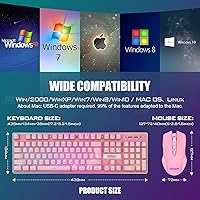
  • Dimensions: The keyboard measures 16.93 x 5.12 x 1.18 inches, making it a standard full-size footprint suitable for most desk setups.
  • Combined Weight: The keyboard and mouse together weigh approximately 2.09 pounds as a combined unit.
  • Color Options: Available in four colorways: Pink, Black, White, and White-Gray, all sharing the same hardware specifications.
  • Compatibility: Designed for use with Windows-based desktop PCs and laptops via USB; not officially supported on macOS or gaming consoles.
  • Anti-Ghosting: The keyboard supports anti-ghosting on key combinations to reduce missed inputs during fast or simultaneous keypresses.
  • Charge Time: RedThunder recommends an initial full charge of approximately 8 hours before first use for both devices.

Related Reviews

RedThunder K84 Wireless Keyboard and Mouse Combo
86%
91%
Keyboard Comfort
89%
Mouse Ergonomics
87%
Build Quality
78%
Backlight Effects
92%
Battery Life
More
RedThunder K20 Wireless Keyboard and Mouse Combo

75%
83%
Value for Money
74%
Wireless Connectivity
51%
Mouse Battery Life
79%
Keyboard Battery Life
86%
RGB Lighting Quality
More
Arteck HW192 Wireless Keyboard and Mouse Combo

78%
78%
Build Quality
72%
Typing Experience
63%
Mouse Comfort & Ergonomics
81%
Battery Life
69%
Wireless Connectivity
More
ULSOU Wireless Keyboard and Mouse Combo
85%
88%
Ergonomics and Comfort
92%
Battery Life
84%
Typing Experience
87%
Wireless Connectivity
80%
Mouse Performance
More
Harburfine Wireless Keyboard and Mouse Combo
85%
88%
Ergonomics & Comfort
93%
Quietness & Noise Level
85%
Wireless Connectivity & Range
84%
Battery Life & Power Management
90%
Setup & Installation
More
Tayderley Wireless Keyboard and Mouse Combo
86%
88%
Typing Comfort
85%
Mouse Performance
94%
Battery Life
83%
Build Quality
92%
Ease of Setup
More
Mobifice Wireless Keyboard and Mouse Combo
87%
89%
Ergonomics & Comfort
92%
Design & Aesthetics
83%
Battery Life
95%
Ease of Use & Setup
88%
Wireless Connectivity
More
MOFII Wireless Keyboard and Mouse Combo
84%
94%
Ease of Setup
85%
Ergonomics and Comfort
90%
Wireless Connectivity
88%
Design and Aesthetics
83%
Battery Life
More
Cimetech Wireless Keyboard and Mouse Combo
88%
91%
Value for Money
88%
Ease of Use
83%
Connectivity
94%
Portability
85%
Ergonomics
More
JOYACCESS Wireless Keyboard and Mouse Combo
82%
88%
Value for Money
83%
Typing Experience
74%
Mouse Performance
86%
Backlight Quality
81%
Battery Life
More

FAQ

They share a single USB receiver, which is actually stored in the bottom compartment of the mouse when not in use. It is a convenient setup, but do keep that dongle safe — if you lose it, both devices stop working and there is no way to replace just the receiver separately.

These are membrane keys built to mimic the tactile feedback of mechanical switches, but they are not true mechanical switches. If you have used genuine mechanical keyboards before, you will notice the difference. For everyday typing and casual gaming though, most users find the feel comfortable and responsive enough.

With the backlighting on, expect around 8 hours of continuous use from the keyboard on a full charge. The mouse battery is smaller at 800mAh, so it runs out faster under heavy use. The auto-sleep feature that kicks in after 2 minutes of inactivity helps stretch those numbers considerably during a typical workday.

It is great for battery life, but it can be mildly annoying in practice. If you pause to read something on screen or step away briefly, both devices go to sleep and take a moment to reconnect when you return. It is not a dealbreaker, just something to be aware of if you find yourself pausing frequently.

The combo is designed for Windows PCs and laptops. While the keyboard may function at a basic level on macOS since it is plug-and-play, the layout labeling and some keys will not map correctly, and it is not officially supported. Gaming consoles are not compatible.

Generally yes, though lighting conditions can make it appear slightly more vibrant in promotional photos than it looks in person under standard room lighting. Several buyers have noted it leans a bit softer or more muted in real life, which some actually prefer. It is a pleasant pastel pink rather than a loud, saturated tone.

Unfortunately no — the mouse lighting is fixed to a 7-color cyclic gradient and cannot be adjusted or locked to a single color. Only the keyboard lighting gives you control over modes and brightness. If a coordinated static lighting setup matters to you, that is worth factoring into your decision.

This is one of the trickier aspects of the RedThunder K10 Wireless Keyboard and Mouse Combo. The keyboard and mouse are pre-paired to a specific receiver, so a generic replacement will not work. Your best option is to contact RedThunder support directly and hope they can supply a matched replacement, but there is no guaranteed retail solution for this.

Yes, completely. You plug in the receiver, power on both devices, and they connect automatically. There is no companion app, no driver download, and no account required. If the connection ever drops for any reason, there is a reset pairing process described in the manual that gets them linked again.

The mouse shape suits a palm grip fairly well and the textured surface helps during longer sessions. It holds up fine for a few hours of casual use or work. That said, the scroll wheel in particular feels noticeably less solid than the rest of the build — it is functional, but it is the one component that reminds you this is a budget device.

Where to Buy