Overview

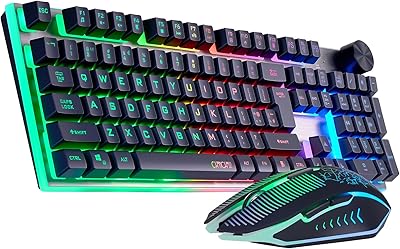
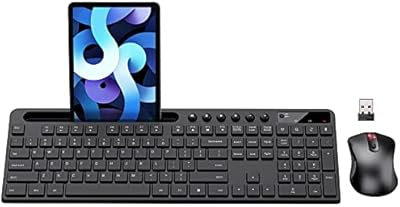
The CHONCHOW G220 Wireless Keyboard and Mouse Combo landed on the market in early 2025 as a straightforward, budget-conscious option for people who want a cable-free desk without spending a lot. It connects via a single USB nano receiver tucked under the mouse — a small touch that makes setup genuinely painless. The 2500mAh rechargeable battery means you are not constantly hunting for AA cells, and the RGB rainbow backlighting gives it a look that punches above its price tier. With nearly 500 ratings averaging 4.1 stars, it has earned a credible early reputation.
Features & Benefits

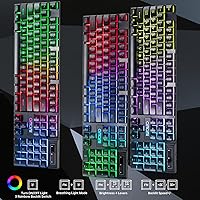
What makes this wireless combo worth a closer look is how thoughtfully the features stack up for an entry-level product. The lighting is genuinely fun — three rainbow backlight modes plus a breathing effect, with adjustable speed and brightness — though buyers hoping for a solid single color will be disappointed, as that option simply does not exist here. The 19 anti-ghosting keys handle casual gaming input reasonably well, and the 12 dedicated multimedia shortcuts save real time during daily work. A splash-proof design and WIN lock key round things out, and the auto-sleep function keeps the battery lasting longer between charges.

Best For

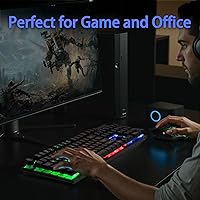
This rechargeable keyboard combo is a natural fit for students, remote workers, and anyone who just wants a clean, cord-free desk without a significant investment. It is particularly well-suited to low-light environments — the backlit translucent keycaps make it easy to type in dim rooms. Casual gamers who like the look of RGB hardware but do not need elite responsiveness will feel right at home, and the plug-and-play compatibility across Windows, Mac, PS4, PS5, and Xbox means households with mixed devices do not have to juggle multiple peripherals. If you swap batteries constantly and find it annoying, this combo solves that frustration.

User Feedback

Buyers generally respond well to the G220 keyboard and mouse set, with the most common praise landing on the value for money and the eye-catching lighting. Many find it a genuine upgrade over older wired setups. That said, a portion of reviewers point out that the typing feel, while tactile and springy, does not replicate a true mechanical switch — it is membrane underneath, so manage your expectations accordingly. A few users also note that the auto-sleep kicks in faster than expected, which can be mildly annoying mid-task. Signal stability and mouse performance have drawn some scattered criticism, but most everyday users report a reliable, largely trouble-free experience.

Pros

  • Single USB nano receiver powers both devices, keeping the desk clean and setup effortless.
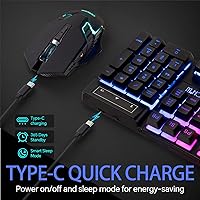
  • Rechargeable 2500mAh battery means weeks of use without hunting for replacement batteries.
  • RGB rainbow backlighting looks genuinely impressive for the price tier.
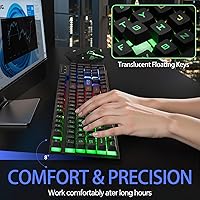
  • Backlit translucent keycaps stay readable in dark or dim rooms without any extra effort.
  • 12 multimedia shortcut keys speed up everyday tasks like volume control and media playback noticeably.
  • Splash-proof keyboard adds a layer of protection that most budget combos skip entirely.
  • Broad plug-and-play compatibility covers Windows, Mac, PS4, PS5, and Xbox with zero driver setup.
  • Auto-sleep function quietly extends battery life without requiring any manual intervention.
  • 19 anti-ghosting keys handle casual multitasking and light gaming inputs without dropped keystrokes.
  • Strong early user satisfaction with a 4.1-star average across several hundred real-world buyers.

Cons

  • The typing feel is membrane-based, not true mechanical, despite the marketing language suggesting otherwise.
  • No single-color RGB mode exists — buyers wanting a clean solid backlight color will be out of luck.
  • Auto-sleep can trigger faster than expected, causing brief frustrating pauses during slower-paced work sessions.
  • Keyboard frame has reported flex under firm or heavy typing, which affects confidence in long sessions.
  • Mouse performance and battery life draw occasional criticism from users with higher baseline expectations.
  • Wireless signal stability may not be fully reliable in environments with significant radio frequency interference.
  • Build materials feel budget-grade in hand, which may concern users planning heavy daily use over years.
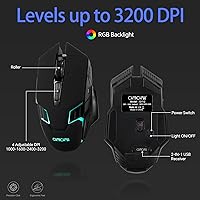
  • Limited adjustability on the mouse — no DPI switch or ergonomic customization options mentioned.

Ratings

The scores below reflect an AI-driven analysis of verified global buyer reviews for the CHONCHOW G220 Wireless Keyboard and Mouse Combo, with spam, bot submissions, and incentivized feedback actively filtered out before scoring. Every category is weighted against real-world usage patterns — not just spec sheets — so both the genuine strengths and the recurring frustrations are represented honestly. If a score looks lower than you might expect, it is because real buyers said so.

Value for Money
88%
Buyers consistently single this combo out as one of the better-equipped options at its price point, particularly noting that the RGB lighting, rechargeable battery, and multimedia keys feel like features you would normally pay more to get. For students and home office workers stretching a budget, the perceived value lands well above average.
A handful of users feel the mouse component does not quite match the keyboard in terms of quality, which slightly undermines the overall value proposition. Those who have previously owned mid-range peripherals may find the combo's build does not fully justify the comparison they were hoping to make.
Wireless Reliability
79%
21%
For typical home and office distances — sitting at a desk, couch gaming, or working across a small room — the 2.4G connection holds up reliably without noticeable input lag. Most users report a solid day-to-day experience with no dropped keystrokes during general typing and casual gaming.
Some buyers report occasional signal hiccups, particularly in environments with dense wireless interference from routers, other peripherals, or USB 3.0 ports placed near the receiver. It is not a dealbreaker for casual use, but users expecting rock-solid competitive gaming performance may notice inconsistencies.
Keyboard Typing Feel
71%
29%
The membrane keys are tuned to produce a springy, somewhat tactile response that many casual typists find genuinely satisfying — especially users upgrading from a flat, mushy laptop keyboard. In moderate daily typing sessions, the feedback feels lively and responsive enough to keep up with comfortable writing speeds.
Anyone who has used a real mechanical switch keyboard will feel the difference immediately. The actuation is softer and less precise under fast, heavy typing, and a few users noted the keys feel slightly inconsistent across the board, which matters more during longer typing sessions.
RGB Lighting Quality
83%
The rainbow cycling modes look genuinely impressive at this price tier, and the breathing animation adds a polished visual touch to a home desk or gaming setup. Users in dim or dark rooms particularly appreciate the backlit translucent keycaps, which make the keyboard easy to use without overhead lighting.
The complete absence of a single-color mode is a real limitation — buyers who searched specifically for a clean white, blue, or red backlight are consistently disappointed. You get rainbow or breathing only, with no way to customize individual key colors or lock the lighting to a preferred hue.
Battery Life
74%
26%
The 2500mAh rechargeable battery in the keyboard is a meaningful upgrade over combos that rely on disposable AA cells, and users who keep the backlight on a lower setting report weeks of use between charges. The auto-sleep function helps stretch battery life noticeably during workdays with frequent breaks.
The auto-sleep sensitivity is a recurring complaint — it can kick in faster than expected, causing a brief but frustrating lag when you return to your desk. Mouse battery performance draws more mixed feedback than the keyboard, with some users finding it drains faster than anticipated under regular daily use.
Build Quality
63%
37%
For the price category, the combo does not feel immediately cheap out of the box, and the splash-proof keyboard adds a layer of reassurance for users who tend to keep drinks at their desk. The key caps themselves feel reasonably solid and the legends are clear and well-printed.
The keyboard frame has a noticeable flex under firm typing pressure, which becomes more apparent during longer, faster typing sessions. Several reviewers mention that the overall plastic construction feels less confidence-inspiring than products from more established peripheral brands, and the mouse in particular feels lightweight in a way that can read as flimsy.
Mouse Performance
66%
34%
For browsing, office work, and casual gaming at normal sensitivity levels, the mouse tracks reliably and clicks without any obvious issues. Users who are not coming from a premium mouse background tend to rate it positively as a functional, low-maintenance daily driver.
Power users and gamers used to dedicated mice will likely find the tracking precision and ergonomics underwhelming — there is no DPI adjustment mentioned, and the mouse does not cater to specific grip styles. A portion of reviews flag inconsistent scroll wheel feel as a minor but persistent annoyance.
Setup & Ease of Use
92%
The single USB nano receiver setup is about as frictionless as it gets — plug it in and both devices connect instantly with zero driver installation across every supported platform. This is a consistent highlight in reviews from users who dread software setup, especially those connecting to PS4, PS5, or Xbox for the first time.
The receiver is stored under the mouse during shipping, which is an elegant storage solution but occasionally confuses first-time buyers who open the box expecting to find it elsewhere. A clearer instruction sheet in the packaging would prevent a small but avoidable moment of frustration.
Compatibility
89%
The cross-platform breadth here is genuinely broad — it works across every modern Windows version, Mac, and multiple console generations without a single driver or app required. Home setups with a laptop, a PS5, and a desktop all in the same room benefit from this flexibility without needing separate input devices.
Mac users get basic functionality but should not expect media key mapping to behave identically to how it does on Windows. A small number of console users report that certain function key combinations do not translate perfectly to PS or Xbox inputs, which can be a minor irritant in practice.
Noise Level
77%
23%
The membrane construction keeps the keyboard notably quieter than most mechanical boards, which is a real practical benefit in shared apartments, open offices, or late-night gaming sessions where noise is a concern. Most buyers describe the keystroke sound as a soft, muted click rather than a loud clatter.
It is not completely silent — the keys produce a light but present click sound that some users in very quiet environments find slightly louder than expected from a membrane keyboard. Those specifically seeking a near-silent typing experience may want to look at low-profile or whisper-quiet alternatives.
Portability
81%
19%
At just over 2 pounds for the full combo and with a single receiver handling both devices, this setup packs down and moves easily between a desk and a bag. Students and remote workers who shift between home, libraries, and co-working spaces find it well-suited for mobile use without a cable tangle.
The keyboard is full-size with 104 keys, which makes it less compact than tenkeyless alternatives for users prioritizing a smaller footprint. The package dimensions are not small, so it is portable in a practical sense but not ultraportable in the way a compact or 60-percent layout would be.
Multimedia Keys
82%
18%
The 12 multimedia shortcut keys are a genuine daily convenience for users who routinely adjust volume, skip tracks, or mute calls without wanting to navigate on-screen controls. Reviewers in home office contexts specifically call these out as one of the more practical features of the G220 keyboard and mouse set.
The multimedia key labels are not always immediately intuitive without consulting the manual, and a couple of function combinations can feel awkward to reach during active use. There is no software to remap these keys, so users who want customized shortcuts are stuck with the defaults.
Lighting Customization
54%
46%
Being able to adjust the brightness and animation speed of the backlight modes gives users some degree of personalization, and the breathing mode at low brightness creates a clean, ambient look that works well in darkened rooms. For buyers who simply want the keyboard to look attractive, it does the job.
The customization ceiling is very low — no per-key color control, no software, no color palette selection, and absolutely no single-color static mode. For anyone who has used a keyboard with even basic RGB software, the limitations here will feel stark and somewhat frustrating given how standard those features have become.
Anti-Ghosting Performance
72%
28%
For casual gaming — think platformers, strategy games, or light action titles — the 19 anti-ghosting keys handle simultaneous inputs comfortably without dropping keystrokes. Users who play cooperatively or use multiple key combinations during everyday productivity tasks benefit from this without needing to think about it.
The anti-ghosting coverage does not extend across the full keyboard, which means users playing fast-paced competitive titles that demand complex key chord combinations may encounter dropped inputs. It is positioned correctly as an entry-level gaming feature, not a substitute for a dedicated gaming keyboard.

Suitable for:

The CHONCHOW G220 Wireless Keyboard and Mouse Combo is a strong match for students, remote workers, and casual home users who want a clean, cable-free desk setup without a steep financial commitment. If you spend your days bouncing between browser tabs, spreadsheets, and video calls, the multimedia shortcut keys and reliable 2.4G connection make daily tasks noticeably less fiddly. It is also a solid pick for anyone who works or games in dim environments — the backlit translucent keycaps stay legible even when the lights are low. Households with a mix of devices will appreciate how broadly compatible this combo is, working across Windows, Mac, PS4, PS5, and Xbox with nothing more than a plug-in receiver. And if you have ever been caught with a dead mouse mid-deadline because of disposable batteries, the rechargeable design alone makes this worth a serious look.
Not suitable for:

The CHONCHOW G220 Wireless Keyboard and Mouse Combo is not the right tool for serious or competitive gamers who demand precise, fast-actuation mechanical switches — the keys have a tactile membrane feel that mimics the mechanical experience without actually delivering it, and experienced typists will notice the difference quickly. Power users who rely on customizable per-key RGB lighting or specific solid color modes will also hit a wall, since this combo only offers rainbow cycling and breathing effects with no option to lock in a single color. Writers or coders who spend long hours typing may find the keyboard flex and overall build quality underwhelming compared to more robust, higher-investment options. If wireless signal consistency is a hard requirement — say, for competitive online gaming or a large-room setup beyond 10 meters — the 2.4G connection on budget hardware can occasionally disappoint. Those coming from premium peripherals should temper expectations significantly.
Specifications

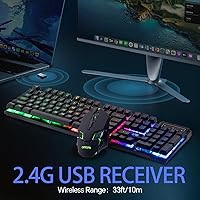
  • Connectivity: The combo uses 2.4GHz wireless transmission via a single USB nano dongle, with a stable range of up to 10 meters.
  • Receiver: Both the keyboard and mouse share one USB nano receiver, which stores neatly under the base of the mouse when not in use.
  • Keyboard Battery: The keyboard houses a built-in 2500mAh rechargeable lithium battery charged via USB cable.
  • Key Count: The full-size keyboard layout includes 104 keys covering all standard functions, multimedia controls, and navigation keys.
  • Anti-Ghosting: 19 keys are anti-ghosting enabled, allowing simultaneous inputs to register correctly during casual gaming or fast typing bursts.
  • Multimedia Keys: 12 dedicated multimedia shortcut keys are built into the top row for direct control of volume, media playback, and other common functions.
  • Backlight: The keyboard offers three rainbow LED cycling modes and one breathing mode, with adjustable brightness and animation speed; no solid single-color mode is available.
  • Switch Type: Keys use a membrane mechanism engineered to provide a tactile, springy feel that approximates — but does not replicate — true mechanical switches.
  • Splash Resistance: The keyboard features a splash-proof construction designed to handle minor liquid spills, though it is not rated for full submersion.
  • WIN Lock: A dedicated WIN lock key disables the Windows key to prevent accidental interruptions during gaming sessions.
  • Auto-Sleep: Both devices include an auto-sleep function that activates during periods of inactivity and wakes instantly with any key press or mouse movement.
  • Dimensions: The package measures 17.83″ x 8.31″ x 1.85″ and the full combo weighs 2.03 pounds.
  • Compatibility: The set works with Windows 2000 through Windows 11, macOS, PS3, PS4, PS5, and Xbox consoles with no driver installation required.
  • Model Number: The keyboard is officially designated the G220, manufactured by CHONCHOW and first listed in February 2025.
  • Power Switch: A dedicated physical power switch on both the keyboard and mouse allows manual shut-off to fully conserve battery when the devices are not in use.

Related Reviews

CHONCHOW G312 Wireless Gaming Keyboard Mouse Combo
79%
88%
Value for Money
82%
Build Quality
84%
Wireless Stability
86%
Keyboard Battery Life
58%
Mouse Battery Life
More
Arteck HW192 Wireless Keyboard and Mouse Combo
78%
78%
Build Quality
72%
Typing Experience
63%
Mouse Comfort & Ergonomics
81%
Battery Life
69%
Wireless Connectivity
More
GUKJOB iK6630 Wireless Keyboard and Mouse Combo
77%
88%
Value for Money
83%
Keyboard Typing Feel
91%
Aesthetic & Design
87%
Ease of Setup
61%
Mouse Performance
More
VEILZOR UK418 Wireless Keyboard and Mouse Combo
81%
91%
Value for Money
84%
Typing Comfort
89%
Noise Level
82%
Wireless Reliability
76%
Mouse Ergonomics
More
Arcwares Wireless Keyboard and Mouse Combo
78%
88%
Value for Money
91%
Aesthetic Design
76%
Keyboard Typing Experience
67%
Mouse Performance
84%
Wireless Connectivity
More
TopMate Wireless Keyboard and Mouse Combo
77%
91%
Value for Money
78%
Typing Experience
68%
Mouse Performance
63%
Build Quality
83%
Wireless Reliability
More
Links9+ Wireless Keyboard and Mouse Combo
85%
89%
Ergonomics and Comfort
92%
Wireless Performance and Connectivity
85%
Build Quality
94%
Ease of Use and Setup
80%
Battery Life
More
RECCAZR Wave Keys Ergonomic Wireless Keyboard Mouse Combo
78%
83%
Typing Comfort
67%
Mouse Feel & Handling
91%
Noise Level
86%
Wireless Connectivity
88%
Value for Money
More
Atelus Wireless Keyboard and Mouse Combo
83%
94%
Ease of Setup
88%
Ergonomics & Comfort
90%
Design & Aesthetics
80%
Mouse Performance
86%
Keyboard Performance
More
Hayyiesh KG659-01 Wireless Keyboard and Mouse Combo
75%
88%
Value for Money
79%
Keyboard Comfort & Ergonomics
74%
Key Feel & Typing Experience
58%
Mouse Build Quality
86%
Noise Level
More

FAQ

No, nothing to install. Just plug the USB nano receiver into an open port on your PC, console, or laptop and both the keyboard and mouse connect automatically. It works straight out of the box on Windows, Mac, PS4, PS5, and Xbox.

Unfortunately, no. The lighting only supports rainbow cycling and breathing effects — there is no way to lock it to a single solid color. If a specific color mode is important to you, this combo will not deliver that.

Real-world battery life varies depending on whether you use the backlighting and how often the device sleeps, but the 2500mAh battery is substantial for this category. With moderate backlight use, most users report weeks of regular use between charges rather than days.

It is membrane underneath — the keys are designed to feel springy and tactile, but there are no actual mechanical switches involved. It is a noticeable step up from a mushy standard membrane keyboard, but experienced users of true mechanical boards will feel the difference immediately.

Try pressing any key firmly or toggling the physical power switch off and then back on. Also check that the USB nano receiver is seated properly in the port. If the indicator light is flashing, the battery likely needs a charge.

Based on the product specifications, the keyboard has the confirmed 2500mAh rechargeable battery. The mouse connectivity is also managed through the same shared receiver, but check the included documentation for specific mouse battery details, as some versions may use a replaceable AA battery.

Yes, the CHONCHOW G220 Wireless Keyboard and Mouse Combo is listed as compatible with PS3, PS4, and PS5. You simply plug the USB nano receiver into one of the PS5 USB ports and it should connect without any configuration.
It is a lightweight build, which some people prefer for portability, but it does have some flex in the frame under firm typing pressure. For light to moderate daily use it holds up fine, but if you type hard and fast for hours on end, you may notice it more than you would like.

No — both devices share a single USB receiver and must be used together on the same host device. There is no multi-device pairing or Bluetooth mode that would let you split them between two machines.

The keyboard has a splash-proof design, so a quick spill or a few drops should not cause immediate damage if you wipe it up promptly. That said, it is not waterproof, so do not let liquid sit in the keys or pour a full glass onto it and expect it to survive.