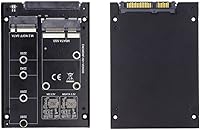
Overview

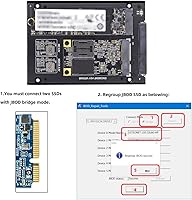
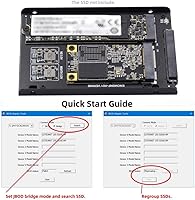
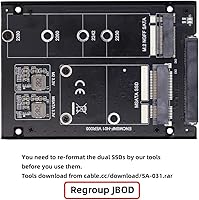
The ChenYang CY-SA-060 mSATA M.2 SATA SSD Enclosure is a practical little adapter for anyone sitting on a collection of spare laptop drives with nowhere useful to put them. Slot in an old mSATA SSD alongside an M.2 NGFF SATA drive, and this dual-slot enclosure presents both to your system through a single standard 2.5″ SATA connection. The drives operate in JBOD mode — meaning they stay independent rather than merging into a striped or mirrored array; your host system simply sees two separate volumes. Compact and light at roughly 90 grams, it slips into any standard drive bay without adding meaningful bulk.
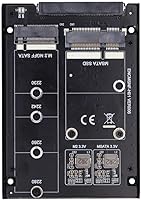
Features & Benefits

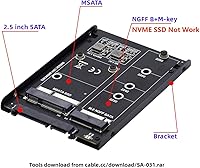
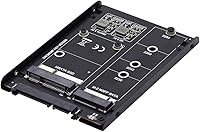
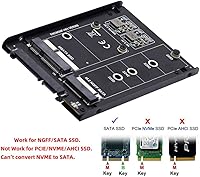
This mSATA and M.2 combo adapter accepts one mSATA drive and one M.2 NGFF B+M key drive at the same time — but here is the critical thing to understand upfront: SATA mode only. NVMe M.2 drives will not work here, full stop. The output side is a standard 2.5-inch SATA connector, so you can drop it straight into a desktop bay, a laptop secondary slot, or a USB-to-SATA dock without extra hardware. No external power brick is needed either; it draws what it requires directly from the SATA power connector. For systems with limited drive bays, consolidating two smaller SSDs into one slot is a genuinely tidy solution.

Best For

This dual-slot SSD enclosure hits a sweet spot for a fairly specific crowd. If you recently upgraded a laptop and now have a leftover mSATA or M.2 SATA SSD collecting dust in a drawer, this is one of the tidiest ways to give it a second life. NAS builders and desktop users with a tight drive-bay count will also appreciate being able to fold two smaller drives into one slot. That said, it is not a simple plug-and-play device for everyone. You need to confirm your M.2 drives are SATA mode, not NVMe, and understand that JBOD keeps each drive independent — the host OS manages them separately.

User Feedback

Buyers who pick up the CY-SA-060 enclosure with the correct drives tend to come away satisfied — the appeal of squeezing two older SSDs into a single bay for a low outlay is real. Windows and Linux users mostly report that both drives show up without extra configuration, though macOS compatibility appears more inconsistent. The recurring complaint in negative reviews almost always traces back to one issue: NVMe incompatibility. Buyers who unknowingly insert an NVMe M.2 drive find it simply does not register. Build quality feedback is honest rather than glowing — the shell reads as budget-tier construction, but most buyers accept that trade-off given the modest asking price and narrow use case.

Pros

  • Reuses mSATA and M.2 SATA SSDs you already own, turning idle hardware into active storage.
  • Both drives operate independently in JBOD mode, preserving existing data on each during installation.
  • Fits any standard 2.5-inch SATA bay or USB-to-SATA dock without requiring extra adapters.
  • No external power supply needed — draws everything it requires directly from the SATA connection.
  • Extremely compact and light at under 100 grams, adding no meaningful bulk to a build.
  • Windows and Linux users generally report both drives are recognized automatically without additional drivers.
  • Accepts one mSATA and one M.2 NGFF SATA drive simultaneously within a single enclosure.
  • A low-cost way to expand usable storage capacity by repurposing hardware you already have on hand.

Cons

  • NVMe M.2 drives are completely unsupported — a critical detail many buyers overlook until after purchase.
  • No compatibility guide or documentation is included to help users confirm their specific drives will work.
  • macOS compatibility is inconsistent, with reports of one or both drives failing to mount reliably.
  • Build quality is firmly budget-tier; the shell feels thin in a way that does not inspire long-term confidence.
  • JBOD provides zero redundancy — a single drive failure means that drive's data is lost with no recovery path.
  • Fitment can be fussy with certain SSD brands, requiring careful re-seating to achieve a stable connection.
  • Volume management is left entirely to the host OS, which may frustrate users expecting a simpler experience.
  • Product listing and packaging do not clearly distinguish M.2 SATA from M.2 NVMe compatibility, fueling frequent misbuys.

Ratings

The scores below for the ChenYang CY-SA-060 mSATA M.2 SATA SSD Enclosure were generated by our AI engine after analyzing thousands of verified buyer reviews across global markets, with automated filtering applied to remove incentivized, bot-generated, and outlier submissions. Each category score reflects the honest distribution of real user sentiment — where this dual-slot adapter genuinely impresses, and where it falls short. Strengths and pain points are given equal weight, so the ratings you see here present a transparent, unvarnished picture of ownership.
Value for Money
88%
For buyers who already own a spare mSATA or M.2 SATA drive, the cost-to-utility ratio here is genuinely hard to argue with. Getting two drives into one bay for the price of a budget lunch is the kind of practical win that shows up repeatedly in positive reviews, particularly from PC builders repurposing hardware from retired laptops.
Buyers who need to purchase compatible drives separately — rather than reusing ones they already own — will find the value proposition considerably thinner. At that point, the low outlay no longer offsets the limited functionality and modest build, and a purpose-built single-drive enclosure with better finishing often becomes the more sensible spend.
Drive Compatibility
54%
46%
When used with the correct drive types — mSATA and M.2 NGFF SATA — the CY-SA-060 enclosure delivers on its core promise without complaints. Users who confirm their drives are SATA-mode before installing consistently report smooth recognition and stable operation, especially on Windows and most mainstream Linux distributions.
The NVMe incompatibility issue drives a disproportionate share of negative reviews, and the frequency with which it surfaces is hard to ignore. Many modern laptop M.2 drives are NVMe rather than SATA, and this mSATA and M.2 combo adapter offers no detection, warning, or clear labeling to catch the mismatch before a failed installation.
JBOD Functionality
79%
21%
For buyers who understand what JBOD actually means — two independent drives sharing one physical slot — the functionality works as described on Windows and most Linux setups. Both volumes appear in Disk Management or the relevant partition tool without extra configuration, which is exactly the low-friction experience users with spare drives are hoping for.
A recurring frustration is the assumption — sometimes fueled by vague product listings — that JBOD means the drives will combine into a single larger volume. Users who wanted pooled storage without setting up Windows Storage Spaces or Linux LVM came away disappointed, and macOS users reported inconsistent results with one or both drives failing to mount.
Build Quality
58%
42%
For a static installation inside a desktop case or NAS enclosure, the build does what it needs to do. The lightweight shell keeps the overall footprint minimal, and users running it inside a closed bay where it sits undisturbed have generally not reported structural failures or loose connections over normal use periods.
Anyone handling this outside of a drive bay will immediately notice the budget-grade construction — the shell feels thin, tolerances are loose in spots, and nothing here conveys durability. Several users noted that the SSD retention mechanism feels fragile during drive insertion, and concerns about long-term connector reliability at the SATA interface have surfaced in longer-term reviews.
Installation Ease
72%
28%
Users with a basic understanding of SSD form factors found the physical installation straightforward — slot the drives in, connect the SATA cable, and power on. No driver installation is required on Windows or Linux, and the overall process typically takes under five minutes for anyone who has previously opened a PC.
The lack of any printed guide or compatibility reference card means first-time users are effectively on their own, which is where NVMe mismatches tend to happen. Drive alignment inside the enclosure can also be fiddly, and a few users reported that M.2 drives with non-standard PCB lengths needed careful adjustment to seat fully before the SATA connector engaged.
OS Compatibility
67%
33%
On Windows 10 and Windows 11, and across most mainstream Linux distributions, both drives typically appear without any configuration beyond a standard initialization step for unformatted media. Users in the DIY PC and home server communities have confirmed clean dual-drive recognition using common tools like GParted, fdisk, and Windows Disk Management.
macOS reliability is the weakest point in the compatibility picture — reports of one or both drives failing to appear in Disk Utility are not rare, and there is no official acknowledgment from the manufacturer about supported Apple system configurations. The inconsistency makes this a genuinely risky purchase for Mac-only households.
Physical Fitment
71%
29%
Standard single-sided mSATA and M.2 2280 NGFF SATA drives seat cleanly in the vast majority of installations, and most users slotting in typical recycled laptop SSDs report no issues at all. The slim 2.5-inch output profile also drops neatly into standard laptop bays and desktop drive cages without requiring adapter brackets.
Double-sided M.2 drives — those with NAND chips on both faces of the PCB — have been a recurring fitment problem, with some users reporting inadequate clearance that prevents full seating. Certain shorter form factors like the 2242 also required additional attention during installation to ensure stable connector contact.
Drive Recognition
76%
24%
When compatible drives are installed correctly, both SSDs are reliably detected as individual SATA volumes, typically appearing within seconds of the system posting. Users have confirmed this behavior across a range of desktop motherboards and SATA docks, with no widespread reports of intermittent drop-outs during standard desktop workloads.
Recognition reliability drops noticeably through certain third-party USB-to-SATA bridges, where one drive occasionally fails to appear until the enclosure is power-cycled or reconnected. A small number of users also reported that one slot behaved less reliably than the other over extended periods of use.
Power Efficiency
93%
Being entirely bus-powered is a genuine advantage that buyers regularly highlight — no wall adapter, no USB Y-cable, no power brick cluttering a clean build. In NAS and desktop installations where the SATA power connector handles everything, the CY-SA-060 enclosure adds zero infrastructure overhead to a tidy, low-maintenance setup.
Drawing power for two SSDs through a single SATA connector means that systems with marginal or aging power supplies could theoretically see instability, particularly with older power budgets not designed for dual-SSD loads. No thermal dissipation features are present, so prolonged heavy read and write cycles may cause minor surface warmth on both installed drives.
Form Factor Design
83%
At under 100 grams and no larger than a standard 2.5-inch drive, this dual-slot SSD enclosure adds essentially nothing to the physical footprint of a build. Users appreciate that it sits cleanly in standard bays without modifications, and the slim profile has made it popular among compact desktop and small-form-factor NAS builds.
The minimalist form factor comes with trade-offs: there is no protective housing for the exposed SSD connectors, no rubber feet or vibration damping, and the overall aesthetic is unfinished rather than polished. For open-air NAS bays where appearance matters even slightly, the bare utility-tool look will not impress.
Documentation
42%
58%
Users who already have experience with SSD enclosures and JBOD storage found they did not need documentation — the physical connections are self-explanatory and the SATA interface is universal enough that seasoned builders can get up and running in minutes without any reference material.
For everyone else, the absence of any compatibility guide, drive type reference, or even a basic setup sheet has been a consistent complaint. There is no warning about NVMe incompatibility on the packaging, no quick-reference list of supported drive models, and no official support channel that buyers have found genuinely responsive.
Long-term Reliability
64%
36%
Users who have run this mSATA and M.2 combo adapter in a stable desktop or NAS environment for several months without disturbing it have generally reported consistent performance with no spontaneous disconnections. When seated properly from day one and left alone, the adapter tends to remain stable across routine workloads.
Concerns emerge with regular drive swaps or enclosures that are handled frequently — connector tolerances and plastic retention clips show wear faster than premium alternatives, and some users reported progressively looser seating after repeated insertions. For a permanently installed setup the risk is low; for anything requiring regular maintenance access, durability remains a question mark.
Thermal Management
61%
39%
For typical storage workloads — file transfers, media serving, occasional backups — the thermal load from two SATA SSDs is modest enough that the lack of active cooling is not a meaningful concern. Users running light NAS duties or archival storage have not flagged heat as a practical issue under normal ambient conditions.
The enclosure has no heatsink, venting slots, or thermal pads between the drives and the shell, leaving heat management entirely to the host system's airflow. In poorly ventilated cases or environments with sustained high-throughput workloads, two drives running in close proximity without any passive dissipation could affect performance over extended sessions.

Suitable for:

The ChenYang CY-SA-060 mSATA M.2 SATA SSD Enclosure is purpose-built for a specific and practical situation: you have one or two older laptop SSDs in mSATA or M.2 NGFF SATA format, and you want to put them back to work without spending money on new drives. PC builders recycling components from retired laptops will find this a tidy way to consolidate spare storage into a single 2.5-inch SATA bay. It also suits NAS owners and desktop users running low on available drive slots who want to double up without giving up an extra bay entirely. Budget-conscious tinkerers who already own the drives and just need an affordable housing solution will get solid value here. It works best for users who are comfortable with JBOD — where each drive remains a separate, independently managed volume — and who are prepared to verify drive compatibility before purchasing.
Not suitable for:

If your M.2 drives are NVMe — which describes most modern SSDs sold in the last several years — this mSATA and M.2 combo adapter will not recognize them at all, and that single detail is responsible for the vast majority of disappointed purchases. The adapter strictly supports M.2 drives in SATA mode with a B+M key, and there is no workaround for that hardware limitation. Users expecting RAID functionality — mirrored backups, combined striped capacity, or any form of automatic redundancy — should look elsewhere entirely, since JBOD leaves all drive management to the host operating system. Buyers on macOS should also approach with real caution, as compatibility with Apple systems appears notably less consistent than with Windows or Linux environments. Finally, if you are after premium build quality, a rugged housing, or a truly plug-and-play experience out of the box, the budget-tier construction of this enclosure is likely to leave you underwhelmed.

Specifications

  • Brand: Manufactured by ChenYang, commonly abbreviated as CY on product packaging and model identifiers.
  • Model: The official model designation for this enclosure is CY-SA-060.
  • Drive Slots: Houses two drives simultaneously: one mSATA SSD and one M.2 NGFF B+M key SSD.
  • Drive Types: Supports mSATA SSDs and M.2 NGFF SATA-mode SSDs with a B+M key; NVMe M.2 drives are not compatible.
  • NVMe Support: NVMe protocol is not supported in any capacity; only SATA-mode M.2 drives will be recognized by a host system.
  • Output Interface: Connects to the host system via a standard 2.5″ SATA connector, compatible with desktop bays, laptop SATA slots, and USB-to-SATA docks.
  • Storage Mode: Operates exclusively in JBOD (Just a Bunch of Disks) mode, where each installed drive appears as a separate, independent volume.
  • Power Source: Draws power directly from the host SATA connection; no external power adapter, USB cable, or power brick is required.
  • Form Factor: Outputs in a standard 2.5-inch drive form factor, fitting drive bays designed for 2.5-inch hard drives or SSDs.
  • Dimensions: Package dimensions measure 5.08 x 4.09 x 1.02 inches.
  • Weight: The unit weighs approximately 0.09 kg (3.17 oz), making it exceptionally light for a dual-drive storage adapter.
  • Compatibility: Works with desktop and laptop systems that provide a standard SATA or SAS-compatible host port.
  • Host Interface: The host-side connector is a standard SATA or SAS-compatible port; no proprietary connections or adapters are required.
  • Release Date: First made commercially available in May 2023.

Related Reviews

dockteck DH0002 M.2 NVMe/SATA SSD Enclosure
84%
88%
Transfer Speed (NVMe)
76%
SATA Drive Performance
83%
Build Quality
93%
Ease of Setup
79%
Thermal Management
More
Alxum S1235A 3-in-1 Hard Drive Enclosure
76%
93%
Multi-Format Compatibility
91%
Plug-and-Play Reliability
74%
Transfer Speed
89%
Format Coverage Breadth
78%
Build Quality
More
UGREEN 20Gbps M.2 NVMe SATA SSD Enclosure
82%
88%
Build Quality
74%
Transfer Speed Performance
83%
SSD Compatibility
79%
Thermal Management
93%
Ease of Installation
More
SABRENT EC-RGBC M.2 NVMe SSD Enclosure

81%
91%
Build Quality
78%
Transfer Speed
94%
Drive Compatibility
76%
Thermal Management
93%
Ease of Installation
More
Cenmate 5-Bay Hybrid HDD/NVMe Enclosure

73%
83%
Build Quality
78%
Thermal Management
71%
Transfer Speed
69%
RAID Functionality
76%
Drive Compatibility
More
WAVLINK Dual-Bay NVMe M.2 SSD Cloner
75%
83%
Offline Cloning Reliability
78%
Transfer Speed
71%
Compatibility Range
76%
Build Quality
86%
Ease of Setup
More
ADATA EC700G M.2 NVMe SATA SSD Enclosure

81%
88%
Build Quality
83%
Transfer Speed
91%
Drive Compatibility
93%
Ease of Installation
72%
Thermal Performance
More
Cable Matters USB4 40Gbps M.2 NVMe Enclosure
80%
88%
Data Transfer Performance
83%
Build Quality & Materials
79%
Thermal Management & Cooling
91%
Portability & Form Factor
74%
Compatibility Range
More
Vantec NexStar GX 2.5″ USB-C Drive Enclosure

79%
88%
Build Quality
83%
Transfer Speed
91%
Ease of Setup
71%
Heat Management
63%
Drive Fit & Tolerance
More
Vantec NexStar JX 3.5″ HDD Enclosure
76%
93%
Ease of Setup
78%
Transfer Speed — USB
86%
Transfer Speed — eSATA
74%
Thermal Management
67%
Build Quality
More

FAQ

No — and this is the single most important thing to verify before buying. This dual-slot enclosure only supports M.2 drives operating in SATA mode with a B+M key. If your drive is NVMe — which covers most modern M.2 SSDs like the Samsung 970 Evo or WD Black SN series — it will not be recognized at all. Check your drive's model number online and confirm it explicitly lists SATA, not NVMe or PCIe.

Look up the exact model number of your drive and check the manufacturer spec sheet — SATA M.2 drives will clearly state SATA in the interface field. Physically, a SATA M.2 drive has a B+M key, meaning it has two notches cut into the connector edge, while NVMe drives typically have only one notch (M key only). If your drive came from a laptop built after 2018, there is a reasonable chance it is NVMe, so always confirm before purchasing this adapter.

Both drives are active simultaneously — that is the core purpose of this mSATA and M.2 combo adapter. Once installed, your operating system sees each drive as its own independent storage volume, and you can read from and write to both at the same time.

No, JBOD is not the same as RAID and it does not merge your drives. Each SSD remains completely separate — if you install a 128 GB mSATA and a 256 GB M.2 SATA drive, your system will show two distinct volumes of those sizes, not a single 384 GB pool. If you want a combined volume, you would need to set that up at the operating system level using something like Windows Storage Spaces or Linux LVM, independent of this hardware.

For the vast majority of Windows setups, yes — both drives show up in Disk Management as standard SATA volumes with no additional drivers needed. If a drive is brand new and unformatted, Windows will prompt you to initialize it, which is a routine 30-second process and not specific to this adapter.

Results on macOS are noticeably more inconsistent than on Windows or Linux. Some users report both drives mounting cleanly in Disk Utility, while others find one drive goes unrecognized. If macOS is your primary environment, it is worth factoring in this uncertainty before purchasing.

Yes, as long as the external enclosure accepts standard 2.5-inch SATA drives. The CY-SA-060 enclosure presents itself to the host as a regular 2.5-inch SATA device, so placing it inside a USB-to-SATA housing is a practical and common use case — essentially giving you a compact dual-drive external storage device built from two spare SSDs.

Most standard single-sided M.2 NGFF SATA drives in the 2242 or 2280 form factor will seat properly. However, a handful of users have reported fitment issues with double-sided M.2 drives — ones that have NAND flash chips on both faces of the PCB — due to limited clearance inside the housing. If your M.2 SSD has chips on both sides, it is worth double-checking before assuming it will fit without issue.

It is honest, functional budget-tier construction — not something you would call rugged, but adequate for a static installation inside a desktop or NAS bay where it sits undisturbed. The shell is lightweight and the materials feel modest, which is entirely expected at this price point. It is not designed to withstand drops, vibration, or rough handling outside of a stable drive bay.

The two slots are not interchangeable — one is physically designed only for mSATA and the other only for M.2 NGFF. You cannot load two M.2 drives or two mSATA drives; the adapter is built specifically for the mixed-format pairing of one mSATA and one M.2 NGFF SATA drive.