
Overview

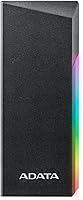
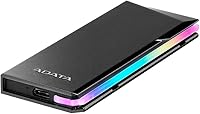
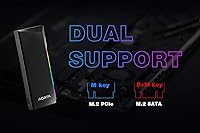
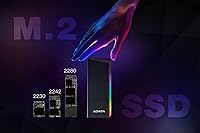
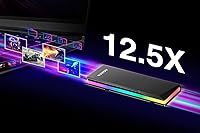
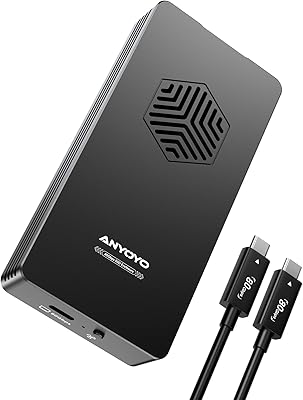
The ADATA EC700G M.2 NVMe SATA SSD Enclosure sits in a crowded field of budget-to-mid-range external drive cases, but it earns its place with a few genuine differentiators. Most competitors at this price arrive in plastic shells — this one wraps its internals in an aluminum alloy body that feels noticeably more solid in hand. It accepts both NVMe and SATA M.2 drives across the 2230, 2242, and 2280 form factors, covering the vast majority of drives people are likely repurposing from old machines. The USB 3.2 Gen 2 interface tops out at 10Gbps, fast enough to move a 100GB folder in well under two minutes. RGB side lighting adds a stylistic touch, though it's worth stating clearly: no drive is included.

Features & Benefits

Installation is refreshingly simple. The EC700G uses a tool-less sliding mechanism — you slot the drive in, close the case, and you're done, no screwdrivers required. A thermal pad comes pre-installed inside the housing, which helps dissipate heat during sustained transfers; NVMe drives can run warm under continuous load, so this is a practical detail rather than a marketing point. Both a Type-C to Type-C and a Type-C to Type-A cable ship in the box, giving you immediate compatibility with modern laptops and older desktop USB-A ports. The case is backward compatible with USB 3.1, 3.0, and 2.0, and it supports hardware encryption for anyone routinely carrying sensitive data.

Best For

This aluminum SSD case makes the most sense for anyone who just swapped out the M.2 drive in a laptop or desktop and wants to give the old one a second life as portable storage rather than letting it collect dust. Content creators moving large video files, students shuttling project folders between campus and home, and photographers batch-transferring raw images will all find the speeds genuinely useful. The EC700G also suits buyers who want a premium-looking enclosure without spending premium prices — the metal shell punches above its weight visually. If plug-and-play simplicity and cross-platform support matter more to you than advanced firmware options, this M.2 enclosure fits the brief.

User Feedback

Across close to 500 ratings, the EC700G holds a 4.5-star average, and the consistency of the praise is telling. Build quality is the most common positive surprise — many buyers expected something that felt cheap and got something that felt genuinely solid instead. Drive detection across Windows, macOS, and Linux is reported as reliable and driver-free. On the downside, some users note the case runs noticeably warm during extended continuous transfers, which is not alarming but worth knowing if you plan to run long backups. A few mention the bundled cables feel thin relative to the case itself. Real-world speeds generally align with the 10Gbps spec, though results naturally vary by drive.

Pros

  • Aluminum alloy body feels genuinely premium and noticeably more solid than plastic-shelled rivals at the same price point.
  • Supports both NVMe and SATA M.2 drives across three form factors, covering almost every spare drive most people will have.
  • Tool-less installation takes under a minute — no screwdrivers, no fiddly screws, no frustration.
  • USB 3.2 Gen 2 delivers real-world speeds fast enough to transfer a 100GB file in roughly 90 seconds on a capable NVMe drive.
  • Both a Type-C to Type-C and a Type-C to Type-A cable are included, so you can connect to virtually any modern device out of the box.
  • Backward compatibility with older USB standards means it works even on machines that have not been recently upgraded.
  • Hardware encryption support makes the EC700G a reasonable choice for professionals carrying sensitive files.
  • At just 3.17 ounces and smaller than most wallets, it disappears easily into a bag or jacket pocket.
  • Holds a 4.5-star average across nearly 500 real buyer ratings — a strong signal of consistent satisfaction at this price tier.
  • Driver-free plug-and-play operation works reliably across Windows, macOS, and Linux without any software setup.

Cons

  • The case runs noticeably warm during extended continuous transfers, which may concern users running long overnight backups.
  • Bundled cables feel thin and lightweight relative to the quality of the enclosure itself.
  • RGB side lighting, while distinctive, cannot be turned off — minimalists or professional settings may find it unwanted.
  • No IP rating means it offers no meaningful protection against water exposure or dusty environments.
  • Fit tolerances can be tight with certain third-party drive brands, occasionally requiring extra effort during installation.
  • No drive is included, despite some product listing metadata implying storage capacity — easy to miss for first-time buyers.
  • Lacks advanced firmware features or UASP configuration options that power users sometimes rely on for tuning performance.
  • Top-end throughput is capped by the USB 3.2 Gen 2 interface, meaning fast NVMe drives will never reach their full sequential potential here.
  • No carrying pouch or protective sleeve is included, leaving the aluminum finish exposed to scratches in transit.

Ratings

The scores below reflect an AI-driven analysis of verified global buyer reviews for the ADATA EC700G M.2 NVMe SATA SSD Enclosure, with spam, bot-generated, and incentivized feedback actively filtered out before scoring. Each category is weighted against real-world usage patterns reported across hundreds of confirmed purchases, not marketing claims. Both standout strengths and recurring frustrations are reflected transparently so you can make a genuinely informed decision.

Build Quality
88%
The aluminum alloy shell consistently surprises buyers who expect something flimsy at this price point — many users describe it as feeling closer to a mid-range branded drive than a budget enclosure. The solid construction gives confidence when tossing it into a laptop bag alongside other gear.
The finish, while attractive, picks up light scratches over time with daily carry use, and a few buyers noted the seam between case halves is slightly uneven on some units. It holds together well, but fit-and-finish consistency is not quite at the level of premium enclosures costing twice as much.
Transfer Speed
83%
On a USB 3.2 Gen 2 host port paired with a capable NVMe drive, real-world sequential reads land reliably in the 900–1000 MB/s range — fast enough to move a 100GB video project in under two minutes. Most buyers report that advertised speeds are genuinely achievable rather than theoretical ceiling numbers.
Speeds are ultimately capped by the USB interface, so owners of high-end NVMe drives will never unlock the drive's full potential here. A handful of users also noticed throughput dipping during very long sustained transfers, likely due to thermal throttling as the enclosure warms up.
Drive Compatibility
91%
Supporting both NVMe and SATA M.2 drives across 2230, 2242, and 2280 form factors is a practical strength that most competitors at this price tier do not fully match. Buyers repurposing drives from a wide range of laptops — Dell, Lenovo, ASUS, Apple — report compatibility without issue in the overwhelming majority of cases.
A small but consistent group of users flagged fit issues with specific third-party brand drives, particularly some that sit slightly thicker than the M.2 standard. The tool-less mechanism also leaves less room for adjustment compared to screw-mount designs, which can make seating an oddly dimensioned drive frustrating.
Ease of Installation
93%
The tool-less sliding design is one of the EC700G's clearest advantages for non-technical buyers — most users report having the drive installed and recognized by their computer within five minutes of opening the box. No instructions are needed for anyone who has handled electronics before.
A few first-time SSD users found the insertion angle for the M.2 connector less intuitive than expected, particularly with smaller 2230 form factor drives. The lack of any screw-down retention also means the drive relies entirely on the enclosure's clip mechanism, which felt slightly loose to a small number of users.
Thermal Performance
72%
28%
The included thermal pad makes a measurable difference for moderate workloads — casual file transfers, backup jobs under 30 minutes, and media playback all run without the case becoming uncomfortably hot. The aluminum body conducts heat away from the drive better than a plastic alternative would in the same scenario.
Extended sustained writes — think multi-hour backup sessions or repeated large transfers — push the enclosure into noticeably warm territory, and some users report slight throttling during these edge cases. Without active cooling, this is an inherent ceiling for the design rather than a defect, but heavy users should be aware of the limitation.
Value for Money
89%
Buyers consistently express that the EC700G delivers more than its price suggests, particularly given the aluminum construction and dual-protocol compatibility. For someone turning a spare M.2 drive into portable storage, the cost-to-utility ratio is hard to beat in this product category.
Those who also factor in the need to purchase a drive separately sometimes find the total cost creeping closer to a branded external SSD, which can soften the value argument. The bundled cables, while functional, feel like a cost-cutting measure that slightly undercuts an otherwise strong package.
Cable Quality
61%
39%
Including both a Type-C to Type-C and a Type-C to Type-A cable is a genuinely thoughtful inclusion — most buyers can connect to their device immediately without sourcing additional accessories. Having both cable types out of the box covers a wide range of real-world setups without extra spending.
The cables themselves are a recurring criticism: thin, stiff, and short enough that they can feel awkward in certain desk configurations. Several users replaced them with higher-quality third-party cables and noted a small improvement in connection stability during long transfers.
Portability
94%
At just 3.17 ounces and not much larger than a stick of gum in profile, this aluminum SSD case is one of the most genuinely pocketable enclosures available. Students and frequent travelers consistently praise how little physical space it occupies in a bag or coat pocket.
No carrying pouch or protective sleeve is included, which means the exposed aluminum surface is vulnerable to scratches when rattling around loose in a bag. This is a minor but real omission for a product marketed partly on its good looks.
RGB Lighting
58%
42%
For buyers who appreciate the aesthetic, the side RGB lighting gives this enclosure a distinctive personality that plain black enclosures completely lack. In low-light environments, the glow is subtle enough to serve as a useful visual indicator that the drive is active and powered.
There is no way to disable the lighting, which is a genuine annoyance for users in professional settings, dark bedrooms, or anyone who simply finds it unnecessary. Several minimalist-leaning buyers specifically mentioned regretting that they could not turn it off after purchase.
Plug-and-Play Reliability
86%
Driver-free operation across Windows, macOS, and Linux is a consistent positive in user feedback — the enclosure is recognized as a standard USB storage device within seconds of plugging in, with no software installation required. Cross-platform reliability is particularly appreciated by buyers who switch between machines frequently.
A small number of users reported intermittent disconnection events, typically linked to the bundled cable rather than the enclosure itself. Swapping to a higher-quality cable resolved the issue in most documented cases, but it adds a minor friction point that should not exist at this level.
Hardware Encryption
67%
33%
Hardware encryption support is a feature many buyers in this price tier do not expect, and it adds genuine utility for professionals or students carrying confidential files. The capability being handled at the hardware level rather than software means it does not slow down the host CPU during read and write operations.
Setup is not guided within the box, and ADATA's documentation on enabling encryption is sparse enough that many buyers are unaware the feature exists or how to use it. Without a clear setup path, the encryption capability goes unused by the majority of owners who could genuinely benefit from it.
Durability
74%
26%
The aluminum shell handles the normal wear of daily bag carry well, and users who have owned the EC700G for over a year generally report it still functions without issues. The solid construction inspires more confidence than competing plastic enclosures for routine handling.
No official drop rating or IP certification means there is no tested protection standard to reference — real-world durability beyond casual carry is not guaranteed. At least a few users reported internal connector issues following accidental drops, which is expected but worth noting for buyers in physically demanding environments.
OS & Device Compatibility
87%
Backward compatibility with USB 3.0 and 2.0 ports extends the useful life of this enclosure across a wider range of host devices than many buyers initially expect. Verified compatibility across Windows 10, Windows 11, macOS Ventura and later, and mainstream Linux distributions makes it a genuinely universal choice.
Performance scales down significantly on older USB 2.0 ports, which can frustrate buyers who connect to legacy desktop machines and expect modern speeds. This is a physical limitation of the USB standard rather than a flaw in the enclosure, but the spec sheet does not make this ceiling obvious to less technical buyers.
Overall Satisfaction
85%
A 4.5-star average sustained across nearly 500 ratings is a reliable signal of consistent buyer satisfaction rather than a spike driven by a handful of early reviews. The most common sentiment across positive reviews is that the EC700G exceeded expectations for its price tier in terms of both appearance and functionality.
The gap between the 4.5-star headline and the realistic experience narrows when you factor in the cable quality concerns, thermal limitations under heavy load, and the inability to disable the RGB lighting. It is an excellent choice within its category, but not a flawless one.

Suitable for:

The ADATA EC700G M.2 NVMe SATA SSD Enclosure is a practical pick for anyone sitting on a spare M.2 drive after upgrading their laptop or desktop — it turns hardware that would otherwise sit in a drawer into a genuinely useful portable storage device. Students shuttling large project files between home and campus, photographers offloading raw files in bulk, and video editors moving footage between editing rigs will all benefit from the 10Gbps throughput, which is fast enough to transfer a 100GB folder in well under two minutes under real-world conditions. The broad compatibility with NVMe and SATA drives across 2230, 2242, and 2280 form factors means most people can use whatever drive they already own without second-guessing compatibility. Cross-platform USB support makes this aluminum SSD case equally at home with a MacBook, a Windows desktop, or a Linux machine. Anyone who values a tool-less setup and wants something that looks and feels more substantial than the cheap plastic enclosures cluttering the budget market will find the EC700G a solid match.

Not suitable for:

Buyers expecting a rugged field-ready enclosure should look elsewhere — the EC700G has no official IP rating, so it offers only basic resistance to dust and minor handling bumps rather than meaningful protection against drops, moisture, or harsh outdoor environments. Power users who run continuous, hours-long backup jobs should be aware that the case can get noticeably warm under sustained NVMe loads; the included thermal pad helps manage heat, but it is not a substitute for the active cooling found in pricier enclosures. This aluminum SSD case also lacks the advanced firmware features — like USB Attached SCSI Protocol or UASP tweaking utilities — that more demanding users sometimes want for fine-tuning performance. If you need the absolute fastest real-world throughput and are willing to pay more for it, higher-end Thunderbolt-based enclosures will outperform the EC700G by a significant margin. Finally, anyone hoping to buy this as a ready-to-use external drive will be disappointed: no storage drive is included, and the product listing metadata around capacity figures can mislead buyers who do not read carefully.

Specifications

  • Interface: Connects via USB 3.2 Gen 2 Type-C, delivering up to 10Gbps of bandwidth for fast file transfers.
  • Drive Compatibility: Supports both M.2 NVMe PCIe and M.2 SATA solid-state drives — no need to verify protocol before purchasing.
  • Form Factors: Accommodates M.2 drives in 2230, 2242, and 2280 sizes, covering the vast majority of consumer and laptop SSDs on the market.
  • Body Material: Outer shell is constructed from aluminum alloy, providing a more rigid and heat-conductive housing than plastic alternatives.
  • Thermal Management: A thermal pad is pre-installed inside the enclosure to help conduct heat away from the drive during sustained read and write operations.
  • Dimensions: Measures 4.41 x 1.77 x 0.48 inches, making it compact enough to carry in a shirt pocket or small accessories pouch.
  • Weight: Weighs 3.17 ounces without a drive installed, light enough to add to a daily carry bag without noticeable bulk.
  • Cables Included: Ships with one Type-C to Type-C cable and one Type-C to Type-A cable, covering both modern and legacy USB port configurations.
  • USB Backward Compat.: Fully backward compatible with USB 3.1, 3.0, and 2.0 hosts, though maximum transfer speed is limited by whichever port it connects to.
  • Installation: Uses a tool-less sliding enclosure design — the drive slides in and the case closes without requiring screws or a screwdriver.
  • Encryption: Supports hardware-level encryption, allowing users to secure stored data without relying on third-party software solutions.
  • Lighting: Features RGB lighting along the side of the enclosure that is active during use; there is no software toggle to disable it.
  • Color: Available in black anodized finish, which shows fingerprints moderately but wipes clean easily with a soft cloth.
  • Drive Included: This is an enclosure only — no M.2 SSD is included, and the drive must be purchased separately.
  • Brand: Manufactured by ADATA, a Taiwanese storage and memory company with over two decades of consumer and enterprise product history.
  • OS Compatibility: Works with Windows, macOS, and Linux operating systems without requiring additional drivers — recognized as a standard USB mass storage device.
  • Durability Rating: No official IP rating is assigned; the enclosure offers basic shock and dust resistance suitable for everyday carry but not outdoor or wet environments.
  • Market Rank: Holds a top-200 Best Sellers rank in the Amazon Enclosures category, reflecting consistently strong sales volume relative to competing products.

Related Reviews

dockteck DH0002 M.2 NVMe/SATA SSD Enclosure
84%
88%
Transfer Speed (NVMe)
76%
SATA Drive Performance
83%
Build Quality
93%
Ease of Setup
79%
Thermal Management
More
Alxum S1235A 3-in-1 Hard Drive Enclosure
76%
93%
Multi-Format Compatibility
91%
Plug-and-Play Reliability
74%
Transfer Speed
89%
Format Coverage Breadth
78%
Build Quality
More
UGREEN 20Gbps M.2 NVMe SATA SSD Enclosure
82%
88%
Build Quality
74%
Transfer Speed Performance
83%
SSD Compatibility
79%
Thermal Management
93%
Ease of Installation
More
SABRENT EC-RGBC M.2 NVMe SSD Enclosure

81%
91%
Build Quality
78%
Transfer Speed
94%
Drive Compatibility
76%
Thermal Management
93%
Ease of Installation
More
Cenmate 5-Bay Hybrid HDD/NVMe Enclosure

73%
83%
Build Quality
78%
Thermal Management
71%
Transfer Speed
69%
RAID Functionality
76%
Drive Compatibility
More
ineo C2605-NVMe M.2 NVMe SSD Enclosure

77%
88%
Write Protection Reliability
79%
Transfer Speed Performance
82%
Thermal Management
61%
Fan Noise Level
76%
Build Quality & Materials
More
WAVLINK Dual-Bay NVMe M.2 SSD Cloner

75%
83%
Offline Cloning Reliability
78%
Transfer Speed
71%
Compatibility Range
76%
Build Quality
86%
Ease of Setup
More
Cable Matters USB4 40Gbps M.2 NVMe Enclosure

80%
88%
Data Transfer Performance
83%
Build Quality & Materials
79%
Thermal Management & Cooling
91%
Portability & Form Factor
74%
Compatibility Range
More
Plugable M.2 NVMe SSD Enclosure
87%
94%
Ease of Setup
92%
Data Transfer Speed
88%
Build Quality
90%
Port Compatibility
87%
Cooling & Thermal Management
More
elecacc Dual Bay NVMe SATA SSD Enclosure
75%
93%
Ease of Setup
84%
Offline Cloning
71%
Transfer Speed
88%
Drive Compatibility
63%
Build Quality
More

FAQ

You need to supply your own M.2 drive — the ADATA EC700G M.2 NVMe SATA SSD Enclosure is the case only. Some product listing metadata references storage capacities, which can be confusing, but those figures relate to drive compatibility ranges, not an included drive. Pick up any compatible M.2 NVMe or SATA drive separately and it will slot right in.

Almost certainly yes. The EC700G supports both NVMe and SATA M.2 drives in 2230, 2242, and 2280 form factors, which covers the overwhelming majority of drives found in consumer laptops from the past several years. If you are unsure which type your drive is, check the laptop's service manual or look up the model number online before ordering.

No screwdriver needed. The enclosure uses a tool-less sliding design: you open the case, align the drive with the M.2 connector at the correct angle, press it in, lay it flat, and close the shell. The whole process typically takes under two minutes even for first-timers.

On a fast NVMe drive connected to a USB 3.2 Gen 2 port, you can expect sequential read speeds in the 900–1000 MB/s range, which translates to transferring a 100GB folder in roughly 90 to 120 seconds. SATA drives will be slower by nature, typically peaking around 500 MB/s through the same interface. Results also depend on your host device — an older USB 3.0 port will cap speeds well below that.

It works on both without any fuss. The enclosure shows up as a standard USB mass storage device on macOS, Windows, and Linux — no drivers to install on any of them. Mac users will likely need to format the drive to APFS or exFAT if it was previously used in a Windows machine, but that is a one-time step handled through Disk Utility.

Unfortunately, no. The side lighting activates whenever the enclosure is powered and there is no physical switch or software option to disable it. For most desk setups it is fairly subtle, but if you are using this in a dark room or a professional environment where blinking lights would be distracting, it is worth knowing upfront.

The aluminum body and included thermal pad do a reasonable job managing heat during typical use, but under sustained heavy loads — like multi-hour backup jobs pushing continuous writes — the case can get noticeably warm to the touch. It is not dangerous, but if you are running overnight backups regularly, make sure the enclosure is on a hard flat surface with airflow around it rather than buried in a bag or resting on carpet.

The EC700G supports hardware encryption, which means you can protect the drive's contents so that the data is inaccessible without the correct credentials even if someone physically takes the drive. Setting this up typically requires compatible software on the host system. If you are not actively using encryption, the data would be accessible to anyone who plugs the drive into another machine, so it is worth enabling if you carry sensitive files.

Yes, a Type-C to Type-A cable is included in the box alongside the Type-C to Type-C cable. You can plug the Type-A end directly into an older USB port on your laptop or desktop without needing an adapter. Just keep in mind that if the port is USB 3.0 rather than Gen 2, the maximum throughput will be limited to around 5Gbps.

The aluminum shell holds up well to the normal bumps and jostles of bag life, and users consistently report it feels solid rather than flimsy. That said, it has no official drop or water resistance rating, so it is not designed to survive being dropped onto hard floors or exposed to rain. Keeping it in a small zippered pouch within your bag would go a long way toward protecting the finish and the drive inside.

Where to Buy